Watch the Stream in an External Player (RTSP)
The Web UI's Streaming Settings page configures how reCamera Pro outputs its video streams, so you can watch the feed in a third-party player (VLC, ffplay, etc.) or integrate the camera with NVRs, video management systems, or your own applications.
1. Enable streaming on the device
- Log in to the Web UI and open the live view page.
- Go to Streaming Settings on the right.
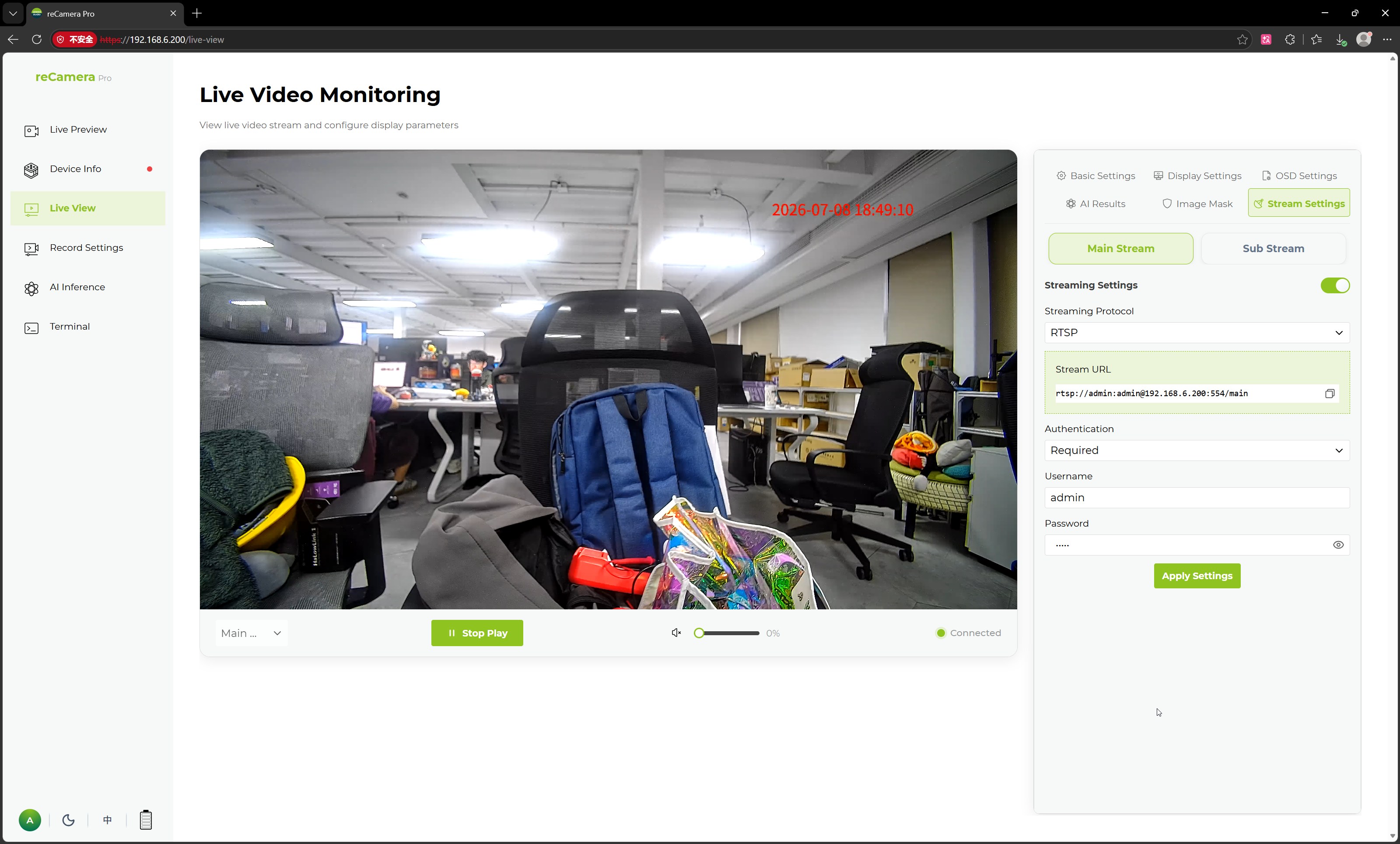
- Configure the following items:
| Parameter | Description |
|---|---|
| Stream Setting Switch | Enable or disable streaming for the current stream |
| Main Stream / Sub-Stream | Select which stream to configure |
| Streaming Protocol | Streaming protocol, e.g. RTSP |
| Authentication Type | Authentication required to access the stream, e.g. no authentication |
- Click Apply Settings to save.
The main stream and the sub-stream are configured separately, so you can, for example, send the high-definition main stream to a recorder and the low-bitrate sub-stream to remote viewers.
2. Get the stream address
The stream address is based on the device IP — rtsp://<reCamera_IP>:<port>/<stream path>. Check the Streaming Settings page after applying your configuration for the exact address of each stream.
3. Play in an external player
VLC: Media → Open Network Stream → paste the RTSP address → Play.
ffplay (from FFmpeg):
ffplay rtsp://<reCamera_IP>:<port>/<stream path>
If you enabled an authentication type other than "no authentication", supply the credentials the player asks for.
NVR / VMS: add the camera as an RTSP device using the same address; select the sub-stream if the NVR manages many channels.
Troubleshooting
- No picture in the player — confirm the Stream Setting Switch is on for the stream you are playing, and that the player is on the same network as the device.
- Choppy playback over Wi-Fi — switch to the sub-stream or lower the main stream bitrate in Basic Settings.
- Stream works in the browser preview but not externally — check the Authentication Type and any network access controls (see Network, Time and Access Control).
Related pages
- Image Quality and Low Light (encoding parameters per stream)
- Configure Event Recording
Tech Support & Product Discussion
Thank you for choosing our products! We are here to provide you with different support to ensure that your experience with our products is as smooth as possible. We offer several communication channels to cater to different preferences and needs.