Trigger Capture by Sound
After training a sound model (see Train a Sound Model), deploy it and configure sound event triggers to automatically capture photos or recordings when specific sounds are detected.
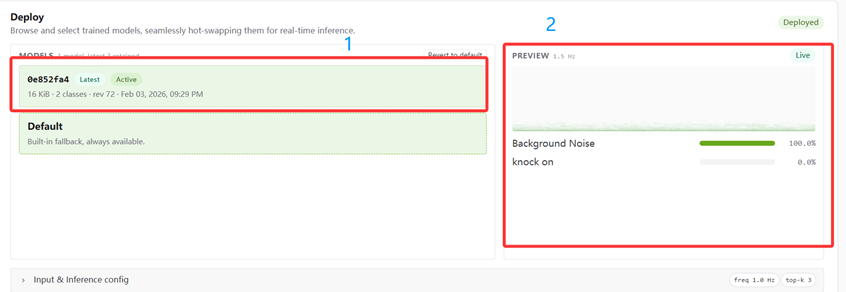
Deploy the model
- In Acoustic Lab, find the Deploy option at the bottom of the interface.
- In the MODELS list, select your trained model and deploy it.
Configure sound event trigger
- Return to the Web UI main interface → Record Settings → Recording Configuration.
- Find the Sound Event Trigger option and click Configure.
- Select the sound categories you want to trigger recording.
- Click Confirm to apply.
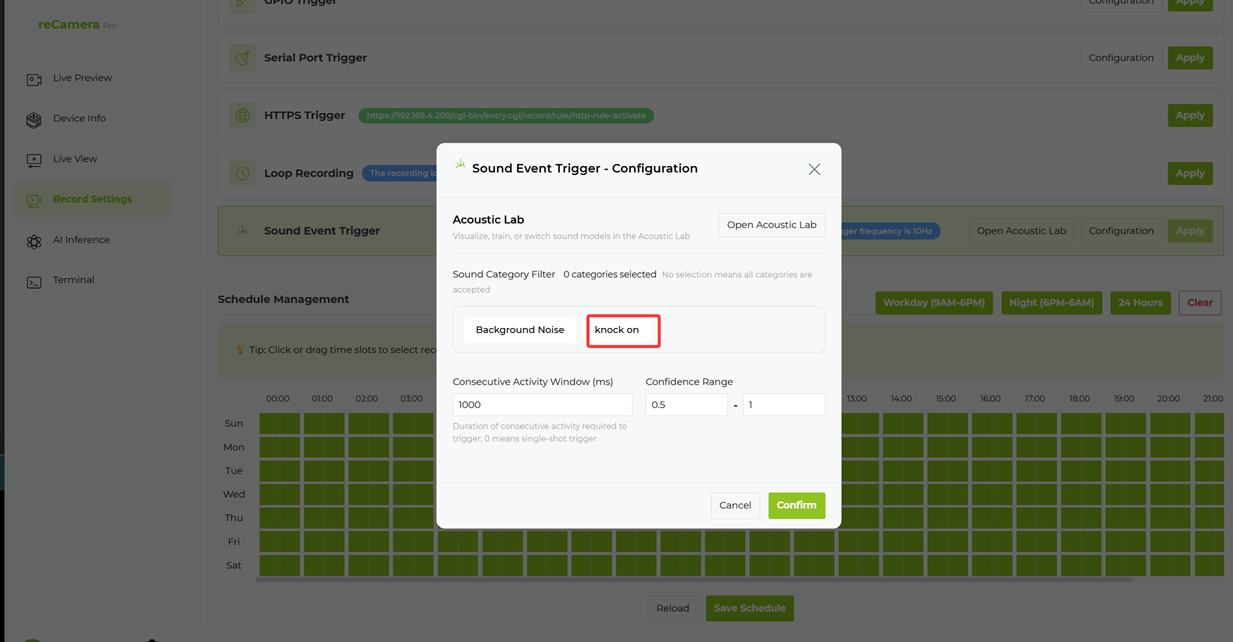
Configuration items
| Configuration Item | Description |
|---|---|
| Sound Category Filter | Sound categories to trigger recording |
| Continuous Activity Window | Duration of continuous activity required (ms) |
| Confidence Range | Confidence threshold for sound recognition |
Typical use cases
- Abnormal sound detection (glass breaking, alarm, machinery fault)
- Voice command triggering (e.g. "help", "stop")
- Equipment status sound recognition
- Environmental monitoring
Related pages
Tech Support & Product Discussion
Thank you for choosing our products! We are here to provide you with different support to ensure that your experience with our products is as smooth as possible. We offer several communication channels to cater to different preferences and needs.