Getting Started with reComputer Super

The reComputer Super Series supercharges the reComputer Classic, delivering up to a 1.7x boost of 157 TOPS in AI performance. It features models with Jetson Orin Nano (11410311, 11410312) and Jetson Orin NX (11410313, 11410314). Designed for both development and production, it comes with a rich array of interfaces, including M.2 Key E/M, dual RJ45 Ethernet, Mini-PCIe, 4xUSB 3.2, HDMI 2.1, 4xCSI, and CAN. With pre-installed Jetpack 6.2 and Linux OS BSP, it enables immediate market entry. It also supports a wide range of LLM & Physical AI frameworks, such as NVIDIA, Hugging Face, ONNX, PyTorch, and ROS2/1 at the edge seamlessly, even merging these multimodal capacity with robotics application to enrich Physical AI development.
Available customization options: logo branding, packaging, and firmware flashing.
Key Features
🚀 Performance Boost
- 1.7x AI performance boost over reComputer Classic, delivering 157 TOPS
- Powered by Jetson Orin Nano (Models: 11410311, 11410312) and Jetson Orin NX (Models: 11410313, 11410314)
🔌 Rich Connectivity & Interfaces
- M.2 Key E/M + Mini-PCIe for expandability
- Dual RJ45 Ethernet ports for high-speed networking
- 4x USB 3.2, HDMI 2.1, 4x CSI (Camera Serial Interface)
- CAN bus support for industrial/robotics applications
🛠️ Ready for Development & Production
- Pre-installed Jetpack 6.2 and Linux OS BSP for out-of-the-box deployment
- Seamless edge AI integration with frameworks:
- NVIDIA, Hugging Face, ONNX, PyTorch
- ROS2/1 for robotics applications
- Supports multimodal AI and Physical AI development
🤖 Edge AI & Robotics Optimized
- Merges LLM (Large Language Model) capabilities with Physical AI at the edge
- Ideal for robotics, industrial automation, and real-time AI inference
- Accelerates market entry with pre-configured software stack
⚠️ Power & Accessory Guidelines
1. Power Adapter
- Jetson Orin Nano: 12V 5A (5525 barrel jack)
- Jetson Orin NX: 19V 4.74A (5525 barrel jack)
- Always use official adapters and meet power requirements.
2. AC Power Cord
- Use region-specific cloverleaf cords.
3. Accessories
- Only officially recommended accessories (e.g., cameras, wireless modules) for optimal performance and compatibility.
Specifications
| Jetson Orin Super System on Module | |||||
|---|---|---|---|---|---|
| Specifications | reComputer Super J3010 | reComputer Super J3011 | reComputer Super J4011 | reComputer Super J4012 | |
| Module | NVIDIA Jetson Orin™ Nano 4GB | NVIDIA Jetson Orin™ Nano 8GB | NVIDIA Jetson Orin™ NX 8GB | NVIDIA Jetson Orin™ NX 16GB | |
| AI Performance | 34 TOPS | 67 TOPS | 117 TOPS | 157 TOPS | |
| GPU | 512-core NVIDIA Ampere architecture GPU with 16 Tensor Cores | 1024-core NVIDIA Ampere architecture GPU with 32 Tensor Cores | |||
| CPU | 6-core Arm® Cortex®-A78AE v8.2 64-bit CPU 1.5MB L2 + 4MB L3 | 6-core Arm® Cortex®-A78AE v8.2 64-bit CPU 1.5MB L2 + 4MB L3 | 8-core Arm® Cortex®-A78AE v8.2 64-bit CPU 2MB L2 + 4MB L3 | ||
| CPU Max Frequency | 1.7 GHz (MAXN_SUPER) | 2 GHz | |||
| Memory | 4GB 64-bit LPDDR5 34 GB/s | 8GB 128-bit LPDDR5 68 GB/s | 8GB 128-bit LPDDR5 102.4GB/s | 16GB 128-bit LPDDR5 102.4GB/s | |
| DL Accelerator | / | 1x NVDLA v2 | 2x NVDLA v2 | ||
| Video Encoder | 1080p30 supported by 1-2 CPU cores | 1x 4K60 (H.265) | 3x 4K30 (H.265) 6x 1080p60 (H.265) | 12x 1080p30 (H.265) | |||
| Video Decoder | 1x 4K60 (H.265) 2x 4K30 (H.265) 5x 1080p60 (H.265) 11x 1080p30 (H.265) | 1x 8K30 (H.265) 2x 4K60 (H.265) 4x 4K30 (H.265) 9x 1080p60 (H.265) 18x 1080p30 (H.265) | |||
| CSI | Up to 4 cameras (8 via virtual channels) 8 lanes MIPI CSI-2 D-PHY 2.1 (up to 20Gbps) | ||||
| Mechanical | 69.6mm x 45mm 260-pin SO-DIMM connector | ||||
| Carrier Board | |||||
| Storage | 1x M.2 KEY M PCIe (M.2 NVMe 2280 SSD 128G included) | ||||
| Networking | M.2 KEY E | 1x M.2 Key E for WiFi/Bluetooth module | |||
| Mini PCIe | 1x mini-PCIe for LTE 4G module | ||||
| Ethernet | 2x RJ45 Gigabit Ethernet | ||||
| I/O | USB | 4x USB 3.2 Type-A (5Gbps); 1x USB 2.0 Type-C (Device Mode/Debug); | |||
| Camera | 4x mipi CSI(2-lane 15-Pin) | ||||
| CAN | 1 x CAN(4-Pin Header) | ||||
| Display | 1x HDMI 2.1 | ||||
| Fan | 1x 4 pin Fan Connector (5V PWM); 1x 4-Pin Fan Connector (12V PWM); | ||||
| Extension Port | 1x 40-Pin extension header; 1x 12-Pin control and UART header; | ||||
| RTC | 1x RTC 2-pin; 1x RTC Socket | ||||
| LED | 2x LED(PWR and ACT) | ||||
| Pinhole Button | 1x PWR; 1x RESET; | ||||
| DIP Switch | 1x REC | ||||
| Antenna Hole | 4x Antenna Hole | ||||
| Power | 12-19V 5525 Barrel DC Jack | ||||
| Jetpack Version | Jetpack 6.2 | ||||
| Mechanical Dimensions | 130mm x 120mm x 66mm | ||||
| Installation | Desk, Wall-mounting | ||||
| Operating Temperature | -10℃~60℃ | ||||
| Warranty | 2 Year | ||||
| Certification | CE,FCC,RoHS,REACH,Telec, KC, Vibration Test(GB/T 2423) | ||||
Interactive 3D Explorer
Explore the reComputer Super Series in an interactive 3D viewer. Rotate the device, inspect hardware interfaces, view the exploded assembly, and learn more about supported modules.
Hardware Interfaces Usage
For detailed specifications and instructions for each hardware interface, please refer to the hardware interfaces usage guide.
Flash JetPack OS
Supported Module
- NVIDIA® Jetson Orin™ Nano Module 4GB
- NVIDIA® Jetson Orin™ Nano Module 8GB
- NVIDIA® Jetson Orin™ NX Module 8GB
- NVIDIA® Jetson Orin™ NX Module 16GB
Prerequisites
- Ubuntu host PC
- reComputer Super
- USB Type-C data transmission cable
We recommend that you use physical ubuntu host devices instead of virtual machines. Please refer to the table below to prepare the host machine.
| JetPack Version | Ubuntu Version (Host Computer) | |||
| 18.04 | 20.04 | 22.04 | 24.04 | |
| JetPack 6.x | ✅ | ✅ | ||
| JetPack 7.2 | ✅ | ✅ | ✅ | |
Note: For JetPack 7.2, Ubuntu 24.04 is supported for flashing and target-side component installation only. Use Ubuntu 20.04 or 22.04 if you need host development components.
Prepare the Jetpack Image
Here, we need to download the system image to our Ubuntu PC corresponding to the Jetson module we are using:
| Jetpack Version | Jetson Module | Download Link1 | SHA256 |
|---|---|---|---|
| 7.2 | Orin Nano 4GB | Download | b3acb95bf1064067029ce8159d48f8a e5633a5ca4d9bb34fa955a39c5f2838ed |
| Orin Nano 8GB | Download | 2b851a7a19105e1e2dd6903881e9e682 7b45c85151ce6a2dabda9928b97ae9e7 | |
| Orin NX 8GB | Download | 290ebf050e74dd30a3f17ab690772a21 a421abf0e8efcf89ff6c4fc2fe8e1ab7 | |
| Orin NX 16GB | Download | ca333821c991da20db5cf9737e6439dc ecf4d5e295ed33a981d4eea856cb3220 | |
| 6.2 | Orin Nano 4GB | Download | 7a1f2085f50d77e5d86d3f01ccdc1255 c90a7c7d22a6ab7e4c4e3263e3148670 |
| Orin Nano 8GB | Download | d26cbf4e16b9d5879e4b737754f65bb0 ea485b98760a1aa0657e07054efd8877 | |
| Orin NX 8GB | Download | 55a559dc6736650d45c2d787265c7e2c 36cd2d7f233ae58b00364aec7d82455c | |
| Orin NX 16GB | Download | 51f816d57dedd6e2305acd0ae8e0ffdc 19aec7319e351b7a70489f7eab8d69c6 |
JetPack image files are large and may take around 60 minutes to download. Please kindly wait for the download to complete.
To verify the integrity of the downloaded firmware, you can compare the SHA256 hash value.
On an Ubuntu host machine, open the terminal and run the command sha256sum <File> to obtain the SHA256 hash value of the downloaded file. If the resulting hash matches the SHA256 hash provided in the wiki, it confirms that the firmware you downloaded is complete and intact.
Enter Force Recovery Mode
Before we can move on to the installation steps, we need to make sure that the board is in force recovery mode.
Step-by-Step
Step 1. Switch the switch to the RESET mode.

Step 2. Power up the reComputer Super by connecting the power cable.
Step 3. Connect the Super to the Ubuntu host PC with a USB Type-C data transmission cable.
Step 4. On the Linux host PC, open a Terminal window and enter the command lsusb. If the returned content has one of the following outputs according to the Jetson SoM you use, then the board is in force recovery mode.
- For Orin NX 16GB: 0955:7323 NVidia Corp
- For Orin NX 8GB: 0955:7423 NVidia Corp
- For Orin Nano 8GB: 0955:7523 NVidia Corp
- For Orin Nano 4GB: 0955:7623 NVidia Corp
The below image is for Orin Nano 8GB

Flash to Jetson
Step 1: Extract the downloaded image file:
cd <path-to-image>
sudo tar xpf mfi_xxxx.tar.gz
# For JetPack 6.2 example: sudo tar xpf mfi_recomputer-super-orin-nx-16g-j401-6.2-36.4.3-2026-02-05.tar.gz
# For JetPack 7.2 example: sudo tar xpf mfi_recomputer-super-orin-nx-16g-7.2.0-39.2.0-2026-06-19.tar.gz
Step 2: Execute the following command to flash jetpack system to the NVMe SSD:
cd mfi_xxxx
# For example: cd mfi_recomputer-orin-super-j401
sudo ./tools/kernel_flash/l4t_initrd_flash.sh --flash-only --massflash 1 --network usb0  --showlogs
You will see the following output if the flashing process is successful

The flash command may run for 2-10 minutes.
Step 3: Connect the monitor using an HDMI cable and complete the initialization configuration of the reComputer Super system:
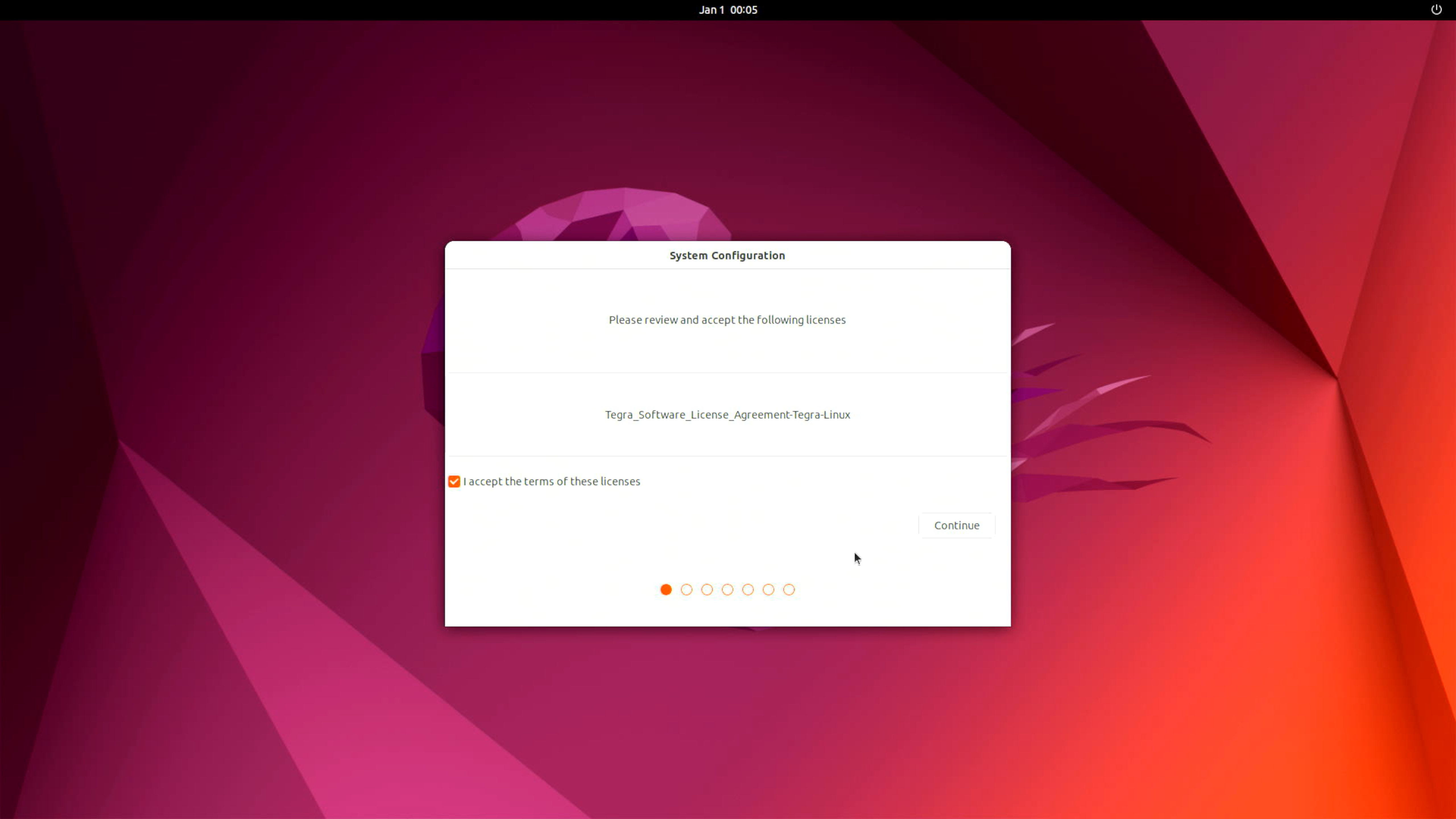
Please complete the System Configuration according to your needs.
Hardware Interfaces Usage
If you want to learn more about the detailed specifications and usage of the hardware interfaces, please refer to this wiki.
Resources
- reComputer Super Datasheet
- Schematic
- 3D File
- Mechanical Document-reComputer Super
- Mechanical Document-reComputer Super PCBA
- Seeed Nvidia Jetson Success Cases
- Seeed Jetson One Pager
Tech Support & Product Discussion
Thank you for choosing our products! We are here to provide you with different support to ensure that your experience with our products is as smooth as possible. We offer several communication channels to cater to different preferences and needs.