Edge AI Voice Satellite: KWS & MultiNet NLU with reSpeaker XVF3800 44mm
Introduction
Say “Jarvis”. The ring flashes mint, a short chime plays, and for the next 6.5 seconds the XIAO listens for one of nine commands. The wake word and every command run on the board with Espressif ESP-SR; no audio is uploaded and no account is needed.
What leaves the board is one readable line over UDP:
JARVIS 0042 3
A small Python brain on your PC turns that line into an action — play music, tell a joke, read the weather, move the character's head — and drives a full-screen Iron Man / JARVIS HUD in the browser. The reply is synthesised on the PC and played through the reSpeaker's own speaker.
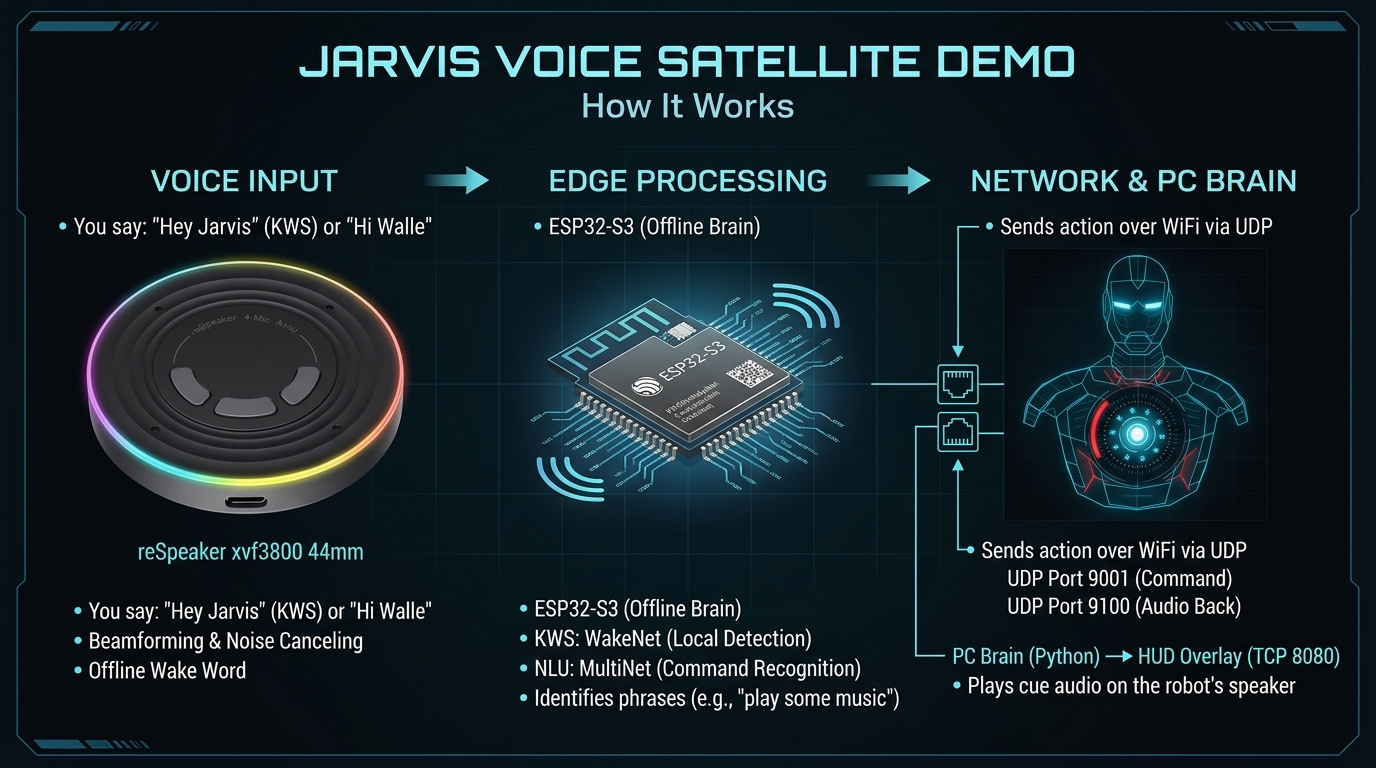
4 mics ─► XVF3800 DSP ─► I²S 16 kHz ─► XIAO ESP32-S3 Plus (WakeNet + MultiNet)
                                             │  UDP :9001  "JARVIS <seq> <id>"
                                             ▼
                                PC brain.py ── HTTP :8080 / SSE ──► browser HUD
                                             └── UDP :9100  PCM ────► reSpeaker speaker
What you say, what happens
| moment | on the board | on the PC |
|---|---|---|
| idle | ring in DOA mode, dim, follows voices | HUD in standby; LINKED when the page reaches the brain |
| “Jarvis” | mint flash, ~0.7 s chime, codec ducks 70 % → 30 % | — |
| +0.8 s | command window opens for 6.5 s (MultiNet only scores the first 5.8 s) | — |
| command matched | ring animation, JARVIS <seq> <id> sent, ACK expected in 2.5 s | action runs, card + event log + spoken reply |
| nothing matched | double amber blink | log: no command heard (wake fired, phrase not matched) |
Why it is built this way
| decision | reason |
|---|---|
| wake word and commands run on the XIAO | works with the venue WiFi down, no latency, no privacy question, no cloud bill |
| 9 commands, not thirty | MultiNet gets confused as the table grows; nine phrases with a different verb each are recognised reliably |
| one text packet per command | a command is JARVIS 0042 3 — 14 bytes, readable in Wireshark, trivially retried |
| wake word lives in the model partition | WakeNet packs are ~3.3 MB; they ride in the esp_sr_16 partition, not in the sketch |
| HUD on the PC | the XIAO has no screen, and a browser is the cheapest 1080p display |
Prerequisites
Hardware
| item | recommendation | why |
|---|---|---|
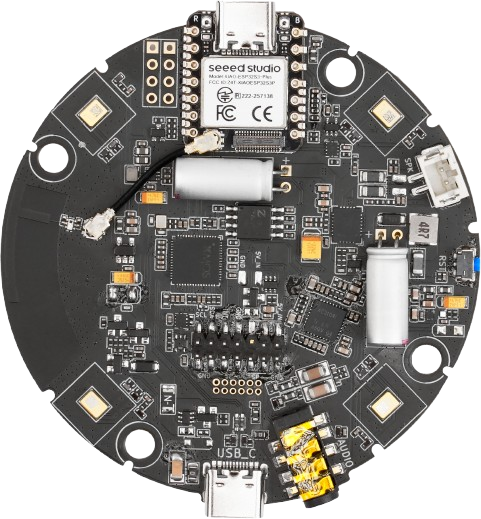
| reSpeaker XVF3800 44mm with XIAO | SKU 100066841 or 100065276 (with case) | mics, XVF3800 DSP, LED ring, codec, amplifier and I²S wiring are on the board |
| Seeed XIAO ESP32-S3 Plus | 16 MB flash / 8 MB PSRAM, pre-soldered | the model partition needs 4 MB and the audio ring lives in PSRAM |
| USB-C data cable | not charge-only | you flash the XIAO port, not the XMOS port |
| speaker | the 5 W 4 Ω unit on the JST connector | replies and music come out of the robot |
| 2.4 GHz WiFi | WPA2, no client isolation | the ESP32-S3 has no 5 GHz radio, and isolation blocks PC ↔ board |
| PC | Windows 10/11 for spoken replies, Chrome or Edge | runs the brain and the HUD |
Software
| software | version | note |
|---|---|---|
Arduino IDE 2 or arduino-cli | 1.5.1 | ESP_SR ships inside the core, no Library Manager step |
| esp32 core | 3.3.11 | the ESP-SR API and the esp_sr_16 partition are tied to this version |
| Python | 3.11 | brain |
numpy, soundfile, scipy | recent | decode MP3 to 16 kHz PCM for the robot speaker |
| Git | 2.50+ | clone the project |
The array must be running the 16 kHz I²S firmware (respeaker_44mm_i2s_c16k2ch_v1.0.0.bin, XVF3800 as I²S master, 2 channels). With the 48 kHz image the XIAO sees silence or garbage and ESP-SR never loads. Update it from Update Firmware and confirm with the project's firmware/audio_rms sketch: speech should show RMS in the hundreds on the left channel.
Time budget on a fresh machine: toolchain 20 min, XMOS check 10 min, keywords and first flash 15 min, brain and HUD 5 min, live verification 10 min.
Set up the IDE
Install the core explicitly; “latest” is not what this firmware was built against.
arduino-cli core update-index
arduino-cli core install esp32:esp32@3.3.11
arduino-cli board list
board list should show your port with the S3 core attached. Do not expect it to name a XIAO: the core has no such entry, so it prints something like
COM9 serial Serial Port (USB) ESP32 Family Device esp32:esp32:esp32_family
                             Ozobot DRVKit        esp32:esp32:ozobot_drvkit
The board name is cosmetic — the FQBN below is what decides the build. Close any serial monitor before you flash.
Then clone the project:
git clone https://github.com/KasunThushara/reSpeaker_44_wakeword.git
cd reSpeaker_44_wakeword
The FQBN is not optional. The installed core has no XIAO_ESP32S3_Plus board entry, and only the esp_sr_16 scheme has the model partition.
$cli  = "C:\Users\<you>\AppData\Local\Programs\Arduino IDE\resources\app\lib\backend\resources\arduino-cli.exe"
$fqbn = "esp32:esp32:esp32s3:FlashSize=16M,PSRAM=opi,PartitionScheme=esp_sr_16,CDCOnBoot=cdc"

& $cli compile --fqbn $fqbn --output-dir build\wake_demo firmware\wake_demo
| option | reason |
|---|---|
FlashSize=16M,PSRAM=opi | XIAO ESP32-S3 Plus: 16 MB flash, 8 MB octal PSRAM (the 3 s audio ring) |
PartitionScheme=esp_sr_16 | creates the ~4 MB model partition for the 3.3 MB ESP-SR pack |
CDCOnBoot=cdc | Serial must come out of native USB, because GPIO43 (UART0 RX) is the I²S data pin |
esp32s3 target | the XIAO is a plain ESP32-S3, not a Plus variant with its own board file |
In the IDE, select ESP32S3 Dev Module and set Flash Size 16 MB, PSRAM OPI PSRAM, Partition Scheme ESP SR 16MB, USB CDC On Boot Enabled — these must match the FQBN exactly.
Set the keywords
Two different things are called “keyword” here:
| what | where it lives | changing it needs |
|---|---|---|
| the wake word “Jarvis” | model pack build/srmodels_jarvis.bin | a reflash of the model |
| the nine commands | sr_commands[] in firmware/wake_demo/wake_demo.ino | a rebuild and reflash |
The wake word
The word is in the model, not in the sketch. This build uses wakenet9l_tts1h8_Jarvis_3_0.627_0.632, measured at 4/4 at 30–50 cm and 3/3 at 1.5–2 m. The committed packs in build/ are:
| pack | size | use |
|---|---|---|
srmodels_jarvis.bin | 3,340,189 B | the one to flash — “Jarvis”, thresholds 0.627_0.632 |
srmodels_stock_backup.bin | 3,340,296 B | factory “Hi ESP”, last-resort rollback |
A different wake word means a different WakeNet model — either another pack from Espressif's model zoo or one you train — and nothing in the sketch changes. The numbers in the model name are its detection thresholds; they live inside the pack, so sensitivity is tuned by repacking, not by editing the sketch.
The same repository carries a second demo with a different wake word and its own eight-phrase list — see pc_brain_walle/ (phrases like “go straight ahead” and “charge your battery”) and its own pack in build/. Reading it is the quickest way to see how another keyword set is wired — but this page stays on Jarvis and the nine commands below, because that pair is what the HUD, the brain ids and build/srmodels_jarvis.bin are matched to.
The commands
Open firmware/wake_demo/wake_demo.ino and replace the two tables near the top with this block. The ids must stay identical to COMMANDS in pc_brain/brain.py; they are the contract between board, brain and HUD, and they are not array indices.
static const sr_cmd_t sr_commands[] = {
  {1, "play some music"},
  {2, "stop the music"},
  {3, "move your head"},
  {4, "tell me a joke"},
  {5, "change the mood"},
  {6, "show me the weather"},
  {7, "open my tasks"},
  {8, "shut it down"},
  {9, "ask the model"},
};

static const char *PHRASE_TEXT[] = {
  "play some music", "stop the music", "move your head", "tell me a joke",
  "change the mood", "show me the weather", "open my tasks", "shut it down",
  "ask the model"
};
The clone ships a placeholder eight-phrase table so the sketch compiles out of the box; replace it verbatim with the block above. Nothing else in the sketch knows the phrases.
Phrase rules learned the hard way:
- three or more words, one distinct verb each — play / stop / move / tell / change / show / open / shut / ask
- avoid minimal pairs (“show me the weather” and “show me the time” steal each other's matches)
- avoid
-ingforms and out-of-vocabulary words; “todo” cannot be pronounced by MultiNet's G2P, which is why the phrase is “open my tasks” and not “show my todo” - a new phrase with an id that does not exist in
brain.pyis harmless but does nothing - 9 phrases is the comfortable ceiling for this table
animForId() in the same sketch maps animations by id range, a leftover from the demo the sketch was written for. With the nine ids above, 1–6 all play the “play some music” colour wheel and 7–9 play the joke rainbow; A_WEATHER, A_SHUT and A_ASK are never reached. That is cosmetic only — the wake flash, the chime and the packet are unaffected. If the demo needs a different animation per command, replace animForId() with a nine-entry table instead of the range switch.
Brand the log (optional)
The pack and the sketch are shared with the repo's other demo, so the strings the board prints at boot still name that demo. Nothing functional depends on them — but the boot log on this page says JARVIS, and matching it makes troubleshooting much easier. Three places in wake_demo.ino:
Replace the four Serial.println lines that open setup():
  Serial.println(F("=== wake_demo jarvis: Jarvis -> chime -> action -> PC + LED -> DOA ==="));
  Serial.println(F("say \"Jarvis\", then one of the 9 voice actions:"));
  Serial.println(F("  play some music / stop the music / move your head"));
  Serial.println(F("  tell me a joke / change the mood / show me the weather"));
  Serial.println(F("  open my tasks / shut it down / ask the model"));
the ready - line just after ESP_SR: ok:
Serial.println(F("ready - say Jarvis, then a command right away"));
and the wake banner:
Serial.printf("\n[%6lu ms] *** \"HI JARVIS\" #%lu ***\n",
Skip this and the board works identically — it just logs walle, Hi Walle, 8 voice actions and *** "HI WALLE" #1 ***, which is confusing if you are diffing against the sample below.
Put the model into the build directory
The core's post-build hook copies srmodels.bin only if it finds {build.path}\libraries\ESP_SR — it never does, because ESP-SR is compiled in place. Copy the pack in by hand before uploading, or the board boots with the factory “Hi ESP” pack.
Copy-Item build\srmodels_jarvis.bin build\wake_demo\srmodels.bin -Force
Add WiFi, the PC address and the ports
Edit the block above setup():
#define WIFI_SSID "YOUR_2G_SSID"
#define WIFI_PASS "YOUR_PASSWORD"
#define PC_IP     "192.168.7.217"
#define PC_PORT   9001
The clone ships WIFI_SSID and WIFI_PASS empty, and an empty pair is not an error path you can fix later: the board boots local-only, prints WiFi: no credentials - edit WIFI_SSID / WIFI_PASS, and never sends a packet. Fill both in before the first flash.
- 2.4 GHz only, WPA2, both devices in the same subnet, no AP/client isolation.
- Give the PC a fixed address (DHCP reservation). The brain learns the board's address from incoming packets, but the board needs the PC's address at boot.
- There is no settings portal: changing WiFi or the PC address means rebuilding and reflashing.
On a venue network with more than one access point the board can land on the other half of the subnet — a /23 bridge handing out 192.168.6.x to the 2.4 GHz radio and 192.168.7.x to the 5 GHz one is normal. ICMP between two wireless clients is usually dropped even when UDP flows fine, so ping reports “Destination host unreachable” on a link that works.
Judge the link by the board’s own log instead: -> PC JARVIS 0001 4 followed by <- ACK 1 means both directions are up. If the ACK never arrives, then look at the firewall.
PC_IP is only used in the log line. The UDP target is three separate IPAddress(192, 168, 7, 217) calls — the ARP warm-up datagram, sendCommand() and resendCommand(). Replace the octets in all three, or the board talks to the wrong PC while the log prints the right address.
| direction | protocol | port | used for |
|---|---|---|---|
| board → PC | UDP | 9001 | JARVIS <seq> <id>, ACK returns to the board's source port |
| PC → board | UDP | 9100 | 16 kHz PCM music and TTS, plus JV <pct> volume packets |
| browser → PC | TCP | 8080 | HUD, API, SSE |
Open the ports once, in PowerShell as Administrator:
New-NetFirewallRule -DisplayName "JARVIS UDP in"  -Direction Inbound -Protocol UDP -LocalPort 9001,9100 -Action Allow -Profile Private
New-NetFirewallRule -DisplayName "JARVIS HTTP in" -Direction Inbound -Protocol TCP -LocalPort 8080 -Action Allow -Profile Private
On a network Windows already trusts these are often redundant — the first time python.exe binds 9001 a prompt appears and “Allow” is enough. Add the rules if that prompt was dismissed, if the LAN profile is Public, or if the board logs no ACK while the PC shows nothing.
Flash
Compile → copy the model → upload, as one sequence. Uploading against a stale build directory flashes a stale app and a stale model.
$cli  = "C:\Users\<you>\AppData\Local\Programs\Arduino IDE\resources\app\lib\backend\resources\arduino-cli.exe"
$fqbn = "esp32:esp32:esp32s3:FlashSize=16M,PSRAM=opi,PartitionScheme=esp_sr_16,CDCOnBoot=cdc"

& $cli compile --fqbn $fqbn --output-dir build\wake_demo firmware\wake_demo
Copy-Item build\srmodels_jarvis.bin build\wake_demo\srmodels.bin -Force
& $cli upload -p COM9 --fqbn $fqbn --input-dir build\wake_demo
Replace COM9 with your port (/dev/cu.usbmodem* on macOS, /dev/ttyACM* on Linux). If flashing cannot connect, hold BOOT, tap RESET, release BOOT and retry.
Open the monitor at 115200. What matters:
=== wake_demo jarvis: Jarvis -> chime -> action -> PC + LED -> DOA ===
say "Jarvis", then one of the 9 voice actions:
  play some music / stop the music / move your head
  tell me a joke / change the mood / show me the weather
  open my tasks / shut it down / ask the model
WiFi: joining YOUR_2G_SSID......
WiFi: ip=192.168.7.205 rssi=-52 dBm -> PC 192.168.7.217:9001
volume: 70% (-3.0 dB, DAC 0x06) boot
i2s full duplex: ok
audio: ring 96000 bytes (ok)
audio: listening on 9100
audio tuning: AGCMAXGAIN=64, ASROUTGAIN=1.5, ASR on
  -> DOA idle (boot)
MC Quantized vadnet1:vadnet1_mediumv1_Speech_1_0.5_0.1, min speech:128 ms, min noise:992 ms, mode:0, threshold:0.500, channel:1, tigger:v1
MC Quantized wakenet9: wakenet9l_tts1h8_Jarvis_3_0.627_0.632, tigger:v4, mode:0, p:0
Build fst from commands.
Quantized MultiNet7:rnnt_ctc_2.0, name:mn7_en
Quantized MultiNet7 search method: 2, time out:5.8 s
Build fst from commands.
ESP_SR: ok
ready - say Jarvis, then a command right away
  DOA 183 deg
WiFi: ip=…— if this fails, the credentials or the band are wrong- the wakenet line must say
Jarvisand0.627_0.632; if it saysHi ESP, the model copy step was skipped ESP_SR: ok— if it hangs or crashes here, the model is missing from the build directoryDOA … degkeeps repeating about ten times a second; that is the ring tracking voices, not an error. The log is chatty by design
Say “Jarvis” once. The ring flashes, the chime plays, and the log prints *** "HI JARVIS" #1 ***. Say a command immediately after and the board answers with the phrase it matched:
[197851 ms] *** "HI JARVIS" #1 ***
[198520 ms] chime done
[198671 ms] command mode open
[198997 ms] listening for a command (6.5 s)
[200773 ms] raw id=4 phrase=4 -> "tell me a joke" -> cmd 4
[200774 ms] -> PC  JARVIS 0001 4
     <-     ACK 1
If your log says HI WALLE instead, you skipped the branding step — the wake and the commands are fine either way.
| symptom | cause | fix |
|---|---|---|
Sketch too big | wrong partition scheme | use PartitionScheme=esp_sr_16 |
| no serial output | CDCOnBoot not set | add CDCOnBoot=cdc, reflash |
ESP_SR: FAILED or reboot loop | model missing from build\wake_demo | copy srmodels_jarvis.bin again |
| wakes on “Hi ESP” | stock pack flashed | repeat the copy step, check the wakenet line |
| wake fires, nothing happens on the PC | phrases or ids differ from the nine above | fix sr_commands[] and brain.py together |
no ACK for seq … in the board log | PC octets or firewall | fix all three IPAddress(...) calls, allow UDP 9001 |
| HUD alive but the event log never updates | an older brain.py still owns 9001/8080 | stop every python process, start one brain |
Open the UI
Install the Python side, then run the launcher:
py -3.11 -m pip install numpy soundfile scipy
cd reSpeaker_44_wakeword\pc_brain
.\start_demo.bat
start_demo.bat starts the brain and opens Chrome (Edge as fallback) in kiosk mode at http://localhost:8080 with autoplay allowed, so the first sound does not need a click. Manual route: python brain.py, then open the same URL. Alt+F4 leaves kiosk; close the minimised “JARVIS brain” window to stop UDP.
The launcher does not look for an existing instance. A brain.py left over from an earlier run keeps UDP 9001 and TCP 8080, the new copy grabs whichever port is still free, and the HUD silently keeps serving the old process — the page looks alive, the event log never updates, and packets go to the wrong brain. Before a demo, close the previous “JARVIS brain” window, or:
Get-Process python | Stop-Process -Force
On screen:
- the Iron Man wireframe bust with an arc reactor that pulses with the music
- left: nine command buttons labelled with the exact phrase to say; keys 1–9 send the same ids, which is how you test without speaking
- top left: status and the phrase the board heard; top right:
LINKED/NO LINK, the PC's address, and a clock - bottom right: event log, newest first; bottom centre: cards for weather, tasks, jokes and model answers
No board at hand? The brain can be driven directly:
python sim.py 1        # play music
python sim.py 4        # tell a joke
python sim.py demo     # 1 -> 2 -> 4 -> 5 with pauses
config.json holds the venue settings: esp_ip (last known board address, refreshed automatically), audio_sink (speaker streams to the robot, pc plays locally), default_track, weather_lat / weather_lon, and openrouter_key — leave the key empty and jokes/answers use canned lines. Prefer the environment variable OPENROUTER_API_KEY over writing it into the file.
The shipped model list is all :free routes, and those are heavily contended: HTTP 429 … rate-limited upstream in the log is normal, not a bad key. The brain walks openrouter_model → openrouter_fallbacks → a canned line, so “ask the model” can take 15–25 s before it answers, and sometimes answers from the offline list. Verify the key itself with curl against https://openrouter.ai/api/v1/key rather than by watching a single reply.
The brain synthesises speech with Windows System.Speech and streams the WAV to the reSpeaker. On macOS or Linux the wake word, the commands, the cards, the log and the music all still work — but JARVIS will not talk.
Limits
- English only — the MultiNet model in this build is
mn7_en. - 16 kHz everywhere — about an 8 kHz audio band; fine for speech and cues, not hi-fi.
- One stream at a time — a new sound kills the previous one.
- WiFi is needed at boot for anything that reaches the PC; the board still wakes and blinks offline, but no action arrives.
- The wake model is TTS-trained and more pronunciation-sensitive than “Hi ESP”. Recalibrate thresholds for a loud room.
Resources
- Project (firmware, brain and HUD): KasunThushara/reSpeaker_44_wakeword
- Board introduction and firmware update: reSpeaker XVF3800 44mm
- XMOS firmware images: reSpeaker_XVF3800_4MIC_44mm
- XIAO setup: XIAO ESP32-S3 Getting Started
- ESP-SR models and API: espressif/esp-sr
Tech Support & Product Discussion
Thank you for choosing our products! We are here to provide you with different support to ensure that your experience with our products is as smooth as possible. We offer several communication channels to cater to different preferences and needs.