Getting Started with reSpeaker XVF3800 44mm with XIAO ESP32-S3 Plus
Overview
The reSpeaker XVF3800 USB 44mm with XIAO ESP32-S3 Plus is a professional circular 4-microphone array based on the XMOS XVF3800. It features AEC, AGC, DoA, beamforming, VAD, noise suppression, de-reverberation, and 360° voice capture up to 5 meters, and it supports both USB and I2S operation. Pairing the array with the XIAO ESP32-S3 Plus adds Wi-Fi and Bluetooth plus a local host processor, so the voice pipeline can be controlled and streamed without a PC.
The board keeps the compact 44 mm microphone pitch of the standard 44 mm array, so it fits the same enclosures, while the XIAO module is soldered directly onto the back and wired to the XVF3800 over I2S and I2C.
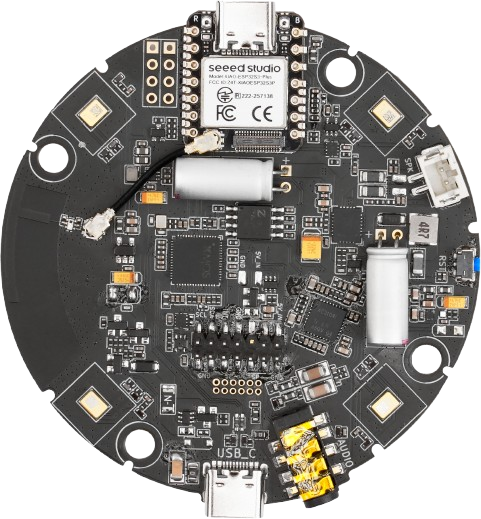 | 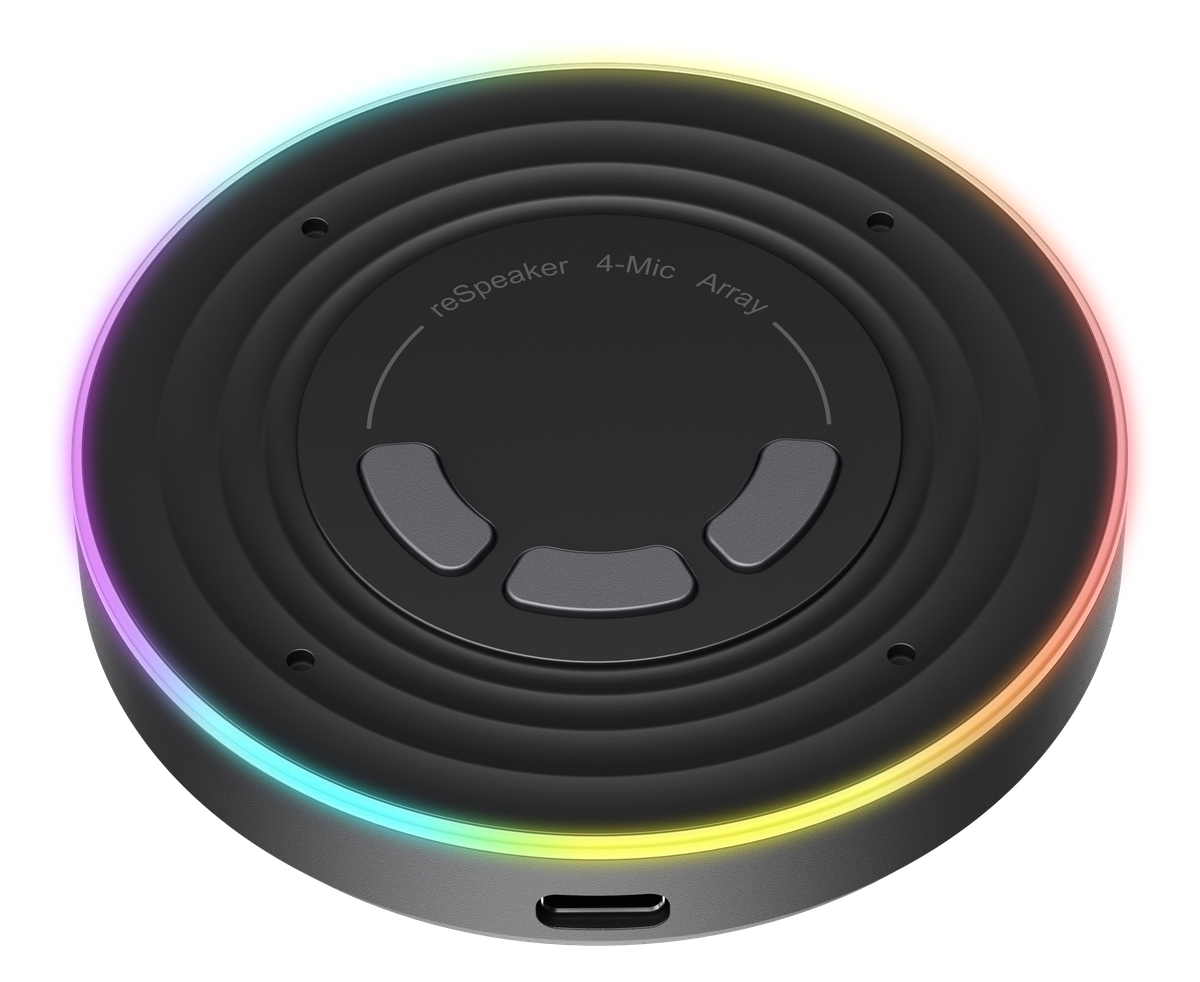 |
reSpeaker XVF3800 4-Mic Array 44mm with XIAO ESP32-S3 Plus | reSpeaker XVF3800 4-Mic Array 44mm with Case & XIAO ESP32-S3 Plus |
Features
-
Compact 44 mm design: microphone pitch reduced from 66 mm to 44 mm for a smaller board that is easier to integrate into space-constrained products.
-
XIAO ESP32-S3 Plus onboard: pre-soldered module adds Wi-Fi and Bluetooth, with I2S audio and I2C control wired directly to the XVF3800.
-
Advanced audio processing: XMOS XVF3800 with AEC, AGC (60 dB range), multi-channel beamforming, DoA, VAD, dynamic noise suppression, and de-reverberation, all adjustable.
-
High audio quality: on par with the existing 66 mm-pitch reSpeaker XVF3800 Circular 4-Mic Array.
-
Dual operating modes: USB Audio Class 2.0 for plug-and-play, or I2S/INT-Device mode for the XIAO and other embedded hosts, selected by firmware.
-
Flexible connectivity and updates: USB and I2C configuration plus DFU firmware updates.
-
Unique device identification: read and write a UUID for multi-device management, identification, and data tracking.
-
Programmable RGB feedback: 24 × WS2812 LEDs show device status, boot animation, and DoA direction, and can be routed to the XIAO.
-
Three customizable buttons: volume up, volume down, and mute by default, switchable between the XVF3800 and the XIAO pads.
-
Broad platform compatibility: USB hosts such as Windows, macOS, and Raspberry Pi OS, plus I2S integration with the XIAO series, ESP32, and Arduino.
Getting Started (I2S vs USB Firmware)
By default, the reSpeaker XVF3800 44mm with XIAO ESP32-S3 Plus ships with the I2S firmware. In I2S mode the board is NOT detected as a USB device.
You can switch between I2S and USB mode by flashing the related firmware. Use Safe Mode to bring the board up as a USB device so you can flash it, update it, or switch between modes.
To ensure optimal voice pickup and correct operation of the audio algorithms, point the microphone port (mic inlet / sound hole) on the back of the device toward the sound source. The microphone port is on the side printed with the Seeed Studio logo.
Flash the I2S Firmware
To use the array with the XIAO ESP32-S3 Plus, make sure the XVF3800 is running the I2S firmware and update it to the latest version. See the Update Firmware section of the introduction page.
The I2S firmware does not support USB DFU, because the board does not enumerate as a USB device in that mode. Enter Safe Mode instead — the factory Safe Mode firmware supports both USB DFU and I2C DFU, so it can always be recovered and re-flashed.
Hardware Overview
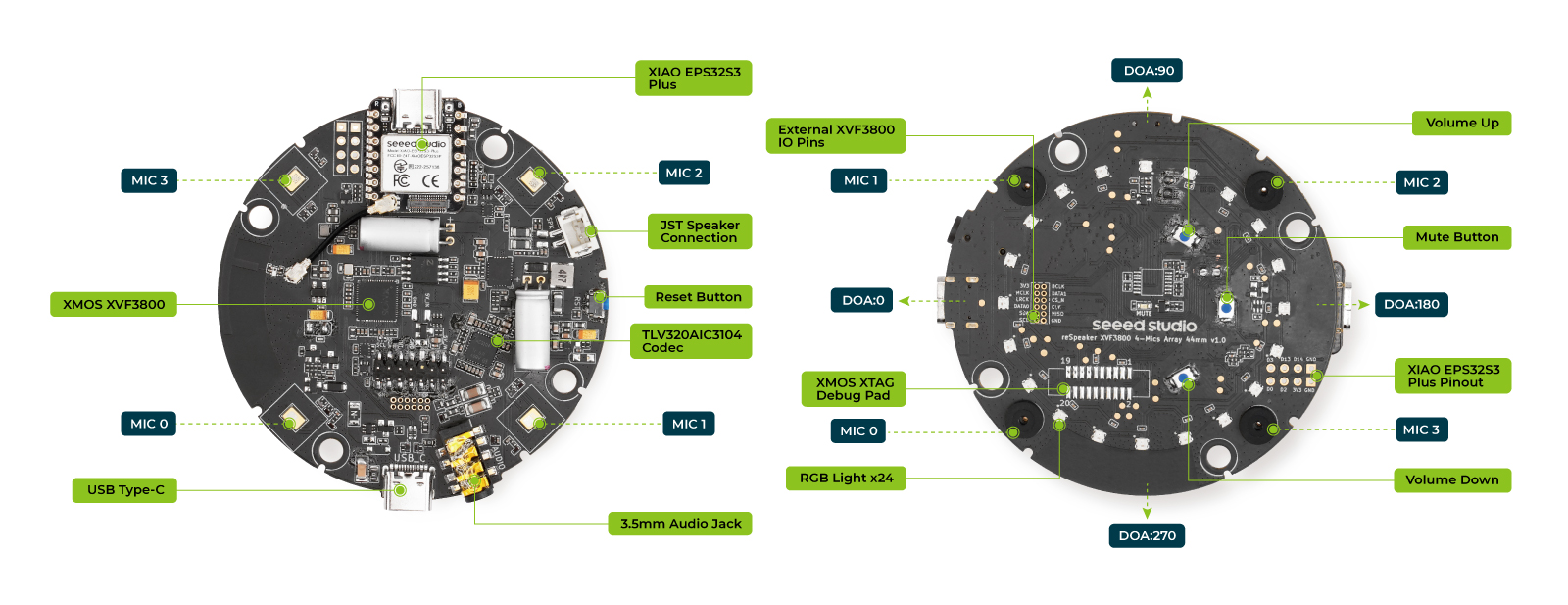
The XIAO module sits on the back of the board, next to the USB-C connector and the XMOS I/O pads. All of its remaining I/O is brought out on labeled pads, so the module can drive peripherals without an extra carrier.
Main Components
| Component / Feature | Description |
|---|---|
| Main Audio Processor | XMOS XVF3800, handling AEC, beamforming, noise suppression, and DoA detection |
| Microphone Array | 4 × PDM MEMS microphones in a circular layout with a 44 mm pitch, 360° far-field capture |
| Audio Codec | TLV320AIC3104, audio conversion and DAC output |
| Amplifier | LM48511 Class D audio amplifier |
| RGB LEDs | 24 × WS2812 individually addressable RGB LEDs |
| Customizable Buttons | Three physical buttons, default volume up / volume down / mute, routable to the XIAO |
| Mute Indicator LED | Red LED that lights while the microphones are muted |
| USB Type-C Port | 5 V power, UAC 2.0 audio, control, and DFU |
| Speaker Connector | Vertical JST for a 5 W 4 Ω speaker, plus a 3.5 mm AUX jack |
| XIAO ESP32-S3 Plus | Pre-soldered module with I2S, I2C, RST, button, and LED routing |
| Onboard Antenna | PCB antenna for Wi-Fi/Bluetooth, with an IPEX connector for an external feeder |
See Main Components on the introduction page for the full pin-level list, including the power, debug, and expansion pads.
XIAO ESP32-S3 Plus Support
The XIAO ESP32-S3 Plus is wired to the XVF3800 and to the onboard buttons and LEDs:
- Stereo I2S input/output with multiple output options, using a dual bus (playback and record) with shared BCLK, MCLK, and LRCLK.
- I2C interface for configuring and managing XVF3800 parameters from the XIAO.
- Reset line — the XIAO can assert a hardware reset on the XVF3800 through a dedicated IO pin.
- Interface and solder pads — the remaining XIAO I/O is brought out to labeled pads for user expansion.
- Flexible button and LED routing — a switch connects the three buttons and the LED chain to either the XVF3800 or the XIAO.
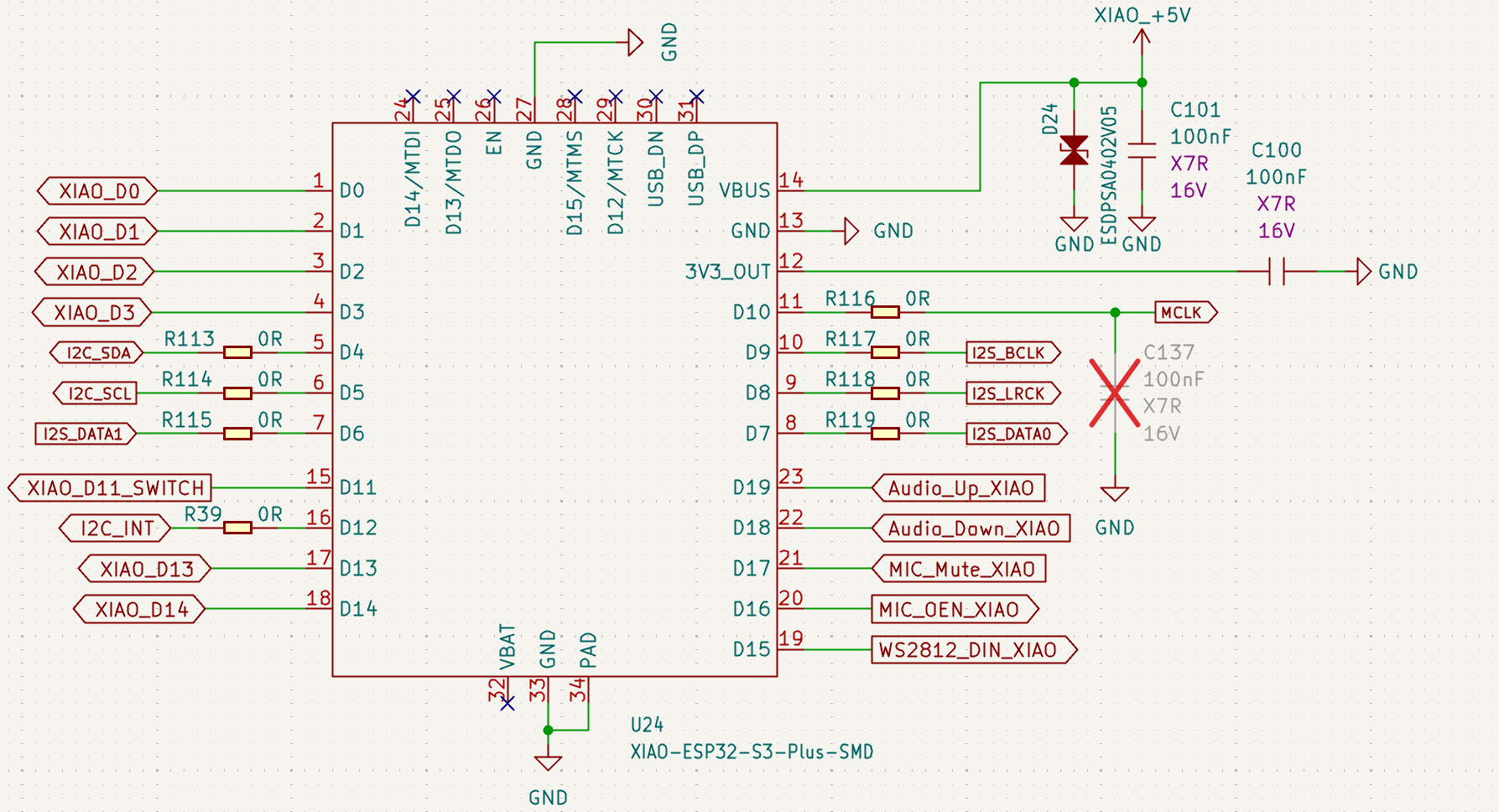
The schematic shows U24, the XIAO ESP32-S3 Plus footprint: D4/D5 carry I2C, D6–D10 carry the I2S bus and MCLK, D11 selects the button/LED routing, D12 is the I2C interrupt, and D15–D19 drive the LED chain, microphone enable/mute, and the volume buttons.
| XIAO Pin | Signal | Function |
|---|---|---|
| D0 | XIAO_D0 | Free GPIO |
| D1 | XIAO_D1 | Free GPIO |
| D2 | XIAO_D2 | Free GPIO |
| D3 | XIAO_D3 | Free GPIO |
| D4 | I2C_SDA | I2C data to the XVF3800 |
| D5 | I2C_SCL | I2C clock to the XVF3800 |
| D6 | I2S_DATA1 | I2S record data (RX) |
| D7 | I2S_DATA0 | I2S playback data (TX) |
| D8 | I2S_LRCK | I2S left/right clock |
| D9 | I2S_BCLK | I2S bit clock |
| D10 | MCLK | I2S master clock |
| D11 | XIAO_D11_SWITCH | Button / LED routing switch control |
| D12 | I2C_INT | I2C interrupt |
| D13 | XIAO_D13 | Free GPIO |
| D14 | XIAO_D14 | Free GPIO |
| D15 | WS2812_DIN_XIAO | WS2812 LED data (when routed to the XIAO) |
| D16 | MIC_OEN_XIAO | Microphone enable |
| D17 | MIC_Mute_XIAO | Microphone mute control |
| D18 | Audio_Down_XIAO | Volume down button |
| D19 | Audio_Up_XIAO | Volume up button |
Pin Out
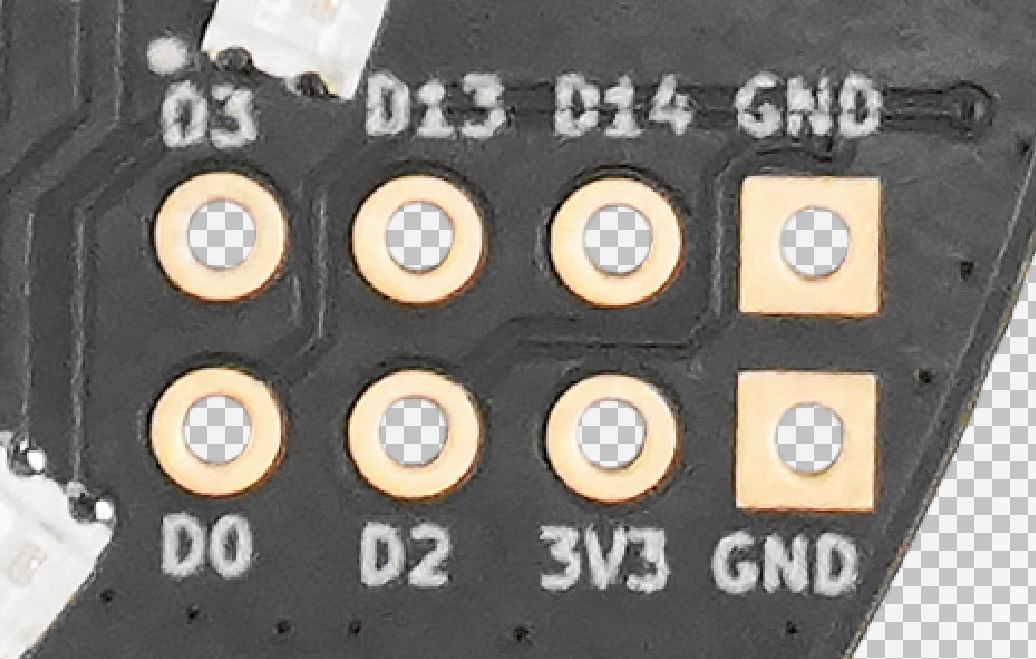
The silkscreen labels on the pads match the table below. Signals shared with the XVF3800 are marked; the rest are free XIAO GPIO.
The pads that are broken out with a XIAO pin number map to these ESP32-S3 GPIOs:
| XIAO ESP32-S3 Plus Pin | ESP32-S3 GPIO |
|---|---|
| D0 | GPIO1 |
| D2 | GPIO2 |
| D3 | GPIO4 |
| D13 | GPIO40 |
| D14 | GPIO41 |
For the full XIAO pinout and toolchain details, see the XIAO ESP32S3 Getting Started page.
On-Board Wi-Fi Antenna
When using the XIAO ESP32-S3 Plus, no external antenna is needed — simply connect the antenna slots to use the built-in PCB antenna.
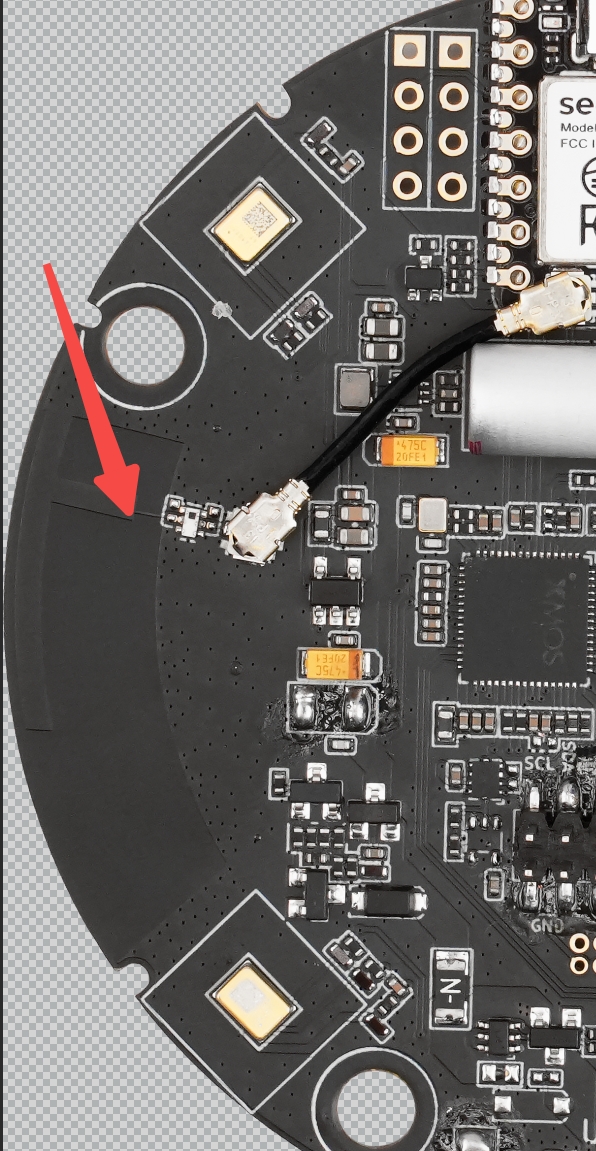
The IPEX connector next to the antenna slots can feed the onboard antenna from the XIAO module with a suitable RF cable if you prefer to route it differently.
Software Preparation
Install Arduino IDE
Download and install the stable version of Arduino IDE for your operating system.
Install Arduino-ESP32
To install the ESP32 board support through the Boards Manager:
-
Install the current upstream Arduino IDE at the 1.8 level or later. The current version is on the arduino.cc website.
-
Start Arduino and open the
Settingswindow. -
Enter the release link below into the Additional Board Manager URLs field. You can add multiple URLs separated by commas.
https://raw.githubusercontent.com/espressif/arduino-esp32/gh-pages/package_esp32_index.json
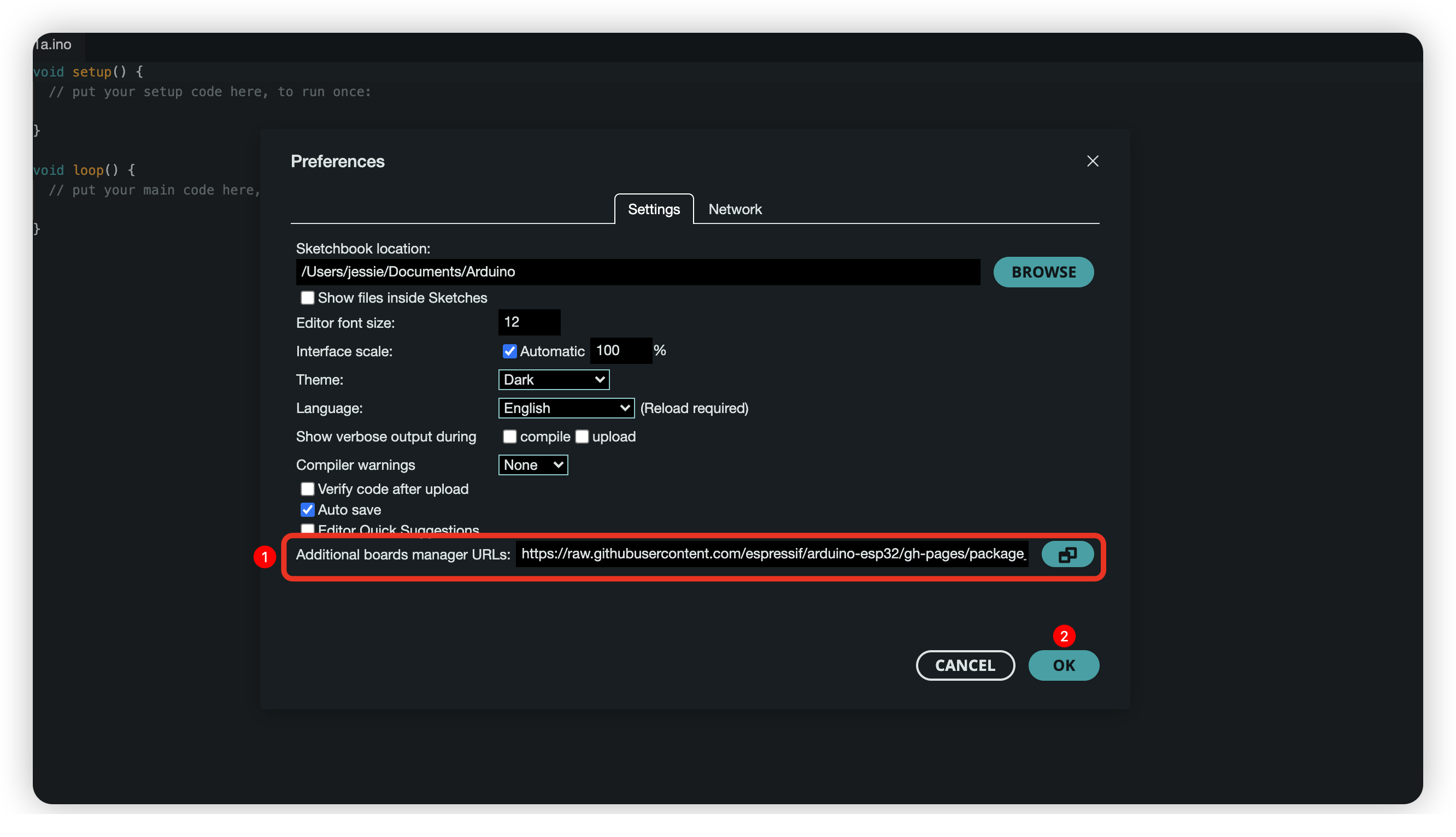
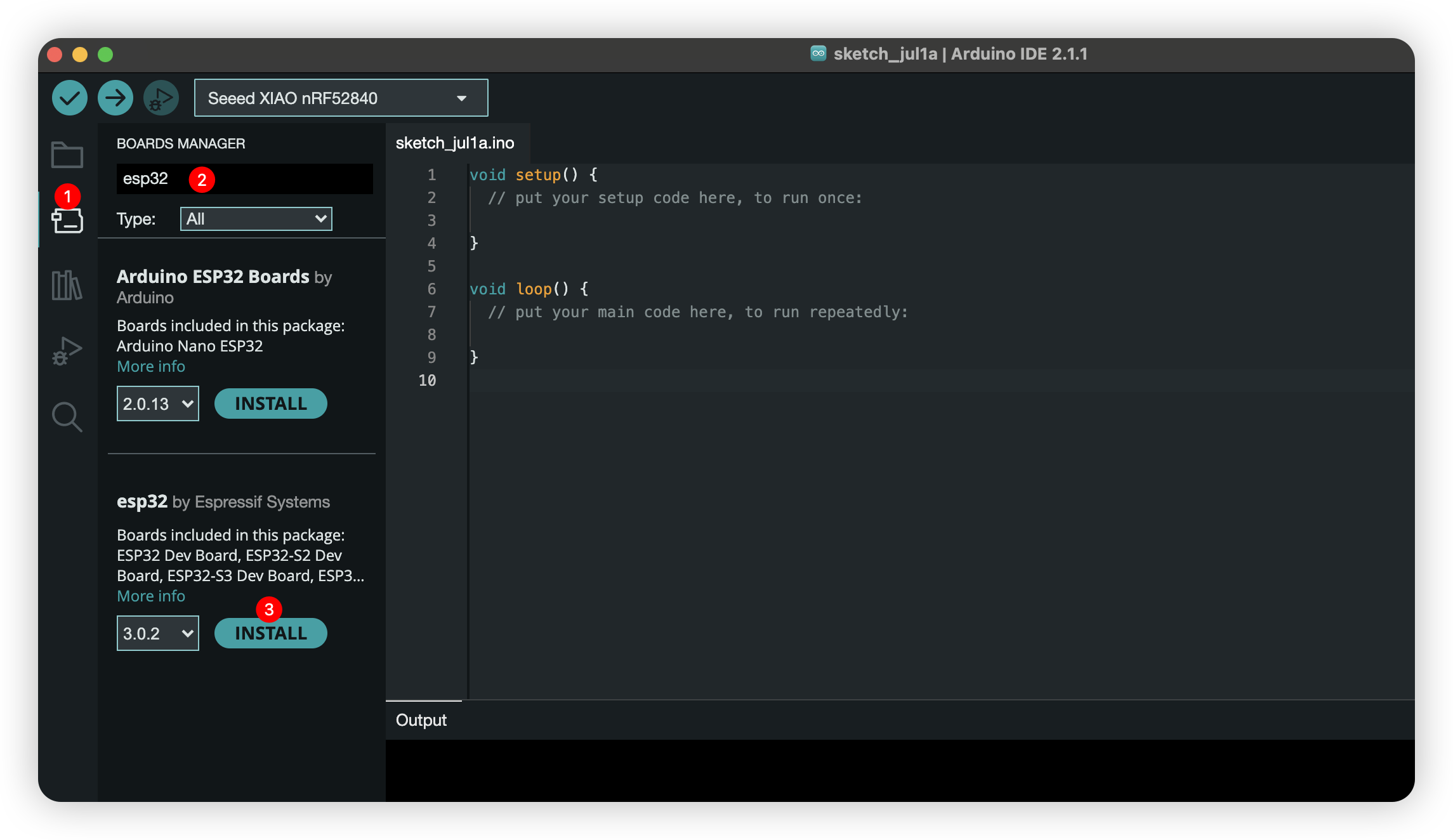
- Open
Boards Managerfrom the sidebar, searchESP32, and clickINSTALL.
- Restart Arduino IDE.
Supportive Library
Please install the Arduino Audio Tools library in order to run the provided examples.
Resources
- reSpeaker XVF3800 44mm introduction
- Firmware and Python control (GitHub)
- Arduino Audio Tools library
- XMOS XVF3800 documentation
Tech Support & Product Discussion
Thank you for choosing our products! We are here to provide you with different support to ensure that your experience with our products is as smooth as possible. We offer several communication channels to cater to different preferences and needs.