LED Effects for reSpeaker XVF3800 44mm with XIAO ESP32-S3 Plus
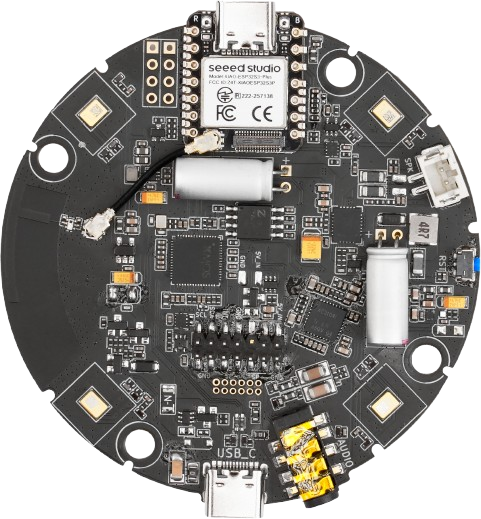
The 24 × WS2812 LEDs on the 44 mm array are driven by the XVF3800. A host MCU can take them over over I2C — power the LED rail, pick an effect, set brightness and speed, and push an RGB colour. This sketch cycles through seven colours every two seconds and reads each colour back to confirm the command landed.
Prerequisites
- The array must be running the I2S firmware — I2C control is available in this mode.
- Arduino IDE with the ESP32 board package. The Arduino Audio Tools library is not required for this sketch. See Software Preparation.
- Board selected as XIAO_ESP32S3_Plus, Port number need to be selected.
LED Control Commands
All commands go to the GPO servicer (RESID 20). Writes use the form [resid, cmd, len, payload...]; reads use [resid, cmd | 0x80, len + 1] and return a status byte first.
| Command | ID | Payload | Notes |
|---|---|---|---|
| GPO write value | 1 | pin, value | Used to switch the LED power rail (X0D33 = 33) |
| LED effect | 12 | 1 byte | See the effect table below |
| LED brightness | 13 | 1 byte | 0–255 |
| LED speed | 15 | 1 byte | Effect animation speed |
| LED colour | 16 | 4 bytes | Blue, Green, Red, 0x00 |
| Effect | Value | Description |
|---|---|---|
LED_EFFECT_OFF | 0 | LEDs off |
LED_EFFECT_BREATHING | 1 | Breathing fade |
LED_EFFECT_RAINBOW | 2 | Rainbow cycle |
LED_EFFECT_SOLID | 3 | Single solid colour |
LED_EFFECT_DOA | 4 | DoA direction indicator |
LED_EFFECT_RING | 5 | Ring animation |
The colour value is stored as 0xRRGGBB in the sketch, but it is transmitted little-endian, so the payload bytes are Blue, Green, Red, 0x00.
How It Works
setup()starts I2C at 100 kHz and waits 2.5 s for the XVF3800's own boot animation to finish.- It enables the LED power rail with a GPO write to pin
33, sets brightness to150, and selectsLED_EFFECT_SOLID. applyColor()sends the colour, waits 30 ms, then reads the colour back and compares the low 24 bits with what was sent, printingColor readback PASSorMISMATCH.loop()advances to the next colour every two seconds.
If the buttons and LEDs are routed to the XIAO instead of the XVF3800 (routing switch on D11), the ring can also be driven from WS2812_DIN_XIAO on D15 as a plain WS2812 chain. The sketch below uses the XVF3800 path.
Arduino Sketch
#include <Wire.h>

// =====================================================
// I2C CONFIGURATION
// =====================================================

#define XMOS_ADDR                 0x2C

#define I2C_SDA_PIN               5
#define I2C_SCL_PIN               6

#define GPO_SERVICER_RESID        20

#define CMD_GPO_WRITE_VALUE       1

#define CMD_LED_EFFECT            12
#define CMD_LED_BRIGHTNESS        13
#define CMD_LED_SPEED             15
#define CMD_LED_COLOR             16

#define LED_POWER_PIN             33

// LED effect modes
#define LED_EFFECT_OFF            0
#define LED_EFFECT_BREATHING      1
#define LED_EFFECT_RAINBOW        2
#define LED_EFFECT_SOLID          3
#define LED_EFFECT_DOA            4
#define LED_EFFECT_RING           5

// =====================================================
// LED CONFIGURATION
// =====================================================

#define LED_BRIGHTNESS            150

// Change LED color every 2 seconds
#define COLOR_INTERVAL_MS         2000

// =====================================================
// COLOR DEFINITIONS
// Format: 0xRRGGBB
// =====================================================

struct LEDColor {
    const char *name;
    uint32_t value;
};

LEDColor colors[] = {
    {"RED",     0xFF0000},
    {"GREEN",   0x00FF00},
    {"BLUE",    0x0000FF},
    {"ORANGE",  0xFF8800},
    {"PURPLE",  0x8000FF},
    {"WHITE",   0xFFFFFF},
    {"YELLOW",  0xFFFF00}
};

const uint8_t COLOR_COUNT =
    sizeof(colors) / sizeof(colors[0]);

uint8_t currentColor = 0;

unsigned long lastColorChange = 0;

// =====================================================
// XMOS I2C WRITE
// =====================================================

bool xmos_write_bytes(
    uint8_t resid,
    uint8_t cmd,
    const uint8_t *value,
    uint8_t write_byte_num
) {

    Wire.beginTransmission(XMOS_ADDR);

    Wire.write(resid);
    Wire.write(cmd);
    Wire.write(write_byte_num);

    for (uint8_t i = 0; i < write_byte_num; i++) {
        Wire.write(value[i]);
    }

    uint8_t error = Wire.endTransmission();

    if (error != 0) {

        Serial.printf(
            "I2C write failed! RESID=%u CMD=%u ERROR=%u\n",
            resid,
            cmd,
            error
        );

        return false;
    }

    return true;
}

// =====================================================
// ENABLE LED POWER
// GPIO X0D33 HIGH = WS2812 LED POWER ENABLE
// =====================================================

bool setLEDPower(bool enable) {

    uint8_t payload[2] = {
        LED_POWER_PIN,
        enable ? 1 : 0
    };

    bool result = xmos_write_bytes(
        GPO_SERVICER_RESID,
        CMD_GPO_WRITE_VALUE,
        payload,
        2
    );

    if (result) {
        Serial.printf(
            "LED power: %s\n",
            enable ? "ON" : "OFF"
        );
    }

    return result;
}

// =====================================================
// SET LED EFFECT
// =====================================================

bool setLEDEffect(uint8_t effect) {

    uint8_t payload[1] = {effect};

    bool result = xmos_write_bytes(
        GPO_SERVICER_RESID,
        CMD_LED_EFFECT,
        payload,
        1
    );

    if (result) {
        Serial.printf("LED effect set: %u\n", effect);
    }

    return result;
}

// =====================================================
// SET LED BRIGHTNESS
// =====================================================

bool setLEDBrightness(uint8_t brightness) {

    uint8_t payload[1] = {brightness};

    bool result = xmos_write_bytes(
        GPO_SERVICER_RESID,
        CMD_LED_BRIGHTNESS,
        payload,
        1
    );

    if (result) {
        Serial.printf("LED brightness: %u\n", brightness);
    }

    return result;
}

// =====================================================
// SET LED SPEED
// =====================================================

bool setLEDSpeed(uint8_t speed) {

    uint8_t payload[1] = {speed};

    return xmos_write_bytes(
        GPO_SERVICER_RESID,
        CMD_LED_SPEED,
        payload,
        1
    );
}

// =====================================================
// SET LED COLOR
// Color format: 0xRRGGBB
// =====================================================

bool setLEDColor(uint32_t color) {

    // Serialize uint32_t in little-endian order.
    // Byte 0 = Blue
    // Byte 1 = Green
    // Byte 2 = Red
    // Byte 3 = Reserved

    uint8_t payload[4] = {
        (uint8_t)(color & 0xFF),
        (uint8_t)((color >> 8) & 0xFF),
        (uint8_t)((color >> 16) & 0xFF),
        0x00
    };

    bool result = xmos_write_bytes(
        GPO_SERVICER_RESID,
        CMD_LED_COLOR,
        payload,
        4
    );

    if (result) {

        Serial.printf(
            "LED color command sent: 0x%06lX\n",
            (unsigned long)(color & 0xFFFFFF)
        );

        Serial.printf(
            "Payload: %02X %02X %02X %02X\n",
            payload[0],
            payload[1],
            payload[2],
            payload[3]
        );
    }

    return result;
}

// =====================================================
// READ BACK LED COLOR
// =====================================================

bool readLEDColor(uint32_t &color) {

    Wire.beginTransmission(XMOS_ADDR);

    Wire.write(GPO_SERVICER_RESID);
    Wire.write(CMD_LED_COLOR | 0x80);
    Wire.write(5);  // Status + 4-byte payload

    if (Wire.endTransmission() != 0) {
        Serial.println("LED color read command failed");
        return false;
    }

    uint8_t received = Wire.requestFrom(
        (uint8_t)XMOS_ADDR,
        (uint8_t)5
    );

    if (received != 5) {

        Serial.printf(
            "LED read response incomplete: %u/5\n",
            received
        );

        while (Wire.available()) {
            Wire.read();
        }

        return false;
    }

    uint8_t status = Wire.read();

    uint8_t b0 = Wire.read();
    uint8_t b1 = Wire.read();
    uint8_t b2 = Wire.read();
    uint8_t b3 = Wire.read();

    if (status != 0) {
        Serial.printf(
            "LED read status error: 0x%02X\n",
            status
        );

        return false;
    }

    color =
        ((uint32_t)b3 << 24) |
        ((uint32_t)b2 << 16) |
        ((uint32_t)b1 << 8) |
        b0;

    Serial.printf(
        "LED readback: 0x%06lX\n",
        (unsigned long)(color & 0xFFFFFF)
    );

    return true;
}

// =====================================================
// APPLY COLOR
// =====================================================

void applyColor(uint8_t index) {

    if (index >= COLOR_COUNT) {
        return;
    }

    Serial.println("\n----------------------------");

    Serial.printf(
        "Changing LED color to: %s\n",
        colors[index].name
    );

    if (!setLEDColor(colors[index].value)) {
        Serial.println("Color update failed!");
        return;
    }

    delay(30);

    uint32_t readback = 0;

    if (readLEDColor(readback)) {

        if ((readback & 0xFFFFFF) ==
            (colors[index].value & 0xFFFFFF)) {

            Serial.println("Color readback PASS");

        } else {

            Serial.println("Color readback MISMATCH");
        }
    }

    Serial.println("----------------------------");
}

// =====================================================
// SETUP
// =====================================================

void setup() {

    Serial.begin(115200);
    delay(1000);

    Serial.println("\n================================");
    Serial.println("ReSpeaker 44mm LED COLOR TEST");
    Serial.println("================================");

    // Initialize I2C
    Wire.begin(
        I2C_SDA_PIN,
        I2C_SCL_PIN
    );

    Wire.setClock(100000);

    Serial.println("I2C initialized");

    // Allow XMOS startup LED initialization to finish
    delay(2500);

    // Enable LED hardware power
    setLEDPower(true);

    delay(100);

    // Configure LED brightness
    setLEDBrightness(LED_BRIGHTNESS);

    // Configure solid color mode
    setLEDEffect(LED_EFFECT_SOLID);

    delay(100);

    // Start with RED
    applyColor(currentColor);

    lastColorChange = millis();

    Serial.println("\nAutomatic LED color changing started");
}

// =====================================================
// LOOP
// =====================================================

void loop() {

    unsigned long now = millis();

    if (now - lastColorChange >= COLOR_INTERVAL_MS) {

        lastColorChange = now;

        currentColor++;

        if (currentColor >= COLOR_COUNT) {
            currentColor = 0;
        }

        applyColor(currentColor);
    }
}
Expected Output
================================
ReSpeaker 44mm LED COLOR TEST
================================
I2C initialized
LED power: ON
LED brightness: 150
LED effect set: 3

----------------------------
Changing LED color to: RED
LED color command sent: 0xFF0000
Payload: 00 00 FF 00
LED readback: 0xFF0000
Color readback PASS
----------------------------

Automatic LED color changing started

----------------------------
Changing LED color to: GREEN
LED color command sent: 0x00FF00
Payload: 00 FF 00 00
LED readback: 0x00FF00
Color readback PASS
----------------------------
The ring should step through red, green, blue, orange, purple, white, and yellow every two seconds.
Tech Support & Product Discussion
Thank you for choosing our products! We are here to provide you with different support to ensure that your experience with our products is as smooth as possible. We offer several communication channels to cater to different preferences and needs.