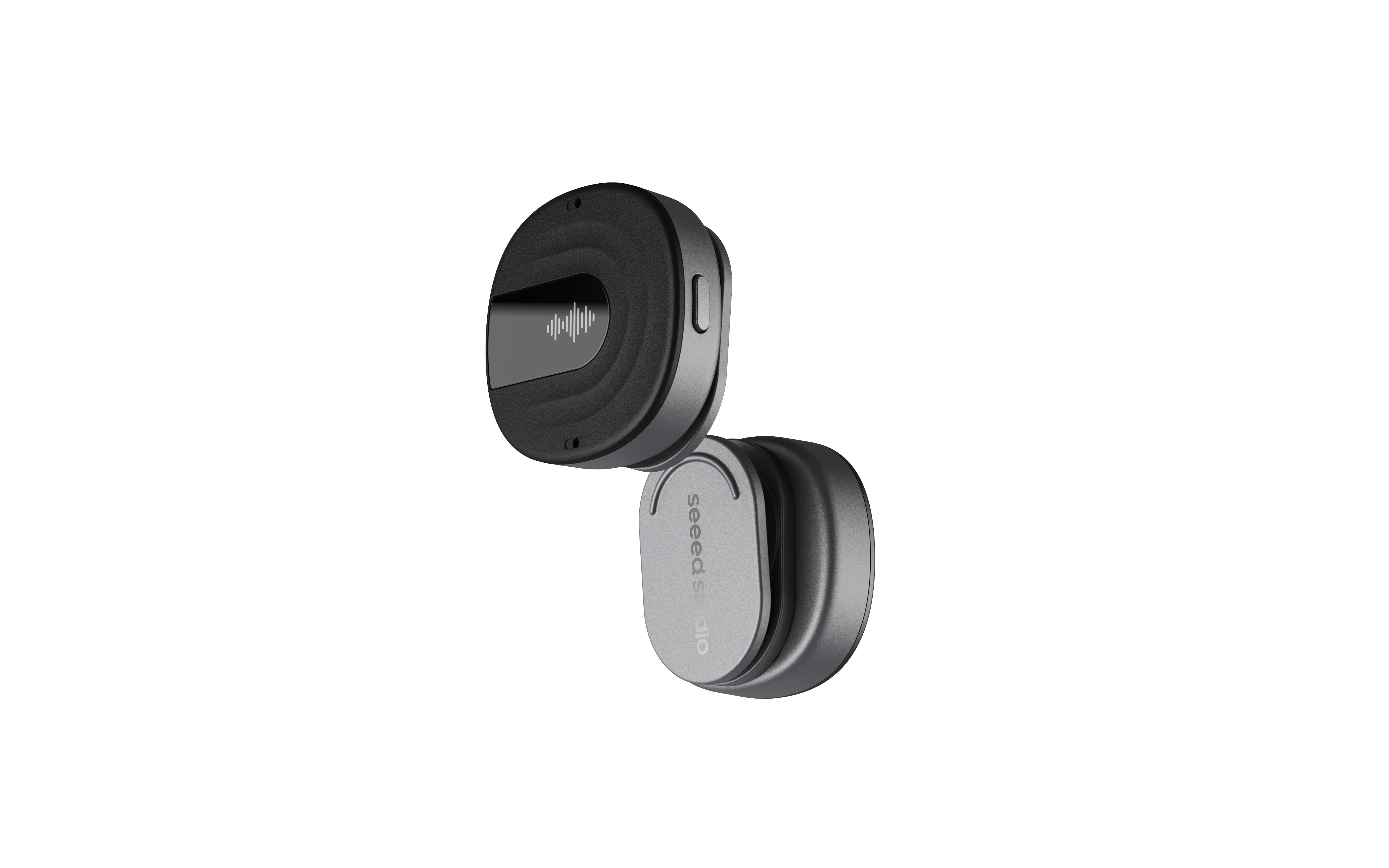
reSpeaker Clip AI Chat System Architecture
A plain-language guide to how the reSpeaker Clip AI Agent chat system works. Everything here is derived from the README and the actual code in backend/.
1. Overview
The system is a voice-first AI assistant built on Flask + LangGraph + Groq. You speak or type a message, the agent decides how to handle it, optionally calls tools, produces an answer, and speaks the reply back to you.
The pipeline at a glance:
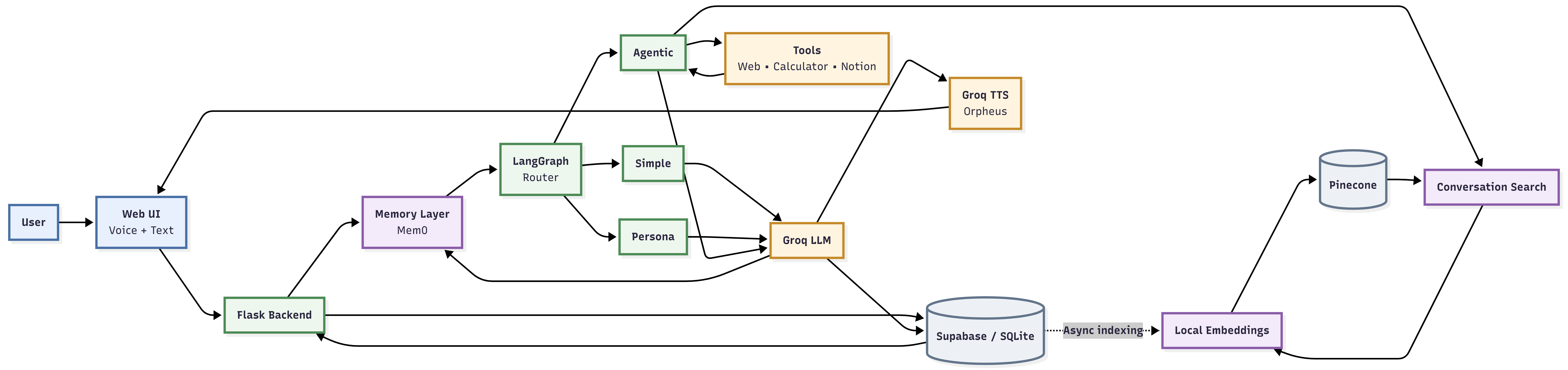
Three ideas make this work:
- A router classifies every request into one of three paths.
- An agent on one of those paths can call tools (web search, calculator, Notion, past-conversation search).
- A vector store + memory layer lets the agent recall your past conversations and long-term facts.
2. System Architecture Diagram
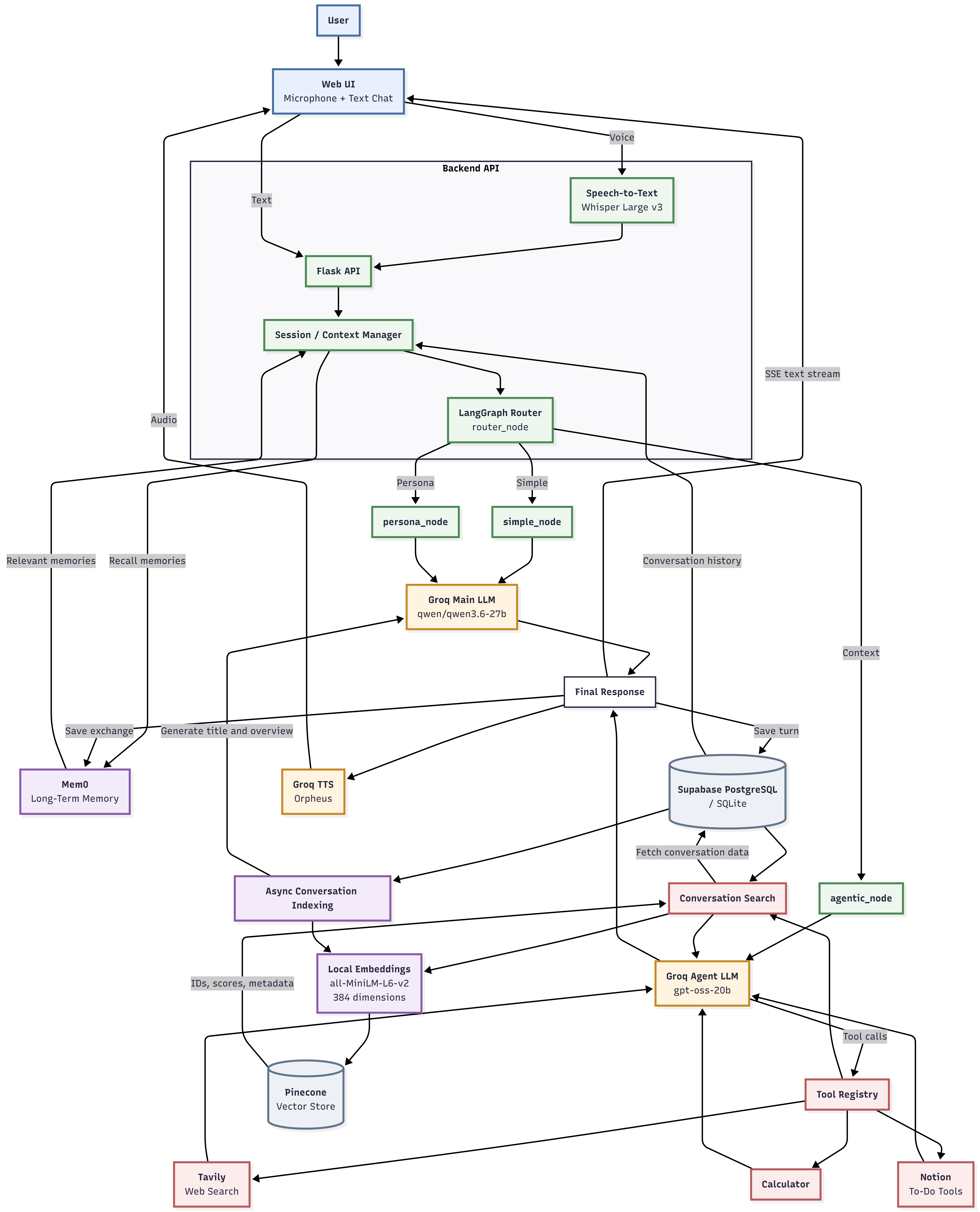
The pieces fit together like this:
- Flask is the API surface (chat, streaming, voice, TTS).
- LangGraph is the state machine that routes the request and runs the chosen node.
- Groq provides the LLM, speech-to-text (Whisper), and text-to-speech (Orpheus).
- Mem0 supplies long-term memory; Pinecone + local embeddings supply past-conversation search.
- Supabase (with a SQLite fallback) stores conversations, messages, and summaries.
3. The Three Routing Paths
Every request is routed to exactly one of three nodes. The code maps the route string to a node in backend/graph/graph.py:
simple — No-context chat
- A plain LLM response. No tools, no special personality.
- Used for general questions, explanations, and normal conversation.
- Node:
simple_node(backend/graph/nodes/simple.py), LLM = the main Groq model.
context — Agentic (tool-enabled)
- The request may need external information or a tool (web, math, Notion, past conversations).
- This node builds a LangChain agent with
create_agentand lets the model call tools in a loop. - Node:
agentic_node(backend/graph/nodes/agentic.py), LLM = a dedicated tool-calling model (gpt-oss-20b).
persona — Styled
- The user explicitly asks for a style, personality, role, or teaching style.
- Same mechanics as
simple, but with a different system prompt that tells the model to adapt its tone. - Node:
persona_node(backend/graph/nodes/persona.py), LLM = the main Groq model.
4. Classification Logic
Routing happens in router_node (backend/graph/router.py) using a keyword pre-check followed by an LLM classification.
-
Keyword pre-check (fast path). The transcript is scanned for tool keywords. If any match, the route is forced to
contextand the LLM is skipped entirely:notion, to-do, todo, task list, to do list, calendar,
schedule, reminder, note down, create a task, add a taskExample: "add a task to my to-do list" never even reaches the classifier.
-
LLM classification. Otherwise the request is sent to the main Groq model with the
ROUTER_PROMPT, which is a classifier prompt returning exactly one word:Route Triggering input simpleGeneral questions, explanations, normal conversation, no tools/persona needed contextMay need external info/tools, data management (Notion/calendar), questions about the user's device/files/stored info personaUser explicitly requests a style, personality, teaching style, role or behavior -
Fallback. The output is lower-cased and trimmed. Anything not in
{simple, context, persona}falls back tosimple.
5. The Agentic Tool System
How tool calling works
The context path uses LangChain's create_agent (backend/graph/nodes/agentic.py). The loop looks like:
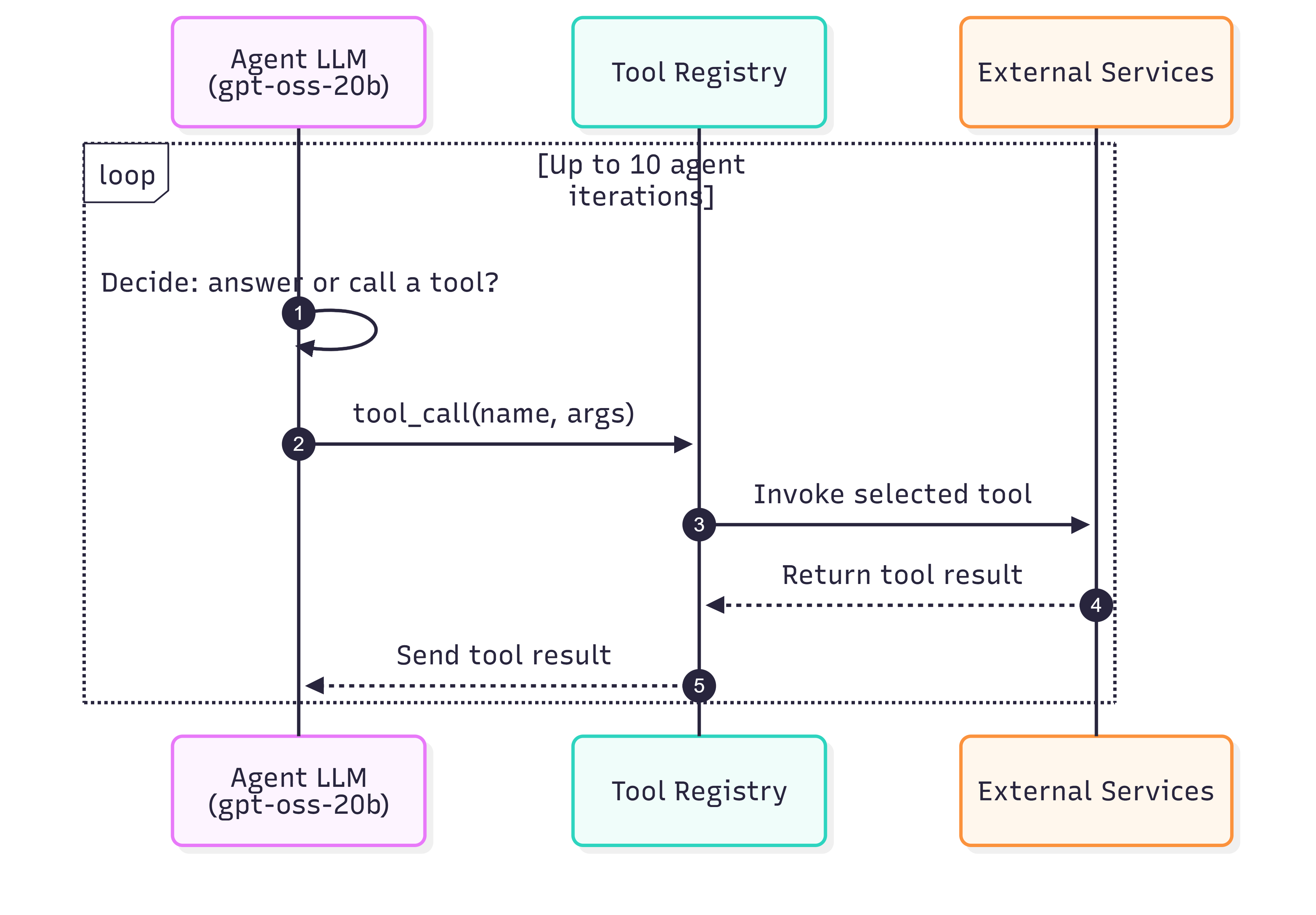
Details worth noting:
- The agent is cached and rebuilt only if the tool signature changes (
_get_agent). - Retry logic: up to
MAX_RETRIES = 3attempts; transienttool_use_failederrors are retried with a 1s sleep. - Guard rail: recursion is capped at
MAX_AGENT_ITERATIONS = 10. If the limit is hit, the agent returns a fixed "I hit my limit…" message instead of crashing. - The system prompt tells the model to use the minimum number of tool calls and answer as soon as it has enough info.
- During SSE streaming, each tool call is surfaced to the UI as a
thinkingevent ({"tool": "web_search"}).
Available tools
get_available_tools() (backend/tools/registry.py) returns everything the agent can call:
| Tool | Backing service | Purpose | Config key(s) |
|---|---|---|---|
calculator | local, safe AST eval | Math via a whitelisted + - * / ** % evaluator | — (always available) |
search_conversations | Pinecone + local embeddings | Find the user's own past conversations by relevance | PINECONE_API_KEY |
composio_search | Composio | Search for Composio app tools matching a natural-language request | COMPOSIO_API_KEY |
composio_execute | Composio | Run a matched tool by slug with JSON args | same |
composio_connect | Composio | Authorize a toolkit (e.g. github) via a Connect Link | same |
web_search | Tavily | Live/current web info (news, firmware, product details) | TAVILY_API_KEY |
add_todo | Notion | Add a task to the to-do list | NOTION_API_KEY / NOTION_DATABASE_ID |
list_todos | Notion | List tasks with status | same |
complete_todo | Notion | Mark a task done (matches by name/keyword) | same |
delete_todo | Notion | Delete a task (matches by name/keyword) | same |
- The Notion tools are only added if Notion is configured.
- Tools that are unconfigured return a friendly message (for example, "Web search is unavailable…"), so the system degrades gracefully.
Configured Tools
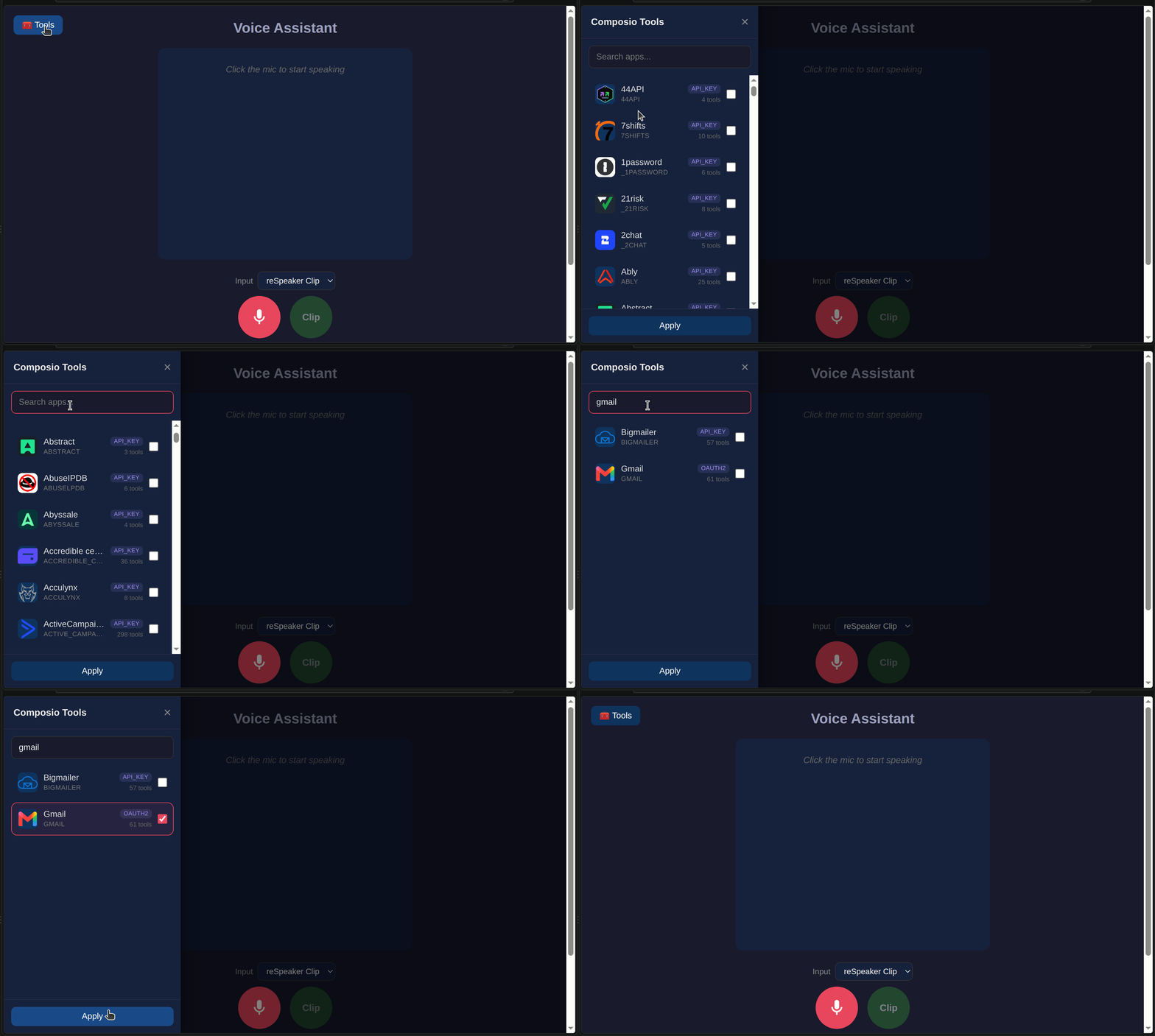
6. Vector Search Deep Dive
Configuration
All vector settings live in config.py / .env:
| Setting | Default | Meaning |
|---|---|---|
PINECONE_API_KEY | — | Enables vector search |
PINECONE_INDEX_NAME | conversations | Pinecone index name |
PINECONE_CLOUD | aws | Serverless cloud provider |
PINECONE_REGION | us-east-1 | Serverless region |
EMBEDDING_MODEL | all-MiniLM-L6-v2 | Local sentence-transformers model |
EMBEDDING_DIM | 384 | Vector dimension (must match the index) |
On startup, init_index() auto-creates the Pinecone index if it doesn't exist (dimension 384, metric cosine, serverless).
What gets embedded vs. stored as metadata
The design keeps vectors small and puts everything else in metadata:
- Embedded (vector):
"<title>\n\n<overview>"— a short semantic summary of the conversation. - Metadata:
user_id,conversation_id,title,created_at. - Not in the vector store at all: the full transcript. The actual conversation turns live in Supabase/SQLite and are fetched by id after a match.
The vector id is "{user_id}-{conversation_id}", so it's stable per user per conversation.
Vector creation (write path)
After every chat/voice turn, the system fires a background thread (index_conversation_async → summarize_and_index in backend/services/conversation_service.py):
Details:
- Conversations with fewer than
MIN_TURNS = 2turns are skipped. - The title/overview is generated by the main Groq LLM using a two-line prompt (
Title:/Overview:). - Embeddings are normalized (cosine-friendly).
- All of this is async (a daemon thread), so the user's response is never blocked on indexing.
Vector query (read path)
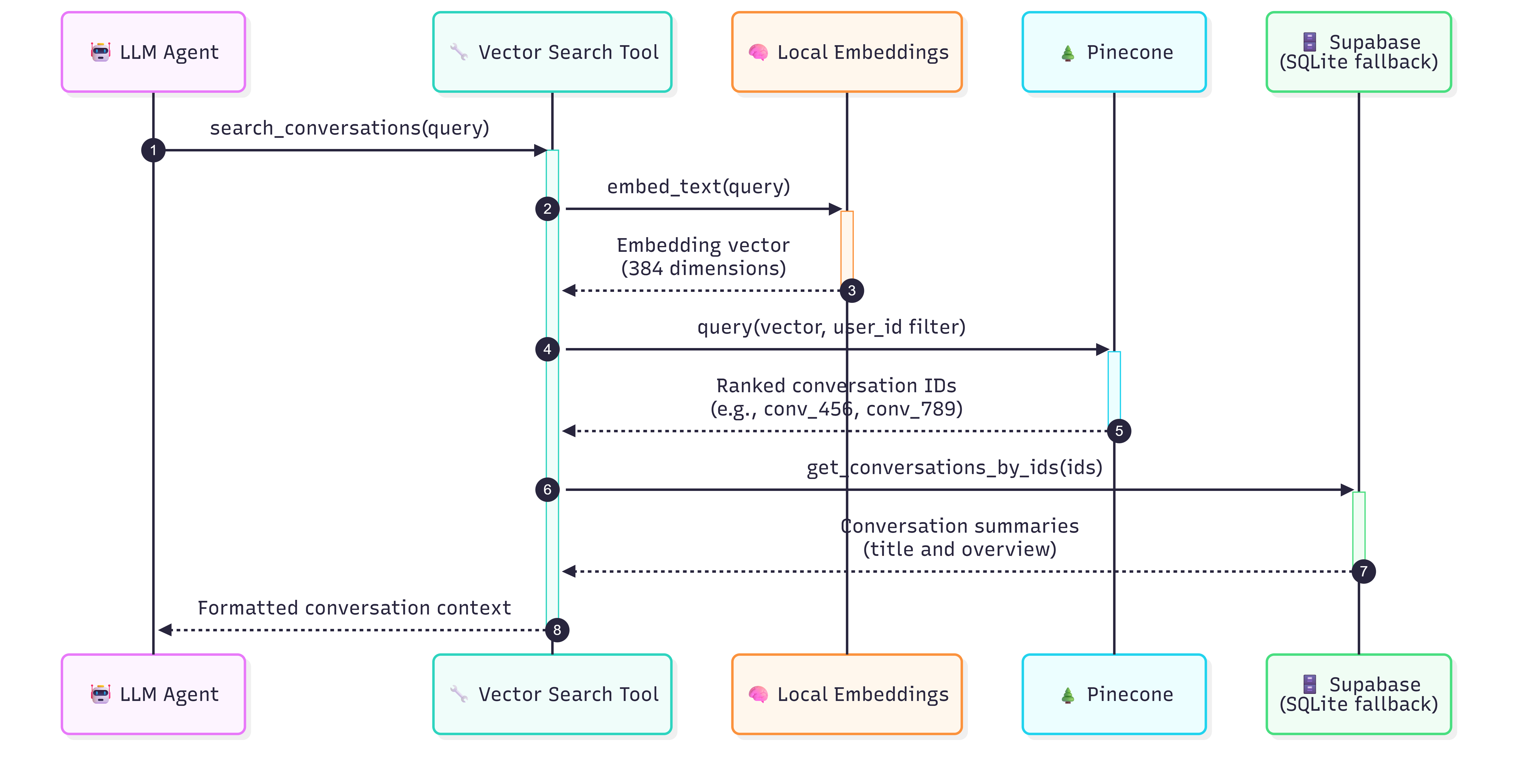
When the agent calls search_conversations, the flow is:
Key points:
- The query is embedded with the same local model, then searched with a
user_idfilter so users only ever see their own conversations. - Matching returns id + score + metadata; the full summaries are pulled from the relational store by id.
- Matches are formatted with their similarity score so the agent can judge relevance.
7. Memories System
Long-term memory uses Mem0, scoped to a single user (MEM0_USER_ID, default user-1).
Memory categories
There are no hard-coded buckets in code; instead, MEM0_CUSTOM_INSTRUCTIONS tells Mem0 which durable facts to extract, in priority order:
- Health constraints & allergies — especially anything a doctor advised (interpreted as applying to the user).
- Schedule — meetings, appointments, reminders.
- Preferences and personal details.
Explicitly excluded: the assistant's own responses/recipes/explanations, and transient one-off requests.
Memory retrieval in chat
Proactive recall happens on every request, before routing (recall(text) in backend/routes/chat.py):
-
The incoming message is sent to Mem0's semantic search (
top_k = 5). -
Results are filtered by a two-tier relevance check on the score breakdown:
semantic ≥ 0.28→ keep, ORsemantic ≥ 0.24andbm25 > 0.01(a keyword-boosted hit) → keep.
-
Surviving memories are sorted by
created_at(newest first) and formatted as:Relevant context from your past conversations:
- <memory text> (created 2026-08-30) -
That block is prepended to the user message before it reaches any node — so the LLM sees it as context but is told to use it only when directly relevant to the topic.
Writing happens after every exchange (save_exchange): the user/assistant pair is sent to Mem0 with the custom instructions. Memory save and recall both fail gracefully (logged, ignored) if the Mem0 key is missing.
8. Chat Session and Context
Session structure
A "session" is a conversation stored relationally (Supabase PostgreSQL, or SQLite fallback). The schema:
users—id,email(single user,user-1, seeded).conversations—id,user_id,title,overview,action_items, timestamps.messages/turns—conversation_id,role(user/assistant),content, timestamp.
Flow for one turn:
- Create (or reuse) a conversation →
conversation_id. - Load context:
recall()memories +get_recent_messages(conversation_id, 10)history. - Build the
AgentState, run it through the LangGraph. - After the response: save both turns, save the exchange to Mem0, and kick off async vector indexing.
Context window
The context assembled for the LLM is intentionally small and layered:
| Component | Source | Size |
|---|---|---|
| System prompt | per-path constant (simple/persona/agent SYSTEM_PROMPT) | fixed |
| Conversation history | get_recent_messages(conversation_id, 10) | last 10 turns (10 user + 10 assistant messages), chronological |
| Recalled memories | Mem0 recall(), top-5, filtered | up to 5 memories |
| Current user message | format_memories(...) + transcript | the request |
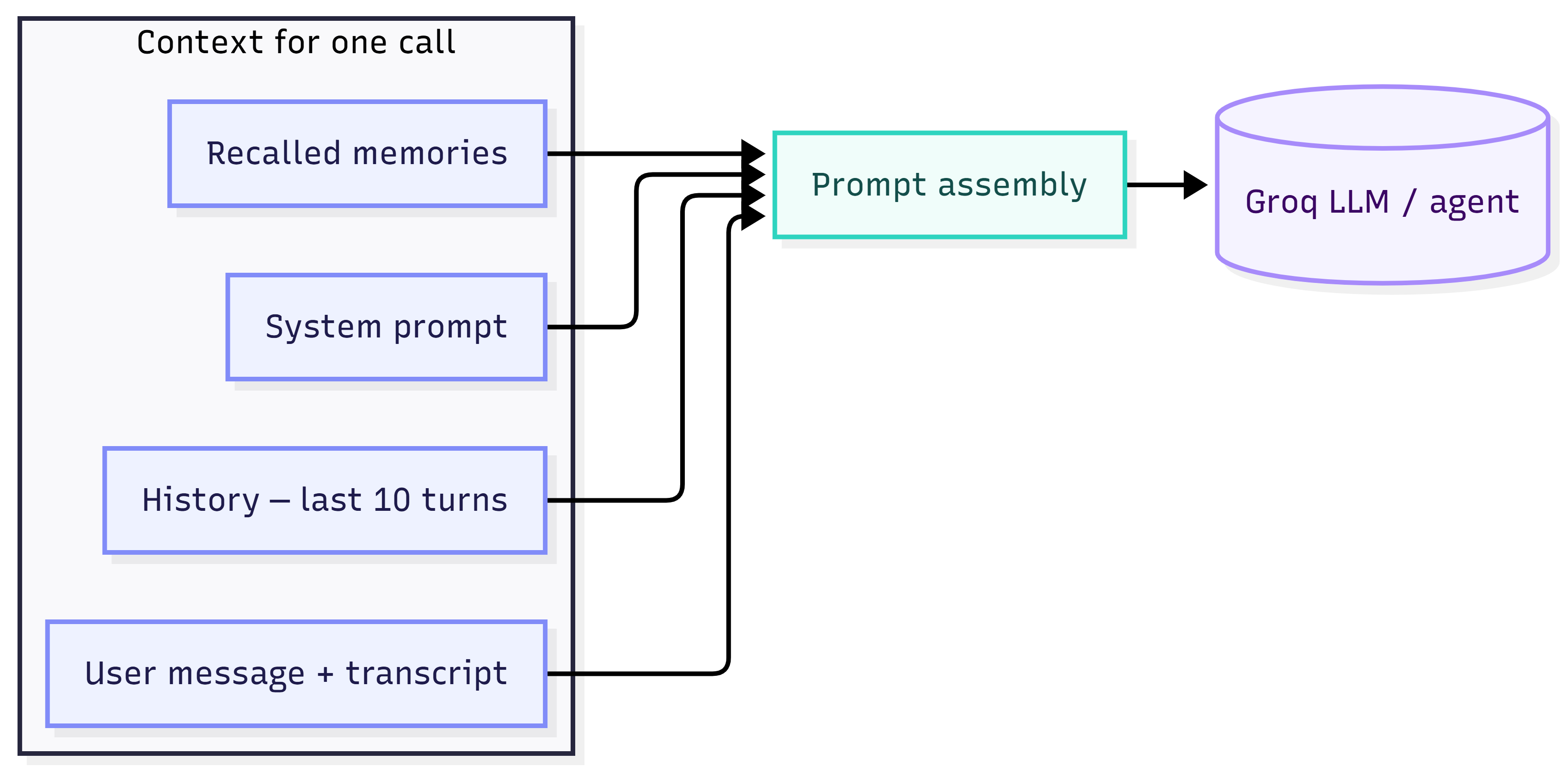
Notes:
- History comes from the relational store, not the vector store (the vector store holds summaries, not turns).
- Memories are injected inline with the user message, so the model treats them as "relevant context from your past conversations."
- The agent path builds messages as
[history..., ("user", memories + transcript)]and lets the agent loop with tools.
9. System Prompt Structure
There are four system prompts:
| Prompt | Where | Used by | Job |
|---|---|---|---|
ROUTER_PROMPT | backend/graph/router.py | router classification | Return one word: simple / context / persona |
SIMPLE_PROMPT (simple.py) | backend/graph/nodes/simple.py | simple_node | Helpful voice assistant, plain chat |
PERSONA_PROMPT (persona.py) | backend/graph/nodes/persona.py | persona_node | Same as simple but adapts style/teaching to the user's request |
SYSTEM_PROMPT (agentic) | backend/graph/nodes/agentic.py | agent | Tool-enabled assistant; explains each tool and when to use it |
The simple, persona, and agentic prompts share a common house style tail:
- Respond in 2–3 short sentences maximum.
- Plain text only — no markdown, no asterisks, no emojis.
- Recalled memories are used only when directly relevant to the topic (schedule vs. food separation is explicitly enforced).
- On conflicts, trust the most recently created memory.
- When the user states a new fact, acknowledge only that fact — don't echo unrelated memories.
The agentic prompt additionally:
- Names the tools (
web_search,calculator,search_conversations, Notion tools). - Instructs minimal tool calls — stop once enough information is gathered.
- Keeps the short, plain-text answer format.
10. LLM Models Used
All models run on Groq. Defined in backend/llm/client.py, config.py, and groq_client.py:
| Role | Env var | Default model | Temperature | Notes |
|---|---|---|---|---|
| Main LLM (router, simple, persona, summaries) | GROQ_LLM_MODEL | qwen/qwen3.6-27b | 0.7 | ChatGroq instance llm |
| Agent / tool-calling LLM | GROQ_AGENT_MODEL | openai/gpt-oss-20b | 0.0 | ChatGroq instance agent_llm, used by create_agent |
| Speech-to-text | GROQ_STT_MODEL | whisper-large-v3 | 0.0 | Whisper transcription |
| Text-to-speech | GROQ_TTS_MODEL | canopylabs/orpheus-v1-english | — | Voice = TTS_VOICE (autumn) |
| Embeddings (local, not Groq) | EMBEDDING_MODEL | all-MiniLM-L6-v2 | — | sentence-transformers, 384-dim, normalized |
LLM inference defaults (via groq_client.chat): max_completion_tokens = 2048, top_p = 1.0, temperature overridable.
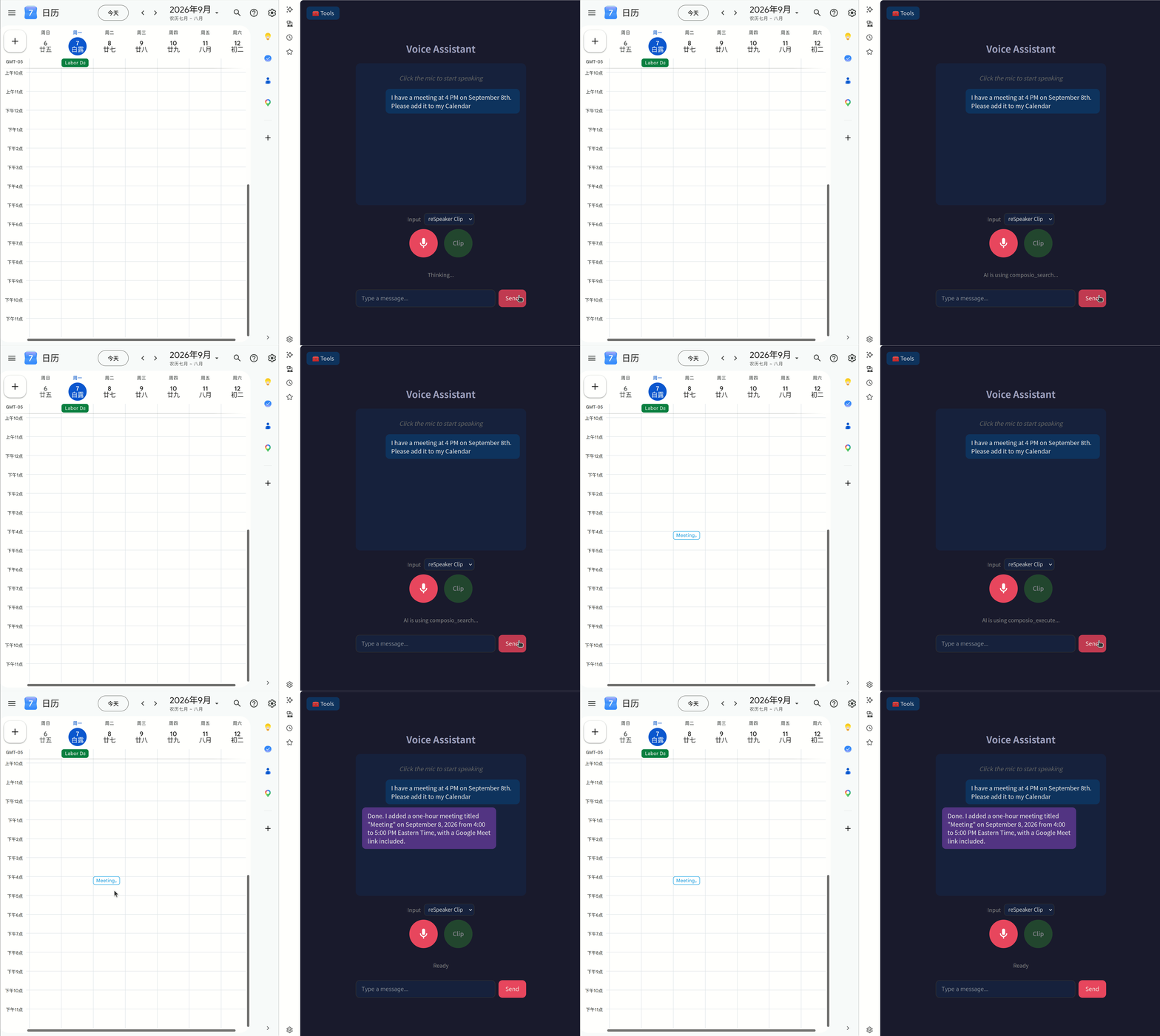
11. Agent Call Demonstration
Read Email
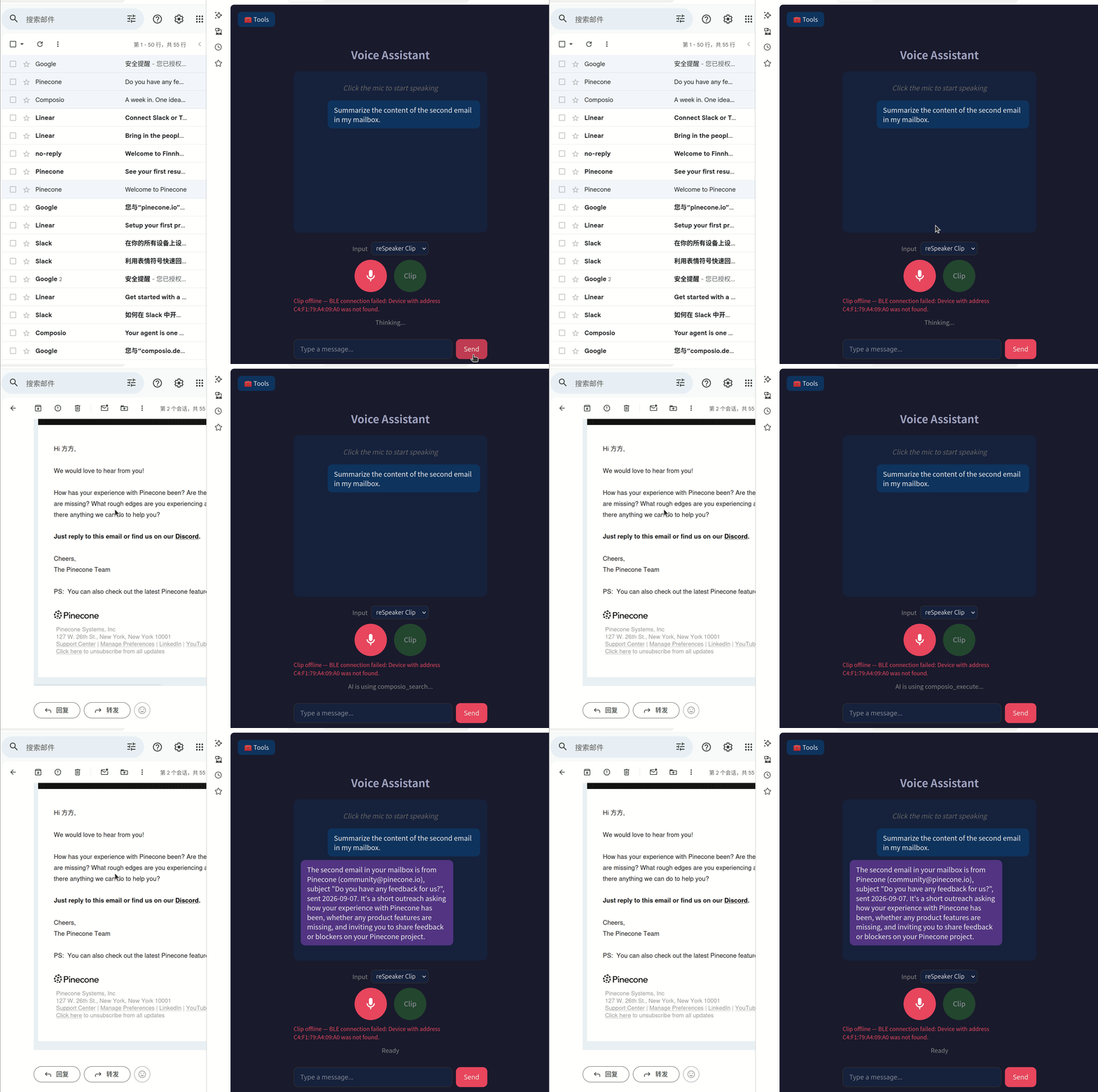
Add Calendar
Tech Support & Product Discussion
Thank you for choosing our products! We are here to provide you with different support to ensure that your experience with our products is as smooth as possible. We offer several communication channels to cater to different preferences and needs.