reSpeaker Clip Basic SDK Guide
Version: matches
clippackage__version__ = 1.0.0
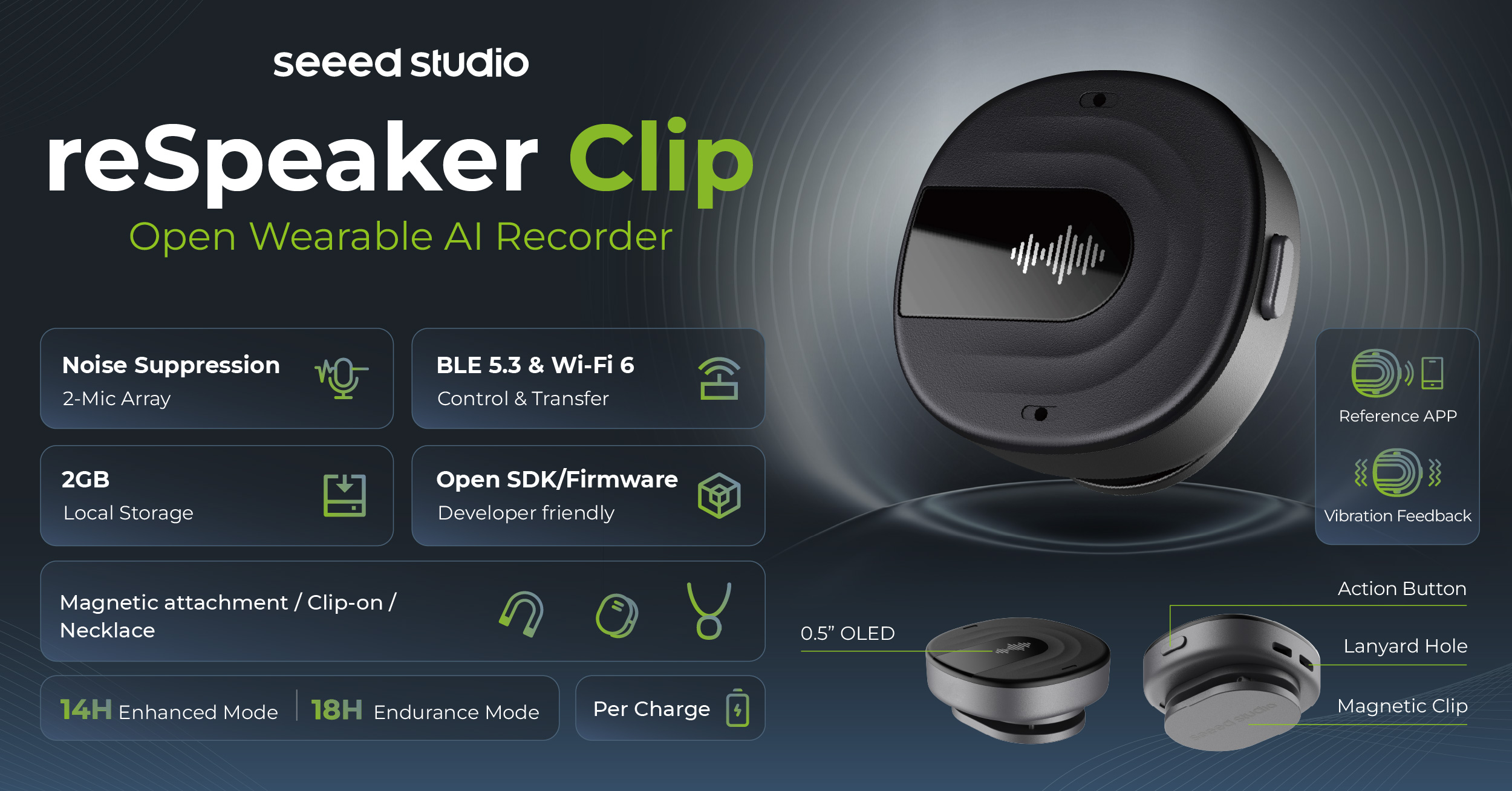
Product: reSpeaker Clip wearable recorder
Overview
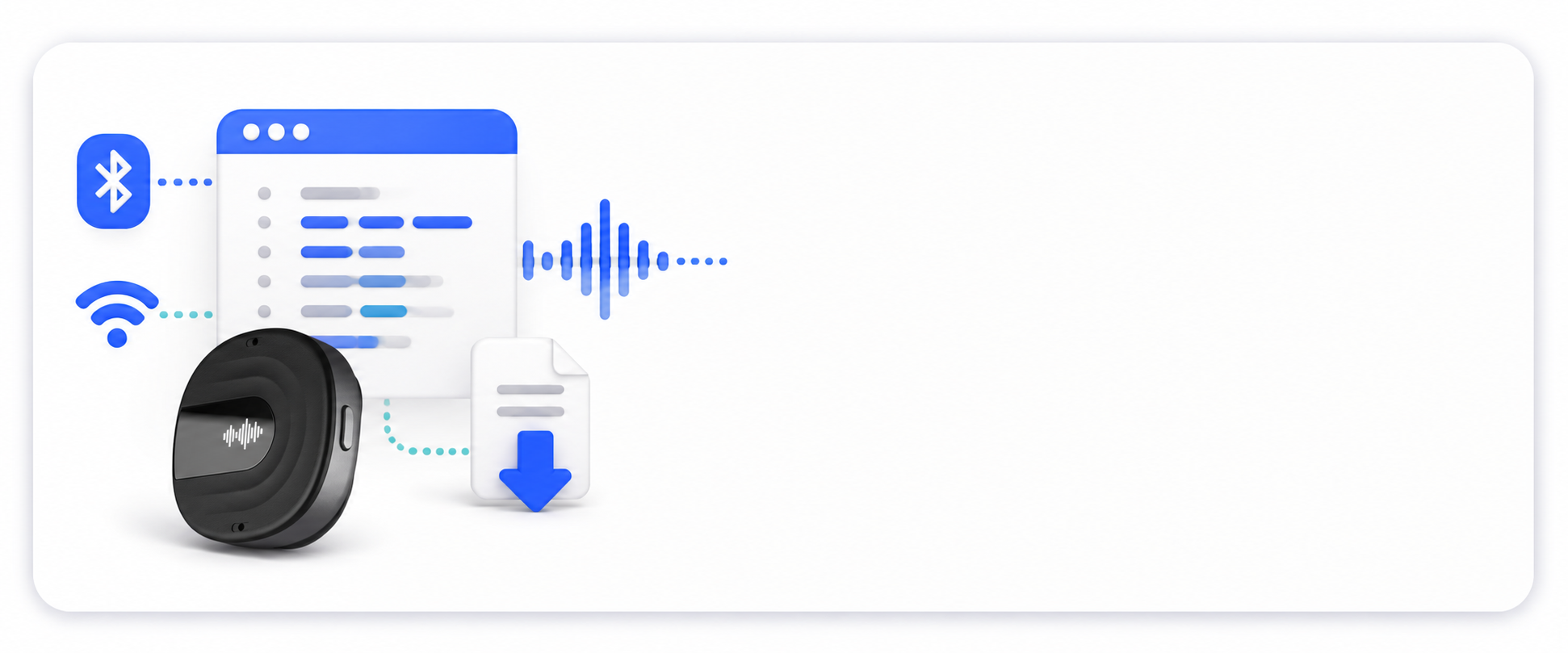
The reSpeaker Clip Basic SDK Guide explains how host-side applications communicate with and control the device through BLE, Wi-Fi, AT commands, GATT, and file-transfer workflows. The Python SDK is provided as the primary reference implementation, together with CLI and Web-based tools.
This guide covers:
- Transports — BLE and Wi-Fi/UDP communication channels.
- Communication protocols — AT commands, GATT characteristics, and file-transfer framing.
- Recording model — recording modes, device state machine, and file format.
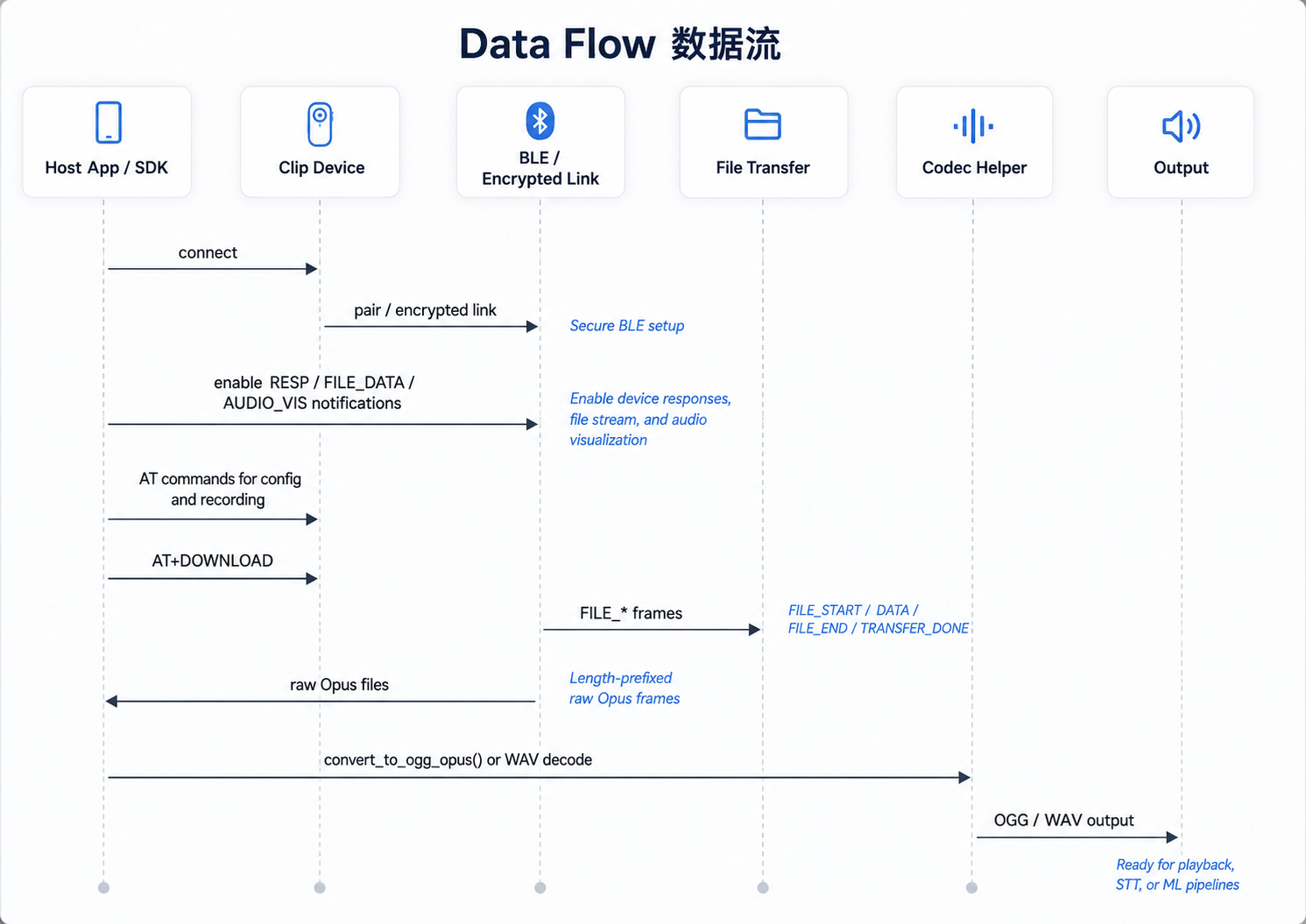
- End-to-end data flow — from connect to downloaded audio output.
- Reference implementations — Python SDK (
clippackage), CLI tools, and a Web interface.
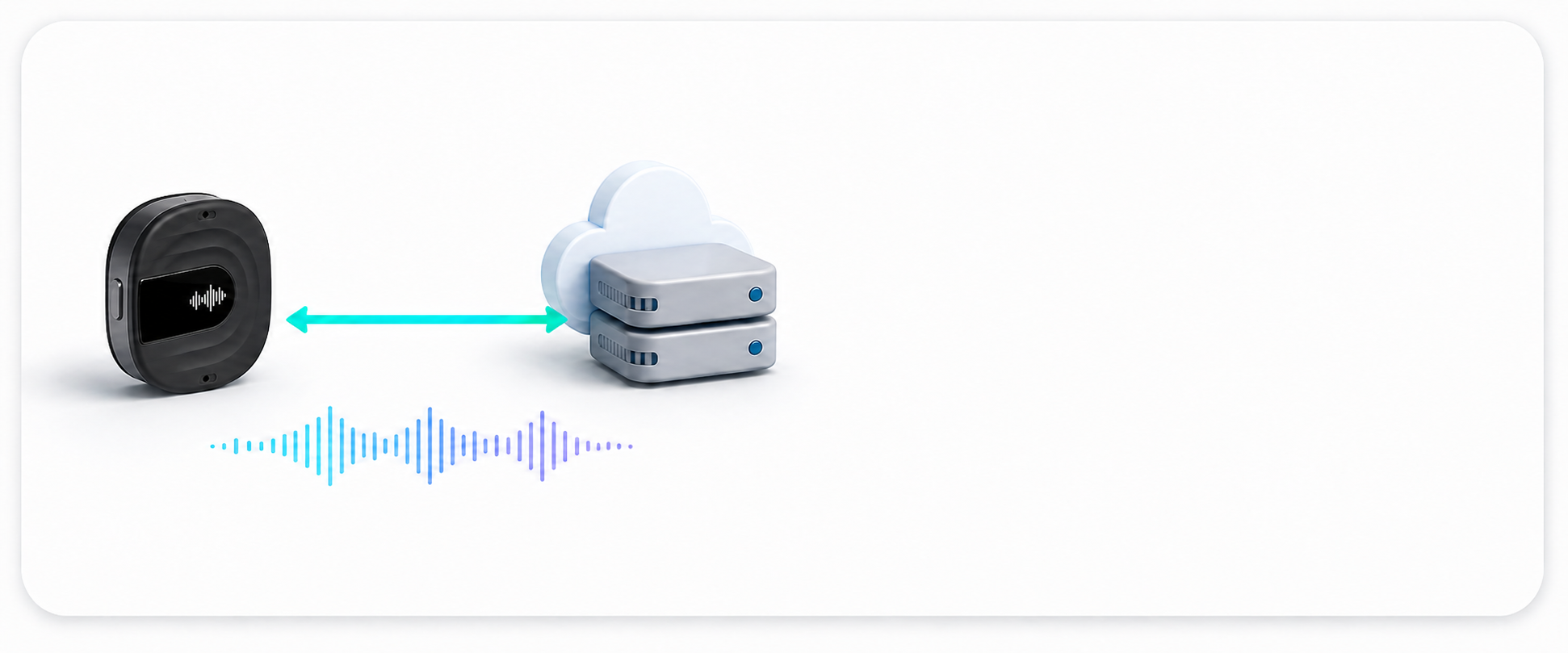
The Basic SDK focuses on using the device's current capabilities from the host side. It does not include cloud transcription, AI summarization, account management, or mobile app services by themselves. Those workflows should be built on top of the downloaded audio files or integrated with another service.
Where This Guide Fits
If you are new to reSpeaker Clip, first read the reSpeaker Clip Getting Started Guide.
The Getting Started Guide introduces the product, target scenarios, hardware capabilities, and normal user workflows.
This guide focuses on application-side development:
- communicating with the device over BLE or Wi-Fi;
- controlling recording and device configuration;
- managing and downloading recording sessions;
- understanding AT commands, GATT, and file-transfer protocols;
- integrating these capabilities through Python, CLI, or Web tools.
Choose the Right reSpeaker Clip Guide
The reSpeaker Clip documentation is organized by development layer. Start with Getting Started for product setup and normal workflows. Use the Basic SDK when a host application needs to control the device or download recordings. Continue to Service Integration when a long-running service needs to own the device connection and expose APIs. Use the Firmware SDK only when you need to change device-side behavior, protocols, or audio processing.
Installation
Requirements
- Python 3.10+
- Bluetooth adapter (BLE mode)
- Wi-Fi adapter (Wi-Fi mode)
Clone the Repository
You can find the GitHub repository here.
git clone <repository-url>
Install Dependencies
After activating the virtual environment, install the required dependencies:
pip install -r requirements.txt
Project Structure
applications/clip/tests/
├── clip/                    SDK library (importable)
│   ├── __init__.py
│   ├── client.py            BLE connection + AT command transport
│   ├── commands.py          High-level AT command wrappers
│   ├── transfer.py          BLE file transfer + SessionSync
│   ├── codec.py             Opus/Ogg codec utilities
│   ├── wifi.py              WiFi UDP transport + WiFiSync
│   ├── progress.py          Progress bar helpers
│   ├── utils.py             File merge, formatting utilities
│   └── exceptions.py        Custom exception classes
├── tools/                   CLI & utility scripts
│   ├── clip-cli.py          Main CLI (BLE + WiFi + USB)
│   ├── clip-web.py          Web interface
│   ├── record.py            Recording control tool
│   ├── sync.py              File sync helper
│   ├── udp_sync.py          WiFi UDP sync
│   ├── udp_terminal.py      WiFi UDP terminal
│   ├── ble_terminal.py      BLE interactive terminal
│   ├── serial_terminal.py   USB CDC serial terminal
│   └── decode_opus.py       Opus decode utility
├── tests/                   Test suite
│   ├── conftest.py          Shared fixtures (device_session, mock_device)
│   ├── test_basic.py        AT commands: VERSION, STATE, TIME, PAIR, errors
│   ├── test_config.py       Configuration: MODE, AUTODEL, BRIGHTNESS
│   ├── test_recording.py    Recording: START/STOP, bookmarks, state transitions
│   ├── test_storage.py      Storage: LIST, DELETE, persistence, file count
│   ├── test_transfer.py     Transfer: download, sync, progress, concurrent
│   └── test_unit.py         Unit tests (no device required)
├── workspace/               Example workspace scripts
│   └── complete_example.py
├── requirements.txt
├── README.md
└── pytest.ini
SDK Modules
| Module | Description |
|---|---|
| client.py | BLE device communication |
| commands.py | High-level AT commands |
| transfer.py | File synchronization |
| codec.py | Audio encoding/decoding |
| wifi.py | WiFi transport |
| progress.py | Progress display |
| utils.py | Helper functions |
| exceptions.py | Exception classes |
SDK Capabilities
The Python SDK supports the following workflows:
- Configure the device: recording mode, bitrate, complexity, auto-delete policy, OLED brightness, BLE device name, and related settings.
- Control recording: start, stop, pause, resume, and add bookmarks.
- Manage sessions: list, query, delete, purge, and format the SD card.
- Download files: transfer recordings over BLE or Wi-Fi/UDP, with resume support.
- Convert audio: re-container device raw Opus data into OGG/Opus, or decode to 16 kHz mono WAV through an Opus decoding path.
- Read status and events: battery level, charging state, device state, state-machine changes, and real-time audio-visualization callbacks.
Transport choice matters:
- Use BLE through
ClipDevicefor portable configuration, recording control, and small downloads. - Use Wi-Fi/UDP through
WiFiDeviceorWiFiSyncfor bulk downloads. It is faster and more stable for large recording sessions. - Recording control is BLE-only. File download works on both BLE and Wi-Fi.
Core Concepts
This section describes the host-side view used by the Basic SDK. For the device-side implementation details, see the matching Firmware Development Guide sections:
| Basic SDK topic | Detailed firmware explanation |
|---|---|
| Transports | Communication Protocol |
| Recording modes | Recording Modes |
| Device state | Event and State Model |
| File format and sessions | Session, Chunking, and Storage Model |
| AT command protocol | AT Command Grammar, JSON Response Contract, and Registered Command Reference |
| GATT characteristics | BLE GATT Service |
| File transfer and resume | UDP Frame Types and Session and File Addressing |
| End-to-end data flow | System Architecture and Audio Pipeline |
Transports
| Transport | Class | Use case | Notes |
|---|---|---|---|
| BLE | ClipDevice | Configuration, recording control, session download | Portable and required for recording control. Bulk download can be slower and may drop notifications under load. |
| Wi-Fi/UDP | WiFiDevice / WiFiSync | Bulk session download | Faster and more stable for large files. Requires enabling Wi-Fi on the device and joining ClipAP_XXXX. |
Recording Modes
| Mode | Description |
|---|---|
normal | Standard recording path without SpeexDSP noise suppression / dereverb. Device AGC, high-pass, and limiter may still be enabled by firmware. |
enhanced | Enhanced path with SpeexDSP noise suppression and dereverb enabled. |
set_mode() accepts only normal and enhanced. start_recording() also accepts the aliases stereo and merge; stereo maps to normal, and merge maps to enhanced.
Both modes output mono 16 kHz Opus by default.
Device State
A recording is represented as a session. A session ID is usually a timestamp-style string such as YYYYMMDDHHMMSS.
IDLE --start_recording--> RECORDING --stop_recording--> IDLE
                              |
                              | pause / resume
                              v
                            PAUSED
Common device states include IDLE, RECORDING, TRANSMITTING, PAUSED, and ERROR.
On connection, the SDK can synchronize the device clock through AT+TIME. The device timezone may still differ from the host timezone.
File Format
The device stores recording data as raw Opus frames, not as an OGG container. The raw format is a sequence of length-prefixed Opus frames:
[2-byte little-endian length][opus frame][2-byte little-endian length][opus frame]...
Use convert_to_ogg_opus() to write a valid .ogg file before passing the recording to tools that expect OGG/Opus input. WAV decoding requires an Opus decoder path such as opuslib.
AT Command Protocol
- The SDK writes a UTF-8 AT string, for example
AT+MODE=enhanced, to the CMD characteristic. - Responses are JSON notifications on
RESP_SEND, for example{"ok":true,"data":{...}}. - Unsolicited events, such as state changes, look like
{"event":"state","state":"RECORDING",...}and are dispatched throughevent_callback.
GATT Characteristics
| Characteristic | UUID | Properties | Purpose |
|---|---|---|---|
| Service | 6E400001-B5A3-F393-E0A9-E50E24DCCA9E | Primary Service | Custom BLE communication service |
| CMD | 6E400002-B5A3-F393-E0A9-E50E24DCCA9E | Write Without Response (Encrypted) | Central → device: write AT command strings |
| RESP_SEND | 6E400003-B5A3-F393-E0A9-E50E24DCCA9E | Notify (CCC Encrypted) | Device → central: JSON responses and event notifications |
| FILE_DATA | 6E400004-B5A3-F393-E0A9-E50E24DCCA9E | Notify (CCC Encrypted) | Device → central: binary file-transfer frame notifications |
| AUDIO_VIS | 6E400005-B5A3-F393-E0A9-E50E24DCCA9E | Notify (CCC Encrypted) | Device → central: real-time audio-visualization notifications |
File-Transfer Protocol
File data is delivered as binary frames on FILE_DATA.
| Frame | Type | Layout |
|---|---|---|
FILE_START | 0x10 | type(1) + fn_len(1) + filename(N) + file_size(4, LE) |
DATA | 0x01 | type(1) + seq(2, LE) + len(2, LE) + data(N) |
FILE_END | 0x11 | type(1) + crc32(4, LE) |
TRANSFER_DONE | 0x12 | type(1) + sid_len(1) + session_id(N) + file_count(4, LE) |
Each file is verified with CRC32. Only verified files should be treated as successfully saved.
Resume
SessionSync.sync() is resume-aware. It can detect existing local .opus files, query the device's synced-file counter, compute start_file, and continue a previous download. Use force=True to start from scratch.
Data Flow
Complete Example
This example demonstrates a typical workflow:
- Auto-connect via BLE
- Check battery level
- Set recording mode to enhanced
- Start a 10-second recording
- Add a bookmark mid-recording
- Stop recording
- Sync the session files to
recordings/<session_id>/
"""
Complete workflow: connect → config → record → bookmark → stop → sync

Usage:
    python workspace/complete_example.py
"""

import asyncio
import sys
from pathlib import Path

# Ensure the parent 'tests/' directory (which contains clip/) is on sys.path
sys.path.insert(0, str(Path(__file__).parent.parent))

from clip import ClipDevice, ClipCommands, SessionSync
from clip import ConnectionError, TimeoutError, CommandError


async def main():
    try:
        async with ClipDevice() as device:
            cmds = ClipCommands(device)

            # 1. Check battery and current settings
            state = await cmds.get_state()
            print(f"Battery: {state.battery}%, Mode: {state.mode}")

            # 2. Configure (only MODE, AUTODEL, BRIGHTNESS work on current firmware)
            await cmds.set_config_dict({"mode": "enhanced"})

            # 3. Start recording in enhanced mode
            session_id = await cmds.start_recording("enhanced")
            print(f"Recording started: {session_id}")

            # 4. Wait and add a bookmark
            await asyncio.sleep(5)
            bookmark = await cmds.add_bookmark()
            print(f"Bookmark added at {bookmark.offset}s")

            # 5. Let it record more, then stop
            await asyncio.sleep(5)
            await cmds.stop_recording()
            print("Recording stopped")

            # 6. Sync session via BLE
            sync = SessionSync(device)
            result = await sync.sync(session_id, Path("recordings"))
            print(
                f"Downloaded {result['file_count']} file(s)"
                f" → recordings/{session_id}/"
            )

    except ConnectionError:
        print("Could not find device. Is it powered on and paired?")
    except TimeoutError:
        print("Device did not respond. Try restarting the Clip.")
    except CommandError as e:
        print(f"Command error: {e.message}")


if __name__ == "__main__":
    asyncio.run(main())
Expected output
Battery: 85%, Mode: normal
Recording started: 20260710_144500
Bookmark added at 5s
Recording stopped
Downloaded 2 file(s) → recordings/20260710_144500/
Snippets Overview
Connection
Connect to the Device
import asyncio
from clip import ClipDevice, ClipCommands

async def main():
    async with ClipDevice() as device:
        cmds = ClipCommands(device)
        state = await cmds.get_state()
        print(state.battery)

asyncio.run(main())
The SDK auto-discovers nearby devices whose name contains Clip.
Connect to a Specific Device
import asyncio
from clip import ClipDevice

async def main():
    device = ClipDevice(address="AA:BB:CC:DD:EE:FF")
    await device.connect()
    # ... use device ...
    await device.disconnect()

asyncio.run(main())
Device Information
Read Firmware Version
version = await cmds.get_version()
print(version.firmware)   # e.g. "v1.0.0"
print(version.hardware)   # e.g. "Clip v0.0.5"
Read Device State
state = await cmds.get_state()
print(state.state)      # IDLE, RECORDING, TRANSMITTING, PAUSED, ERROR
print(state.battery)    # 0-100
print(state.mode)       # normal, enhanced
print(state.bitrate)    # Opus bitrate in bps
Read / Set Device Time
import time

timestamp = await cmds.get_time()          # returns int (Unix timestamp)
await cmds.set_time(int(time.time()))      # returns True
Recording Audio
Start / Stop Recording
session_id = await cmds.start_recording("normal")   # returns str (session ID)
# ... record ...
await cmds.stop_recording()                          # returns dict with session info
"normal"is mono,"enhanced"enables DSP preprocessing (noise suppression, AGC).
Pause / Resume Recording
await cmds.pause_recording()
await cmds.resume_recording()
Add Bookmark (during recording)
bookmark = await cmds.add_bookmark()
print(bookmark.offset)   # seconds from recording start
Full Recording Example
session_id = await cmds.start_recording("normal")
await asyncio.sleep(10)
await cmds.stop_recording()
File Synchronization
List Sessions
sessions = await cmds.list_sessions()
for s in sessions:
    print(s.id, s.files, s.size)
Sync a Session (BLE)
from pathlib import Path
from clip import SessionSync

session_id = "20260326120000"      # from cmds.list_sessions()
sync = SessionSync(device)

await sync.sync(session_id, Path("recordings"))
Resume Interrupted Download
await sync.sync(
    session_id,
    Path("recordings"),
    start_file="0015.opus"          # pick up where you left off
)
Keep Files on Device After Sync
await sync.sync(
    session_id,
    Path("recordings"),
    delete_after=False               # default: False (keep on device)
)
Sync All Sessions
results = await sync.sync_all(Path("recordings"))
Configuration Management
Set Parameters (working commands)
await cmds.set_mode("enhanced")          # normal | enhanced
await cmds.set_auto_delete(7)            # days (0-30), pass -1 to disable
await cmds.set_brightness(128)           # 0-255
Read Parameters
mode        = await cmds.get_mode()          # returns str
auto_delete = await cmds.get_auto_delete()   # returns bool
brightness  = await cmds.get_brightness()    # returns int
Batch Configuration
await cmds.set_config_dict({
    "mode":         "enhanced",
    "auto_delete":  7,
    "brightness":   128,
})
WiFi Communication
The Clip can communicate over WiFi UDP when its AP is enabled.
| Parameter | Value |
|---|---|
| SSID | ClipAP_XXXX |
| Password | 12345678 (default) |
| IP | 192.168.4.1 |
| Port | 8089 |
Connect and Send AT Commands
from clip import WiFiDevice

async def main():
    async with WiFiDevice("192.168.4.1", 8089) as device:
        resp = await device.send_command("AT+GSTAT")
        print(resp)

asyncio.run(main())
Sync a Session over WiFi (blocking API)
from pathlib import Path
from clip import WiFiSync

sync = WiFiSync("192.168.4.1", 8089)
sync.connect()
sync.download_session(session_id, Path("recordings"))
sync.disconnect()
WiFiSyncis synchronous (blocking sockets) — no need forasync/await.
Error Handling
from clip import ConnectionError, TimeoutError, CommandError

try:
    async with ClipDevice() as device:
        cmds = ClipCommands(device)
        version = await cmds.get_version()
except ConnectionError:
    print("Device not found or could not connect")
except TimeoutError:
    print("Device did not respond in time")
except CommandError as e:
    print(f"Command failed: {e.message}")
Command Line Tools
The SDK includes several ready-to-use utilities.
clip-cli -Unified CLI
BLE (default)
General-purpose CLI.
tools/clip-cli.py status
Expected output

tools/clip-cli.py version
tools/clip-cli.py list
Expected output

tools/clip-cli.py record --duration 60
Expected output

tools/clip-cli.py sync --session 20260326120000
Expected output

tools/clip-cli.py sync --session 20260326120000 --delete
Expected output

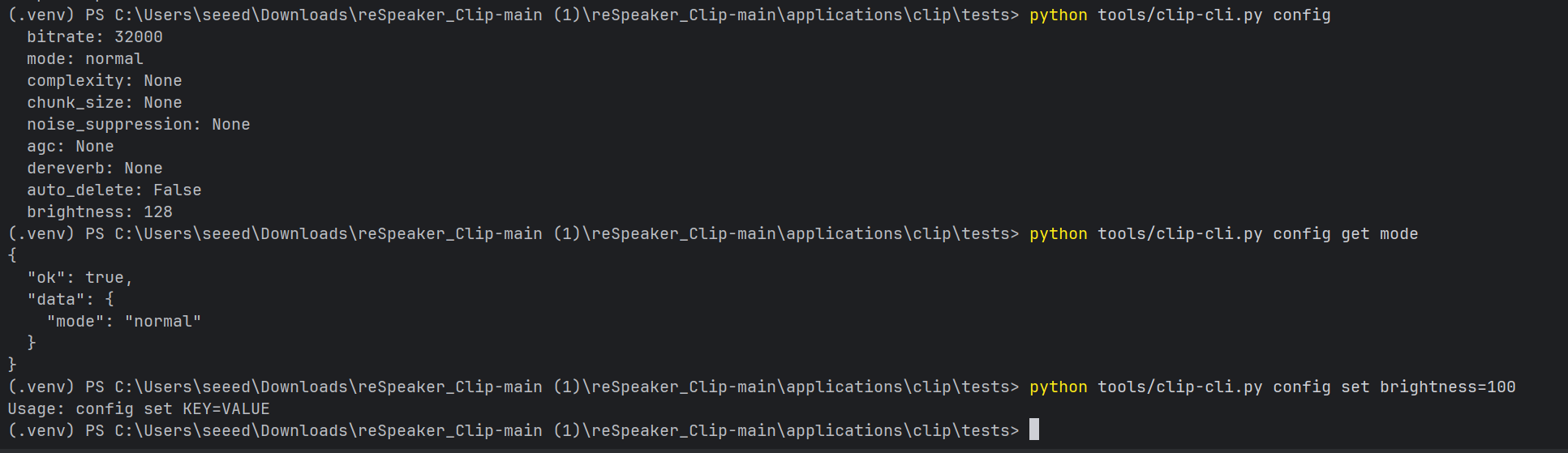
tools/clip-cli.py config get
Expected output
tools/clip-cli.py bookmark
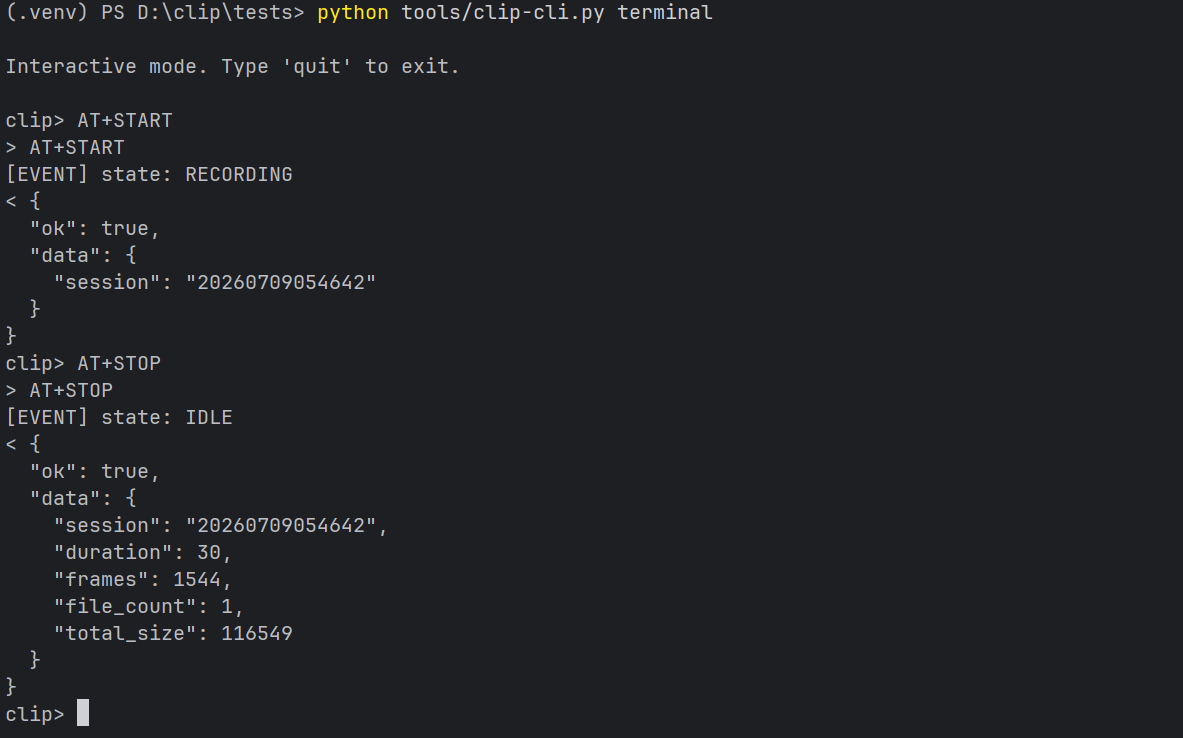
tools/clip-cli.py terminal
Expected output
WiFi
tools/clip-cli.py wifi on
Expected output

tools/clip-cli.py --transport wifi status
Expected output

tools/clip-cli.py wifi off
Expected output

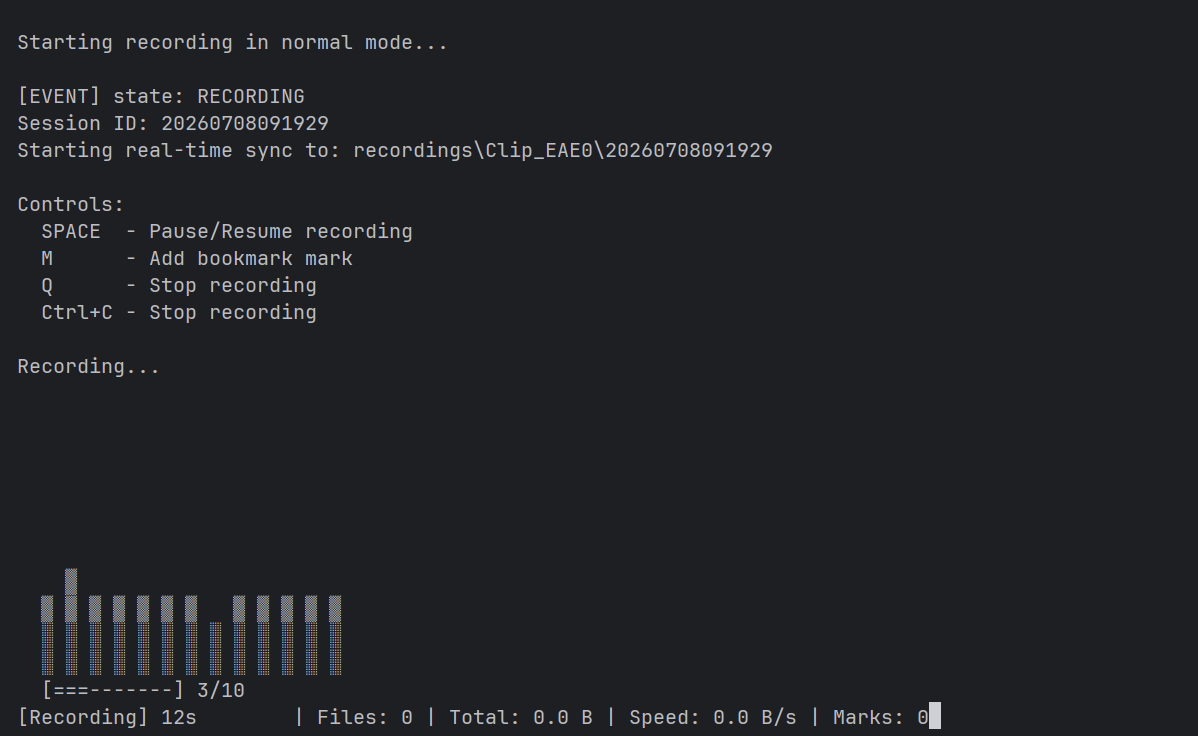
record.py
Automatically records audio and synchronizes it.
python tools/record.py

python tools/record.py --duration 60

python tools/record.py --mode enhanced
Expected output
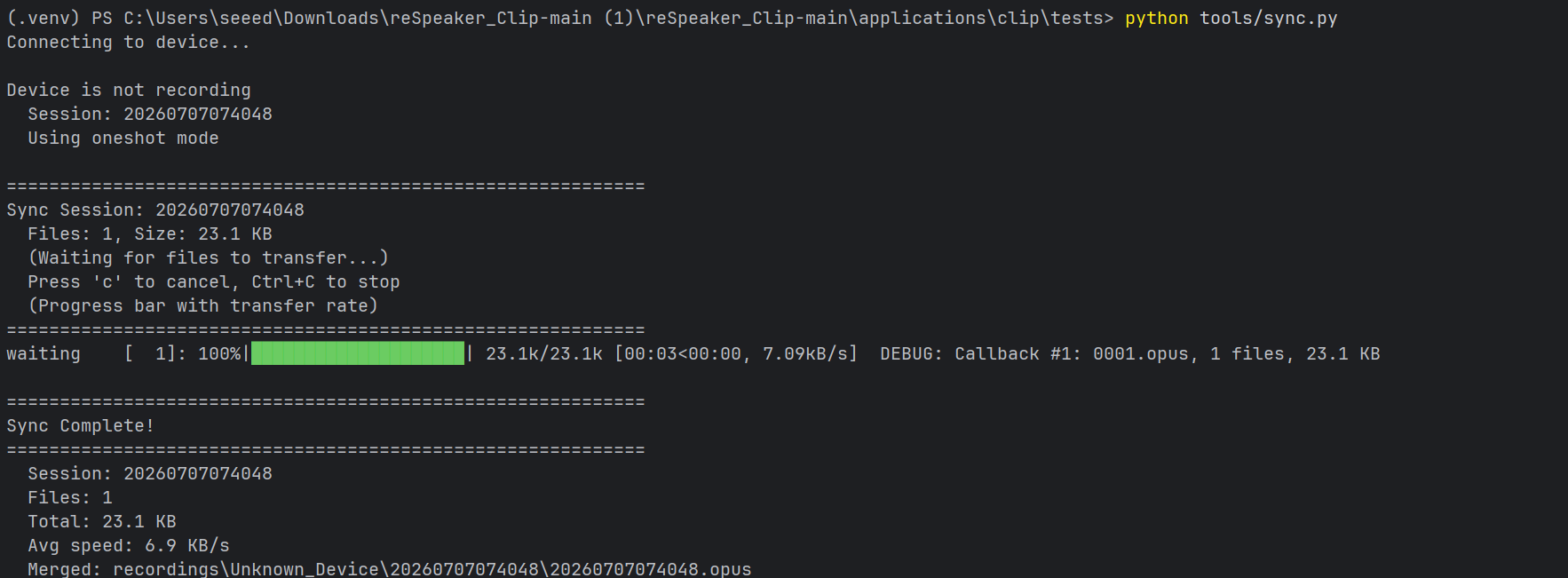
sync.py
Synchronize recordings via BLE.
python tools/sync.py

python tools/sync.py --all-sessions
Expected output
udp_sync.py
Synchronize recordings via WiFi.
python tools/udp_sync.py

python tools/udp_sync.py --session 20260326120000
Expected output

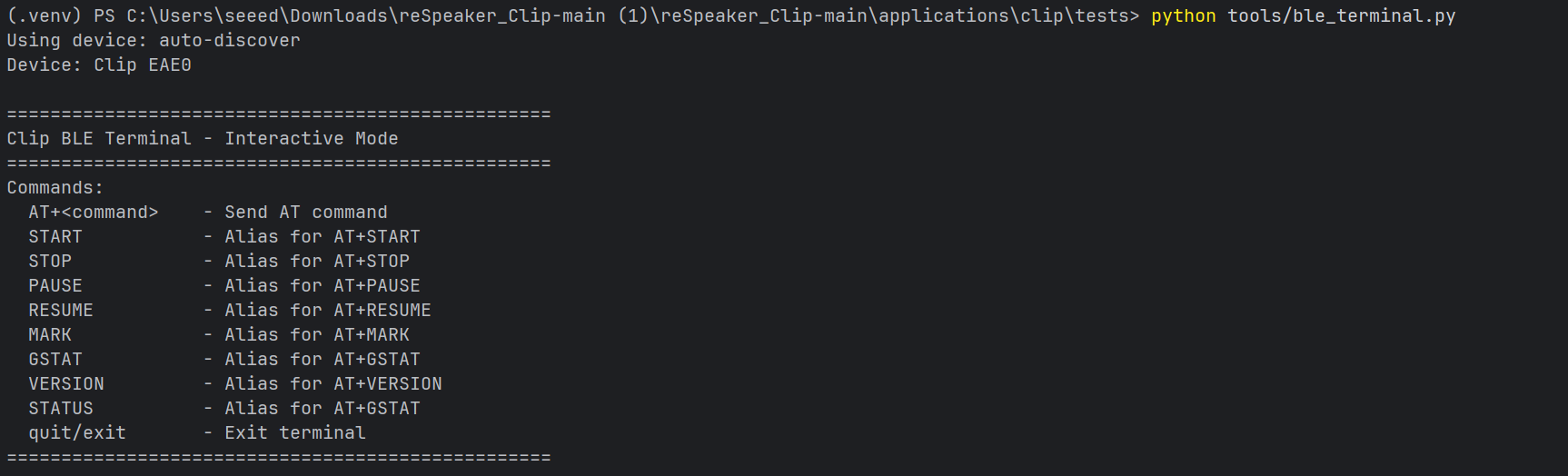
ble_terminal.py
Interactive AT command terminal.
python tools/ble_terminal.py
Expected output
decode_opus.py
Convert Opus recordings to WAV.
python tools/decode_opus.py <input_file.opus> <output_file.wav>
Web Interface
Launch the built-in web application.
BLE mode:
python tools/clip-web.py
Wi-Fi mode:
python tools/clip-web.py --transport wifi
Then open:
http://localhost:5000
Features
- Device status
- Recording control
- Session management
- Audio visualization
- Configuration editor
- Sync progress
REST API
| Method | Endpoint |
|---|---|
| GET | /api/status |
| GET | /api/version |
| GET | /api/sessions |
| POST | /api/record/start |
| POST | /api/record/stop |
| POST | /api/record/bookmark |
| POST | /api/sync/{id} |
| DELETE | /api/sessions/{id} |
| GET | /api/config |
| PUT | /api/config |
| WS | /ws |
Core Modules
| Module | Main purpose |
|---|---|
ClipDevice | BLE connection, pairing, AT command transport, notifications, and transfer progress |
ClipCommands | High-level wrapper for device AT commands |
FileTransfer / SessionSync | BLE session download and resume-aware synchronization |
WiFiDevice / WiFiSync | Wi-Fi/UDP download workflow for larger transfers |
codec | Raw Opus frame parsing and OGG/Opus writing |
utils | Session ID parsing, formatting helpers, config loading, progress reporting, and file utilities |
exceptions | SDK-specific exception classes |
API Reference
ClipDevice
BLE device communication and connection management.
| Signature | Returns | Notes |
|---|---|---|
ClipDevice(address=None, name_filter="Clip", debug=False) | ClipDevice | Auto-discovers if address is None |
await connect(timeout=10.0, sync_time=True, lazy_device_name=False) | None | 3 retries; sync_time auto-sets device clock |
await disconnect() | None | Stops all BLE notifications |
await send_command(command, timeout=10.0) | dict | Send AT command, get JSON response |
is_connected | bool | Property — checks both _connected and client.is_connected |
device_name | `str | None` |
await __aenter__() / await __aexit__() | ClipDevice / None | Async context manager |
ClipCommands
High-level AT command interface.
| Signature | Returns | Notes |
|---|---|---|
await get_version() | VersionInfo | .firmware, .hardware, .sdk, .build |
await get_state() | DeviceState | .state, .battery, .mode, .bitrate, .charging, .free_space |
await get_time() | int | Unix timestamp |
await set_time(timestamp) | bool | Converts to AT+TIME=<ts> |
await get_pairing_status() | Dict[str, Any] | BLE pairing status + peer address |
await reboot() | None | Device reboot |
| Recording | ||
await start_recording(mode="normal") | str | mode: normal, enhanced, stereo, merge. Returns session ID. |
await stop_recording() | Dict[str, Any] | Session summary; handles device-not-recording gracefully |
await pause_recording() | bool | |
await resume_recording() | bool | |
await add_bookmark() | BookmarkInfo | .offset in seconds from session start |
await get_bookmarks(session_id, fetch_all=True) | List[BookmarkInfo] | Paginated, auto-fetches all pages |
await get_bookmarks_count(session_id) | int | Fast count without details |
| Sessions | ||
await list_sessions(page=1, per_page=10) | List[SessionInfo] | .id, .files, .size, .synced_files, .mode |
await list_all_sessions(per_page=15) | List[SessionInfo] | Auto-paginates all |
await get_session_info(session_id) | SessionInfo | Includes synced_files count |
await list_session_files(session_id) | List[str] | Filenames for all files in session |
await delete_session(session_id) | bool | |
await purge_all_sessions() | bool | |
await format_sd_card() | bool | |
| Configuration | ||
await get_mode() | str | |
await set_mode(mode) | bool | "normal" or "enhanced" only |
await get_auto_delete() | bool | |
await set_auto_delete(days) | bool | days: 0–30, pass -1 to disable |
await get_brightness() | int | 0–255 |
await set_brightness(value) | bool | 0–255 |
await get_device_name() | str | BLE device name |
await set_device_name(name) | bool | Max 15 chars |
await get_config_dict() | Dict[str, Any] | All settings; unsupported keys return None |
await set_config_dict(config, ignore_errors=True) | None | Skips None values; silently drops unsupported keys |
get/set_bitrate() | — | Firmware: unsupported — raises CommandError |
get/set_complexity() | — | Firmware: unsupported — raises CommandError |
get/set_chunk_size() | — | Firmware: unsupported — raises CommandError |
get/set_noise_suppression() | — | Firmware: unsupported — raises CommandError |
get/set_agc() | — | Firmware: unsupported — raises CommandError |
get/set_dereverb() | — | Firmware: unsupported — raises CommandError |
| Transfer control | ||
await get_progress() | Dict[str, Any] | Download progress |
await pause_transfer() | bool | |
await resume_transfer() | bool | |
await cancel_transfer() | bool | |
| WiFi / USB | ||
await wifi_on() | bool | 20+ second timeout for nRF7002 init |
await wifi_off() | bool | |
await get_wifi_status() | Dict[str, Any] | .running, .ssid, .clients |
await usb_on() | bool | CDC + MSC |
await usb_off() | bool | |
await get_usb_status() | bool | |
| Helpers | ||
await ensure_idle() | None | Stops recording if needed; retries up to 5x |
await wait_for_state(target, timeout=10.0) | bool | Polls until state matches |
await wait_for_recording_to_start(timeout=5.0) | bool | |
await wait_for_recording_to_stop(timeout=5.0) | bool | |
await get_battery_status() | BatteryStatus | .percent, .charging, .voltage |
SessionSync
File synchronization over BLE with resume support.
| Signature | Returns | Notes |
|---|---|---|
SessionSync(device, commands=None) | SessionSync | Extends FileTransfer |
await sync(session_id, output_dir, delete_after=False, continuous=False, force=False, progress_callback=None, session_info=None, start_file=None) | Dict[str, Any] | Resume auto-detected; returns file_count, total_size, files, merged_file |
await sync_all(output_dir, delete_after=False, progress_callback=None) | List[Dict] | Syncs all sessions |
await download_session(session_id, output_dir, progress_callback=None, stop_recording=False, continuous=False, timeout=300.0, start_file=None, session_info=None) | Dict[str, Any] | Lower-level; also saves session.json + bookmarks.json |
await cancel() | None | Thread-safe cancel |
WiFiDevice
WiFi UDP transport (async) — compatible with ClipDevice.send_command.
| Signature | Returns | Notes |
|---|---|---|
WiFiDevice(host="192.168.4.1", port=8089, timeout=10.0) | WiFiDevice | |
await connect(timeout=None) | None | Starts recv + heartbeat worker threads |
await disconnect() | None | |
await send_command(command, timeout=None) | dict | JSON-parsed AT response |
is_connected | bool | Property |
await __aenter__() / await __aexit__() | — | Async context manager |
WiFiSync
WiFi UDP file sync (blocking/synchronous — no async needed).
| Signature | Returns | Notes |
|---|---|---|
WiFiSync(host="192.168.4.1", port=8089, timeout=120.0) | WiFiSync | |
connect() | bool | Blocking |
disconnect() | None | |
download_session(session_id, output_dir, convert_ogg=True, start_file=None, delete_after=False, progress_callback=None, cancel_after=None) | bool | CRC-verified; tqdm progress; press 'c' to cancel |
list_sessions() | List[dict] | Paginated |
delete_session(session_id) | bool |
Exceptions
| Exception | Base | Description |
|---|---|---|
ClipError | Exception | Base for all library errors |
ConnectionError | ClipError | BLE or WiFi connection failure |
DisconnectedError | ClipError | Unexpected disconnect |
CommandError | ClipError | AT command returned error; .command attribute |
TransferError | ClipError | File transfer operation failed |
TimeoutError | ClipError | Command/transfer timed out |
ResponseError | ClipError | Invalid or unexpected response |
StateError | ClipError | Device in wrong state for operation |
Troubleshooting
Q1: Commands hang or time out after connecting.
The command characteristic requires an encrypted BLE link. The SDK can initiate pairing, but the operating system may show a Bluetooth pairing or authorization dialog. Confirm it manually. If the connection is still stuck, remove stale bonds and reconnect.
Q2: Download reports CRC mismatch or zero files.
BLE stacks may occasionally deliver duplicate notifications or drop frames under load. Disconnect, reconnect, and retry. Use SessionSync so the transfer can resume where possible.
Q3: Download is slow or drops halfway.
Use SessionSync for resume-aware BLE transfer. For large recording volumes, use Wi-Fi download through WiFiSync: enable Wi-Fi on the Clip, join ClipAP_XXXX, then download over Wi-Fi.
Q4: delete_after=True deleted a session that did not fully download.
Use the safer pattern: sync(force=True, delete_after=False), verify that the local merged_file exists and is non-empty, then manually call cmds.delete_session(session_id).
Q5: AT+NOISE, AT+DEREVERB, or AT+AGC returns Unknown command.
The current firmware may not register those optional commands. The SDK keeps wrappers for compatible firmware versions. If restoring a config, set_config_dict(..., ignore_errors=True) can skip unsupported values.
Q6: bleak raises errors such as 'BleakClient' object has no attribute 'get_services' or 'get_mtu'.
bleak APIs differ across versions. Use the SDK-tested dependency set after the installation package is released.
Q7: Recording is silent or quality is poor.
Check microphone distance and orientation, battery level, and recording mode. enhanced mode can suppress noise more aggressively, which may over-process very clean speech.
Q8: The session ID timestamp does not match local time.
The device clock or timezone may differ from the host. The SDK can sync time on connect. You can also call await cmds.set_time(int(time.time())).
Q9: How do I convert Opus to WAV for STT or ML?
Use convert_to_ogg_opus() for OGG/Opus output. For WAV, decode the raw Opus stream with an Opus decoder such as opuslib.
Q10: Logs are flooded by audio-visualization events during recording.
AUDIO_VIS notifications fire frequently. Only register the audio-visualization callback when you need it, and keep the callback lightweight.
Tech Support & Product Discussion
Thank you for choosing our products! We are here to provide you with different support to ensure that your experience with our products is as smooth as possible. We offer several communication channels to cater to different preferences and needs.