Integrate reSpeaker Clip into Your Service
This guide shows how to add reSpeaker Clip as a managed audio source to an existing Python service. It focuses on the integration boundary: one device adapter, one long-lived connection, a small API surface, and clear state ownership.
reSpeaker Clip is an input source.
ClipClienthandles device communication,ClipServiceadapts it to your application, and your service retains ownership of processing and business logic.
For transport setup, the full ClipClient API, AT commands, and the file-transfer protocol, see the reSpeaker Clip Basic SDK Guide. This page does not re-explain BLE/GATT, frame formats, CRC handling, or CLI tools.
Integration Approach
Keep the device behind a narrow adapter and send downloaded recordings to the processing entry point your service already uses:
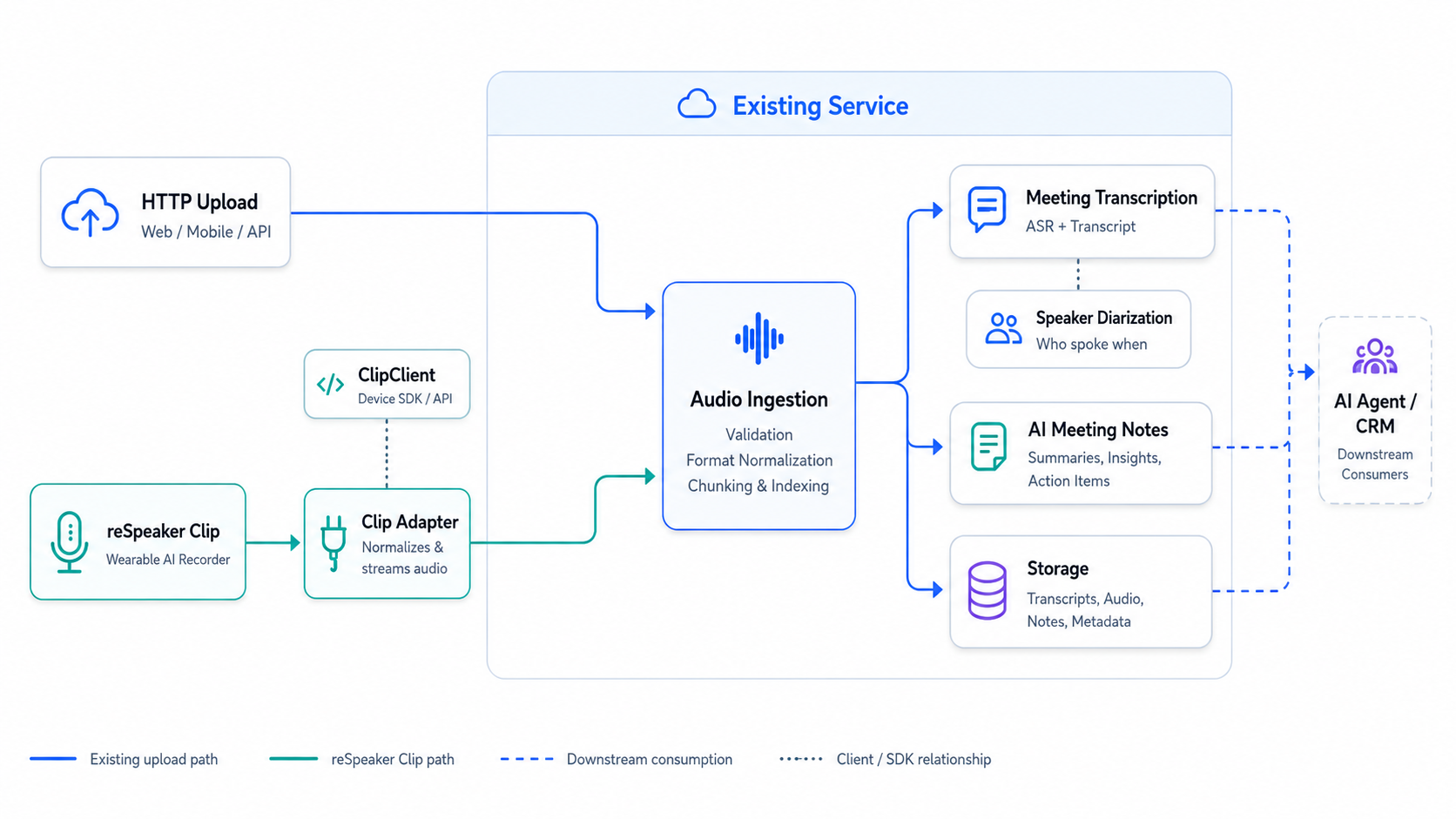
- Create one
ClipServicefor each physical device. - Connect it during application startup and disconnect it during shutdown.
- Expose only the recording operations your service needs.
- Pass completed audio files to the existing processing pipeline.
Before You Start
This guide assumes you can already talk to a Clip on your own machine. Before continuing, make sure you can:
- install the reSpeaker Clip Python SDK and connect to a Clip;
- start and stop a recording;
- list completed sessions;
- download one recording successfully.
If any of these fail, stop here and complete the reSpeaker Clip Basic SDK Guide first. The Basic SDK Guide is the source of truth for transport configuration, device commands, and file-transfer details; this guide links to it rather than repeating it.
Choose the Right reSpeaker Clip Guide
The reSpeaker Clip documentation is organized by development layer. Start with Getting Started for product setup and normal workflows. Use the Basic SDK when a host application needs to control the device or download recordings. Continue to Service Integration when a long-running service needs to own the device connection and expose APIs. Use the Firmware SDK only when you need to change device-side behavior, protocols, or audio processing.
Add reSpeaker Clip as an Audio Source to Your Existing Service
Follow the steps below to connect the device adapter to an existing FastAPI service.
Step 1: Prepare Pipeline
Assume your service already has one function that accepts an audio file:
async def process_audio(path: Path) -> dict:
    # your existing processing pipeline
    ...
An existing upload route already calls it:
@app.post("/audio")
async def upload_audio(file: UploadFile):
    path = await save_upload(file)
    return await process_audio(path)
The Clip integration should produce a normal local audio file and call the same process_audio() function. Processing remains independent of the capture device.
Wrap that function in the service object used by the Clip ingestion route:
# audio_service.py
from pathlib import Path


class AudioService:
    def __init__(self, recordings_dir: Path):
        self.recordings_dir = recordings_dir
        self.recordings_dir.mkdir(parents=True, exist_ok=True)

    async def process(self, path: Path) -> dict:
        return await process_audio(path)
Step 2: Build Adapter
Wrap only the operations this integration needs: connect, disconnect, start, stop, and download.
# clip_service.py
from __future__ import annotations
from pathlib import Path

from clip import ClipClient, ClipError


class ClipUnavailable(Exception):
    """The Clip device is not connected or could not perform an operation."""


class ClipStateError(Exception):
    """The device is in the wrong state for this operation."""


class ClipService:
    """Application-level adapter over a single long-lived ClipClient."""

    def __init__(self, transport, *, command_timeout: float = 10.0):
        self._client = ClipClient(transport, command_timeout=command_timeout)
        self._connected = False
        self._active_session: str | None = None

    async def connect(self) -> None:
        await self._client.connect()
        self._connected = True

    async def disconnect(self) -> None:
        if self._connected:
            await self._client.disconnect()
            self._connected = False

    async def start_recording(self, mode: str | None = None) -> str:
        if not self._connected:
            raise ClipUnavailable("Clip is not connected")
        if self._active_session is not None:
            raise ClipStateError("a recording is already in progress")
        try:
            session_id = await self._client.start_recording(mode)
        except ClipError as exc:
            raise ClipUnavailable("Clip could not start recording") from exc
        if not session_id:
            raise ClipStateError("Clip did not return a session id")
        self._active_session = session_id
        return session_id

    async def stop_recording(self) -> str | None:
        if not self._connected:
            raise ClipUnavailable("Clip is not connected")
        if self._active_session is None:
            raise ClipStateError("no recording in progress")
        session_id = self._active_session
        try:
            await self._client.stop_recording()
        except ClipError as exc:
            raise ClipUnavailable("Clip could not stop recording") from exc
        self._active_session = None
        return session_id

    async def download_session(self, session_id: str, destination: str | Path):
        if not self._connected:
            raise ClipUnavailable("Clip is not connected")
        try:
            return await self._client.download_session(session_id, destination)
        except ClipError as exc:
            raise ClipUnavailable("Clip could not download the recording") from exc
Step 3: Bind Lifecycle
Create the adapter during FastAPI startup, store it in application state, and disconnect it during shutdown.
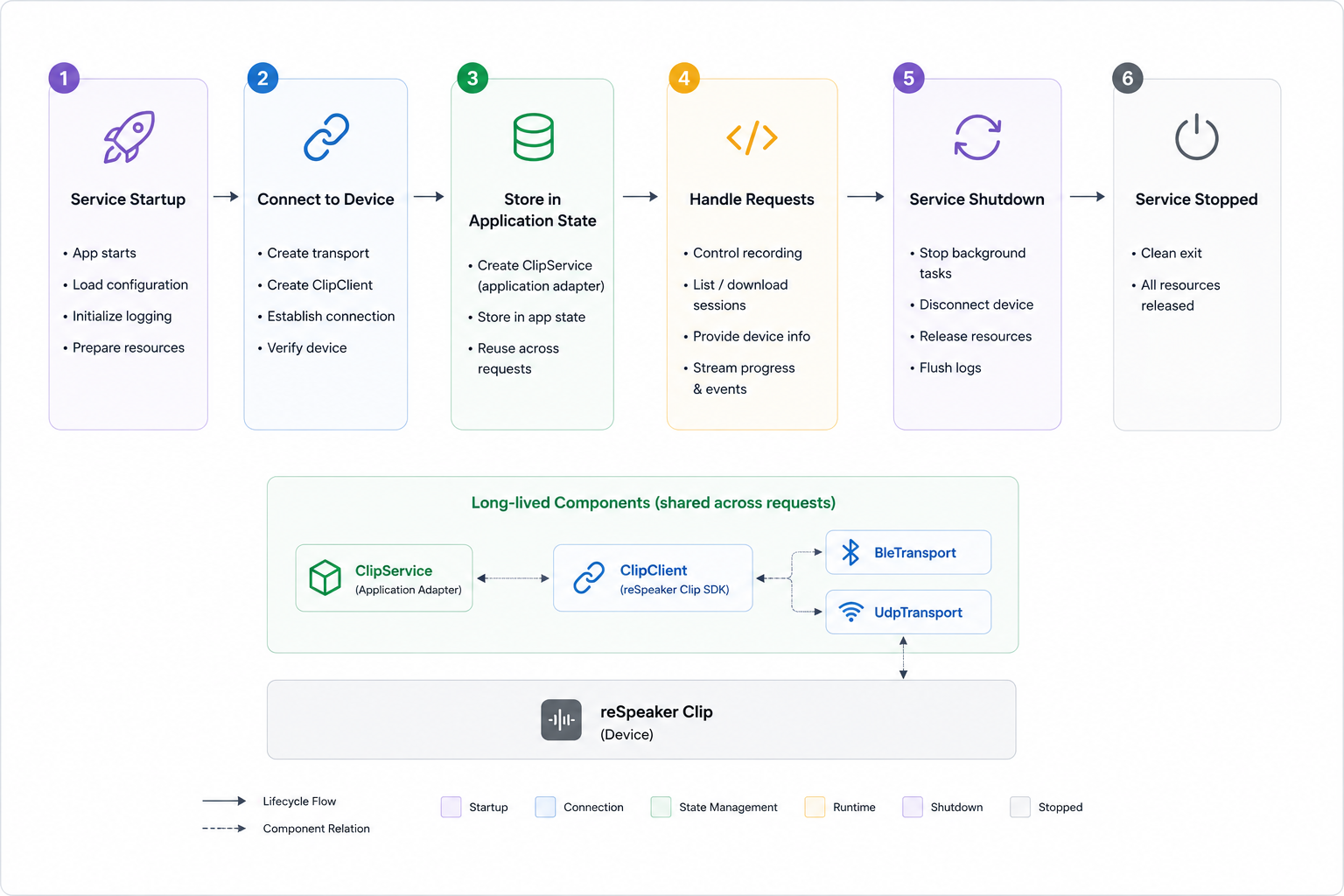
Bind the connection to the FastAPI lifespan so it opens once at start and closes once at stop:
# main.py
from contextlib import asynccontextmanager
from pathlib import Path

from fastapi import FastAPI

from clip import BleTransport  # or UdpTransport after the Wi-Fi AP is on
from clip_service import ClipService
from audio_service import AudioService


@asynccontextmanager
async def lifespan(app: FastAPI):
    transport = BleTransport(name="Clip")
    clip = ClipService(transport)
    await clip.connect()
    app.state.clip = clip
    app.state.audio = AudioService(recordings_dir=Path("recordings"))
    try:
        yield
    finally:
        await clip.disconnect()


app = FastAPI(lifespan=lifespan)
Step 4: Add Routes
Create endpoints for starting, stopping, and ingesting a completed recording:
POST /clip/recordings/start
POST /clip/recordings/stop
POST /clip/sessions/{session_id}/ingest
# routes.py
from pathlib import Path

from fastapi import APIRouter, HTTPException, Request

from audio_service import AudioService
from clip_service import ClipService, ClipStateError, ClipUnavailable

router = APIRouter(prefix="/clip")


@router.post("/recordings/start")
async def start_recording(request: Request, mode: str | None = None):
    clip: ClipService = request.app.state.clip
    try:
        session_id = await clip.start_recording(mode)
    except ClipStateError as exc:
        raise HTTPException(status_code=409, detail=str(exc))
    except ClipUnavailable as exc:
        raise HTTPException(status_code=503, detail=str(exc))
    return {"session_id": session_id}


@router.post("/recordings/stop")
async def stop_recording(request: Request):
    clip: ClipService = request.app.state.clip
    try:
        session_id = await clip.stop_recording()
    except ClipStateError as exc:
        raise HTTPException(status_code=409, detail=str(exc))
    except ClipUnavailable as exc:
        raise HTTPException(status_code=503, detail=str(exc))
    return {"session_id": session_id, "status": "stopped"}


@router.post("/sessions/{session_id}/ingest")
async def ingest_session(session_id: str, request: Request):
    clip: ClipService = request.app.state.clip
    audio: AudioService = request.app.state.audio
    try:
        result = await clip.download_session(session_id, audio.recordings_dir)
    except ClipUnavailable as exc:
        raise HTTPException(status_code=502, detail=str(exc))
    ingested = [await audio.process(Path(file.path)) for file in result.files]
    return {"session_id": session_id, "files": ingested}
Step 5: Register Router
Import the router in main.py and register it after creating the FastAPI application:
from routes import router

app = FastAPI(lifespan=lifespan)
app.include_router(router)
The integration now consists of main.py, routes.py, clip_service.py, and audio_service.py in your application package.
Step 6: Verify API
Start the service, then call the routes in order:
curl -X POST "http://localhost:8000/clip/recordings/start"
curl -X POST "http://localhost:8000/clip/recordings/stop"
curl -X POST "http://localhost:8000/clip/sessions/<session_id>/ingest"
The start and stop responses should contain the same session_id. The ingest response should contain the files returned by your existing AudioService pipeline.
BLE Disconnect and Command Timeout Recovery
The adapter above covers only the happy path. A long-running service must also handle two failures:
- Link loss: the device moves out of range, sleeps, the host Bluetooth adapter resets, or another application takes it over.
- Command timeout: the device does not answer before the deadline. The firmware protocol has no request ID, so the transport cannot correlate a late response with the next command. A timeout therefore requires a reconnect rather than a direct retry.
This section provides a reference implementation that replaces clip_service.py directly. It keeps the connect(), disconnect(), start_recording(), stop_recording(), and download_session() interface and adds automatic recovery.
Design
- Connection lock: business operations and disconnect/reconnect share one
asyncio.Lock, so no command or download crosses a reconnect. - Background health check: every
health_check_intervalseconds the task checksClipClient.is_connected. A business operation that catches a drop or timeout wakes the task immediately through an event. - Bounded exponential backoff: waits start at 1 second, double on each failed attempt, and stop at 30 seconds. Each connect attempt has its own 30-second limit. A successful connection resets the backoff.
- No command replay: a failed start, stop, or download only raises
ClipUnavailable. The device may already have executed the command and only the response was lost; replaying could create a duplicate recording or transfer. - Readiness probe after reconnect: the adapter calls
status()once. If the device is still recording and returns asession_id, it restores_active_session; otherwise it clears local session state. This covers both "recording continued during the drop" and "the stop response was lost". - Graceful shutdown: cancel and await the background task before closing the client; no reconnect is scheduled after shutdown.
- Public API only: drop detection uses
ClipClient.is_connected; recovery usesClipClient.status(). No new SDK API is added.
BLE subscription cleanup. The current SDK's
BleTransport.disconnect()skips the underlying Bleak client when the link is already down, so BlueZ keeps that client's notification subscription. Reconnecting the same transport object then delivers every notification twice (both command responses and file frames), and downloads fail withreceived FILE_START before previous file ended. The reference_close_link()calls the underlying client's publicdisconnect()after the transport disconnect to release the subscription. UDP transports are unaffected.
Startup race. The firmware can answer
AT+STARTwithokand an emptydatabefore the audio thread publishes the session ID.start_recording()pollsstatus()for the ID instead of treating a running recording as a failed start.
Configuration
| Parameter | Default | Purpose |
|---|---|---|
command_timeout | 10.0 | Per-command response timeout passed to ClipClient |
health_check_interval | 2.0 | Seconds between background is_connected checks |
reconnect_initial_delay | 1.0 | Wait before the first reconnect attempt, in seconds |
reconnect_max_delay | 30.0 | Backoff ceiling, in seconds |
reconnect_attempt_timeout | 30.0 | Limit for one connect attempt and its readiness probe, in seconds |
Full Reference Implementation
Replace clip_service.py with the following version:
"""Application-level Clip adapter with BLE drop and command-timeout recovery.

This module is the reference implementation referenced by the reSpeaker Clip
Service Integration wiki page.  It keeps the small application surface used by
the integration guide (connect, disconnect, start, stop, download) and adds:

* one connection lock that serializes business operations against reconnect;
* one background task that polls ``ClipClient.is_connected`` every
  ``health_check_interval`` seconds;
* a wake event so a failed command can request an immediate reconnect;
* bounded exponential backoff (1 s .. 30 s by default);
* a ``status()`` readiness probe after reconnect that restores or clears
  ``_active_session``.

A failed command is never replayed: the device may already have executed it and
only the response was lost.
"""

from __future__ import annotations

import asyncio
import logging
from pathlib import Path

from clip import (
    ClipClient,
    ClipError,
    CommandTimeoutError,
    ConnectionError,
    DownloadResult,
    Status,
)

logger = logging.getLogger(__name__)


class ClipUnavailable(Exception):
    """The Clip device is not connected or could not perform an operation."""


class ClipStateError(Exception):
    """The device is in the wrong state for this operation."""


class ClipService:
    """Application-level adapter over a single long-lived ``ClipClient``."""

    def __init__(
        self,
        transport,
        *,
        command_timeout: float = 10.0,
        health_check_interval: float = 2.0,
        reconnect_initial_delay: float = 1.0,
        reconnect_max_delay: float = 30.0,
        reconnect_attempt_timeout: float = 30.0,
    ) -> None:
        for name, value in (
            ("command_timeout", command_timeout),
            ("health_check_interval", health_check_interval),
            ("reconnect_initial_delay", reconnect_initial_delay),
            ("reconnect_max_delay", reconnect_max_delay),
            ("reconnect_attempt_timeout", reconnect_attempt_timeout),
        ):
            if value <= 0:
                raise ValueError(f"{name} must be positive")
        if reconnect_initial_delay > reconnect_max_delay:
            raise ValueError("reconnect_initial_delay must not exceed reconnect_max_delay")

        self._client = ClipClient(transport, command_timeout=command_timeout)
        self._connected = False
        self._active_session: str | None = None

        # Serializes business operations with connect/disconnect/reconnect.
        self._connection_lock = asyncio.Lock()
        # Set by a failed command; the background task wakes immediately.
        self._wake = asyncio.Event()
        self._closed = False
        self._monitor_task: asyncio.Task[None] | None = None

        self._health_check_interval = health_check_interval
        self._reconnect_initial_delay = reconnect_initial_delay
        self._reconnect_max_delay = reconnect_max_delay
        self._reconnect_attempt_timeout = reconnect_attempt_timeout
        self._reconnect_delay = reconnect_initial_delay

    # ------------------------------------------------------------------
    # Connection lifecycle
    # ------------------------------------------------------------------

    @property
    def is_connected(self) -> bool:
        """Whether the device link is currently usable (read-only)."""
        return self._connected and self._client.is_connected

    async def connect(self) -> None:
        """Open the initial connection.

        A startup failure still propagates: background recovery only covers
        drops that happen after the service is running.
        """
        async with self._connection_lock:
            if self._connected:
                return
            await self._client.connect()
            self._connected = True
            self._closed = False
            self._reconnect_delay = self._reconnect_initial_delay
        if self._monitor_task is None or self._monitor_task.done():
            self._monitor_task = asyncio.create_task(
                self._monitor_loop(), name="clip-reconnect"
            )

    async def disconnect(self) -> None:
        """Stop recovery first, then close the client exactly once."""
        self._closed = True
        self._wake.set()

        task, self._monitor_task = self._monitor_task, None
        if task is not None:
            task.cancel()
            try:
                await task
            except asyncio.CancelledError:
                pass

        async with self._connection_lock:
            await self._close_link()
            self._connected = False
            self._active_session = None

    # ------------------------------------------------------------------
    # Business operations
    # ------------------------------------------------------------------

    async def start_recording(self, mode: str | None = None) -> str:
        async with self._connection_lock:
            self._require_connection()
            if self._active_session is not None:
                raise ClipStateError("a recording is already in progress")
            try:
                session_id = await self._client.start_recording(mode)
                if not session_id:
                    # AT+START can answer ok before the audio thread has
                    # published its session id.  Recover it from device state
                    # instead of reporting a failure for a running recording.
                    session_id = await self._probe_session_id()
            except (ConnectionError, CommandTimeoutError) as exc:
                await self._handle_link_failure(exc)
                raise ClipUnavailable("Clip could not start recording") from exc
            except ClipError as exc:
                logger.warning("Clip start failed: %s", exc)
                raise ClipUnavailable("Clip could not start recording") from exc
            if not session_id:
                raise ClipStateError("Clip did not return a session id")
            self._active_session = session_id
            return session_id

    async def stop_recording(self) -> str | None:
        async with self._connection_lock:
            self._require_connection()
            if self._active_session is None:
                raise ClipStateError("no recording in progress")
            session_id = self._active_session
            try:
                await self._client.stop_recording()
            except (ConnectionError, CommandTimeoutError) as exc:
                await self._handle_link_failure(exc)
                raise ClipUnavailable("Clip could not stop recording") from exc
            except ClipError as exc:
                logger.warning("Clip stop failed: %s", exc)
                raise ClipUnavailable("Clip could not stop recording") from exc
            self._active_session = None
            return session_id

    async def download_session(
        self, session_id: str, destination: str | Path
    ) -> DownloadResult:
        async with self._connection_lock:
            self._require_connection()
            try:
                return await self._client.download_session(session_id, destination)
            except (ConnectionError, CommandTimeoutError) as exc:
                await self._handle_link_failure(exc)
                raise ClipUnavailable("Clip could not download the recording") from exc
            except ClipError as exc:
                logger.warning("Clip download failed: %s", exc)
                raise ClipUnavailable("Clip could not download the recording") from exc

    # ------------------------------------------------------------------
    # Link failure and recovery
    # ------------------------------------------------------------------

    async def _probe_session_id(
        self, attempts: int = 5, delay: float = 0.1
    ) -> str | None:
        """Recover the session id published just after AT+START succeeded."""
        for attempt in range(attempts):
            status = await self._client.status()
            if status.recording and status.session_id:
                return status.session_id
            if attempt + 1 < attempts:
                await asyncio.sleep(delay)
        return None

    def _require_connection(self) -> None:
        if not self.is_connected:
            self._connected = False
            # The monitor may still be asleep; ask it to look now.
            self._wake.set()
            raise ClipUnavailable("Clip is not connected")

    async def _handle_link_failure(self, exc: Exception) -> None:
        """Mark the link unusable and hand recovery to the background task."""
        self._connected = False
        logger.warning(
            "Clip link failure (%s: %s); requesting reconnect without replaying the command",
            type(exc).__name__,
            exc,
        )
        # Best effort: a desynchronized transport must not be reused.
        await self._close_link()
        self._wake.set()

    async def _close_link(self) -> None:
        """Close the link and release a subscription left by a dead link.

        ``BleTransport.disconnect()`` skips the underlying Bleak client when
        the link is already down.  BlueZ keeps that client's notification
        subscription, so a later connection receives every notification
        twice.  Calling the client's public ``disconnect()`` releases it.
        Transports without a ``_client`` (for example UDP) are unaffected.
        """
        stale_client = getattr(self._client.transport, "_client", None)
        try:
            await self._client.disconnect()
        except Exception as exc:  # noqa: BLE001 - cleanup must not mask
            logger.debug("Clip disconnect failed: %s", exc)
        if stale_client is not None:
            try:
                await stale_client.disconnect()
            except Exception as exc:  # noqa: BLE001 - best effort
                logger.debug("Clip stale-client cleanup failed: %s", exc)

    async def _monitor_loop(self) -> None:
        while not self._closed:
            try:
                await asyncio.wait_for(
                    self._wake.wait(), timeout=self._health_check_interval
                )
            except asyncio.TimeoutError:
                pass
            self._wake.clear()
            if self._closed:
                return
            if self.is_connected:
                self._reconnect_delay = self._reconnect_initial_delay
                continue
            if self._connected:
                logger.warning("Clip link dropped; starting reconnect")
                self._connected = False
            await self._reconnect_until_connected()

    async def _reconnect_until_connected(self) -> None:
        attempt = 0
        while not self._closed and not self.is_connected:
            delay = self._reconnect_delay
            logger.info(
                "Clip reconnect attempt %d in %.1f s", attempt + 1, delay
            )
            await asyncio.sleep(delay)
            if self._closed:
                return

            attempt += 1
            async with self._connection_lock:
                if self._closed:
                    return
                await self._close_link()

                try:
                    await asyncio.wait_for(
                        self._client.connect(),
                        timeout=self._reconnect_attempt_timeout,
                    )
                except asyncio.CancelledError:
                    raise
                except Exception as exc:  # noqa: BLE001 - retry any connect failure
                    logger.warning(
                        "Clip reconnect attempt %d failed: %s", attempt, exc
                    )
                    self._connected = False
                else:
                    try:
                        status = await asyncio.wait_for(
                            self._client.status(),
                            timeout=self._reconnect_attempt_timeout,
                        )
                    except asyncio.CancelledError:
                        raise
                    except Exception as exc:  # noqa: BLE001 - probe failure = retry
                        logger.warning(
                            "Clip readiness probe after attempt %d failed: %s",
                            attempt,
                            exc,
                        )
                        self._connected = False
                        await self._close_link()
                    else:
                        self._connected = True
                        self._reconnect_delay = self._reconnect_initial_delay
                        self._restore_session(status)
                        logger.info(
                            "Clip reconnected after %d attempt(s): recording=%s session=%s",
                            attempt,
                            status.recording,
                            status.session_id,
                        )
                        return

            self._reconnect_delay = min(
                self._reconnect_delay * 2, self._reconnect_max_delay
            )

    def _restore_session(self, status: Status) -> None:
        if status.recording and status.session_id:
            if self._active_session != status.session_id:
                logger.info("Recovered active session %s", status.session_id)
            self._active_session = status.session_id
        else:
            if self._active_session is not None:
                logger.info("Cleared stale active session %s", self._active_session)
            self._active_session = None
Application code and routes do not change: ClipService(transport) keeps the same call shape. A failure during the initial connect still propagates; background recovery covers only drops after the service has started successfully.
Verification
The behavior below was verified against a physical Clip over BLE:
- Link loss: after forcing a BLE disconnect from the host, the background task detects it on the next health-check cycle and reconnects; commands work after recovery.
- Command timeout: after injecting one
CommandTimeoutError, the old link is closed, the failed command runs once, and the adapter recovers. - Backoff sequence: consecutive connection failures wait 1, 2, 4, 8, 16, 30, and 30 seconds; a success resets the wait to 1 second.
- Recording recovery: the device keeps recording through the drop; after reconnect
_active_sessionis restored fromstatus(). When the device is idle, local session state is cleared. - Concurrency: while reconnecting, business requests fail fast with
ClipUnavailable(mapped to503) instead of waiting. The connection lock prevents commands from crossing a connect or disconnect. - Shutdown: the background task exits and no further reconnect attempts are scheduled.
- Download after recovery: a session downloaded after reconnect passes the length and CRC32 checks.
Production Considerations for a Long-Running Service
Keep connection, error, and workflow state explicit when the integration runs as a service.
Adapter Boundary
Keep all ClipClient calls inside ClipService. The adapter owns connection access, recording commands, downloads, and SDK error translation; it does not own processing, storage, or other business logic.
Code above the adapter should use application concepts such as session_id and application exceptions rather than transport, AT command, or file-transfer details.
Client Reuse
Map one physical Clip to one long-lived ClipClient and one ClipService. Because the firmware has no request ID, ClipClient serializes commands. For multiple devices, key ClipService instances by device ID in a ClipManager.
Connection Lifetime
A common mistake is to open the device inside the request handler:
# WRONG — do not do this in a service
@app.post("/clip/start")
async def start():
    async with ClipClient(BleTransport(name="Clip")) as clip:
        await clip.start_recording()
This reconnects for every call and loses the active session between requests. The application lifespan owns the connection; requests reuse it.
Error Boundary
Translate SDK exceptions into application exceptions inside ClipService, then map them to HTTP responses at the route boundary.
A simple example mapping (illustrative, not an SDK mandate):
| Application condition | HTTP status |
|---|---|
| Clip unavailable | 503 |
| Invalid device state | 409 |
| Device command failed | 502 |
| Bad client request | 400 |
The exact codes are application-specific. Code outside the adapter should depend on ClipUnavailable and ClipStateError, not SDK exceptions.
Reconnection
On a device error, mark the device unavailable and reconnect or recreate the transport. A command timeout requires reconnection before the next command because the transport can no longer correlate responses. Surface the failure as ClipUnavailable, then reconnect from a background task or the next request. See BLE Disconnect and Command Timeout Recovery for a complete implementation with a connection lock, background health checks, exponential backoff, and session recovery.
Idempotency
HTTP retries, worker retries, and restarts can submit the same session_id more than once. Check persistent state before processing it.
Track each session in your database:
session_id | downloaded | processed | result_id | created_at |
|---|---|---|---|---|
| Unique device session | Download status | Pipeline status | Result reference | First-ingestion time |
async def ingest_clip_session(session_id: str):
    if repository.is_processed(session_id):
        return repository.get_result(session_id)

    result = await clip_service.download_session(session_id, Path("recordings"))
    for file in result.files:
        await process_audio(Path(file.path))

    repository.mark_processed(session_id)
    return repository.get_result(session_id)
This prevents duplicate processing and downstream side effects.
State Ownership
Keep device state separate from workflow state:
| State | Owner | Example values |
|---|---|---|
| Clip state | Device integration layer (ClipService) | connected, recording, session available, downloadable |
| Workflow state | Application/job layer | ingesting, processing, completed, failed |
Do not collapse both state machines into one field. A session can be downloaded while its application workflow is still running.
Next Steps
After the adapter is working, keep device integration separate from any application-specific processing. Related pages:
- reSpeaker Clip Basic SDK Guide — device protocol,
ClipClientAPI, BLE/UDP transport, file transfer - Getting Started with the reSpeaker Clip Firmware SDK — when you need to modify device-side firmware instead of integrating the SDK
Tech Support & Product Discussion
Thank you for choosing our products! We are here to provide you with different support to ensure that your experience with our products is as smooth as possible. We offer several communication channels to cater to different preferences and needs.