ReSpeaker + OpenClaw: Lark Group Smart Location and Interactive Meeting Card Push
Want to give your robot voice interaction capabilities? Try Seeed Studio's ReSpeaker series! The target of this project is to integrate the reSpeaker XVF3800 USB 4-Mic Array with OpenClaw, enabling voice-controlled AI agent operation. With reSpeaker's powerful audio capture and noise reduction capabilities, combined with OpenClaw's flexible AI agent framework, you can easily create a voice-controlled smart assistant that can understand and respond to your commands. This demo demonstrates how to use reSpeaker to control Openclaw, enabling it to automatically locate Lark groups and send interactive meeting invitation cards. Project Source Code Repository reSpeaker Product Source Code reSpeaker 4-Mic Array | Seeed Studio Purchase Link

Result Showcase
Below is a demonstration of the actual operation of this project:
Demo Video
Function Demonstration Description
The video demonstrates a complete voice interaction workflow:
- Voice Wake-up - Using reSpeaker microphone array for voice pickup.
- Speech Recognition - Whisper model recognizes voice commands in real-time.
- Information Extraction - Automatically parses meeting topic, time, location, and participants.
- Card Generation - Creates a beautiful Feishu interactive meeting card.
- One-click Send - Card is sent to a specified Feishu group chat.
- Calendar Event Creation - Click the card button to directly create an event in Feishu calendar.
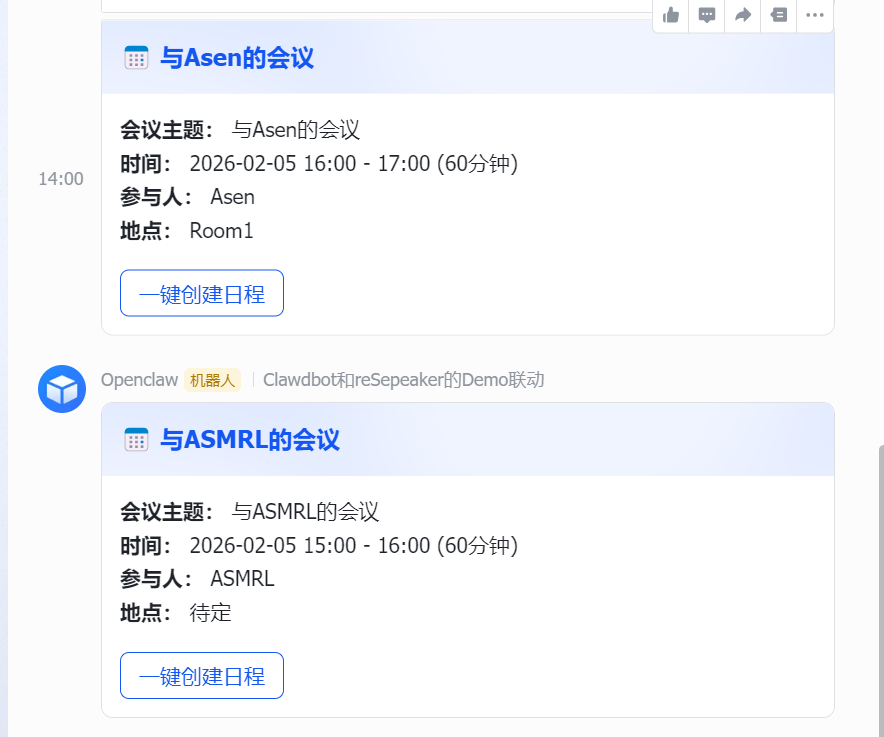
Actual Effect Screenshot
After successful execution, the Feishu group will receive an interactive card as follows:
Project Background
While developing voice assistant projects, I found the need to create a Skill capable of sending Feishu interactive meeting cards. Unlike plain text messages, interactive cards require a specific JSON structure and Feishu API support, which prompted me to dive deeper into OpenClaw's Skill development mechanism.
This project combines speech recognition, natural language processing, and the Feishu API to implement the function of automatically creating and sending interactive meeting invitation cards to Feishu groups via voice input.
Voice Input Feature
This project supports creating meeting cards via voice commands. Below is the complete voice input solution:
Voice Input Processing Workflow
# Example voice input
"Schedule a meeting with Tom tomorrow at 3pm in Room 1"

# System parsing results:
{
    "topic": "Meeting",
    "date": "2024-01-15",
    "time": "15:00",
    "attendees": ["Tom"],
    "location": "Room 1",
    "duration": 60
}
Voice Recognition Configuration
1. Hardware Requirements
- reSpeaker 4-Mic Array - 4-microphone circular array
- 2GB+ RAM
- Internet connection
2. Install Speech Recognition Model
# Download Whisper model
mkdir -p ~/moltbot/asr_model_en
cd ~/moltbot/asr_model_en

# Download tiny.en model files
wget https://github.com/k2-fsa/sherpa-onnx/releases/download/asr-models/tiny.en-encoder.onnx
wget https://github.com/k2-fsa/sherpa-onnx/releases/download/asr-models/tiny.en-decoder.onnx
wget https://github.com/k2-fsa/sherpa-onnx/releases/download/asr-models/tiny.en-tokens.txt
3. Voice Command Examples
English Commands:
"Schedule a meeting with Tom tomorrow at 3pm""Book a review meeting today at 2pm in Room 1""Create a discussion next Monday at 10am"
Chinese Commands:
"Tomorrow at 3pm, have a meeting with Tom""Today at 2pm, create a review meeting in Room 1""Next Monday 10am, create a discussion meeting"
Voice Input Workflow
- Speech Recognition - 5 seconds recording, Whisper model recognition.
- Information Parsing - Extracting time, person, location, etc.
- Card Generation - Creating a Feishu interactive meeting card.
- Group Sending - Sending to the configured Feishu group.
- Result Feedback - Displaying sending status and Card ID.
Start Voice Input Program
cd ~/feishu_card
python3 Demo.py
Skill Development Complete Process
Step 1: Understand OpenClaw Skill Architecture
OpenClaw's Skill system is based on a modular design. Each Skill is an independent Python module that interacts with the OpenClaw core system through specific interfaces.
Key Concepts:
- Skill Directory:
~/.openclaw/skills/[skill_name]/ - Entry File:
__init__.pyor a specified Python file. - Tool Registration: Registered via the
@tooldecorator. - Configuration File:
SKILL.mdprovides usage instructions.
Step 2: Create Skill Basic Structure
1. Create Skill Directory
mkdir -p ~/.openclaw/skills/feishu_meeting
cd ~/.openclaw/skills/feishu_meeting
2. Create Core Files
touch __init__.py
touch send_meeting_card.py
touch SKILL.md
Step 3: Write Core Function Code
1. Main Function File: send_meeting_card.py
#!/usr/bin/env python3
"""
Feishu Meeting Card Sending Module
Used for OpenClaw Skill system to create and send interactive meeting invitation cards
"""

import json
import sys
from datetime import datetime, timedelta
from typing import Dict, Any, Optional

def create_meeting_card(params: Dict[str, Any]) -> Dict[str, Any]:
    """Create Feishu interactive meeting card"""

    # Parameter extraction and default value processing
    topic = params.get("topic", "Meeting")
    date = params.get("date", datetime.now().strftime("%Y-%m-%d"))
    time = params.get("time", "15:00")
    attendees = params.get("attendees", [])
    location = params.get("location", "TBD")
    duration = params.get("duration", 60)

    # Construct attendees string
    attendees_str = ", ".join(attendees) if attendees else "TBD"

    # Create Feishu interactive card structure
    card_content = {
        "msg_type": "interactive",
        "card": {
            "config": {
                "wide_screen_mode": True,
                "enable_forward": True
            },
            "header": {
                "title": {
                    "tag": "plain_text",
                    "content": f"📅 {topic}"
                },
                "template": "blue"  # Blue theme
            },
            "elements": [
                {
                    "tag": "div",
                    "text": {
                        "tag": "lark_md",
                        "content": f"**🕐 Time:** {date} {time}"
                    }
                },
                {
                    "tag": "div",
                    "text": {
                        "tag": "lark_md",
                        "content": f"**👥 Attendees:** {attendees_str}"
                    }
                },
                {
                    "tag": "div",
                    "text": {
                        "tag": "lark_md",
                        "content": f"**📍 Location:** {location}"
                    }
                },
                {
                    "tag": "hr"  # Separator line
                },
                {
                    "tag": "action",
                    "actions": [
                        {
                            "tag": "button",
                            "text": {
                                "tag": "plain_text",
                                "content": "Create Calendar"
                            },
                            "type": "primary",
                            "value": {
                                "action": "create_calendar_event",
                                "meeting_data": {
                                    "topic": topic,
                                    "date": date,
                                    "time": time,
                                    "duration": duration,
                                    "attendees": attendees,
                                    "location": location
                                }
                            }
                        }
                    ]
                }
            ]
        }
    }

    return card_content

def send_meeting_card(params: Dict[str, Any]) -> Dict[str, Any]:
    """Send meeting card to Feishu group"""

    try:
        # Create card content
        card_content = create_meeting_card(params)

        # Get group ID (can be specified in params or use default)
        group_chat_id = params.get("group_chat_id", "oc_837f7a564514f")

        # Send using OpenClaw message tool
        result = send_feishu_message(group_chat_id, card_content)

        if result.get("success"):
            return {
                "success": True,
                "message_id": result.get("message_id"),
                "group": params.get("group_name", "Group")
            }
        else:
            return {
                "success": False,
                "error": result.get("error", "Failed to send")
            }

    except Exception as e:
        return {
            "success": False,
            "error": f"Send exception: {str(e)}"
        }

def send_feishu_message(target: str, content: Dict[str, Any]) -> Dict[str, Any]:
    """Send Feishu message through OpenClaw"""
    try:
        # Import OpenClaw message tool
        from tools import message

        # Send message
        response = message.send(
            channel="feishu",
            target=target,
            message=json.dumps(content, ensure_ascii=False)
        )

        return {"success": True, "message_id": response.get("message_id")}

    except ImportError:
        # Standby plan if running independently
        import subprocess
        import json

        try:
            cmd = [
                "openclaw", "message", "send",
                "--channel", "feishu",
                "--target", target,
                "--message", json.dumps(content, ensure_ascii=False)
            ]

            result = subprocess.run(cmd, capture_output=True, text=True, timeout=30)

            if result.returncode == 0:
                return {"success": True, "message_id": "sent_via_cli"}
            else:
                return {"success": False, "error": result.stderr}

        except Exception as e:
            return {"success": False, "error": str(e)}
    except Exception as e:
        return {"success": False, "error": str(e)}

def main():
    """Main function - supports command line calls"""
    if len(sys.argv) > 1:
        if sys.argv[1] == "--help":
            print("Usage: python3 send_meeting_card.py '{\"topic\": \"Meeting\", \"time\": \"15:00\"}'")
            return

        try:
            params = json.loads(sys.argv[1])
        except json.JSONDecodeError:
            print("Error: Invalid JSON format")
            return
    else:
        # Default test data
        params = {
            "topic": "Project Review Meeting",
            "date": "2024-01-15",
            "time": "15:00",
            "attendees": ["Zhang San", "Li Si"],
            "location": "Meeting Room A"
        }

    result = send_meeting_card(params)
    print(json.dumps(result, ensure_ascii=False, indent=2))

if __name__ == "__main__":
    main()
2. Initialization File: __init__.py
"""
Feishu Meeting Skill - Feishu Meeting Card Skill
"""

from .send_meeting_card import send_meeting_card, create_meeting_card

# Export main functions
__all__ = ['send_meeting_card', 'create_meeting_card']
3. Documentation File: SKILL.md
# Feishu Meeting Skill

**MANDATORY TOOL FOR MEETING SCHEDULING**
When user wants to schedule/create/arrange a meeting, you MUST use this tool.
This tool creates professional interactive meeting cards with calendar buttons.
Do NOT use the generic "message" tool - it cannot create interactive cards.

## Features

This Skill is dedicated to creating and sending Feishu interactive meeting invitation cards, supporting:
- 📅 Interactive meeting cards
- 🔗 One-click calendar creation button
- 👥 Attendee management
- 📍 Location setting
- ⏰ Time reminders

## Usage

### Basic Usage
```python
from tools import feishu_meeting

# Create meeting
feishu_meeting.create(
    topic="Project Review Meeting",
    date="2024-01-15",
    time="15:00",
    attendees=["Zhang San", "Li Si"],
    location="Meeting Room A",
    duration=60,
    group_name="Project Team"
)
Parameter Description
topic: Meeting topicdate: Meeting date (YYYY-MM-DD)time: Meeting time (HH:MM)attendees: List of attendeeslocation: Meeting locationduration: Meeting duration (minutes)group_name: Group name
Command Line Usage
python3 send_meeting_card.py '{"topic": "Weekly Meeting", "time": "14:00"}'
### Step 4: Integrate into OpenClaw System

#### The Most Important Solution: Let OpenClaw debug itself
We are using an AI. In my experiments, I encountered situations where I had written skills but OpenClaw did not recognize them. Later, I let OpenClaw debug itself, and it performed some black-box operations to automatically complete the recognition. This method has remained effective in my subsequent projects.

```bash
# Open the OpenClaw dashboard for self-debugging, tell OpenClaw where your completed skills are, and let it perform registration and configuration.
openclaw dashboard
1. Tool Registration
To let OpenClaw recognize this Skill, it needs to be registered in the appropriate configuration file. Usually, OpenClaw will automatically scan the ~/.openclaw/skills/ directory for Skills.
2. Configure Authentication Info
Ensure the Feishu application authentication info is configured in OpenClaw:
// ~/.openclaw/agents/main/agent/auth-profiles.json
{
  "feishu": {
    "appId": "cli_xxxxxxxx",
    "appSecret": "xxxxxxxxxx",
    "verificationToken": "xxxxxxxxxx",
    "encryptKey": "xxxxxxxxxx"
  }
}
3. Test Skill Functionality
# Enter Skill directory
cd ~/.openclaw/skills/feishu_meeting

# Test basic functionality
python3 send_meeting_card.py

# Test with parameters
python3 send_meeting_card.py '{"topic": "Test Meeting", "time": "16:00", "attendees": ["Test User"]}'
Step 5: Use Skill in OpenClaw
1. Calling via Agent
When a user says: "Schedule a meeting", OpenClaw should automatically invoke this Skill:
# In Agent's processing logic
from tools import feishu_meeting

# Parse user intent and call Skill
feishu_meeting.create(
    topic=extracted_topic,
    date=extracted_date,
    time=extracted_time,
    attendees=extracted_attendees,
    location=extracted_location
)
2. Direct Command Line Call
openclaw message send --channel feishu --target [group_id] --message '[Card Content]'
Key Technical Points
1. Feishu Card Format
Feishu interactive cards require a specific JSON structure:
msg_type: Must be "interactive"card: Contains the full card definitionelements: Defines various components of the cardactions: Defines interactive buttons
2. Error Handling Mechanism
try:
    # Main logic
    result = send_feishu_message(target, card_content)
    if result.get("success"):
        return {"success": True, "message_id": result["message_id"]}
    else:
        return {"success": False, "error": result.get("error")}
except Exception as e:
    return {"success": False, "error": f"Exception: {str(e)}"}
3. Compatibility Considerations
- OpenClaw Integration Mode: Via
from tools import message - Independent Execution Mode: Calling openclaw commands via subprocess
- Command Line Mode: Directly processing JSON parameters
Debugging and Troubleshooting
1. Debugging Tips
# Enable debug mode
export OPENCLAW_DEBUG=1

# View logs
tail -f ~/.openclaw/logs/gateway.log

# Manually test card JSON
python3 -c "import json; print(json.dumps(card_content, indent=2))"
2. Verification Steps
-
Skill Recognition Verification
openclaw skills list -
Authentication Verification
# Test Feishu API connection
python3 -c "from tools import message; print('OK')" -
Function Verification
# Test card creation
python3 send_meeting_card.py
Technical Support and Product Discussion
Thank you for choosing our product! We provide multiple communication channels to ensure you have a smooth product experience.