On-Robot Deployment & Performance Evaluation
Run ACT on a real robot, understand preprocessing and action-chunk execution, measure success, and improve data by analyzing failures.
- On-robot inference
- Action-chunk execution
- Evaluation
- Data iteration
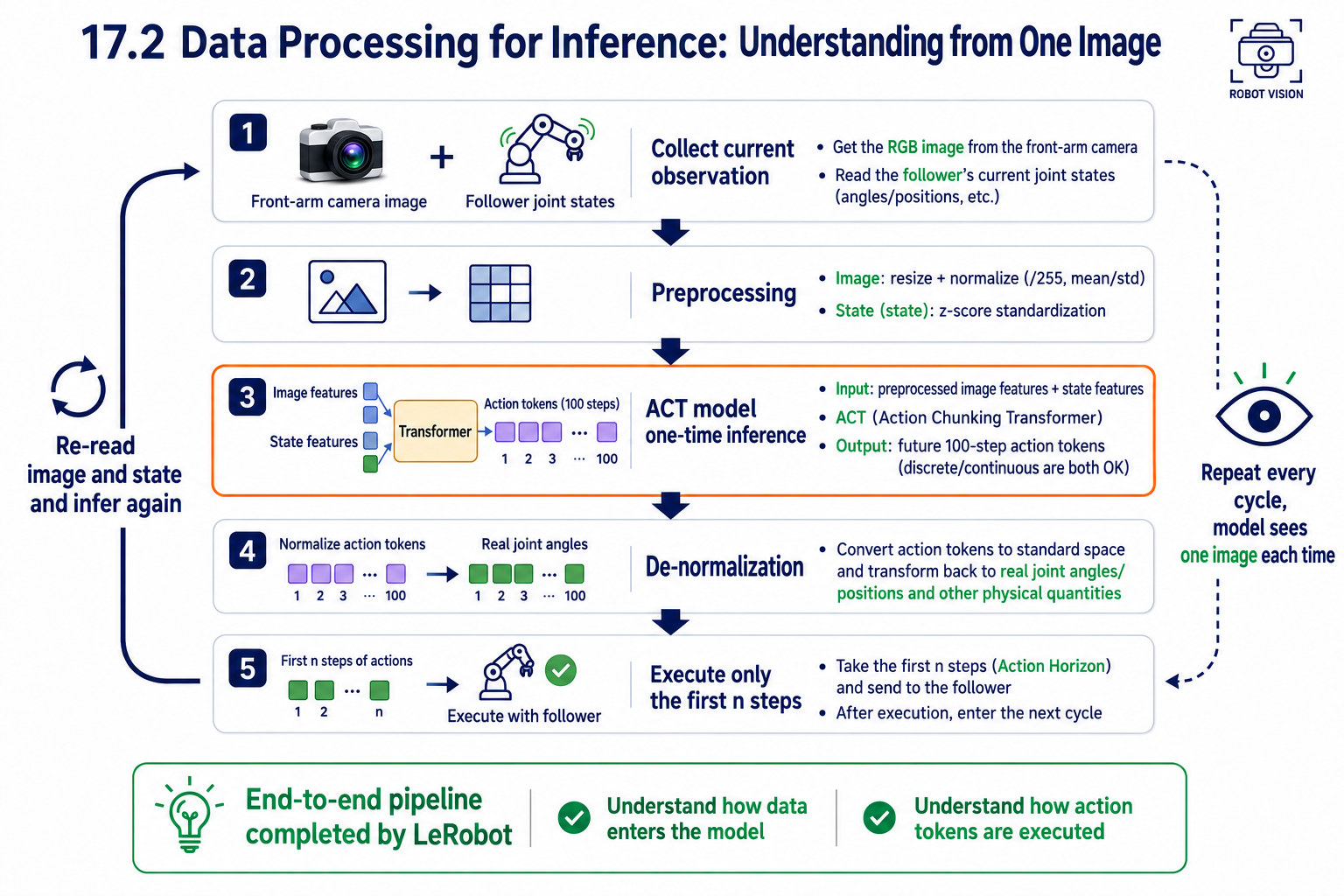
Inference Data Flow at a Glance
Preprocessing and Denormalization
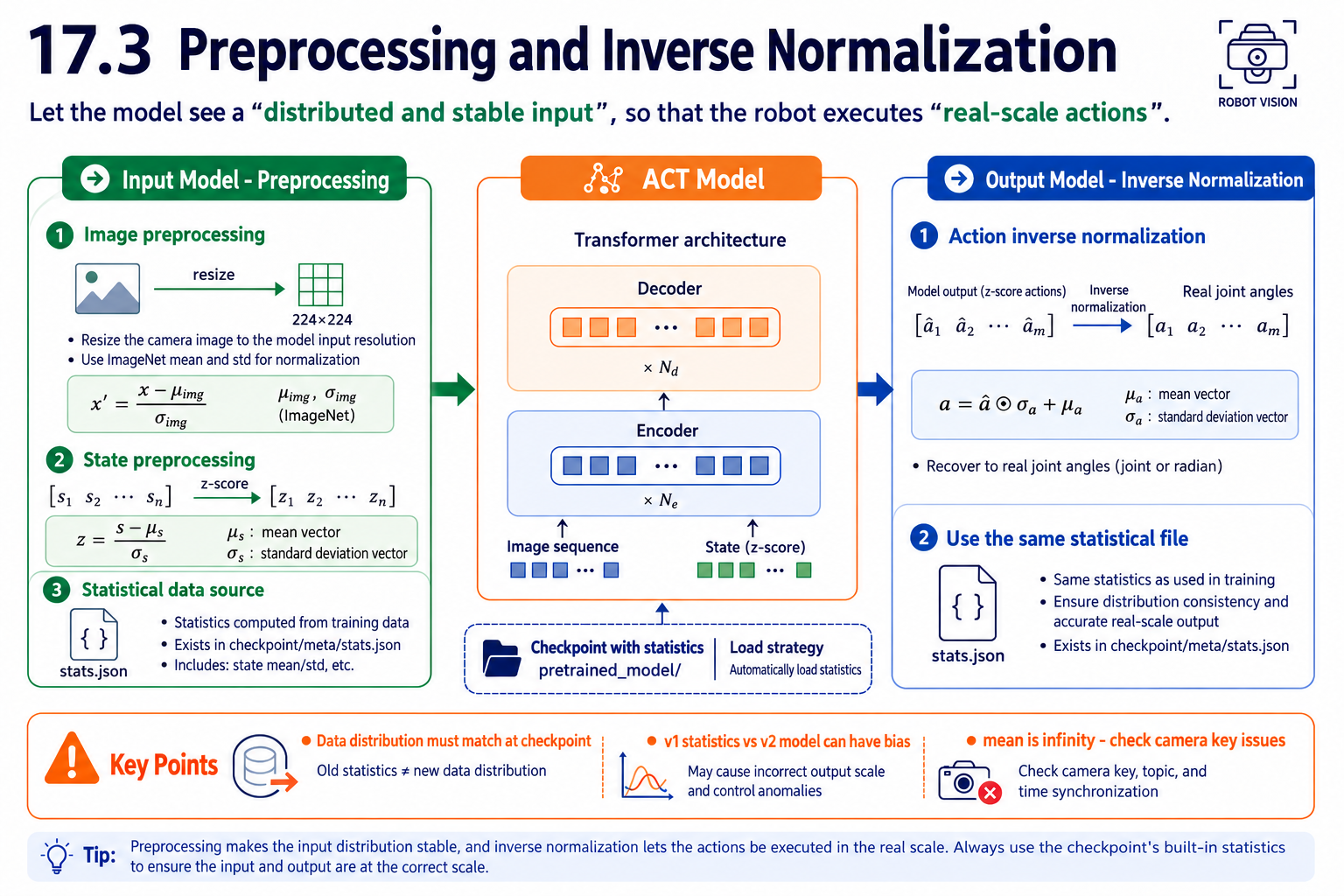
The model was trained with normalized data, so inference must apply the same input and output rules:
| Direction | Processing | Statistics |
|---|---|---|
| Into the model | Resize images and apply ImageNet normalization; subtract state means and divide by standard deviations (z-score). | Training dataset meta/stats.json |
| Out of the model | Multiply actions by standard deviations and add means to recover physical joint angles. | The same statistics |
Start On-Robot Inference and Iterate on Data
Load the policy with lerobot-record. Use exactly the same robot and camera parameters as during collection:
RS version:
lerobot-record \
  --robot.type=seeed_b601_rs_follower \
  --robot.port=can0 \
  --robot.can_adapter=socketcan \
  --robot.cameras='{ front: {type: opencv, index_or_path: 0, width: 640, height: 480, fps: 30, fourcc: "MJPG"}, side: {type: opencv, index_or_path: 2, width: 640, height: 480, fps: 30, fourcc: "MJPG"} }' \
  --robot.id=follower1 \
  --display_data=false \
  --dataset.repo_id=seeed/eval_test18 \
  --dataset.single_task="Grab the crayfish into the box" \
  --dataset.num_episodes=10 \
  --dataset.episode_time_s=60 \
  --dataset.reset_time_s=10 \
  --policy.path=outputs/train/act_rebot_test/checkpoints/last/pretrained_model \
  --policy.push_to_hub=false
DM version:
lerobot-record \
  --robot.type=seeed_b601_dm_follower \
  --robot.port=/dev/ttyACM0 \
  --robot.can_adapter=damiao \
  --robot.cameras='{ front: {type: opencv, index_or_path: 0, width: 640, height: 480, fps: 30, fourcc: "MJPG"}, side: {type: opencv, index_or_path: 2, width: 640, height: 480, fps: 30, fourcc: "MJPG"} }' \
  --robot.id=follower1 \
  --display_data=false \
  --dataset.repo_id=seeed/eval_test18 \
  --dataset.single_task="Grab the crayfish into the box" \
  --dataset.num_episodes=10 \
  --dataset.episode_time_s=60 \
  --dataset.reset_time_s=10 \
  --policy.path=outputs/train/act_rebot_test/checkpoints/last/pretrained_model \
  --policy.push_to_hub=false
-
--dataset.num_episodes=10: record 10 evaluation episodes. -
--dataset.episode_time_s=60: allow at most 60 seconds per episode. Set this for the task duration: if putting the crayfish in the box takes 20–30 seconds, allow 30–40 seconds. For extended observation without waiting between episodes, you can use a longer duration such as 300 seconds. -
--dataset.reset_time_s=10: allow 10 seconds between episodes to restore object positions. Keep starting conditions as consistent as possible during evaluation.
Executing an Action Chunk
-
One inference predicts a 100-step action chunk. Execute only the first n steps open-loop (
n_action_steps), then observe again: predictions become less reliable further into the future. -
With temporal ensembling (
temporal_ensemble_coeff), the action at each timestep is a weighted average of overlapping predictions, producing smoother trajectories. -
Visible pauses often occur when a chunk finishes before the next inference is ready. Increasing
n_action_stepscan reduce these pauses, at the cost of slower responses to disturbances.
Safety: Limits, Speed, and Emergency Stops
-
Use ESC to end the session; do not use Ctrl+C. Before stopping, let the arm finish its current action chunk or manually return it to a safe pose (although Ctrl+C currently also returns the robot to zero), to avoid leaving it suspended under load.
-
Be ready to disconnect power immediately if the arm behaves abnormally.
Evaluate Success Rate and Completion Time
Fix the starting conditions and run 20 trials, recording each result.
-
Success rate = successful trials ÷ 20. For the first trained model, above 50% is a normal starting point and above 80% is excellent.
-
Completion time indicates consistency. Successful trials should take similar amounts of time; large variations suggest hesitation.
-
For failures, record the failure mode, rather than only marking a cross.
Test Generalization
After testing standard conditions, change one condition at a time and measure the success-rate drop. An ACT model trained on 50 episodes has limited generalization; broader coverage requires more demonstrations.
| Test | Method | Expected behavior |
|---|---|---|
| Position generalization | Place the block away from the five marked points, but within the demonstrated region. | Little degradation; a drop suggests insufficient position diversity. |
| Mild distraction | Add unrelated objects to the table. | A model with clean visual understanding should be unaffected. |
| Clear distribution shift | Use a completely new object or a reflective tabletop. | Failure is expected outside the training distribution. |
The purpose is to map the model's capability boundary, then extend it gradually with more data.
Analyze Failure Types
| Failure | Most likely cause | Response |
|---|---|---|
| Reaches toward the wrong position | Insufficient data coverage at that position; distribution shift. | Collect more demonstrations in that region. |
| Contacts the object but cannot hold it, or drops it | Poorly learned closing timing or too few grasp examples. | Add high-quality demonstrations of the grasping moment. |
| Moves erratically throughout | Training has not converged, or the scene and lighting have changed substantially. | Check that the scene and lighting during collection match inference. |
Rule out configuration problems before blaming the data. Erratic motion often calls for configuration checks; inaccurate reaching often calls for better coverage.
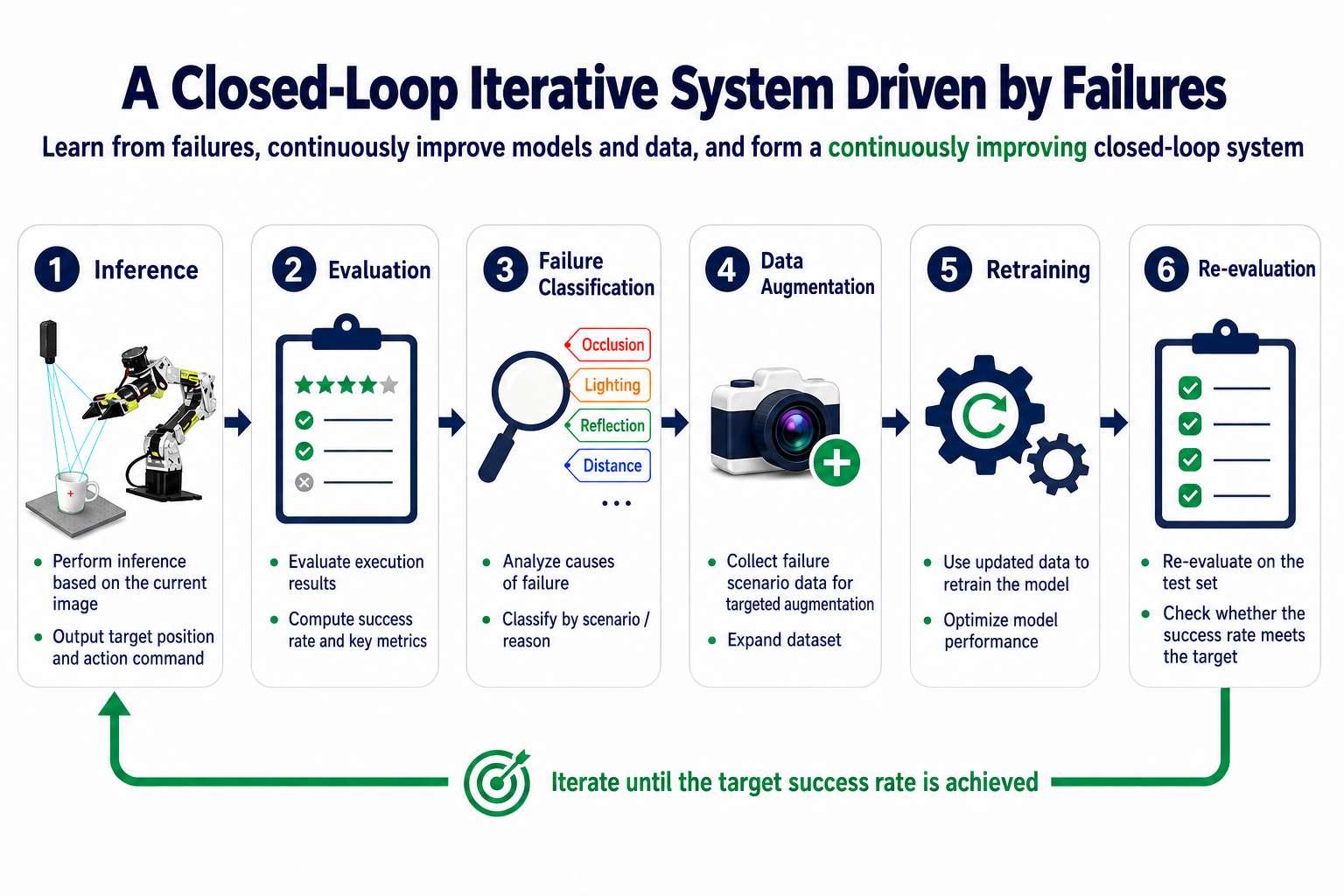
Data Iteration: Collect for Failure Cases
Close the loop by turning failures into data:
-
Classify the failure and the scene in which it occurs.
-
Collect 10–20 new demonstrations targeting that case. For missed reaches, record the problematic location; for unstable grasps, emphasize the closing motion. Expand the covered region gradually, for example with new points spaced 5–10 cm around the original cross.
-
Retrain using the updated dataset.