ACT Model Training
Configure ACT training, launch a run, monitor loss and GPU usage, resume interrupted training, and manage checkpoints.
- Training configuration
- Loss and GPU usage
- Resume training
- Checkpoint
Three Key Settings: Batch Size, Learning Rate, and Steps
Run nvidia-smi to check your GPU and VRAM. Consumer GPUs, including an RTX 3050, can also train the model.
Batch size: increase it when memory allows, but do not exceed available VRAM.
| Configuration | Guidance |
|---|---|
| 8 GB VRAM or less | Use a small batch: for example, 4 with 8 GB or 2 with 4 GB. |
| More than 12 GB VRAM | A more comfortable range for the default batch size; use 16 if memory permits. |
| Integrated graphics only / no NVIDIA GPU | Train on a cloud server. |
Learning rate:
This is the size of each update. ACT provides presets: the AdamW optimizer, learning rate 1e-5, weight decay 1e-4, and a separate 1e-5 learning rate for the vision backbone. lerobot-train enables policy training presets (use_policy_training_preset) by default, so these values apply automatically without additional settings. Too large an update makes loss oscillate or diverge; too small an update can make training take twice as long. Keep the preset for your first run: these values come from the paper and extensive practice.
-
When changing batch size or training steps, the recommendation is to keep the learning rate unchanged.
-
When fine-tuning an existing checkpoint, consider
1e-6to3e-6, about 3–10 times lower. -
If training loss barely decreases and stays flat, do not raise the learning rate first. Increase steps or add data; if it still does not move, try
2e-5.Add the following settings together and use the same value for both:
--policy.optimizer_lr=1e-6 \
--policy.optimizer_lr_backbone=1e-6
Training steps:
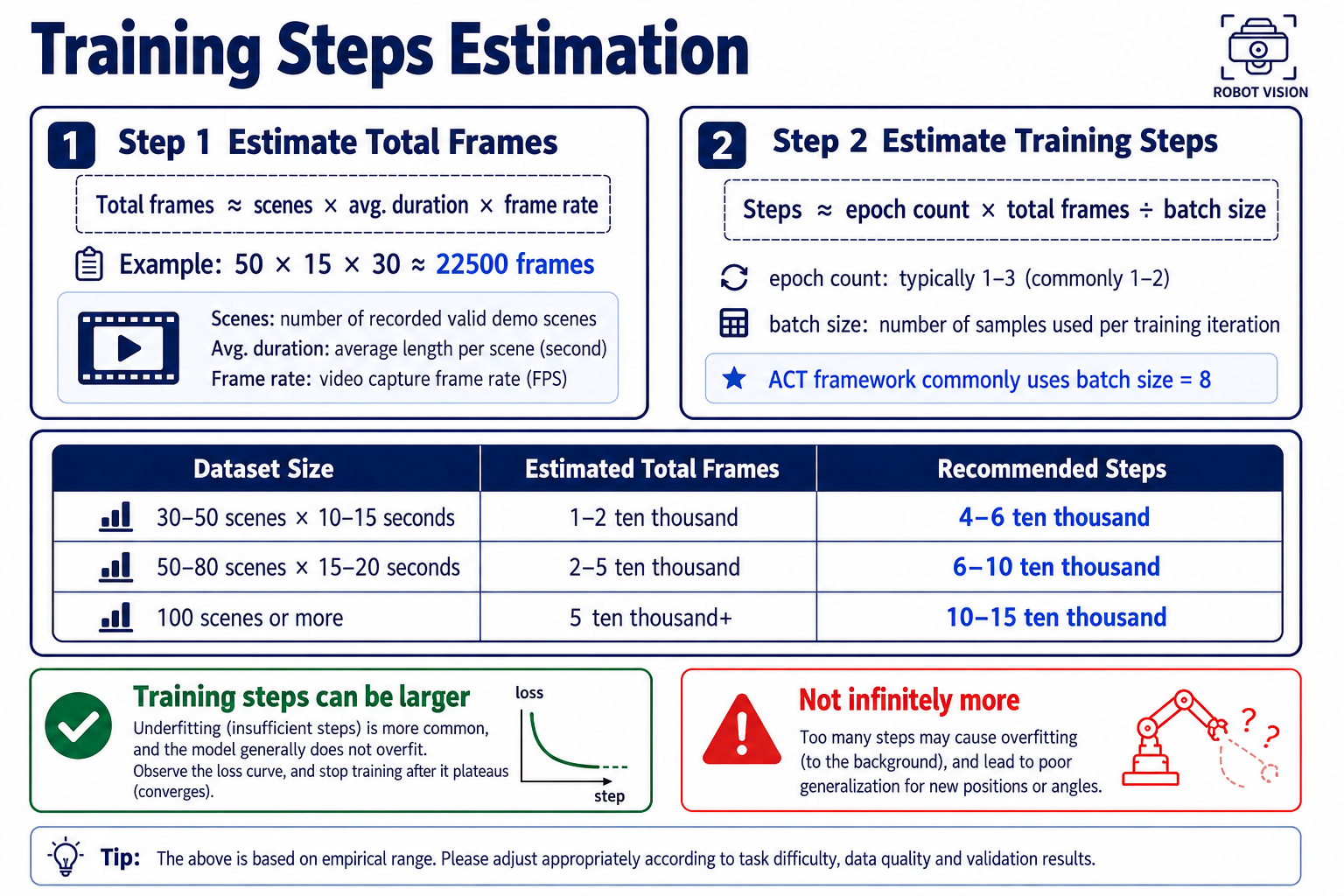
For 50 episodes, a simple starting point is 80,000 steps.
Scale steps with batch size:
Halving batch size halves the samples seen per update. Double the steps to preserve approximately the same number of epochs. Starting from batch_size=8 and steps=80000, use 160000 steps for a batch of 4, four times as many steps for a batch of 2, or half as many for a batch of 16.
You can also set more training steps. During training, use Ctrl+C to interrupt based on loss and other metrics; the corresponding models already generated are saved automatically.
-
Total frames roughly correspond to the total recorded duration.
-
One epoch means seeing the complete recorded dataset once.
-
Steps count the number of minibatch updates.
Start Training
After all checks pass, run the following in the lerobot conda environment:
lerobot-train \
    --dataset.repo_id=rebot_b601/grab_cube_v1 \
    --policy.type=act \
    --output_dir=outputs/train/act_grab_cube_v1 \
    --job_name=act_grab_cube_v1 \
    --policy.device=cuda \
    --wandb.enable=false \
    --policy.push_to_hub=false \
    --steps=100000
For RTX 50-series GPUs, add --dataset.video_backend=pyav to bypass the missing API in the torchvision preview version used by this setup.
If VRAM is insufficient or you want to process more samples at once, add --batch_size to set the batch size.
Parameter reference:
| Parameter | Meaning |
|---|---|
--dataset.repo_id | Dataset name from Chapter 13; enter the local name directly, or ${HF_USER}/xxx for a Hub dataset. |
--policy.type=act | Policy type; other options include diffusion and smolvla. Use ACT here. |
--output_dir | Directory for all outputs from this run. |
--job_name | Run name used to distinguish logs. |
--policy.device=cuda | Train on the GPU. |
--wandb.enable=false | Disable the optional W&B online dashboard. |
--policy.push_to_hub=false | Keep the model off the Hub until you are satisfied with evaluation in Chapter 17. |
--steps | Number of training steps. |
--batch_size | Set the batch size. |
As a rough guide, 100,000 steps typically take several hours on a consumer GPU, depending on the GPU and batch size.
Monitor Loss and GPU Usage
Training logs appear after launch. LeRobot prints a summary periodically, by default every 200 steps, controlled by --log_freq. For example:
step: 10000 smpl: 80K ep: 35.6 loss: 1.832 grdn: 12.4 lr: 1.0e-05 updt_s: 0.21 data_s: 0.003 eta: 3:42:10
Read the fields as follows; names may vary slightly between versions:
| Field | Meaning | What to check |
|---|---|---|
step | Current training step | Compare with --steps to track progress. |
ep | Epochs completed | How many times the model has watched the recording, as discussed in Section 16.5. |
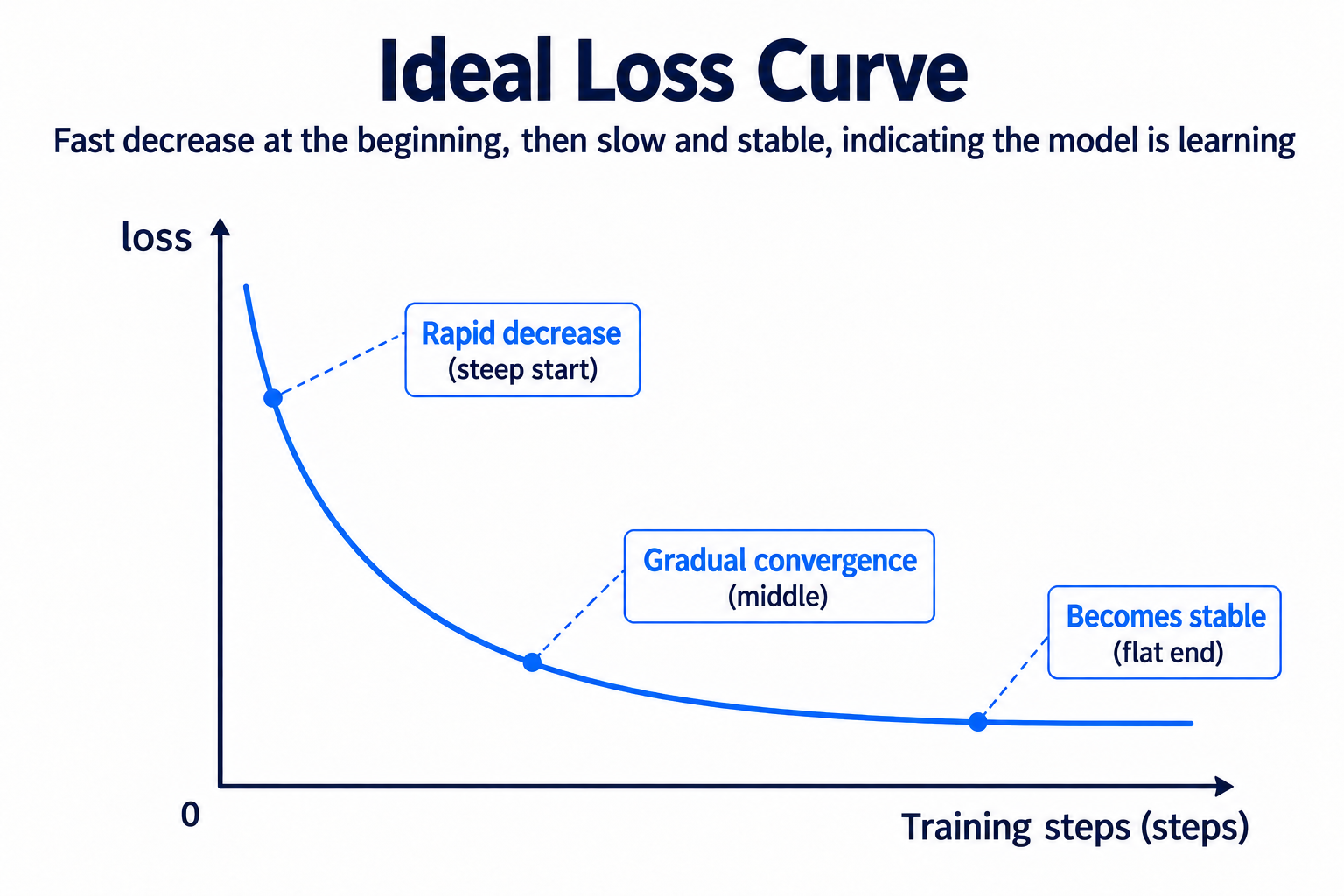
loss | Training loss | A fast initial decrease, slower later decrease, and small fluctuations are normal. |
grdn | Gradient norm | Sudden jumps into the hundreds or thousands can indicate instability. |
lr | Current learning rate | Confirm the expected value. |
updt_s / data_s | Update / data-loading time per step | A large data_s suggests a data-loading bottleneck. |
eta | Estimated remaining time | Use it to plan the run. |
Expected trends fall into three groups:
-
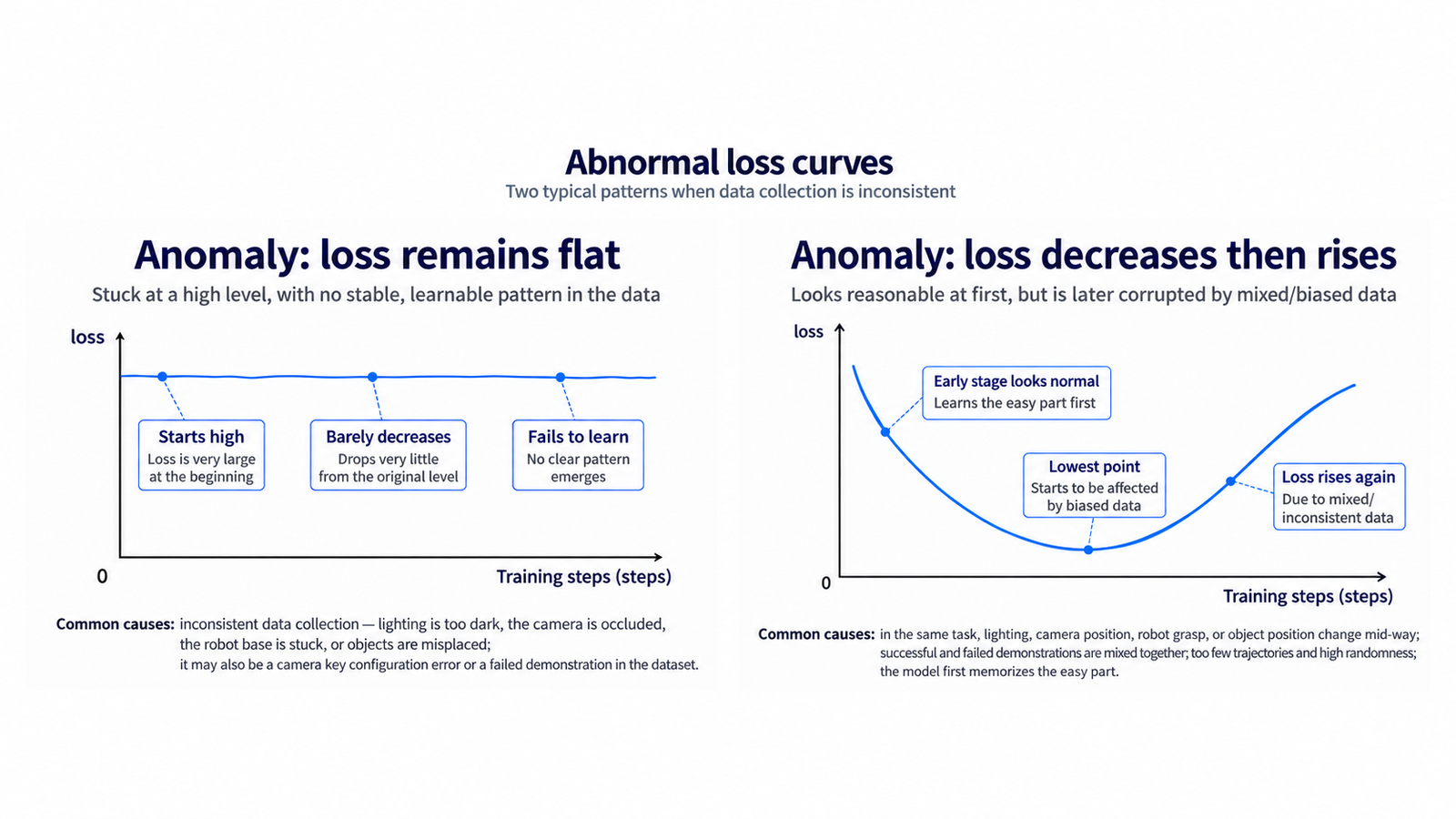
lossshould decrease throughout. Healthy convergence has three phases: a steep early drop, a gradual middle decline, and small fluctuations at a low, broadly flat level. Watch for two abnormal patterns: no decrease at all (a data or configuration problem; return to Section 14.6 to inspect curves and camera keys), or a decrease followed by a rebound (training divergence; halve the learning rate and retrain). -
grdnshould broadly stabilize, with occasional spikes allowed. It often falls alongside loss. An isolated spike that recovers is usually less concerning than a steadily growing series of spikes, which can precede divergence; reduce the learning rate in that case. -
lr,updt_s,data_s, and GPU utilization should remain broadly stable in this setup. Check thatlrmatches the configuration. Stable step times and GPU utilization inwatch -n 1 nvidia-smiare desirable. Persistently low or erratic utilization can mean the GPU is waiting for data.
Resume Interrupted Training
After a power loss, network interruption, or accidentally closing the terminal mid-training, you do not need to start over, provided at least one checkpoint has been saved—that is, after 20,000 training steps:
lerobot-train \
    --config_path=outputs/train/act_grab_cube_v1/train_config.json \
    --resume=true
-
The saved configuration governs resumption. Resume uses
train_config.json; additional command-line parameters are ignored. To change steps or batch size, start a new run instead of using resume. -
Continue from the latest checkpoint. Optimizer state and the step counter are restored, allowing the loss curve to continue.
Save and Manage Checkpoints
Checkpoints are saved automatically every 20,000 steps (save_freq) and at the end of training. A larger step budget is therefore workable: evaluate an earlier checkpoint if later ones are underperforming or overfitting, rather than using only the final model.
outputs/train/act_grab_cube_v1/
├── train_config.json              ← Full configuration used for resuming
└── checkpoints/
    ├── 0020000/pretrained_model/  ← Model saved at this step
    ├── 0040000/pretrained_model/
    ├── ...
    └── last/pretrained_model/     ← Final checkpoint, used in Chapter 17
-
Disk usage: each checkpoint contains a complete set of model weights, so many checkpoints can consume substantial space. Once training is stable, remove unneeded early checkpoints and retain
lastplus one or two recent checkpoints. -
During inference, point
--policy.pathtocheckpoints/last/pretrained_model.