Policy Switching & Task Execution
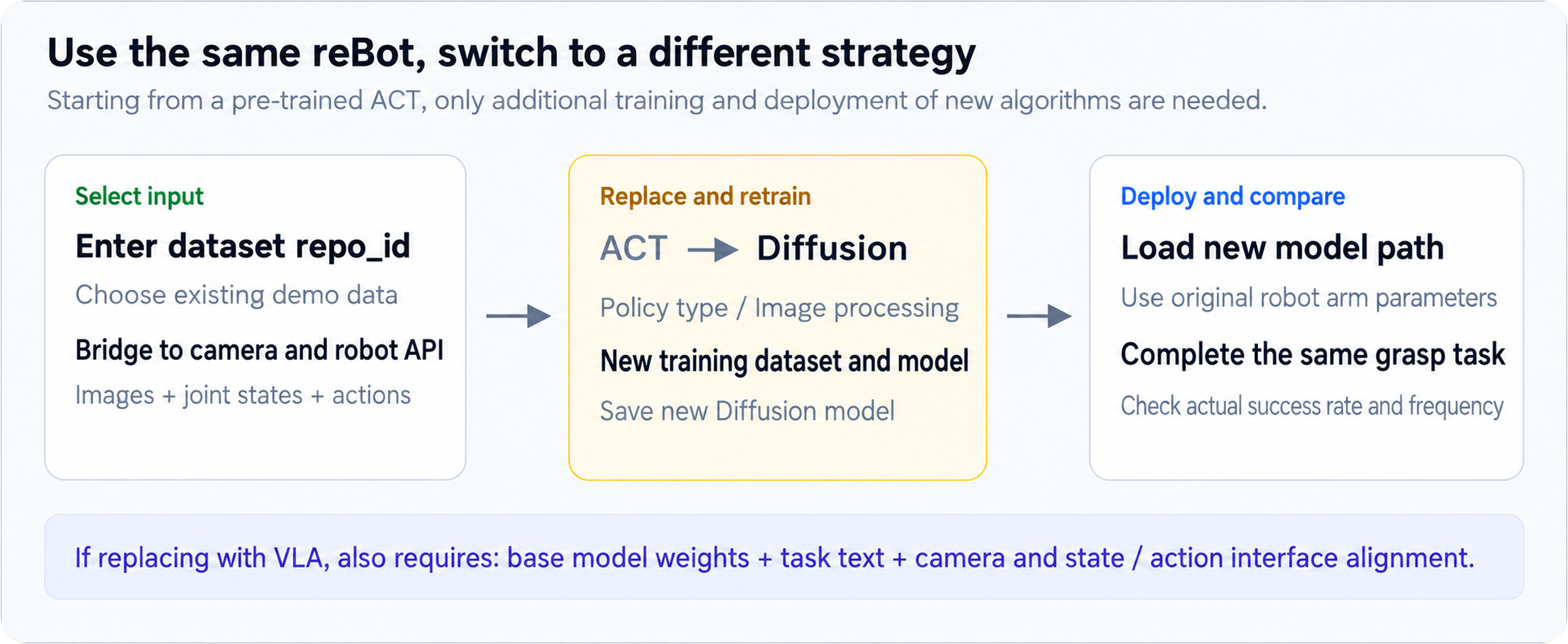
Reuse a working ACT platform and its dataset to train and deploy a new policy, then compare performance on the robot. Commands are provided for reBot-RS, reBot-DM, and SO-ARM 101.
- Diffusion
- SmolVLA
- π policies
- On-robot evaluation
Choose a policy → Configure and train → Load the new model → Evaluate on the robot.
This guide uses ACT → Diffusion for grasping a black block as the example. Complete assembly, calibration, teleoperation, and ACT training and deployment first. Keep the working hardware configuration and train the new policy on the same platform's dataset.
Environment and Platform
Select your arm's tab. The training and deployment commands below switch together.
- reBot-RS
- reBot-DM
- SO101
Reuse the working Seeed LeRobot environment and B601-RS plugin configuration from ACT. Commands target the Seeed LeRobot 0.4.4 series. For hardware setup, see reBot-RS with LeRobot.
Reuse the working Seeed LeRobot environment and B601-DM plugin configuration from ACT. Commands target the Seeed LeRobot 0.4.4 series. For hardware setup, see reBot-DM with LeRobot.
Reuse the LeRobot v0.4.4 environment that already runs ACT. If Feetech motor support is not installed, run the following from the LeRobot source directory:
pip install -e ".[feetech]"
For hardware preparation, see the official SO-ARM 101 documentation.
What Each Policy Requires
| Target policy | Required work |
|---|---|
| Diffusion | Set policy.type=diffusion and image-cropping options; train a new model; update the deployment path. |
| SmolVLA | Install .[smolvla]; fine-tune lerobot/smolvla_base; align task text, camera names, and state/action dimensions. |
| π₀ / π₀.₅ | Install .[pi]; fine-tune the appropriate base model; align task text, images, actions, and normalization statistics; adjust batch size for VRAM. |
VLA data needs accurate task descriptions. If camera names or counts differ from the base model, configure input-name mappings and missing views. SmolVLA · π₀ · Input mappings
Train Diffusion on the Existing Dataset
Run these commands in the existing ACT environment from the LeRobot source directory. Replace dataset.repo_id with your dataset. For a custom data location, retain --dataset.root and decoding settings from the original training command. The example uses one front camera, 640×480 images, and 30 FPS data.
- reBot-RS
- reBot-DM
- SO101
lerobot-train \
  --dataset.repo_id=your_username/rebot_rs_cube \
  --policy.type=diffusion \
  --policy.crop_shape=null \
  --policy.device=cuda \
  --policy.push_to_hub=false \
  --output_dir=outputs/train/diffusion_rebot_rs_cube \
  --job_name=diffusion_rebot_rs_cube \
  --batch_size=8 \
  --steps=100000 \
  --wandb.enable=false
lerobot-train \
  --dataset.repo_id=your_username/rebot_dm_cube \
  --policy.type=diffusion \
  --policy.crop_shape=null \
  --policy.device=cuda \
  --policy.push_to_hub=false \
  --output_dir=outputs/train/diffusion_rebot_dm_cube \
  --job_name=diffusion_rebot_dm_cube \
  --batch_size=8 \
  --steps=100000 \
  --wandb.enable=false
lerobot-train \
  --dataset.repo_id=your_username/so101_cube \
  --policy.type=diffusion \
  --policy.crop_shape=null \
  --policy.device=cuda \
  --policy.push_to_hub=false \
  --output_dir=outputs/train/diffusion_so101_cube \
  --job_name=diffusion_so101_cube \
  --batch_size=8 \
  --steps=100000 \
  --wandb.enable=false
| Parameter | Required setting |
|---|---|
policy.type | Use diffusion to create and train the new policy. |
policy.crop_shape | null retains the complete image; processing the full view increases memory and inference costs. |
output_dir / job_name | Use new names; deployment policy.path must point to the corresponding output. |
batch_size / steps | Start with 8 / 100000, then adjust for VRAM and on-robot performance. |
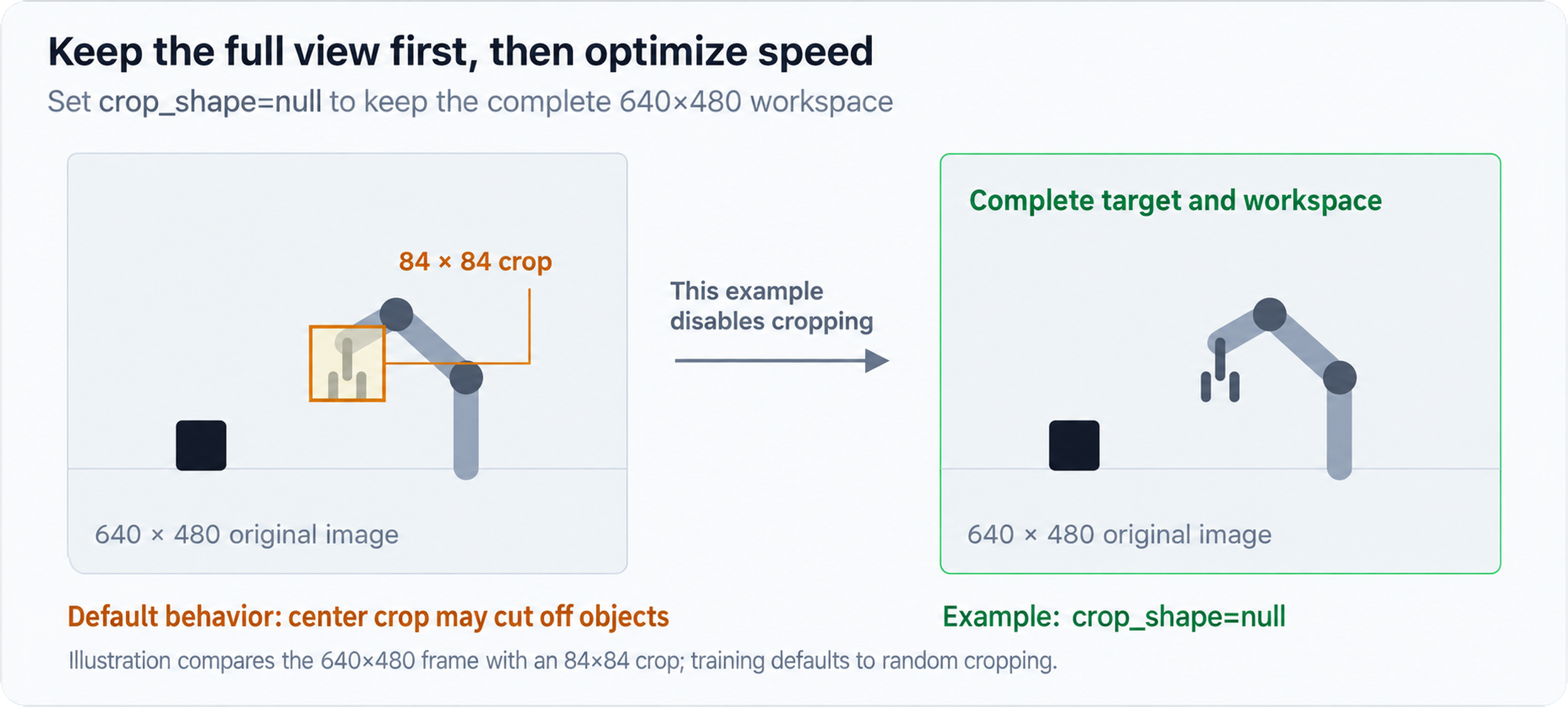
When optimizing cropping or resizing, keep image processing consistent between training and deployment. Configuration references: Seeed Diffusion · LeRobot v0.4.4 Diffusion.
Run the New Model
Point policy.path to the newly trained Diffusion model and choose a new evaluation dataset name. Ports, robot.id, camera settings, and task descriptions below are examples: replace them with your working ACT configuration. Keep the robot.id used during calibration.
- reBot-RS
- reBot-DM
- SO101
lerobot-record \
  --robot.type=seeed_b601_rs_follower \
  --robot.port=can0 \
  --robot.id=follower1 \
  --robot.can_adapter=socketcan \
  --robot.cameras='{"front":{"type":"opencv","index_or_path":0,"width":640,"height":480,"fps":30,"fourcc":"MJPG"}}' \
  --policy.path=outputs/train/diffusion_rebot_rs_cube/checkpoints/last/pretrained_model \
  --policy.device=cuda \
  --dataset.repo_id=local/eval_diffusion_rebot_rs_cube_01 \
  --dataset.single_task="Grab the black cube" \
  --dataset.fps=30 \
  --dataset.num_episodes=1 \
  --dataset.episode_time_s=30 \
  --dataset.reset_time_s=10 \
  --dataset.push_to_hub=false \
  --display_data=true
lerobot-record \
  --robot.type=seeed_b601_dm_follower \
  --robot.port=/dev/ttyACM0 \
  --robot.id=follower1 \
  --robot.can_adapter=damiao \
  --robot.cameras='{"front":{"type":"opencv","index_or_path":0,"width":640,"height":480,"fps":30,"fourcc":"MJPG"}}' \
  --policy.path=outputs/train/diffusion_rebot_dm_cube/checkpoints/last/pretrained_model \
  --policy.device=cuda \
  --dataset.repo_id=local/eval_diffusion_rebot_dm_cube_01 \
  --dataset.single_task="Grab the black cube" \
  --dataset.fps=30 \
  --dataset.num_episodes=1 \
  --dataset.episode_time_s=30 \
  --dataset.reset_time_s=10 \
  --dataset.push_to_hub=false \
  --display_data=true
lerobot-record \
  --robot.type=so101_follower \
  --robot.port=/dev/ttyACM0 \
  --robot.id=my_awesome_follower_arm \
  --robot.cameras='{"front":{"type":"opencv","index_or_path":0,"width":640,"height":480,"fps":30}}' \
  --policy.path=outputs/train/diffusion_so101_cube/checkpoints/last/pretrained_model \
  --policy.device=cuda \
  --dataset.repo_id=local/eval_diffusion_so101_cube_01 \
  --dataset.single_task="Grab the black cube" \
  --dataset.fps=30 \
  --dataset.num_episodes=1 \
  --dataset.episode_time_s=30 \
  --dataset.reset_time_s=10 \
  --dataset.push_to_hub=false \
  --display_data=true
- reBot-RS: retain the verified CAN interface and
socketcansettings. - reBot-DM: retain the verified serial port and
damiaoadapter settings. - SO-ARM 101: retain the verified serial configuration, including the previous
--robot.use_degreesvalue if used.
Keep camera names, placement, image dimensions, action units, and frame rate consistent with training. Use a new eval_… dataset name for every evaluation.
Configuration references: Seeed plugin configuration · LeRobot v0.4.4 evaluation workflow.
On-Robot Evaluation and Policy Comparison
Secure the arm and clear its workspace. Run one episode first to check motion direction, range, and actual control rate. Once these are correct, evaluate Diffusion using the same task, object positions, and number of trials as ACT, recording successes and completion times.
To switch next to SmolVLA or π policies, install the documented dependencies, fine-tune the base model, align task text, camera inputs, state/action dimensions, and normalization statistics, and update policy.path.