Data Quality: Structure, Synchronization & Validation
Understand LeRobot video, Parquet, and metadata files, then check time synchronization, image quality, and complete demonstrations.
- Dataset structure
- Time synchronization
- Quality checks
- Troubleshooting
Dataset Structure
A recorded dataset such as seed_rebot_b601_rs/test has the following layout:
~/.cache/huggingface/lerobot/seed_rebot_b601_rs/test/
├── data/
│   └── chunk-000/
│       └── file-000.parquet          ← Numerical frames: state / action / timestamps
├── videos/
│   ├── observation.images.front/
│   │   └── chunk-000/
│   │       └── file-000.mp4          ← Front camera: concatenated video for 50 episodes
│   └── observation.images.wrist/
│       └── chunk-000/
│           └── file-000.mp4          ← Wrist camera: the same arrangement
└── meta/
    ├── info.json                     ← Version, fps, frame count, and feature definitions
    ├── stats.json                    ← Mean, variance, and extrema for each feature
    ├── tasks.parquet                 ← Task descriptions
    └── episodes/
        └── chunk-000/
            └── file-000.parquet      ← Per-episode records
Three formats hold three kinds of information:
| Format | Contents | Why use it? |
|---|---|---|
| MP4 video | All image frames from both cameras | Images account for over 90% of dataset size; video compression can save one to two orders of magnitude compared with individual image files. |
| Parquet tables | Per-frame state, action, timestamps, and indices | Columnar storage lets you read, for example, all joint-3 values without loading the entire table. |
| Metadata | Structure, statistics, tasks, and episode indices | Loaders and training programs read these first to interpret the other files. |
Timestamps and Synchronization
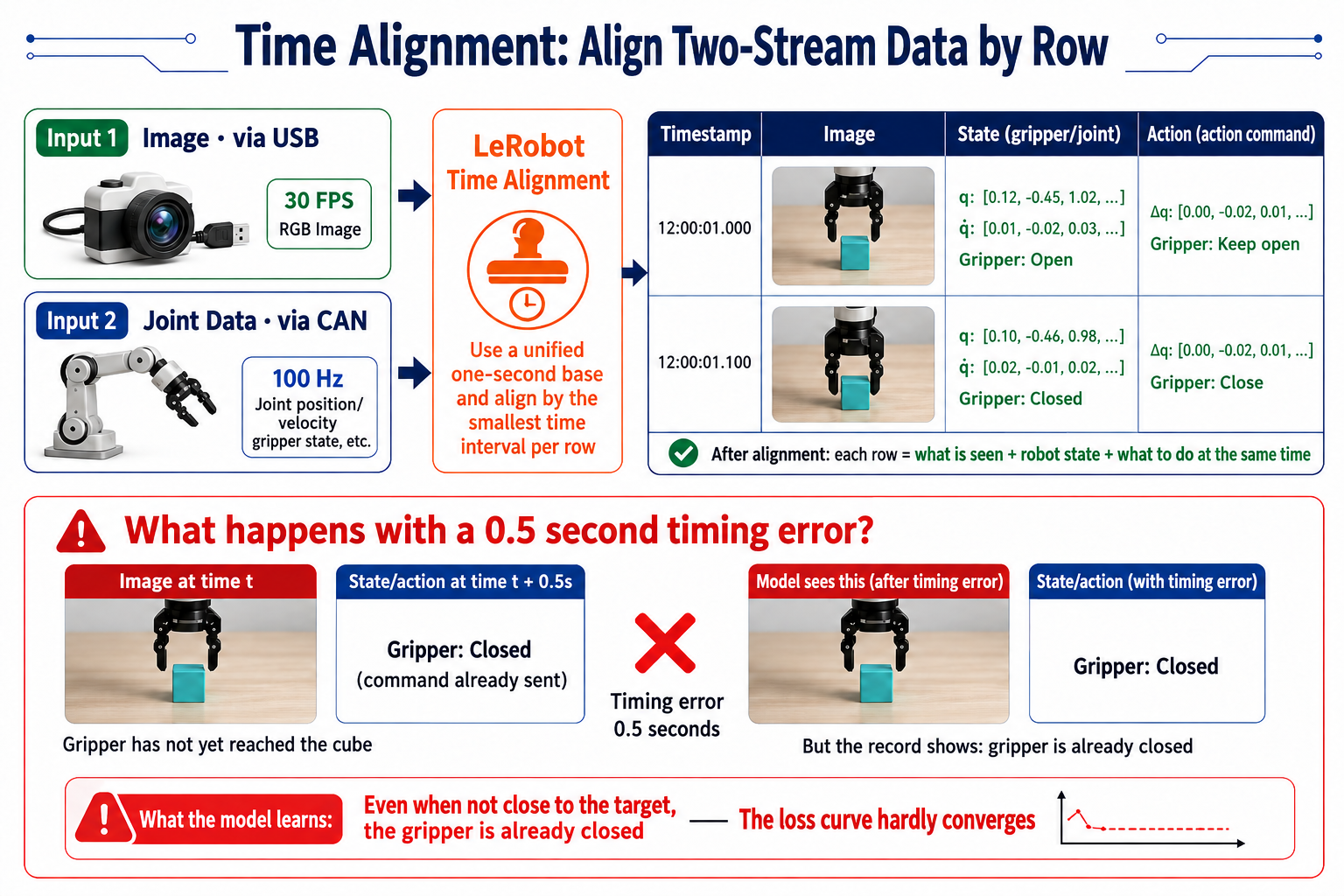
- Images travel over USB, while joint data travels over CAN, so they naturally reach the computer at different times. LeRobot assigns timestamps to align images, states, and actions representing the same logical instant in one row.
Assess Overall Dataset Quality
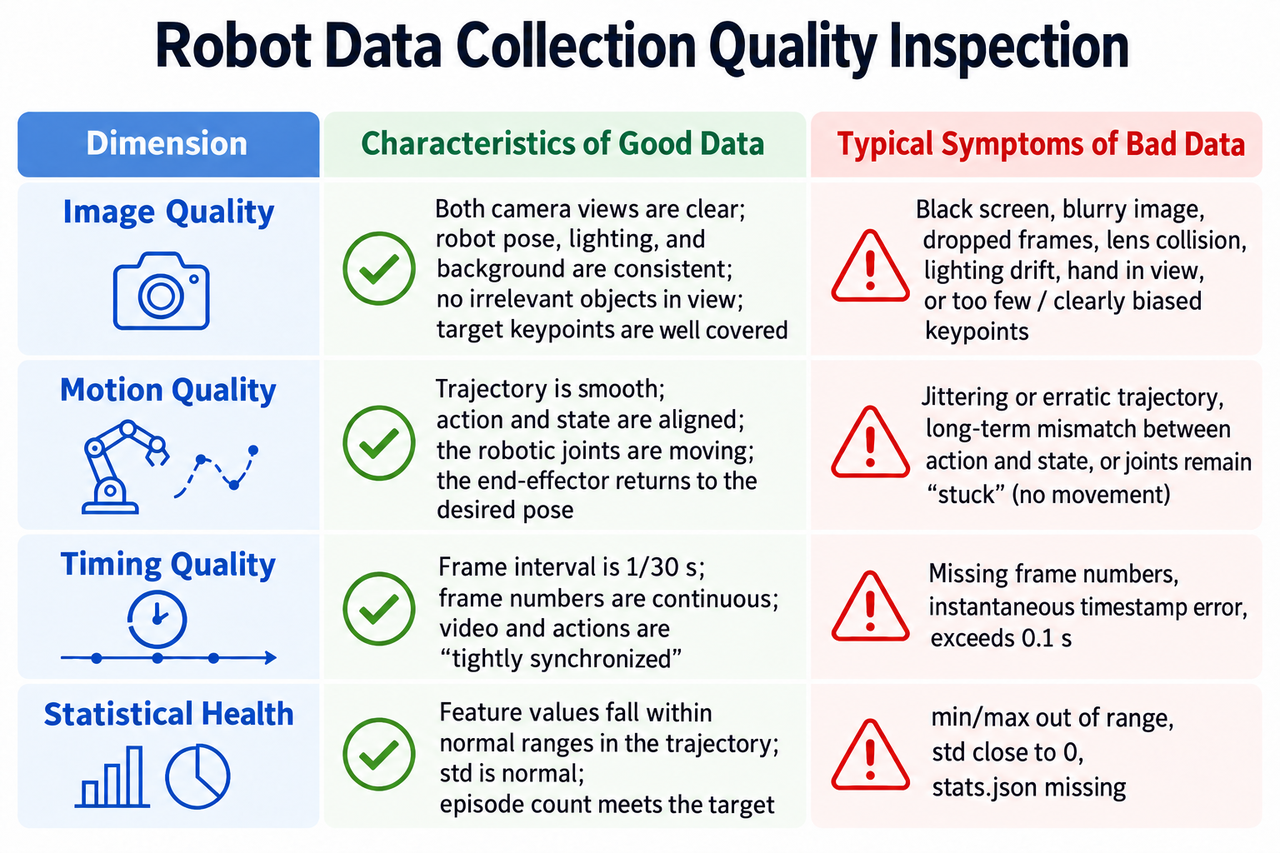
Check four dimensions before using a dataset for training:
Replay and Inspect Images
Use lerobot-dataset-viz for visualization and lerobot-replay for replay on the robot, as described earlier. Inspect at least episode 0, one middle episode, and the final episode. The first checks the workflow, the middle checks drift, and the last often reveals quality loss from operator fatigue.
During replay, check that:
-
Both camera views are present, without black frames, corrupted images, or a frozen stream.
-
Images are sharp and correctly exposed, with the block and gripper visible throughout.
-
Actions and images align: when the gripper closes, the image shows it contacting the block.
-
The episode begins at the standard initial pose and ends with the stopping condition satisfied.
What to Do When Problems Appear
Handle problems according to their scope:
-
A few bad episodes, such as blurred images in episodes 3 and 17: remove those two and record two replacements.
-
Widespread problems, such as lighting changes in half the episodes or a whole batch with misaligned video and actions: record the dataset again. A patchwork of inconsistent repairs can be worse than having less data.
After deletion, the tool rebuilds the dataset automatically: episode indices become consecutive and stats.json is recomputed. Whether removing or adding episodes, the tools regenerate metadata; you do not need to edit it manually.