Hardware & Software Setup
Prepare the hardware and software, establish leader–follower teleoperation, and get ready for data collection, model training, and paper reproduction.
- Hardware checklist
- Environment setup
- Leader–follower setup
- Teleoperation practice
Hardware Configuration
Computer: Choose One Platform
Choose one of the following computing platforms based on the equipment available to you.
| Required hardware | Link | Quantity | Notes |
|---|---|---|---|
| Desktop or laptop | Provide your own | 1 | Native Ubuntu 22.04; RTX 4080 or better GPU with at least 12 GB VRAM; at least 16 GB system memory. |
| NVIDIA Jetson AGX Thor 128G |  NVIDIA Jetson AGX Thor Developer Kit Bundle NVIDIA Jetson AGX Thor Developer Kit Bundle | 1 | An alternative to the desktop/laptop option. |
reBot Arm Hardware
| Required hardware | Link | Quantity | Notes |
|---|---|---|---|
| reBot Arm B601 DM / RS |  B601-DM assembled bundle B601-DM assembled bundle B601-RS assembled bundle B601-RS assembled bundle | 1 | Choose DM or RS as the follower arm. Select the matching power adapter and table clamps in the bundle options. |
| reBot Arm 102 leader arm |  Star Arm 102 leader arm Star Arm 102 leader arm 12 V / 2 A power adapter 12 V / 2 A power adapter | 1 | Used for leader–follower teleoperation. The arm and power adapter are separate listings. |
| RGB USB Camera-100°-720P (wrist view) |  RGB USB Camera-100°-720P RGB USB Camera-100°-720P | 1 | Mount on the robot wrist. |
| RGB USB Camera-100°-720P (fixed view) | RGB USB Camera-100°-720P | 1 | Provides a fixed external view. Uses the same camera model as the wrist view. |
| Wrist camera mount | Mount model and instructions | 1 | Print it yourself; if you do not have a printer, ask customer support about availability of a complimentary mount. |
| Third-person camera mount |  Robot Arm Camera Mount for LeRobot SO-101 & reBot B601 Robot Arm Camera Mount for LeRobot SO-101 & reBot B601 | 1 | Fixes the external camera position and angle. |
Purchasing and assembly
- To reduce the purchase cost, you can choose a kit and follow Seeed's detailed assembly instructions: DM assembly or RS assembly.
- Power supplies shipped by Seeed use flame-retardant materials, which increases their cost. Alternatively, purchase a genuine Mean Well power supply and configure it to meet the requirements of your chosen arm.
Seeed Experiment Sandbox (Optional)
The experiment sandbox is optional. You can also learn and reproduce experiments using shared datasets and models trained by other users.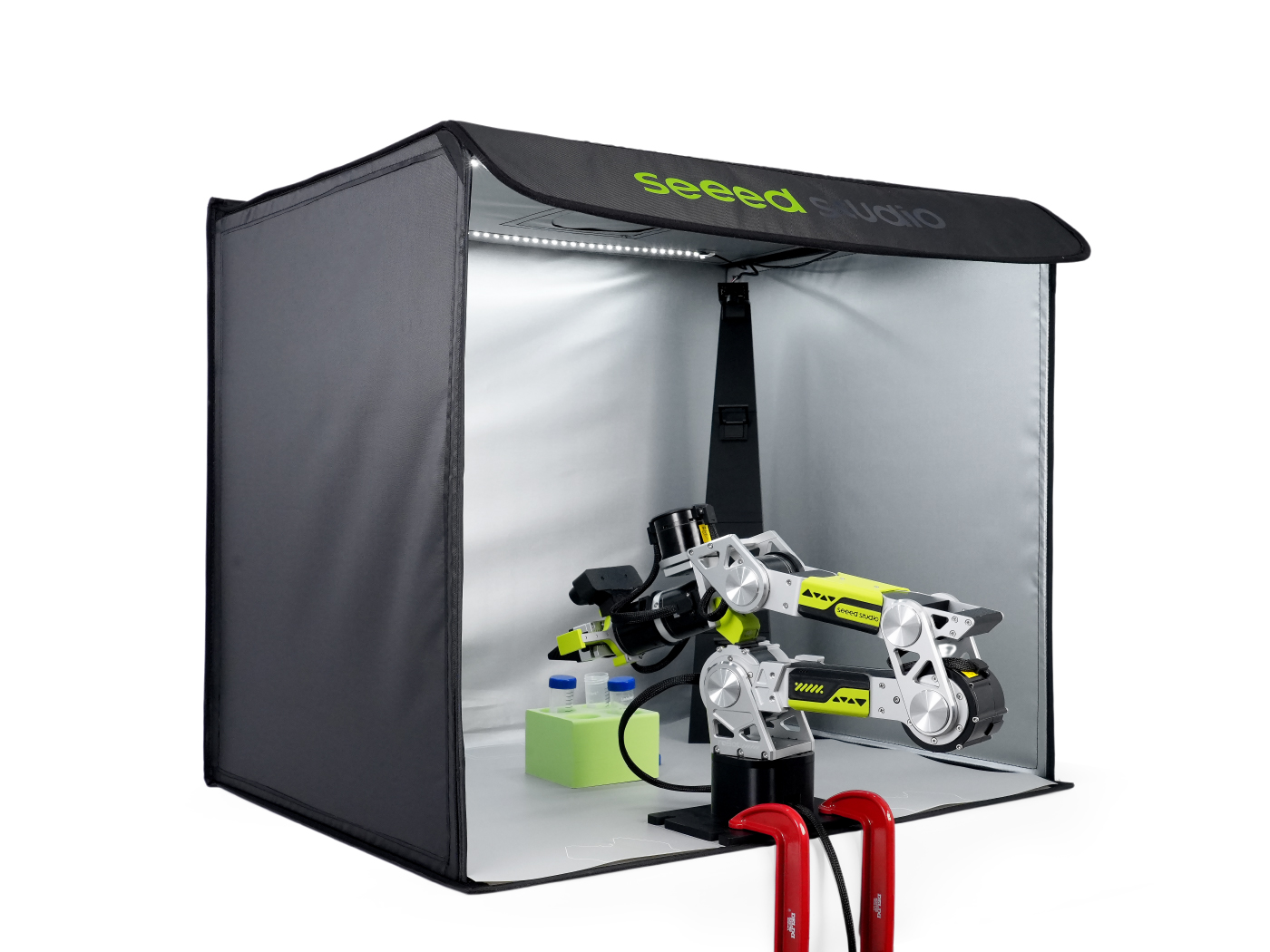
Software Environment
Install LeRobot
Use native Ubuntu 22.04, rather than a virtual machine or WSL. Follow the installation guide for your arm model.
| Arm model | Installation guide |
|---|---|
| SO-ARM 101 | Install LeRobot for SO-ARM 101 |
| reBot Arm DM | Install LeRobot for reBot-DM |
| reBot Arm RS | Install LeRobot for reBot-RS |
Configure Cameras and CAN
Configure communication and cameras for your arm. SO-ARM 101 uses a serial connection; reBot DM / RS use CAN as described in their respective guides.
| Arm model | Communication setup | Camera setup |
|---|---|---|
| SO-ARM 101 | Serial connection, calibration, and teleoperation | Add cameras |
| reBot Arm DM | Software setup and calibration | Add cameras |
| reBot Arm RS | Software setup and calibration | Add cameras |
Leader–Follower Setup
Follower and Leader
- Leader: operated by a person; its joint positions provide the teleoperation input.
- Follower: receives mapped control commands and follows the leader's motion.
Calibrate both arms before starting teleoperation. Check joint directions, motion ranges, and gripper opening and closing.
Related resources: Follower and Leader (original Feishu document) · Wiki guide to leader–follower calibration and teleoperation.
Control Frequency and Latency
How closely the follower tracks your hand depends on two things: how many times the forwarding loop runs per second (frequency) and the delay between your movement and the arm's response (latency).
Where Does Latency Come From, and Why Is It Unavoidable?
Reading leader joint positions, mapping them, sending CAN commands, executing follower movements, and reading back its state all take time. The figure below shows the sources of delay along this chain.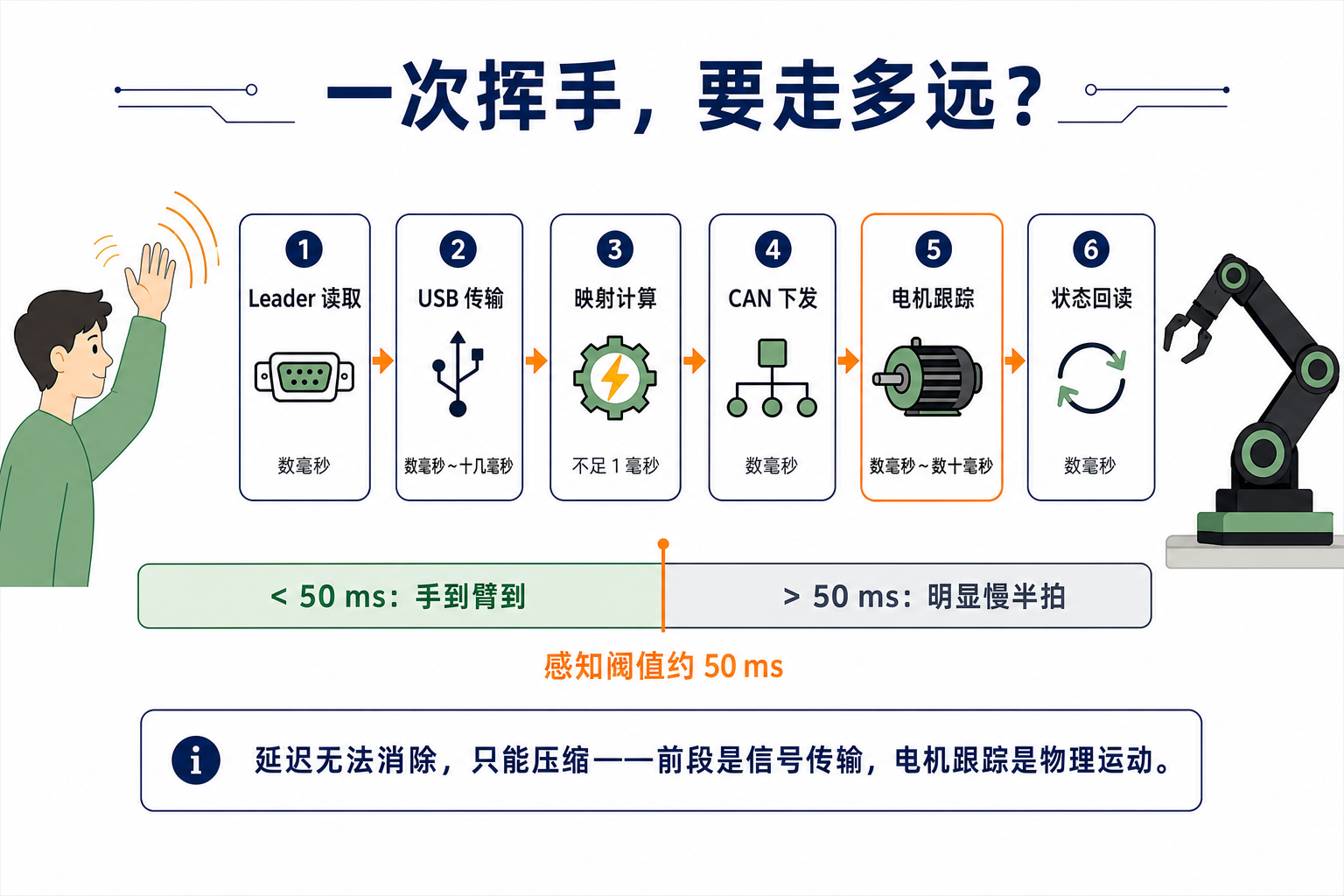
What Is the Control Frequency? Can It Be Changed?
This section uses the 60 Hz teleoperation configuration from the reBot guide: 60 cycles per second of “read leader → map → send CAN → read back,” with a time budget of about 16.7 ms per cycle. Adjust it using the fps parameter in the teleoperate configuration.
- The hardware loop determines the upper limit. One cycle on this hardware already takes more than ten milliseconds; the practical limit is roughly 60–100 Hz. Setting a higher value may not increase the actual rate and can cause cycle-overrun warnings. Measure the results on your own hardware and configuration.
- 60 Hz is sufficient for the manual exercises here. For grasping, transport, and placement, consistent sampling and execution matter more than simply increasing the rate.
Hands-on Practice: Grasp, Transport, and Place
Stable teleoperation lets the arm move, but performing a task reliably takes deliberate practice. The quality of later demonstrations depends on your operating skill. Work through the following two levels.
Exercise 1: Move Light Objects and Get a Feel for the Controls
Place a few lightweight blocks in the workspace and practice:
Move above the target → Lower → Close the gripper → Lift
Goal: complete 10 consecutive attempts without collisions or dropped objects. Perform each sequence smoothly, without hesitation.
Exercise 2: Complete the Transport-and-Place Task
Perform the entire sequence:
Grasp → Transport → Place in the designated container
Goal: complete 10 consecutive attempts while keeping the starting and ending poses broadly consistent.