23. Robot Arm Mathematical Foundations and Coordinate Systems
Chapter 23 of the Seeed Physical AI Beginner's Course — coordinate frames and homogeneous transforms: world, base, joint, end-effector and camera frames, vectors and matrices, translation and rotation matrices, chaining transforms, and Euler angles versus quaternions.
Hardware needed for this stage
What to prepare for this stage. The complete list for every stage is in Chapter 3.
Main control unit
| Item | Buy | Qty |
|---|---|---|
| reComputer Robotics J4012 | 🛒 | 1 |
| NVIDIA Jetson AGX Thor 128G | 🛒 | 1 |
A desktop or laptop is also required: Ubuntu 22.04, GTX 4080 or better with 12GB+ VRAM, 16GB+ RAM.
For this stage
| Item | Buy | Qty |
|---|---|---|
| reBot Arm B601 DM/RS | 🛒 | 1 |
Where this stage sits in the course
The content introduced in these chapters belongs to traditional control, i.e. controlling the robot arm through hard-coded programming. Traditional control is used in the vast majority of deployed projects. Its advantage is stability and reliability, which is especially valuable in industrial production scenarios. Its drawback is that in a new environment it requires re-tuning before it can run stably.
| Chapter | Title | Type | Focus |
|---|---|---|---|
| 23 | Robot Arm Mathematical Foundations and Coordinate Systems | Theory | Frames, vectors, homogeneous transforms, rotation representations |
| 24 | Forward Kinematics, Inverse Kinematics, and the Jacobian | Theory | How joint angles and end-effector pose are connected |
| 25 | Trajectory Planning and Robot Arm Control | Theory | Path vs trajectory, interpolation, feedforward + feedback |
| 26 | Pinocchio and MeshCat | Practice | Run FK / IK / trajectory planning on the real reBot Arm model |
Chapters 23–25 are reference material: in real projects the URDF and the kinematics library do the matrix work for you. Read them once to understand what the numbers mean, then keep them as a look-up reference while you work through Chapter 26.
Why stage 5 comes after stage 4. Stage 3 and stage 4 taught the arm to imitate and to follow language. Those systems are learned: they see the world and act on it, but they do not guarantee anything. The moment you need a straight weld seam, a repeatable grasp or a safe emergency stop, you need the deterministic layer underneath — the mathematics and motion control in this stage. The picture above is the contrast in one image: a VLM describes the world, a VLA acts on it, and everything you learn here decides how the action is actually executed.
| Aspect | VLM (Vision-Language Model) | VLA (Vision-Language-Action Model) |
|---|---|---|
| Input | Image + question | Image + task instruction (+ robot state) |
| Output | A text description | A sequence of robot actions |
| Purpose | Understand and describe | Understand and act |
| Typical models | LLaVA, Qwen-VL | GR00T, pi0 |
| Used in | Perception, annotation, debugging | Real-robot control (Stage 4) |
23.1 Learning Objectives
After this chapter you should be able to:
- Explain what a coordinate frame is and why a robot arm needs several of them.
- Name the world frame, base frame, joint-space frame, end-effector/tool frame and camera frame, and say what each one is attached to.
- Write a translation and a rotation as a 4x4 homogeneous transform matrix, and multiply two of them by hand.
- Explain why homogeneous coordinates exist, and what "non-homogeneous" notation loses.
- Say when to use Euler angles and when to use quaternions.
23.2 Vector and Matrix Basics
Forward and inverse kinematics (covered in the next chapter) involve a large number of vectors and matrices, so building a solid matrix foundation is important. In actual control we do not need to participate in low-level computations ourselves, so this chapter is provided for reference only.
- A vector describes a quantity with direction and magnitude: a position, a velocity, a force.
- A matrix describes a linear mapping: how a vector in one frame becomes a vector in another frame.
- The three objects used everywhere in robotics are the 3x1 position vector , the 3x3 rotation matrix , and the 4x4 homogeneous transform .
A useful sanity check for any rotation matrix :
Worked micro-example: reading a 4x4 transform
Read the columns of as the axes of the child frame expressed in the parent frame:
- child x = -> points down in the parent frame
- child y = -> same as the parent y
- child z = -> points along the parent x
and read as where the child frame's origin sits. That is all a transform is.
23.3 World Frame and Base Frame
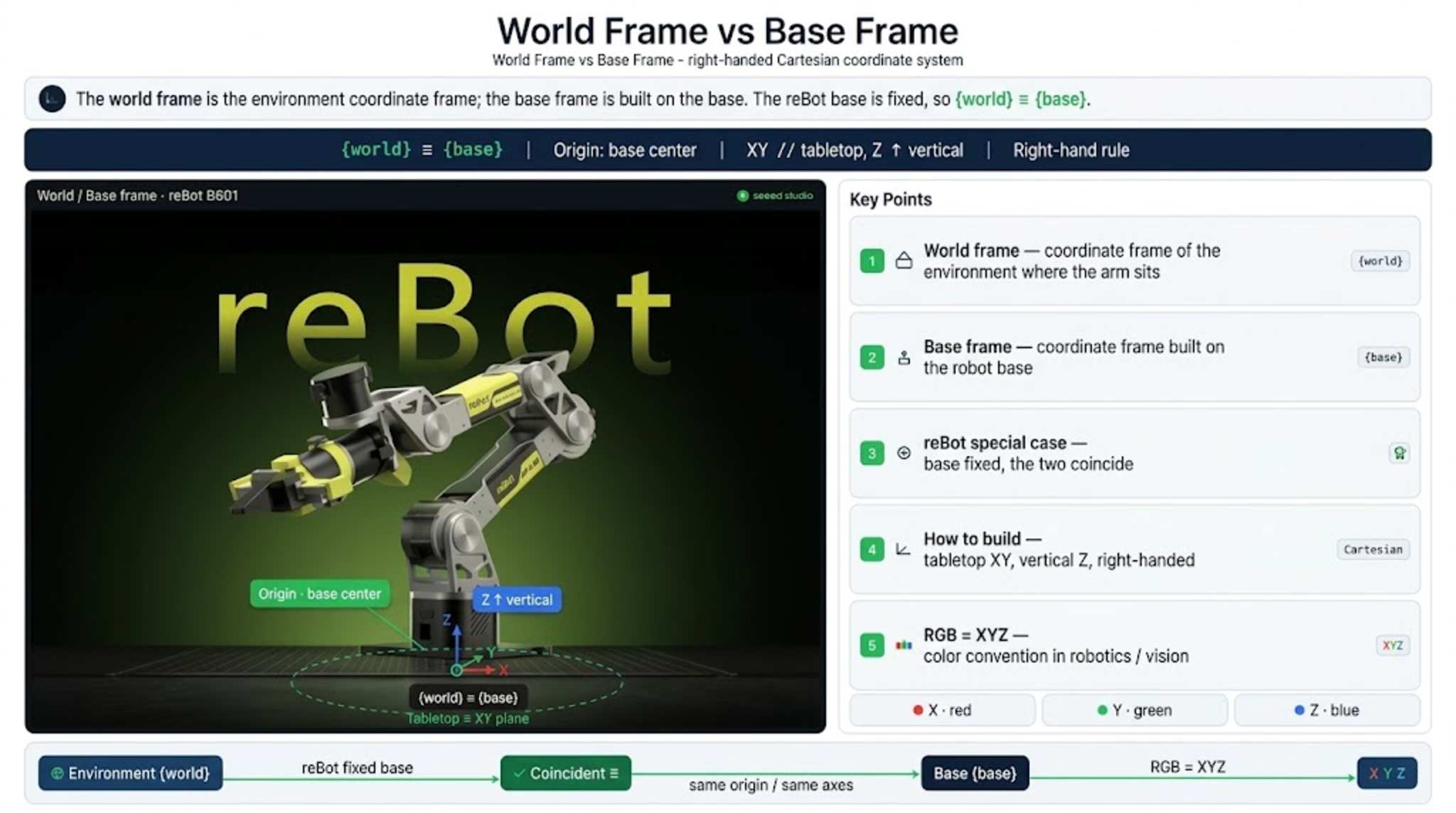
The world frame can be understood as the coordinate frame of the environment in which the robot arm sits; the base frame is established at the robot's base. In the reBot arm design, because the robot base is fixed, the world frame and base frame coincide.
For example: the arm is placed on a table, with the center of the arm base as the origin, the tabletop as the xy plane, and the vertical direction of the table legs as the z axis; the world frame follows the right-hand rule. The base frame also coincides with the world frame. (Commonly used Cartesian frame.)
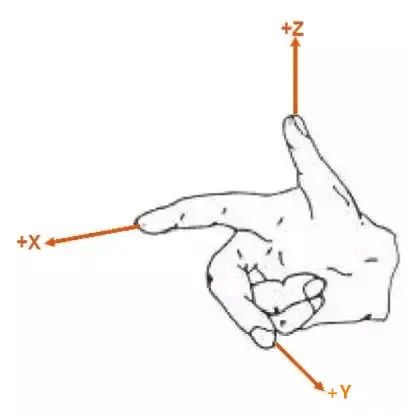
XYZ three-axis color convention in robotics/vision (RGB = XYZ)
| Axis | Color | Common name |
|---|---|---|
| X | 🔴 Red | Red |
| Y | 🟢 Green | Green |
| Z | 🔵 Blue | Blue |
Right-hand rule: point +X along the index finger and +Y along the middle finger; the thumb gives +Z. Rotations about +X, +Y, +Z are positive counter-clockwise when looking back along the axis towards the origin. Every robotics tool (RViz, MeshCat, SolidWorks, URDF) uses this same convention, which is why the RGB = XYZ color mapping is worth memorizing.
23.4 Joint Space Frame and End-Effector Frame
The joint space frame is the most commonly used frame in robot control. It is established on the robot's joints; the number of dimensions equals the number of joints the robot has.
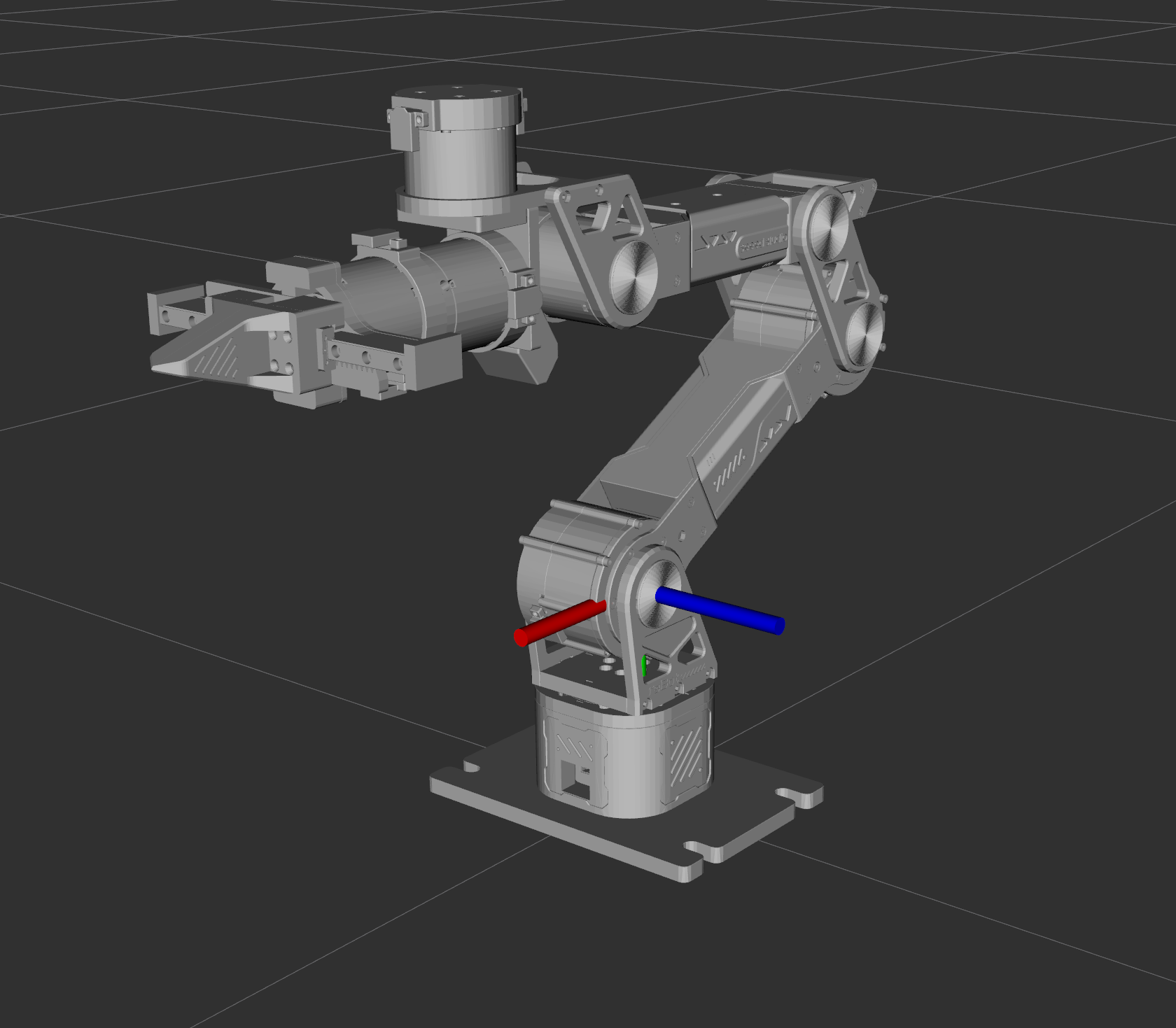
The reBot B601 has six rotary joints plus a gripper, so its joint-space frame is 6-dimensional (7-dimensional if the gripper is carried as an extra axis).
End-effector frame
- Origin: tool center point (TCP)
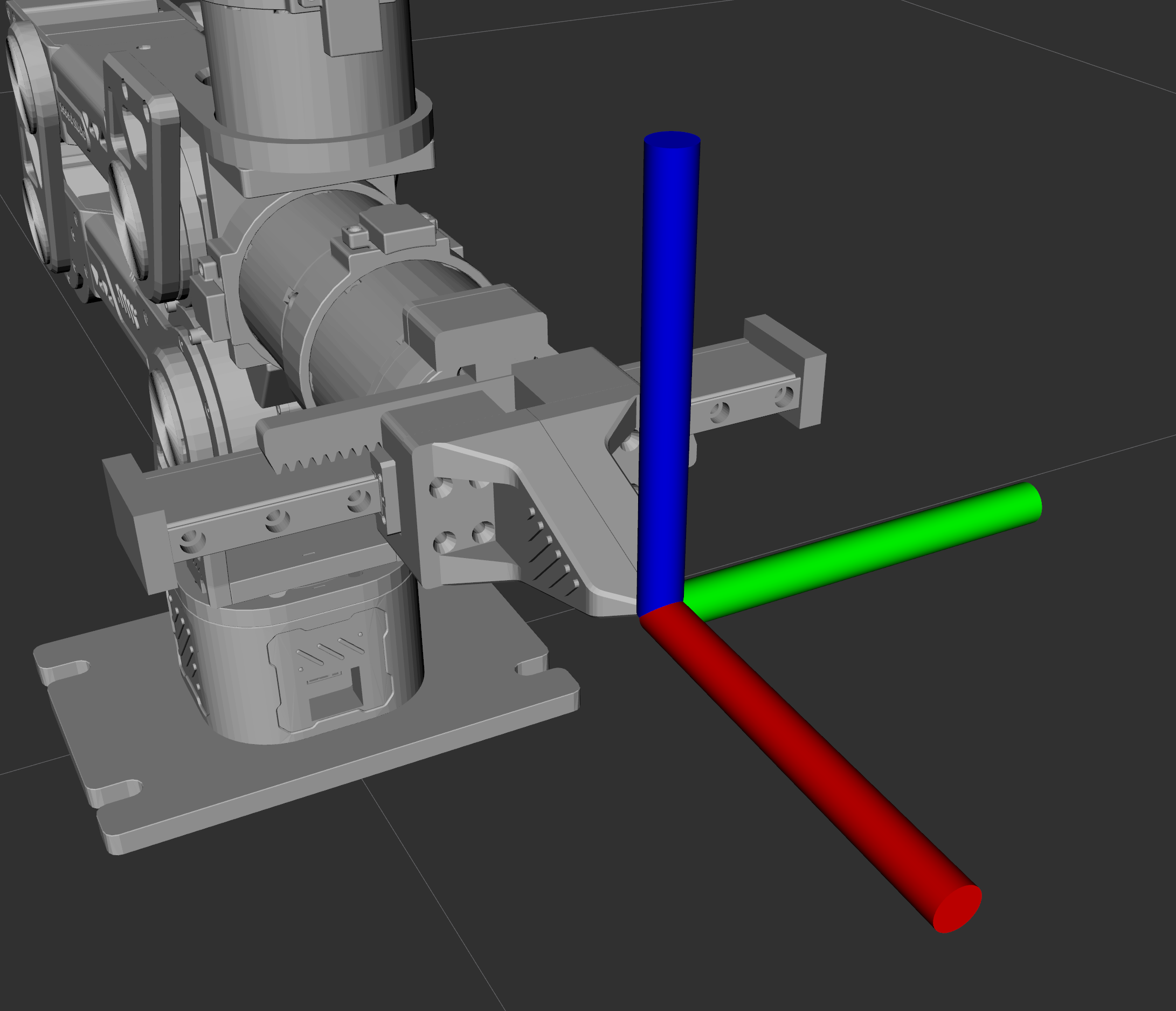
The end-effector frame is established at the robot's end; there is also a tool frame. When we need the end to reach a certain position, we care about the end-effector coordinate; if a gripper is mounted at the end, we care about the gripper coordinate.
| Frame | Attached to | Origin | Typical use |
|---|---|---|---|
| World | The environment | A fixed point on the table / cell | Task-level coordinates, camera work |
| Base | The robot base | Base center | Root of the kinematic chain |
| Joint | Joint | Joint axis | FK / IK internal computation |
| Flange | Last joint output | Flange center | Where a tool is mounted |
| Tool / TCP | The tool itself | Tool center point | Path planning, grasping points |
In one sentence: the world frame is the frame humans most intuitively understand, while the robot relies on the joint space frame to change the position of the end gripper. So we set targets using world coordinates, and use the joint space frame to make the robot move as we intend. The connection between them is coordinate transformation.
23.5 Camera Frame
The camera frame and the end-effector frame are usually obtained through a translation transform.
- Origin: camera optical center
- Convention: z axis forward along the optical axis, x to the right, y down (OpenCV convention; some OpenGL/ROS tools use y up)
| Convention | x | y | z | Right-handed |
|---|---|---|---|---|
| OpenCV / vision | right | down | forward (into the scene) | yes |
| OpenGL / some ROS tools | right | up | backward | yes |
ROS camera_optical_frame | right | down | forward | yes |
Never mix the two conventions silently. A "y down" camera and a "y up" camera differ by a 180 deg rotation about x, and a hand-eye calibration computed with one convention will send the gripper to the wrong side of the object when used with the other.
Where the camera frame appears in a visual grasping pipeline:
23.6 Matrix Representation of Coordinate Transformations
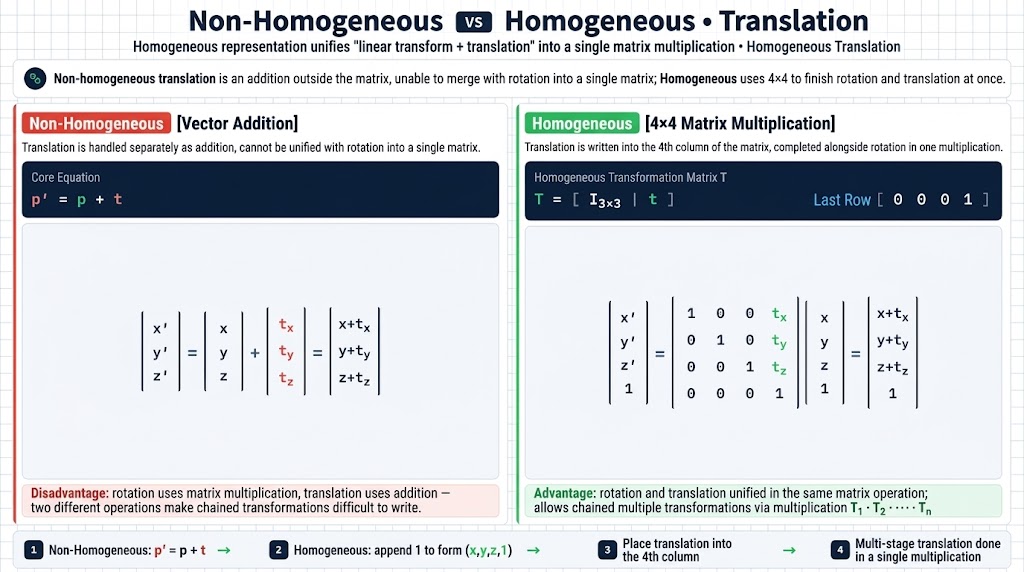
Homogeneous representation unifies "linear transform + translation" into a single matrix multiplication.
Under non-homogeneous representation, translation is an addition outside the matrix and cannot be combined with rotation into a single matrix.
General homogeneous transform
Translation transform
Written out in full, non-homogeneous on the left and homogeneous on the right:
Rotation transform
The three elementary rotation matrices. Writing and keeps the matrices readable; expand them by substituting back when you work them out by hand.
The homogeneous version of each rotation keeps the same 3x3 block with a zero translation column, so a rotation matrix becomes
| Axis | Non-homogeneous | Homogeneous |
|---|---|---|
| X axis | ||
| Y axis | ||
| Z axis |
Why the bottom row is . It carries no physical meaning; it exists so that the matrix product of two transforms is again a transform, and so that a point and a direction can be transformed by the same matrix — the direction ignores the translation, the point does not.
Composing transforms — chaining is just matrix multiplication, and the inverse is cheap:
23.7 Euler Angles and Quaternions
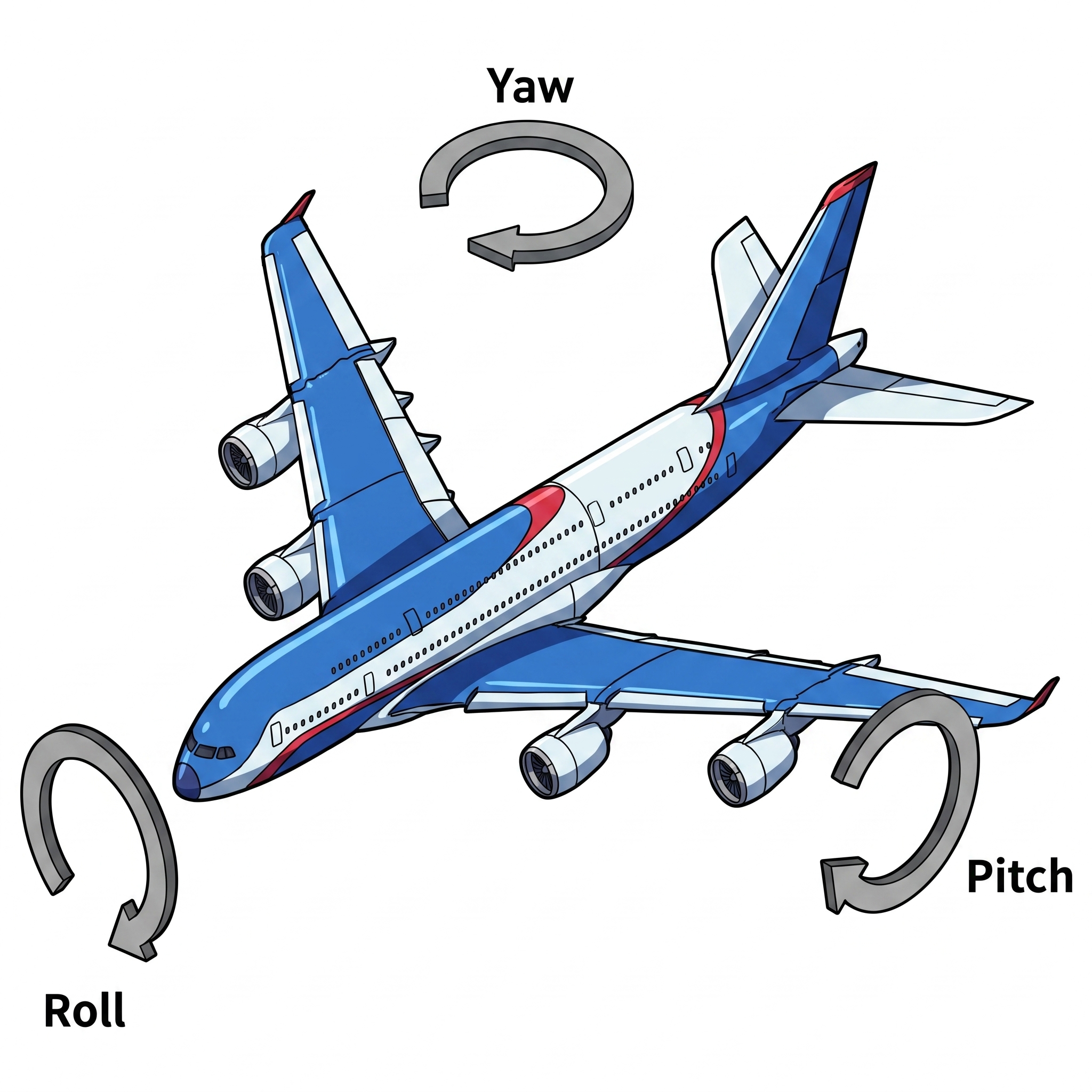
Euler angles vs. quaternions
- Euler angles: 3 numbers, intuitive, have gimbal lock
- Quaternions: 4 numbers (1 constraint), not intuitive, no gimbal lock
| Aspect | Euler angles (roll/pitch/yaw) | Quaternion |
|---|---|---|
| Numbers | 3 | 4, with the constraint |
| Intuitive | Yes, easy to read and log | No |
| Singularity | Gimbal lock when the middle angle reaches +/-90 deg | None |
| Interpolation | Poor (jumps, multi-valued) | Good (slerp) |
| Convention risk | 24 different conventions (order, intrinsic/extrinsic) | Single convention (sign ambiguity only) |
| Typical use | Human input, config files, logs | Internal computation, ROS messages, state estimation |
In engineering: use Euler angles for humans, quaternions for the machine.
On the reBot Arm this shows up concretely: MeshCat and Pinocchio think in rotation matrices and SE(3) objects, while you type roll/pitch/yaw in degrees at the terminal. The demos in Chapter 26 convert between the two for you (rpyToMatrix, matrixToRpy).
- A frame is three axes plus an origin; the arm needs at least world, base, joint, tool and camera frames.
- on the reBot Arm because the base is bolted down.
- A homogeneous transform packs rotation and translation into one 4x4 matrix; chaining is multiplication.
- Euler angles for humans, quaternions for the machine.
- Next chapter: use these transforms to compute the end-effector pose from joint angles — and back again.