25. Trajectory Planning and Robot Arm Control
Chapter 25 of the Seeed Physical AI Beginner's Course — path versus trajectory, joint-space and Cartesian-space interpolation, linear, cubic and quintic polynomials, and the torque command built from feedforward (model and gravity) plus feedback error correction.
25.1 Learning Objectives
Help the user understand how the arm generates smooth, safe continuous motion from a target pose.
After this chapter you should be able to:
- Separate a motion into a path (shape) and a trajectory (timing), and say which one a task constrains.
- Choose between joint-space and Cartesian-space interpolation.
- Explain the difference between linear, cubic and quintic interpolation, and why the start/stop behavior matters.
- Explain feedforward, feedback and gravity compensation, and how the torque command is composed.
25.2 Path vs. Trajectory
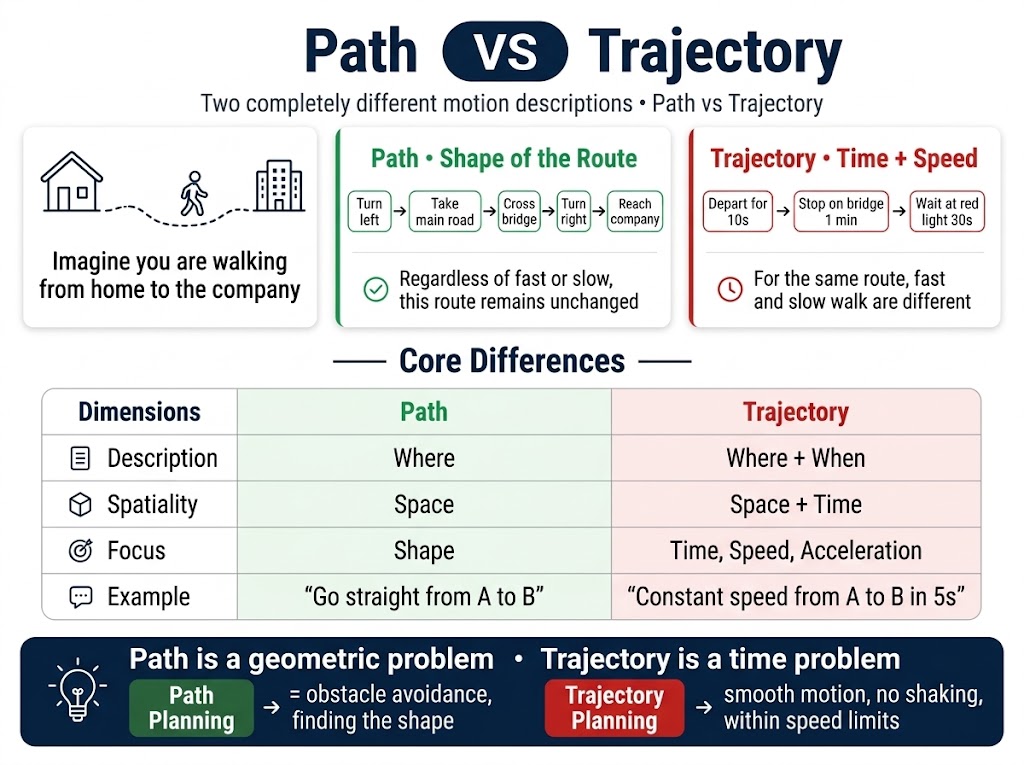
Imagine walking from home to the office.
Path = the route you take (shape)
Turn left out the door, take the main road, cross the bridge, turn right, arrive at the office
No matter how fast or slow you walk, this route stays the same.
Trajectory = the pace you walk at (time + speed)
Walk out the door in 10 seconds, pause on the bridge for 1 minute, wait at the red light downstairs for 30 seconds
Same road, fast or slow walking differs.
Core difference
| Dimension | Path | Trajectory |
|---|---|---|
| Description | Where | Where + when |
| Domain | Space | Space + time |
| Concerns | Shape | Time, velocity, acceleration |
| Example | "Go straight from A to B" | "Go from A to B at constant speed in 5 seconds" |
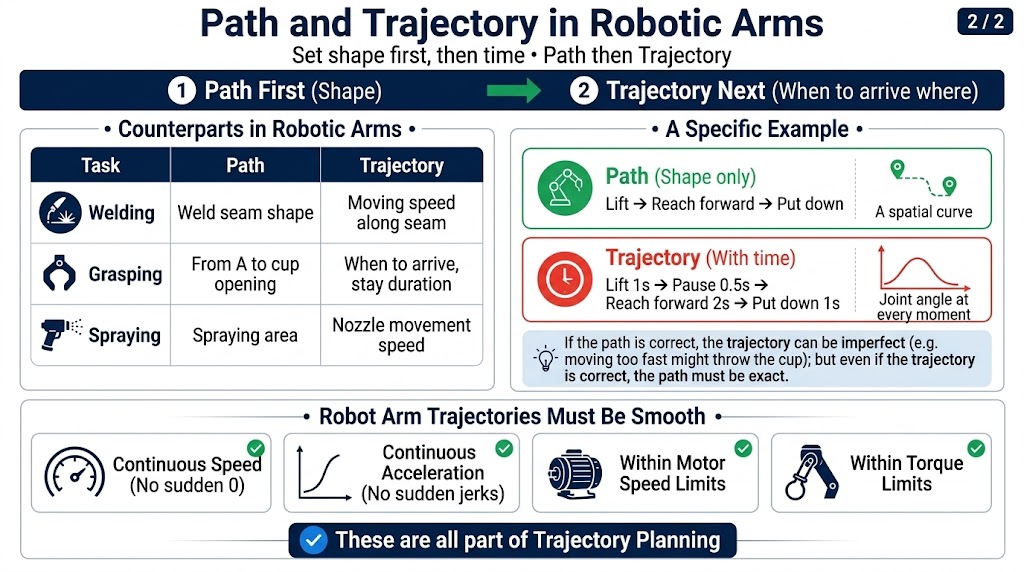
Mapping in the robot arm
| Task | Path | Trajectory |
|---|---|---|
| Welding | Weld seam shape | Movement speed along the seam |
| Grasping | From A to the cup rim | When to arrive, how long to hold |
| Painting | Paint area | Sprayer movement speed |
Planning order:
First define the path (shape)
Then define the trajectory (when to be where)
A concrete example
The arm moves a cup from point A to point B.
Path (shape only):
Lift up -> extend forward -> lower
(a spatial curve)
Trajectory (with time):
Lift 1 s -> pause 0.5 s -> extend 2 s -> lower 1 s
(joint angles at each moment)
The path can be right while the trajectory is wrong (e.g. too aggressive, cup flies off); the trajectory being right requires the path to be right first (a wrong path makes an accurate trajectory useless).
Why discuss them separately
| Stage | Concerns |
|---|---|
| Path planning | Avoid obstacles, find a feasible shape |
| Trajectory planning | Make motion smooth, without shaking or over-speed |
Path is a geometric problem; trajectory is a timing problem.
The arm's trajectory must be "smooth"
Not just "from A to B", but also:
- Continuous velocity (no sudden jumps to/from 0)
- Continuous acceleration (no sudden jerk)
- Within motor speed limits
- Within torque limits
All of these belong to trajectory planning.
25.3 Joint-Space and Cartesian-Space Trajectories
| Dimension | Joint-space trajectory | Cartesian-space trajectory |
|---|---|---|
| Interpolated object | Joint angles | End-effector pose |
| Interpolation function | Polynomial | Line / arc / geodesic |
| Velocity property | Constant joint velocity | Constant end-effector velocity |
So "joint vs. Cartesian" is discussed at both levels, but what is most often asked is at the path level — because that is the key to the arm "doing different things."
Why the path gets more attention
| Task | Which path to choose | Reason |
|---|---|---|
| Welding | Cartesian (straight line) | The weld seam is a straight line |
| Painting | Cartesian (specific curve) | The paint surface must be covered |
| Palletizing | Either joint space | The end path doesn't matter |
| Free transport | Joint space | No need to care about the end path |
| Place after picking | Joint space | No straight-line requirement |
A Cartesian-space trajectory is the natural way to describe a task, but it is the expensive way to execute it: every sampled pose needs an IK solution. Plan in Cartesian space, then check that the resulting joint trajectory respects the joint limits and stays away from singularities — or generate the path in Cartesian space and the timing in joint space.
25.4 Linear Interpolation
Joint-space trajectory:
The joint smoothly goes from 0 deg to 90 deg, taking a value every 10% along the way.
Position-space trajectory:
The end moves in a straight line from to ; an intermediate position is , where the ratio goes from 0 to 1.
Pros & cons
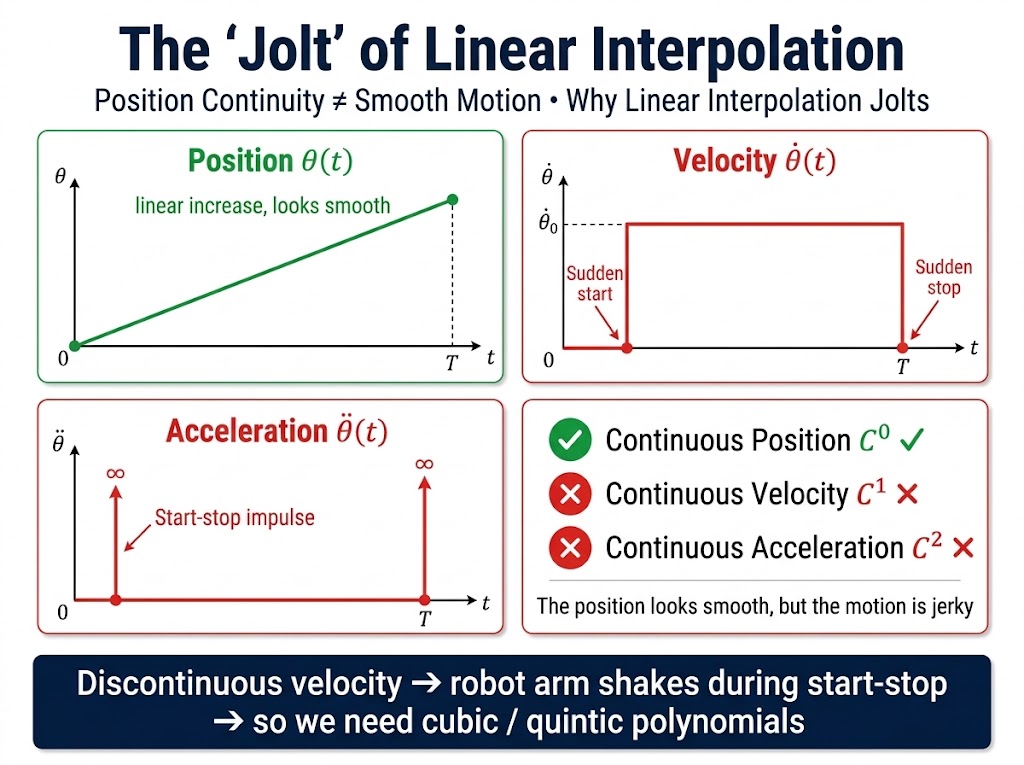
The problem is the velocity profile: the joint moves at a constant, non-zero speed and then stops instantly.
Pros:
- Simple and easy to compute
- Done in one line of code
- High real-time performance
Cons:
- Velocity jumps at the start and end (it is not zero there)
- The arm "jolts" at start/stop
- Not suitable for high-precision tasks
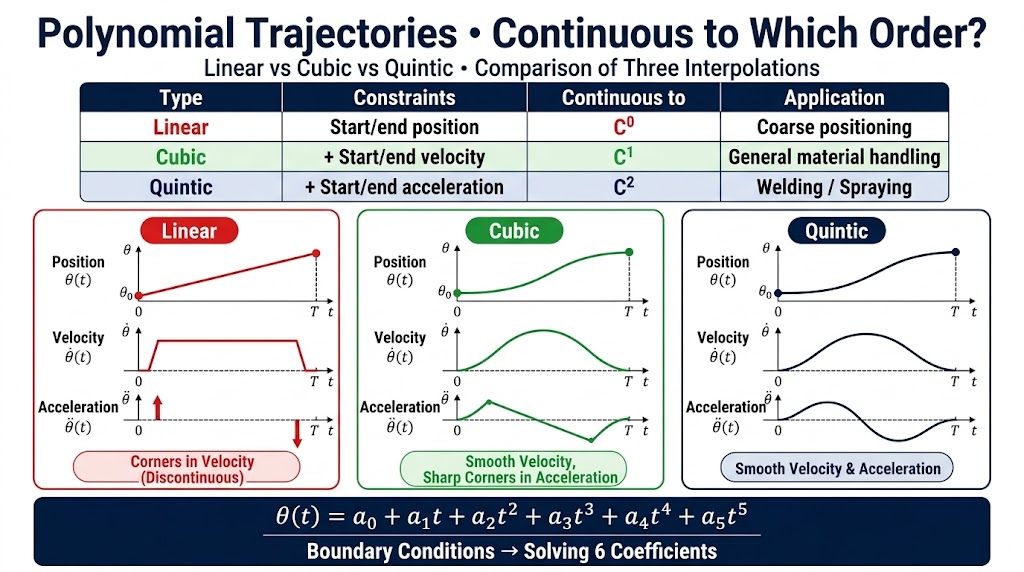
The start/stop "jolt" is the core problem — so finer trajectories use cubic/quintic polynomials.
25.5 Polynomial Interpolation
Why polynomials are needed
Core differences
| Dimension | Linear | Cubic | Quintic |
|---|---|---|---|
| Start/stop velocity | Jump | 0 | 0 |
| Start/stop acceleration | Jump | Jump | 0 |
| Smoothness | Poor | Medium | Good |
| Compute load | Minimum | Medium | Medium |
| Best for | Rough motion | General purpose | High precision |
Applications in robot arms
| Scenario | Which to use |
|---|---|
| Rough transport, palletizing | Cubic |
| Welding, assembly | Quintic |
| Collaborative robots | Quintic (must be stable around humans) |
| High-speed motion | Cubic (sufficient) |
| Research / demo | Quintic (smoothest) |
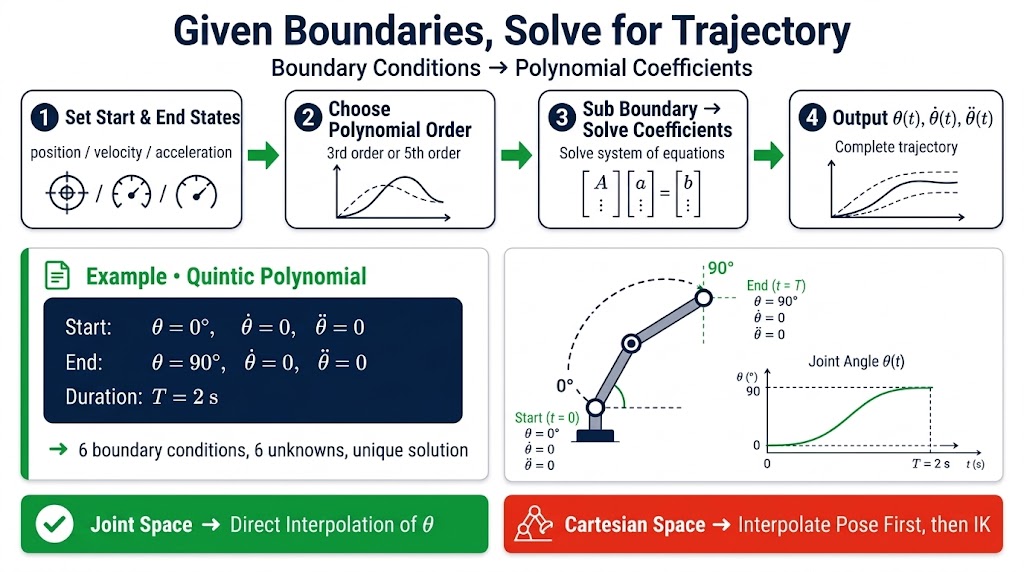
Quintic with rest-to-rest boundary conditions — the arm starts at rest and stops at rest:
Six conditions, six unknowns — a unique solution.
25.6 Feedforward, Feedback, and Gravity Compensation
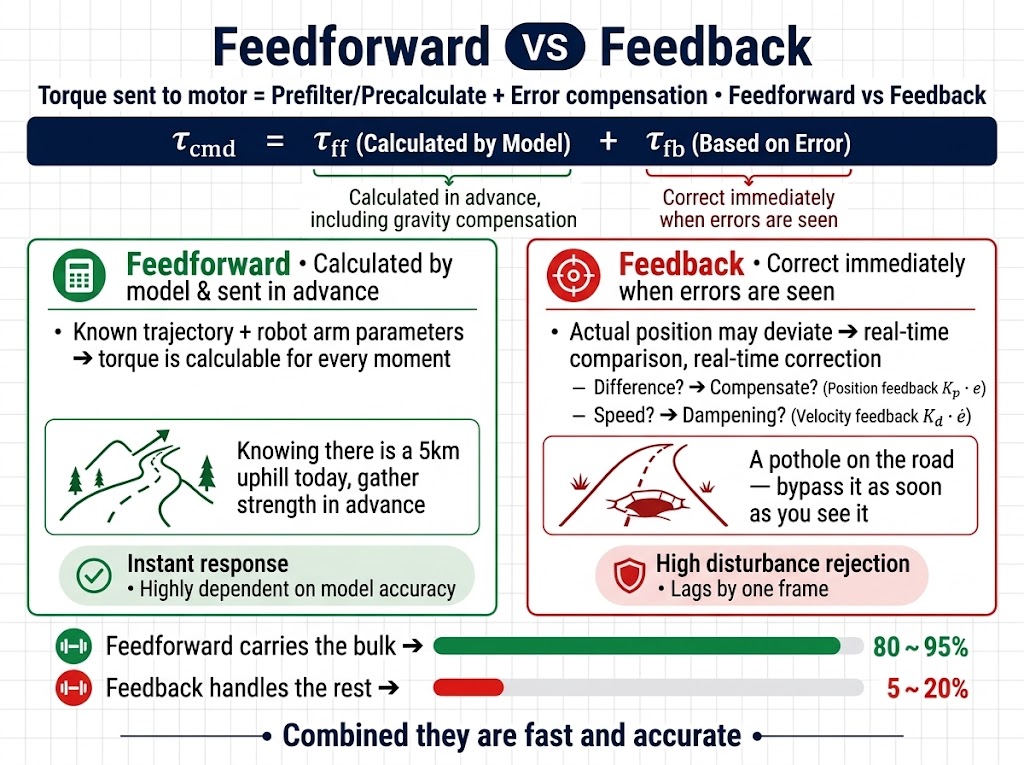
The torque sent to the motor is the sum of two things:
Feedforward: send in advance based on the model
Given the trajectory and the arm's parameters, how much torque is needed at each moment can be computed:
| Model contains | Purpose |
|---|---|
| Inertia term | Overcome inertia when accelerating |
| Coriolis term | Counter coupling when turning |
| Gravity term | Present even when the arm is still; directly cancels gravity |
The gravity term is especially important — the arm must send it even while standing still, otherwise gravity pulls it down.
Analogy: knowing there's a 5 km uphill today, build up the effort in advance.
Feedback: fix when something is wrong
No matter how accurate the model, there are errors and external disturbances -> the actual position drifts.
Feedback is real-time comparison and real-time correction:
- How far off -> add that much (position feedback)
- How fast it drifts -> damp that much (velocity feedback)
Analogy: knowing there's an uphill today, but there are potholes on the road — steer around them when you see them.
How the two work together
| Source | Role | Share (typical) |
|---|---|---|
| Feedforward | Most of the torque | 80~95% |
| Feedback | Compensate small errors | 5~20% |
Feedforward handles the bulk, feedback handles the small remainder — together they are fast and accurate.
Comparison
| Dimension | Feedforward | Feedback |
|---|---|---|
| Timing | Compute in advance | Correct in real time |
| Depends on | Model accuracy | Sensor readings |
| Response | Immediate | Lags one frame |
| Disturbance rejection | Poor | Strong |
| Includes | Includes gravity compensation | Does not |
What the actual controller looks like
Gravity is inside feedforward — no need to compute it separately.
In one sentence
Feedforward sends torque in advance based on the model (including gravity); feedback compensates in real time based on error; gravity need not be mentioned separately — it is the sub-term in feedforward that must be computed even when the arm is still.
- Path = geometry, trajectory = timing; plan the path first, then the timing.
- Joint-space interpolation is cheap and singularity-free; Cartesian-space interpolation is what the task usually asks for.
- Linear interpolation jolts; cubic removes the velocity jump and quintic also removes the acceleration jump.
- The torque command is feedforward (model + gravity) plus feedback (error correction); gravity lives inside feedforward.
- Next chapter: run all of this on the real reBot Arm model with Pinocchio and MeshCat.