26. Pinocchio and MeshCat
Chapter 26 of the Seeed Physical AI Beginner's Course — hands-on Pinocchio and MeshCat on the reBot Arm: installing uv, loading the URDF, and running the forward kinematics, inverse kinematics (damped least squares with line search) and trajectory planning (SE(3) geodesic plus CLIK) demos.
26.1 Learning Objectives
Apply coordinate transforms, kinematics, and trajectory planning theory to a real robot development framework.
Learn to use Pinocchio and MeshCat
26.2 What Pinocchio and MeshCat Give You
Pinocchio is an open-source library for robot dynamics analysis and optimization. It provides efficient forward/inverse kinematics, dynamics computation, and trajectory planning. MeshCat is a web-based 3D visualization tool that can display robot state and motion trajectories in real time.
By reading the robot's URDF model, Pinocchio can do the following.
| Capability | Pinocchio call | Used in this chapter |
|---|---|---|
| Build the kinematic model from URDF | pin.buildModelFromUrdf() | Load reBot-DevArm_fixend.urdf |
| Forward kinematics (all link poses) | pin.forwardKinematics() | FK demo, IK iteration |
| Update frame placements | pin.updateFramePlacements() | Read the end_link pose |
| Frame Jacobian | pin.getFrameJacobian() | Damped least squares IK |
| SE(3) exponential / logarithm | pin.exp6() / pin.log6() | 6D pose error, geodesic interpolation |
| Rotation helpers | pin.rpy.rpyToMatrix(), matrixToRpy() | Reading and printing poses |
Next, use the reBot control repository to try it out.
26.3 Download the Demo and Set Up the Environment
Following the tutorial, first complete the arm initialization.
26.4 Install uv (if not installed)
curl -LsSf https://astral.sh/uv/install.sh | sh
26.5 Sync the Environment (install all dependencies)
git clone https://github.com/Seeed-Projects/reBotArm_control_py.git
cd reBotArm_control_py
uv sync
uv sync creates the virtual environment and installs Pinocchio, MeshCat and the reBot dependencies. Check it before going further:
uv run python -c "import pinocchio, meshcat; print(pinocchio.__version__)"
How to switch between Damiao and Robostride motor configurations
Modify the config/rebotarm_dm.yaml (Damiao) or config/rebotarm_rs.yaml (Robostride) config file, and load the corresponding config in the code.
| Version | Config file | Motor bus | End-effector frame |
|---|---|---|---|
| B601-DM (Damiao) | config/rebotarm_dm.yaml | Damiao serial | end_link (from config) |
| B601-RS (Robostride) | config/rebotarm_rs.yaml | SocketCAN | end_link (from config) |
config/rebotarm.yaml is the entry point: it points to the hardware config (rebotarm_dm.yaml /
rebotarm_rs.yaml), which in turn points to the URDF (reBot-DevArm_fixend.urdf). If a demo cannot
find the model, check this chain first.
26.6 Forward Kinematics MeshCat Visualization Demo
uv run ./example/sim/fk_sim.py

#Open the arm model visualization web address as prompted in the terminal

#Enter angles as prompted
45 -30 15 -60 90 -180

#The arm model moves accordingly
26.7 Walkthrough of the Forward Kinematics Demo
fk_sim.py is a straight-through forward kinematics pipeline: joint angles -> Pinocchio FK -> end-effector pose + MeshCat rendering.
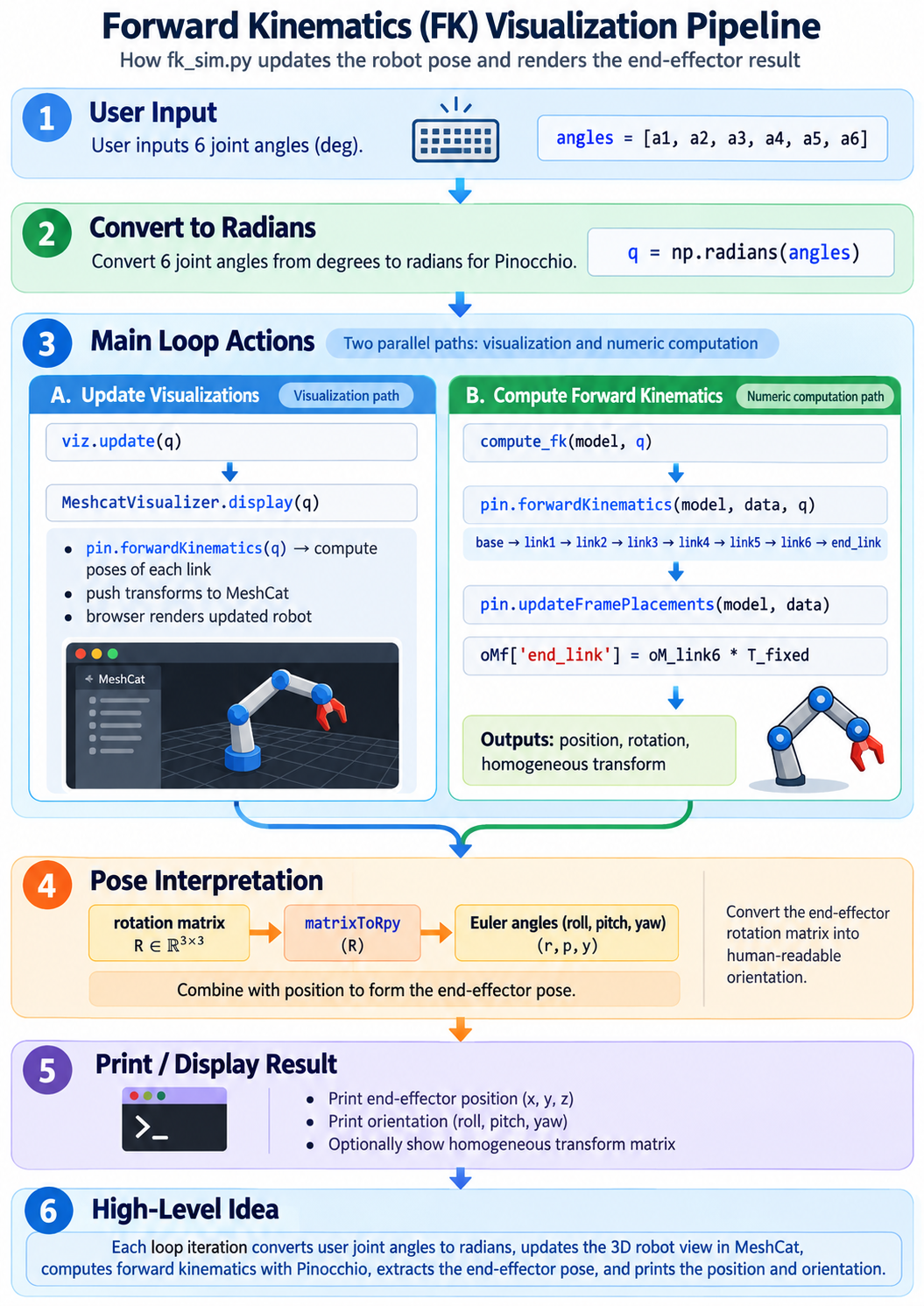
The reason this demo is a good starting point: it is the shortest possible path from "six numbers" to "a 3D model that moves", with no IK, no dynamics and no hardware in between.
26.8 Inverse Kinematics MeshCat Visualization Demo
uv run ./example/sim/ik_sim.py

#Open the arm model visualization web address as prompted in the terminal

#Enter position and orientation as prompted

0.25 0.0 0.25              # position only

0.25 0.0 0.25 0 0 0        # position + orientation
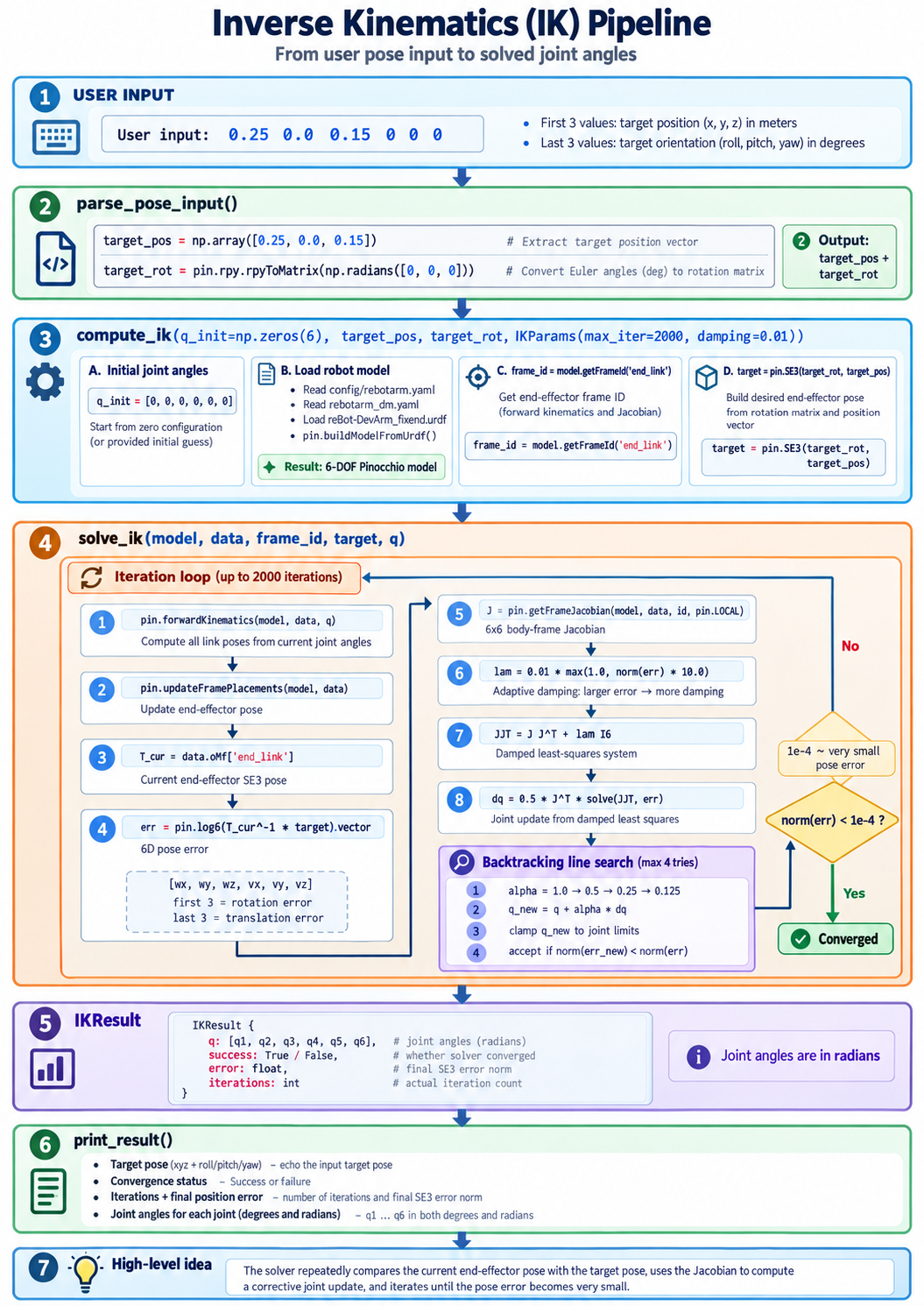
26.9 Walkthrough of the Inverse Kinematics Demo
-
Input target — the user gives the desired end-effector position (xyz) and orientation (roll/pitch/yaw); the program builds them into an SE3 pose object.
-
Load model — read the URDF from the config file, build the robot's kinematic model, and determine which frame the end-effector is on.
-
Forward kinematics — based on current joint angles, compute the end's actual SE3 pose in the world frame.
-
Compute the gap — use
log6to logarithm-map the current SE3 and target SE3, getting a 6-dimensional error (how much rotation differs, how much translation differs). -
Infer the correction — through the Jacobian, "translate" the end error into how much each joint should rotate; solve with damped least squares to prevent joint jumps.
-
Loop to converge — repeat steps 3->5, with line search each time to ensure the error decreases, until the error is below a threshold (~0.1 mm), at which point it is considered reached.
-
Output result — return the solved joint angles (radians), whether it converged, and the final error, for subsequent control.
26.10 Trajectory Planning MeshCat Visualization Demo
uv run python example/sim/traj_sim.py

#Open the arm model visualization web address as prompted in the terminal

#Enter position and orientation as prompted

0.25 0.0 0.25              # position only

0.25 0.0 0.25 0 0 0        # position + orientation
26.11 Walkthrough of the Trajectory Planning Demo
SE(3) Pose
What it is
SE(3) = position + orientation, the complete description of a 3D rigid body's "current state."
- S — special: the rotation part is a proper rotation,
- E — Euclidean: lengths and angles are preserved
- 3 — the space is three-dimensional
Analogy
A car in a parking lot:
- Position = in parking spot P3
- Orientation = nose facing outward
- These two together are the car's current SE(3) pose
Degrees of freedom
- Position: 3 numbers (up/down, left/right, front/back)
- Orientation: 3 numbers (how it is rotated)
- Total 6 DOF
Matrix form (4x4 homogeneous matrix)
- Top-left block = , the rotation matrix (orientation)
- Top-right column = , the translation vector (position)
- The bottom row is a fixed placeholder
Example: position changes -> changes; orientation changes -> changes.
Trajectory Generation
The sampler generates a dense SE(3) pose timeline.
Work is in three layers:
-
Geometry layer — use
log6/exp6on the SE(3) curved manifold to compute a geodesic (shortest path): rotation follows slerp (great circle), translation follows a straight line in the end local frame. Formula , where is the path fraction. -
Time layer — choose a profile to determine , with : LINEAR constant speed, MIN_JERK quintic polynomial (default, zero start/stop velocity and acceleration), TRAPEZOID trapezoidal acceleration/deceleration.
-
Sampling layer — at (50 Hz) cut frames at equal steps; each frame is , output as
CartesianTrajectory: .
Core idea: geometry (path) and time (pace) are decoupled; output is all SE(3), containing no joint information, left for CLIK to solve in reverse.
Car at P3 (position ), nose facing east (no rotation)
Car moved: P3 unchanged, nose now facing north (rotated about )
CLIK
Step 4: log6 error -> feedback signal
- Compute the distance between "where the end is" and "where the end should go" as a 6-dimensional twist
- These 6 dimensions are the error signal in CLIK, equivalent to the deviation in a control system
- Euler angles are not subtracted directly, to avoid the wrap-around blowing up the error computation
Step 5: DLS Jacobian solve -> controller
- This is the "controller" role in CLIK
- Translates the end 6D error into how much each joint should move
- DLS: , equivalent to minimizing
- The damping term prevents from exploding when approaches a singularity (the pseudoinverse tends to infinity at singularities)
Step 6: iteration + line search -> closed-loop structure
- This step gives "closed-loop" its name
- Each round recomputes FK -> recomputes error -> recomputes , forming a feedback loop
- Line search ensures each update actually reduces the error, avoiding oscillation
- Same pattern as PID control: measure error -> compute control -> apply -> measure again
26.12 Inverse Kinematics Control for Smooth Real-Robot Trajectories (8_arm_traj_control.py)
Using inverse kinematics (IK) in MIT mode, within a target time it automatically plans a motion trajectory at constant speed or with smooth acceleration/deceleration, avoiding violent joint shaking.
Input format:
- Position only:
<x> <y> <z>(meters) - Position + orientation:
<x> <y> <z> <roll> <pitch> <yaw>(degrees) - Position + orientation + time (default 2.0):
<x> <y> <z> <roll> <pitch> <yaw> <time>(degrees) - Enter
state: view the actual current radians of each joint. - Enter
end_state: view the end's actual coordinates (m) and euler angles (rad) in space.
How to run:
uv run python example/8_arm_traj_control.py

*#Usage A*
> 0.3 0.0 0.4 *#position only, orientation defaults to 0, move time defaults to 2.0 s*

*#Usage B*
> 0.3 0.0 0.4 0.0 0.0 0.5 *#control position and orientation together: move to the target position while rotating the wrist yaw by 0.5 rad; move time defaults to 2.0 s*

*#Usage C*
> 0.3 0.0 0.4 0.0 0.0 0.0 5.0 *#move the arm to a specific position, taking 5.0 s to ease over there. (Note: if you input a time, the preceding orientation parameters 0 0 0 cannot be omitted)*

> ctrl + c *# exit the system*
26.13 Troubleshooting the Demos
| Symptom | Likely cause | What to do |
|---|---|---|
ModuleNotFoundError: pinocchio | Environment not synced | Re-run uv sync inside reBotArm_control_py |
| MeshCat page opens but stays empty | Browser blocked the local websocket | Use the URL printed in the terminal, try another browser |
FileNotFoundError: ...urdf | Wrong working directory | Run from the repository root, as shown in the commands |
IK returns success: False | Target outside the workspace, or a singular pose | Move the target closer to the base, or increase damping |
| Joints clamp at a limit during IK | Target needs an unreachable orientation | Reduce the orientation demand, or change the initial guess q_init |
- Pinocchio turns the URDF into a kinematic model; FK, Jacobians and SE(3) helpers come from one library.
- MeshCat gives you a browser view of the same numbers the controller uses — invaluable for debugging.
- The three demos are the theory of Chapters 23–25 made executable: FK (pose from angles), IK (angles from pose, DLS + line search), trajectory planning (geodesic + time profile + CLIK).
- On the real arm,
8_arm_traj_control.pyshows the same pipeline driving actual motors through IK in MIT mode.