27. Robot Vision and 3D Perception
Chapter 27 of the Seeed Physical AI Beginner's Course — how a robot turns pixels into 3D: the robot vision pipeline, RGB-D sensing, depth maps, stereo / structured-light / TOF depth cameras, the pinhole camera model with intrinsics and extrinsics, pixel-to-3D conversion and point clouds.
Hardware needed for this stage
What to prepare for this stage. The complete list for every stage is in Chapter 3.
Main control unit
| Item | Buy | Qty |
|---|---|---|
| reComputer Robotics J4012 | 🛒 | 1 |
| NVIDIA Jetson AGX Thor 128G | 🛒 | 1 |
A desktop or laptop is also required: Ubuntu 22.04, GTX 4080 or better with 12GB+ VRAM, 16GB+ RAM.
For this stage
| Item | Buy | Qty |
|---|---|---|
| reBot Arm B601 DM/RS | 🛒 | 1 |
| Realsense 435i or Orbbec Gemini2 Depth Camera or Realsense 405 Stereo Camera | 🛒 | 1 |
| Camera Wrist Mount | 🛒 | 1 |
27.1 Chapter Overview
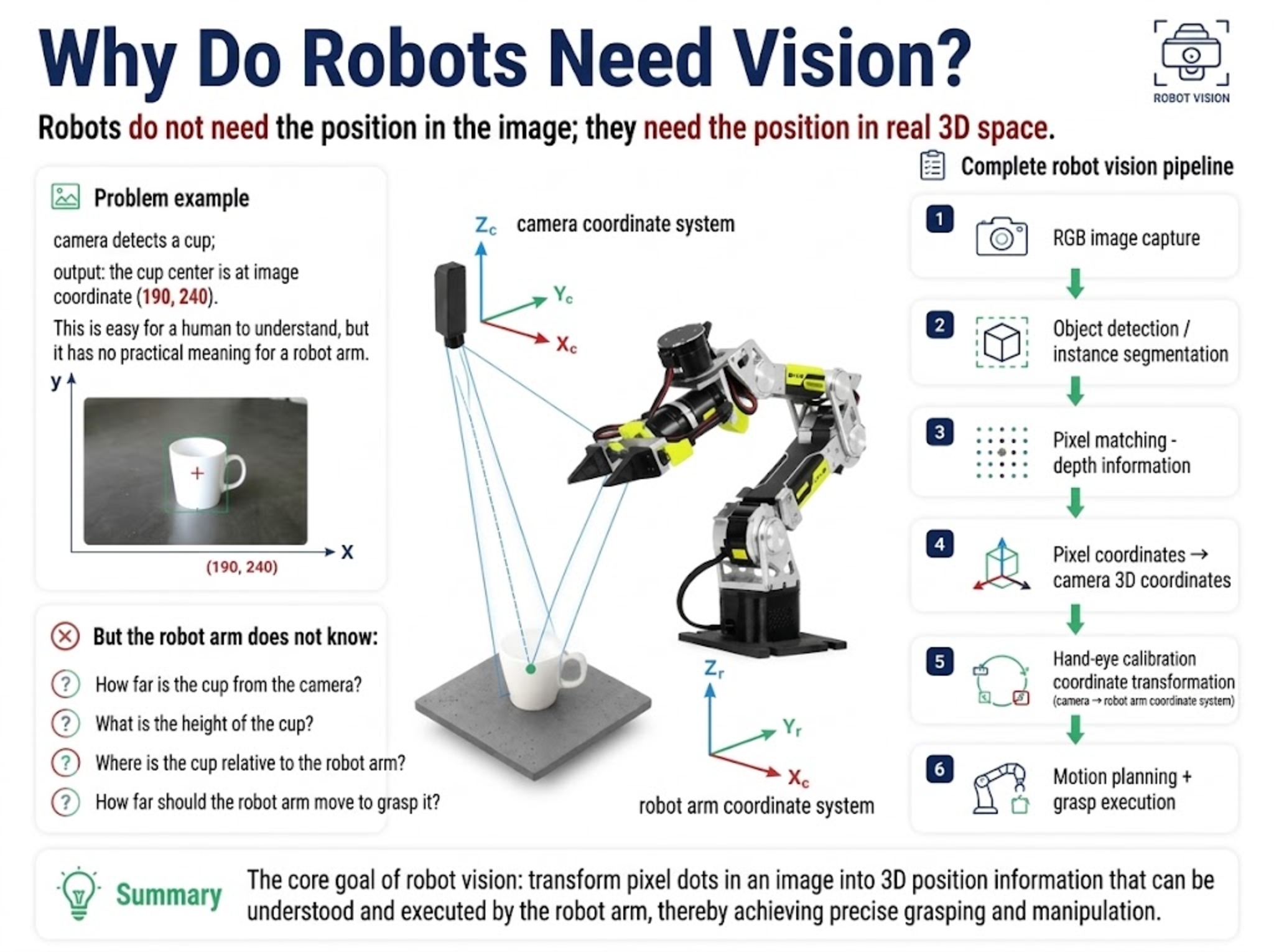
Robot vision is a key way robots perceive the external environment. For a robot arm, merely knowing "where the object is in the image" is not enough; what the robot truly needs is the object's position in real three-dimensional space.
For example: the camera detects a cup and outputs: the cup's center is at image coordinates (190, 240). This is easy for a human to understand, but it has no real meaning for the robot arm.
Because the arm does not know:
- How far the cup is from the camera;
- How high the cup is;
- Where the cup is relative to the arm;
- How far the arm should move to grasp it.
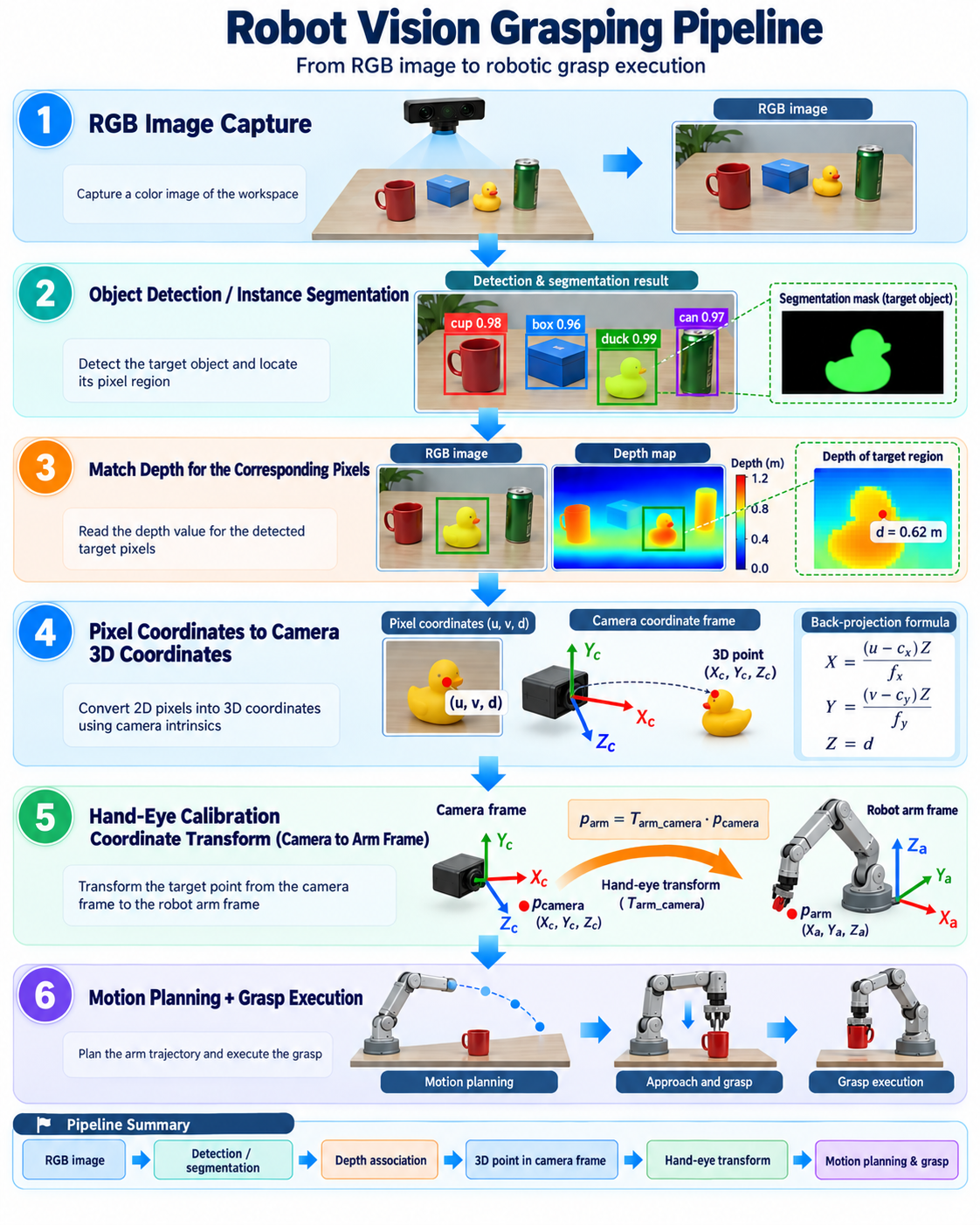
Therefore robot vision must complete a full process:
27.2 Introduction to Robot Vision Systems
What is Robot Vision
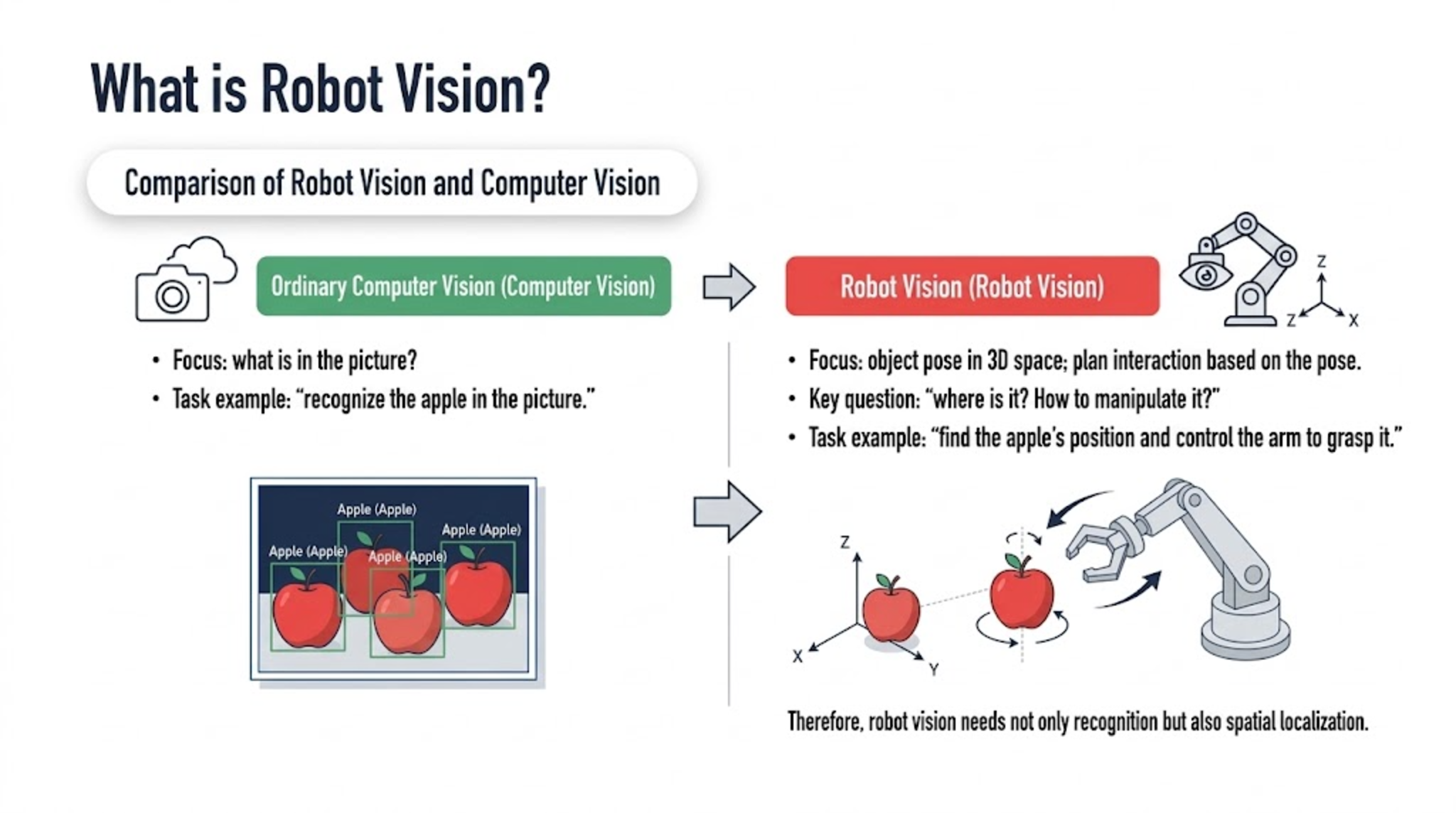
Robot vision means the robot uses cameras and other sensors to acquire environmental information and understands it through algorithms, so as to complete tasks such as localization, recognition, and grasping. Unlike ordinary computer vision:
- Ordinary computer vision asks: what is in the picture?
- Robot vision focuses on two problems: the object's pose in 3D space, and planning the robot's action from that pose to complete interaction—i.e., where is this thing? How should the robot manipulate it?
For example:
- Computer vision task: "recognize the apple in the picture."
- Robot vision task: "find the apple's position and control the arm to grasp it."
So robot vision needs not only recognition but also spatial localization.
Arm Visual Grasping Pipeline
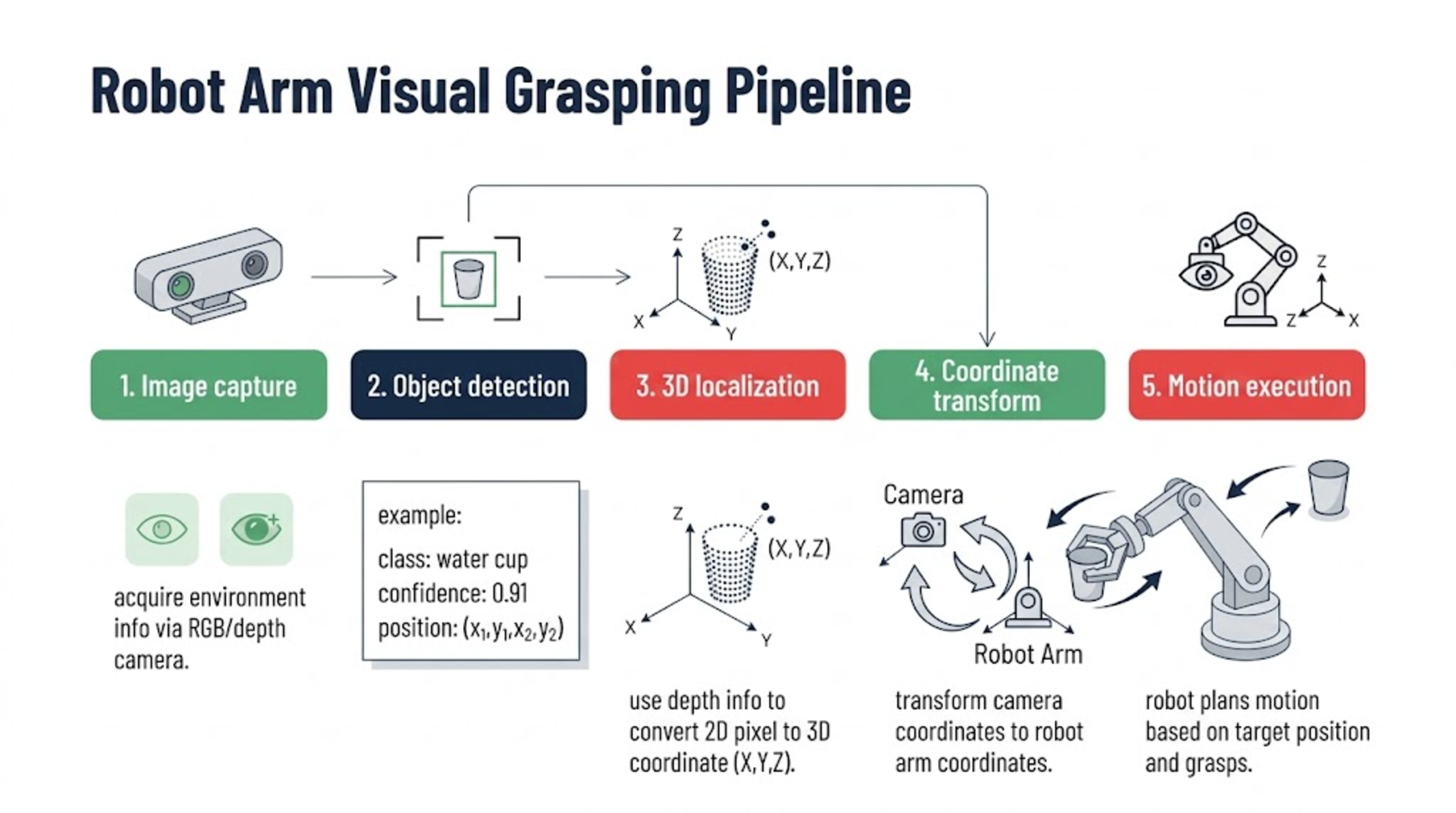
A complete visual grasping system usually includes:
- Step 1: Image capture
- Acquire environmental information via an RGB or depth camera.
- Step 2: Object detection
- Find the target object, classify it, get its position
- For example:
- Class: water cup
- Confidence: 0.91
- Position: (x1,y1,x2,y2)
- Step 3: 3D localization
- Use depth information to convert 2D pixels into 3D coordinates.
- Step 4: Coordinate transform
- Convert camera coordinates into arm coordinates.
- Step 5: Motion execution
- The robot plans motion from the target position and performs the grasp.
RGB Images and Object Detection
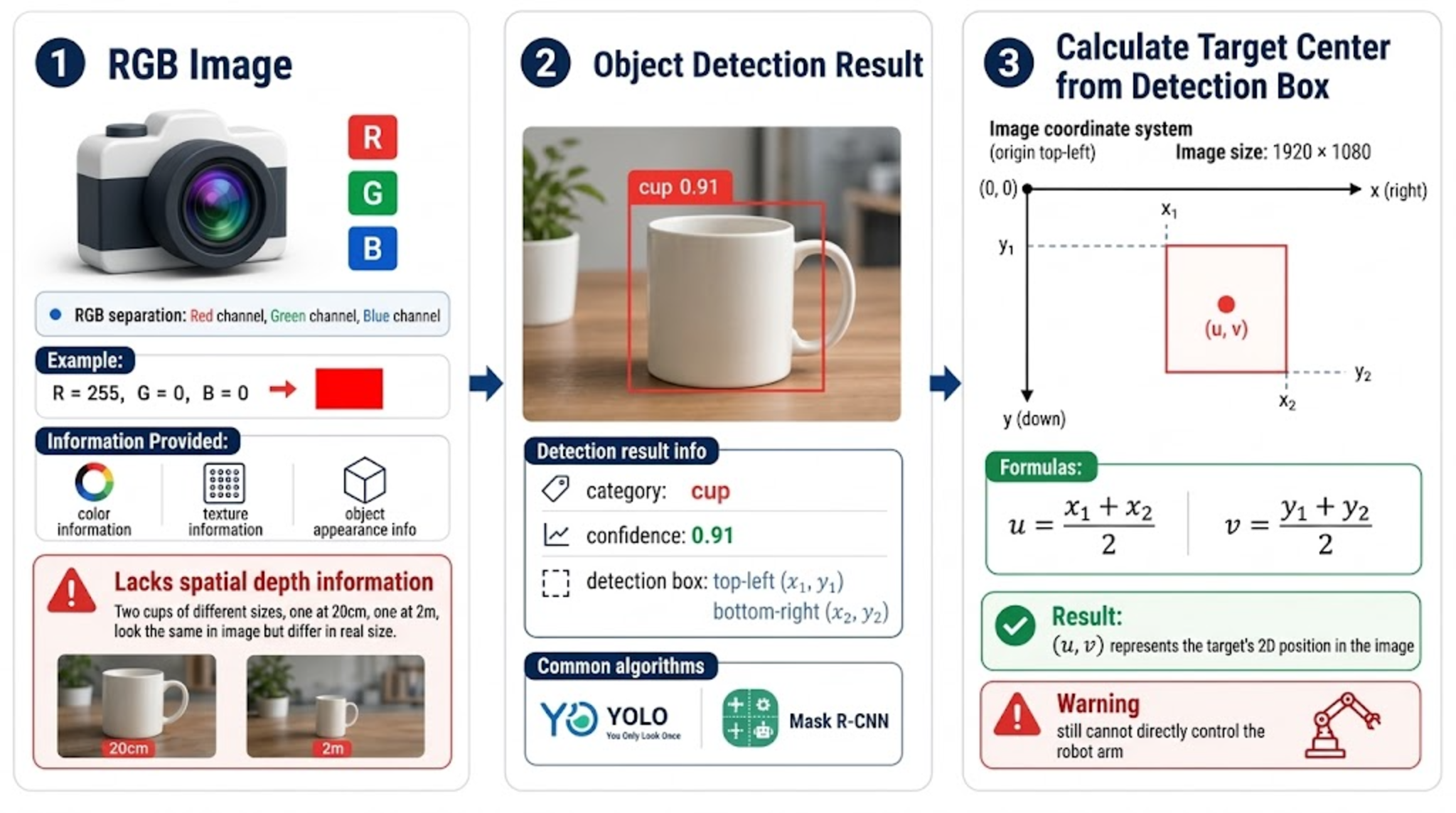
(1) RGB Images
RGB images are the most common visual data used by robots. RGB stands for:
- R: Red
- G: Green
- B: Blue
Each pixel is composed of three values: , , .
RGB images mainly provide: color information, texture information, object appearance information. But RGB images have an important problem: they lack spatial distance information.
- For example: two cups, one 20 cm from the camera, one 2 m away. If they are the same size, they may look very similar in a 2D image. RGB can only tell the robot "where the cup is in the picture," but not "how far the cup is from me."
(2) Object Detection Results
The robot usually does not use the whole image directly; it first runs object detection.
Detection algorithms (YOLO, Mask R-CNN) output:
| Field | Meaning |
|---|---|
| Class | cup — a cup was detected |
| Confidence | 0.91 — the model is 91% sure of that class |
| Bounding box | Top-left (x1, y1), bottom-right (x2, y2) |
(3) Computing the Target Center from the Box
The robot usually needs the target's center. The image the computer sees is essentially a grid of pixels. For a 1920x1080 image, each pixel has its own coordinate: top-left (0,0), bottom-right (1920,1080); x increases to the right, y increases downward. So the detection output (u,v) is essentially image coordinates. Compute:
Result: (u,v). This point is the target's 2D position in the image. But it still cannot directly control the arm.
27.3 Why Robots Need Depth Information
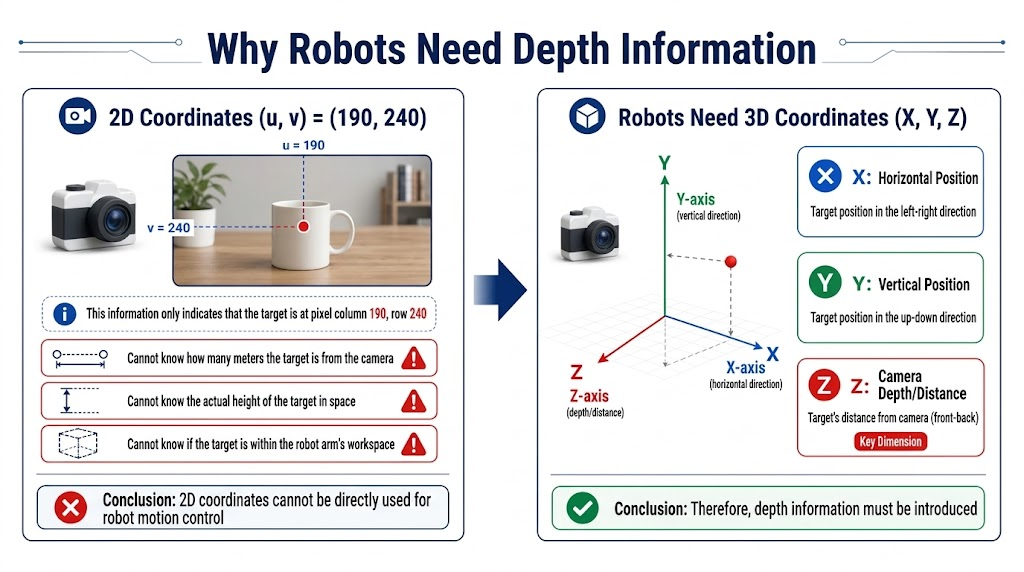
Assume the target center is:
(u,v)=(190,240)
This only says: the target is at column 190, row 240 of the image.
But the robot does not know: how far the target is from the camera; its height in space; whether it is within the arm's workspace. So: 2D coordinates cannot directly drive robot motion.
The robot needs the object's 3D coordinates: x, horizontal position; Y, vertical position; Z, depth from camera. Hence depth information is needed.
27.4 Depth Maps and RGB-D Data
Depth Map
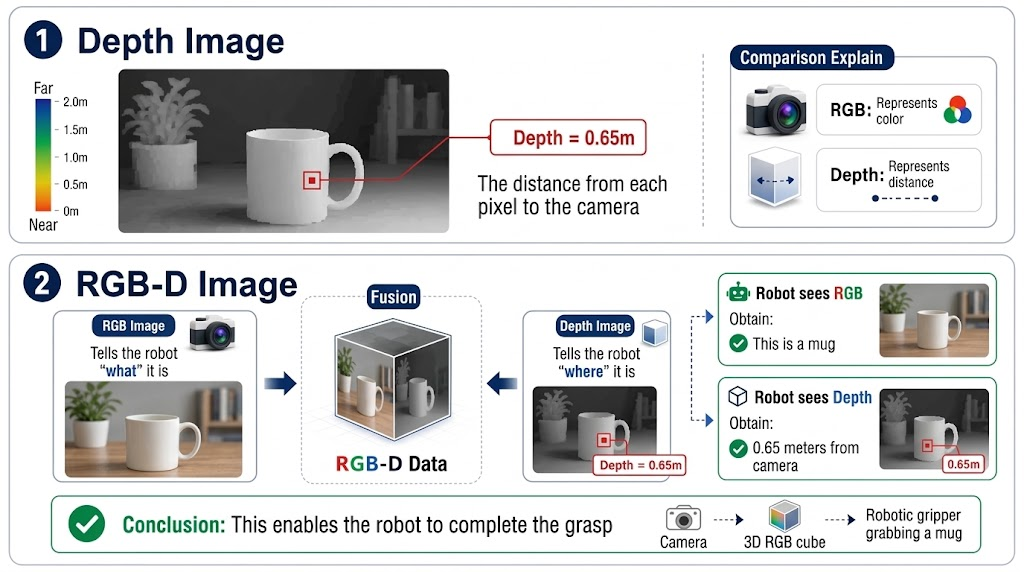
A depth map represents: the distance of each pixel from the camera.
For example: some pixel, Depth=0.65 m.
Meaning: that location is about 65 cm from the camera. Unlike RGB (which represents color), Depth represents distance.
RGB-D Image
Fuse the RGB image and the Depth image to get RGB-D data. RGB-D contains:
- RGB part: tells the robot "what it is"
- Depth part: tells the robot "where it is"
For example:
- The robot sees the RGB image and learns this is a cup; sees the Depth image and learns the cup is 0.65 m from the camera. Only then can the robot grasp.
27.5 Depth Camera Principles
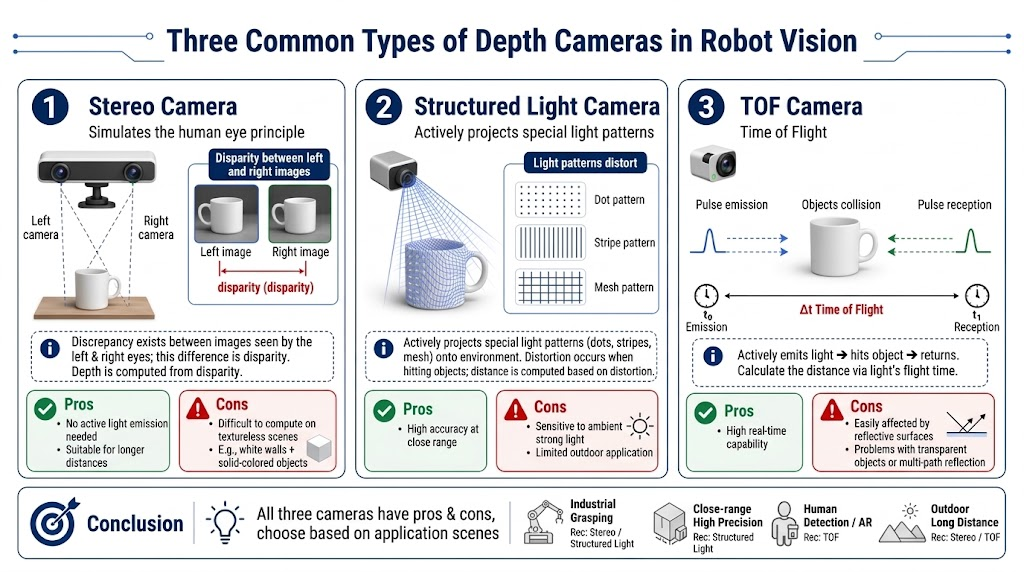
The three common depth cameras in robot vision are stereo cameras, structured-light cameras, and TOF cameras.
| Camera | Principle | Pros | Cons |
|---|---|---|---|
| Stereo | Mimics human eyes: two cameras compare where the same object appears in the left and right view, and depth follows from that disparity | Needs no active illumination; works at longer range | Fails on textureless objects — a white wall and a solid-color object look nearly identical to both cameras |
| Structured light | Actively projects a known pattern (dot matrix, stripes, grid) and reads how the pattern deforms on the object | High accuracy at close range | Easily disturbed by strong light and outdoor conditions |
| TOF (Time Of Flight) | Emits light, waits for the reflection and times the round trip | High real-time performance | Affected by reflective surfaces, transparent objects and multipath reflection |
27.6 Camera Coordinate Model and Intrinsics
Coordinate Systems
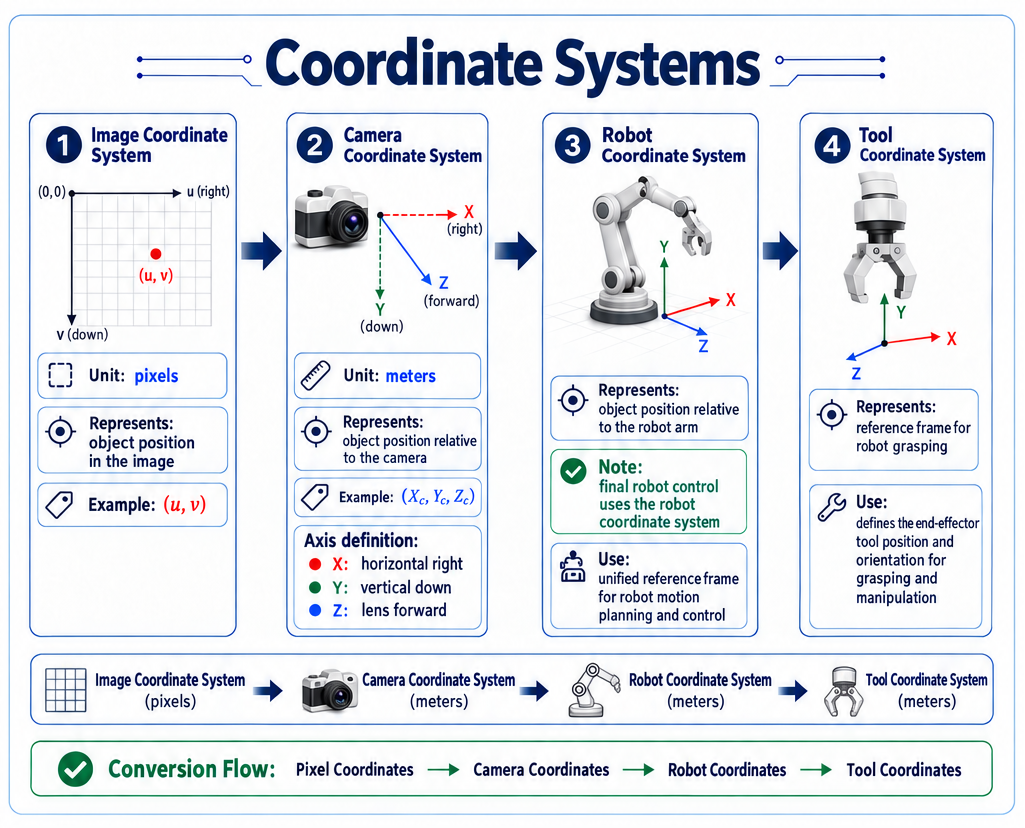
Robot vision involves four coordinate frames:
| Frame | Unit | Meaning | Example |
|---|---|---|---|
| Image frame | Pixels | Where the object is in the picture | (u, v) |
| Camera frame | Meters | Where the object is relative to the camera | (Xc, Yc, Zc) — X rightward, Y downward, Z out of the lens |
| Robot frame | Meters | Where the object is relative to the arm; the arm is ultimately controlled in robot coordinates | — |
| Tool frame (end gripper frame) | Meters | The frame the arm uses to execute a grasp | — |
Camera Intrinsics
Why are intrinsics needed?
- Because a 2D image is not real space. The camera projects 3D space to a 2D image; this is called projection, and intrinsics describe that projection. With intrinsics you can reverse-compute 2D pixels back to 3D space—that is, intrinsics describe how the camera forms an image.
| Parameter | Meaning |
|---|---|
fx, fy | Focal length in x and y (pixels) |
cx, cy | Principal point in x and y — the image center (pixels) |
k1, k2, k3, p1, p2 | Distortion coefficients |
- Lens distortion offsets pixel positions near the image edges. Without undistortion, the (u,v) pixel coordinates themselves have error, and the 3D conversion drifts. In practice, undistort the image first, then use the pixel coordinates.
27.7 Converting Pixels to 3D Coordinates
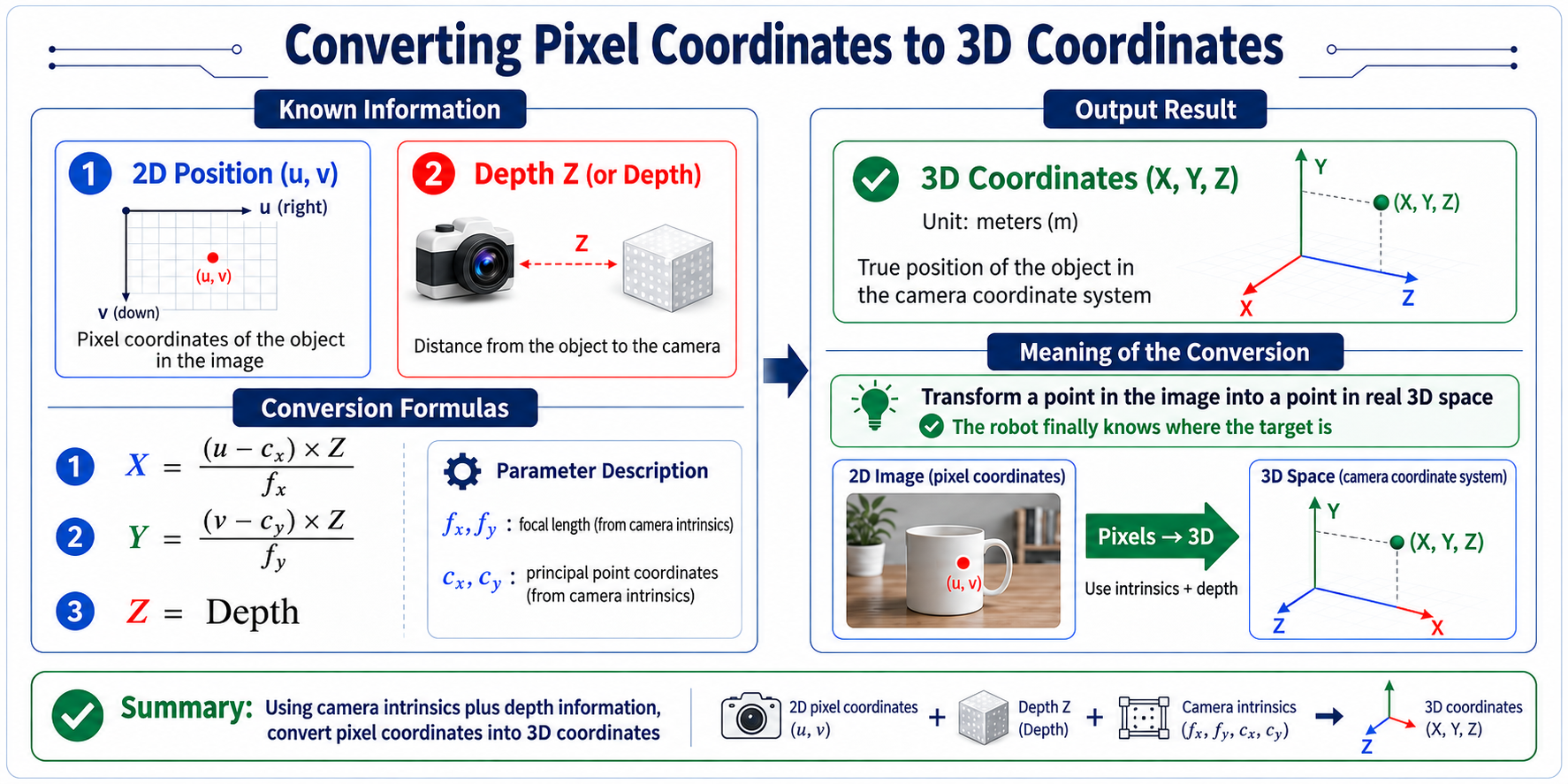
Given the following information about the object:
- 2D position: (u,v)
- Depth: Z
Using intrinsics, get the object's:
- (X,Y,Z)
Formulas:
The meaning: turn a point on the picture into a point in real space, so the robot finally knows where the target is.
27.8 Camera Extrinsics and Coordinate Transform
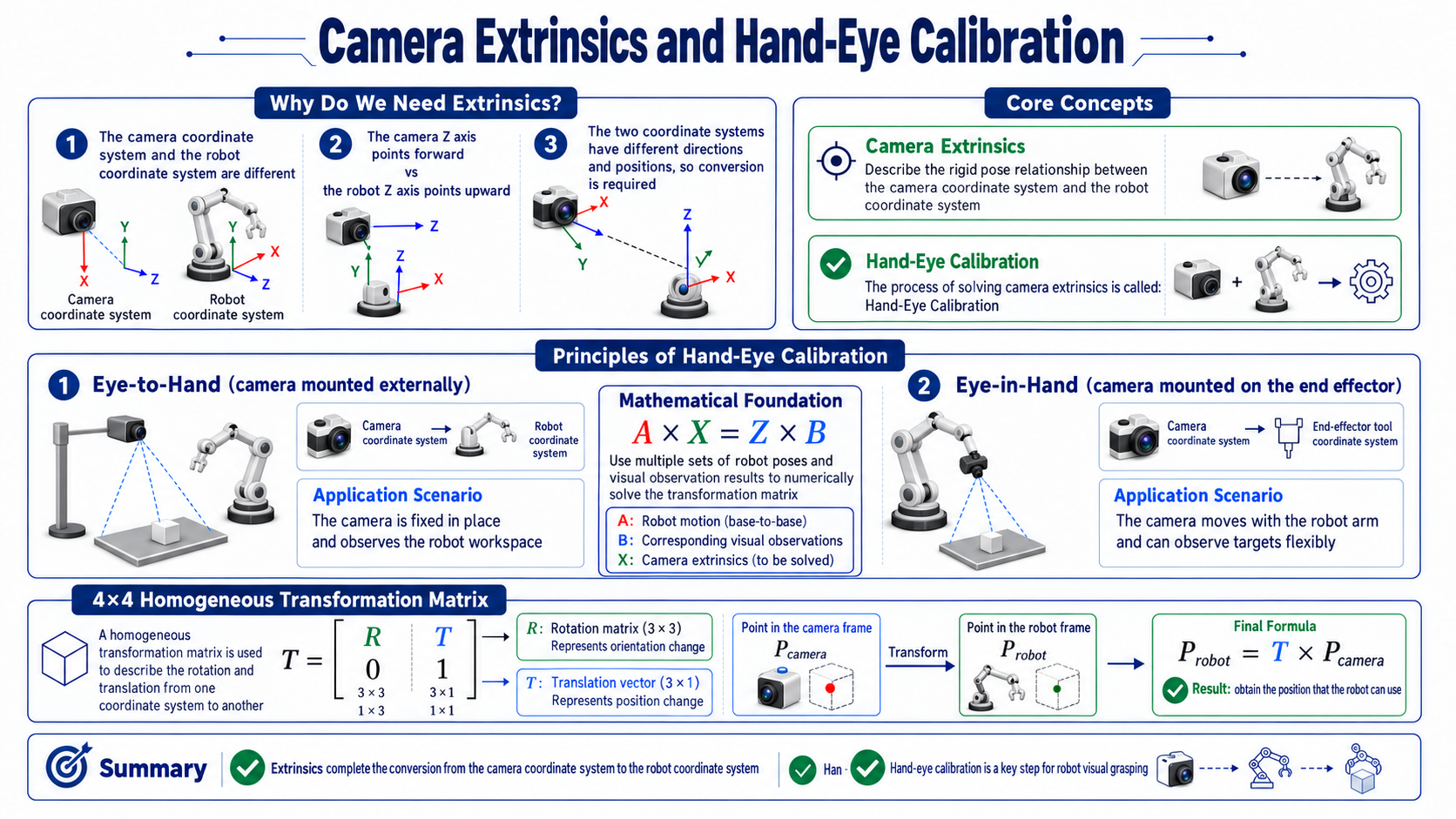
Why are extrinsics needed?
- Because the camera frame and robot frame differ. For example, the camera's Z axis points forward, while the robot's Z axis points up. The two frames differ in both orientation and position, so a transform is needed. Camera extrinsics describe the rigid-body pose relationship between the camera frame and the robot frame; solving for them is called hand-eye calibration.
Hand-eye calibration principles
- Eye-to-Hand: solve the transform from camera frame to arm base frame
- Eye-in-Hand: solve the transform from camera frame to arm end-tool frame
- The mathematical basis is : by collecting multiple pairs of arm poses and visual observations, numerically solve for the transform X.
Calibration matrix
Calibration error and grasp point, homogeneous transform X
- Robots usually use a 4x4 matrix to represent coordinate transforms.
- The matrix contains:
- Rotation matrix R, representing orientation change.
- Translation vector T, representing position change.
- Finally: , giving the position the robot can use.
27.9 Point Clouds
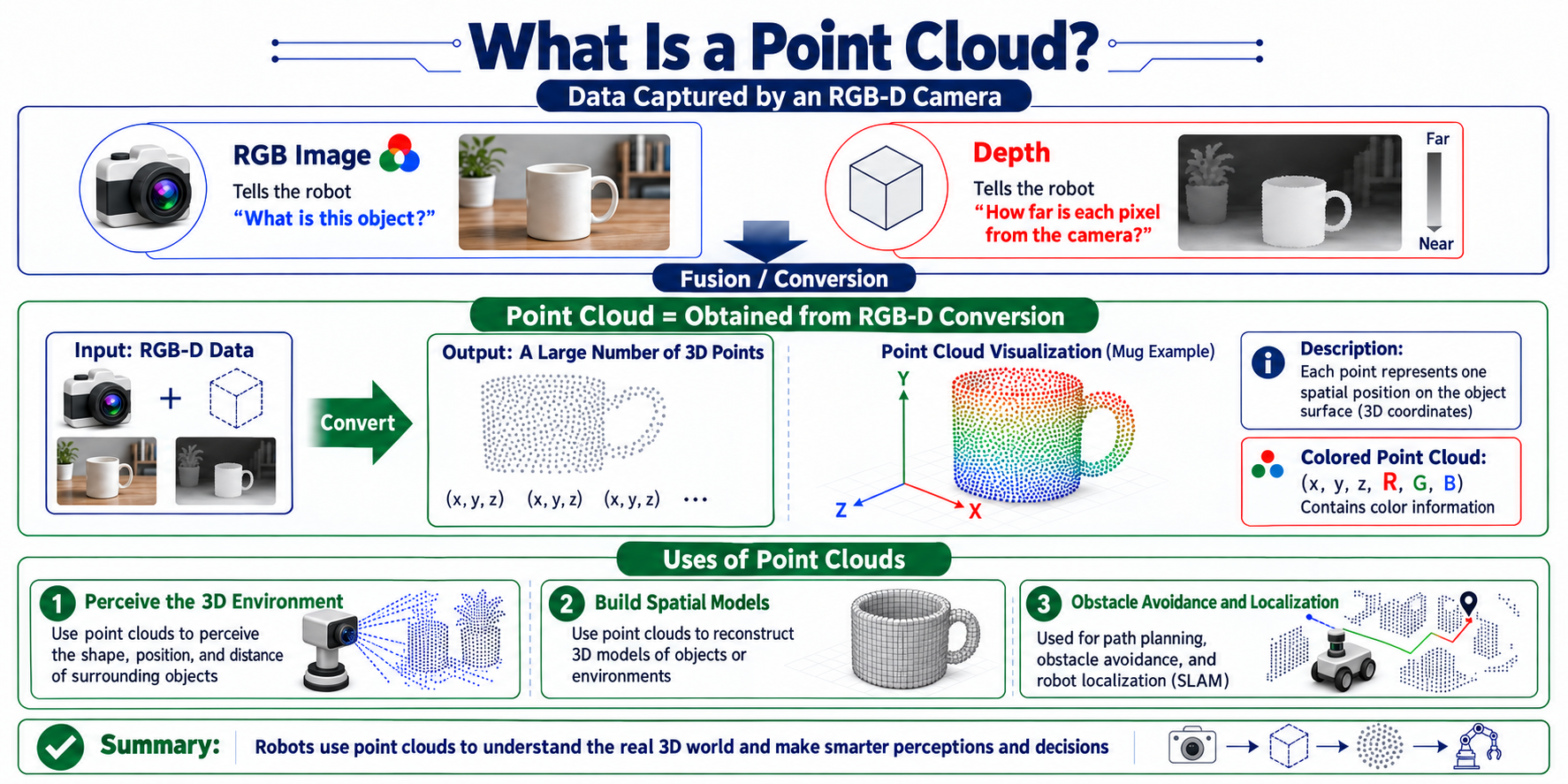
What is a point cloud?
- RGB-D camera data usually includes
- RGB image: tells the robot what this thing is?
- Depth: tells the robot how far each pixel is from the camera?
- A point cloud is obtained by converting RGB-D:
Uses of point clouds
- Robots can use point clouds to perceive the 3D environment, build spatial models, avoid obstacles, and localize.