28. Object Detection and Hand-Eye Calibration
Chapter 28 of the Seeed Physical AI Beginner's Course — object detection and hand-eye calibration: the vision task taxonomy, YOLO and open-vocabulary detection, oriented bounding boxes, NMS and mAP, ArUco markers with solvePnP, AX = XB hand-eye calibration, and 6-DoF grasp pose estimation with GraspNet.
28.1 Chapter Overview
In the last chapter we learned the basic pipeline of robot vision: environment -> camera capture -> 2D image -> depth information -> 3D space coordinates -> robot coordinates, but we did not dwell on the algorithmic principles and implementation details of each link. This chapter goes one level deeper into each link so the reader understands the mathematics and engineering trade-offs behind the algorithms.
In a real robot system, the robot does not face an already annotated target position. So four core questions must be solved in depth:
- Question 1: Why is the detection algorithm YOLO? How does YOLOE let you define custom classes?
- See: object detection algorithm principles (28.3)
- Question 2: Why use ArUco instead of a chessboard for camera calibration?
- See: ArUco marker principles (28.4)
- Question 3: Why can active depth cameras directly produce a depth map? How are depth and RGB aligned?
- See: active depth camera principles (Chapter 27, section 27.5)
- Question 4: How is a 6-DoF grasp pose estimated from an image?
- See: 6-DoF grasp pose estimation (28.6)
- This chapter builds a deeper understanding:
- Detection algorithms (YOLOE / OBB) -> ArUco camera calibration -> active depth camera principles -> 6-DoF grasp pose estimation
28.2 Visual Task Taxonomy
The Task Chain in Robot Vision
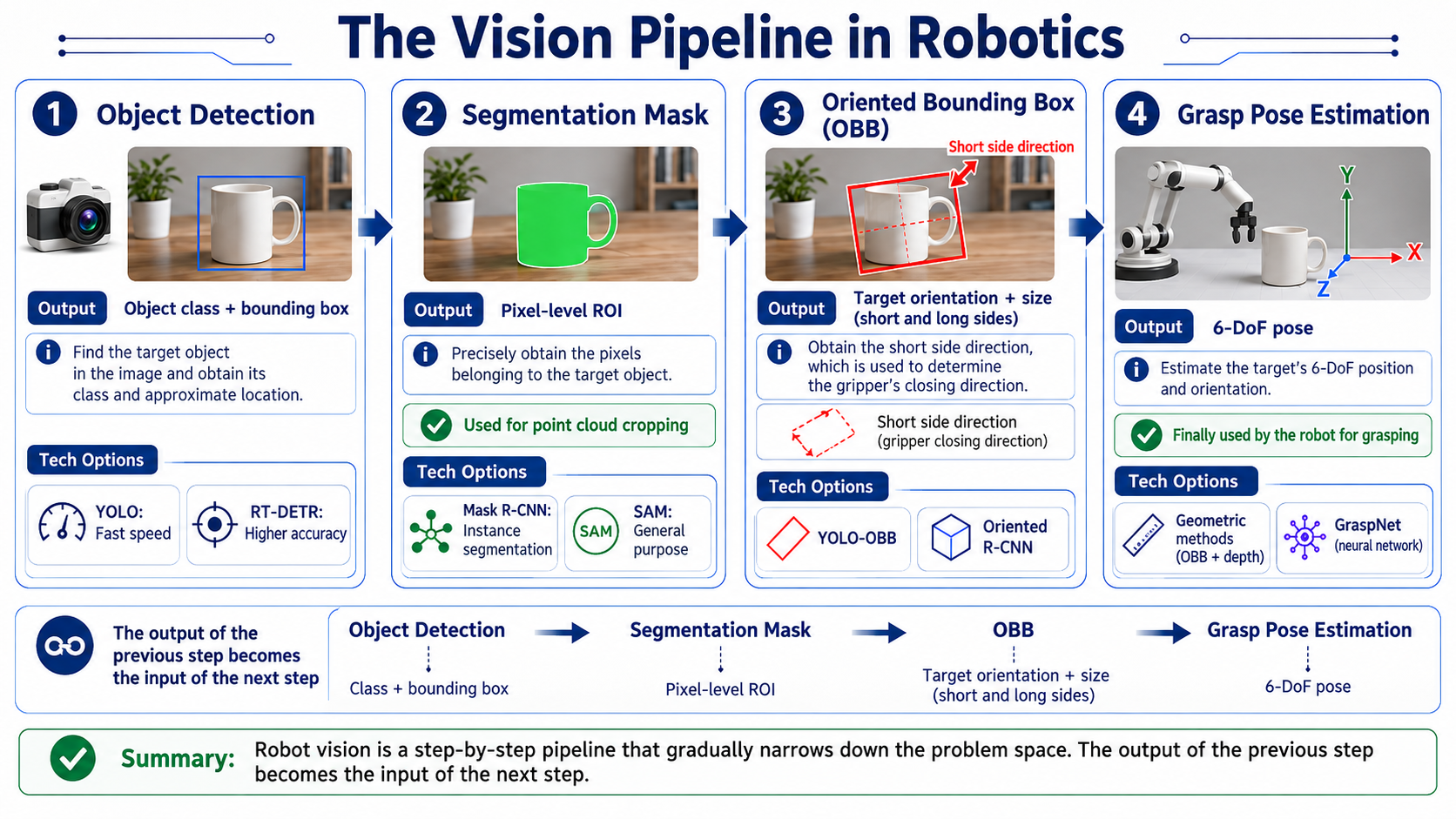
Each stage has its own technical choices:
| Stage | Output | Typical algorithms |
|---|---|---|
| Object detection | Class + coarse position | YOLO (speed) or RT-DETR (accuracy) |
| Segmentation | Pixel-level ROI, used to crop the point cloud | Mask R-CNN (instance) or SAM (zero-shot) |
| Oriented bounding box | Short-edge direction = gripper open/close direction | YOLO-OBB or Oriented R-CNN |
| Grasp pose estimation | 6-DoF pose | Geometric method (OBB + depth) or GraspNet (neural network) |
Comparison of Four Visual Tasks
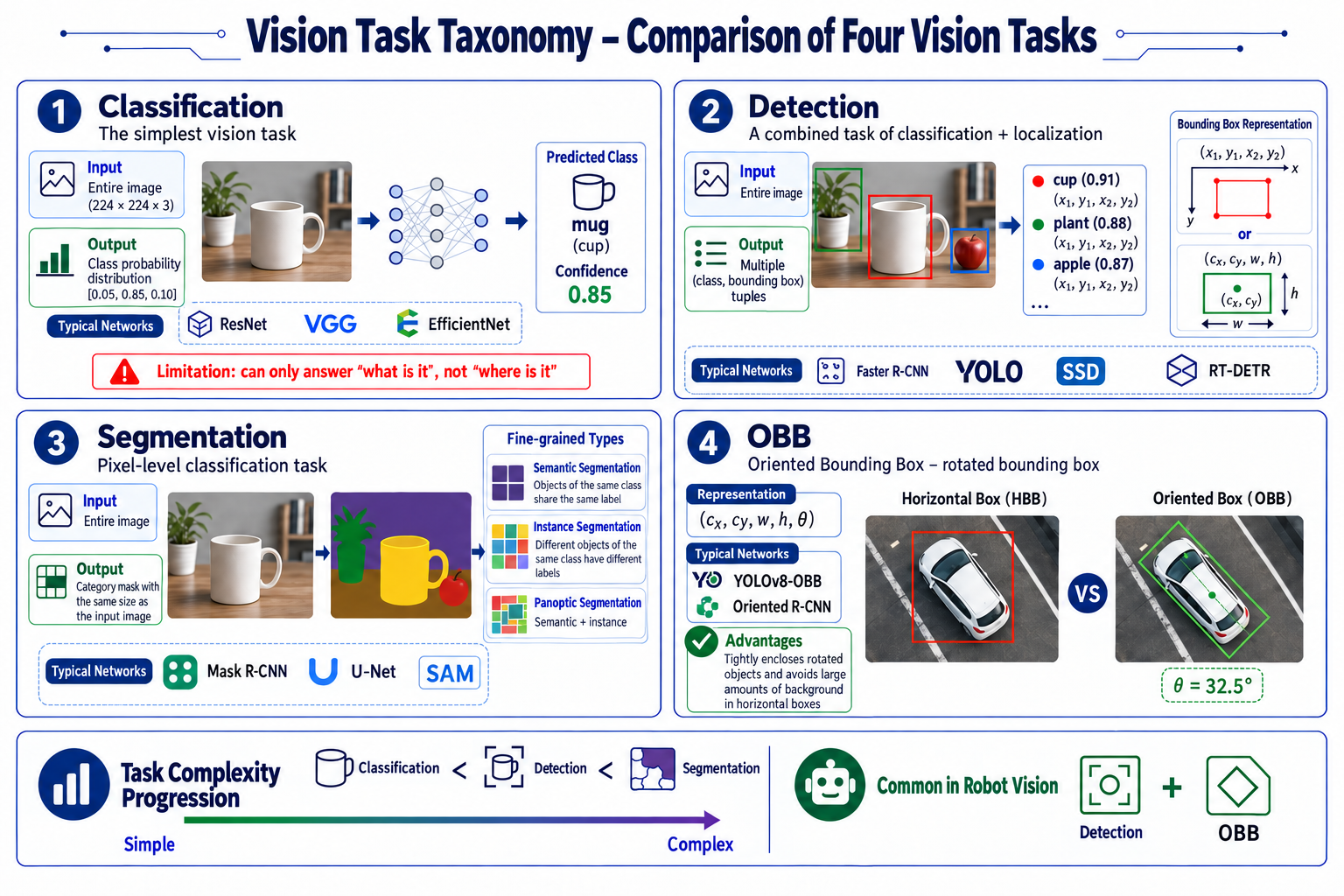
The four tasks build on one another; they differ in what they take in and what they give back:
| Task | What it does | Input | Output | Typical networks |
|---|---|---|---|---|
| Classification | Simplest task: image in, class label out | Whole image (e.g. 224x224x3) | Class probability distribution (e.g. [0.05, 0.85, 0.10]) | ResNet, VGG, EfficientNet |
| Detection | Classification + localization | Whole image | One (class, bounding box) tuple per object; box as (x1, y1, x2, y2) or (cx, cy, w, h) | Faster R-CNN, YOLO, SSD, RT-DETR |
| Segmentation | Pixel-level classification: one class label per pixel | Whole image | A class mask the same size as the input | Mask R-CNN (instance), U-Net (semantic), SAM |
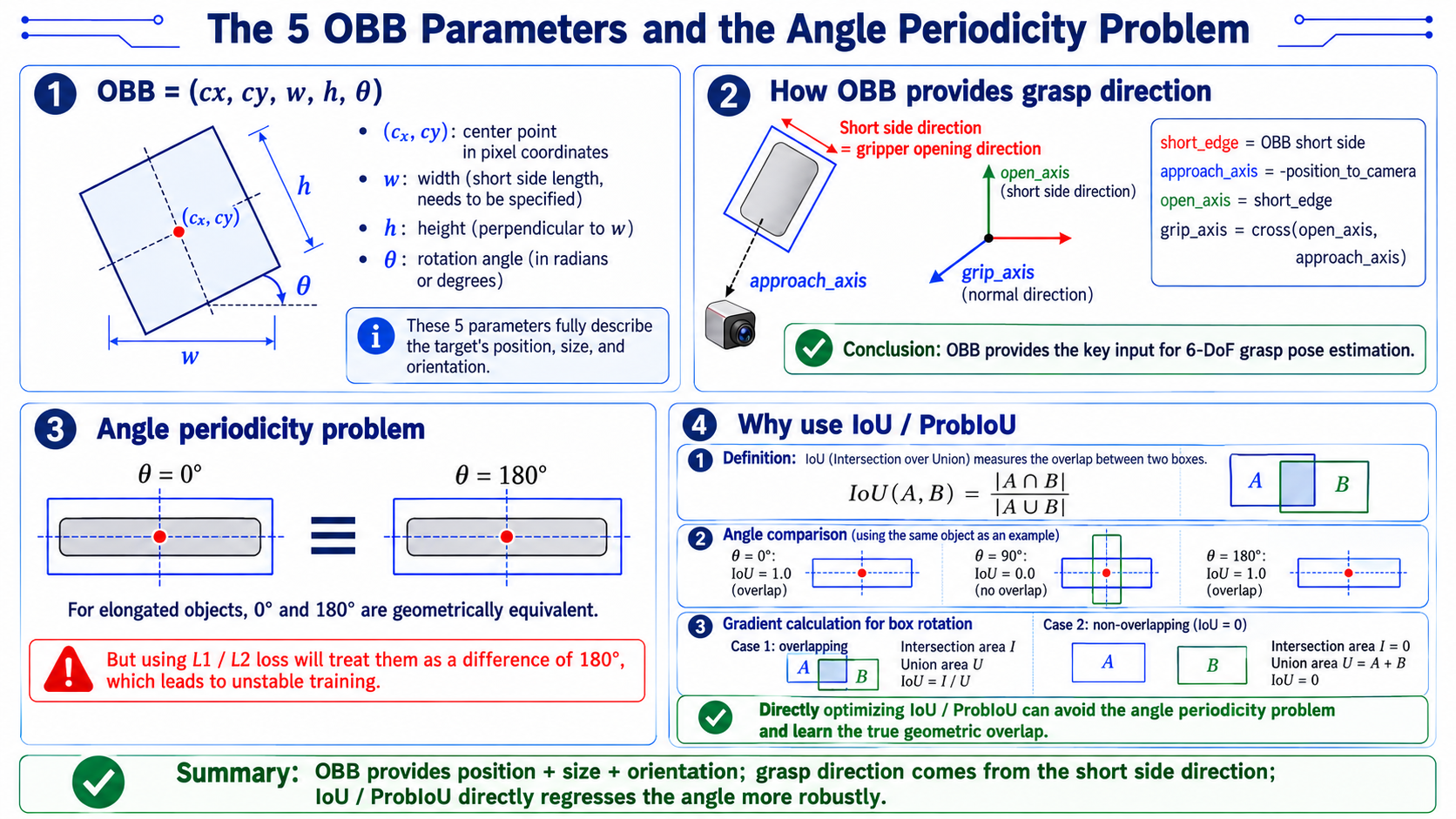
| Oriented bounding box (OBB) | Bounding box with a rotation angle | Whole image | (cx, cy, w, h, theta) | YOLOv8-OBB, Oriented R-CNN |
Three things worth remembering: classification can only answer "what is there", not "where"; segmentation comes in three flavours — semantic (same class shares one label), instance (different objects of the same class get different labels) and panoptic (semantic + instance); and OBB hugs a rotated object tightly instead of dragging in the background a horizontal box would include.
28.3 Deep Dive into Detection Algorithms
Why YOLO for Real-Time Robot Vision
The core requirement of robot vision algorithms is real-time performance. Consider a typical scenario:
- An object moves on a conveyor at 0.1 m/s; field of view is 0.5 m; crossing time is 5 seconds. Assume 20 Hz control (50 ms frame interval). If detection takes 200 ms per frame (5 Hz), the robot cannot keep up and will frequently miss the grasp.
- YOLO's "look once" idea: divide the image into an SxS grid, each grid directly predicts B boxes + class, and produces results in a single forward pass.
Open-Vocabulary Detection (YOLOE / YOLO-World)
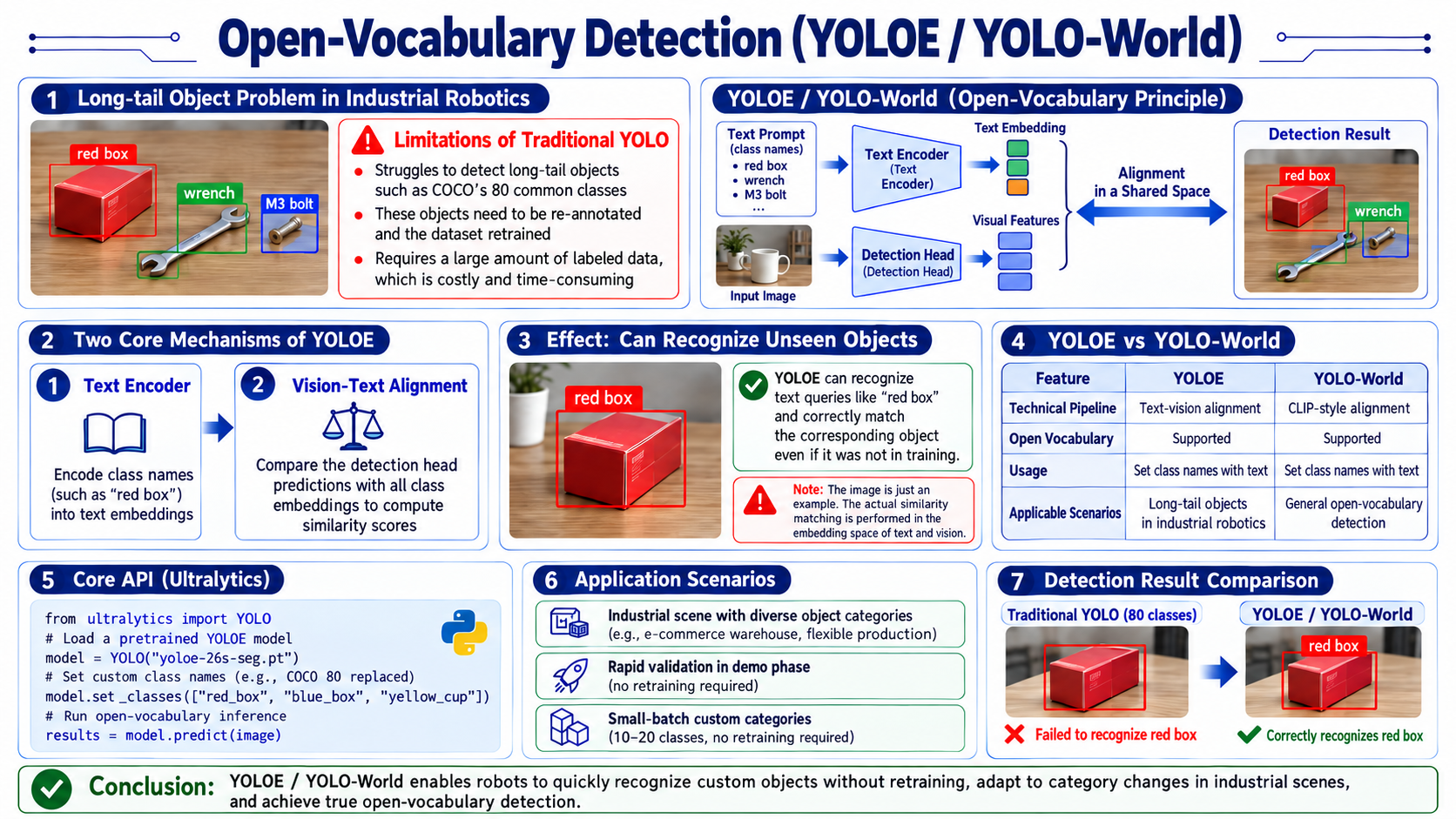
Industrial robots often encounter objects not covered by COCO's 80 classes: boxes of a specific color ("red box"), custom parts ("M3 bolt"), temporarily placed tools ("wrench"). Traditional YOLO must retrain on a dataset (hundreds of annotations) to recognize these—costly.
YOLOE (YOLO with Extended vocabulary) achieves open vocabulary through two mechanisms:
- Text encoder: encodes class names (e.g. "red box") into semantic vectors;
- Vision-text alignment: the detection head compares predicted boxes against all class-vector similarities.
- The text encoder knows the visual concept behind the phrase "red box." Even if it never saw a red box during training, it can match the text "red box" to the red box in the image. Note it performs text-visual similarity matching, not true language understanding; and if the text encoder has never seen a word, it cannot understand it.
YOLO-World uses a similar approach
- YOLO-World uses CLIP-style image-text alignment for open vocabulary; its working principle is the same as YOLOE.
Core API
from ultralytics import YOLO

# load pretrained YOLOE model
model = YOLO("yoloe-26s-seg.pt")

# set custom classes (replace default 80)
model.set_classes(["red_box", "blue_box", "yellow_cup"])

# now the model detects only these three classes
results = model.predict(image)
Suitable scenarios
- Arm scenarios with many category changes (e-commerce warehousing, flexible production)
- Rapid demo validation (test without training)
- Small-batch customization (10-20 classes, no retraining)
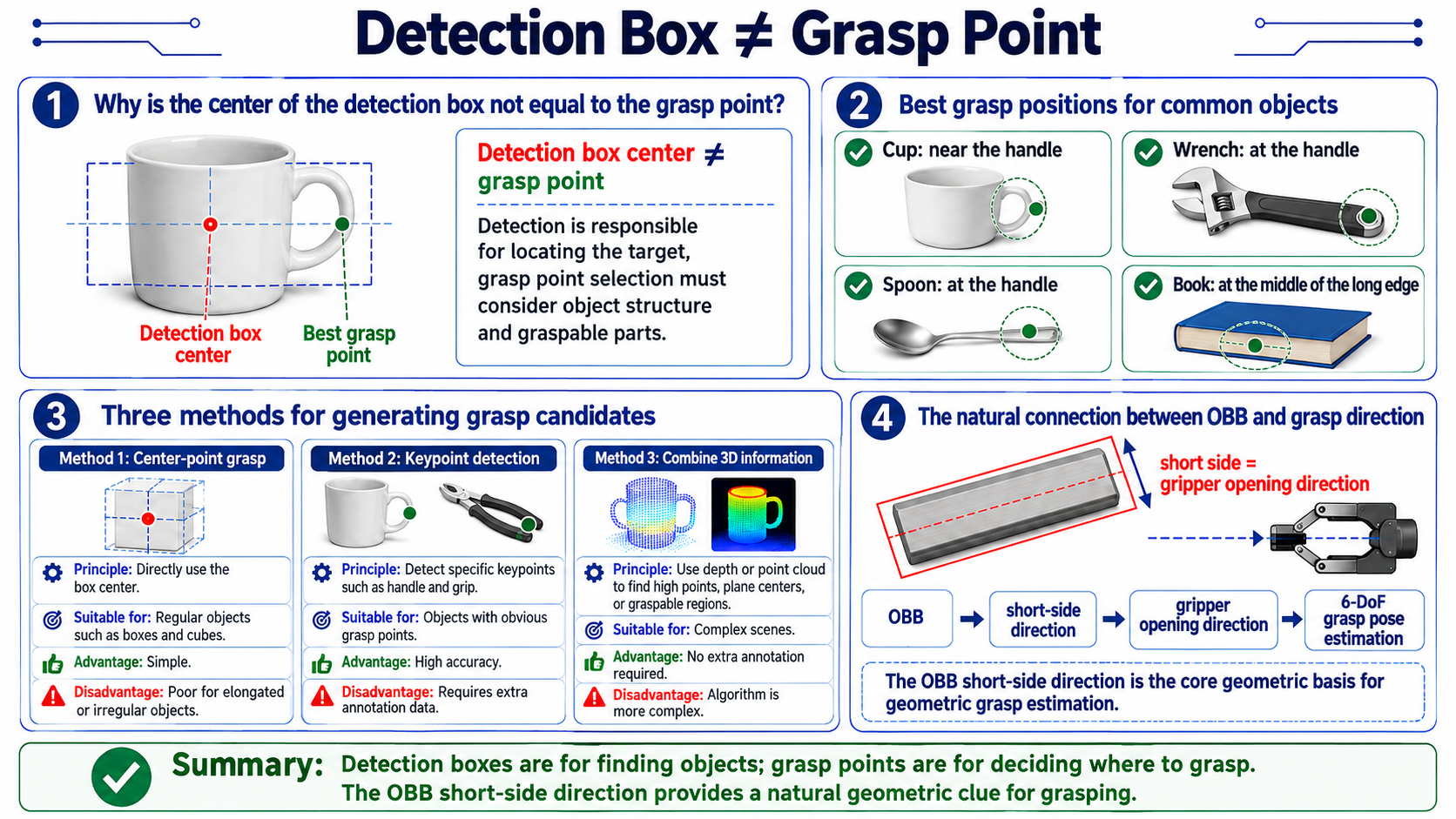
Why Robot Vision Often Uses OBB
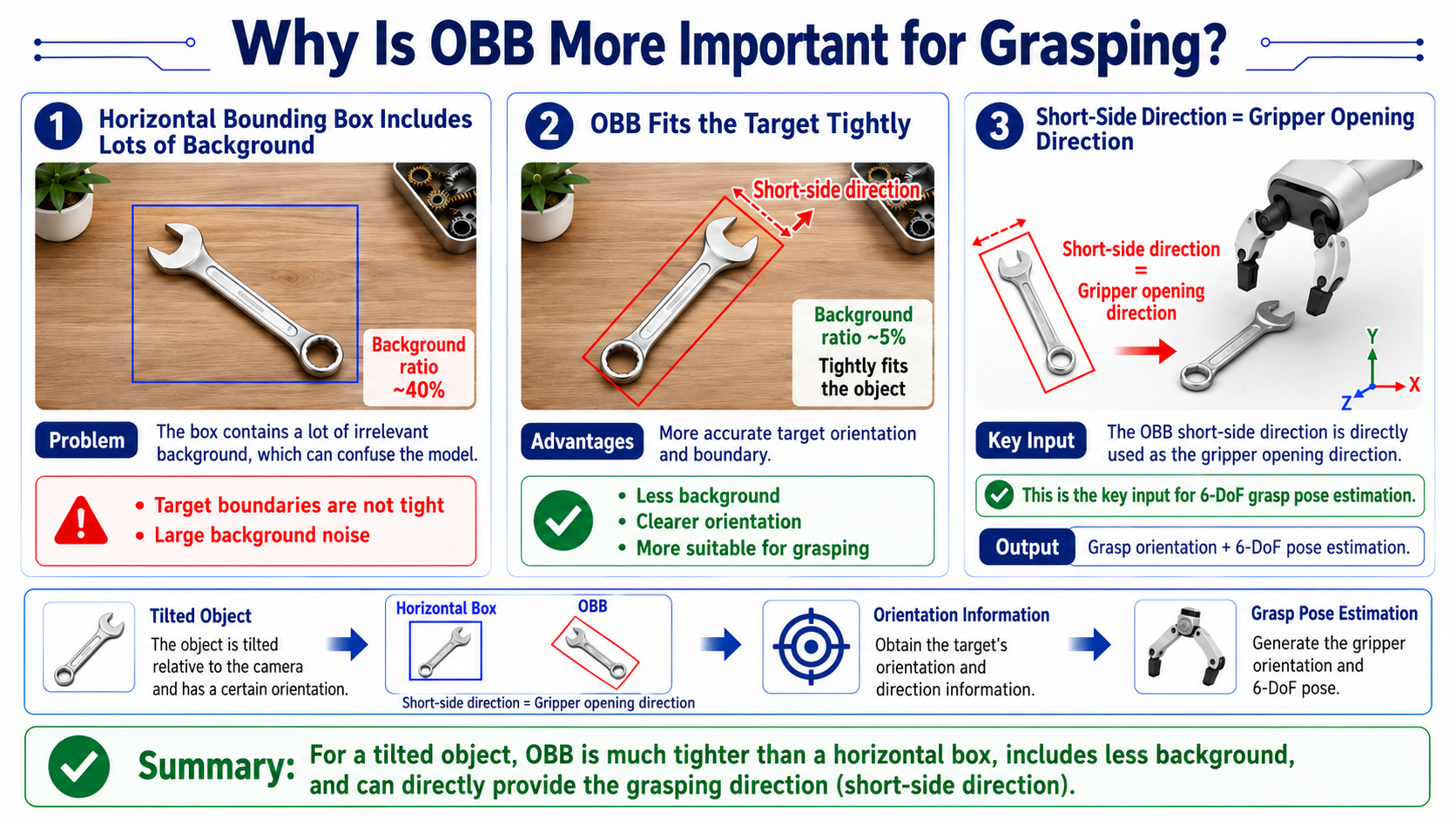
The OBB short-edge direction directly gives the gripper open/close direction—the key input for downstream 6-DoF grasp estimation.
Oriented Bounding Box (OBB) Principles
Post-processing: NMS
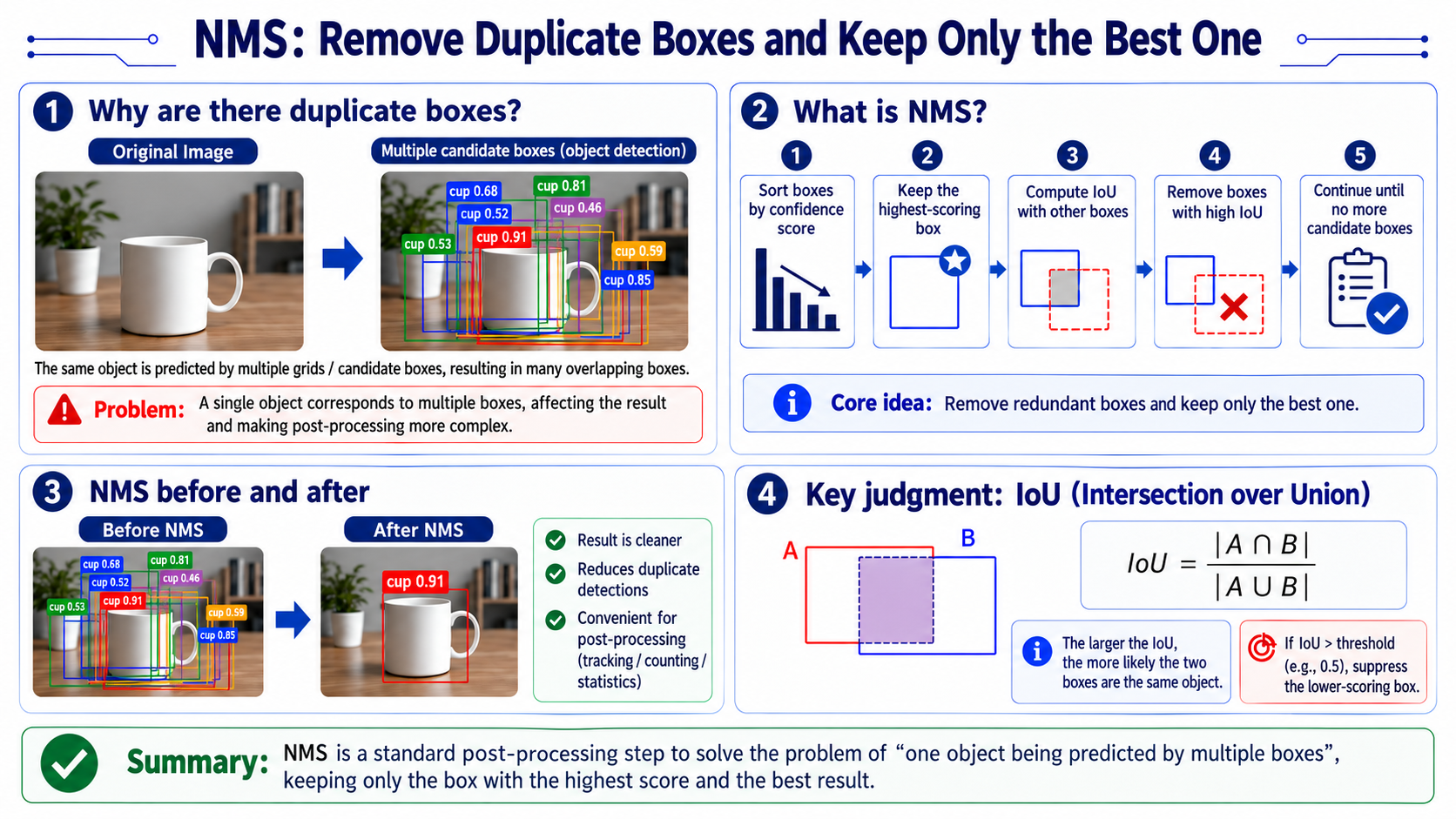
NMS is the standard post-detection step. After YOLO detects an image, the same object may be "repeatedly" predicted by multiple grid cells as several overlapping boxes. NMS removes these duplicates, keeping only the best one.
-
Example code
def nms(boxes, scores, iou_threshold):
    """
    boxes: [(x1, y1, x2, y2), ...]
    scores: [confidence, ...]
    returns: list of kept indices
    """
    # 1. sort by confidence descending
    order = sorted(range(len(scores)), key=lambda i: scores[i], reverse=True)

    keep = []
    while order:
        # 2. pick the highest-scoring box
        i = order[0]
        keep.append(i)

        # 3. compute IoU with other boxes
        rest = order[1:]
        ious = [compute_iou(boxes[i], boxes[j]) for j in rest]

        # 4. keep boxes with IoU < threshold (remove redundant)
        order = [rest[j] for j, iou in enumerate(ious) if iou < iou_threshold]

    return keep
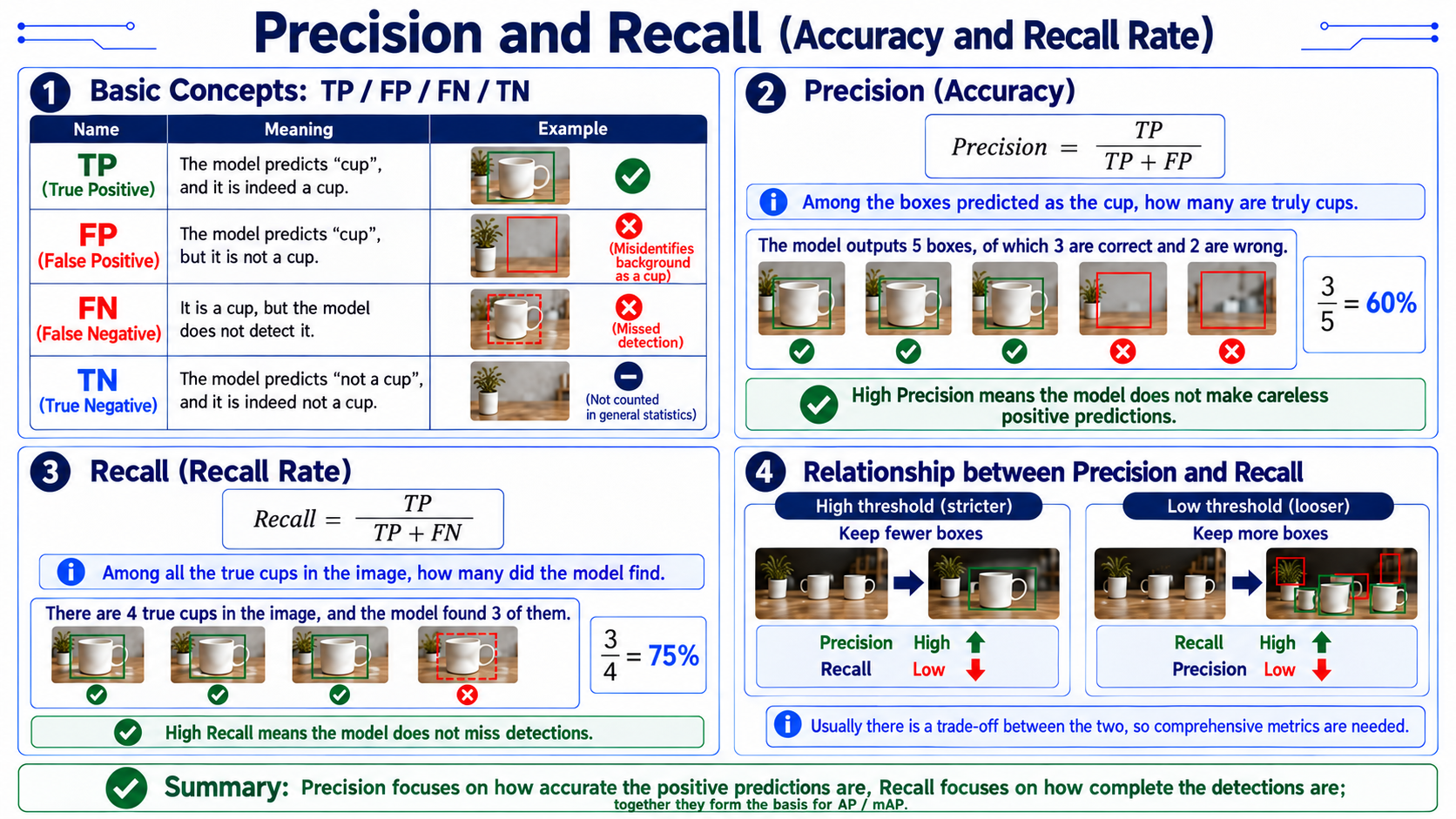
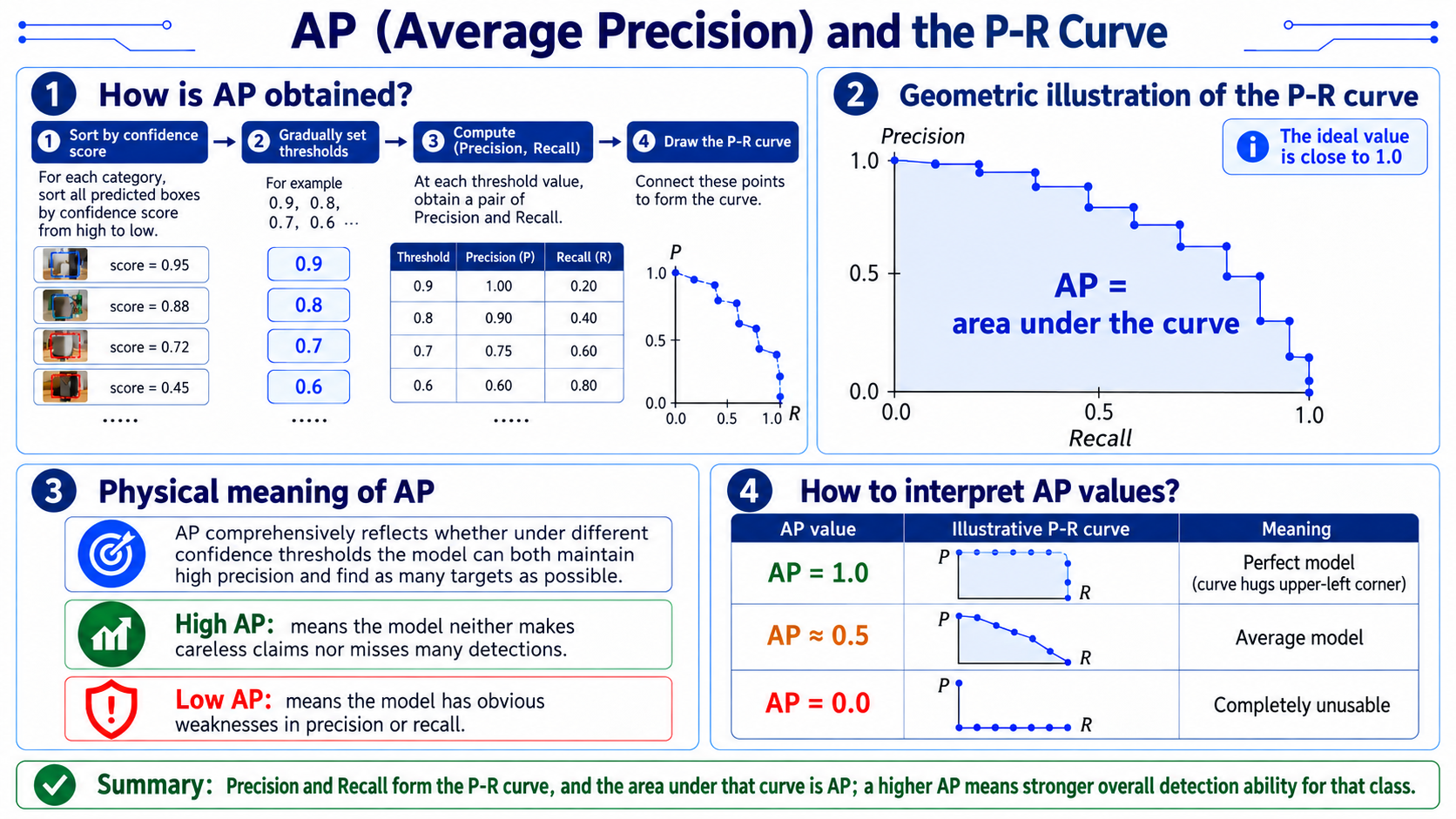
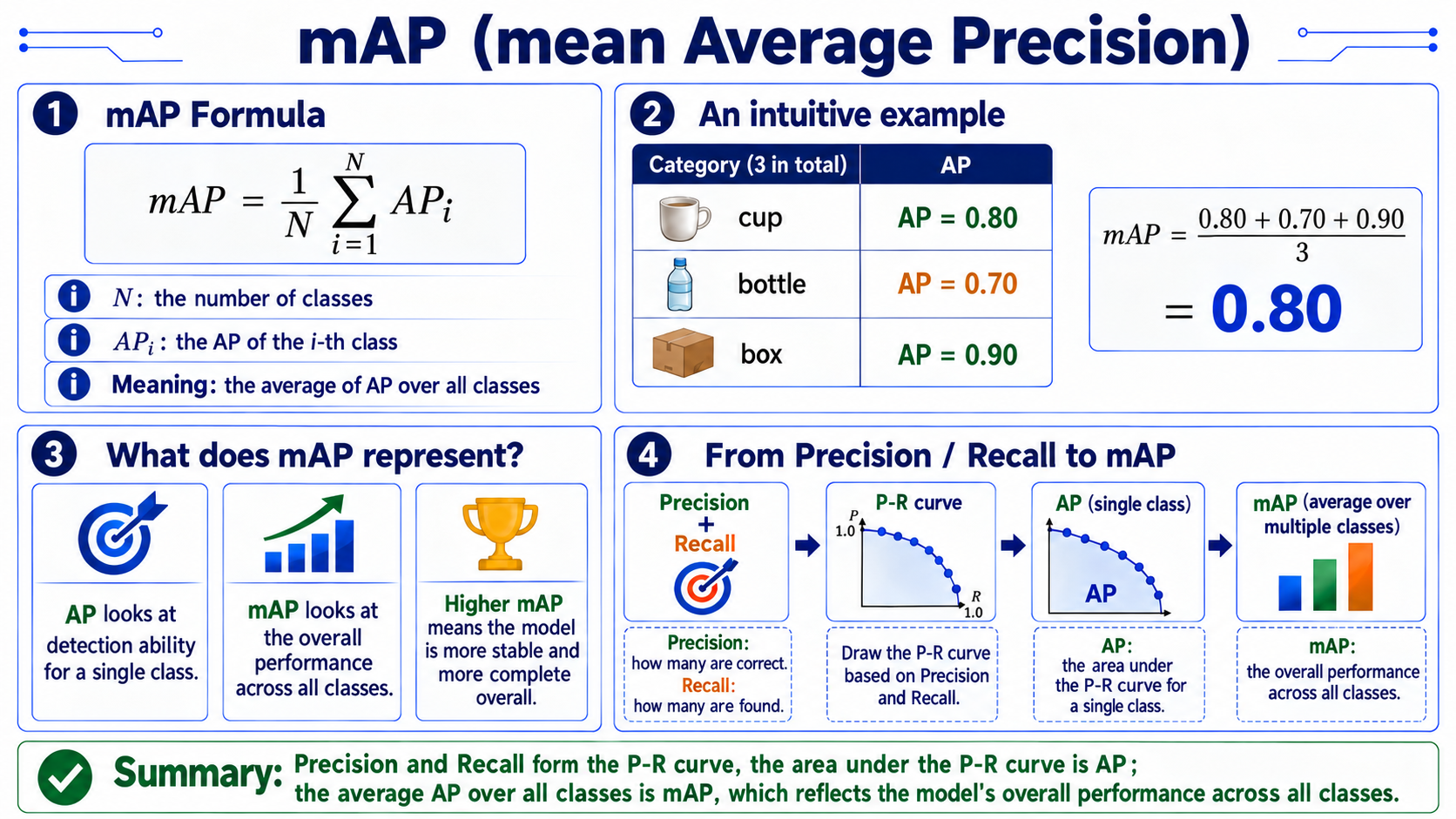
mAP (Evaluation Metric)
From Detection Result to Grasp Direction
28.4 ArUco and Camera Calibration
Full Derivation: Pixels to 3D Coordinates
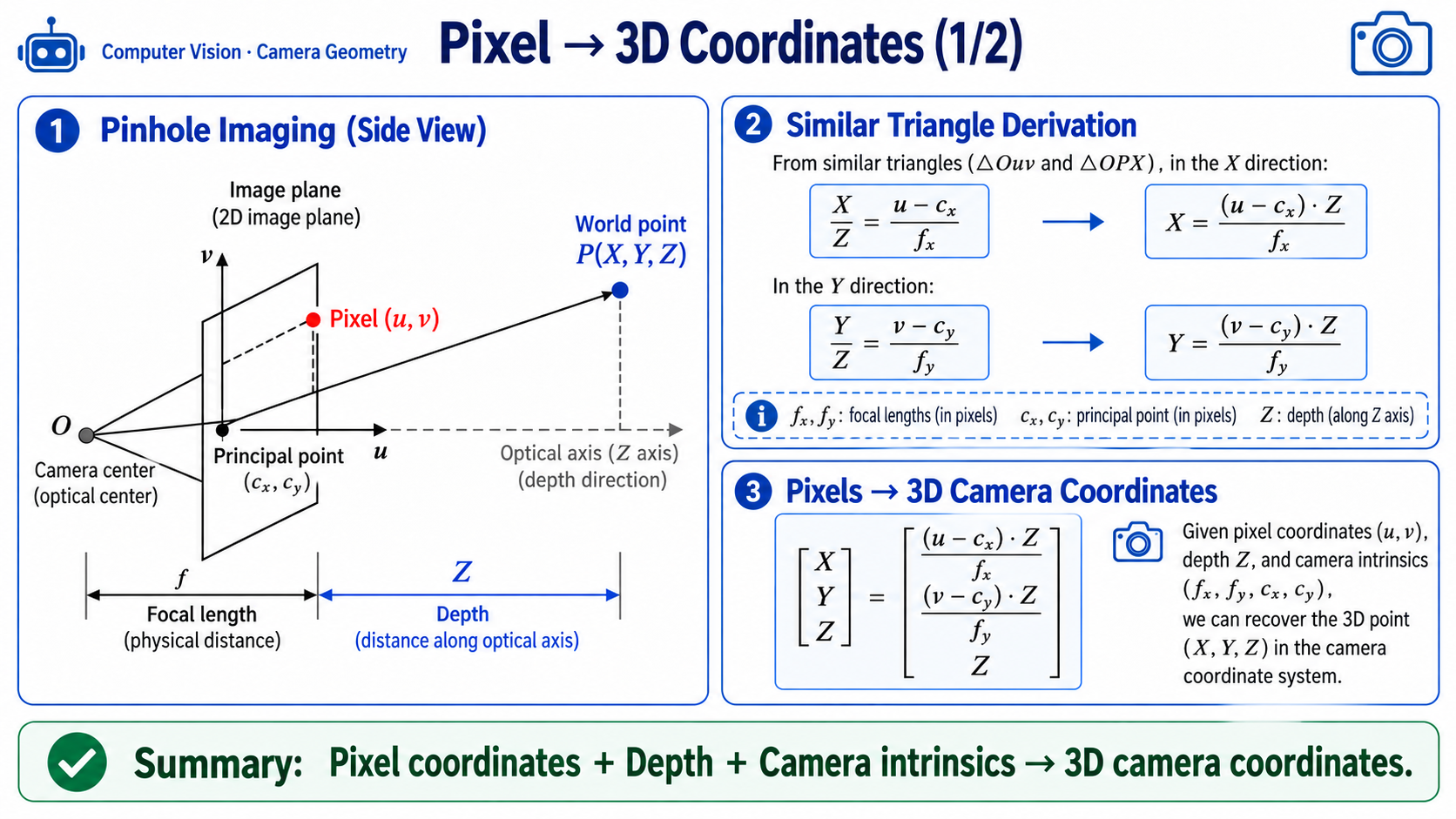
Similar-triangle derivation
-
From similar triangles (image-plane X axis):
-
Rearranged:
Error propagation analysis
-
Let depth error be ; from the X formula:
- That is: the farther a pixel is from the optical center (cx, cy), the more the depth error is amplified.
- Physical meaning: objects near the image edge have a large disparity angle, so a small depth error significantly affects X, Y position estimates.
-
Numerical example: let , , , , m and pixel .
-
The object's position in the camera frame: (0.217, 0, 0.65) m
-
Implementation reference:
# ordinary_grasp.py L398-403 implementation reference
def _backproject(u, v, z_m, K):
    fx, fy = float(K[0, 0]), float(K[1, 1])
    cx, cy = float(K[0, 2]), float(K[1, 2])
    x = (u - cx) * z_m / fx
    y = (v - cy) * z_m / fy
    return np.array([x, y, z_m], dtype=np.float32)
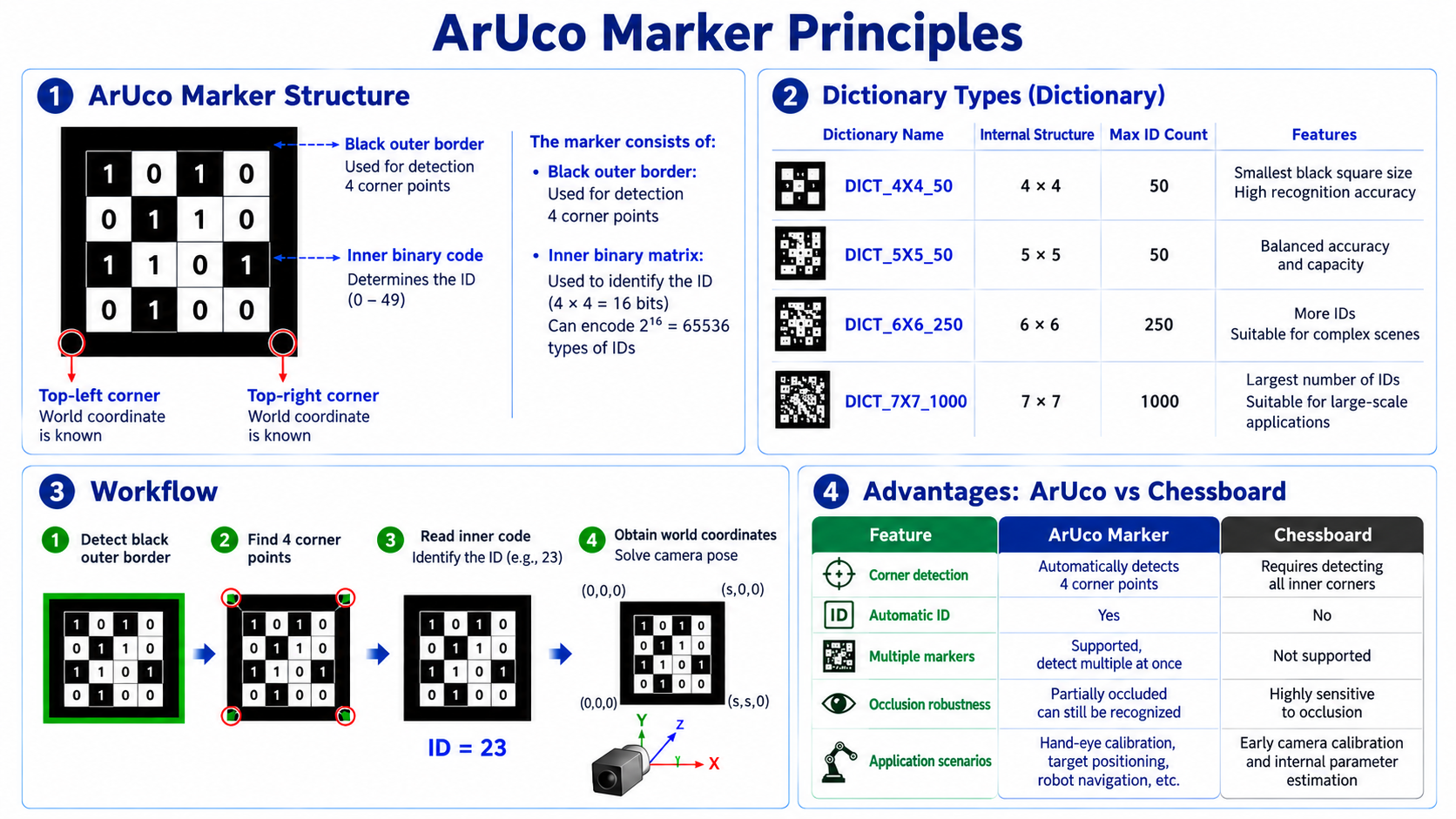
ArUco Marker Principles
ArUco marker structure
ArUco Pose Estimation (solvePnP)
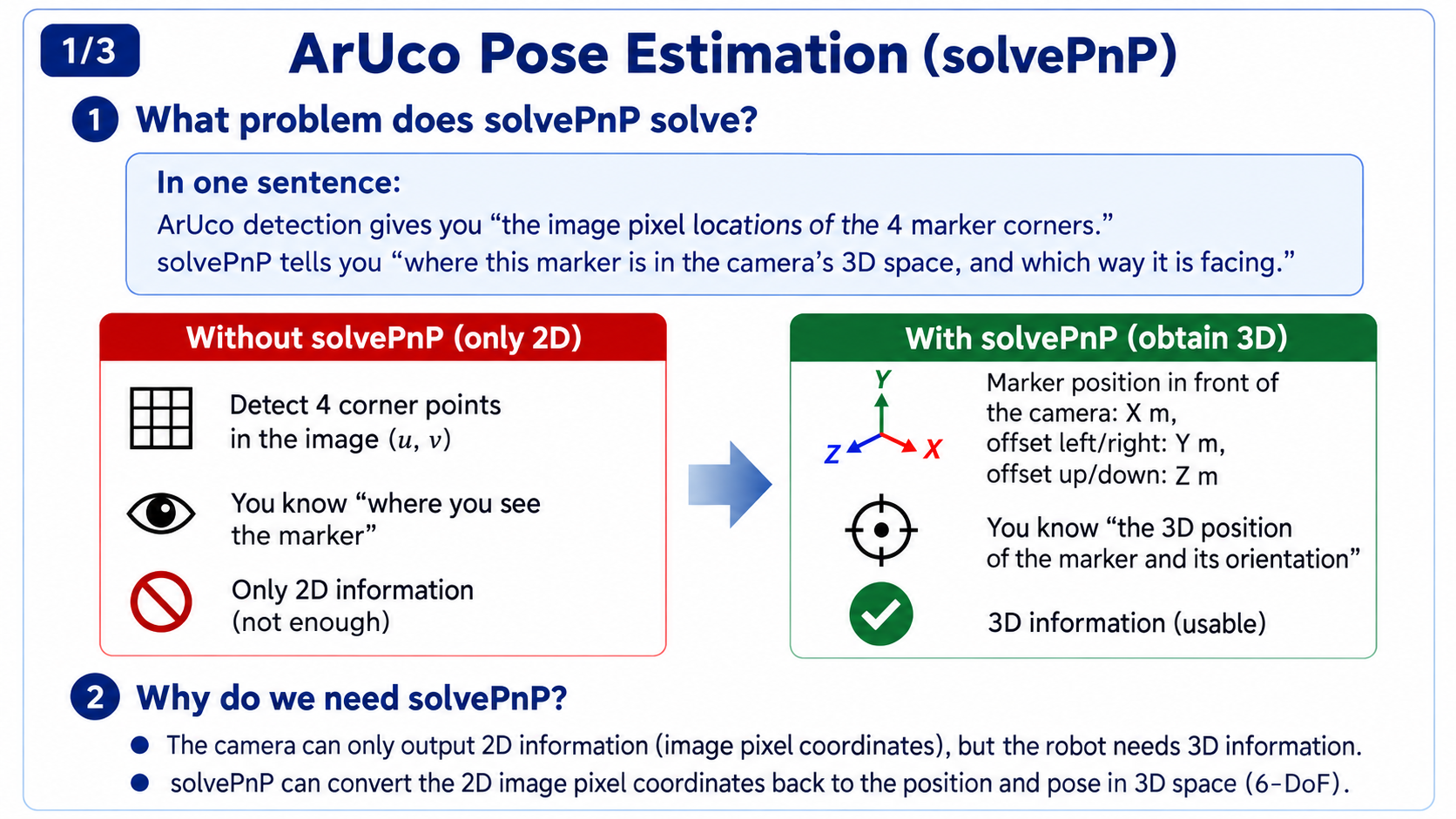
What problem solvePnP solves
- In one sentence: ArUco detection tells you "where the marker's 4 corners are in pixels"; solvePnP tells you "where this marker is in the camera's 3D space and how it is oriented."
Why solvePnP is needed
- The camera only outputs 2D information (pixel coordinates), but the robot needs 3D information:
- Recall the hand-eye calibration. Its equation is AX = XB, where B is the transform from marker to camera, T_marker2cam—and B is exactly obtained by ArUco corner detection followed by solvePnP. Without solvePnP there is no B; without B you cannot solve X; hand-eye calibration cannot proceed.
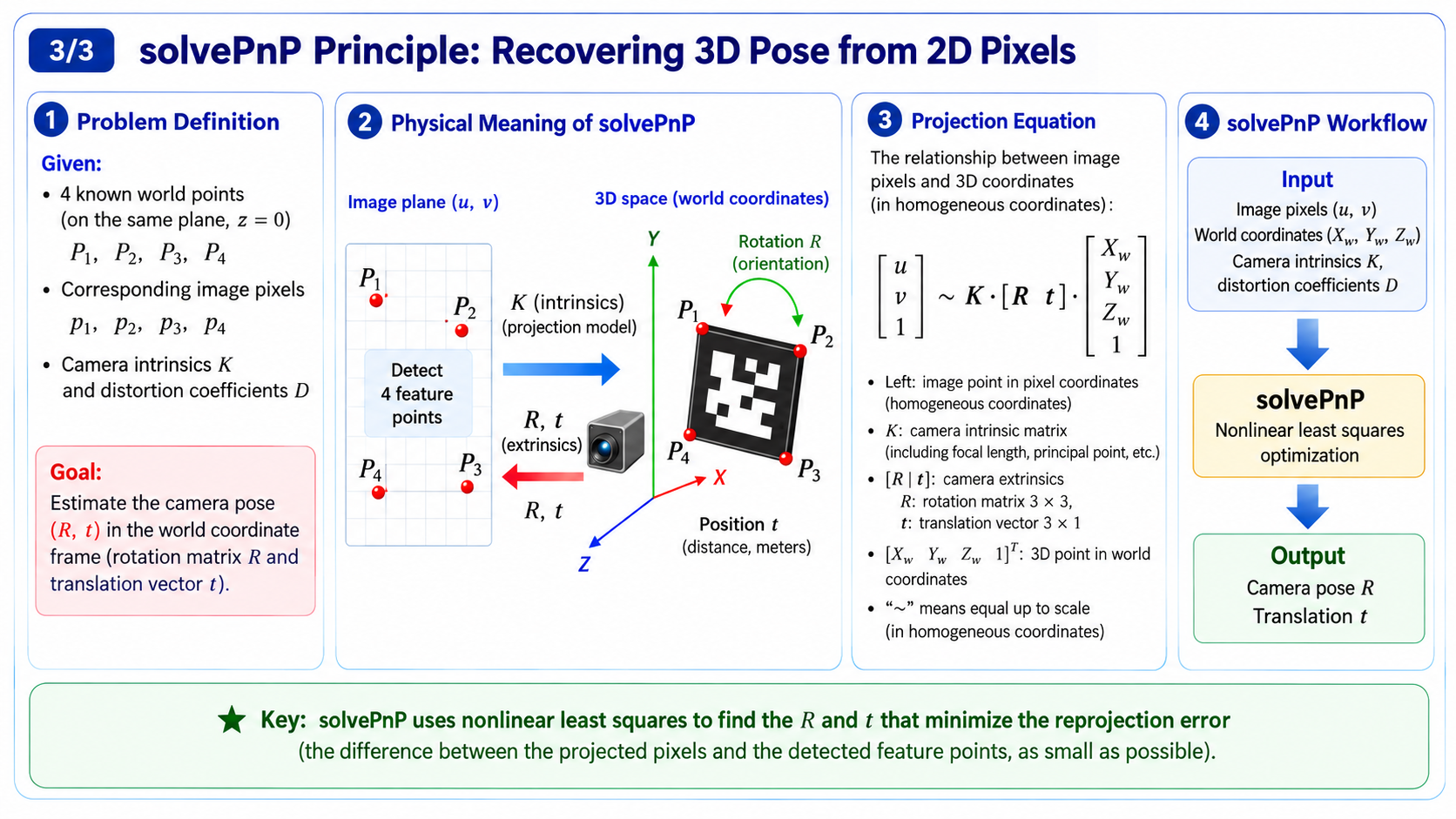
Physical meaning of solvePnP
- Given 3D world coordinates (a fixed 3D frame describing "where the marker's corner is in real space" with 3 numbers (X, Y, Z), in real length units cm/m), the corresponding 2D pixel coordinates (a 2D image frame describing "where that corner landed in the picture" with 2 numbers (u, v)), and camera intrinsics K, solvePnP back-deduces the camera's rotation R and translation t. It internally uses least-squares optimization, minimizing projection error; the output is the marker's pose relative to the camera.
28.5 Deep Dive: Hand-Eye Calibration
Geometric Meaning of AX = XB
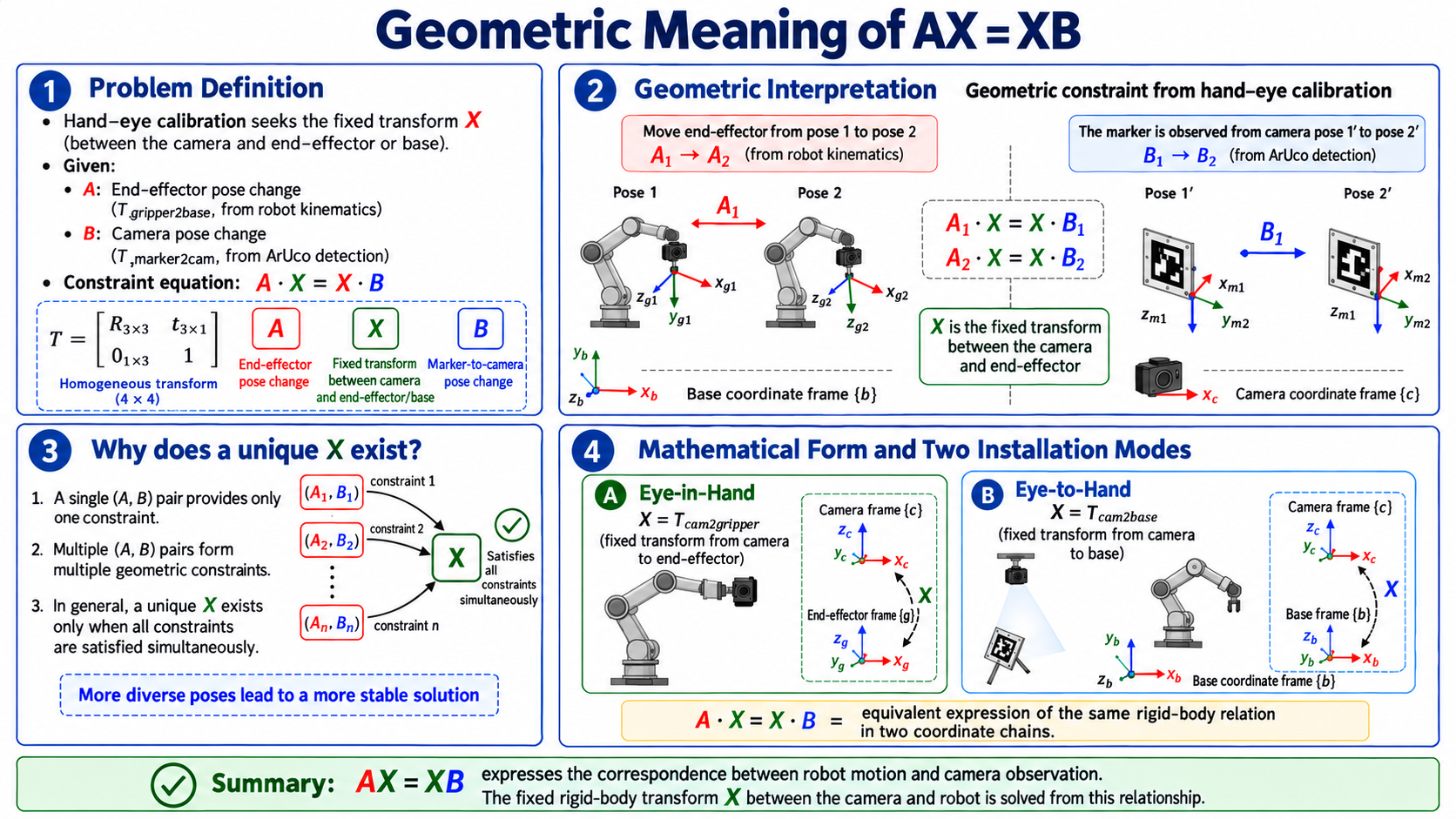
Problem definition
-
Hand-eye calibration solves for X (the fixed transform between camera and end or base), given:
- A: end-to-base transform (T_gripper2base, from arm forward kinematics)
- B: marker-to-camera transform (T_marker2cam, from ArUco detection)
-
Constraint equation:
-
X is the hand-eye matrix—a 4x4 homogeneous transform describing the fixed pose (orientation + position) of the camera frame relative to the arm end frame.
- It contains a 3x3 rotation matrix R_X (orientation) and a 3x1 translation t_X (position);
- Euler angles are just another "reading" of R_X—the same orientation can be a rotation matrix or Euler angles, and they convert back and forth.
Geometric interpretation
Geometrically the constraint is simple. The end moves from pose 1 to pose 2, (recorded by the arm), while the camera sees the marker move from to , (ArUco detection). is the fixed transform between the camera and the end (camera on the end), so the same rigid relationship has to hold at every pose:
Multiple (A, B) pairs give multiple constraints; geometrically only one X satisfies all of them.
Mathematical form
- Eye-in-Hand: solve for X = T_cam2gripper (fixed pose of camera relative to end)
- Eye-to-Hand: solve for X = T_cam2base (fixed pose of camera relative to base)
- In implementation, each sampled (A, B) is stored; once enough are collected, a calibration solver solves them together.
Rigid-Body Transform Math Basics
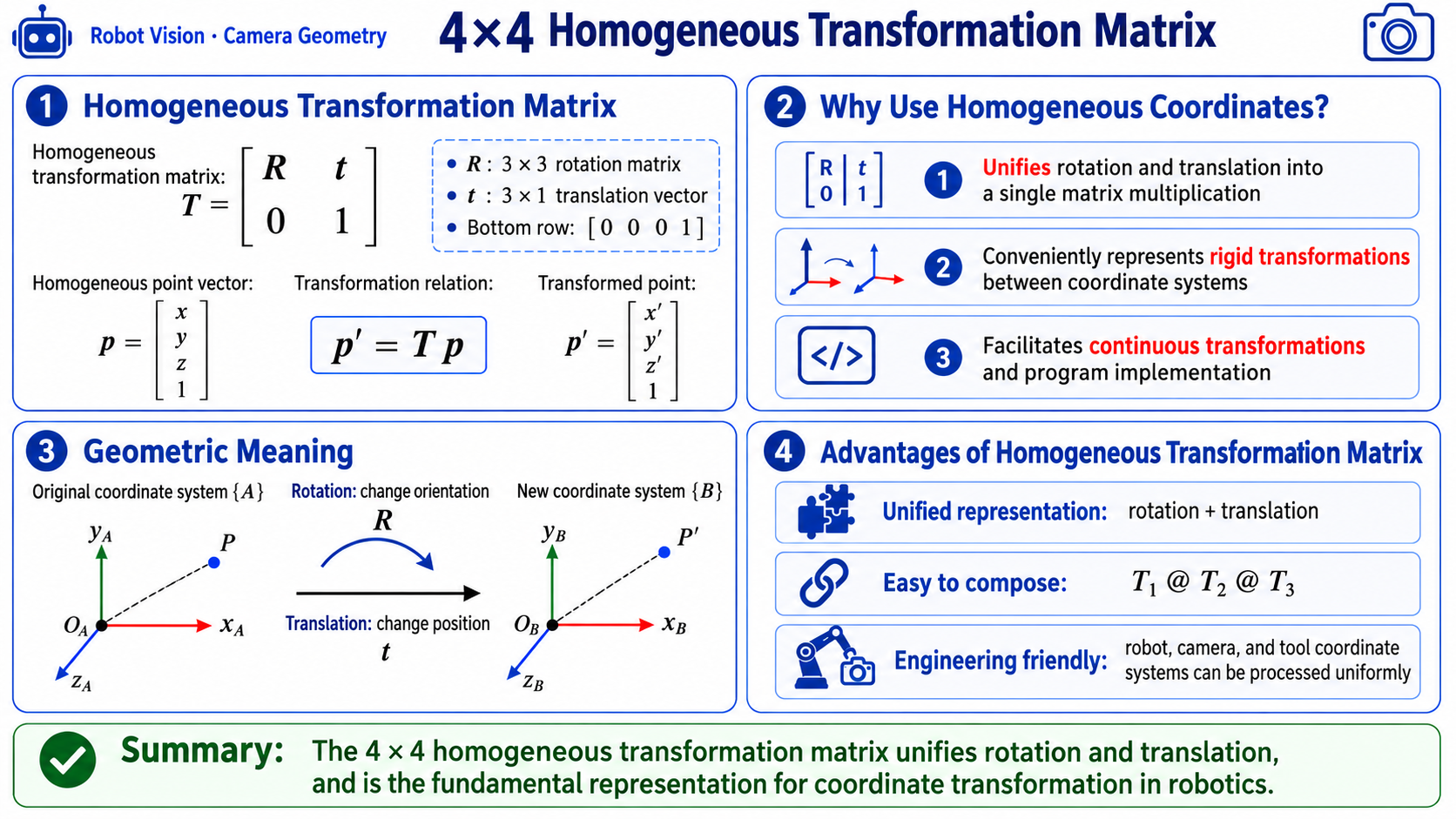
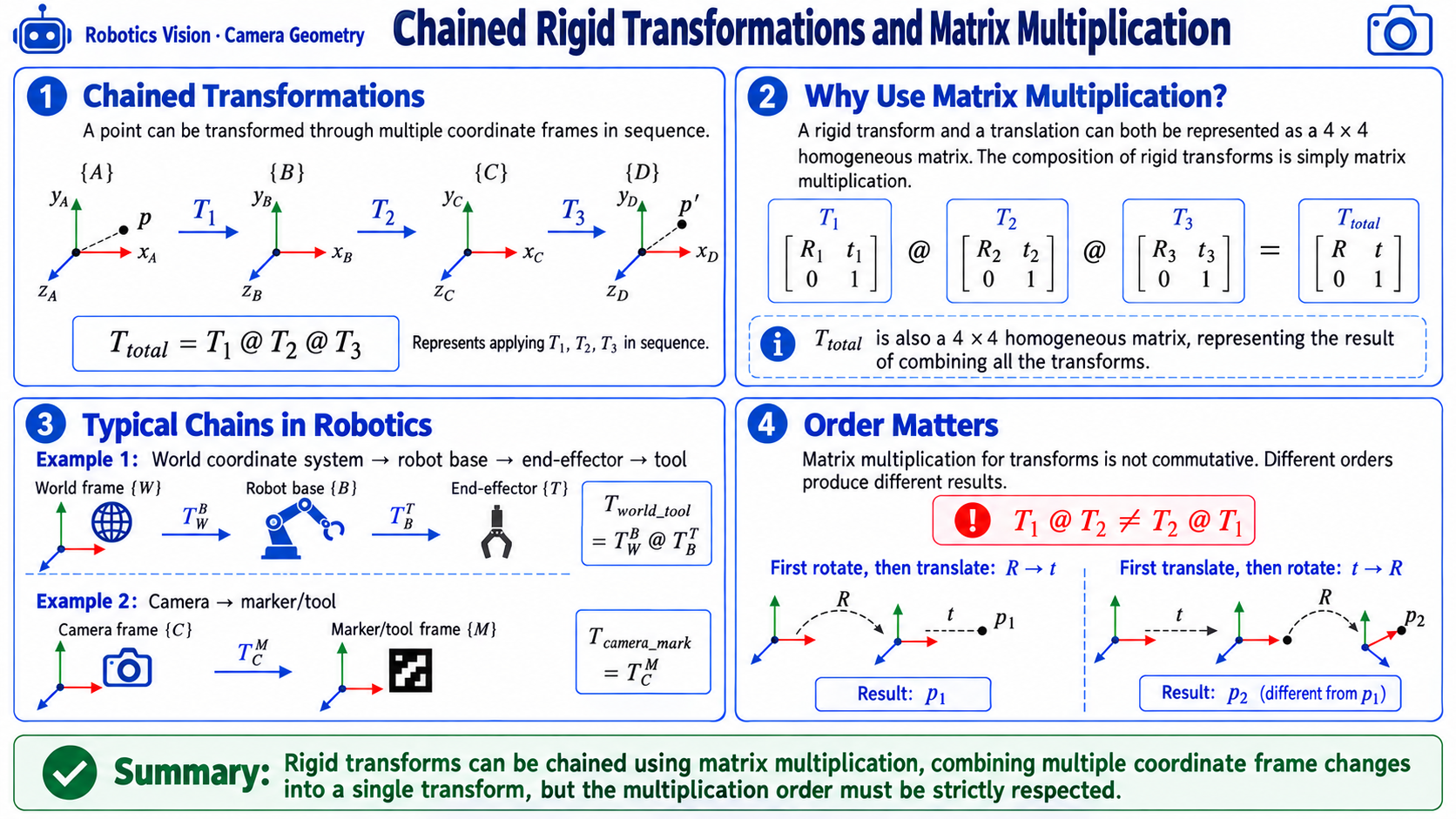
4x4 homogeneous transform matrix
T = [ R   t ]    R: 3x3 rotation matrix
    [ 0   1 ]    t: 3x1 translation vector
Advantages of homogeneous transforms:
- Unifies rotation and translation in one matrix multiplication
- Can chain: T1 @ T2 @ T3 means successive transformations through T1, T2, T3. But note: matrix multiplication is non-commutative—different order gives completely different results—"rotate 90 degrees then translate" is not the same as "translate then rotate 90 degrees."
Three rotation representations
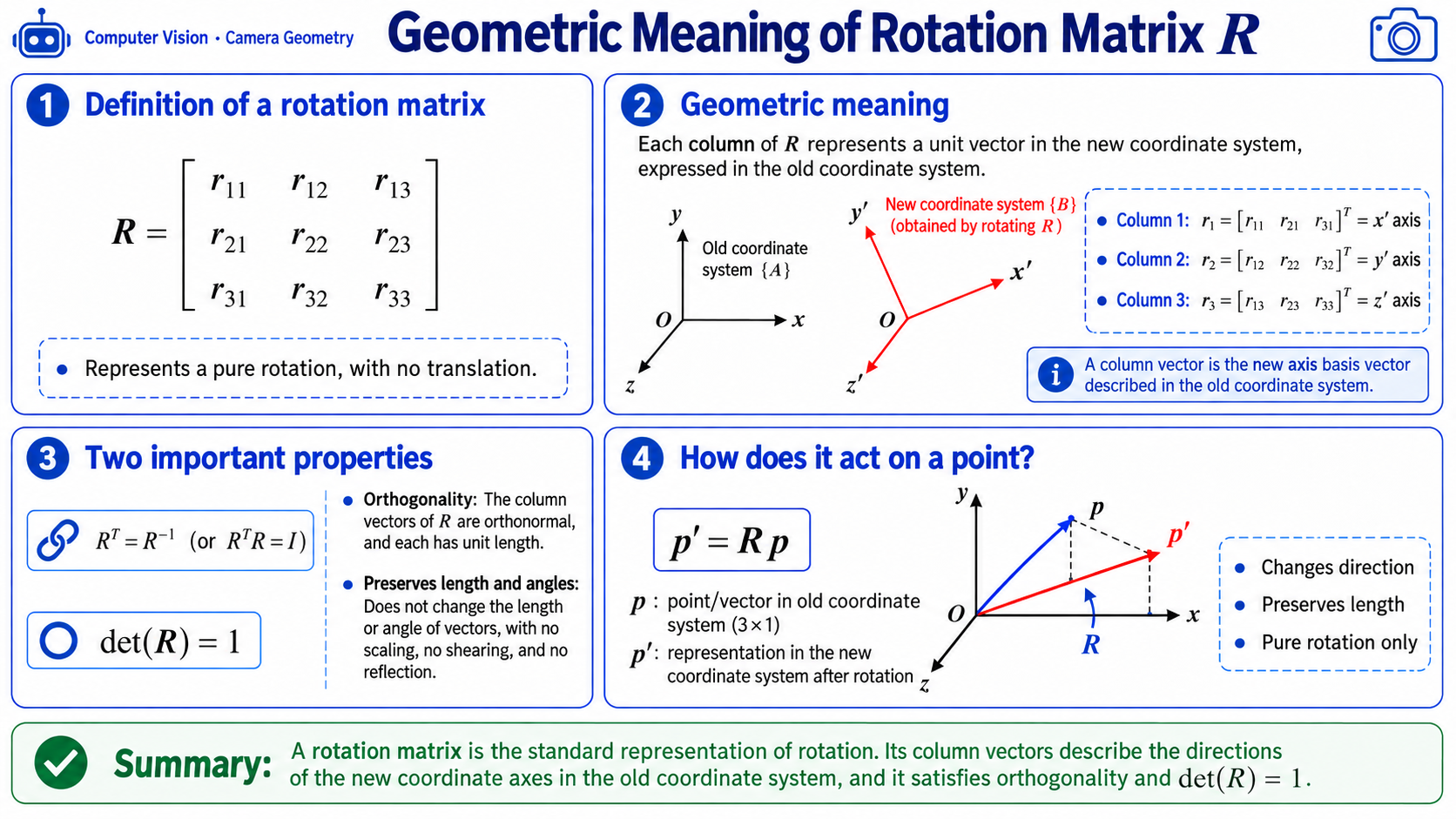
- Rotation matrix R
-
Properties:
- R^T = R^(-1) (orthogonality)
- det(R) = 1
[diagram: geometric meaning of R]

R = [ r11 r12 r13 ]    each column is a basis vector
    [ r21 r22 r23 ]    expressed in the new frame
    [ r31 r32 r33 ]
-
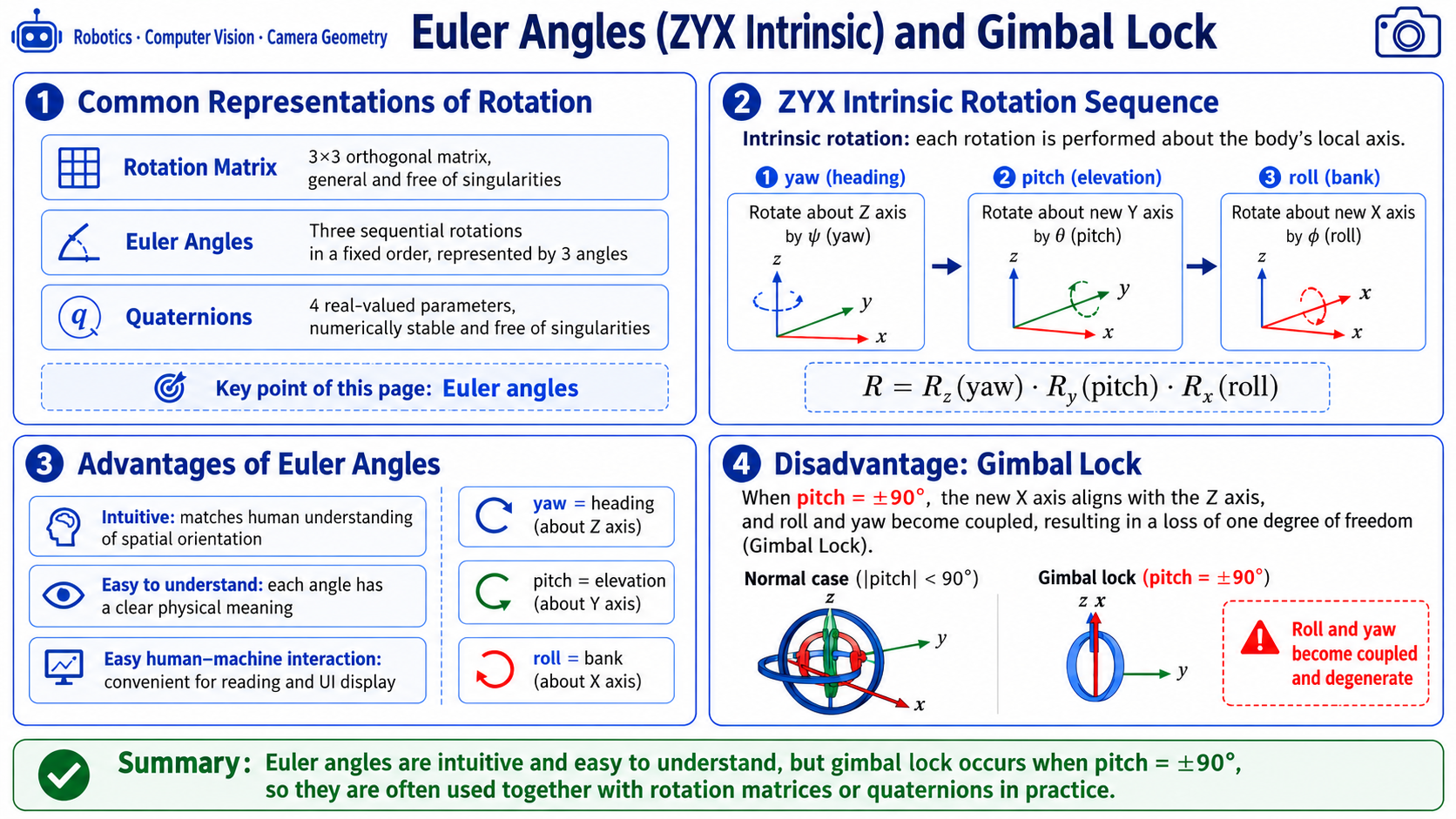
-
Euler angles (ZYX intrinsic)
-
Implementation: rotate about Z (yaw) -> about new Y (pitch) -> about new X (roll):
# transforms.py L32-72 implementation reference
def pose6d_to_mat4(x, y, z, rx, ry, rz, degrees=False):
    if degrees:
        rx, ry, rz = np.radians(rx), np.radians(ry), np.radians(rz)

# Rotation around X (roll)
    Rx = np.array([
        [1,          0,           0],
        [0,  np.cos(rx), -np.sin(rx)],
        [0,  np.sin(rx),  np.cos(rx)],
    ])
# Rotation around Y (pitch)
    Ry = np.array([
        [ np.cos(ry), 0, np.sin(ry)],
        [          0, 1,          0],
        [-np.sin(ry), 0, np.cos(ry)],
    ])
# Rotation around Z (yaw)
    Rz = np.array([
        [np.cos(rz), -np.sin(rz), 0],
        [np.sin(rz),  np.cos(rz), 0],
        [         0,           0, 1],
    ])

# Intrinsic ZYX rotation: R = Rz @ Ry @ Rx
    R = Rz @ Ry @ Rx

    T = np.eye(4, dtype=np.float64)
    T[:3, :3] = R
    T[:3, 3] = [x, y, z]
    return T
-
-
Singularity (gimbal lock):
-
Euler angles have a famous pitfall called "gimbal lock": when pitch is +/-90 degrees, X and Z axes coincide, roll and yaw degenerate, DOF drops from 3 to 2, and the pose representation is no longer unique. So near singularities the code uses a fallback formula—this is why Euler angles are often paired with rotation matrices or quaternions in engineering.
# transforms.py L110-122 implementation (handling singularities)
def rotation_matrix_to_euler_zyx(R):
    R = _nearest_rotation_matrix(R)
    sy = np.sqrt(R[0, 0] ** 2 + R[1, 0] ** 2)
    if sy > 1e-6:
        rx = np.arctan2(R[2, 1], R[2, 2])
        ry = np.arctan2(-R[2, 0], sy)
        rz = np.arctan2(R[1, 0], R[0, 0])
    else:
# near singularity, use fallback formula
        rx = np.arctan2(-R[1, 2], R[1, 1])
        ry = np.arctan2(-R[2, 0], sy)
        rz = 0.0
    return np.array([rx, ry, rz], dtype=np.float64)
-
Eye-in-Hand vs Eye-to-Hand
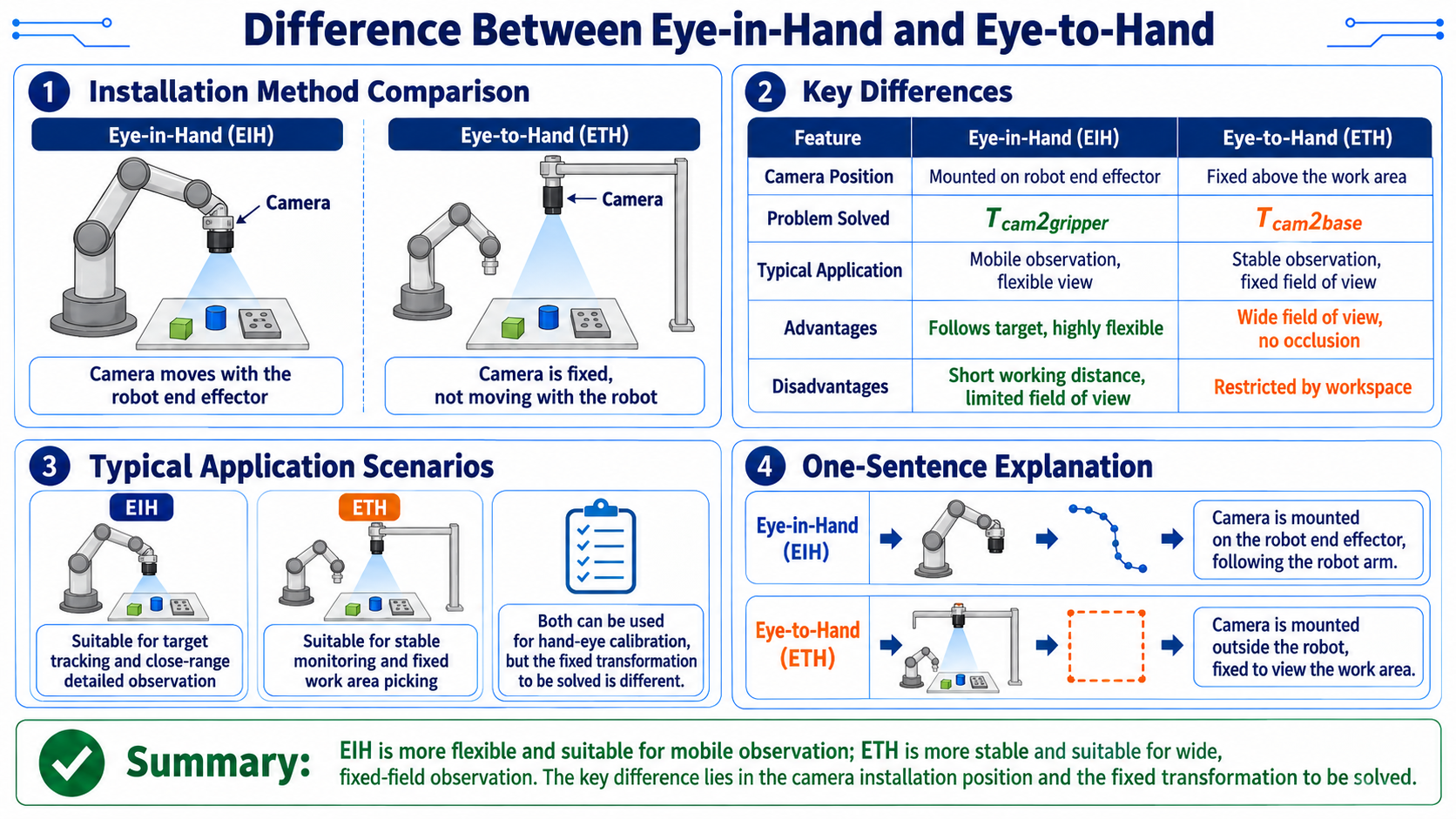
[diagram: EIH vs ETH mounting]

Eye-in-Hand:
  arm end -- camera -- looking at workspace
  camera moves with the end

Eye-to-Hand:
  above workspace -- camera -- looking down
  camera fixed, does not move with the end
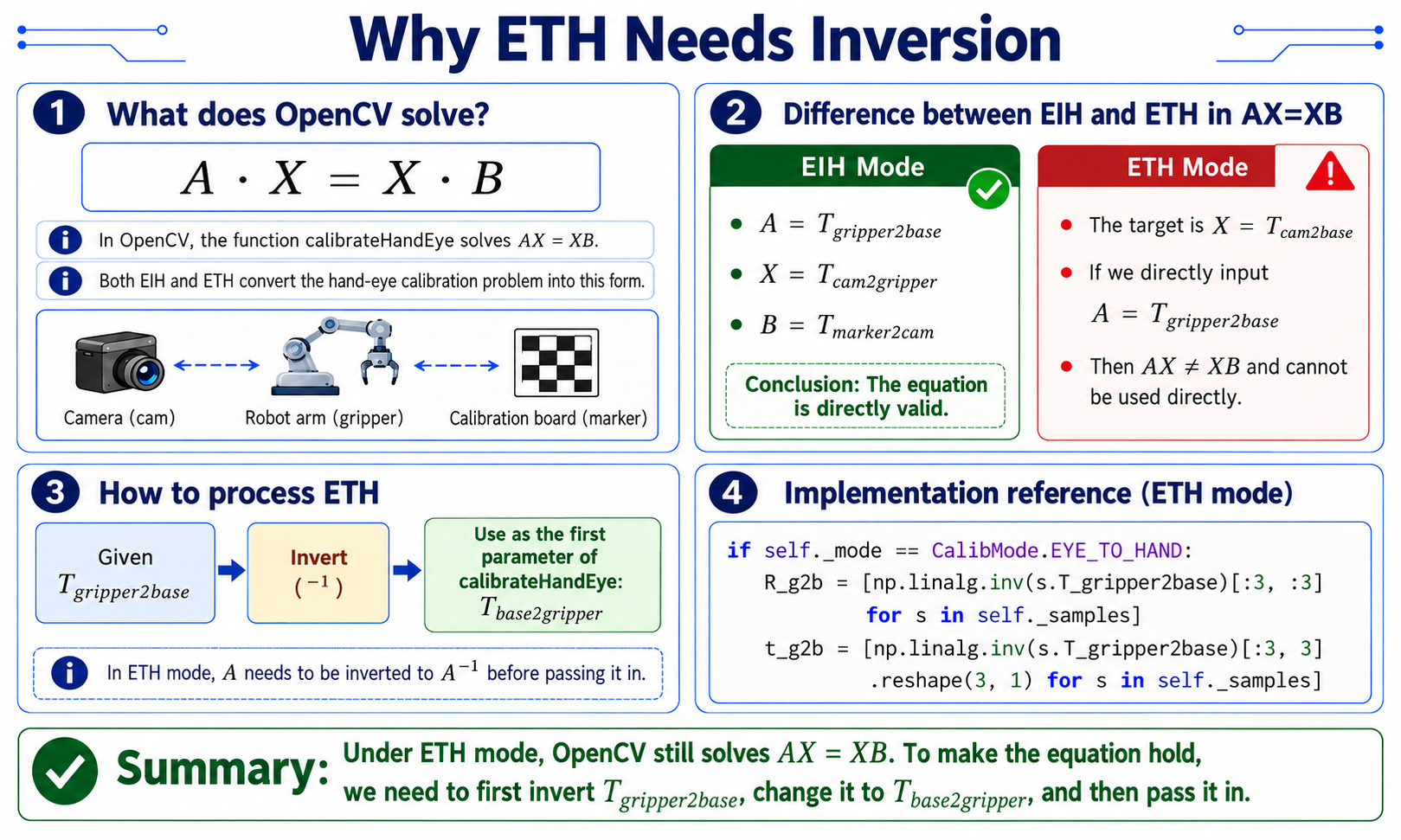
Special handling for ETH (taking the inverse)
Implementation:
# hand_eye.py L110-114 implementation (ETH mode: invert A)
if self._mode == CalibMode.EYE_TO_HAND:
# OpenCV calibrateHandEye solves AX=XB; in ETH mode, invert
# T_gripper2base and pass it as the first argument; it returns T_cam2base.
    R_g2b = [np.linalg.inv(s.T_gripper2base)[:3, :3] for s in self._samples]
    t_g2b = [np.linalg.inv(s.T_gripper2base)[:3, 3].reshape(3, 1) for s in self._samples]
Why ETH needs the inverse:
- OpenCV's
calibrateHandEyesolves AX=XB internally. - EIH mode: A is T_gripper2base (end motion), X is T_cam2gripper (fixed camera-end), B is T_marker2cam. The equation holds directly.
- ETH mode: A is still T_gripper2base, but X is T_cam2base (fixed camera-base). Then AX != XB directly; you must invert A before passing it.
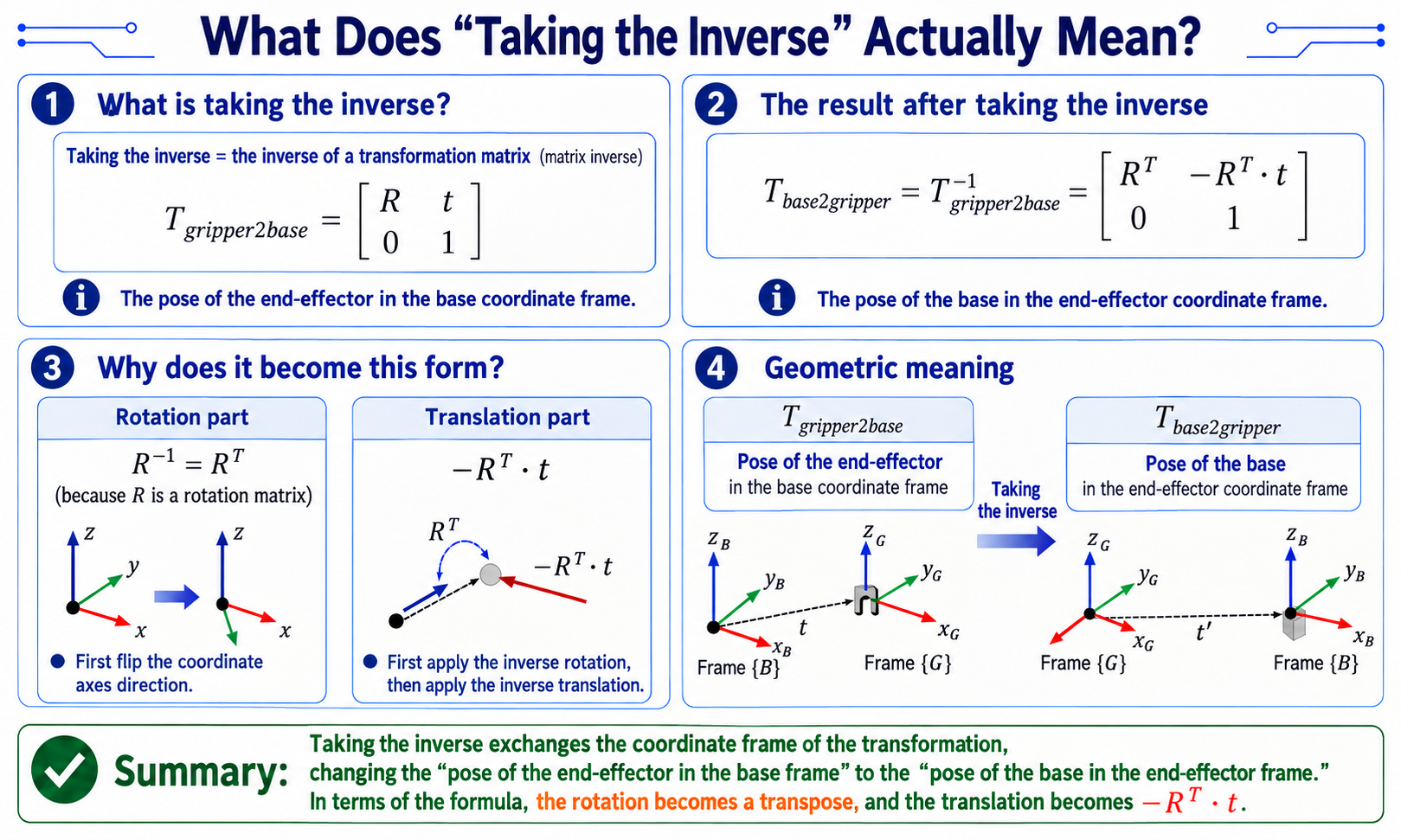
What "taking the inverse" means
-
"Taking the inverse" = matrix inverse. In ETH mode, OpenCV does not accept
T_gripper2base; it wantsT_base2gripper, so you take the matrix inverse.# what we have (arm FK output)
T_gripper2base = [R t] # end pose (in base frame)
[0 1]
# what OpenCV ETH mode wants (after inversion)
T_base2gripper = T_gripper2base^-1 = [R^T -R^T.t] # base in end frame
[0 1 ] -
Rotation part: inverse of R = transpose of R (R is orthogonal)
-
Translation part: -R^T . t (un-rotate first, then un-translate)
-
Geometric meaning: "end pose in base frame" becomes "base pose in end frame" after inversion.
Calibration Pose Design Principles
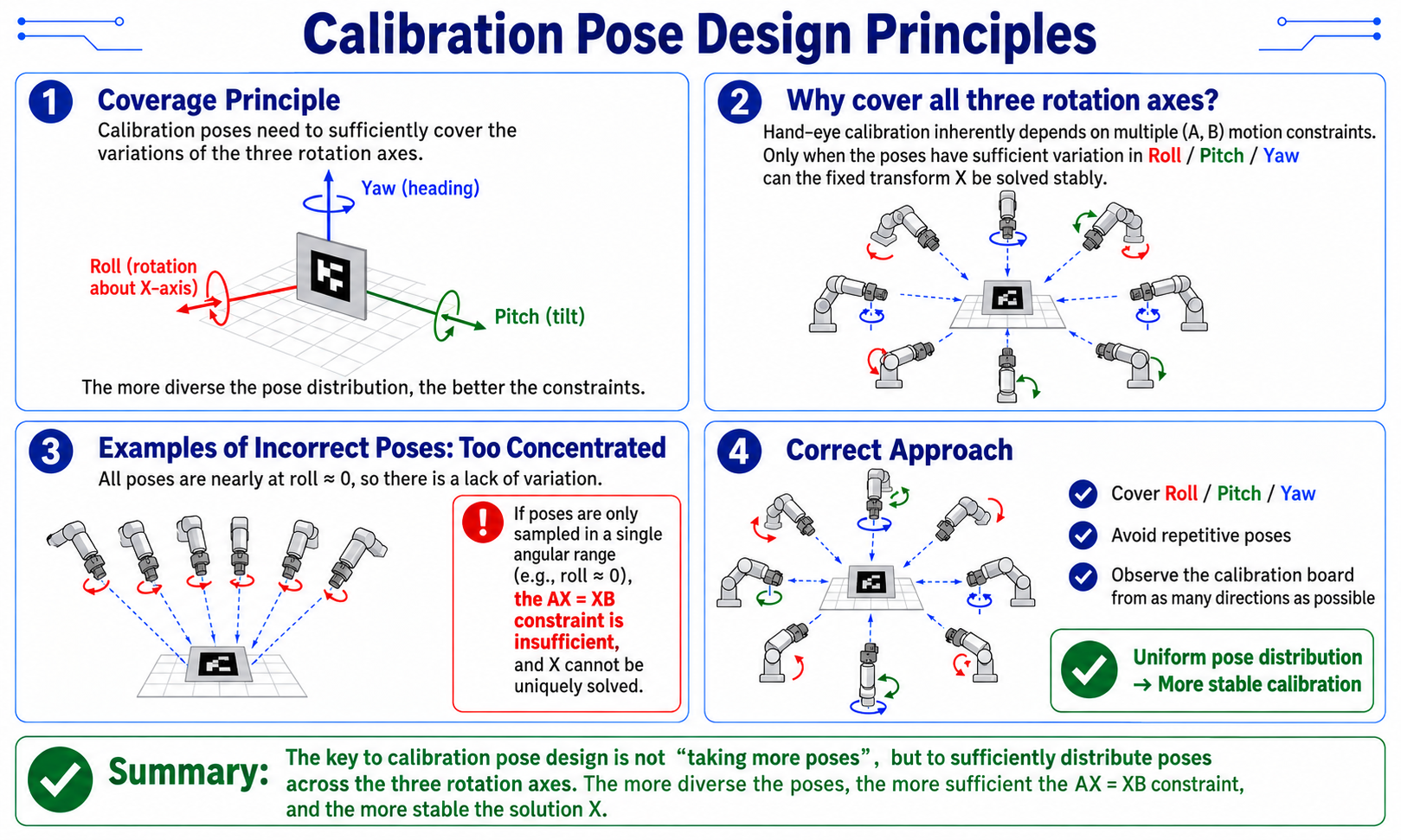
Coverage principle
-
Calibration poses must cover changes across all three rotation axes:
[diagram: calibration pose distribution]

      Roll ^
           |
   +-------+-------+
   |       |       |
   |  Yaw -+-->    |
   |       |       |
   +-------+-------+
           |
v Pitch -
If poses are limited to one angular range (e.g. all roll ~ 0), AX=XB is under-constrained and X is non-unique. So during calibration the arm's poses must involve Roll, Pitch, and Yaw changes.
Coordinate Transform Chain After Calibration
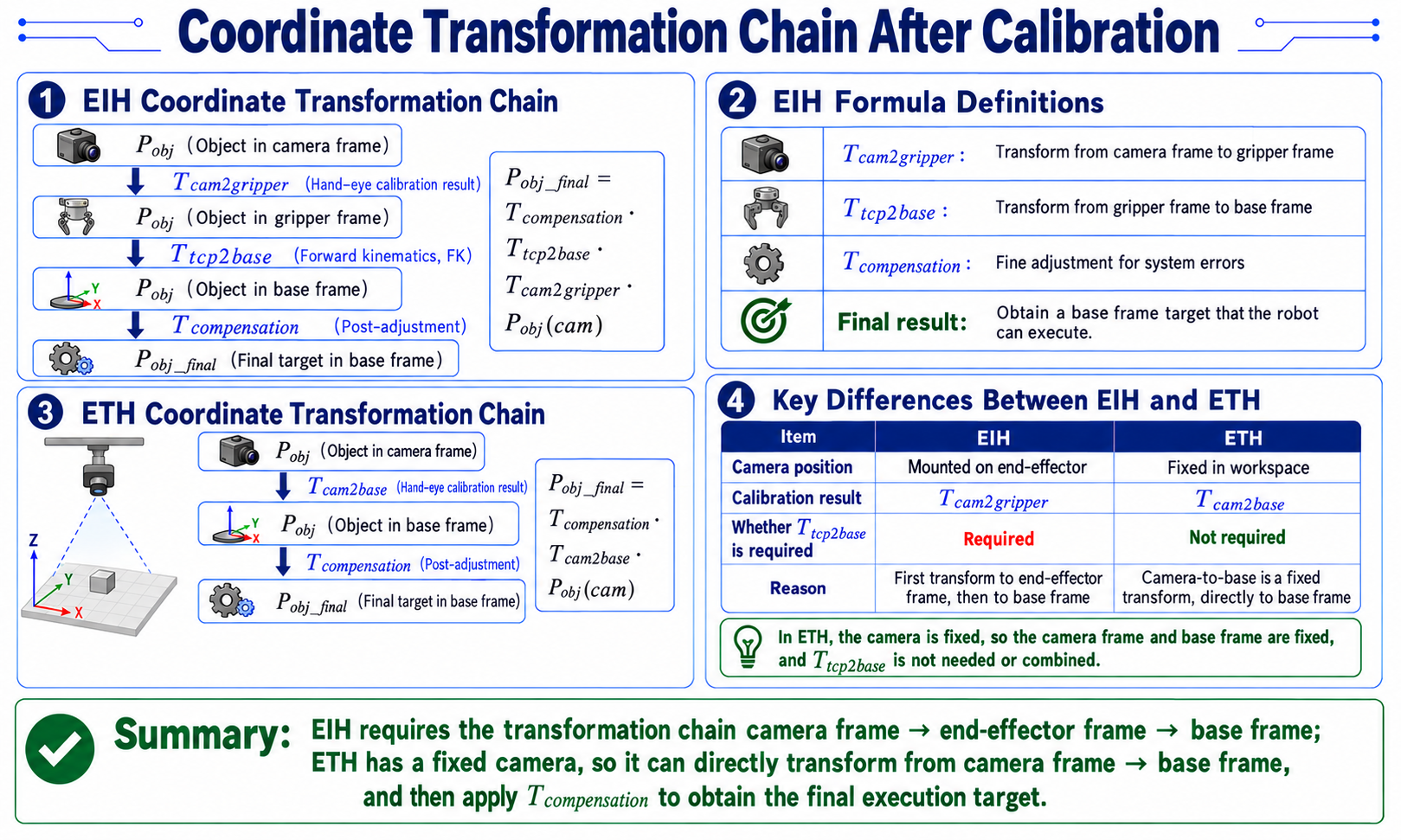
Implementation:
"""Transform a camera-observed pose into the arm base frame"""
    T_compensation = hand_eye_compensation_matrix(cfg)
    T_he = np.asarray(T_hand_eye, dtype=np.float64)

    if hand_eye_mode == "eye_in_hand":
# EIH: T_cam2base = T_comp x T_tcp2base x T_hand_eye
        return T_compensation @ np.asarray(T_tcp2base, dtype=np.float64) @ T_he
    if hand_eye_mode == "eye_to_hand":
# ETH: T_cam2base = T_comp x T_hand_eye
        return T_compensation @ T_he
EIH formula meaning
[diagram: EIH transform chain]

  P_obj (target in camera frame)
       |
       | T_cam2gripper (hand-eye result)
       v
  P_obj (target in end frame)
       |
       | T_tcp2base (forward kinematics)
       v
  P_obj (target in base frame)
       |
       | T_compensation (post-hoc fine tune)
       v
  P_obj_final (final target in base frame)
-
Implementation:
"""Read compensation matrix from config"""
    calibration = cfg.get("calibration") or {}
    compensation = calibration.get("hand_eye_compensation_m") or {}
    T = np.eye(4, dtype=np.float64)
    T[:3, 3] = [
        float(compensation.get("x", 0.0)),
        float(compensation.get("y", 0.0)),
        float(compensation.get("z", 0.0)),
    ]
    return T
ETH formula
- Because the camera is fixed, the base-camera transform is fixed; T_tcp2base does not enter the composition.
Calibration Error and Reprojection Analysis
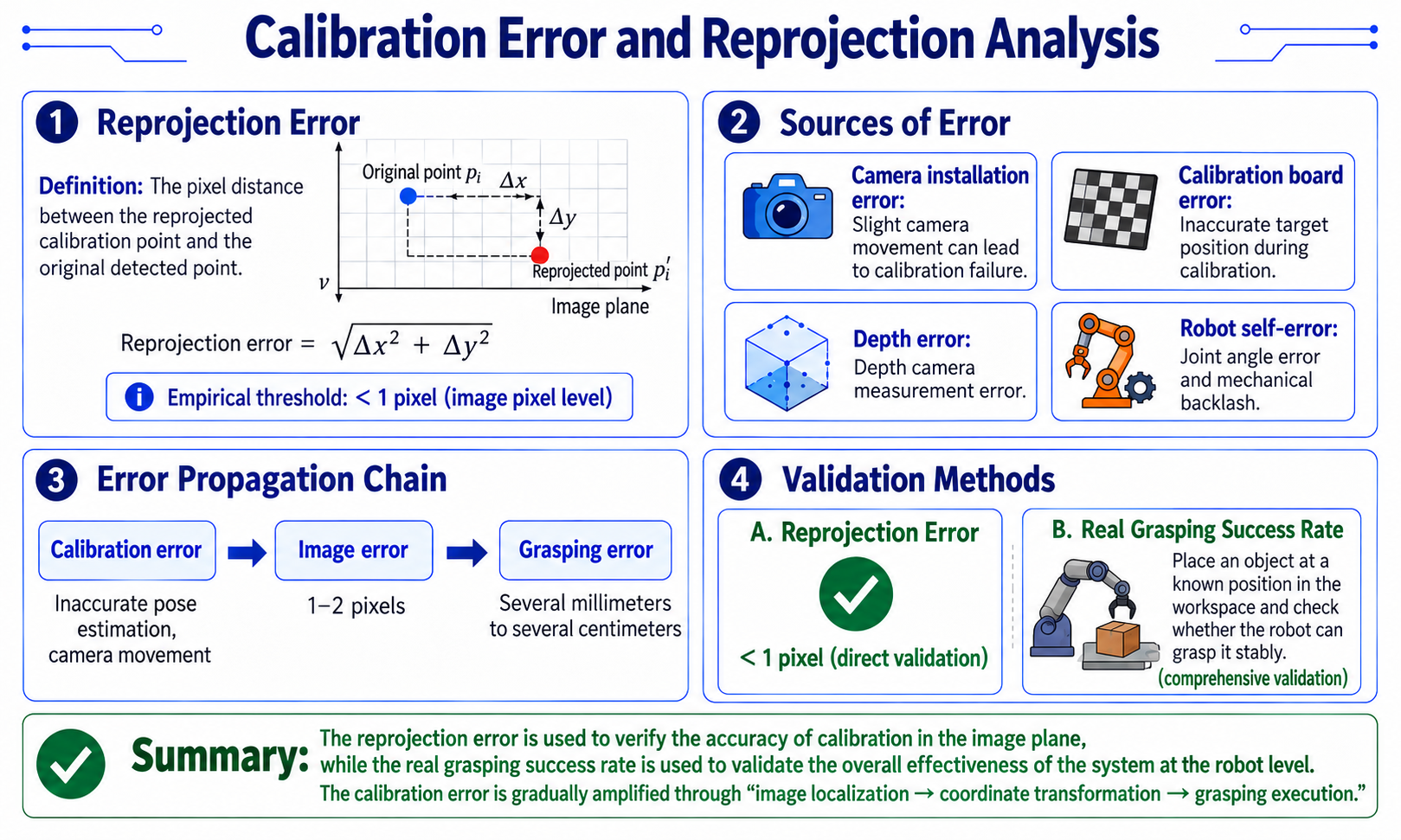
Reprojection error
-
Definition: reproject calibration points into the image and compute the pixel distance to the originally detected points.
[diagram: reprojection error]

  original point p_i      reprojected point p_i'
       |                    |
       +---- dx, dy -------+

reprojection error = sqrt(dx^2 + dy^2)-
Empirical threshold: < 1 pixel (sub-pixel).
-
Error sources
Source Effect Camera mounting error Slight camera movement invalidates the calibration Calibration board error Inaccurate target position during calibration Depth error Depth-camera measurement error Robot error Joint error and mechanical backlash
-
Error propagation chain
calibration error -> pixel error -> grasp deviation
   ^                  ^              ^
   |                  |              |
   |            1-2 pixels     a few mm to cm
   |
   +-- poor calibration poses, camera moved
Validation methods
- Reprojection error: < 1 pixel (direct validation)
- Real grasp success rate: place objects at known positions in the workspace and see whether the robot reliably grasps (integrated validation)
28.6 6-DoF Grasp Pose Estimation
Coordinate Conventions for 6-DoF Grasping
Vision grasp frame (GraspNet convention)
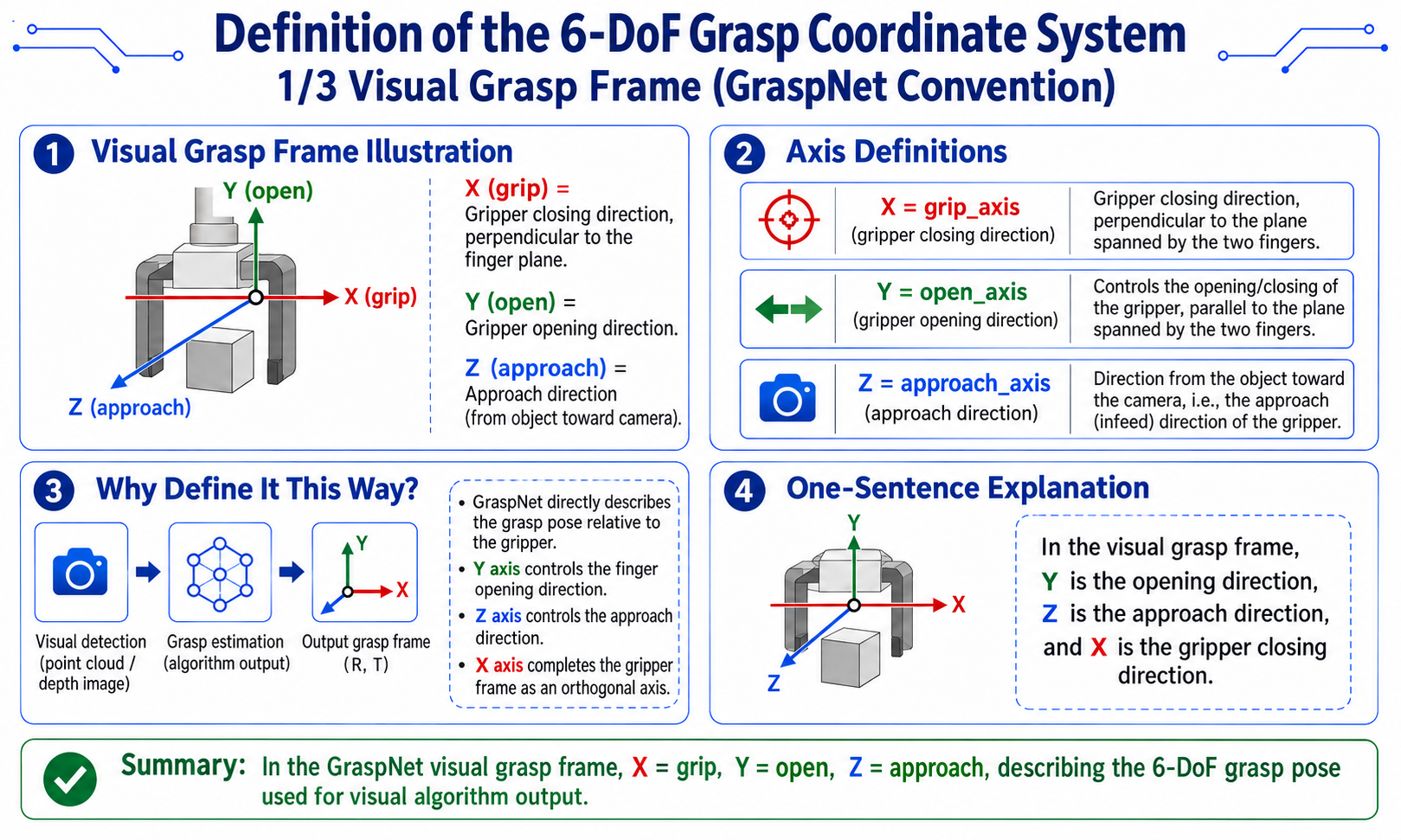
[diagram: vision grasp frame]

Y (open)
|
|   gripper open/close direction
|
+------ X (grip) -> gripper axis (grasp direction)
/
Z (approach)
v approach direction (object toward camera)
- X = grip_axis (gripper axis, perpendicular to the finger plane)
- Y = open_axis (open/close direction)
- Z = approach_axis (approach direction, from object toward camera)
Robot TCP frame (reBotArm convention)
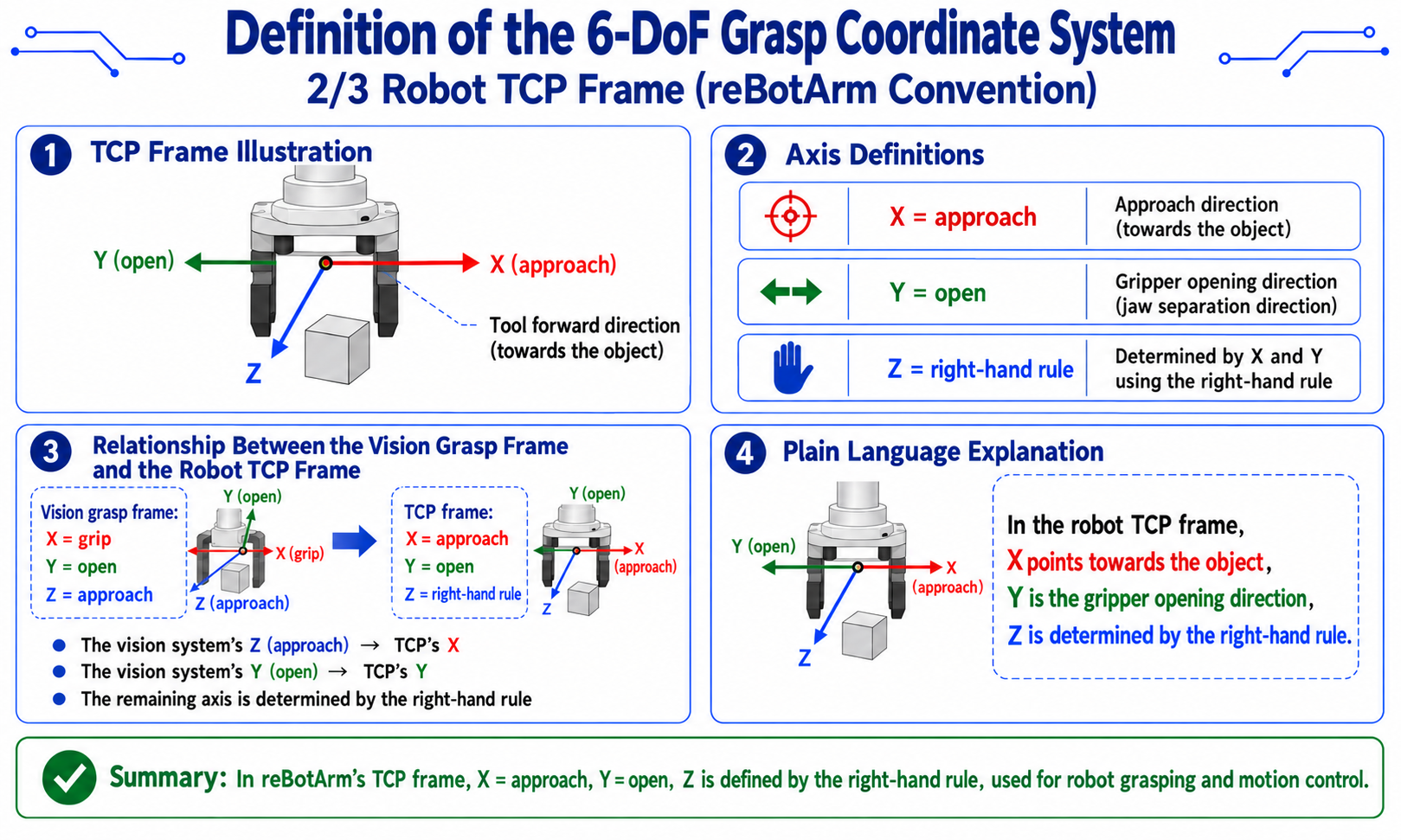
[diagram: TCP frame]

Z
|  / Y (open)
| /
+------ X (approach) -> tool forward direction (approach object)
- X = approach
- Y = open
- Z = completed by right-hand rule
Conversion between the two frames
-
Implementation:
# transforms.py L141-182 implementation reference
def grasp_axes_to_rebot_tcp_rotation(grip_axis, open_axis, approach_axis):
    """Map grasp-frame axes to the reBotArm TCP frame."""
    grip = grip_axis / norm(grip_axis)
    open_vec = open_axis / norm(open_axis)
    approach = approach_axis / norm(approach_axis)

# tcp_x = tool forward = approach direction (negate, since plane normal faces camera)
    tcp_x = -approach
# tcp_y = open direction, subtract approach component to make orthogonal
    tcp_y = open_vec - dot(open_vec, tcp_x) * tcp_x
    tcp_y = tcp_y / norm(tcp_y)
# tcp_z = right-hand cross product
    tcp_z = cross(tcp_x, tcp_y)
    tcp_z = tcp_z / norm(tcp_z)

# keep tcp_z aligned with grip_axis
    if dot(tcp_z, grip) < 0:
        tcp_y = -tcp_y
        tcp_z = -tcp_z

    R = np.column_stack([tcp_x, tcp_y, tcp_z]).astype(np.float64)
    if np.linalg.det(R) < 0.0:
        R[:, 2] *= -1.0
    return R
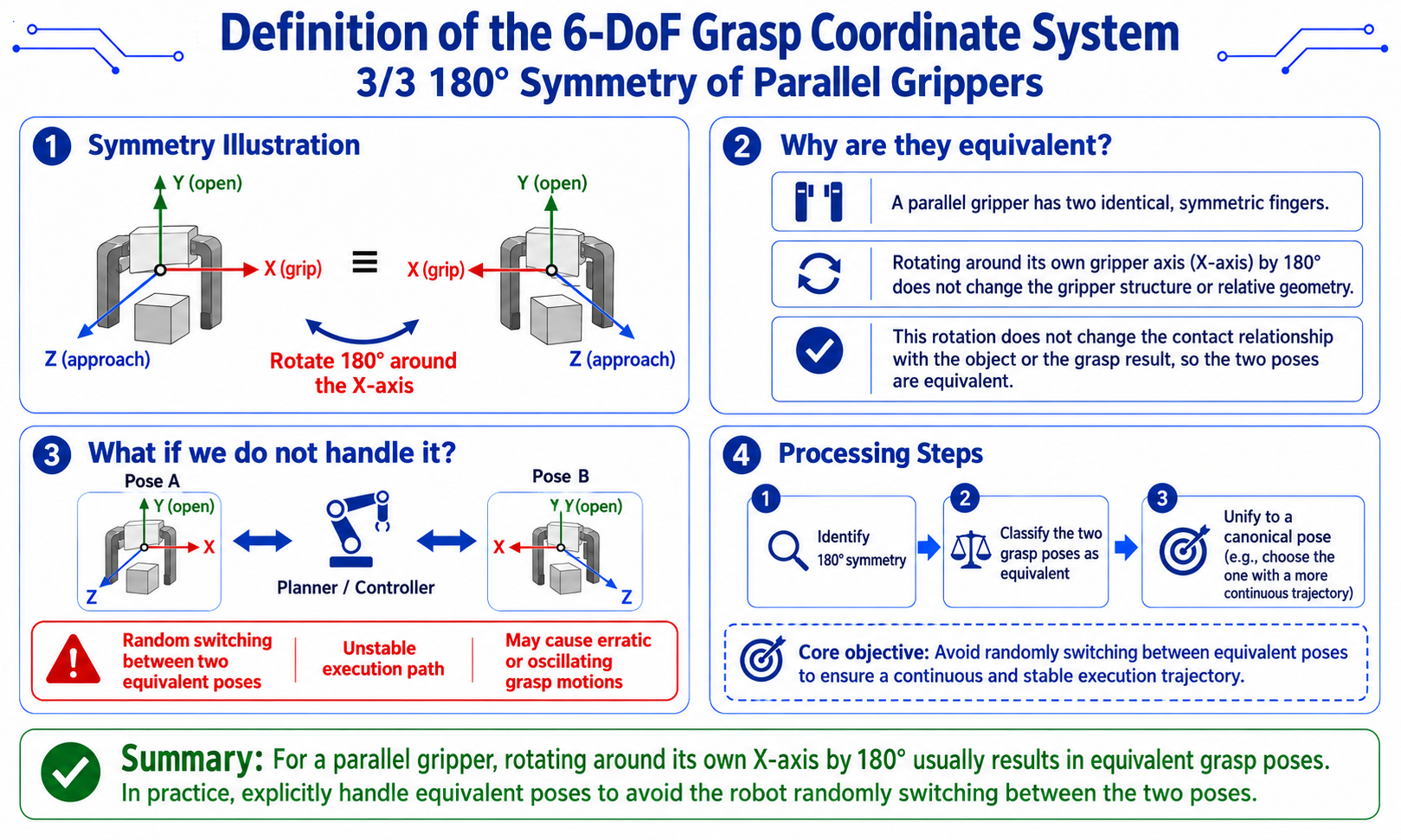
180-degree symmetry of a parallel gripper
-
A parallel (two-finger) gripper has a special symmetry: rotating 180 degrees about its own X axis (gripper axis) is equivalent.
[diagram: parallel-gripper symmetry]

   X (grip)     X (grip)
   |            |
   +-+    <=>    +-+
   | |   rotate  | |
   +-+  180 deg  +-+
| | -
If unhandled, the robot randomly switches between equivalent poses and the execution path becomes unstable.
-
Implementation:
# transforms.py L125-138 implementation reference
def canonicalize_parallel_gripper_tcp_rotation(R):
    """Pick a stable equivalent pose."""
    alt = R @ Rx(pi)  # rotate 180 deg about X

    roll = rotation_matrix_to_euler_zyx(R)[0]
    alt_roll = rotation_matrix_to_euler_zyx(alt)[0]

# pick the branch with smaller |roll| (roll~0 is usually more stable)
    return alt if abs(alt_roll) < abs(roll) else R
-
Geometric Grasp Estimation from OBB + Depth Quantile
Full pipeline
-
Implementation:
# ordinary_grasp.py L98-219 core pseudocode
def estimate_grasp(result, index, depth_mm, K, depth_quantile=0.75):
# 1. get OBB
    rect_points = _rect_points(result, index, depth_mm.shape, bbox_xyxy)
    center = rect_points.mean(axis=0).astype(np.float32)

# 2. short edge = grasp direction
    short_vec_uv, short_len_px = _short_edge(rect_points)
    short_dir_uv = _normalize(short_vec_uv)

# 3. mask refinement (for curved objects)
    if short_dir_uv is not None:
        refined = _refine_grasp_line_from_mask(mask, center, short_dir_uv, long_len_px)
        if refined is not None:
            center, short_edge_points, grasp_span_px = refined

# 4. depth sampling (75th quantile within mask)
    depth_values = depth_mm[mask > 0]
    depth_values = depth_values[depth_values > 0]
    if len(depth_values) == 0:
        center_depth = get_depth_mm(depth_mm, center_px[0], center_px[1], 5)
        if center_depth > 0:
            depth_values = np.array([center_depth], dtype=np.float32)

    z_m = float(np.quantile(depth_values, depth_quantile) / 1000.0)

# 5. backproject center to 3D
    position = _backproject(float(center[0]), float(center[1]), z_m, K)

# 6. build three axes
    approach = _normalize(-position)       # Z axis: object toward camera
    open_axis = _pixel_vec_to_3d(short_dir_uv, z_m, K)
    open_axis = open_axis - float(np.dot(open_axis, approach)) * approach  # Gram-Schmidt
    open_axis = _normalize(open_axis)

# ensure open_axis[0] >= 0 (avoid symmetry ambiguity)
    if open_axis[0] < 0:
        open_axis = -open_axis

    grip_axis = _normalize(np.cross(open_axis, approach))
    open_axis = _normalize(np.cross(approach, grip_axis))

# 7. assemble rotation matrix
    rotation = np.column_stack([grip_axis, open_axis, approach]).astype(np.float32)

# 8. convert to reBotArm TCP rotation
    tcp_rotation = grasp_axes_to_rebot_tcp_rotation(
        rotation[:, 0], rotation[:, 1], rotation[:, 2]
    ).astype(np.float32)

# 9. estimate grasp width
    jaw_width_m = float(np.linalg.norm(
        _pixel_vec_to_3d(short_dir_uv * grasp_span_px, z_m, K)
    ))

    return grasp_pose
Three-axis orthogonalization in detail
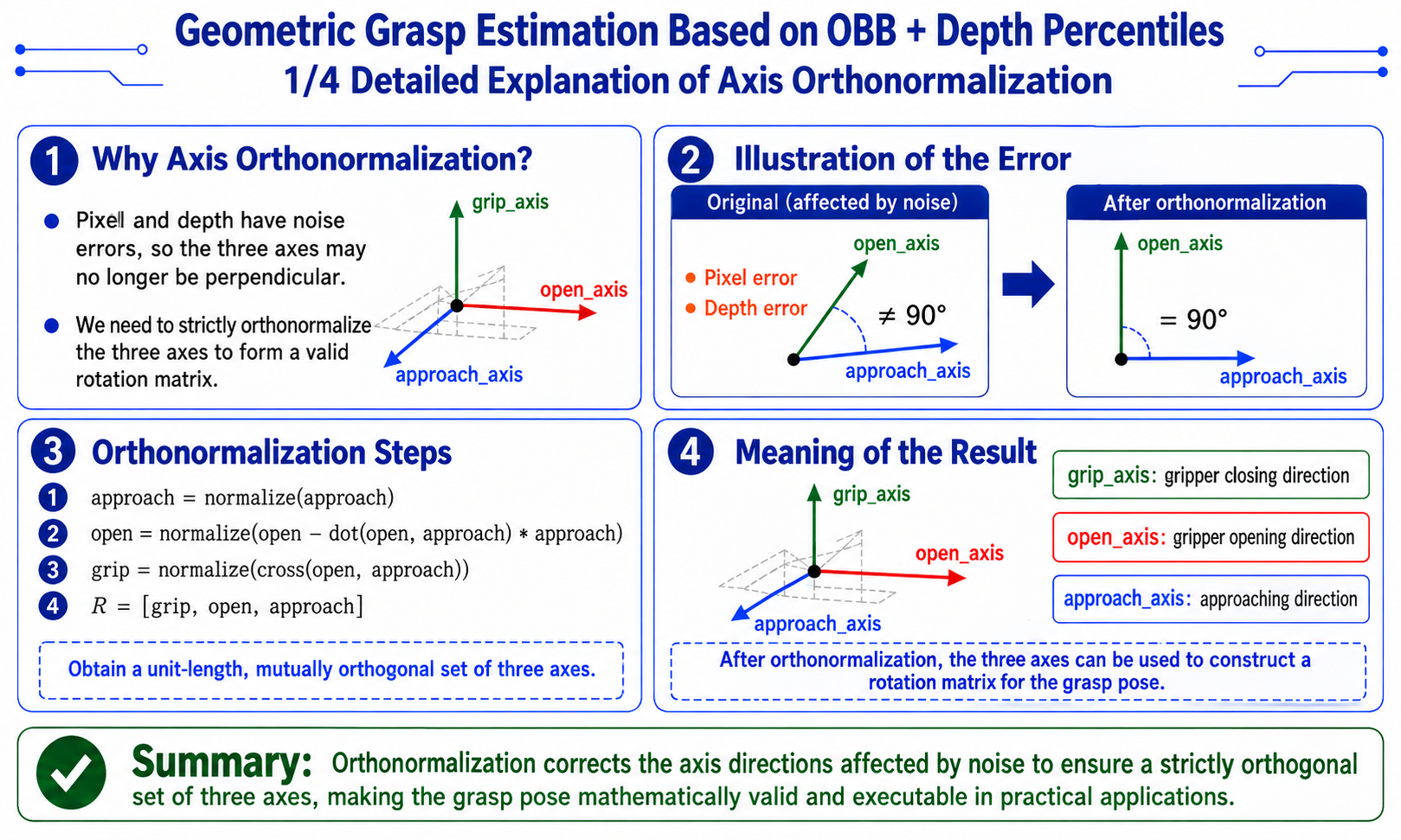
- Why orthogonalize:
-
In numerical computation, pixel vectors and depth both carry error, so
open_axisandapproachmay not be orthogonal. Gram-Schmidt orthogonalization guarantees a strictly orthogonal triad forming a valid rotation matrix.# key steps
approach = -position / norm(position) # object toward camera
open_3d = pixel_to_3d(short_dir_uv, z_m, K) # short-edge direction in 3D
open_axis = open_3d - dot(open_3d, approach) * approach # Gram-Schmidt
open_axis = normalize(open_axis)
grip_axis = normalize(cross(open_axis, approach))
open_axis = normalize(cross(approach, grip_axis)) # re-orthogonalize for numerical stability
-
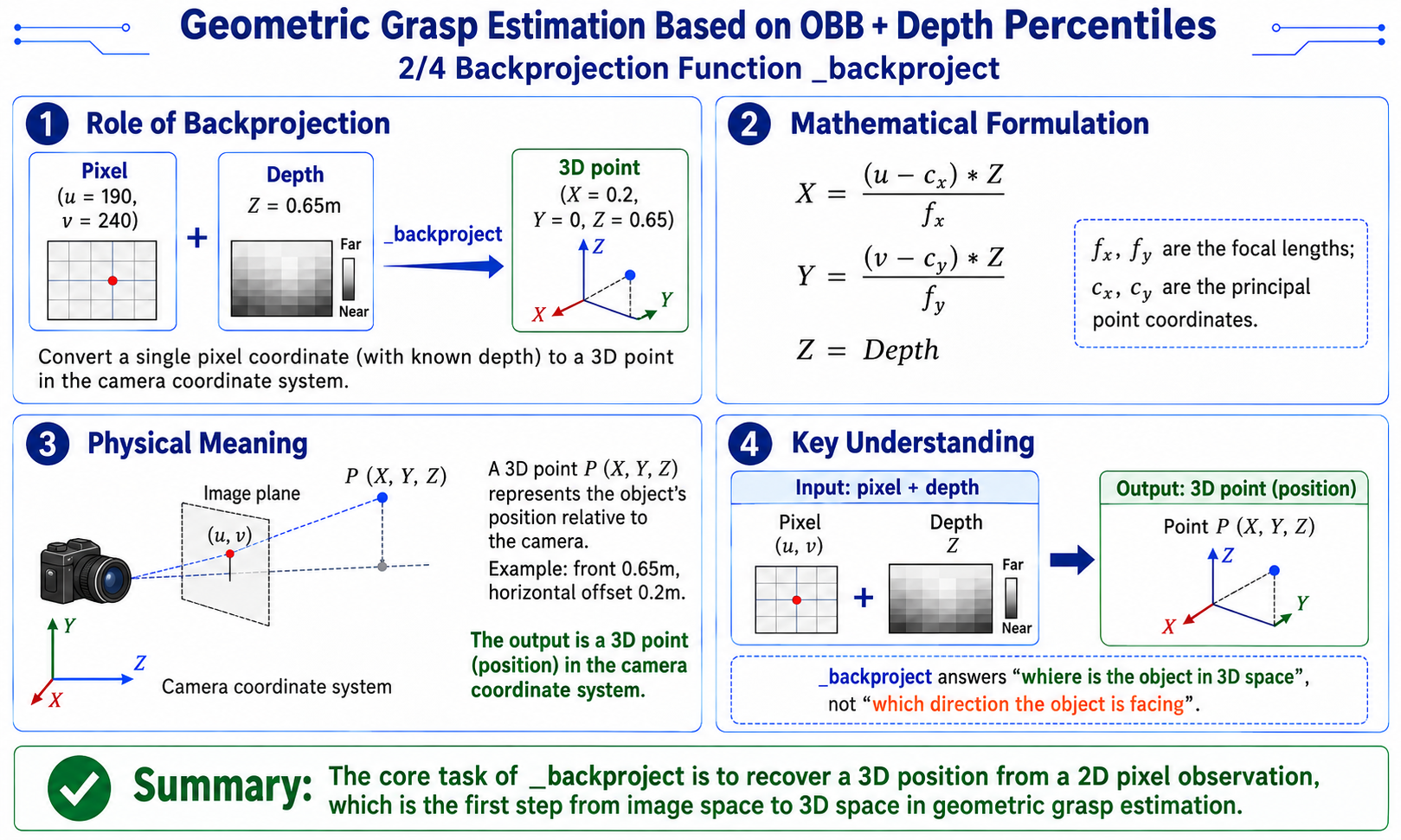
Backprojection function
-
Role: convert a single pixel coordinate (with known depth) to a 3D point (position) in the camera frame.
[diagram: physical meaning of backprojection]

  pixel (u=190, v=240) + depth Z=0.65m
           v _backproject
  3D point (X=0.2, Y=0, Z=0.65)
           v
"object is 0.65m ahead, 0.2m to the right" -
Implementation:
# ordinary_grasp.py L398-403 implementation
def _backproject(u, v, z_m, K):
    fx, fy = float(K[0, 0]), float(K[1, 1])
    cx, cy = float(K[0, 2]), float(K[1, 2])
    x = (u - cx) * z_m / fx
    y = (v - cy) * z_m / fy
    return np.array([x, y, z_m], dtype=np.float32)
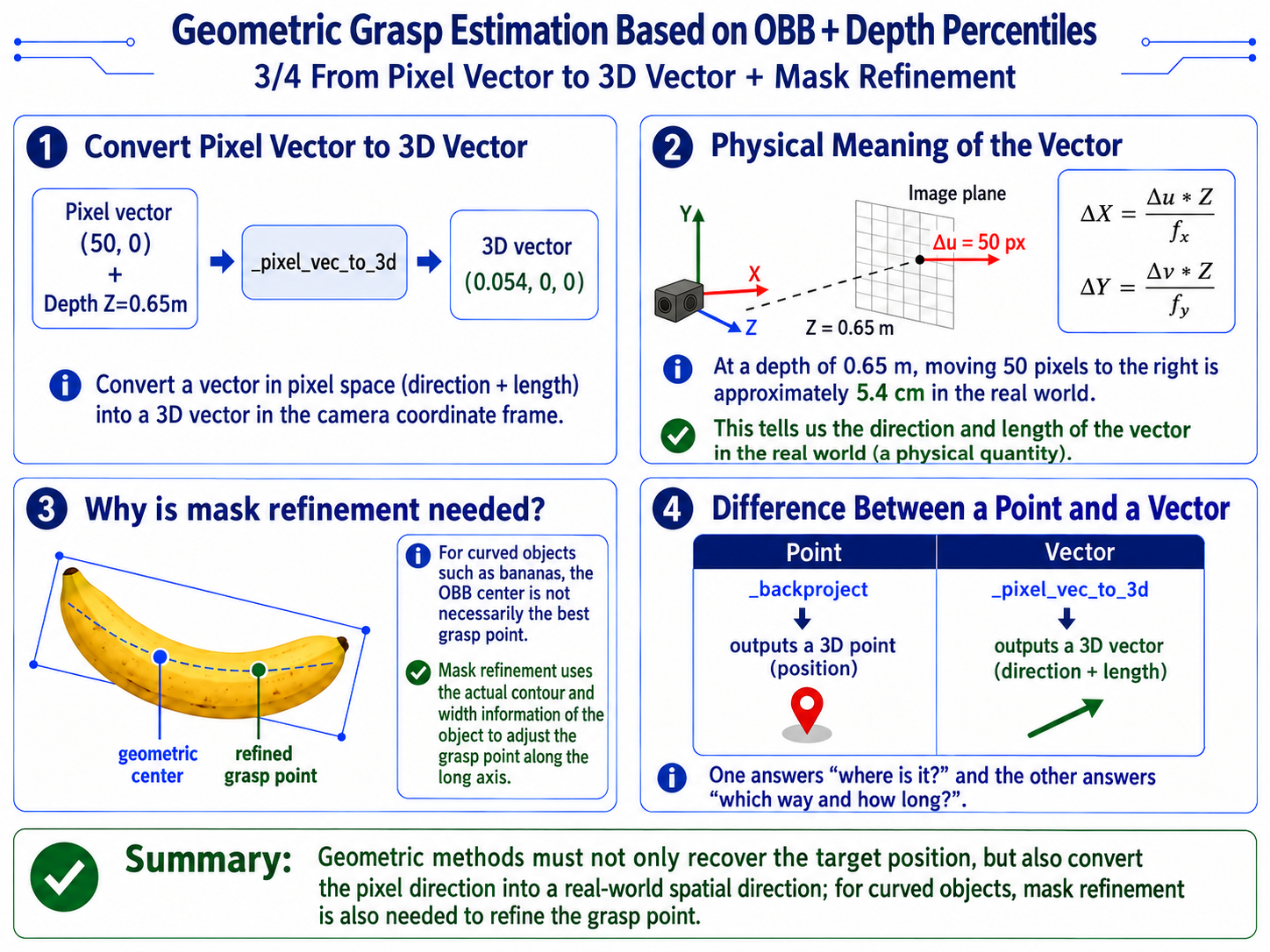
Pixel vector to 3D vector
-
Role: convert a pixel-space vector (direction + length) to a camera-frame 3D vector (direction + length).
[diagram: physical meaning of a pixel vector]

  pixel vector (50, 0) + depth Z=0.65m
           v _pixel_vec_to_3d
  3D vector (0.054, 0, 0)
           v
"at depth 0.65m, 50 pixels right = 5.4 cm physical" -
Implementation:
# ordinary_grasp.py L406-408 implementation
def _pixel_vec_to_3d(vec_uv, z_m, K):
    fx, fy = max(float(K[0, 0]), 1e-6), max(float(K[1, 1]), 1e-6)
    return np.array([
        float(vec_uv[0]) * z_m / fx,
        float(vec_uv[1]) * z_m / fy,
        0.0
    ], dtype=np.float32)
Mask refinement (curved objects)
- Why mask refinement is needed:
-
The OBB center is the object's geometric center, but for curved objects like a banana, the best grasp point is a specific location along the long axis (usually near the middle). The refinement uses the mask's actual width to adjust the grasp point.
-
Implementation:
utils/ordinary_grasp.py_refine_grasp_line_from_mask()(L233-275)# ordinary_grasp.py L233-275 implementation
def _refine_grasp_line_from_mask(mask, center, short_dir_uv, long_len_px):
"""Refine the short-axis grasp point using the mask's central cross-section."""
ys, xs = np.nonzero(mask > 0)
if len(xs) < 32:
return None # mask too small, skip refinement
points = np.column_stack([xs, ys]).astype(np.float32)
grip_dir_uv = np.array([-short_dir_uv[1], short_dir_uv[0]], dtype=np.float32)
rel = points - center.reshape(1, 2)
grip_coord = rel @ grip_dir_uv # coordinate along short axis
open_coord = rel @ short_dir_uv # coordinate along long axis
grip_center = float(np.median(grip_coord))
band_half_width = clip(long_len_px * 0.04, 2.0, 12.0)
band_mask = np.abs(grip_coord - grip_center) <= band_half_width
if count(band_mask) < 24:
band_half_width = clip(long_len_px * 0.08, 4.0, 18.0)
band_mask = np.abs(grip_coord - grip_center) <= band_half_width
if count(band_mask) < 24:
return None
# within the band, take 5%/95% quantiles along open direction
open_min = np.percentile(open_coord[band_mask], 5.0)
open_max = np.percentile(open_coord[band_mask], 95.0)
open_center = 0.5 * (open_min + open_max)
# recombine center
refined_center = center + grip_center * grip_dir_uv + open_center * short_dir_uv
short_edge_points = _line_from_center(refined_center, short_dir_uv * (open_max - open_min))
return refined_center, short_edge_points, float(open_max - open_min)
-
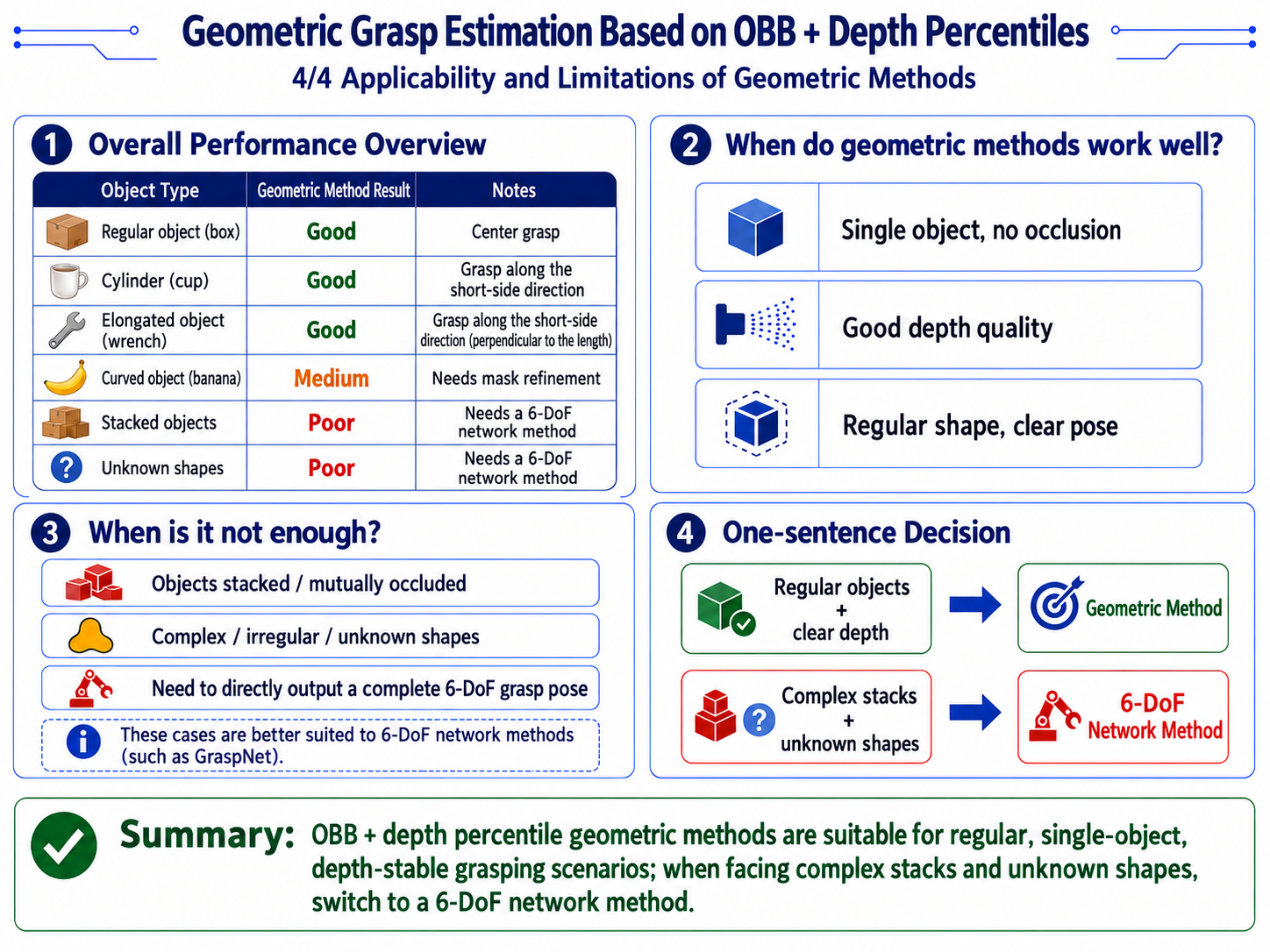
When the geometric method works—and its limits
6-DoF Grasp Estimation with Point-Cloud Networks (GraspNet)
Implementation:
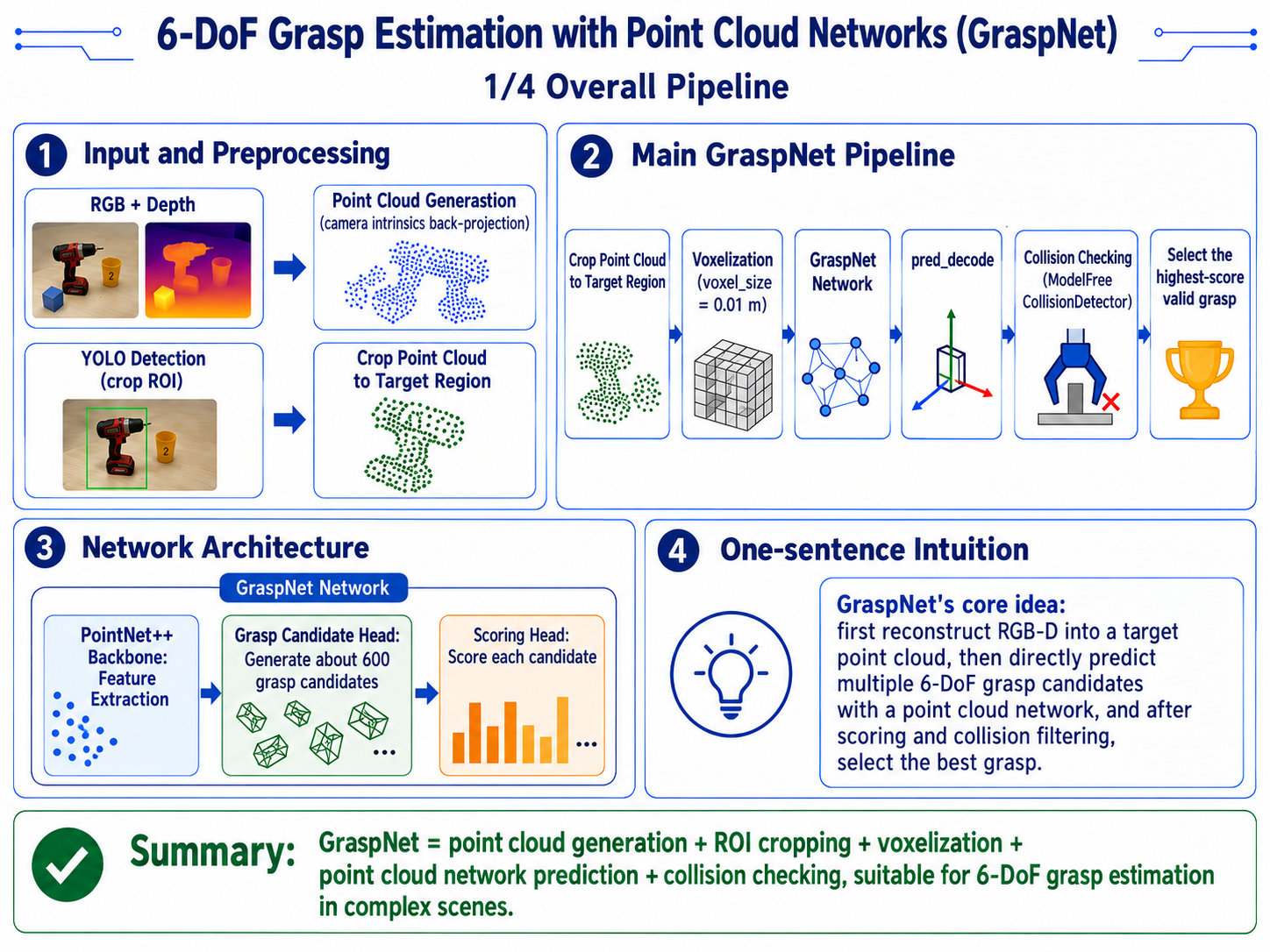
[diagram: GraspNet pipeline]

RGB + depth
  |
  +-> point cloud generation (backproject with camera intrinsics)
  |
  +-> YOLO detection (crop ROI)
       |
       +-> crop point cloud to target region
            |
            +-> voxelize (voxel_size = 0.01 m)
                 |
                 +-> GraspNet network
                      |
                      +-> PointNet++ backbone (feature extraction)
                      |
                      +-> grasp candidate head (~600 candidates)
                      |
                      +-> scoring head (scores each candidate)
                           |
                           +-> pred_decode (parse into Grasp objects)
                                |
                                +-> collision detection (ModelFreeCollisionDetector)
                                     |
                                     +-> pick the highest-scoring valid grasp
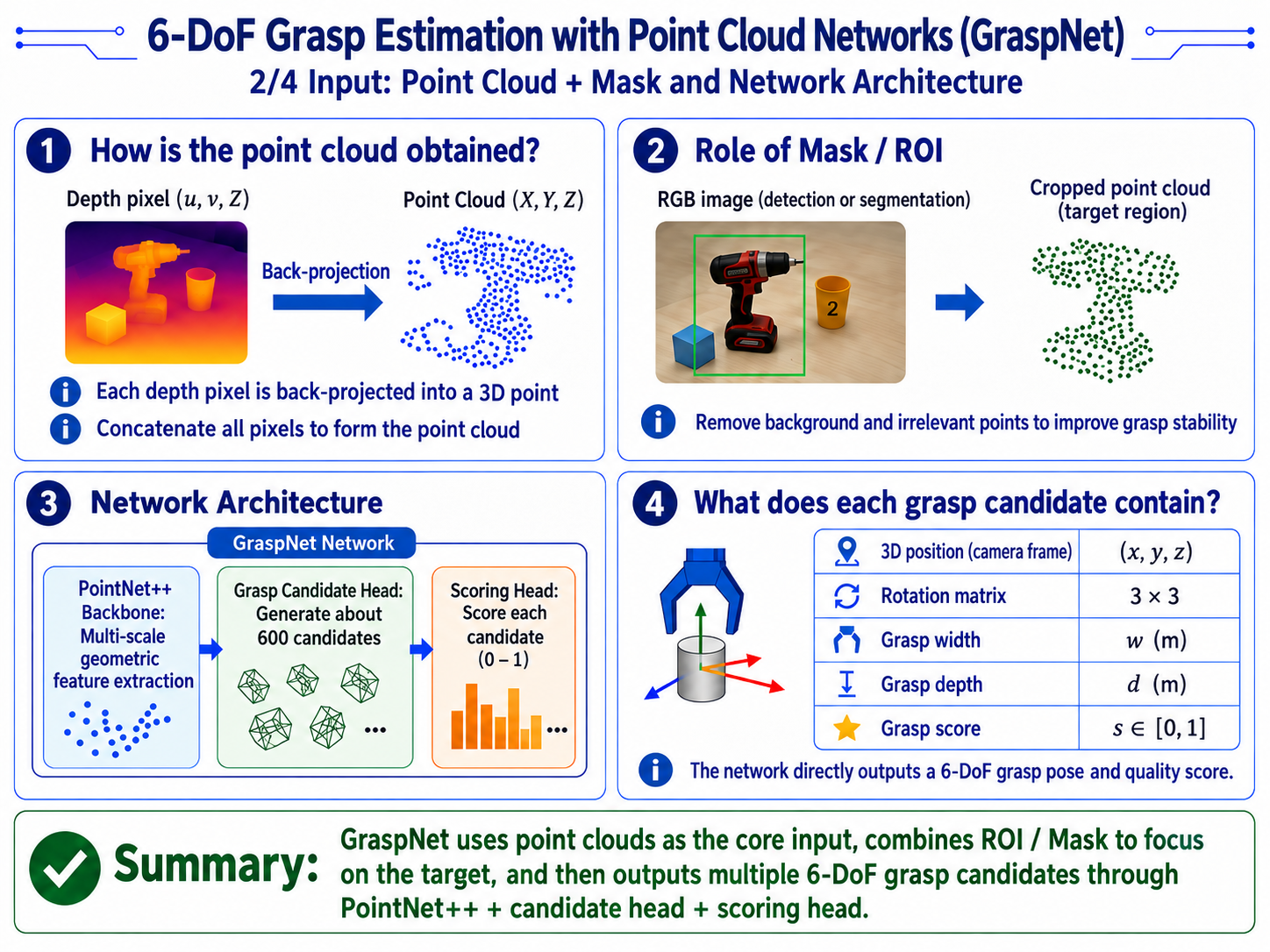
Input: point cloud + Mask
-
Implementation:
# graspnet_utils.py L21-25 implementation
PROJECT_ROOT = Path(__file__).resolve().parents[1]
GRASPNET_ROOT = PROJECT_ROOT / "sdk" / "graspnet-baseline"
DEFAULT_NUM_VIEW = 300
DEFAULT_VOXEL_SIZE = 0.01              # 1 cm voxel
DEFAULT_WARMUP_FRAMES = 20
DISPLAY_FLIP_X = np.diag([1.0, -1.0, -1.0, 1.0]).astype(np.float64) -
Point cloud backprojected from depth map:
- Each depth pixel (u, v, Z) backprojects to (X, Y, Z)
- Concatenate all pixels into the point cloud
-
Network structure
- PointNet++ backbone
- Point-cloud feature backbone extracting multi-scale geometric features from local to global.
- Grasp candidate head
- Outputs many 6-DoF grasp candidates (~600), each containing: 3D position (camera frame), rotation matrix, grasp width, grasp depth.
- Scoring head
- Scores each candidate (0-1); higher score means higher expected success.
- PointNet++ backbone
Output format
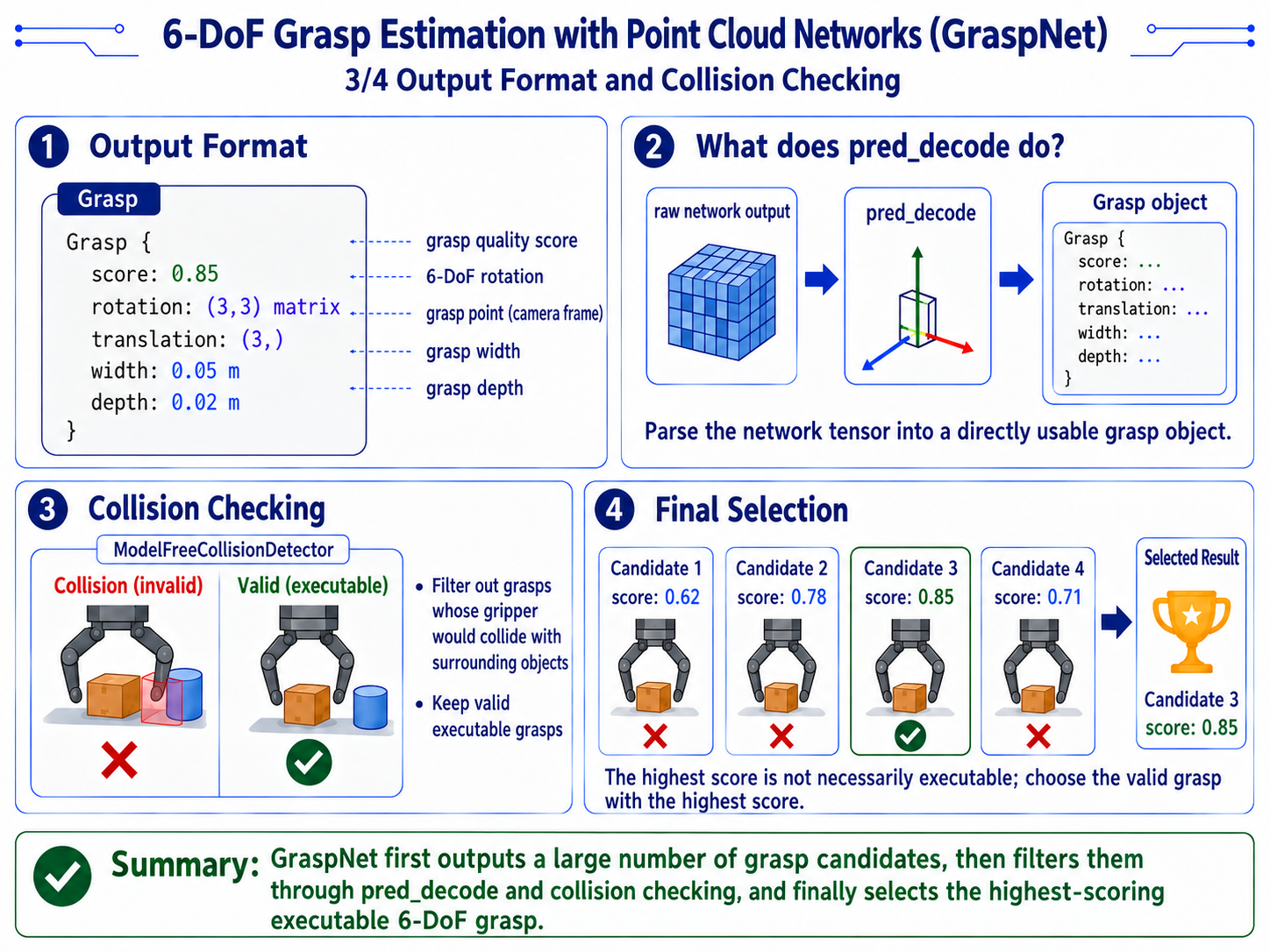
Grasp {
  score: 0.85              # grasp quality score
  rotation: (3, 3) matrix  # 6-DoF rotation
  translation: (3,)        # grasp point (camera frame)
  width: 0.05              # grasp width (m)
  depth: 0.02              # grasp depth (m)
}
Collision detection
-
Implementation:
# graspnet_utils.py L45 implementation
from collision_detector import ModelFreeCollisionDetector # noqa -
The collision detector checks whether the gripper would hit surrounding objects when executing the grasp, and filters out colliding grasps.
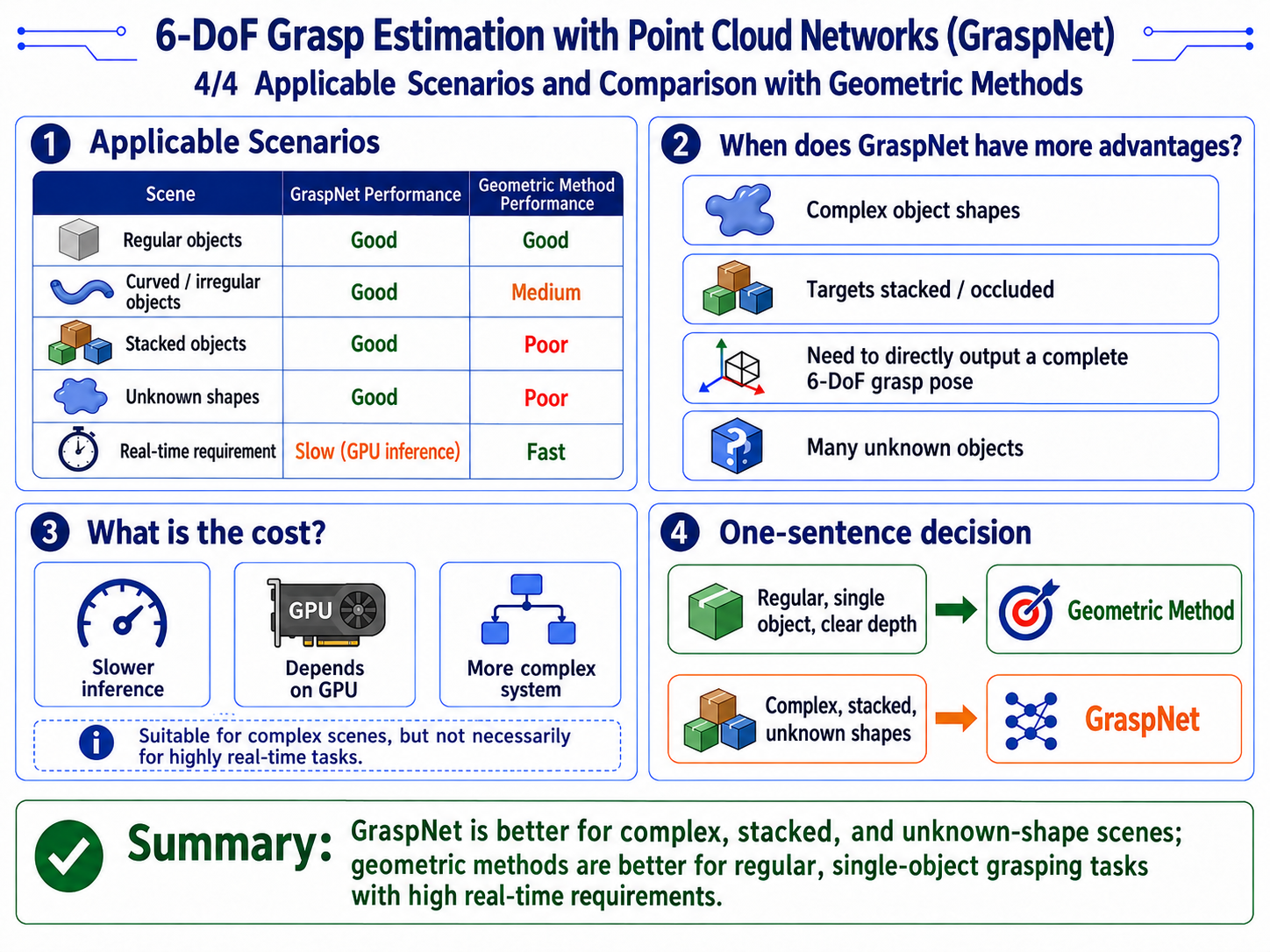
Suitable scenarios
Converting the Grasp Pose to the Base Frame
-
Implementation:
# transforms.py L227-240 implementation
def transform_grasp_pose_to_base_with_retreat(
    position_cam,           # grasp point (camera frame)
    tcp_rotation_cam,       # TCP rotation (camera frame)
    T_cam2base,             # hand-eye camera->base matrix
    pregrasp_offset_m,      # pregrasp retract distance
    retreat_offset_m,       # retreat distance
    insertion_depth_m=0.0,
):
# 1. transform grasp point to base frame
    T_grasp_cam = make_T(position_cam, tcp_rotation_cam)
    T_grasp_base = T_cam2base @ T_grasp_cam

# 2. canonicalize parallel-gripper symmetry
    T_grasp_base[:3, :3] = canonicalize_parallel_gripper_tcp_rotation(T_grasp_base[:3, :3])

# 3. offset along TCP X to get pregrasp and retreat
    T_grasp_base = offset_along_tool_x(T_grasp_base, -insertion_depth_m)
    T_pregrasp_base = offset_along_tool_x(T_grasp_base, pregrasp_offset_m)
    T_retreat_base = offset_along_tool_x(T_grasp_base, retreat_offset_m)

# 4. convert back to 6D pose
return mat4_to_pose6d(T_grasp_base), mat4_to_pose6d(T_pregrasp_base), mat4_to_pose6d(T_retreat_base)-
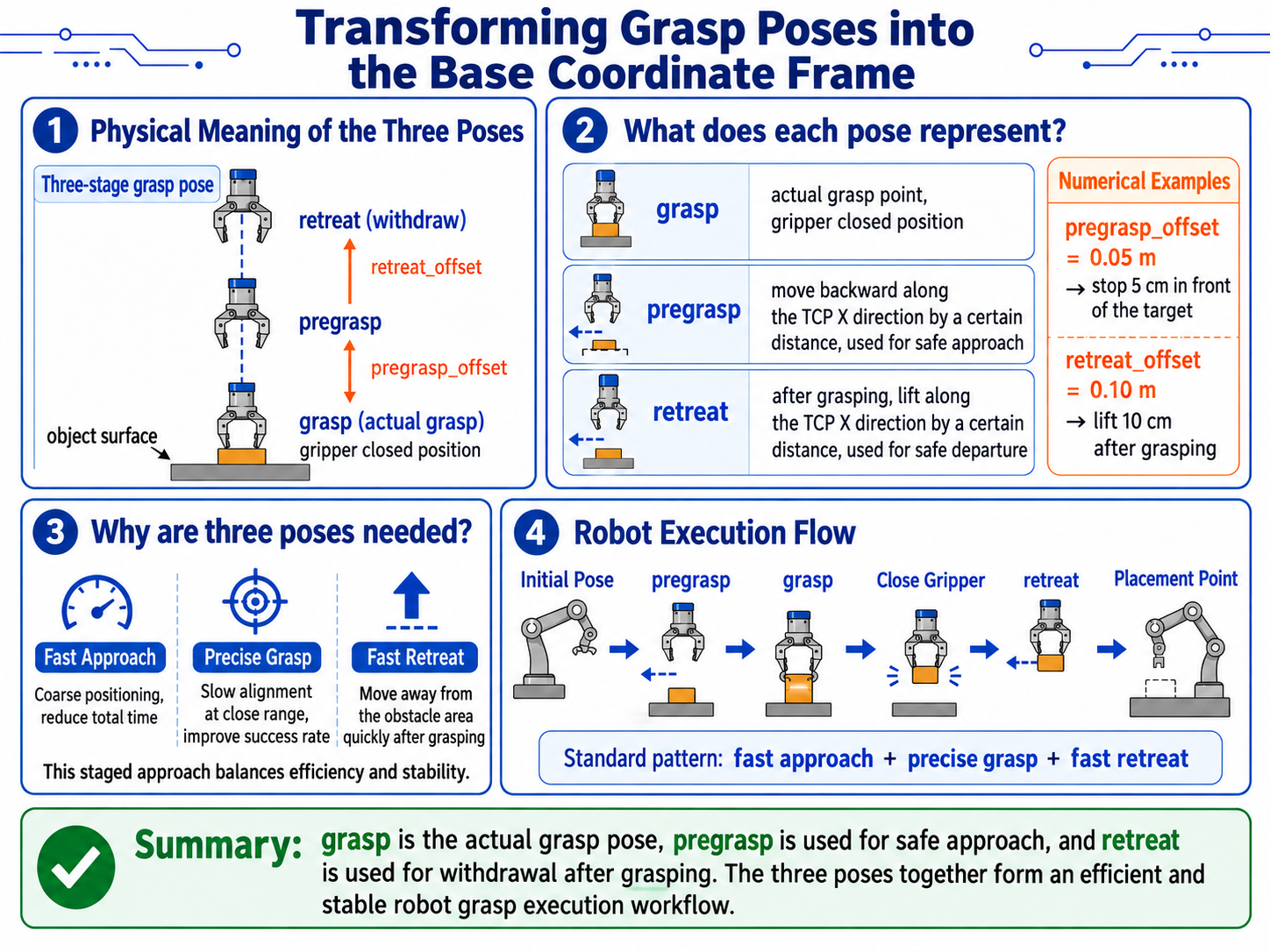
Physical meaning of the three poses
[diagram: three grasp-pose stages]

       retreat
         ^
         | retreat_offset
         |
       pregrasp
         ^
         | pregrasp_offset
         |
       grasp
v object surface- grasp: the actual grasp point, where the gripper closes
- pregrasp: pre-grasp point, retracted along TCP X by some distance, for obstacle-free approach
- retreat: post-grasp point, lifted along TCP X by some distance after grasping
- For example:
- pregrasp_offset = 0.05 m -> stop 5 cm away before approaching
- retreat_offset = 0.10 m -> lift 10 cm after grasping
-
Why three poses are needed
- The standard robot grasp flow:
- Move from the initial position to pregrasp (fast, coarse positioning)
- Move slowly from pregrasp to grasp (precise alignment)
- Close the gripper
- Lift from grasp to retreat (fast withdrawal)
- Move from retreat to the place point
This "fast approach + precise grasp + fast retreat" pattern ensures grasp precision while improving overall efficiency.