30. Voice and Multimodal Interaction
Chapter 30 of the Seeed Physical AI Beginner's Course — an elective voice and multimodal interaction project: a reSpeaker microphone array with DOA sound-source tracking plus Groq Whisper speech recognition and Llama intent understanding to voice-control the reBot Arm, from hardware wiring to the command-line reference.
30.1 Chapter Overview
Use a reSpeaker to voice-control the reBot Arm. This document walks you step by step, from scratch, through building an intelligent arm system that "can hear and can move."
This is a voice-driven intelligent arm control system.
When you say "hello," the arm turns toward you and nods; when you say "dance," it sways happily; clap on the other side of the room, and it "hears" the direction of the sound and turns to face you.
The system does three things:
- Hear — capture audio through the microphone array and estimate sound direction
- Understand — recognize speech with AI and infer intent
- Move — control the arm to perform the corresponding action
This project demonstrates a complete "device-cloud collaboration + multi-sensor fusion" system:
- Edge (on-device): DOA sound localization, motion control, idle animation
- Cloud: speech recognition (Whisper), intent understanding (Llama)
Advantages of this architecture:
- DOA is a real-time task (< 100 ms) and must run locally
- Speech recognition needs a large model and must run in the cloud
- Motion control is a safety loop and must run locally
Two interaction modes
| Mode | Name | Interaction Method | Applicable Scenarios | Internet Required |
|---|---|---|---|---|
| Mode 1 | DOA Sound Source Tracking | Automatically detect the direction of sound source and turn towards it | Exhibition demos, interactive installations | No |
| Mode 2 | Voice Command Control | Hold Enter key to control | Voice assistant, teaching demonstrations | Yes (Groq API) |
System architecture
You speak / make a sound
      v
[ reSpeaker ]  4-mic array + XVF3800 chip
      v
[ Ubuntu ]  Python 3.10 main program
      v
   two paths:
   |--> DOA mode: compute sound direction locally -> turn the arm
   +--> Voice mode: upload to Groq cloud AI -> Whisper STT + Llama NLU -> control the arm
      v
[ reBot Arm ]  7-DoF arm executes
- Layered architecture
- Hardware layer (devices you can touch):
- reSpeaker (4-mic array with XIAO ESP32S3 controller)
- reBot Arm B601-DM (6-DoF arm + gripper)
- Ubuntu 22.04 PC (runs the main program)
- Driver layer (let hardware talk to each other):
- USB audio (pyusb / libusb) — connects the microphone array
- Serial communication (MotorBridge) — connects the arm
- Web API (Groq Cloud) — connects cloud AI services
- Algorithm layer (the "brain" that processes data):
- DOA sound localization (local, real-time)
- Whisper speech recognition (Groq Cloud)
- Llama-3.3 intent understanding (Groq Cloud)
- Motion interpolation planning (local, smooth control)
- Application layer (effects you can see):
- DOA tracking mode
- Voice control mode
- Breathing idle animation
- Voice broadcast
- Hardware layer (devices you can touch):
30.2 Hardware Preparation
What to Prepare
| Component | Model | Qty | General Function | Purchase Recommendation |
|---|---|---|---|---|
| Robotic Arm | reBot Arm B601-DM | 1 | The "body" to execute motions | Official Seeed Studio |
| Microphone Array | reSpeaker XVF3800 | 1 | Capture sound and detect direction | Official Seeed Studio |
| Host PC | Ubuntu 22.04 PC | 1 | The "brain" running programs | x86_64 architecture |
| USB Cable | USB-A to USB-C | 2 | Device connection | Usually included with device |
| Woodworking Clamp | 3 inch or larger | 2 | Fix the base of robotic arm | Official Seeed Studio |
| Power Supply | 24V 15A (XT30 connector) | 1 | Power the robotic arm | Official Seeed Studio |
Why this hardware
- The reSpeaker XVF3800 is a 4-microphone array from Seeed Studio and XMOS:
- Onboard XVF3800 DSP chip, natively supporting DOA, echo cancellation, and noise suppression
- No extra algorithm development needed; sound localization done at the hardware level
- USB plug-and-play
The reBot Arm B601-DM is a desktop-grade 7-DoF arm:
- 7 DoF means very flexible motion (close to a human arm)
- B601-DM is the DM motor version (the other is the RS servo version); DM motors have higher precision
- Built-in Pinocchio kinematics library support
Hardware Overview
reSpeaker microphone array
A 4-microphone intelligent audio processing module:
| Feature | Detail |
|---|---|
| Split design | The core board and the microphone array board can be separated for flexible deployment |
| 360° pickup | Four microphones arranged in a ring, capturing sound from all directions |
| Onboard intelligent processing | XMOS XVF3800 chip with echo cancellation, noise suppression and sound localization (DOA) |
| Dual USB interfaces | USB-C connector and PH2.0 locking connector |
| Onboard amplifier | Drives a 10 W speaker directly (via the JST connector) |
In one sentence: an "all-hearing ear" — four "ears" to hear sound from every direction, plus the ability to work out the direction and filter noise.
Ubuntu 22.04 PC
| Item | Requirement |
|---|---|
| OS | Ubuntu 22.04 LTS (64-bit) |
| Architecture | x86_64 (ordinary Intel/AMD PC) |
| Minimum | 4-core CPU / 8 GB RAM / 50 GB disk / internet access |
Windows users' options:
- Install a dual-boot system (recommended)
- Use a VM (VMware; performance loss; not recommended for this project)
Hardware Wiring Diagram
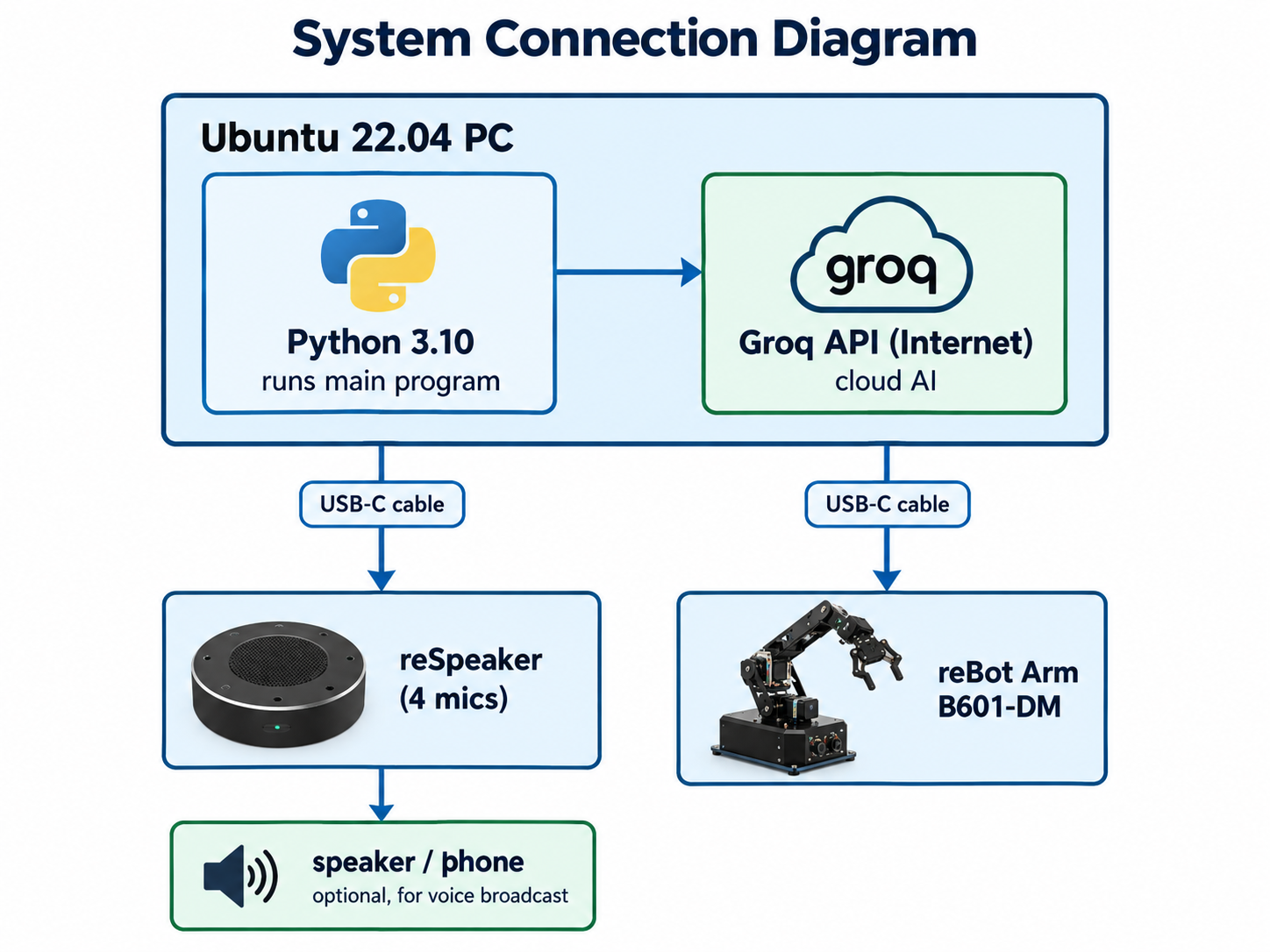
Wiring steps:
- Connect reSpeaker to the PC with a USB-C cable
- Connect the reBot Arm to the PC with a USB-C cable
- (Optional) connect a speaker or headphones to reSpeaker's audio output
- Ensure the PC is online
30.3 Environment Setup
Install Miniforge
wget "https://github.com/conda-forge/miniforge/releases/latest/download/Miniforge3-$(uname)-$(uname -m).sh"
bash Miniforge3-$(uname)-$(uname -m).sh
Why Miniforge instead of system Python
- Isolation: each project has its own Python environment, independent of others
- Flexible versions: pin a specific Python version for the project (e.g. 3.10.2)
- Dependency management: conda resolves complex binary dependencies (e.g. Pinocchio's C++ libraries)
Installer prompts:
- Press Enter to view the license
- Type
yesto agree - Press Enter to confirm the install path (default
~/miniforge3) - Type
yesto initialize conda (recommended)
After it finishes, close and reopen the terminal:
conda --version
# expected: conda 24.x.x
Clone the project code
git clone https://github.com/xr686/reBot-Arm-reSpeaker-Flex.git
cd reBot-Arm-reSpeaker-Flex
If the network is slow, use a mirror: git clone https://ghproxy.com/https://github.com/xr686/reBot-Arm-reSpeaker-Flex.git
Create the Conda environment
conda env create -f environment.yml
This takes about 10-30 minutes and will:
- Create a Python 3.10.2 environment named
flex - Install pinocchio, numpy, pyusb, and other dependencies
Success looks like:
Executing transaction: ... done
# To activate this environment, use
#     $ conda activate flex
Why pinocchio
- Pinocchio is a fast C++ rigid-body kinematics library
- Provides forward kinematics (FK), inverse kinematics (IK), and dynamics
- Is the core dependency for this project's arm motion control
Activate the Conda environment
conda activate flex
Activation succeeded: (flex) appears before the prompt
(flex) user@computer:~/reBot-Arm-reSpeaker-Flex$
Reactivate this every time you open a new terminal.
Install system dependencies
sudo apt-get update && sudo apt-get install -y ffmpeg
What ffmpeg does
- ffmpeg is an audio/video processing tool; this project uses it to post-process audio files after TTS: convert audio format, adjust sample rate, and merge/trim audio.
Install uv
curl -LsSf https://astral.sh/uv/install.sh | sh
Why uv is needed
- uv is an extremely fast Python package manager (10-100x faster than pip)
- The project's
motorbridgelibrary must be installed via uv - The uv.lock file pins exact dependency versions
After installation, close and reopen the terminal.
Clone the arm control library
git clone https://github.com/vectorBH6/reBotArm_control_py.git
cd reBotArm_control_py
uv sync
Expected output: install progress with no errors.
Set PYTHONPATH
export PYTHONPATH="$PWD:$PYTHONPATH"
What this means
-
When Python imports a library, it searches the paths in
sys.path. This command tells Python: "in addition to the default search paths, look in this directory." -
⚠ This setting is lost when you close the terminal. Permanent option:
echo 'export PYTHONPATH="'$PWD':$PYTHONPATH"' >> ~/.bashrc
source ~/.bashrc
Why not pip install
reBotArm_control_pyis a library under development, not a stable package published to PyPI- An editable install is more flexible
- Pointing PYTHONPATH directly at the source directory also works
Set serial port permissions
sudo chmod 666 /dev/ttyACM*
Why
- Linux has strict permission management for hardware devices. By default, ordinary users cannot directly access serial devices; this command lets all users read and write these devices.
This setting is lost after reboot. Permanent option:
sudo usermod -a -G dialout $USER
# log out and back in to take effect
- Principle:
dialoutis the Linux group with serial device access; joining it grants the user read/write on devices owned by that group.
Configure the Groq API Key
Get the API key:
- Visit https://console.groq.com/keys
- Register / log in (email or GitHub account)
- Click "Create API Key"
- Copy the key (format
gsk_xxxxxxxxxxxx)
Configure it in the code:
cd ~/reBot-Arm-reSpeaker-Flex
nano sound_tracking_arm.py
Find VOICE_CFG:
VOICE_CFG = {
    "api_key": "12345678",   # ←- replace with your API key
    ...
}
Change it to:
"api_key": "gsk_aBcDeFgHiJkLmNoPqRsTuVwXyZ",
- Save: Ctrl O -> Enter -> Ctrl X
Security reminder:
- Do not share the API key in public repositories
- Do not post screenshots on social media
- If leaked, immediately delete and regenerate it in the Groq console
30.4 Hardware Connection and Assembly
Hardware Connection
- Step 1: connect reSpeaker
- Connect reSpeaker to the PC with a USB-C cable
- The LED on reSpeaker should light up
lsusbshould show the Seeed Studio device
- Step 2: connect the reBot Arm
- Clamp the arm base to a table with a woodworking clamp
- Connect the arm to the PC with a USB-C cable
- Connect the 24 V power (XT30); do not power on yet
- Pre-power safety checklist:
- Arm base secured
- No obstacles in the motion range
- No people near the motion range
- USB cable connected
- Power cable correctly connected
- Step 3: turn on power
- After confirming, turn on the 24 V supply
- The arm emits a soft motor-power-on sound
ls /dev/ttyUSB*should show/dev/ttyUSB0
Verify hardware connections
arecord -l
Expected: card 2: XVF3800 [reSpeaker XVF3800], device 0: USB Audio [USB Audio]
ls -la /dev/ttyUSB0
Expected: crw-rw-rw- 1 root dialout ... /dev/ttyUSB0
30.5 First Run
Pre-run Verification
Check 1: Python dependencies
conda activate flex
cd ~/reBot-Arm-reSpeaker-Flex
python -c "import usb.core; import numpy; print('pyusb + numpy OK')"
Expected: pyusb + numpy OK
Check 2: arm library
export PYTHONPATH="$HOME/reBotArm_control_py:$PYTHONPATH"
python -c "from reBotArm_control_py.actuator import RobotArm; print('Robot Arm Library OK')"
- Expected:
Robot Arm Library OK
Check 3: microphone
arecord -D plughw:2,0 -c 6 -r 16000 -f S16_LE -d 3 /tmp/test.wav
aplay -D plughw:2,0 /tmp/test.wav
- Hearing the recorded audio = microphone works.
Startup
cd ~/reBot-Arm-reSpeaker-Flex
python sound_tracking_arm.py
Expected output:
==================================================
  reBot Arm B601-DM + reSpeaker Flex
  Please select the operating mode:
==================================================
  [1] DOA Interaction Mode (Sound Source Tracking + Standby Animation)
  [2] Voice control mode (button trigger + AI LLM control)
==================================================
Please enter the mode number (1 or 2):
- Enter
1: DOA sound-source tracking mode - Enter
2: voice control mode
Start directly in a given mode:
python sound_tracking_arm.py --mode doa    # DOA mode
python sound_tracking_arm.py --mode voice  # voice mode
First-Run Test
DOA mode test
- The program: initializes USB -> connects the arm -> enters idle
- Test method: stand next to the arm and speak or clap
- Observe whether the arm turns toward you, nods, and returns to idle
Voice mode test
- Press Enter; see the "recording" prompt
- Say "hello" or "say hello"
- Wait about 5 seconds
- Observe whether it recognizes the speech, the arm performs the action, and a voice reply is broadcast
30.6 Feature Details
Mode 1: DOA Sound-Source Tracking
What is DOA
- DOA = Direction of Arrival
- Estimate which direction sound comes from (like ears judging where a sound is)
Workflow
Start the system
    v
Initialize USB device
    v
Connect reSpeaker  ←->  Connect reBot Arm
    v
Loop:
    |- Read DOA angle data (0 deg~360 deg)
    |- Is a valid sound source detected?
    |   |- No -> Breathing idle animation -> keep reading
    |   +- Yes -> 4-frame angle buffer queue -> compute weighted average angle
    |           -> cosine-similarity smoothing filter
    |           -> angle change > trigger threshold?
    |               |- No -> keep reading
    |               +- Yes -> arm turns toward the target direction
    |                       -> performs a nod
    |                       -> enters cooldown
    |                       -> keep reading
    v
Exit (Press Ctrl+C)
Core algorithm details
-
4-frame angle buffer queue
-
Problem: single-frame DOA angles jitter (+/-5 deg~10 deg); driving the arm directly causes constant shaking.
-
Solution: a ring buffer stores the last 4 frames of DOA data (~200 ms).
[diagram: ring buffer]

     new frame written
        v
  [F4] [F3] [F2] [F1]
   |              |
   +---- average --+
        v
smoothed angle -
Why 4 frames:
- Too few: insufficient smoothing (jitter still visible)
- Too many: response lag (arm reacts slowly)
- 4 frames is an empirical value balancing smoothness and responsiveness
Cosine-similarity smoothing filter
-
Problem: the microphone may misjudge direction (sudden noise, reflected sound).
-
Solution: check angle consistency across recent frames; too much difference is treated as noise.
import numpy as np

def is_consistent(angles, threshold_deg=30):
    """Check whether recent angles are consistent."""
    if len(angles) < 2:
        return True
    # compute angle differences between adjacent frames (handle 360 deg wrap)
    diffs = []
    for i in range(len(angles) - 1):
        diff = abs(angles[i+1] - angles[i])
        # the diff may wrap around 360; take the smaller
        diff = min(diff, 360 - diff)
        diffs.append(diff)

    # consistent only when the max diff is below the threshold
return max(diffs) < threshold_deg -
Trigger threshold
- Rationale for the default 15 deg:
- Human ears judge sound direction with about +/-10 deg~15 deg error
- The threshold is slightly larger than ear error to avoid responding to minor fluctuations
- Threshold too large -> sluggish response
- Threshold too small -> frequent false triggers
- Rationale for the default 15 deg:
Cooldown rationale (default 3 seconds)
- Turning + nodding takes about 2-3 seconds
- During cooldown, new sounds are ignored so an action is not interrupted mid-execution
- Cooldown should be slightly longer than a single action's duration
Breathing idle animation
- Cycle about 4 seconds
- Joint angles slowly oscillate by +/-5 degrees sinusoidally
- Visual effect: like a person breathing
- Shows the system is running and gives the user confidence
Mode 2: Voice Command Control
Complete interaction loop
- Record -> recognize -> understand -> execute -> announce
Workflow
The user presses Enter.
    v
arecord starts recording (6 channels, 16kHz, 5 seconds)
    v
User releases Enter -> stop recording
    v
NumPy audio normalization (extract first channel + gain amplification)
    v
Upload to Groq API
    v
Whisper model performs speech-to-text (STT)
    v
Text command obtained (e.g. "turn left")
    v
Send to Llama-3.3-70B large language model
    v
LLM understands intent + outputs JSON structured result
    v
Parse result
    |- Invalid -> broadcast "Sorry, I didn't catch that. Could you please repeat?"
    +- Valid -> execute the corresponding arm action
              v
         Edge-TTS voice broadcast of the result
              v
         Return to idle
Audio processing details
# 6-channel capture
audio_data = arecord(... -c 6 -r 16000 ...)  # 6 channels, 16kHz
# take channel 1 (XVF3800 has already beamformed)
single_channel = audio_data[:, 0]

# normalize + gain
normalized = single_channel / np.max(np.abs(single_channel))
amplified = normalized * 0.9  # leave 10% headroom to avoid clipping
# save as WAV
scipy.io.wavfile.write("output.wav", 16000, (amplified * 32767).astype(np.int16))
Supported voice commands
How the AI understands your words
- Uses prompt engineering: give the AI a detailed instruction template:
- Which actions can be executed
- The meaning of each action
Required output format (JSON)
-
For example, "help me turn my head to the left" is parsed as:
{"action": "turn_left", "params": {"angle": 45}, "reply": "Okay, turning left."}
Benefit: no fixed command words needed; just speak naturally like chatting.
-
Prompt design example
SYSTEM_PROMPT = """
You are a robotic arm voice-control assistant. The user will say what they want the arm to do.
Choose the best-matching action from the list below and output it as JSON:

Available actions:
- turn_left: turn left, param angle (default 45)
- turn_right: turn right, param angle (default 45)
- say_hello: greet, nod twice in a row
- wave: wave, sway left and right twice
- reset: return to initial position
- stop: stop immediately

Output format (strict JSON):
{"action": "<action_name>", "params": {<params>}, "reply": "<voice reply to user>"}

Do not output anything else; output only JSON.
"""
30.7 Command-Line Arguments
Full argument table
python sound_tracking_arm.py [arguments]
Usage Examples
Basic usage
python sound_tracking_arm.py                    # DOA tracking mode (default)
python sound_tracking_arm.py --mode voice       # voice control mode
Adjust DOA sensitivity
# raise the trigger threshold (larger angle change needed, fewer false triggers)
python sound_tracking_arm.py --threshold 25

# lower the trigger threshold (more sensitive, but more false triggers)
python sound_tracking_arm.py --threshold 10

# extend cooldown
python sound_tracking_arm.py --cooldown 5

# adjust multiple at once
python sound_tracking_arm.py --threshold 20 --cooldown 5
Specify hardware devices
# arm on a different serial port
python sound_tracking_arm.py --port /dev/ttyACM0

# pass the API key on the command line (overrides code config)
python sound_tracking_arm.py --mode voice --groq-key gsk_xxxxxxxxxxx
Switch TTS voice
# Chinese male voice (Yunjian)
python sound_tracking_arm.py --mode voice --tts-voice zh-CN-YunjianNeural

# Chinese female voice (Xiaoxiao, default)
python sound_tracking_arm.py --mode voice --tts-voice zh-CN-XiaoxiaoNeural

# Chinese female voice (Xiaoxiao, multilingual, multi-emotion)
python sound_tracking_arm.py --mode voice --tts-voice zh-CN-XiaoxiaoMultilingualNeural
-
Enable debug
python sound_tracking_arm.py --debug
Note: part of this content was generated with Doubao AI.