31. ROS2 Communication and Robot Software Architecture
Chapter 31 of the Seeed Physical AI Beginner's Course — ROS2 communication and robot software architecture: why a robot needs ROS2, nodes, the Topic / Service / Action mechanisms, message interfaces, QoS, the parameter server, launch files, the rosbag tool and why modular robot software is built this way.
Hardware needed for this stage
What to prepare for this stage. The complete list for every stage is in Chapter 3.
Main control unit
| Item | Buy | Qty |
|---|---|---|
| reComputer Robotics J4012 | 🛒 | 1 |
| NVIDIA Jetson AGX Thor 128G | 🛒 | 1 |
A desktop or laptop is also required: Ubuntu 22.04, GTX 4080 or better with 12GB+ VRAM, 16GB+ RAM.
For this stage
| Item | Buy | Qty |
|---|---|---|
| reBot Arm B601 DM/RS | 🛒 | 1 |
31.1 Why Do Robots Need ROS2?
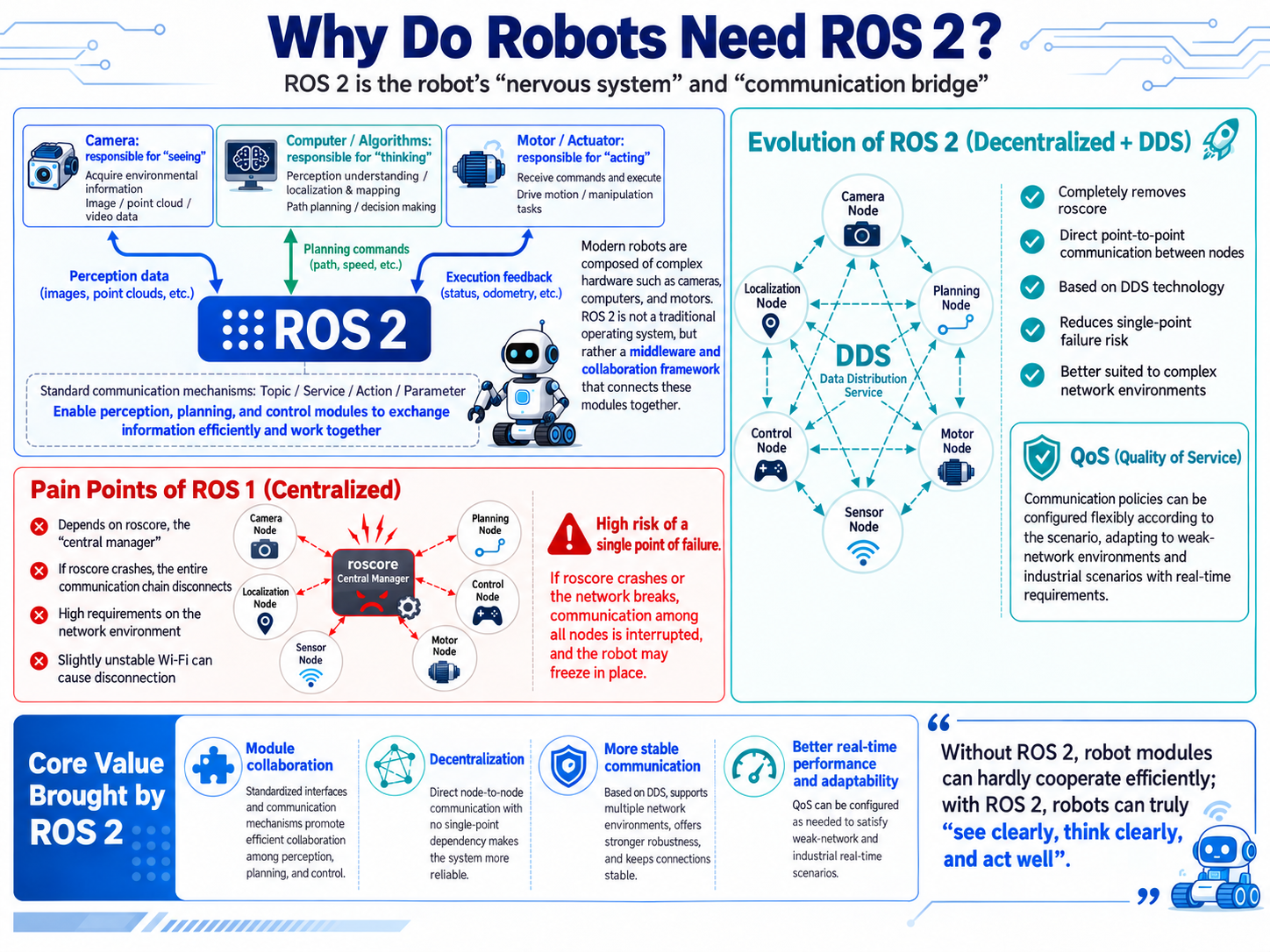
A modern robot is usually made of various complex hardware: cameras that "see," computers that "think," and motors that "move." If each piece of hardware works alone, the robot cannot move an inch. ROS2 (Robot Operating System 2) is not really a traditional operating system like Windows or Linux; it is the robot's "nervous system" or "communication bridge." It provides a standard set of communication rules so that perception (eyes), planning (brain), and control (limbs) modules can exchange information efficiently and smoothly.
The core differences between ROS2 and the previous generation ROS1 (paving the way for QoS):
- ROS1's pain points (centralized): It relies on a "manager" called
roscore. Once the "manager" crashes, communication across the entire robot collapses; it also demands a high-quality network environment—slightly weak Wi-Fi causes disconnects. - ROS2's evolution (decentralized with DDS): The "manager" is completely removed, and nodes communicate directly point-to-point (based on DDS technology). Not only is the single-point-of-failure risk gone, but QoS (Quality of Service) is introduced, adapting to extremely poor network environments and industrial scenarios with strict real-time requirements.
31.2 Node: The Basic Work Unit of a Robot
In the ROS2 world, a Node is an independent entity (process/program). It is the most basic working unit in a robot software architecture.
- Feature: One specialty per task. A well-designed robot system is composed of many single-purpose Nodes.
- Example: The "camera node" only captures images; the "motor node" only drives the wheels. They run independently—even if the camera node crashes, the motor node still works normally.
Since nodes are independent, how do they cooperate? This leads to the three major communication methods between nodes.
31.3 Communication Between Nodes (Mechanisms): "Interface Types" for Node Interaction
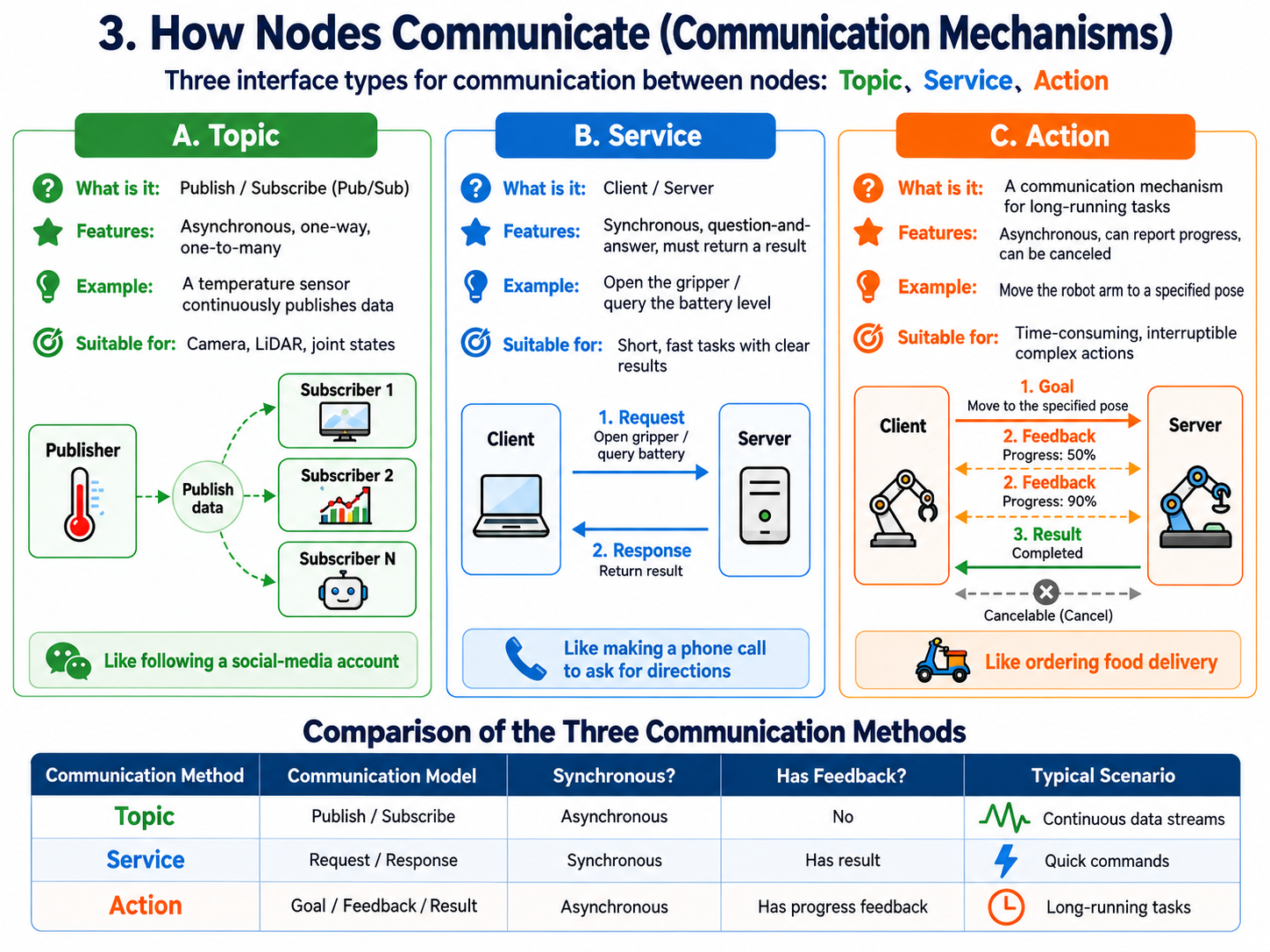
Communication between nodes mainly falls into three types: Topic, Service, and Action.
A. Topic
| Topic | Service | Action | |
|---|---|---|---|
| What it is | Publish/Subscribe, like an official account (WeChat public feed) | Client/Server, like calling to ask for directions | A combination of Topic and Service, for complex tasks, like ordering takeout in an app |
| Features | Asynchronous, one-way data flow; one publisher to many subscribers, and readers can unsubscribe at any time | Synchronous, two-way: one request, one response, and the client usually blocks while it waits | Asynchronous with progress feedback and the ability to cancel midway; it has a Goal, Feedback and Result |
| Example | A temperature sensor node publishes "current temperature" like a weather account; an air-conditioner node subscribes and starts cooling above 28 degrees | Like calling to ask for directions: one question, one answer, quick response, used for tasks such as "open the arm gripper" | Like ordering takeout: while you wait you get progress feedback, you can cancel if something goes wrong, and you finally get the result |
| Use cases | High-frequency, continuous data that needs no immediate reply: camera video, LiDAR point clouds, real-time joint angles | Short, fast commands that need a clear result: query the battery level, open or close the gripper, switch the working mode | Long-running, complex physical actions that may be interrupted at any time: move the arm from A to B, with progress and cancellation |
B. Service
Service is the Client/Server model: one request, one response, and the client usually blocks while it waits — the Service column of the table above has the details.
C. Action
Action is a combination of Topic and Service for long tasks, made of three parts — Goal, Feedback and Result — the Action column of the table above has the details.
Now we know the communication methods between nodes. But what exactly do they transmit? And what rules do they follow? Next comes Message—the "standard form" or "common language" (data format) they use when exchanging information.
31.4 Message: The "Transport Format" for Node Interaction
After understanding "how nodes talk" (Topic/Service/Action), we still need to specify "what to talk about and in what format." This leads to Message.
- What it is: A standardized data structure for passing data between nodes (like a strictly formatted table).
- Why it is needed: If the camera node sends image data in format A but the brain node only understands format B, they cannot communicate. ROS2 predefines a huge set of standard Messages (e.g., generic images, generic velocity commands). As long as everyone fills in the form according to the standard, hardware from any vendor can connect seamlessly.
- Message formats corresponding to the three mechanisms:
.msg** file (for Topic):** A simple data packet. For example, a "velocity message" only contains linear velocity (how fast to go forward) and angular velocity (how sharply to turn)..srv** file (for Service):** Split into upper and lower parts. The upper part defines the request (Request) format; the lower part defines the response (Response) format, separated by---..action** file (for Action):** Split into three parts, defining the Goal, Result, and continuous Feedback data formats, also separated by---.

After unifying the communication format, who maintains the quality of communication between nodes? Compared with ROS1, the QoS mechanism in ROS2 maintains the stability and real-time performance of node communication.
31.5 QoS (Quality of Service): The "Traffic Commander" for Node Interaction
To guarantee the stability of the communication above, ROS2 introduces QoS. You can set different transport rules for different communication methods:
- Reliable mode: Like sending a WeChat message—the recipient must receive it; the underlying mechanism automatically retransmits until it succeeds.
- Use cases: Sending an arm emergency-stop command (Service); it must never be lost.
- Best Effort mode: Like a video call—losing a frame or two is fine; keeping extremely low latency matters most.
- Use cases: High-frequency camera frames (Topic).
So far, the operation of a single node and communication between nodes are quite complete. But in real engineering, a complex robot carries dozens or even hundreds of nodes because of many sensors and controllers. If we had to start them all manually one by one at every boot, that is clearly unrealistic. To solve this hassle, ROS2 provides the Launch and Parameter mechanisms.
31.6 Parameter Server and Launch
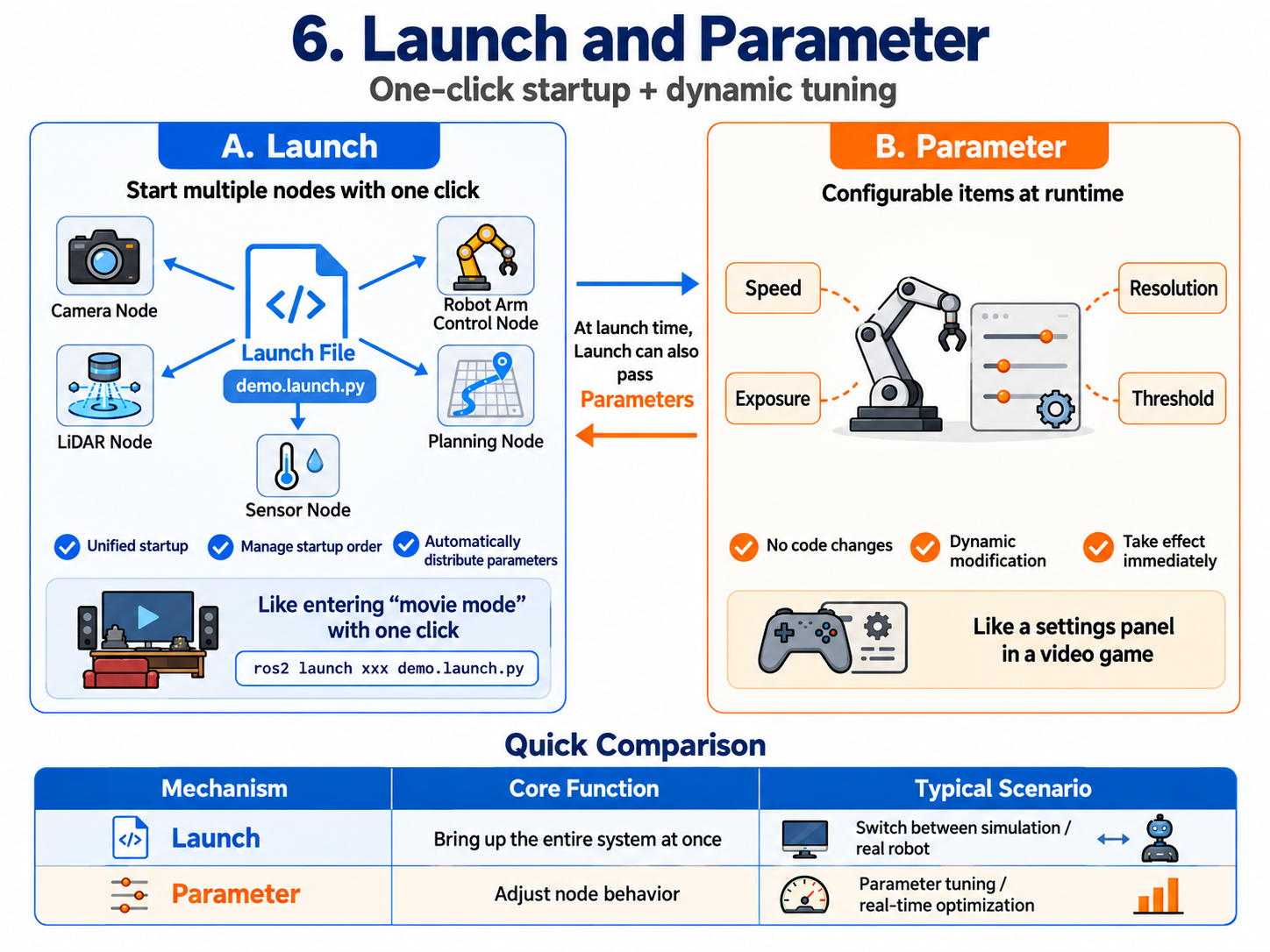
A. Launch (launch mechanism files and automated deployment)
- Pain point: Today's robot systems are very complex. For example, to start an autonomous-driving robot you may need to launch dozens of Nodes at once: the LiDAR node, camera node, arm control node, path planning node, etc. If an engineer had to open dozens of terminal windows and type dozens of commands every time, it would be maddening and error-prone (e.g., the brain node starts before the eye node and fails because it cannot get data).
- What it is: The robot system's "one-click start button" or "symphony conductor." It is an automated orchestration script written in Python (or XML/YAML).
- Features (core advantages): It can "package" all related nodes—cameras, motors, planning algorithms—and bring them up in one shot, manage their startup order (lifecycle), and distribute the configured Parameters uniformly at startup, greatly improving development and deployment efficiency.
- Example: Like the "movie mode" in a smart home. You do not manually draw the curtains, turn off the main light, turn on the TV, and adjust the speakers one by one. You just press one key (run one Launch file), and all devices start collaborating immediately in the preset order and state.
- Real use cases:
- One-click orchestration of everything: One command starts the robot's entire perception, decision, and control system.
- Fast switching between scenarios: During development we can write two Launch files. One is
sim.launch.py(assigns virtual-environment parameters to nodes for simulation), the other isreal.launch.py(assigns real hardware parameters to control the real robot). Just run a different file to seamlessly switch environments without changing any core code.
B. Parameter (parameter mechanism and dynamic configuration)
- Pain point: Suppose you are debugging the arm and find it moves too fast. If every speed change required editing C++ or Python source code, recompiling for minutes, and restarting the program, development efficiency would be far too low.
- What it is: The node's runtime "global configuration dictionary" or "control panel." It lets a node expose adjustable variables to the outside.
- Features (core advantage): The biggest feature is "dynamic modification, instant effect." You can change the robot's behavior dynamically without modifying underlying code or recompiling. With Parameters we can adjust parameters on the fly and see the effect in real time.
- Example: Like playing a 3D game: you do not exit the game to change code; during play you press ESC to open the settings menu, lower "graphics quality," raise "mouse sensitivity," save—and the game view changes immediately.
- Real use cases:
- As the robot's "global config file": Centrally manage the initial settings of every module.
- Hardware parameter tuning: E.g., dynamically adjust camera exposure and image resolution, or the LiDAR scan frequency.
- Real-time algorithm tuning: We can make the arm's "maximum speed" a Parameter. During testing we can assign initial values from a Launch file, and also dynamically adjust it from the command line at runtime and visually inspect the change in the arm's motion. With Parameters, tuning becomes intuitive and efficient.
Once the robot starts and runs smoothly, what if we want to record all the data it produces for review or bug-hunting? That is where rosbag comes in.
31.7 The rosbag Tool: The Robot's "Dashcam"
During robot development and debugging, we often hit pain points: an unexpected incident happens during outdoor testing, but back in the lab it can never be reproduced; or real robot hardware is extremely expensive and power-hungry, so we cannot run algorithms 24/7.
To solve these problems, ROS2 provides the powerful rosbag tool.
- What it is: It can record Messages flowing on any Topic in the system (e.g., LiDAR point clouds, camera images, motor speeds) with timestamps, exactly as-is, into a local file (usually an SQLite3 database in ROS2). Like the robot's "dashcam," it records everything on the Topics for later replay and offline debugging.
- Its "deceptive" principle: When you play back a rosbag file, it republishes those Topics at the original time order and frequency. For downstream algorithm nodes (e.g., object detection, path planning), they simply cannot tell whether the data comes from real hardware sensors or from rosbag replay.
Core use cases
- Offline algorithm debugging (most common): Algorithm engineers do not have to follow the robot outside in the sun. Testers simply record a rosbag containing rich scenes outdoors. In an air-conditioned office, engineers can replay this data any number of times to validate and tune their perception or navigation algorithms.
- On-site incident review (a bug-hunting artifact): If the robot suddenly hits a wall while running, replaying the rosbag from that moment lets developers inspect frame by frame: did the camera miss an obstacle? Did the planning node compute a wrong trajectory? Or did the chassis fail to execute the stop command?
- AI dataset collection: Modern robots rely heavily on deep learning models. rosbag makes it easy to collect massive amounts of real sensor data for later model training.

31.8 Modular Robot System
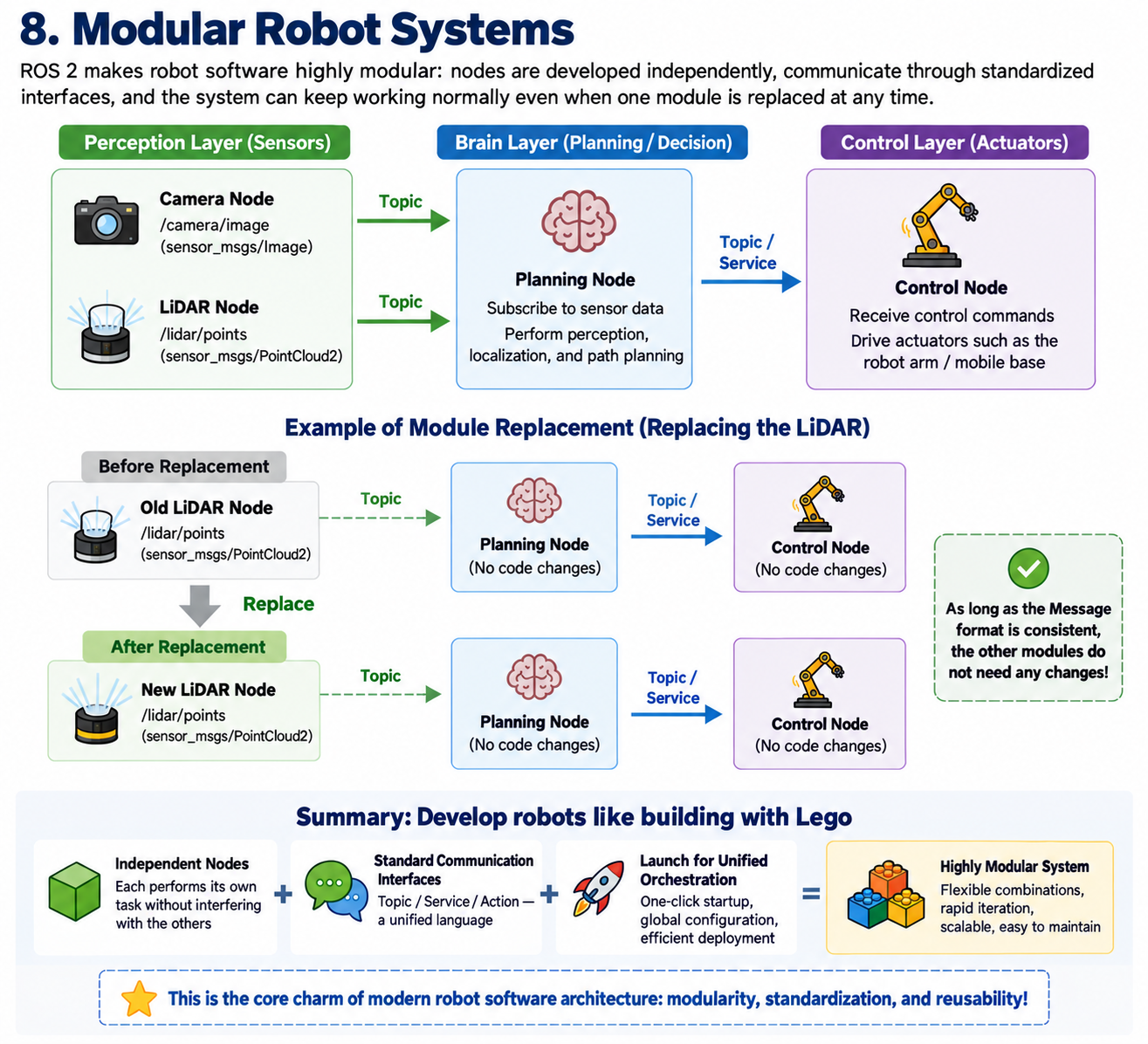
Through the mechanisms above, ROS2 makes robot software highly modular. You can replace the "LiDAR node" with another brand's radar node at any time; as long as they publish the same Message format, the downstream brain (planning node) needs no code changes at all. That is the core charm of modern robot software architecture. Summary: Independent Nodes with standardized Topic/Service/Action communication, plus unified orchestration by Launch, form ROS2's extremely modular software architecture, making robot development as flexible as building with LEGO bricks.
Chapter Transition: From "Nervous System" to "Machine Model"
If Chapter 31 built the robot's "nervous system" (communication mechanisms), then Chapter 32 teaches the computer how to recognize and control the robot's "physical entity," letting the computer truly feel how the machine exists and how spatial positions transform.