32. URDF, TF, and Robot Models
Chapter 32 of the Seeed Physical AI Beginner's Course — the robot model in ROS2: URDF and Xacro, links and joints, the visual / collision / inertial attributes, the TF transform tree, robot_state_publisher, camera and end-effector frames, and how the digital model tracks the real arm.
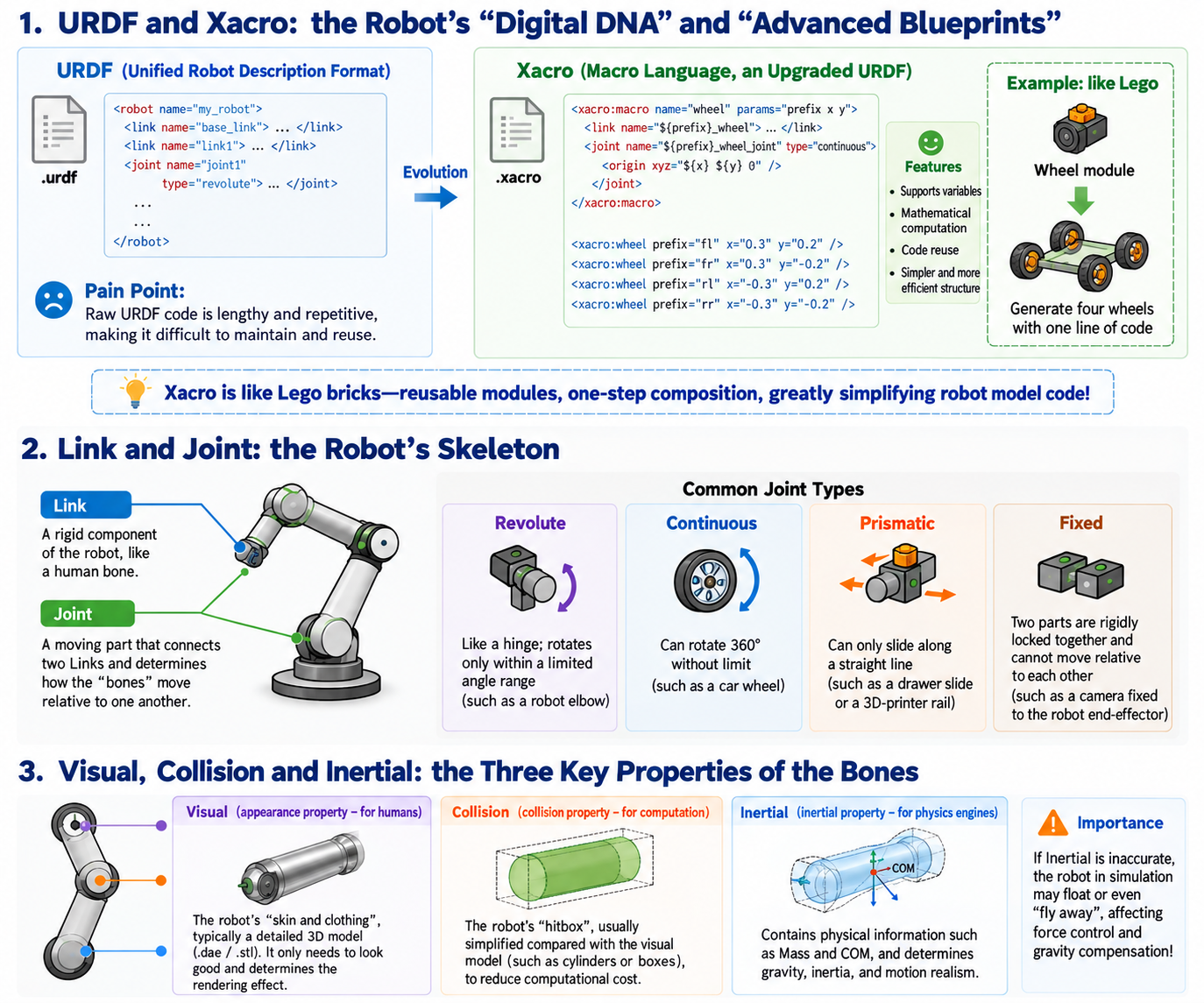
32.1 URDF and Xacro: The Robot's "Digital DNA" and "Advanced Blueprint"
Just as building a house needs construction drawings, in ROS2, to let a computer control an arm, you first have to tell the computer what the arm looks like.
- URDF (Unified Robot Description Format):
- What it is: An XML-based text file—the robot's "factory design blueprint." It records in detail how many parts the robot has, their dimensions, and how the joints connect.
- Pain point: Native URDF is verbose and full of duplicated code. For example, for a car with four wheels, you may have to copy-paste the wheel code four times.
- Xacro (macro language):
- Evolution and features: It is the "upgraded blueprint" of URDF. It brings in programming ideas, supporting variables, mathematical computation, and code reuse.
- Example: Like building with LEGO: you can write a generic "wheel module" in Xacro, then pass different coordinate parameters to generate all four wheels in one line, greatly simplifying the model code.
So what exactly is drawn in this "digital blueprint"? The core is the robot's two major components: links and joints.
32.2 Link and Joint: The Robot's Skeleton
- Link (link/bone): The robot's rigid parts, like a human's upper arm, forearm, and palm.
- Joint (joint/tendon): The movable part connecting two Links, like a human's elbow and wrist. It determines how the bones move relative to each other.
Common Joint types
- Revolute (rotational joint): Like a hinge, it can only rotate within a limited angle (e.g., an arm's elbow).
- Continuous (continuously rotating joint): It can rotate 360 degrees indefinitely (e.g., a car's wheel).
- Prismatic (sliding joint): It can only translate along a straight line (e.g., a sliding door or a 3D printer's rail).
- Fixed (fixed joint): Two parts welded rigidly together, completely immovable (e.g., fixing a camera to the arm's end).
The skeleton alone is not enough. To make the robot look real in physics simulation environments (such as Mujoco), we also need to give every "bone (Link)" three attributes.
32.3 Visual, Collision, and Inertial: The Three Attributes of a Bone
In URDF, we must describe three characteristics of every Link to the computer:
- Visual (appearance attribute—for humans to see):
- What it is: The robot's "skin and clothes," usually a fine 3D model (such as
.daeor.stlfiles). It is only for looks and determines how the robot renders in the computer.
- What it is: The robot's "skin and clothes," usually a fine 3D model (such as
- Collision (collision attribute—for the computer to compute):
- What it is: The robot's "hitbox." To keep the computer's computation from exploding, the collision model is usually far simpler than the visual model (e.g., simplifying a complex mechanical hand into a simple cylinder or box).
- Inertial (inertia attribute—for the physics engine):
- What it is: Contains physical information such as mass and center of mass.
- Importance: If you want to do gravity compensation for the arm on a real robot, or check in simulation whether it will fall over, this attribute must be filled in extremely accurately; otherwise the robot's motion will look weightless or simply fly off.
Now the robot's digital model is built. But as it moves, the relative positions of its joints change every moment. How does the computer know where the robot's "hand" currently is? This leads to an extremely important concept in ROS2: the TF transform tree.
32.4 TF Transform Tree: The Robot's "Proprioceptor"
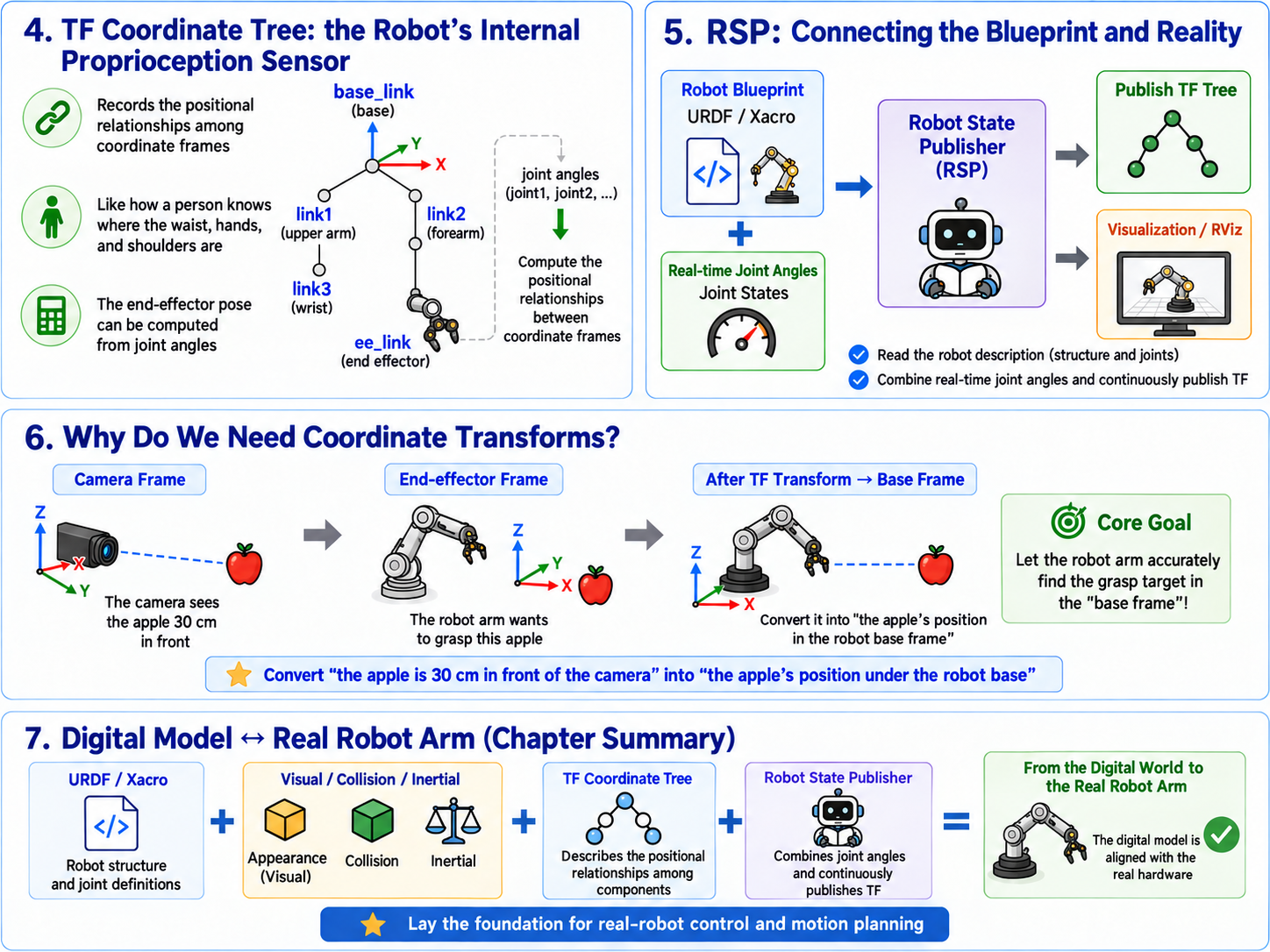
- What it is: TF stands for Transform. It is a tree-like system that dynamically records the spatial relationship (how far apart, how many degrees rotated) of every part and sensor on the robot relative to one another.
- Example: Close your eyes right now. Even though you cannot see, you can still accurately touch your nose. That is because your brain has a "TF tree": where the nose is on the head, where the head is on the shoulders, where the hand is relative to the shoulders.
- Feature: As long as we know how many degrees each joint has currently rotated, the TF system can, through matrix multiplication, follow the chain and compute the position of the arm's very end (hand) relative to the very base.
So who silently computes and publishes this TF tree behind the scenes?
32.5 Robot State Publisher (RSP): The Hub Connecting Blueprint and Reality
- Role: It is the "chief translator" in the robot system.
- How it works: In one hand it holds the static URDF blueprint we wrote; in the other it receives the joint angle information (Joint States) streamed back in real time by the motors. It combines the two, and after complex mathematical computation, continuously publishes the latest TF transform tree to the entire ROS2 network. With it, RViz (visualization software) can draw the robot's real-time pose.
32.6 Camera and End-Effector Frames: Why Do We Compute Coordinates?
In arm grasping tasks, we usually need to handle two extremely critical coordinate frames:
- End-effector frame: The center point of the arm's gripper.
- Camera frame: The "eye" responsible for "seeing" the target.
Real use case: Suppose the camera sees an apple on the table and computes "the apple is 30 cm directly in front of the camera." However, the arm's brain only knows where its own gripper is; it has no idea where the camera's 30 cm is. This is where TF comes in! Through the TF tree, the system can quickly convert "the apple's position in the camera frame" into "the apple's position in the arm base frame," guiding the arm to grasp precisely.
32.7 Digital Model and the Real Arm
URDF and Xacro draw the blueprint for the robot; Visual/Collision/Inertial give it real physical laws; and TF and RSP let this body maintain absolute self-awareness while moving. By mastering this model set, we establish a perfect correspondence between the computer's digital world and the real physical hardware, laying a solid foundation for the next chapter's real-robot driver integration (reBot Arm) and motion planning.
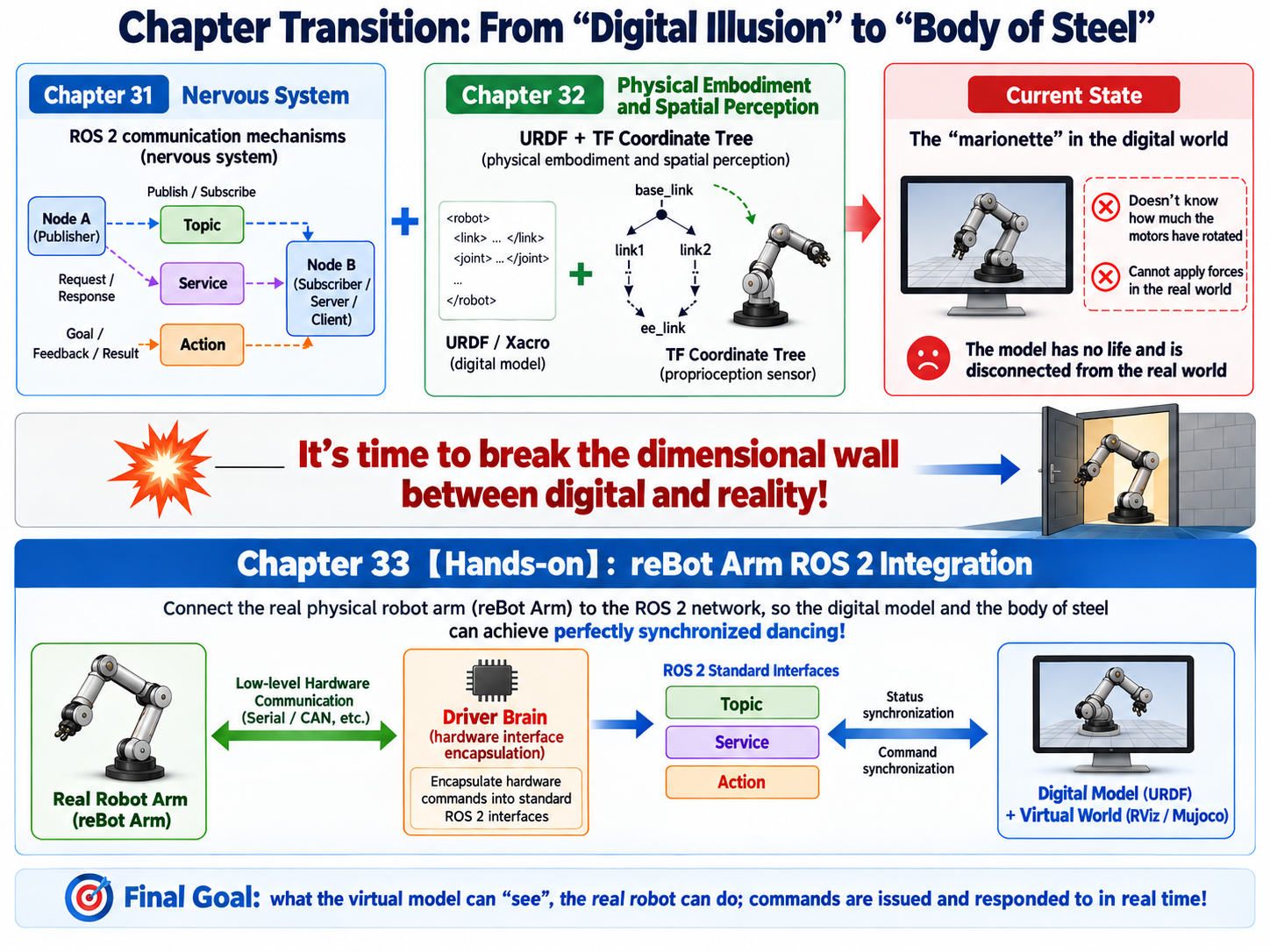
Chapter Transition: From "Digital Phantom" to "Body of Steel"
If Chapter 31 laid the "nervous system" that transmits signals for the robot**,** and Chapter 32 reshaped its precise "physical body" and "spatial perception" in the digital world, then by now all our theoretical preparation is complete.
But the model in the computer is still a lifeless "marionette"—it does not know how many degrees the real motors have rotated, nor can it exert any force on the real physical world.
It is time to break the dimensional wall between digital and reality!
In the upcoming Chapter 33 [Practice]: reBot Arm ROS2 Integration, we will connect a real physical arm (reBot Arm) into the ROS2 network we have built. We will apply the Topic, Service, and Action learned in Chapter 31, combined with the URDF model built in Chapter 32, and teach you how to write a "driver brain" that wraps low-level hardware commands into standard interfaces, letting the virtual digital model and the real body of steel dance in perfect synchronization.