33. reBot Arm ROS2 Integration
Chapter 33 of the Seeed Physical AI Beginner's Course — hands-on ROS2 integration of the reBot Arm: building the ROS2 workspace, wrapping the Python SDK in a driver node, launching and visualizing the arm in RViz, driving it through Topic / Service / Action interfaces, and safe stopping with troubleshooting.
33.1 Building the reBot ROS2 Workspace
Preparation: Environment and Hardware
Before officially starting, make sure the hardware is correctly connected and the software environment is ready. This is the foundation of all subsequent steps.
- Hardware wiring: Bridge the
USB2CAN/ serial port to the arm's CAN bus adapter board. After powering on, plug theUSB2CANinto the host and confirm the system recognizes the CAN/serial device. - Operating system: It is recommended to use Ubuntu 24.04 with ROS2 Jazzy, or Ubuntu 22.04 with ROS2 Humble.
RS:
sudo ip link set can0 down 2>/dev/null || true
sudo ip link set can0 type can bitrate 1000000
sudo ip link set can0 up
DM:
sudo chmod 666 /dev/ttyACM*
Core Workspace
This is the core code repository of the entire integration work; it contains all the components needed to wrap the reBot Arm into a standard ROS2 robot.
- Get the code: clone the workspace from the official repository:
#RS:
git clone https://github.com/Yang-Ci/ReBot_Arm_DigitalTwin_RS.git ~/ReBot_Arm_DigitalTwin_RS

#DM:
git clone https://github.com/Yang-Ci/ReBot_Arm_DigitalTwin_DM.git ~/ReBot_Arm_DigitalTwin_DM
Workspace structure: the RS and DM versions use different workspace directory names (RS is rebotarm_ros2_RS, DM is rebotarm_ros2_DM). It contains seven major ROS2 packages:
rebotarm_msgs: custom message, service, and action interfaces.rebotarmcontroller: the driver node, containing the core controllerreBotArmController.rebotarm_bringup: launch files, config files, URDF models, and RViz resources.rebotarm_moveit_config: MoveIt 2 configuration files.rebotarm_moveit_demos: MoveIt 2 example programs.rebotarm_mujoco: the DM version's MuJoCo simulation sync node (package namerebotarm_mujoco; the RS version isrebotarm_mujoco_rs).rebotarm_agent: the DM version's high-level Agent node.
33.2 The Bridge Between the Python SDK and the ROS2 Driver
reBotArm_control_py is the low-level Python control library, and the role of the rebotarm_ros2 workspace is to "wrap" it into standard ROS2 interfaces.
- Install the low-level SDK:
In the workspace's third_party directory, obtain this low-level library (RS is under rebotarm_ros2/third_party; DM automatically matches—setup.sh checks the three candidate paths reBotArmController_ROS2-main/third_party, reBotArmController_ROS2-main/sdk, and ~/reBotArm_control_py in order):
git clone https://github.com/Seeed-Projects/reBotArm_control_py.git third_party/reBotArm_control_py

#reBotArm_control_py's default yaml config is dm; change the one in /reBotArm_control_py/config to the matching option

#RS:
hardware_yaml: "rebotarm_rs.yaml"

#DM:
hardware_yaml: "rebotarm_dm.yaml"
- Install motorbridge: this is the key middleware connecting motors and high-level software; install it via pip:
python3 -m pip install motorbridge

#verify
motorbridge -v
#output
motorbridge 0.5.0
33.3 Launching and Visualization
- Verify the executable entry points:
RS:
cd ~/ReBot_Arm_DigitalTwin_RS/rebotarm_ros2
source install/setup.bash
ros2 pkg executables rebotarmcontroller
DM:
cd ~/ReBot_Arm_DigitalTwin_DM/rebotarm_ros2
source install/setup.bash
ros2 pkg executables rebotarmcontroller
- You should expect to see at least:
rebotarmcontroller GravityCompensation
rebotarmcontroller GripperControl
rebotarmcontroller MoveTo
rebotarmcontroller MoveToPose
rebotarmcontroller reBotArmController
The RS version has two additional executable entry points:
rebotarmcontroller FakeRsDriver        # RS-only: MuJoCo simulation fake driver (fake_rs_driver.py)
rebotarmcontroller CancelAction        # RS-only: cancel an executing Action goal
The DM version has one additional executable entry point:
rebotarmcontroller FakeReBotArmDriver # DM-only: MuJoCo simulation fake driver (fake_driver.py)
Note: the RS version also includes the two motion planning files motion_profiles.py and trajectory_profiles.py; the DM version does not.
- After building the workspace, you can launch the complete system with a single command, wiring together the arm's control, state publishing, and visualization.
# Build the workspace
source /opt/ros/${ROS_DISTRO}/setup.bash
colcon build --symlink-install
source install/setup.bash

# Launch the full system and enable RViz visualization
# RS:
cd ~/ReBot_Arm_DigitalTwin_RS/rebotarm_ros2
ros2 launch rebotarm_bringup bringup.launch.py model:=rs channel:=can0 use_rviz:=true

# DM:
cd ~/ReBot_Arm_DigitalTwin_DM
./rebotarm start dm use_rviz:=true
- State publishing: after launch, the
reBotArmControllernode continuously publishes the arm's state, e.g., joint states (/rebotarm/joint_states) and overall status (/rebotarm/arm_status).
#show active topic names
ros2 topic list
#list topics and their message types; adding the -t flag also shows each topic's message type:
ros2 topic list -t
#example output:
/client_count
/connected_clients
/goal_pose
/initialpose
/parameter_events
/rebotarm/arm_status
/rebotarm/control_reference
/rebotarm/control_target
/rebotarm/gripper/cmd/mit
/rebotarm/gripper/cmd/pos_vel
/rebotarm/gripper/state
/rebotarm/joint_states
/rebotarm/joints/joint1/cmd/mit
/rebotarm/joints/joint1/cmd/pos_vel
/rebotarm/joints/joint1/state
/rebotarm/joints/joint2/cmd/mit
/rebotarm/joints/joint2/cmd/pos_vel
/rebotarm/joints/joint2/state
/rebotarm/joints/joint3/cmd/mit
/rebotarm/joints/joint3/cmd/pos_vel
/rebotarm/joints/joint3/state
/rebotarm/joints/joint4/cmd/mit
/rebotarm/joints/joint4/cmd/pos_vel
/rebotarm/joints/joint4/state
/rebotarm/joints/joint5/cmd/mit
/rebotarm/joints/joint5/cmd/pos_vel
/rebotarm/joints/joint5/state
/rebotarm/joints/joint6/cmd/mit
/rebotarm/joints/joint6/cmd/pos_vel
/rebotarm/joints/joint6/state
/rebotarm/mujoco/object_states
/rebotarm/mujoco/overhead_rgb/image_raw
/rebotarm/sim/animation_event
/rebotarm/vision/color_blocks/detections
/robot_description
/rosout
/tf
/tf_static
- RViz display: through RViz, you can watch the URDF-based arm move in real time, achieving a "what you see is what you get" monitoring effect.
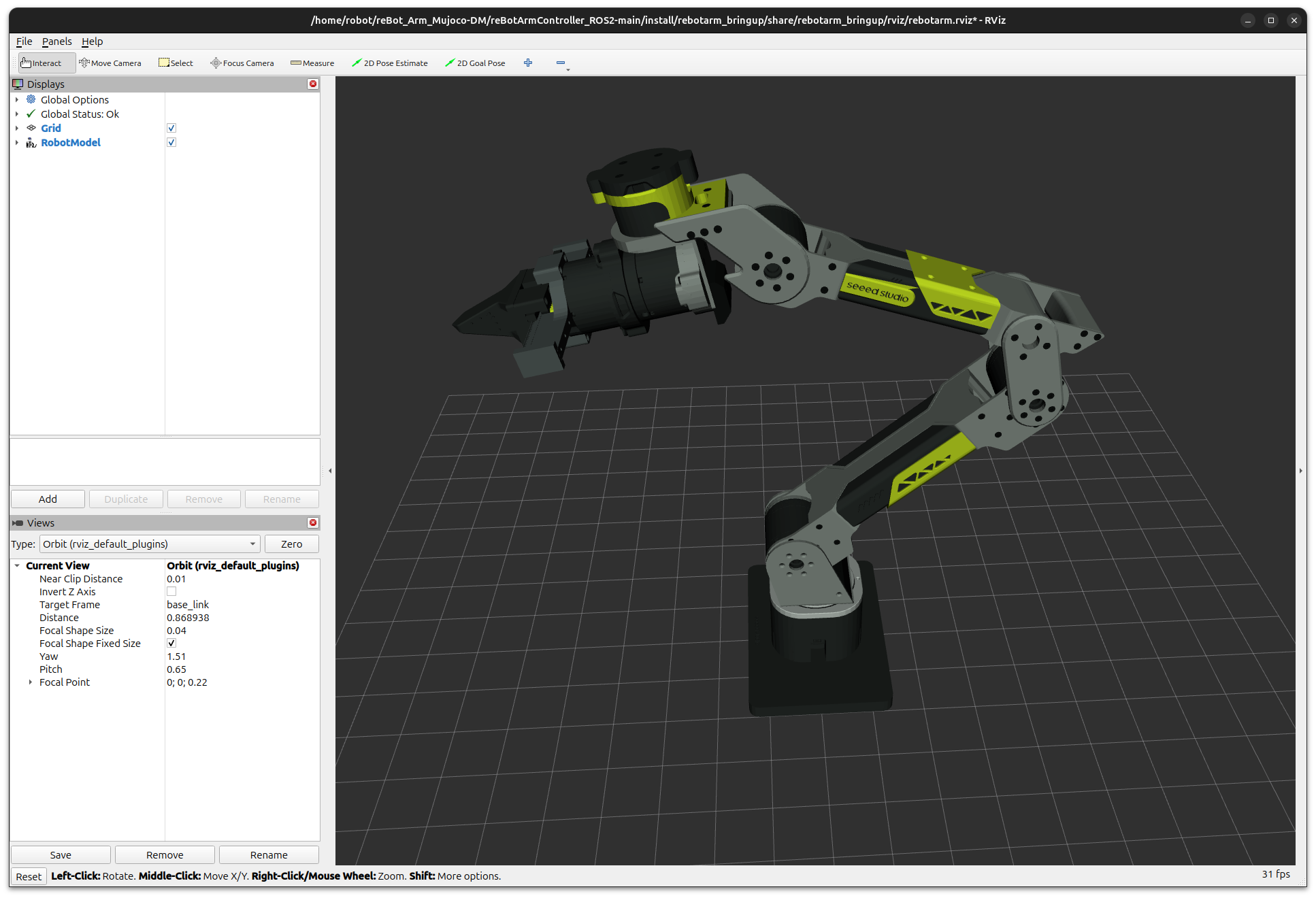
After launch, the reBotArmController node continuously publishes the arm's state. State publishing is managed uniformly by the JointStatePublisher class (ros_publishers.py), driven by a timer at a configurable frequency (100 Hz by default), with no external trigger needed.
Overview of published topics:
| Topic | Message type | Description |
|---|---|---|
/rebotarm/joint_states | sensor_msgs/msg/JointState | 6-axis joint position, velocity, torque, plus the gripper finger_left |
/rebotarm/arm_status | rebotarm_msgs/msg/ArmStatus | Control mode, enabled state, state machine, per-joint status codes, error codes (latched QoS) |
/rebotarm/joints/<joint>/state | rebotarm_msgs/msg/JointMotorState | Single-joint motor-level state; <joint> is joint1 to joint6 |
/rebotarm/gripper/state | rebotarm_msgs/msg/JointMotorState | Gripper motor-level state; not published when no gripper is configured |
The ArmStatus message uses TRANSIENT_LOCAL durability (latched QoS), meaning late-joining subscribers immediately receive the latest state snapshot—suitable for UI and health-monitoring components to sync state:
# View joint states
ros2 topic echo /rebotarm/joint_states --once

# View overall status (including state machine and error codes)
ros2 topic echo /rebotarm/arm_status --once

# View a single joint's motor state
ros2 topic echo /rebotarm/joints/joint1/state --once
Fields of the ArmStatus message:
std_msgs/Header header
string mode               # current control mode: mit / pos_vel / vel
bool enabled              # whether the arm is enabled
bool control_loop_active  # whether the internal pos_vel control loop is running
string state_machine      # state machine: IDLE / TRAJ_RUNNING / LOWLEVEL_STREAMING / GRAVITY_COMP
string[] joint_names      # list of joint names
uint8[] per_joint_status_code  # status code of each joint motor
string[] error_codes     # list of error codes
33.4 Topic, Service, and Action Control
rebotarm_ros2 provides a variety of ROS2-standard control interfaces for choosing based on the application scenario. All interfaces are under the /rebotarm namespace by default, overridable via the launch parameter arm_namespace.
Unify units before control: angles in radians (rad); time in seconds.
Example flow for control via Topic, Service, and Action
#1 Power on and enable the motors
ros2 service call /rebotarm/enable std_srvs/srv/Trigger
#2 Return to the safe home (verify the zero position is correct)
ros2 service call /rebotarm/safe_home std_srvs/srv/Trigger
# Now you can send move_to_pose / follow_joint_trajectory action goals
# ...execute motion...
# Disable after finishing
ros2 service call /rebotarm/disable std_srvs/srv/Trigger
Topic: low-level single-motor passthrough
For debugging and low-level control experiments, motor_passthrough.py provides per-joint sparse raw command topics:
| Topic | Message type | Description |
|---|---|---|
/rebotarm/joints/<joint>/cmd | rebotarm_msgs/msg/JointMotorCmd | Single-joint sparse raw command |
/rebotarm/gripper/cmd | rebotarm_msgs/msg/JointMotorCmd | Gripper sparse raw command |
JointMotorCmd uses a sparse-flag design: only fields whose use_pos, use_vel, use_kp, use_kd, use_tau, use_vlim are true override the defaults. mode can be 0 (MIT), 1 (POS_VEL), 2 (VEL).
# Single-joint MIT mode command
ros2 topic pub --once /rebotarm/joints/joint1/cmd/mit \
  rebotarm_msgs/msg/JointMitCmd \
  "{pos: 0.2, vel: 0.0, kp: 80.0, kd: 4.0, tau: 0.0}"
During trajectory execution, low-level cmd is rejected by default (cmd_arbitration:=reject). For preemptive override, pass cmd_arbitration:=preempt at launch.
Service: trigger-style control
Service is suitable for trigger-style operations such as enable/disable, safe homing, and mode switching. It is defined in the ArmServices class of ros_services.py.
| Service | Type | Description |
|---|---|---|
/rebotarm/enable | std_srvs/srv/Trigger | Enable the arm and gripper, start the pos_vel control loop |
/rebotarm/disable | std_srvs/srv/Trigger | Stop the control loop and disable the arm |
/rebotarm/safe_home | std_srvs/srv/Trigger | Return to zero at a safe speed (joints + gripper) |
/rebotarm/set_zero | rebotarm_msgs/srv/SetZero | Set the zero position of all or specified joints |
/rebotarm/move_to_pose_ik | rebotarm_msgs/srv/MoveToPoseIK | Only do the IK solve and update the target joint angles |
/rebotarm/gripper/set | rebotarm_msgs/srv/SetGripper | Set the gripper opening distance and maximum torque |
/rebotarm/gravity_compensation/start | std_srvs/srv/Trigger | Start the controller-internal gravity compensation closed loop |
/rebotarm/gravity_compensation/stop | std_srvs/srv/Trigger | Stop the gravity compensation closed loop |
/rebotarm/gravity_compensation/status | std_srvs/srv/Trigger | Query gravity compensation status; success=true means running |
Common command examples:
# Enable
ros2 service call /rebotarm/enable std_srvs/srv/Trigger

# Safe homing
ros2 service call /rebotarm/safe_home std_srvs/srv/Trigger

# IK solve (!!! note the arm moves very fast)
ros2 service call /rebotarm/move_to_pose_ik rebotarm_msgs/srv/MoveToPoseIK \
  "{target_pose: {position: {x: 0.30, y: 0.0, z: 0.30}, orientation: {w: 1.0}}}"

# Send a Cartesian pose goal (3 s total motion time)
ros2 action send_goal /rebotarm/move_to_pose rebotarm_msgs/action/MoveToPose \
  "{target_pose: {position: {x: 0.30, y: 0.0, z: 0.30}, orientation: {w: 1.0}}, duration: 3.0}"

# Set the gripper opening (rad; 0-5)
ros2 service call /rebotarm/gripper/set rebotarm_msgs/srv/SetGripper \
  "{position: 2.5, max_effort: 0.5}"

# DM
ros2 service call /rebotarm/gripper/set \
  rebotarm_msgs/srv/SetGripper "{position: -1.0, max_effort: 0.0}"
Action: process-oriented control
Action is suitable for long-duration motions requiring feedback and cancellation, such as trajectory execution. It is defined in the ArmActions class of ros_actions.py.
| Action | Type | Description |
|---|---|---|
/rebotarm/move_to_pose | rebotarm_msgs/action/MoveToPose | End-effector Cartesian pose trajectory; internally uses ArmEndPos.move_to_traj() |
/rebotarm/follow_joint_trajectory | control_msgs/action/FollowJointTrajectory | Standard joint trajectory interface; MoveIt2's standard interface |
/rebotarm/gripper/command | control_msgs/action/GripperCommand | Standard gripper action |
move_to_pose example: send a motion goal to the reBot Arm's Action service—move the arm to a specified pose, keep the total motion time at 3 seconds, and print the real-time feedback during motion.
ros2 action send_goal /rebotarm/move_to_pose rebotarm_msgs/action/MoveToPose \
  "{target_pose: {position: {x: 0.30, y: 0.0, z: 0.30}, orientation: {w: 1.0}}, duration: 3.0}" \
  --feedback
View the Action's message definition
ros2 interface show rebotarm_msgs/action/MoveToPose
#You can see the complete Goal / Feedback / Result fields.
Demo Examples
All examples assume reBotArmController has already been launched:
cd ~/seeed/rebotarm_ros2
source /opt/ros/jazzy/setup.bash
source install/setup.bash
ros2 launch rebotarm_bringup bringup.launch.py channel:=/dev/ttyACM0
The examples are registered as ROS2 executable entry points and can be invoked directly with ros2 run. The source files are under src/rebotarmcontroller/rebotarmcontroller/examples/.
End-Effector Pose Example
move_to_pose.py — end-effector pose motion. The script sends a geometry_msgs/Pose goal through the /rebotarm/move_to_pose action; the control node handles mode switching and trajectory execution internally. It corresponds to the low-level SDK's ArmEndPos.move_to_traj() capability chain. It is a single-action demo and does not automatically safe_home or disable.
ros2 run rebotarmcontroller MoveToPose -- --x 0.30 --y 0.0 --z 0.30 --qw 1.0 --duration 2.0
Gravity Compensation Example
gravity_compensation.py — a gravity compensation lock example. The script does not rewrite the control loop; it directly calls the gravity compensation service inside reBotArmController; the actual gravity compensation closed loop runs inside the controller process, using the SDK's RobotArm.get_positions/get_velocities/mit.
ros2 run rebotarmcontroller GravityCompensation
When the script starts, it first calls /rebotarm/enable, then starts gravity compensation. On Ctrl+C exit, the script sequentially calls /rebotarm/gravity_compensation/stop → /rebotarm/safe_home → /rebotarm/disable, so the arm first stops gravity compensation, then returns to the safe zero position and disables.
33.5 Safe Stopping and Troubleshooting
Safety is the first priority in robot operation. rebotarm_ros2 provides safety mechanisms at multiple levels.
safe_home service: via the /rebotarm/safe_home service, the arm returns to the preset zero position at a safe speed.
Internally, this service first stops gravity compensation, then switches to pos_vel mode, and then executes homing:
ros2 service call /rebotarm/safe_home std_srvs/srv/Trigger
disable service: stop the control loop and disable the arm; it is the first choice for emergency stop
ros2 service call /rebotarm/disable std_srvs/srv/Trigger
hold_current_position: when a trajectory is canceled or an exception occurs, the controller automatically calls this method to lock the current joint positions, preventing the arm from free-falling.
State machine monitoring
The state_machine field in the /rebotarm/arm_status topic reflects the current running state and is the first entry point for troubleshooting:
| State | Meaning |
|---|---|
IDLE | Idle, waiting for commands |
TRAJ_RUNNING | Executing a trajectory |
LOWLEVEL_STREAMING | Streaming low-level single-motor commands |
GRAVITY_COMP | Gravity compensation closed loop running |
# Continuously monitor the state machine
ros2 topic echo /rebotarm/arm_status --field state_machine
Error code troubleshooting
The per_joint_status_code and error_codes fields in the ArmStatus message are used for fault localization:
per_joint_status_code: each joint motor's status code (uint8), from the low-level SDK's motor.get_state().status_code; a non-zero value means the motor is abnormal. error_codes: controller-level error code strings
# View the full status (including error codes)
ros2 topic echo /rebotarm/arm_status --once
33.6 FAQ: Common Issues and Troubleshooting
Serial port not found: when launching, open serial port /dev/ttyACM0 failed appears; use ls /dev/ttyACM*
to see the actual device, then override with channel:=/dev/ttyACM1.
Insufficient permissions: if the serial port exists but you lack permission, run sudo usermod -a -G dialout $USER,
and it takes effect after logging back in.
RViz model not displayed: confirm the URDF mesh path is package://rebotarm_bringup/description/meshes/....
Trajectory execution failed: check whether the first trajectory point is close to the current joint angles (the deviation must be less than 0.10 rad),
and the final position error must be less than 0.03 rad. You can use ros2 topic echo /rebotarm/joint_states --once
to view the current joint angles.