35. Robot Simulation Basics and Platform Introduction
Chapter 35 of the Seeed Physical AI Beginner's Course — robot simulation from the ground up: why simulation is a flight simulator for robots, the three core elements (model, environment, controller), the robot model's visual / collision / inertial avatars, joints, actuators and sensors, simulation step size versus control frequency, the URDF / MJCF / USD formats, MuJoCo versus Isaac Sim, and the digital twin.
Hardware needed for this stage
What to prepare for this stage. The complete list for every stage is in Chapter 3.
Main control unit
| Item | Buy | Qty |
|---|---|---|
| reComputer Robotics J4012 | 🛒 | 1 |
| NVIDIA Jetson AGX Thor 128G | 🛒 | 1 |
A desktop or laptop is also required: Ubuntu 22.04, GTX 4080 or better with 12GB+ VRAM, 16GB+ RAM.
For this stage
| Item | Buy | Qty |
|---|---|---|
| reBot Arm B601 DM/RS | 🛒 | 1 |
35.1 Why Use Simulation? — The "Flight Simulator" Logic
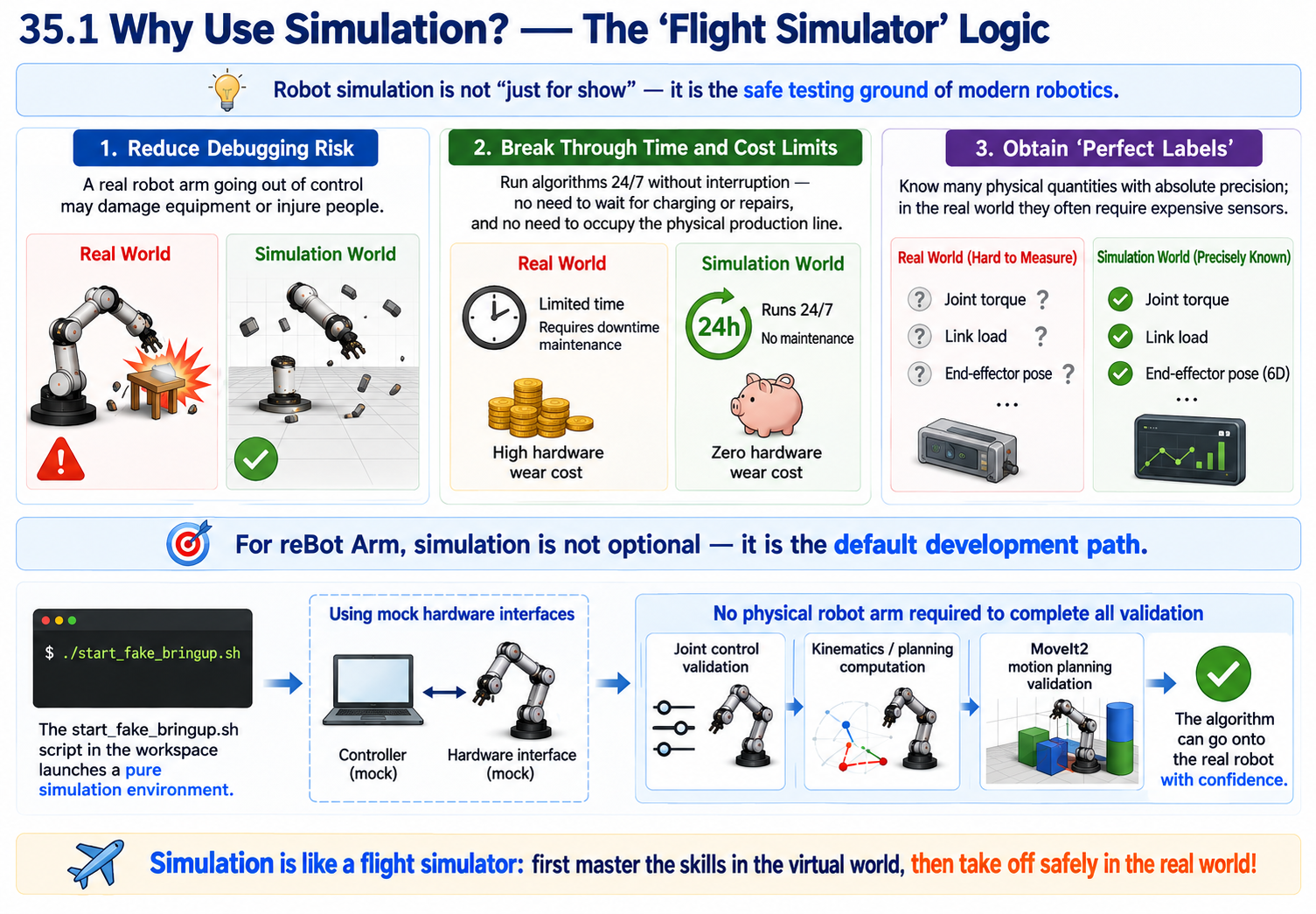
Robot simulation is not a "showpiece"; it is the safe testing ground of modern robotics.
- Reduce debugging risk: A real arm out of control may smash equipment or hurt people; in simulation, the worst case is the model flying away (physics engine explosion).
- Break through time and money limits: You can run algorithms 24/7 without waiting for the real arm to charge or be repaired, and no physical production line is occupied.
- Get "perfect labels": In simulation, you know each joint's torque, each link's force, and the end-effector's 6D pose with absolute precision—things that in the real physical world often require expensive sensors to measure.
For the reBot Arm, simulation is not optional; it is the default development path. The start_fake_bringup.sh script in the workspace starts a pure simulation environment—using mock hardware interfaces, it can complete all validation from joint control to MoveIt2 motion planning without connecting a real arm.
35.2 The Three Core Roles of Simulation in Development
| Development stage | What simulation helps you do |
|---|---|
| Algorithm validation (kinematics/dynamics) | Test whether the inverse kinematics (IK) algorithm converges, whether trajectory planning is smooth, and whether the controller (PID/MPC) is stable. |
| Software-in-the-loop (SIL) testing | Your high-level decision code (e.g., VLA model output commands) stays completely unchanged; only the low-level communication interface is swapped for simulated Topics, to verify the software logic works end to end. |
| Reinforcement learning (RL) training | Let the arm "die" tens of thousands of times in simulation to learn policies, obtaining massive training data at zero cost (Sim2Real transfer). |
35.3 The Three Core Elements of Simulation: Model, Environment, Controller
A complete simulation system consists of these three parts, none of which can be missing:
Robot model (Agent): describes "what I look like, how much I weigh, and how my joints rotate."
Environment: describes "where I am and what is around me." (ground, table, objects to grasp, obstacles)
Controller: describes "how I move." (VLA policy, trajectory interpolation, low-level PID)
In one sentence: the controller issues torque/position commands -> drives the model to move in the environment -> sensors feed the state back to the controller, forming a closed loop.
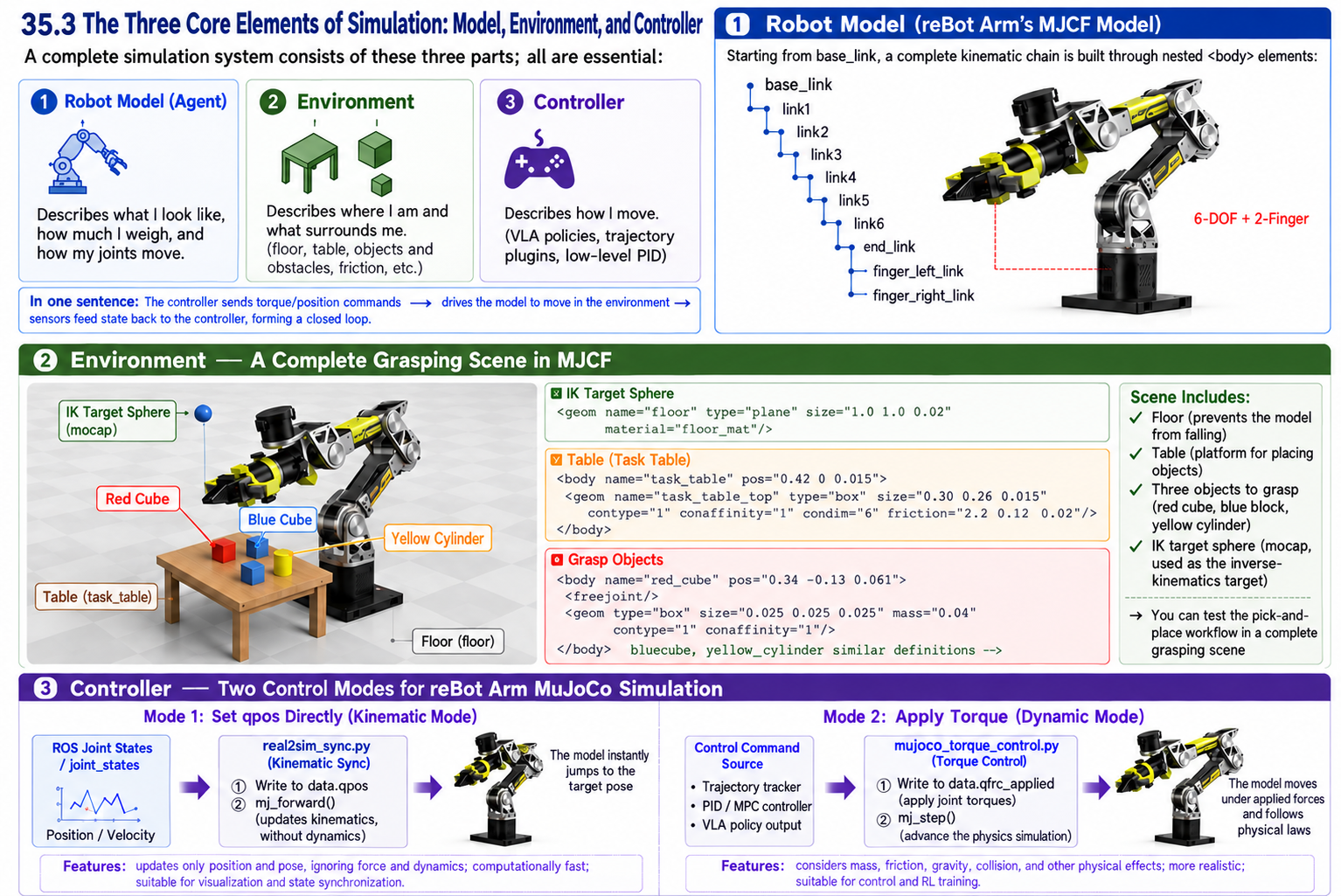
In the reBot Arm's MJCF model, all three parts have concrete manifestations: robot model—starting from base_link, building the complete kinematic chain through nested <body> elements:
base_link -> link1 -> link2 -> link3 -> link4 -> link5 -> link6 -> end_link
                                                              |- finger_left_link
                                                               `- finger_right_link
Environment—MJCF defines a complete grasping scene:
<geom name="floor" type="plane" size="1.0 1.0 0.02" material="floor_mat"/>

<body name="task_table" pos="0.42 0 0.015">
  <geom name="task_table_top" type="box" size="0.30 0.26 0.015"
        contype="1" conaffinity="1" condim="6" friction="2.2 0.12 0.02"/>
</body>

<body name="red_cube" pos="0.34 -0.13 0.061">
  <freejoint/>
  <geom type="box" size="0.025 0.025 0.025" mass="0.04" contype="1" conaffinity="1"/>
</body>
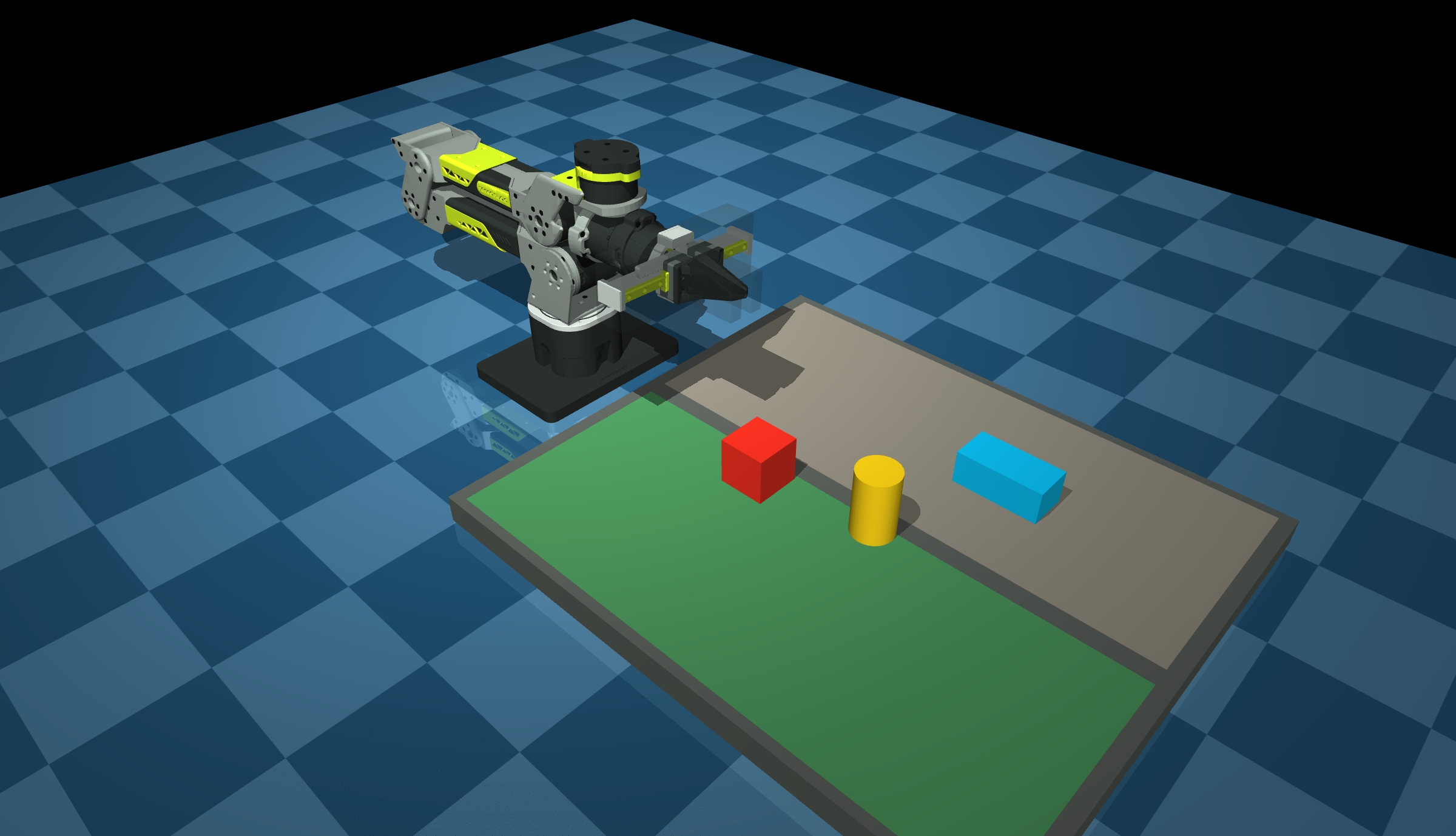
The scene contains a table, three objects to grasp (a red cube, a blue block, a yellow cylinder), and a mocap-type IK target sphere. These environment elements make simulation more than just "watching the arm move"—you can test the pick-and-place flow in a complete grasping scene.
The controller—the reBot Arm's MuJoCo simulation has two control methods:
- Directly set
qpos(kinematics mode):real2sim_sync.pywrites the ROS joint states intodata.qpos, callsmj_forwardto correct kinematics, and involves no forces or dynamics. - Apply torque (dynamics mode):
mujoco_torque_control.pyapplies joint torques throughdata.qfrc_applied, and callsmj_stepto advance the physics simulation.
35.4 The "Three Avatars" of the Robot Model: Visual, Collision, Inertial
In simulation files (such as URDF / MJCF), a link usually contains these three attributes, each with its own duty:
| Attribute | Metaphor | Role | Graphical requirement |
|---|---|---|---|
| Visual (visual model) | The actor's "skin/appearance" | Used only for rendering display, so it looks nice in the GUI. | Fine meshes (STL/DAE), many triangles. |
| Collision (collision model) | The actor's "safety bubble/skeleton" | Used by the physics engine to compute collision detection and contact forces. | Extremely simplified (wrapped in spheres, capsules, boxes), very few faces, guaranteed to compute fast. |
| Inertial (inertial model) | The actor's "weight and center of gravity" | Defines mass, center-of-mass position (origin), and moment of inertia (inertia matrix). The key to physical realism. | Only mathematical parameters, no graphics. |
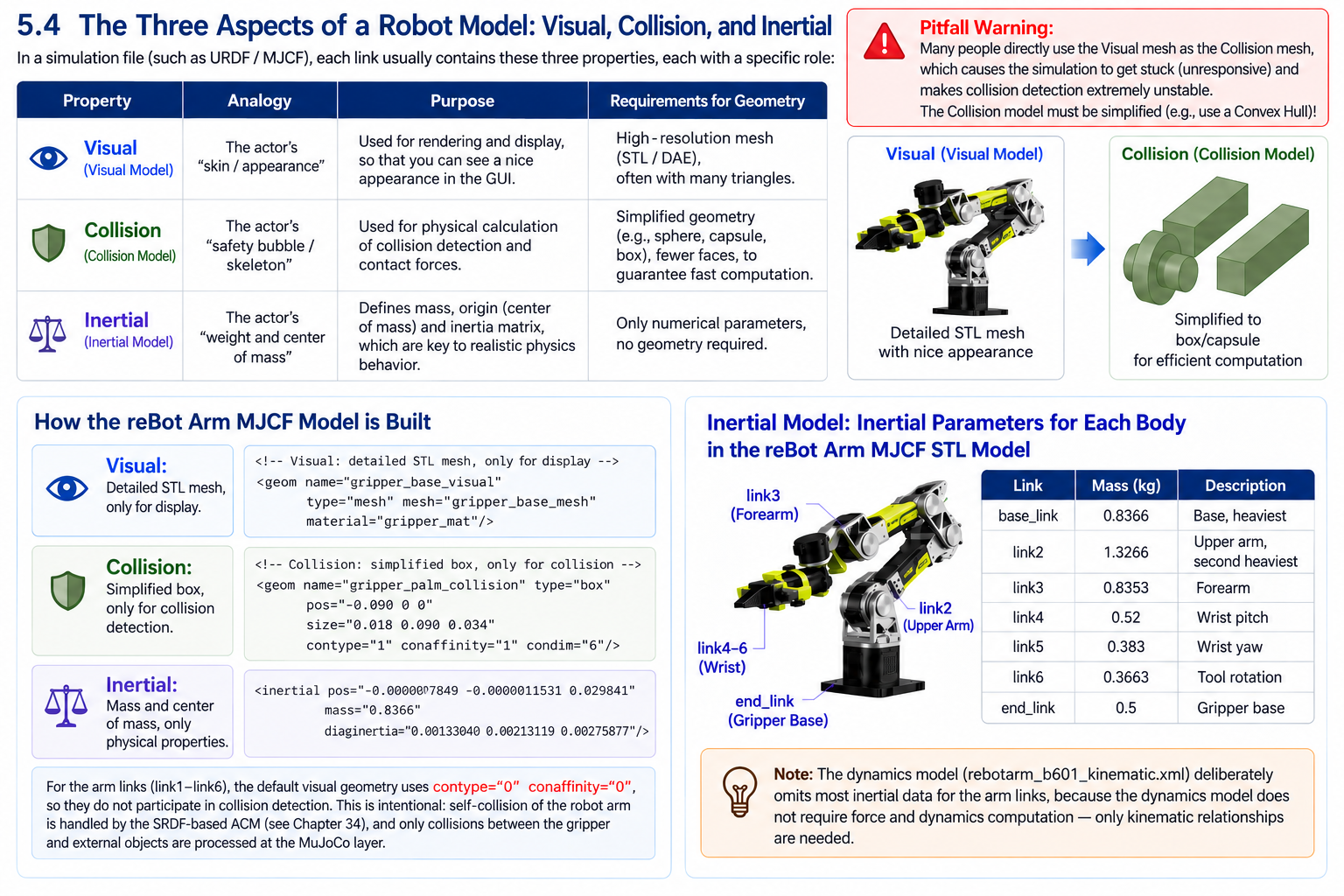
Pitfall warning: Many people copy Visual directly into Collision for convenience, which makes simulation lag (the GPU cannot keep up) and collision detection extremely unstable. Collision must be simplified with Convex Hull!
The reBot Arm's MJCF model does exactly this—visual uses STL meshes, collision uses boxes:
<!-- Visual: fine STL mesh, only for looks -->
<geom name="gripper_base_visual" type="mesh" mesh="gripper_base_mesh" material="gripper_mat"/>

<!-- Collision: simplified box, only for collision detection -->
<geom name="gripper_palm_collision" type="box" pos="-0.090 0 0"
      size="0.018 0.090 0.034" contype="1" conaffinity="1" condim="6"/>
For the link parts (link1-link6), the visual geoms default to contype="0" conaffinity="0", not participating in collision detection. This is intentional design: the arm's self-collision is managed by the SRDF's ACM matrix (see Chapter 34),
and at the MuJoCo level only collisions between the gripper and objects are handled. For the Inertial model, the reBot Arm's MJCF STL model defines complete inertial parameters for each body:
<inertial pos="-0.000007849 -0.0000011531 0.029841"
          mass="0.8366"
          diaginertia="0.00133040 0.00213119 0.00275877"/>
Mass distribution of each link
| Link | Mass (kg) | Description |
|---|---|---|
| base_link | 0.8366 | Base, the heaviest |
| link2 | 1.3266 | Upper arm, second heaviest |
| link3 | 0.8353 | Forearm |
| link4 | 0.52 | Wrist pitch |
| link5 | 0.383 | Wrist yaw |
| link6 | 0.3663 | Tool rotation |
| end_link | 0.5 | Gripper base |
It is worth noting that the kinematics model (rebotarm_b601_kinematic.xml) omits the inertial data of most links, because kinematics mode does not need to compute forces and dynamics, only geometric relationships.
35.5 Joints, Actuators, and Sensors (The "Nerve Endings" in Simulation)
{{/* TODO: the original document shows a figure here (image 1.png) that was not exported - the file is not in the folder and there is nothing to upload, so the figure has to be re-created. */}}
Joint: defines the relative motion between links.
Common types:
| Joint type | URDF name | MJCF name | Description |
|---|---|---|---|
| Revolute joint | revolute | hinge | Like a servo, with limits. |
| Continuous rotation | continuous | hinge (no range) | Like a wheel, unlimited rotation. |
| Prismatic joint | prismatic | slide | Like a hydraulic rod. |
| Fixed joint | fixed | None (welded directly) | Welds two links together. |
The reBot Arm uses hinge (joint1-joint6) and slide (finger_left, finger_right):
<joint name="joint1" type="hinge" axis="0 0 1" range="-2.8 2.8"/>
<joint name="joint2" type="hinge" axis="0 0 -1" range="-3.14 0"/>
<joint name="finger_left" type="slide" axis="0 1 0" range="0 0.0285"/>
Each joint in MJCF has damping and rotor inertia (armature) parameters:
<default>
  <joint damping="0.8" armature="0.01" limited="true"/>
</default>
damping="0.8" simulates joint friction, making the joint decelerate naturally without external forces. armature="0.01" simulates the equivalent inertia of the motor rotor, making the simulation closer to the response characteristics of a real motor.
Actuator: In simulation, defines the driving force/torque limits and transmission delay. For example, if you send a torque command of -10~10 Nm, the actuator clips it before passing it to the physics engine.
But the reBot Arm's MJCF model does not define any <actuator> elements—this is not an omission,
but intentional design:
real2sim_sync.pydirectly writesdata.qpos, bypassing the actuator, to achieve kinematic synchronization.mujoco_torque_control.pydirectly writesdata.qfrc_applied, bypassing the actuator,
to achieve torque control. Torque clipping is done at the code level: torque_limit=18.0.
This "no-actuator" design gives developers maximum control freedom: you can choose the kinematics mode (directly set positions) or the dynamics mode (directly set torques), without being constrained by the actuator model.
Sensor: The simulator can perfectly simulate (or add noise to simulate reality)
| Sensor type | Simulation method | Embodiment in the reBot Arm |
|---|---|---|
| Joint position/velocity encoder | Directly read data.qpos / data.qvel | mujoco_torque_control.py reads joint states |
| Force/torque sensor (F/T) | Read data.qfrc_bias (bias force = gravity + Coriolis force) | The core of the torque comparison feature |
| IMU | Read the body's acceleration and angular velocity | Not used in the project |
| Camera/LiDAR | Generate RGB or point clouds through the rendering engine | MJCF defines the overhead_rgb camera |
The reBot Arm's MJCF model does not define <sensor> elements; sensor data is read directly through the Python API:
# Read joint position
qpos = self.data.qpos[joint.qpos_addr]

# Read joint velocity
qd = self.data.qvel[joint.dof_addr]

# Read the gravity compensation torque (bias force)
mujoco.mj_forward(self.model, self.gravity_data)
tau_g = self.gravity_data.qfrc_bias[joint.dof_addr]
35.6 Key Time Parameters: Simulation Step Size vs Control Frequency (Easily Confused)
Physics dt: the time interval of the physics engine's internal integration iteration. E.g., 0.001 s = 1 kHz. The smaller the step, the more accurate and stable the physics, but the higher the CPU load.
Control Rate: the frequency at which the control node sends commands to the simulation.
E.g., 100 Hz. The control period must be an integer multiple of the simulation step (e.g., compute a control command every 10 physics steps).
Golden rule: the control frequency must sufficiently cover the arm's mechanical bandwidth (typically joint velocity loop > 1 kHz, position loop > 100 Hz), while the simulation step should be 5-10x faster than the control frequency to keep torque commands smooth over time.
The reBot Arm's two MJCF models use different time steps:
| Model | timestep | Meaning |
|---|---|---|
rebotarm_b601_stl.xml (physics model) | 0.001 s (1 ms = 1 kHz) | Advance 1 ms of physics per step |
rebotarm_b601_kinematic.xml (kinematics model) | 0.002 s (2 ms = 500 Hz) | Advance 2 ms per step, no physics computation |
The physics model uses a smaller time step (1 ms), because dynamics simulation needs sufficient resolution to guarantee numerical stability. The kinematics model does not need to solve equations of motion, so 2 ms is enough.
<option timestep="0.001" gravity="0 0 -9.81" iterations="100" noslip_iterations="20"/>
iterations="100" and noslip_iterations="20" are parameters of the constraint solver, affecting the solution accuracy of contacts and friction. Larger values are more accurate but more computationally expensive.
In mujoco_torque_control.py, the control frequency and the publish frequency are separated:
self.declare_parameter("control_hz", 500.0)   # control loop 500 Hz
self.declare_parameter("publish_hz", 60.0)     # state publishing 60 Hz
The control loop runs at 500 Hz (every 2 ms), matching MuJoCo's 1 ms time step—each control cycle calls mj_step to advance the physics simulation. State publishing runs at 60 Hz and publishes externally through ROS2 topics, avoiding flooding subscribers with high-frequency data.
real2sim_sync.py's sync frequency is much lower:
self.declare_parameter("sync_hz", 60.0) # sync rendering at 60 Hz
Because real2sim only does kinematic sync (write qpos + mj_forward), without calling mj_step, it does not need high-frequency physics computation. 60 Hz is enough to keep the visuals smooth.
35.7 Comparing the Three Model Formats: URDF, MJCF, and USD
| Format | Full name / origin | Features | Applicable scenarios |
|---|---|---|---|
| URDF | Unified Robot Description Format (ROS standard) | Tree structure (no closed loops); extremely strong for kinematics, but weak for dynamics (inertia) description, and does not support complex terrains. | Traditional arms, mobile bases, ROS ecosystem standard. |
| MJCF | MuJoCo XML Format | Optimized specifically for multibody dynamics and contact; extremely fine-grained physical parameter description (friction, elasticity, damping). Supports automatic convex hull generation. | Reinforcement learning (RL), high-precision contact tasks (e.g., dexterous hand grasping). |
| USD | Universal Scene Description (open-sourced by Pixar) | Hollywood-grade scene management; supports ultra-large scenes, hierarchical composition, and extremely realistic materials and lighting. | Isaac Sim, digital twins, high-fidelity synthetic data generation (deeply integrated with NVIDIA Omniverse). |
Development path recommendation: use URDF for traditional arm algorithms; use MJCF for reinforcement learning/dexterous manipulation; choose USD for simulation data generation/photorealistic rendering.
The reBot Arm development involves the first two:
URDF—exported from SolidWorks, each link contains the three sub-elements <inertial>, <visual>,
and <collision>, used for RViz display and MoveIt2 planning:
<link name="base_link">
  <inertial>
    <mass value="0.79874480798149"/>
    <inertia ixx="..." iyy="..." izz="..."/>
  </inertial>
  <visual>
    <geometry>
      <mesh filename="package://rebotarm_bringup/description/meshes_b601_gripper/base_link.STL"/>
    </geometry>
  </visual>
  <collision>
    <geometry>
      <mesh filename="package://rebotarm_bringup/description/meshes_b601_gripper/base_link.STL"/>
    </geometry>
  </collision>
</link>
Note URDF's limitation: collision can only reuse the visual mesh; you cannot separately define a simplified collision body.
This is also why the reBot Arm maintains MJCF in parallel—MJCF can independently define visual (mesh) and collision (box) on the same link.
MJCF—the reBot Arm's MJCF also supports scene elements that URDF cannot express (table, objects, camera):
<camera name="overhead_rgb" mode="fixed" pos="0.42 0 0.86" fovy="50"/>
<body name="red_cube" pos="0.34 -0.13 0.061">
  <freejoint/>
  <geom type="box" size="0.025 0.025 0.025" mass="0.04"/>
</body>
USD—the reBot Arm does not use it currently, but if migration to Isaac Sim is needed in the future, conversion can be done with the urdf_to_usd or mjcf_to_usd tools.
35.8 The Two Simulator Giants: MuJoCo VS Isaac Sim (Answering "Which One Should I Choose")
| Comparison dimension | MuJoCo | Isaac Sim |
|---|---|---|
| Core positioning | Lightweight physics laboratory (the mathematician's tool) | Enterprise-grade digital twin platform (the engineer's metaverse) |
| Physics engine | Based on convex optimization/cone complementarity; stable and explosion-resistant contacts, extremely fast simulation (can run at 10x speed or more). | Based on PhysX 5 (GPU-accelerated); supports rigid/soft bodies and fluids; strong physical realism. |
| Rendering capability | Crude (OpenGL), almost no lighting or shadows. | Cinematic ray tracing (RTX); can generate perfect semantic/depth/segmentation images. |
| Hardware requirement | Runs smoothly on CPU (works even without a GPU). | Requires an NVIDIA RTX GPU (at least a 3060 to start). |
| Typical scenarios | Reinforcement learning policy training (e.g., OpenAI Gym), optimal control (MPC), low-compute devices. | Synthetic data generation (training vision foundation models), hardware-in-the-loop (HIL), full-factory line simulation. |
The reBot Arm's reason for choosing MuJoCo is clear: the project needs precise dynamics validation (gravity compensation torque comparison) and real-time real-robot mirroring (real2sim). These tasks demand high physical accuracy and computation speed but low rendering quality. MuJoCo exactly satisfies this need.
Selection criteria between the two:
| Requirement | Recommended platform | Reason |
|---|---|---|
| Dynamics modeling and torque analysis | MuJoCo | High physical accuracy, API gives direct access to torques |
| Motion planning and trajectory validation | MuJoCo / RViz | Lightweight, fast startup |
| Visual perception and sensor simulation | Isaac Sim | Supports cameras, LiDAR, and other sensors |
| Reinforcement learning training | Isaac Sim | GPU parallelism, large-scale environments |
| Real-time real-robot mirroring | MuJoCo | Runs on CPU, low latency |
| Photorealistic scene rendering | Isaac Sim | RTX ray tracing |
35.9 Simulated Arm vs Real Arm: "Mirror" and "Gap"
Relationship: the simulated arm is an "idealized mathematical projection" of the real arm.
Similarities: kinematics (forward/inverse solutions) are completely identical; joint limits and velocity limits can be filled in exactly according to the real parameters.
The six joints of the reBot Arm have exactly the same limits in MJCF and URDF:
| Joint | Range | URDF limits | MJCF limits |
|---|---|---|---|
| joint1 | -2.8 ~ 2.8 rad | lower="-2.8" upper="2.8" | range="-2.8 2.8" |
| joint2 | -3.14 ~ 0 rad | lower="-3.14" upper="0" | range="-3.14 0" |
| joint3 | -3.14 ~ 0 rad | lower="-3.14" upper="0" | range="-3.14 0" |
| joint4 | -1.87 ~ 1.57 rad | lower="-1.87" upper="1.57" | range="-1.87 1.57" |
| joint5 | -1.57 ~ 1.57 rad | lower="-1.57" upper="1.57" | range="-1.57 1.57" |
| joint6 | -3.14 ~ 3.14 rad | lower="-3.14" upper="3.14" | range="-3.14 3.14" |
Differences (Sim2Real Gap, the gap to be overcome):
1. Dynamics differences
Reality has friction, backlash, and flexible deformation; simulation is often a perfect rigid body or has a simplified friction model. In the reBot Arm's MJCF, damping="0.8" and armature="0.01" are estimated values; the real joint friction and motor rotor inertia need to be obtained through system identification. The torque comparison feature of mujoco_torque_control.py exists precisely to quantify this error—it simultaneously computes MuJoCo's gravity compensation torque and the SDK's gravity compensation torque, and publishes the difference:
tau_mujoco = self._compute_mujoco_tau_g(q)  # computed by MuJoCo
tau_sdk = self._sdk_gravity(q=q)              # computed by SDK
diff = tau_mujoco - tau_sdk                    # difference
The comparison result is published through three topics:
| Topic | Content |
|---|---|
/rebotarm/mujoco/tau_g | Gravity compensation torque computed by MuJoCo |
/rebotarm/mujoco/sdk_tau_g | Gravity compensation torque computed by the SDK |
/rebotarm/mujoco/tau_g_diff | The difference between the two |
If the difference is small, the simulation model matches the real-robot dynamics well, and sim-to-real transfer risk is low. If the difference is large, the model parameters need calibration.
2. Latency differences
Simulation control commands execute almost instantly with zero latency; reality must go through "communication delay -> motor acceleration -> torque establishment." real2sim_sync.py handles this with the stale_timeout parameter:
self.declare_parameter("stale_timeout", 1.0) # stop syncing after 1 second without data
If the real arm's joint state is not updated for more than 1 second, the simulation model stops following, avoiding displaying stale poses.
3. Perception differences
The simulated camera outputs perfect RGB without motion blur; a real camera has exposure delay, white balance drift, and dynamic blur. The reBot Arm's MJCF defines a fixed camera:
<camera name="overhead_rgb" mode="fixed" pos="0.42 0 0.86" fovy="50"/>
This camera can render the scene in the MuJoCo viewer, but there is a gap between it and the image quality of a real camera.
35.10 Digital Twin — The Ultimate Form of Simulation
Definition: not just "offline simulation," but establishing a real-time data channel so that every joint angle, torque, and temperature of the real arm is mapped to the virtual model in real time, while the virtual model can also "rehearse" the next few seconds of motion in reverse (predictive maintenance).
The three levels of digital twins:
| Level | Name | Capability |
|---|---|---|
| Level 1 | Visualization | 3D dashboard, purely for watching. |
| Level 2 | Diagnosis | When a real error occurs, the twin highlights the faulty part and traces back the logs. |
| Level 3 | Prediction | Based on the current load, the virtual body calculates in advance that "the motor may overload in 2 seconds," triggering speed-reduction protection in the real world. |
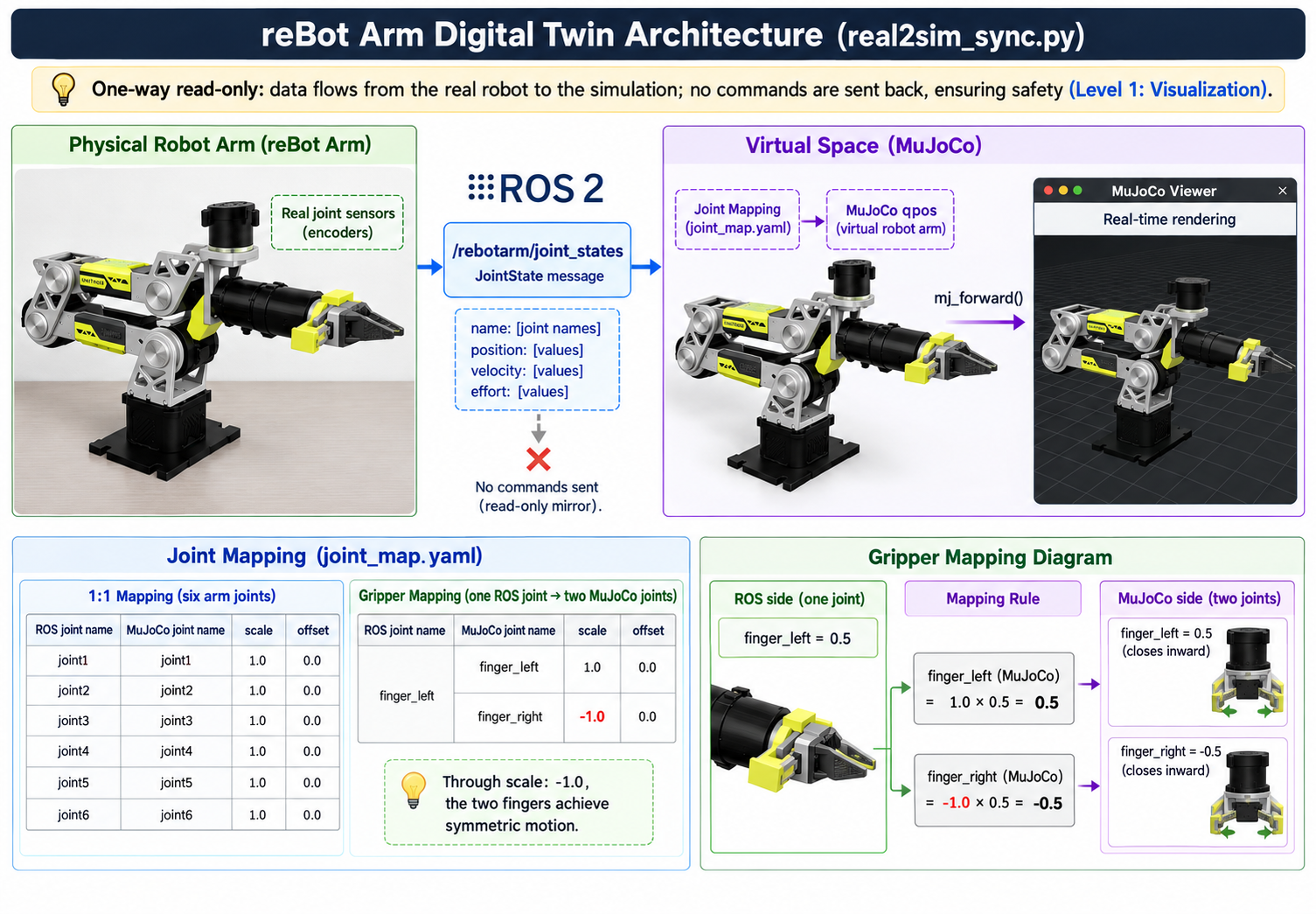
Smoothing and timeout: digital twins need to handle jitter and interruption of real-robot data. The smoothing_alpha parameter controls tracking smoothness (1.0 is direct tracking; less than 1.0 is exponential smoothing), and stale_timeout controls the behavior after data timeout.
Virtual grasping: real2sim_sync.py also implements virtual grasping—when the gripper closes to a certain degree and the TCP is close to an object, the object becomes "attached" to the TCP and moves along with it; when the gripper opens, the object is released and falls freely. This lets the digital twin not only mirror poses but also simulate grasping interactions.
Torque-level twin: mujoco_torque_control.py lifts the digital twin from the kinematics level to the dynamics level. It not only syncs joint positions but also torques—using MuJoCo's torque closed loop to track the real arm's joint trajectory, while comparing the gravity compensation torques of MuJoCo and the SDK. This is the key step of the digital twin moving from "can see" to "calculates accurately," and the foundation for advancing toward Level 2 (diagnosis) and Level 3 (prediction).