13. Dataset Structure and Quality Inspection
Chapter 13 of the SO-ARM Physical AI Beginner's Course — what a LeRobot dataset looks like on disk, four quality standards, visualization and replay, and the lerobot-edit-dataset toolbox for deleting, splitting, merging, and converting datasets.
13.1 Dataset Structure: What's Actually Stored on Disk
13.1 Dataset Structure: What's Actually Stored on Disk
A local dataset recorded in Chapter 12 lives under ~/.cache/huggingface/lerobot/<repo_id>/:
├── meta/
│   ├── info.json          ← robot, fps, features, camera keys
│   ├── episodes/          ← per-episode metadata
│   ├── stats/             ← per-feature statistics (needed by training!)
│   └── tasks/             ← task descriptions
├── data/                  ← parquet frames: observation / state / action
└── videos/                ← encoded camera streams (if video=true)
Three facts worth internalizing:
- Camera keys are part of the data contract.
frontandsidebecomeobservation.images.front/observation.images.side. Training and evaluation must use the same keys. - Stats are computed after recording finishes. This is why you shouldn't kill a recording session midway.
- The
single_taskstring is stored inmeta/tasks— for Stage 4, language annotations build on exactly this field.
13.2 What Counts as "Good" Data: Four Quality Standards
13.2 What Counts as "Good" Data: Four Quality Standards
- Completeness: every episode runs the full "approach → grasp → transport → place → retract" flow; no truncated endings.
- Consistency: same strategy, speed, and rhythm across episodes; cameras and scene untouched.
- Coverage: target positions spread over the marked grid, not clustered in one corner.
- Cleanliness: no failed grasps left in, no frames where the object leaves the camera view, no leader arm blocking the cameras.
13.3 Visualizing and Playing Back
13.3 Visualizing and Playing Back
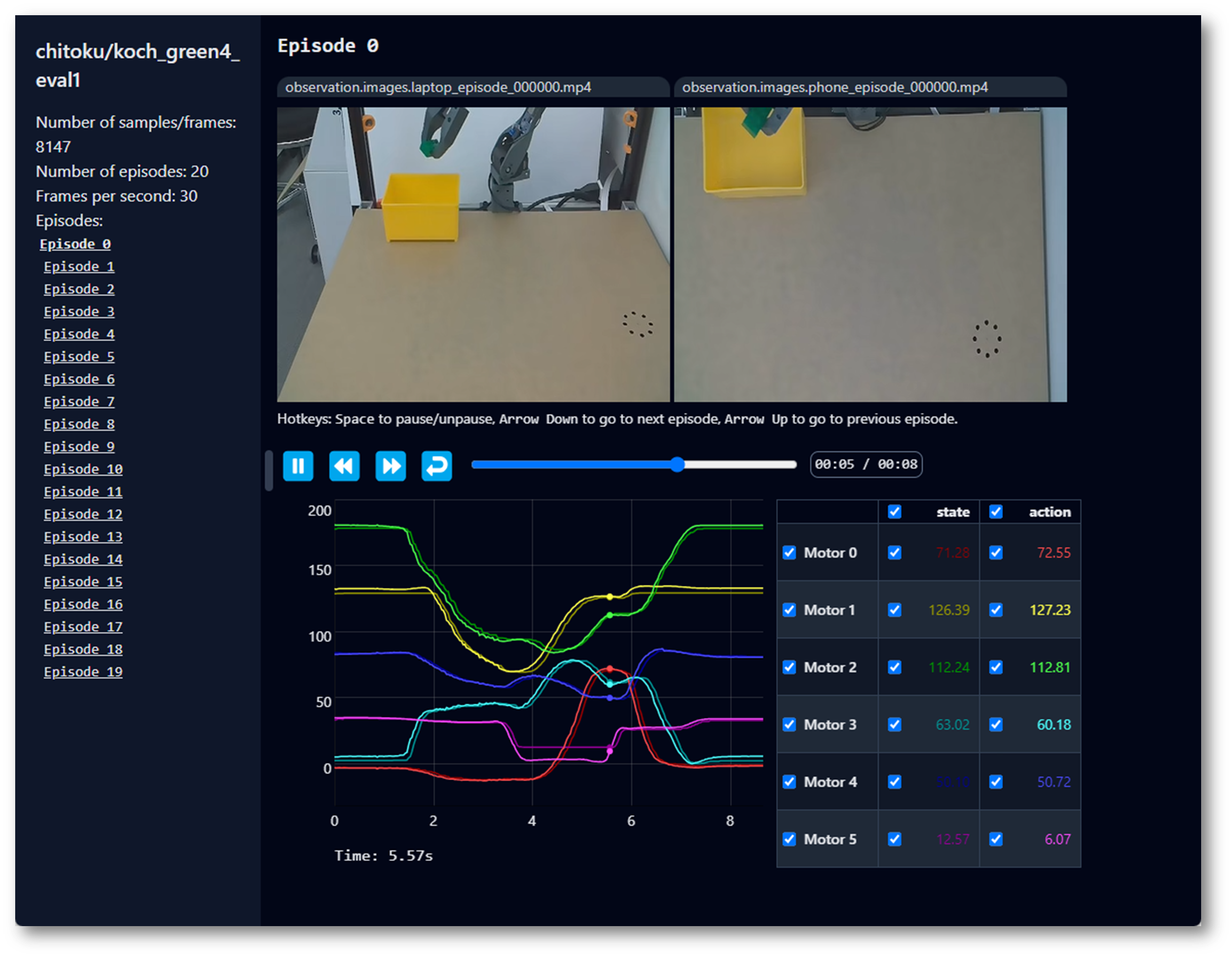
Visualize a Dataset
Online — if you recorded with --dataset.push_to_hub=true, paste your repo id into the official dataset visualizer.
Locally — the same viewer works offline for local datasets:
lerobot-dataset-viz \
    --repo-id seeedstudio123/test \
    --mode local \
    --episode-index 0
Replay an Episode on the Real Arm
Replay moves the real follower arm through recorded actions. Clear the workspace and keep hands away before starting.
The replay function replays any recorded episode on the real arm — the best possible check of action consistency and robot-to-robot transferability:
lerobot-replay \
    --robot.type=so101_follower \
    --robot.port=/dev/ttyACM0 \
    --robot.id=my_awesome_follower_arm \
    --dataset.repo_id=seeedstudio123 \
    --dataset.root=~/.cache/huggingface/lerobot/seeedstudio123 \
    --dataset.episode=0
dataset.root is the physical path to the dataset; repo_id is the custom name defined during collection; episode is a 0-based index. Your arm should replicate the movements you recorded — if it deviates wildly, suspect calibration drift before suspecting the data.
What to Do When Problems Are Found
- Bad episode (drop, miss, blockage): delete it — next section.
- Systematic problem (every episode grasps from a different side): a data-design problem — fix the protocol and re-record; deleting episodes won't help.
- Stats look off (infinity/NaN in visualization): usually a broken episode; delete and regenerate.
13.4 The Dataset Toolbox: lerobot-edit-dataset
13.4 The Dataset Toolbox: lerobot-edit-dataset
All dataset surgery is done with lerobot-edit-dataset and the right --operation.type.
Delete Episodes
Delete specific bad episodes (here 0, 2, and 5):
lerobot-edit-dataset \
    --repo_id seeedstudio123/test \
    --operation.type delete_episodes \
    --operation.episode_indices "[0, 2, 5]"
Or delete and save as a new dataset, preserving the original:
lerobot-edit-dataset \
    --repo_id seeedstudio123/test \
    --new_repo_id seeedstudio123/test_clean \
    --operation.type delete_episodes \
    --operation.episode_indices "[0, 2, 5]"
After in-place deletion the original data is backed up to a _old folder next to the dataset (e.g. .../test_old/). Once you've verified the new dataset, delete the backup yourself.
Split a Dataset
By fractions (e.g. 80% train / 10% test / 10% val) — creates test_train, test_test, test_val:
lerobot-edit-dataset \
    --repo_id seeedstudio123/test \
    --operation.type split \
    --operation.splits '{"train": 0.8, "test": 0.1, "val": 0.1}'
Or by explicit episode indices:
lerobot-edit-dataset \
    --repo_id seeedstudio123/test \
    --operation.type split \
    --operation.splits '{"task1": [0, 1, 2, 3], "task2": [4, 5]}'
Merge Datasets
Combine batches recorded across sessions (task descriptions must match exactly):
lerobot-edit-dataset \
    --repo_id seeedstudio123/test_merged \
    --operation.type merge \
    --operation.repo_ids "['seeedstudio123/test_batch1', 'seeedstudio123/test_batch2']"
Remove Features
Drop a camera you no longer want to train on (e.g. keep only the wrist camera):
lerobot-edit-dataset \
    --repo_id seeedstudio123/test \
    --operation.type remove_feature \
    --operation.feature_names "['observation.images.side']"
Convert Images to Video
Convert an image-based dataset into video format — smaller storage, faster training data loading:
lerobot-edit-dataset \
    --repo_id seeedstudio123/test_image \
    --new_repo_id seeedstudio123/test_video \
    --operation.type convert_image_to_video \
    --operation.vcodec libsvtav1 \
    --operation.pix_fmt yuv420p \
    --operation.g 2 \
    --operation.crf 30
Useful options: --operation.output_dir (custom output path), --operation.num_workers 8 (parallel encoding), --operation.max_episodes_per_batch / --operation.max_frames_per_batch (memory-constrained machines). The result is a complete, standard LeRobotDataset — videos under videos/, metadata preserved.
13.5 FAQ for This Chapter
13.5 FAQ for This Chapter
- Which LeRobot repository? The verified one from Chapter 5:
https://github.com/Seeed-Projects/lerobot.git. The official repository updates continuously and may change dataset versions or command syntax. - The operation looks stuck. Press Enter to refresh the terminal output. The new dataset format is stored compressed, so operations take time — watch the progress bar and be patient.
- Reference: Using dataset tools in the official docs.