2. Getting to Know SO-ARM Hardware and the Open-Source Project
Chapter 2 of the SO-ARM Physical AI Beginner's Course — get to know the SO-ARM open-source project, the difference between SO-ARM100 and SO-ARM101, the Standard and Pro editions, and its open-source hardware and software.
2.1 What Is SO-ARM
2.1 What Is SO-ARM
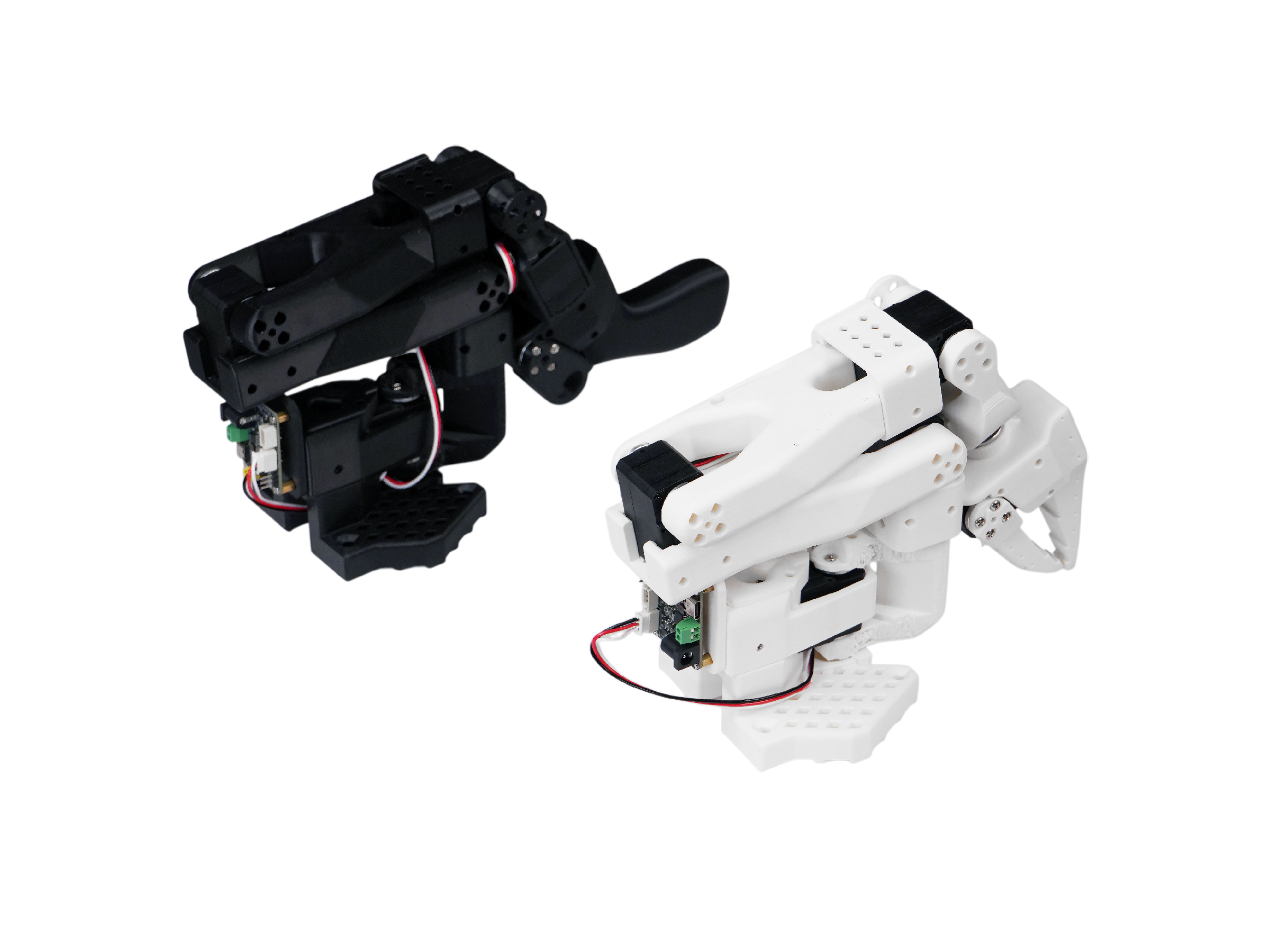
SO-ARM is a low-cost, 100% open-source robotic arm designed for AI and robotics learning. The original SO-ARM100 was created by TheRobotStudio as the reference leader-follower arm for the Hugging Face LeRobot project, and Seeed Studio turns the design into complete kits — the SO-ARM100 and the newer SO-ARM101 — with verified 3D-printed parts, Feetech STS3215 bus servos, servo control boards, and full wiki support.
An SO-ARM kit always contains two arms:
- A Leader arm (black): the lightweight teaching arm you hold in your hand. Its servos only read positions — it is the "input device" for demonstrations.
- A Follower arm (white): the execution arm. Its servos are powered at full voltage and actually grasp and move objects.
Each arm is driven by 6 STS3215 serial-bus servos (5 arm joints + 1 gripper), daisy-chained on a 3-pin bus and connected to your computer through a USB servo control board. From this open-source project you can learn from scratch:
- 3D printing, assembly, and bus servo configuration;
- Servo ID assignment, calibration, and debugging;
- Leader-follower master-slave teleoperation;
- LeRobot data collection, visualization, and dataset management;
- ACT, SmolVLA, and diffusion policy training and real-robot evaluation;
- Double-arm (bimanual) cooperative training;
- VLA fine-tuning with NVIDIA Isaac GR00T and deployment on Jetson;
- No-code VLA on the SenseCraft Robotics platform.
Its main goal is to allow users to learn and validate embodied intelligence algorithms using truly low-cost, open, and reproducible hardware.
2.2 SO-ARM100 vs. SO-ARM101
2.2 SO-ARM100 vs. SO-ARM101
There are two generations of the arm:
- SO-ARM100 — the original version, which made the design famous;
- SO-ARM101 — the current version, with cable clips for tidier wiring and a redesigned leader arm.
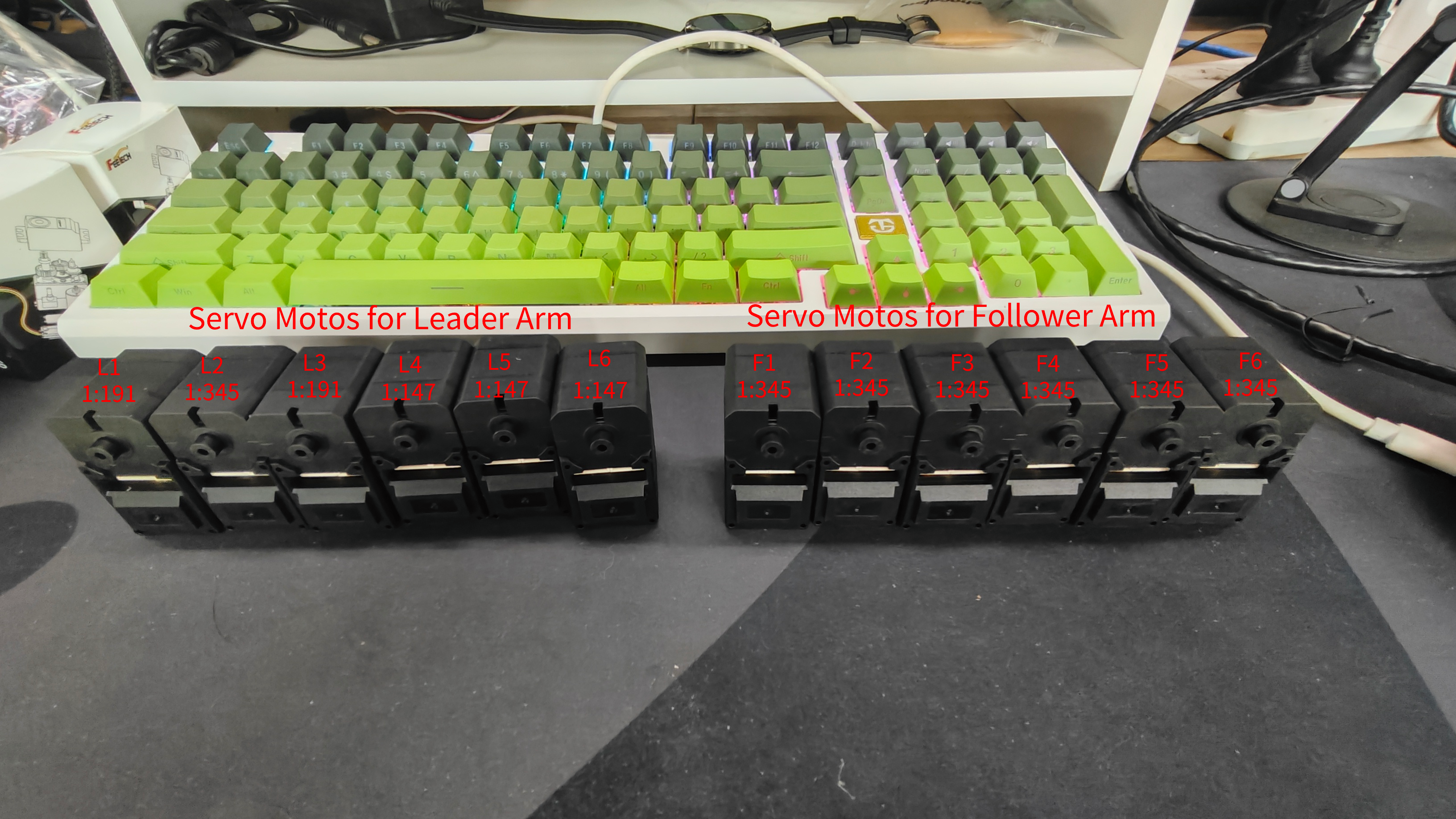
The two versions are highly compatible:
The SO-ARM101 kit is the recommended purchase today. The SO100 and SO101 codes are compatible — users of SO100 can directly use SO101's parameters and commands (so101_follower / so101_leader in LeRobot), and the SO101 print files are fully compatible with the SO100 motor kit installation.
The key difference to be careful about is the gear ratio of the leader arm servos: the first three joints (L1-L3) of the SO-ARM101 Leader use different gear ratios than SO-ARM100, so servo configuration must follow the mapping table for your version (see Chapter 6).
2.3 Standard Edition vs. Pro Edition
2.3 Standard Edition vs. Pro Edition
The SO-ARM101 kit comes in two editions that share the same structure and differ in servo torque and power:
| Edition | Follower servos | Leader servos | Power |
|---|---|---|---|
| SO101 Standard | ST-3215-C001 7.4V (gear ratio 1:345) ×6 | ST-3215 7.4V series | Both arms 5V |
| SO101 Pro | ST-3215 12V series (higher torque, e.g. C018 / C047) | ST-3215 7.4V series | Leader 5V, Follower 12V |
Power rules matter. The Standard edition powers both arms at 5V. On the Pro edition, the Leader must always use the 5V supply and the Follower must always use the 12V supply — plugging the wrong voltage can burn the servos. Double-check the adapter label before every power-up.
2.4 Main Parameters
2.4 Main Parameters
| Product | SO-ARM100 kit | SO-ARM101 kit |
|---|---|---|
| Purchase Link | Bazaar | Bazaar |
| Degrees of Freedom | 5 + gripper | 5 + gripper |
| Actuators | Feetech STS3215 bus servo ×6 per arm | Feetech STS3215 bus servo ×6 per arm |
| Communication | Serial bus (TTL) via USB servo control board | Serial bus (TTL) via USB servo control board |
| Power Supply | 5V (Standard) / 5V+12V (Pro) | 5V (Standard) / 5V+12V (Pro) |
| Structure | 3D-printed PLA+ parts, open-source STL | 3D-printed PLA+ parts with cable clips, open-source STL |
| Ecosystem | LeRobot, GR00T, SenseCraft Robotics | LeRobot, GR00T, SenseCraft Robotics |
2.5 Open-Source Hardware and Open-Source Software
2.5 Open-Source Hardware and Open-Source Software
SO-ARM is open from the printable structure to the software stack:
- Arm design and STL files: TheRobotStudio/SO-ARM100
- Verified LeRobot fork used in this course: Seeed-Projects/lerobot
- Upstream framework: huggingface/lerobot
- Servo debugging tool: Seeed-Projects/Seeed_RoboController
- VLA foundation model: NVIDIA Isaac GR00T on Hugging Face
This course installs LeRobot from the Seeed-Projects fork, which is verified against the SO-ARM kits. The upstream repository changes quickly — command arguments, dataset formats, and dependencies may differ from the chapters here.