4. Fundamentals of Robotic Arms and Bus Servos
Chapter 4 of the SO-ARM Physical AI Beginner's Course — how joints, links, and degrees of freedom make up an arm, what a bus servo actuator is, and how the STS3215 serial bus, servo IDs, and the control board work together.
4.1 Review: Joints, Links, and Degrees of Freedom
4.1 Review: Joints, Links, and Degrees of Freedom
In Chapter 1 we defined a robotic arm as "multiple joints and links working together." Now map that onto the SO-ARM concretely. Each arm has five rotational joints plus a parallel gripper:
| Joint | Name | What it does |
|---|---|---|
| 1 | Shoulder pan (base) | Rotates the whole arm left / right |
| 2 | Shoulder lift | Raises / lowers the upper arm |
| 3 | Elbow | Raises / lowers the forearm |
| 4 | Wrist pitch | Tilts the gripper up / down |
| 5 | Wrist roll | Rotates the gripper about its axis |
| 6 | Gripper | Opens / closes the fingers |
Five rotational degrees of freedom position and orient the gripper anywhere in the arm's tabletop workspace, and the gripper acts as the end effector — the part that actually touches the workpiece.
Every joint is driven by one Feetech STS3215 bus servo. In total, an SO-ARM leader-follower pair uses 12 servos — that is the whole actuation system of the robot.
4.2 What Is a Servo Actuator
4.2 What Is a Servo Actuator
An actuator converts commands into motion. Robot arms commonly use electric motors with some form of feedback. A servo ("servomotor") packages three things into one housing:
- A DC motor that produces rotation;
- A gearbox that trades speed for torque;
- A position sensor (potentiometer or magnetic encoder) plus a control circuit that continuously drives the motor toward a commanded angle.
Send a servo a target position and it moves there and holds it — no external controller needed. That "move to angle and hold" behavior is exactly what a joint needs.
Why Gear Ratio Matters
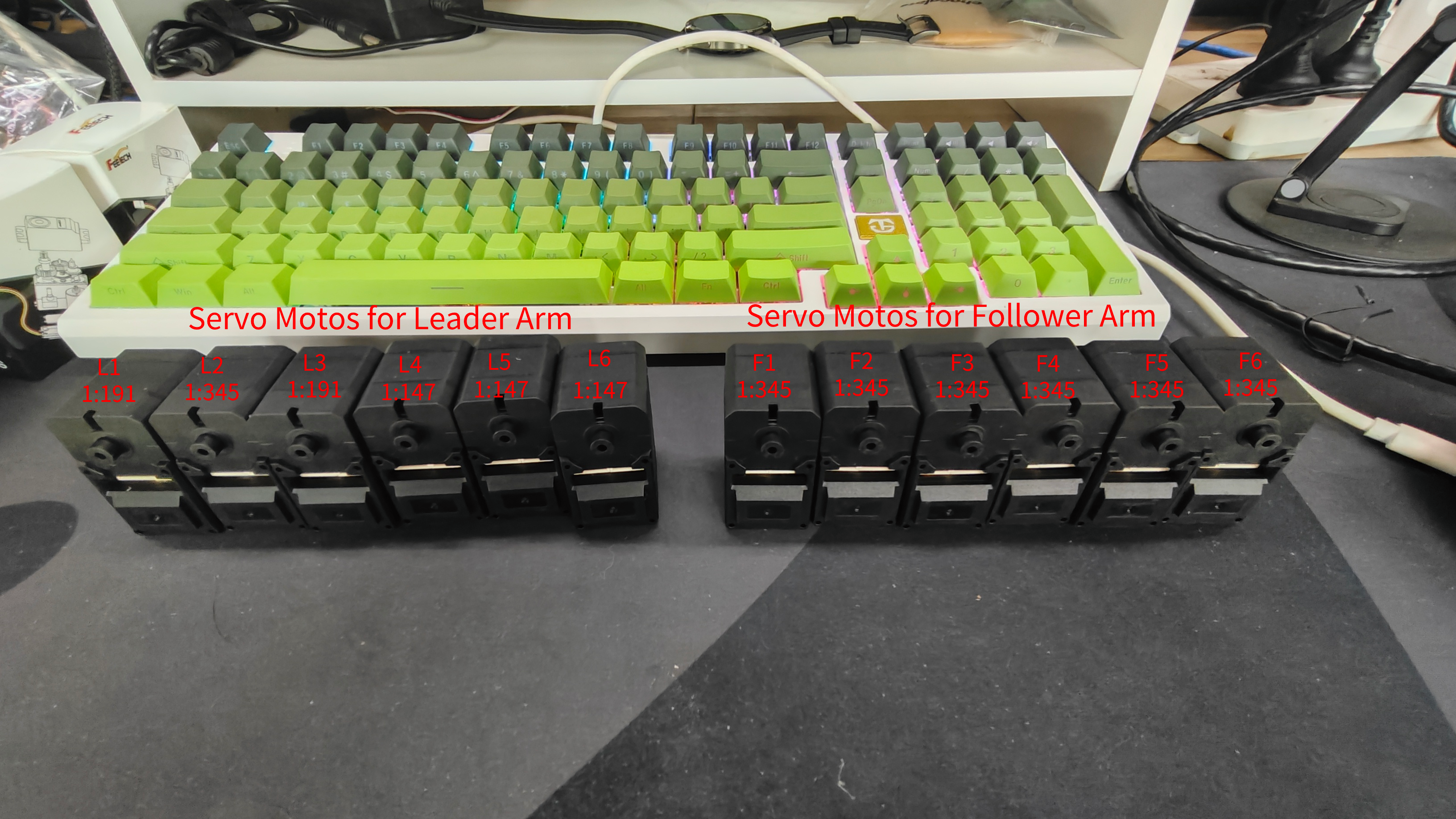
The gearbox ratio determines how much the output turns per motor rotation — and how much torque you gain. SO-ARM uses STS3215 servos with different gear ratios in different joints:
| Servo Model | Gear Ratio | Used On |
|---|---|---|
| ST-3215-C044 (7.4V) | 1:191 | SO101 Leader L1, L3 |
| ST-3215-C001 (7.4V) | 1:345 | SO101 Leader L2 |
| ST-3215-C046 (7.4V) | 1:147 | SO101 Leader L4–L6 |
| ST-3215-C001 (7.4V) / C018 (12V) / C047 (12V) | 1:345 | Follower F1–F6 |
- Higher ratio (1:345) = more torque, slower speed — needed where the arm lifts its own weight and the payload (follower joints, leader shoulder L2).
- Lower ratio (1:147 / 1:191) = faster, lighter feel — used on leader joints the human moves by hand.
Because the SO-ARM101 leader uses different gear ratios on L1-L3 than the SO-ARM100, servo configuration in Chapter 6 must match your kit version exactly. A servo with the wrong expected gear ratio will produce wrong calibration and wrong following.
4.3 The Serial Bus: One Cable, Six Servos
4.3 The Serial Bus: One Cable, Six Servos
Traditional hobby servos each need their own signal wire (PWM). The STS3215 is a serial bus servo: every servo connects to a shared 3-pin bus (GND, VCC, DATA) and is daisy-chained to the next.
Two concepts make this work:
- Servo ID: each servo on a bus has an ID (1-6 in SO-ARM, matching its joint). Commands on the bus carry the target ID, so all six servos share one wire without confusion. During factory setup (Chapter 6), IDs are flashed one servo at a time.
- Baud rate: servos and the control board must agree on the communication speed; the setup tool writes a consistent baud rate to every servo.
The bus protocol also lets you read back each servo's current position, temperature, voltage, and load — this is how the leader arm reports the human's motion during teleoperation, and how the follower's state is recorded into datasets.
Because all servos share one bus, flashing an ID affects every servo with that ID. If duplicate IDs exist (for example, two servos both answering as ID 4), rewriting ID 4 changes both. That is why IDs are always programmed one connected servo at a time — and why the debugging tool in Chapter 7 asks you to disconnect the other servos first.
4.4 The Servo Control Board, Wiring, and Power
4.4 The Servo Control Board, Wiring, and Power
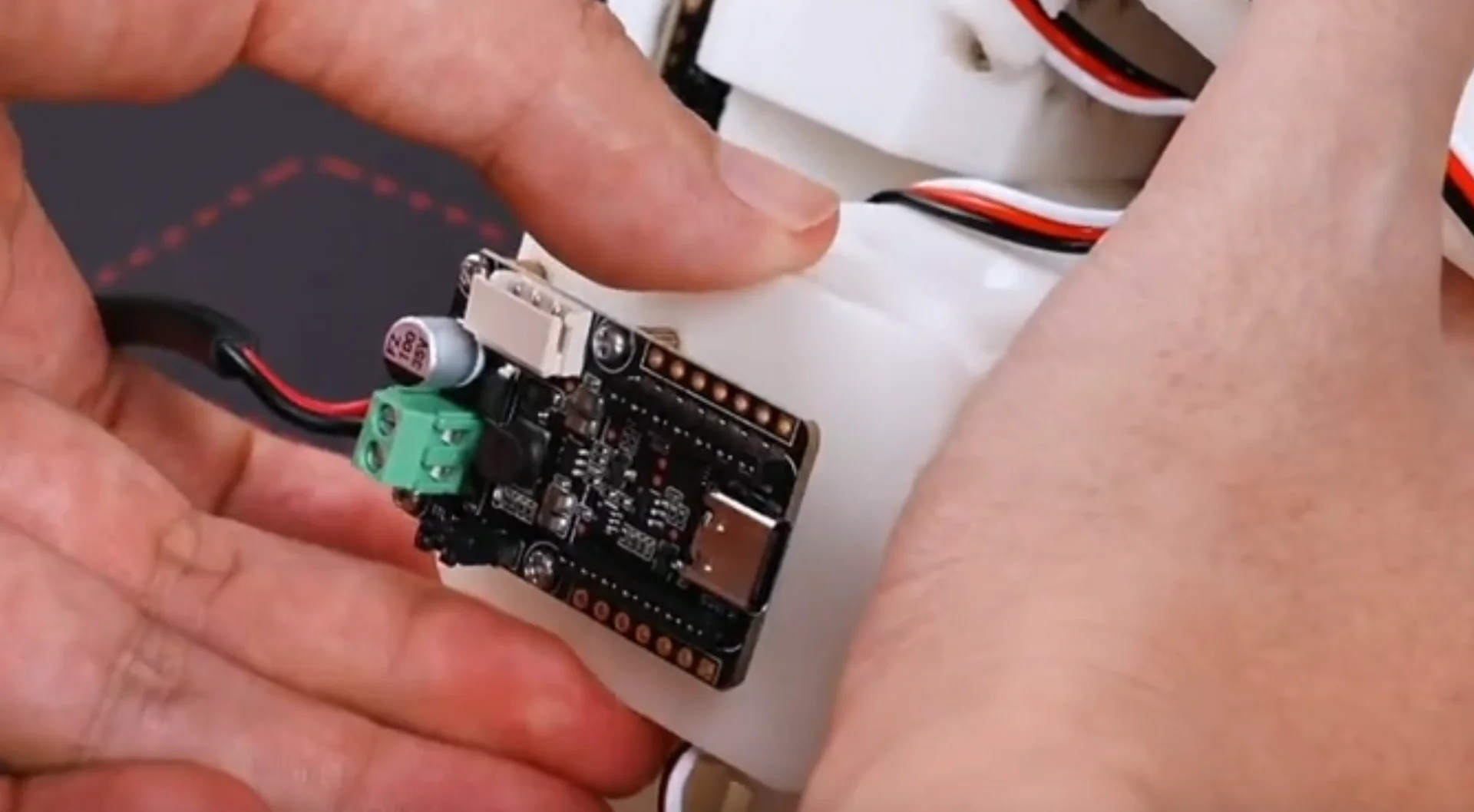
Each arm has a small LeRobot servo control board: on one side the 3-pin socket for the servo bus, on the other side a USB-C connector to the computer and a DC barrel jack for power.
Rules that prevent the most common hardware failures:
- USB-C carries data only. The USB cable does not power the servos — the DC power supply must also be connected for anything to move.
- Voltage must match the servo type: 5V for the 7.4V STS3215 versions, 12V for the 12V versions. The leader arm always uses 7.4V motors (5V supply). On the Pro kit the follower uses a 12V supply.
- Power off before plugging or unplugging servo cables, USB cables, or power connectors.
- The first servo (ID 1, base) connects to the board; each subsequent servo connects to the one below it. If a servo's LED is off, the cable before it may be loose.
4.5 Summary
4.5 Summary
- An SO-ARM = 5 rotational joints + gripper, one STS3215 bus servo per joint.
- A servo is motor + gearbox + position feedback; the gear ratio trades speed for torque.
- All six servos share one 3-pin serial bus; servo IDs tell them apart, and positions can be read back.
- The control board bridges USB (data) and DC (power) to the bus — both must be connected, at the right voltage.
Next chapter we set up the software environment, then configure and assemble the arms.