9. LeRobot and SO-ARM System Architecture
Chapter 9 of the SO-ARM Physical AI Beginner's Course — what LeRobot is, leader/follower arm division of labor, the Robot and Teleoperator plugin architecture, the camera/serial-bus/arm data flow, and SO-ARM configuration essentials.
9.1 What Is LeRobot and Why Do We Need It?
9.1 What Is LeRobot and Why Do We Need It?
In Chapter 8 we established the conceptual framework of imitation learning: demonstration, data, model, closed loop. But to actually run this pipeline, you immediately encounter a host of trivial yet specific problems:
- How to align timestamps between camera frames and joint angles?
- What format should be used to store images, states, and actions for dozens of Episodes?
- How to share and download trained models on Hugging Face Hub?
- How can the three codebases — data collection, training, and inference — share the same arm control logic?
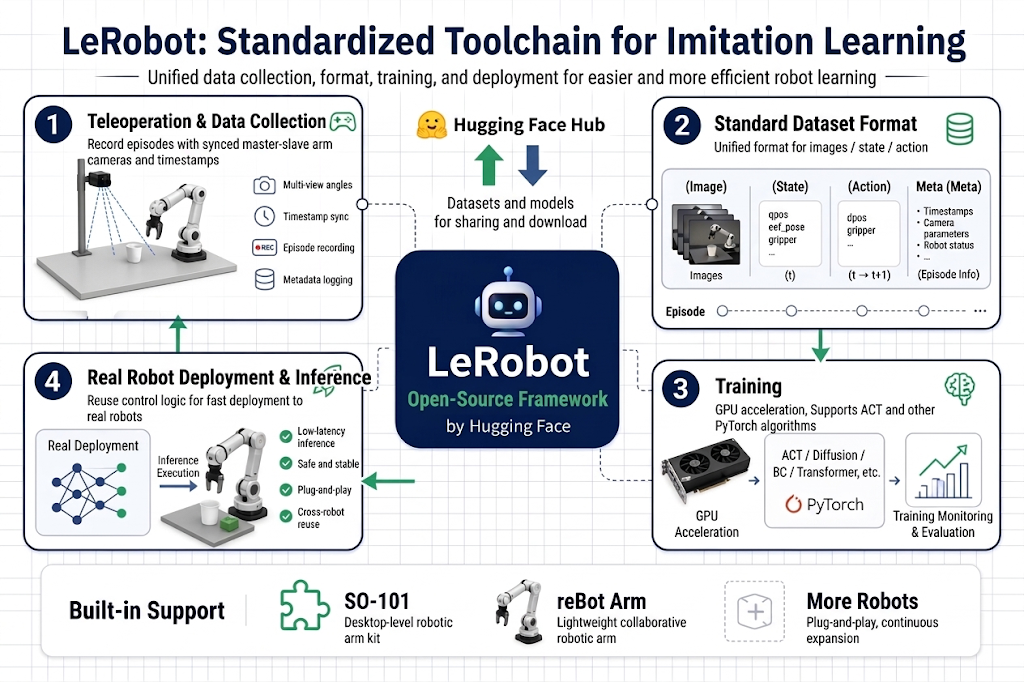
If everyone reinvented the wheel, robot learning would remain a game for only a few labs. LeRobot is the open-source framework Hugging Face built to solve this — it implements proven imitation learning algorithms (ACT, SmolVLA, GR00T, etc.) in PyTorch, defines a standard robot dataset format, and provides a complete command-line toolchain from teleoperation and data collection to training and real-robot deployment. SO-ARM was, in fact, born together with LeRobot as its reference low-cost hardware — the two are designed for each other.
9.2 Leader Arm and Follower Arm
9.2 Leader Arm and Follower Arm
- The first step of imitation learning is "human demonstrates to the robot." The question is: how does a human "teach" an arm to do precise grasping motions? Physically guiding it by hand is both dangerous and produces non-smooth data.
- The answer is master-slave teleoperation: use a structurally identical, lightweight, freely-moving demonstration arm as the "input device" — the human moves the leader, and the follower follows in real time.
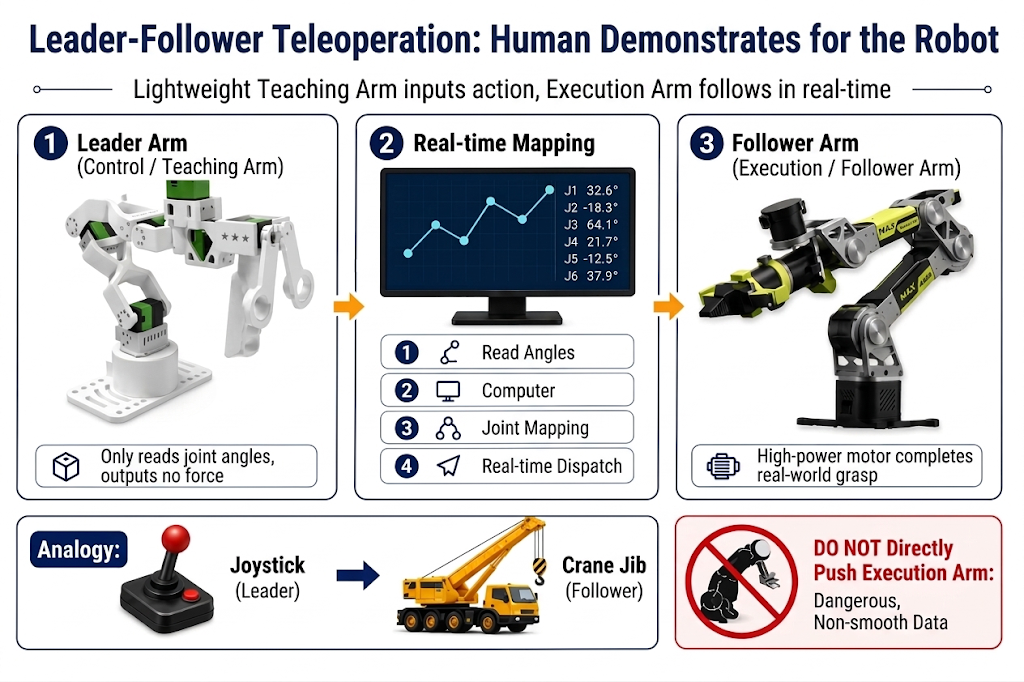
- Leader Arm (leader / teaching arm): the arm the human holds and moves. It only reads positions — it reads its own joint angles in real time and sends them to the computer. It doesn't need to output force, so it runs the same STS3215 servos unpowered or lightly powered, with lower gear ratios where the human does the work.
- Follower Arm (follower / execution arm): the arm that actually does the work. It receives joint angles from the leader and drives its higher-torque, fully-powered servos to follow, completing the actual grasping.
This is like the relationship between the control stick in a crane cab and the crane arm itself. The operator moves the lightweight stick (Leader), while the heavy lifting is done by the arm outside (Follower). Every movement of the stick is real-time "translated" into movements of the crane arm.
An SO-ARM kit gives you both in one box — that is why it is such a natural teaching platform.
9.3 Plugin Architecture
9.3 Plugin Architecture: Robot Plugin and Teleoperator Plugin
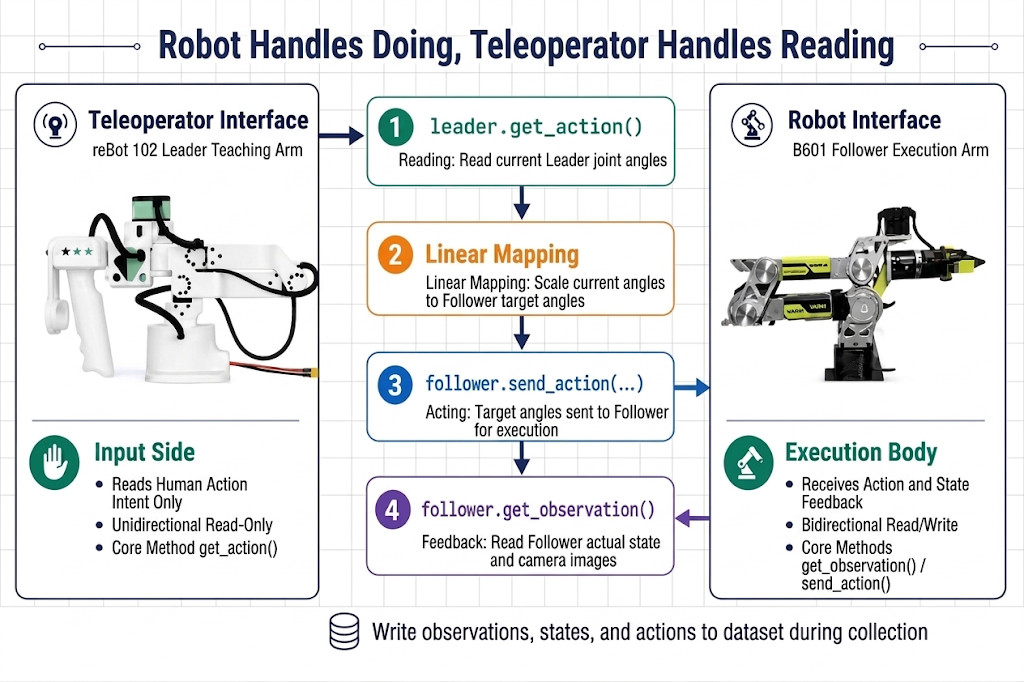
LeRobot's first design principle: the framework doesn't know any specific hardware; it only defines interfaces. Hardware connects as plugins.
| Robot Plugin | Teleoperator Plugin | |
|---|---|---|
| Role | Executor: receives actions, reports state | Input: only reads human motion intent |
| Data Direction | Bidirectional (read + write) | Unidirectional (read-only) |
| Core Methods | get_observation(), send_action() | get_action() |
| In the SO-ARM system | so101_follower (the white follower arm) | so101_leader (the black leader arm) |
One-sentence distinction: The Robot handles "doing," the Teleoperator handles "reading."
9.4 Data Flow Overview: Cameras, Serial Bus, and the Arms
9.4 Data Flow Overview: Cameras, Serial Bus, and the Arms
In one control cycle, what data flows, in what format, through which path? One computer connects three types of peripherals, corresponding to three data paths:
- Cameras → computer: USB video frames (front and side views).
- Leader arm → computer: joint positions over the serial bus (
/dev/ttyACM1) — the human's intent. - Computer → follower arm: target joint positions over the serial bus (
/dev/ttyACM0) — plus the follower's own state read back on the same bus.
The computer sits at the center: it reads cameras + leader, writes to the follower, timestamps everything, and (when recording) writes one aligned row of observation/state/action per frame to the dataset.
9.5 Four Workflows: Four Uses of the Same System
9.5 Four Workflows: Four Uses of the Same System
Understanding the hardware and data flow, when you look at the four workflows in later chapters of this stage, you'll find they use the same plugins and same configuration; only the LeRobot tools called differ:
| Workflow | LeRobot Tool |
|---|---|
| Teleoperation | lerobot-teleoperate |
| Data Collection | lerobot-record |
| Training | lerobot-train |
| Inference & Deployment | lerobot-record (with a policy) or lerobot-rollout |
- Teleoperation and data collection use the same hardware chain — the only difference is whether data is recorded.
- Inference deployment and data collection are structural mirror images: during collection, actions come from the Leader (human); during inference, actions come from the model (checkpoint). Everything else (camera reading, State feedback, servo commands, safety limits) is identical. This is the benefit of a plugin architecture — changing the decision-maker doesn't require changing the system.
- Teleoperation and inference deployment: both have all hardware active and control the arm online; the difference is "who makes decisions" — in teleoperation, the decision-maker is the human; in inference, it's the model.
9.6 SO-ARM Configuration Essentials
9.6 SO-ARM Configuration Essentials
| Item | Follower arm | Leader arm |
|---|---|---|
| LeRobot type | --robot.type=so101_follower | --teleop.type=so101_leader |
| Typical port | /dev/ttyACM0 | /dev/ttyACM1 |
| Config key for port | --robot.port | --teleop.port |
| ID key | --robot.id | --teleop.id |
| Power (Standard kit) | 5V | 5V |
| Power (Pro kit) | 12V | 5V |
Notes that prevent the most common mistakes:
- SO100 and SO101 share code.
so101_leaderandso100_leaderare the same implementation; SO100 users use the same commands. - The
idstores the calibration file. Use the same--robot.id/--teleop.idacross teleoperation, recording, and evaluation for the same physical arm — otherwise LeRobot looks for a calibration file that doesn't exist. - Port order follows plug-in order on Linux and Jetson: first board =
ttyACM0, second =ttyACM1. Double-check withlerobot-find-portbefore every session.
One sentence summarizing the system: same skeleton, two roles. Leader reads, follower writes, cameras watch, and the computer stitches it all together with timestamps. All subsequent teleoperation, data collection, training, and evaluation commands reuse exactly this configuration.