Semtech LR2021 LoRa Plus™ Evaluation Kit
Features
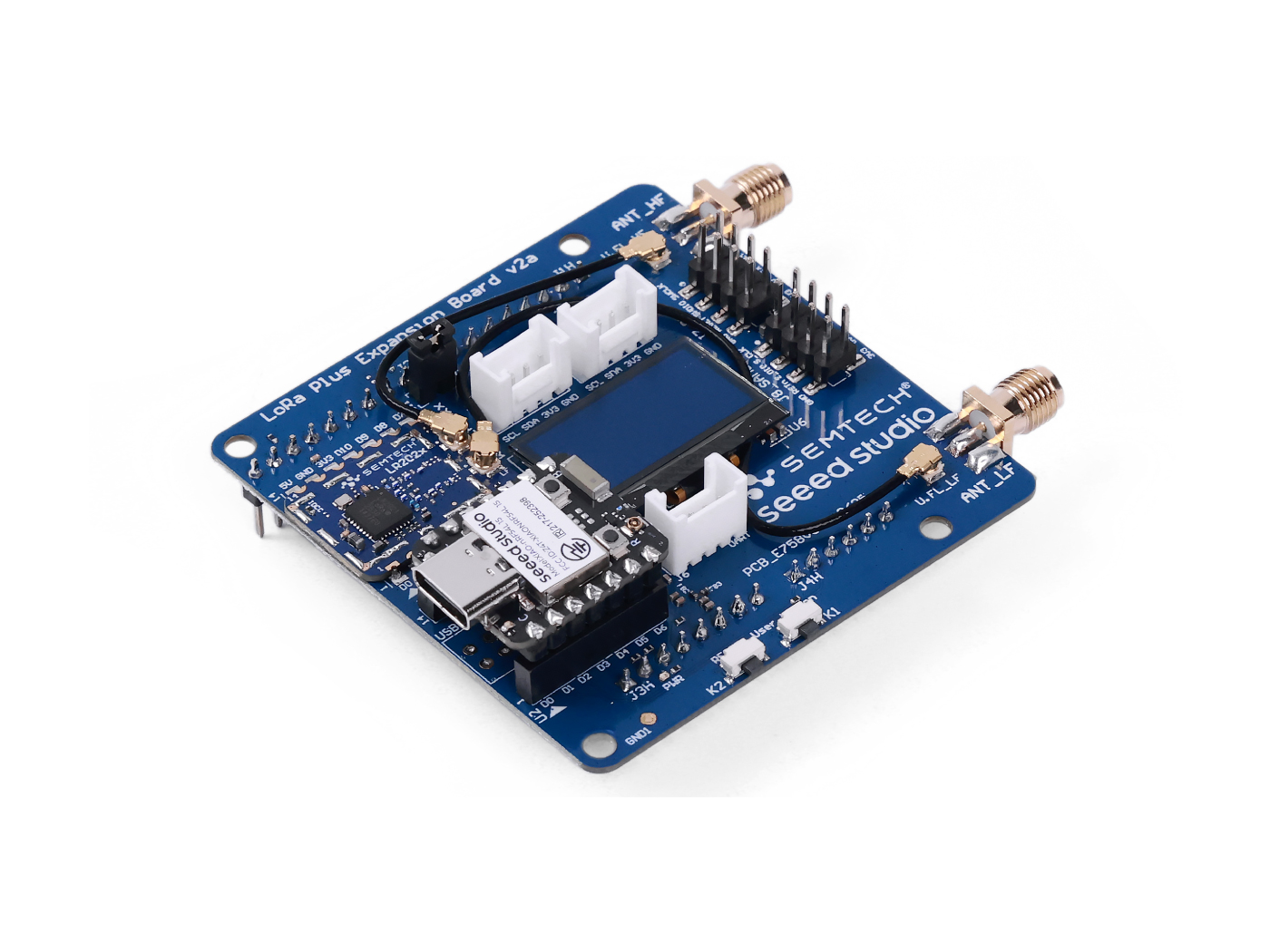
The Semtech LR2021 LoRa Plus Evaluation Kit features a modular design that seamlessly integrates the powerful Seeed Studio XIAO nRF54L15 Core Board with the LoRa Plus Expansion Board. This compact and robust hardware platform is specifically engineered for evaluating full-scenario ground-to-satellite communication. Its compatibility with numerous mainstream IoT protocols ensures it meets development requirements across diverse application scenarios.
Semtech LR2021 Transceiver
-
Universal Connectivity (Multi-Band Support):
- Sub-GHz LoRa/FSK: Perfectly compatible with traditional 470/868/915 MHz LoRaWAN networks, maintaining extreme long-range transmission and penetration capabilities.
- 2.4GHz LoRa: Supports global ISM band LoRa modulation. This resolves regulatory fragmentation across different countries (enabling "One SKU Globally") while offering higher data rates than Sub-GHz.
- S-Band Satellite Support: A major upgrade. The LR2021 features native support for the 1.9GHz - 2.5GHz band, enabling direct communication with Low Earth Orbit (LEO) satellites to fill coverage gaps in oceans, deserts, and remote areas where terrestrial networks cannot reach.
-
Enhanced LR-FHSS Support: The chip includes built-in hardware support for Long Range - Frequency Hopping Spread Spectrum (LR-FHSS). This modulation technology significantly increases network capacity and interference immunity, serving as a critical technology for Direct-to-Satellite IoT.
-
Multiple Modulation Support: LoRa, LR-FHSS, FLRC, FSK/GFSK, OQPSK, OOK, BLE 5.0 PHY
-
Multiple Protocols Compatible: LoRaWAN(Sub-GHz, 2.4 GHz), Amazon Sidewalk, Wi-SUN, Wireless M-Bus, Z-Wave, BLE, IEEE 802.15.4 (Thread, Zigbee)
-
Ultra-Low Power Architecture: Despite integrating a multi-band RF front-end, the LR2021 maintains Semtech's industry-leading low power standards:
- 105mA @ +22dBm transmit power
- 5.7mA receiving current
- 470nA sleeping current
Making it ideal for battery-powered, long-lifecycle asset tracking devices.
- Enhanced Channel Activity Detection (CAD): LR2021's Fast CAD employs an intelligent adaptive threshold and early termination mechanism, which significantly reduces the power consumption and time required for idle channel detection.
LoRa Plus Expansion Board Features
Dual Antenna Interface Design
- LF Port (SMA): Dedicated to Sub-GHz bands (150MHz - 960MHz).
- HF Port (SMA): Dedicated to 2.4GHz ISM and S-Band Satellite frequencies.
Host Core: XIAO nRF54L15
- Next-Gen Silicon: Powered by Nordic Semiconductor's latest nRF54 Series (nRF54L15).
- High-Performance Processing: Features an ARM Cortex-M33 core running at up to 128 MHz, providing ample computing power for complex LoRaWAN protocol stacks and Edge AI algorithms.
- Next-Gen Efficiency: Compared to the nRF52 series, the nRF54 delivers a leap in power efficiency. When paired with the LR2021, it allows for the construction of terminal products with exceptional battery life.
- Compact Form Factor: Utilizes the classic XIAO stamp-hole design, making it easy to integrate into smaller prototype enclosures.
Specification
| Parameters | Specifications |
|---|---|
| Dimension | Expansion Board: 65(W)x73(L)x27(H)mm Package: 200x130x50mm |
| Voltage - Supply | 5V (USB Type C) |
| Voltage - Output | 3.3V / 5V |
| Maximum Operating Current (Transmitter) | Sub-GHz: 105mA @ +22dBm 2.4 GHz: 27mA @ +14dBm |
| Maximum Operating Current (Receiver) | LoRa SF7 @ 125KHz: 5.7mA FLRC: 10.9mA |
| Frequency Plan | EU868 / US915 / CN490 |
| Output Power | Sub-GHz: +22dBm to -10dBm 2.4 GHz: +12dBm |
| Receiving Sensitivity | LoRa SF12 @ 125kHz: -141.5dBm FLRC @ 260kbps: -111dBm BLE @ 2Mbps: -97dBm |
| interfaces | USB Type C / Grovex3(IICx2 / UARTx1) / SMA-Kx2 |
| modulation | LoRa, (G)FSK, LR-FHSS, FLRC, OQPSK, OOK, BLE 5.0 PHY |
| working temperature | -40℃ ~ 85℃ |
Harware Overview
Diagram
Pinout
Expansion Board:


XIAO nRF54L15:
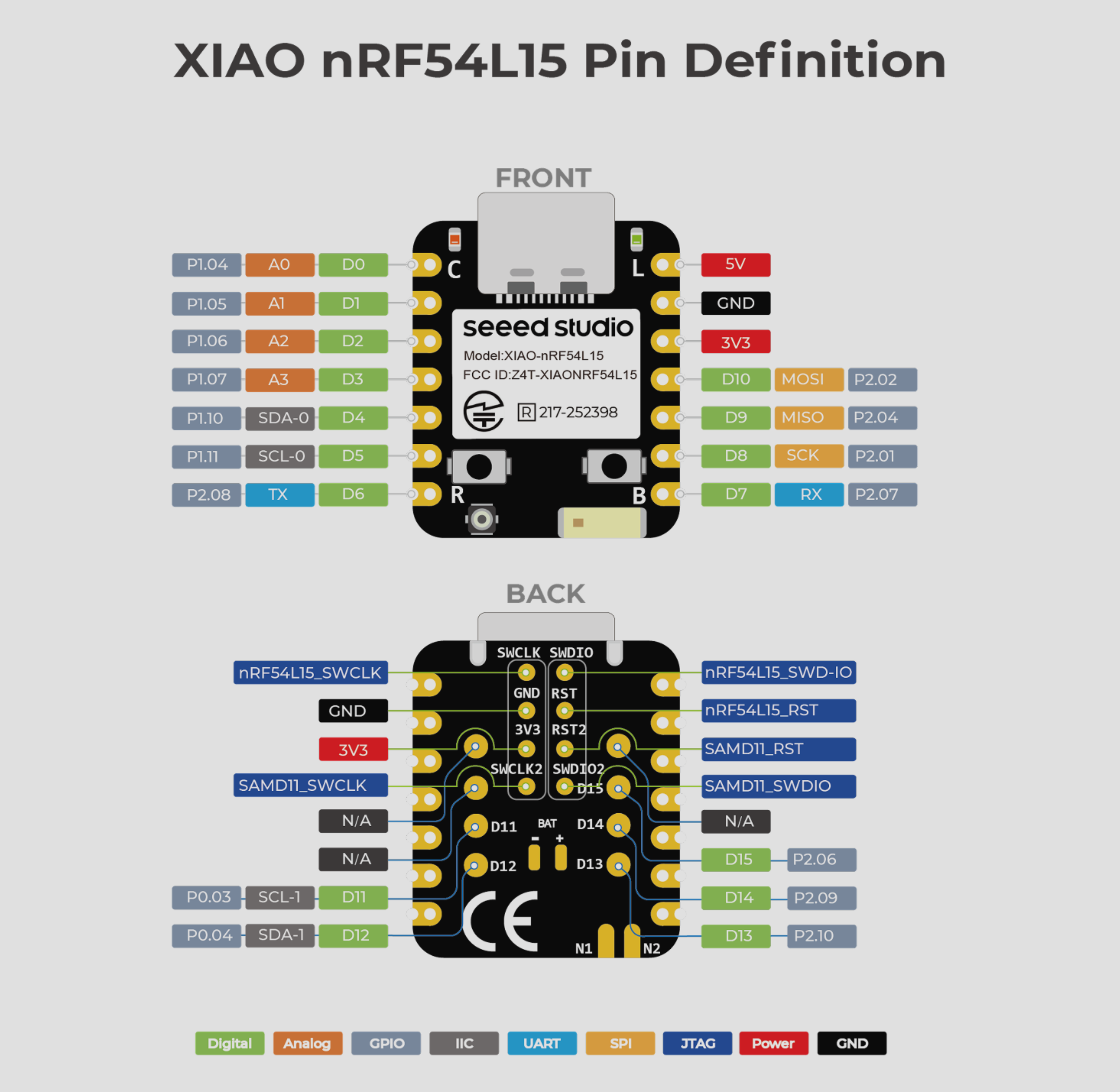
Pinout Mapping:
| XIAO Pin Definition | nRF54L15 Pin Definition | Pin Function | DeviceTree Index |
|---|---|---|---|
| A0 / D0 | P1.04 | Digital IO | |
| A1 / D1 | P1.05 | Digital IO | |
| A2 / D2 | P1.06 | Digital IO | |
| A3 / D3 | P1.07 | Digital IO | |
| SDA0 / D4 | P1.10 | I2C | i2c22 |
| SCL0 / D5 | P1.11 | I2C | |
| TX / D6 | P2.08 | UART | uart21 |
| RX / D7 | P2.07 | UART | |
| SCK / D8 | P2.01 | SPI | spi00 |
| MISO / D9 | P2.04 | SPI | |
| MOSI / D10 | P2.02 | SPI | |
| SCL1 / D11 | P0.03 | I2C | i2c30 |
| SDA1 / D12 | P0.04 | I2C | |
| D13 | P2.10 | Digital IO | |
| D14 | P2.09 | Digital IO | |
| D15 | P2.06 | Digital IO |
Getting Started
1. Overview
This guide provides step-by-step instructions for setting up a command-line Zephyr RTOS development environment integrated with Semtech's usp_zephyr module for a quick evaluation by using the provided samples with the on-board XIAO-nRF54L15. Learn more about Semtech's LoRa USP™ (Unified Software Platform). You can also download the source code and find more detailed information in the Semtech usp_zephyr repository:
The usp_zephyr project follows a hybrid structure, combining:
-
West Workspace Module Structure: The core hardware support (boards, drivers, HAL) integrates directly into the Zephyr build system as a standard module.
-
Layered Structure: Application-layer libraries and examples reside separately in the workspace for better organization and reuse.
2. Prerequisites
Ensure your system meets these requirements before proceeding. Learn more about setting up the Zephyr development environment:
-
Operating System:
- Ubuntu 22.04 LTS (recommended) or another supported Linux distribution, Windows (10 and later), or macOS.
-
Main Dependencies:
-
west(Zephyr's meta-tool) -
ninja -
cmake(version 3.20.0 or higher) -
Python 3.8 or higher with
pip -
Devicetree compiler
dtc
-
Install & Check Dependencies
- For Linux:
sudo apt install --no-install-recommends git cmake ninja-build gperf \
  ccache dfu-util device-tree-compiler wget python3-dev python3-venv python3-tk \
  xz-utils file make gcc gcc-multilib g++-multilib libsdl2-dev libmagic1
Due to the unavailability of gcc-multilib and g++-multilib on AArch64 (ARM64) systems, you may need to omit them from the list of packages to install.
- For macOS:
Use
brewto install the required dependencies:
brew install cmake ninja gperf python3 python-tk ccache qemu dtc libmagic wget openocd
- For Windows:
Here we use the pre-installed windows package manager
winget. If this is not an option, you can also install the dependencies from their respective websites and add their environment varibles toPATH.
Use winget to install the required dependencies:
winget install Kitware.CMake Ninja-build.Ninja oss-winget.gperf Python.Python.3.12 Git.Git oss-winget.dtc wget 7zip.7zip
You can verify the versions of the main dependencies installed on your system by:
cmake --version
python3 --version
ninja --version
3. Setup Zephyr Workspace(Standalone Workspace)
Create a foundational Zephyr workspace:
# Create and navigate into your workspace directory
mkdir ~/zephyr_workspace && cd ~/zephyr_workspace
To avoid Python environment conflicts, we strongly recommend creating and using a virtual environment for development and testing. Please remember to activate the virtual environment every time you start working.
- Linux
- macOS
- Windows
Create a new virtual environment:
python3 -m venv ~/zephyr_workspace/.venv
Activate the virtual environment:
source ~/zephyr_workspace/.venv/bin/activate
Once activated your shell will be prefixed with (.venv). The virtual environment can be deactivated at any time by running deactivate.
# 1. Install west
pip3 install west

# 2. Navigate into your workspace directory
cd ~/zephyr_workspace

# 3. Clone the usp_zephyr repository from GitHub
git clone https://github.com/Lora-net/usp_zephyr.git

# 4. Initialize the workspace with the loacal manifest repository
west init -l usp_zephyr

# 5. Update/fetch all Zephyr modules and dependencies
west update

# 6. Install Python dependencies
west packages pip --install
Then we need to install the Zephyr Software Development Kit (SDK), which contains toolchains for all architectures supported by Zephyr. The SDK includes a compiler, assembler, linker and other programs required to build Zephyr applications:
cd ~/zephyr_workspace/zephyr
west sdk install
Create a new virtual environment:
python3 -m venv ~/zephyr_workspace/.venv
Activate the virtual environment:
source ~/zephyr_workspace/.venv/bin/activate
Once activated your shell will be prefixed with (.venv). The virtual environment can be deactivated at any time by running deactivate.
# 1. Install west
pip3 install west

# 2. Navigate into your workspace directory
cd ~/zephyr_workspace

# 3. Clone the usp_zephyr repository from GitHub
git clone https://github.com/Lora-net/usp_zephyr.git

# 4. Initialize the workspace with the loacal manifest repository
west init -l usp_zephyr

# 5. Update/fetch all Zephyr modules and dependencies
west update

# 6. Install Python dependencies
west packages pip --install
Then we need to install the Zephyr Software Development Kit (SDK), which contains toolchains for all architectures supported by Zephyr. The SDK includes a compiler, assembler, linker and other programs required to build Zephyr applications:
cd ~/zephyr_workspace/zephyr
west sdk install
Open a cmd.exe as a regular user, and create a new virtual environment:
cd %HOMEPATH%
python -m venv zephyr_workspace\.venv
Activate the virtual environment:
zephyr_workspace\.venv\Scripts\activate.bat
Once activated your shell will be prefixed with (.venv). The virtual environment can be deactivated at any time by running deactivate.
# 1. Install west
pip3 install west

# 2. Navigate into your workspace directory
cd ~/zephyr_workspace

# 3. Clone the usp_zephyr repository from GitHub
git clone https://github.com/Lora-net/usp_zephyr.git

# 4. Initialize the workspace with the loacal manifest repository
west init -l usp_zephyr

# 5. Update/fetch all Zephyr modules and dependencies
west update

# 6. Install Python dependencies
cmd /c scripts\utils\west-packages-pip-install.cmd
Then we need to install the Zephyr Software Development Kit (SDK), which contains toolchains for all architectures supported by Zephyr. The SDK includes a compiler, assembler, linker and other programs required to build Zephyr applications:
cd %HOMEPATH%\zephyr_workspace\zephyr
west sdk install
Please wait while the west tool completes the fetching and installation of all modules and components. Once installation is complete, you will obtain the following zephyr_workspace directory structure:
zephyr_workspace/
├── bootloader/
├── modules/
├── tools/
├── usp_zephyr/
│       ├── boards/
│       │     ├── seeed/xiao_nrf54l15/
│       │     └── shields/
│       ├── doc/
│       ├── drivers/
│       │     └── usp/
│       │          ├── lr11xx/
│       │          ├── lr20xx/
│       │          └── sx126x/
│       ├── dts/bindings/
│       ├── include/zephyr/
│       ├── modules/
│       │     ├── lora_basics_modem/
│       │     ├── smtc_modem_hal/
│       │     ├── usp/
│       │     └── usp_drivers/
│       ├── samples/
│       │     └── usp/
│       │          ├── lbm/
│       │          ├── rac/
│       │          └── sdk/
│       ├── subsys/
│       └── zephyr/
│             └─ module.yml
└── zephyr
USP for Zephyr Project Structure:
| Directory Path | Description |
|---|---|
| boards/ | Board Support Contains definitions for hardware platforms: - seeed/xiao_nrf54l15/: Support for the Seeed Studio XIAO nRF54L15 board - shields/: Definitions for Zephyr shields (add-on boards) that are compatible with the LoRa radio drivers |
| drivers/usp/ | Device Drivers Core hardware abstraction layer for Semtech radios: - lr11xx/,lr20xx/,sx126x/: Contains the Radio HAL & BSP implementation for specific Semtech LoRa transceiver chips.
User should not modify those files. |
| dts/bindings/ | Devicetree Bindings Contains YAML files that define how to describe the LoRa radio hardware (SPI connection, control pins) in the Zephyr Devicetree (.dts files). This links hardware description to the drivers. |
| include/zephyr/ | Public API Headers Exposes the public driver APIs (drivers/usp/lr20xx.h) to the rest of the Zephyr application code. |
| modules/ | Semtech Libraries & HALs - lora_basics_modem/: Semtech LoRa Basics Modem software library. - smtc_modem_hal/: Hardware Abstraction Layer (HAL) for the modem. - usp/ & usp_drivers/: Guide the compilation file pointing to the corresponding component in Zephyr modules. |
| samples/usp/ | Example Applications Ready-to-build sample code demonstrating key funxtions. - lbm/: Samples for the Lora Basics Modem. - rac/: Samples for the Radio Abstraction Controller. - sdk/: Generic SDK examples |
| subsys/ | Subsystem Integration |
| zephyr/module.yml | Module Manifest The YAML file declares this entire usp_zephyr/ directory as a Zephyr module. The west tool will use this to find and integrate the module's boards, drivers into the build. |
4. Build and Run
Semtech has provided several samples for a quick evaluation along with the evaluation kit. All samples are located in the samples/usp directory and you can use any supported board/shield as define to build and flash these samples. We will begin with the LBM samples, demonstrating the core features of the new-generation LR2021.
usp_zephyr/samples/
└── usp/
     ├── lbm/
     │    ├── geolocation
     │    ├── lctt_certif
     │    ├── periodical_uplink
     │    └── porting_tests
     ├── rac/
     └── sdk/
LoRa Basics Modem (LBM):
LoRa Basics Modem is a user-friendly software library designed by Semtech to streamline the development of LoRaWAN® end-nodes operating in both the ISM Sub-GHz and 2.4GHz bands, ensuring worldwide interoperability. It offers developers a high-level, event-driven interface, abstracting away complexity while maintaining full compliance with the TS001-LoRaWAN L2 1.0.4 specification and the Regional Parameters RP2-1.0.3 standard.
Learn more about LoRa Basics Modem here.
4.1. LoRaWAN Periodical Uplink
This application demonstrates how to set up and run a LoRaWAN device using the LoRa Basics Modem (LBM) stack. It supports periodic automatic uplinks, manual button-triggered uplinks, and downlink reception making it an ideal prototype for basic LoRaWAN function validation.
Key Features
- LoRaWAN Network Join: Support OTAA (Over-The-Air Activation) network joining only.
- Periodic Uplinks: Configurable automatic uplinks every 60 seconds by default at
FPort 101. - Button-Triggered Uplinks: Manual uplink transmission triggered by button pressing at
FPort 102. - Downlink Reception: Receives and processes downlink messages.
- Multiple LoRaWAN Regions: Support for multiple regions including EU868, US915 and CN470.
- Relay TX Support: Optional LoRaWAN relay transmission capability.
- Low Power Mode: Optional power-optimized configuration available.
Prerequisites
- A LoRaWAN network account (The Things Network, ChirpStack, etc.)
- Valid LoRaWAN credentials:
DevEUI,JoinEUI,AppKey - A compatible LoRaWAN gateway within range
Set LoRaWAN Credentials
Here we use The Thing Network as the example. You can choose your preferred LNS if needed.
-
Step 1. Visit The Things Network website and sign up for a new account.
-
Step 2. After logging in, click your profile and select Console.

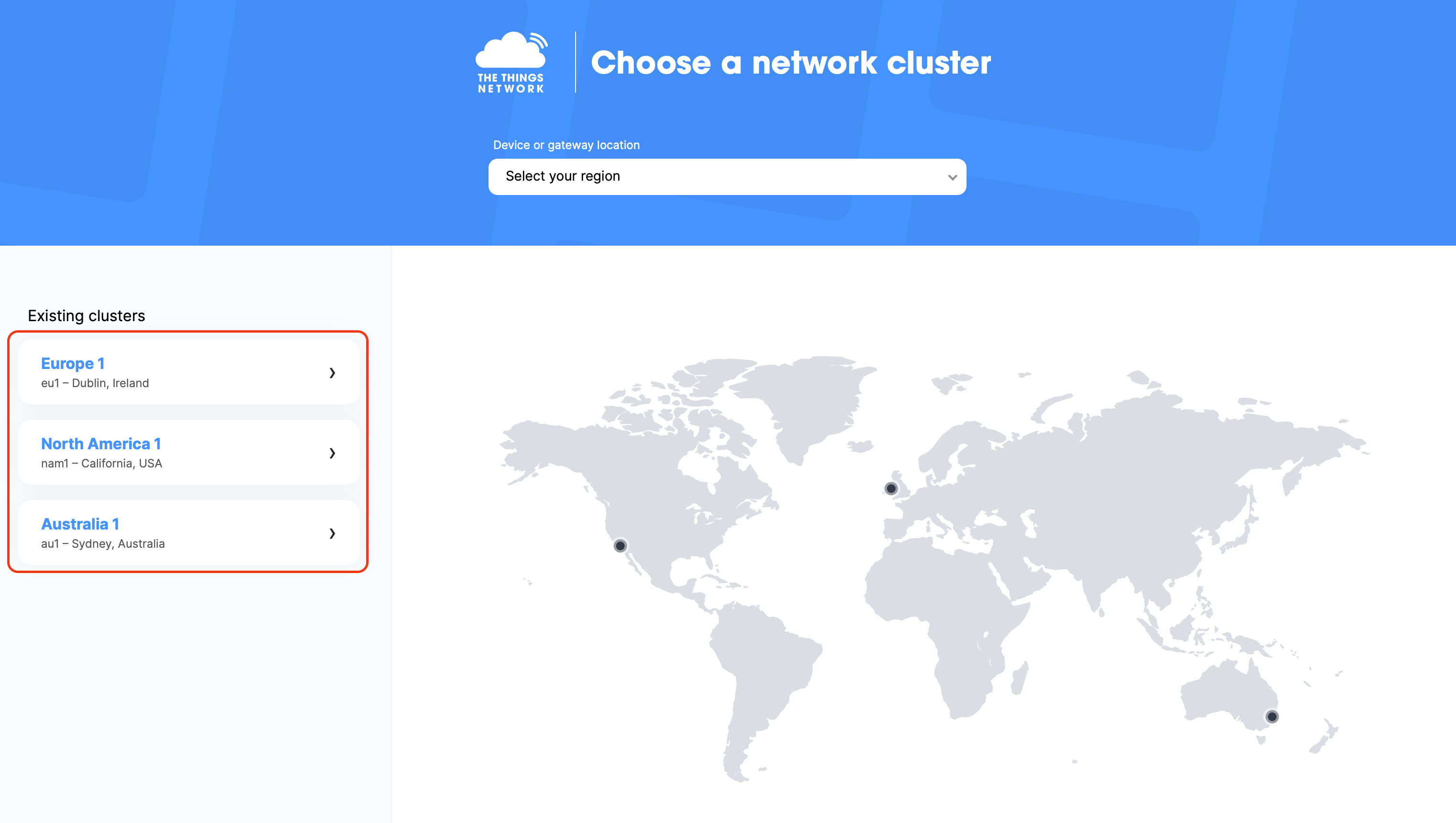
- Step 3. Select a cluster to start adding gateways and devices.
For a rapid deployment of LoRaWAN coverage networks at your site, check out our out-of-the-box SenseCAP M2 multi-platform LoRaWAN indoor gateway.
- Step 4. Click Applications on the panel, then click Add application.

-
Step 5. Fill Application ID then click Create application.
-
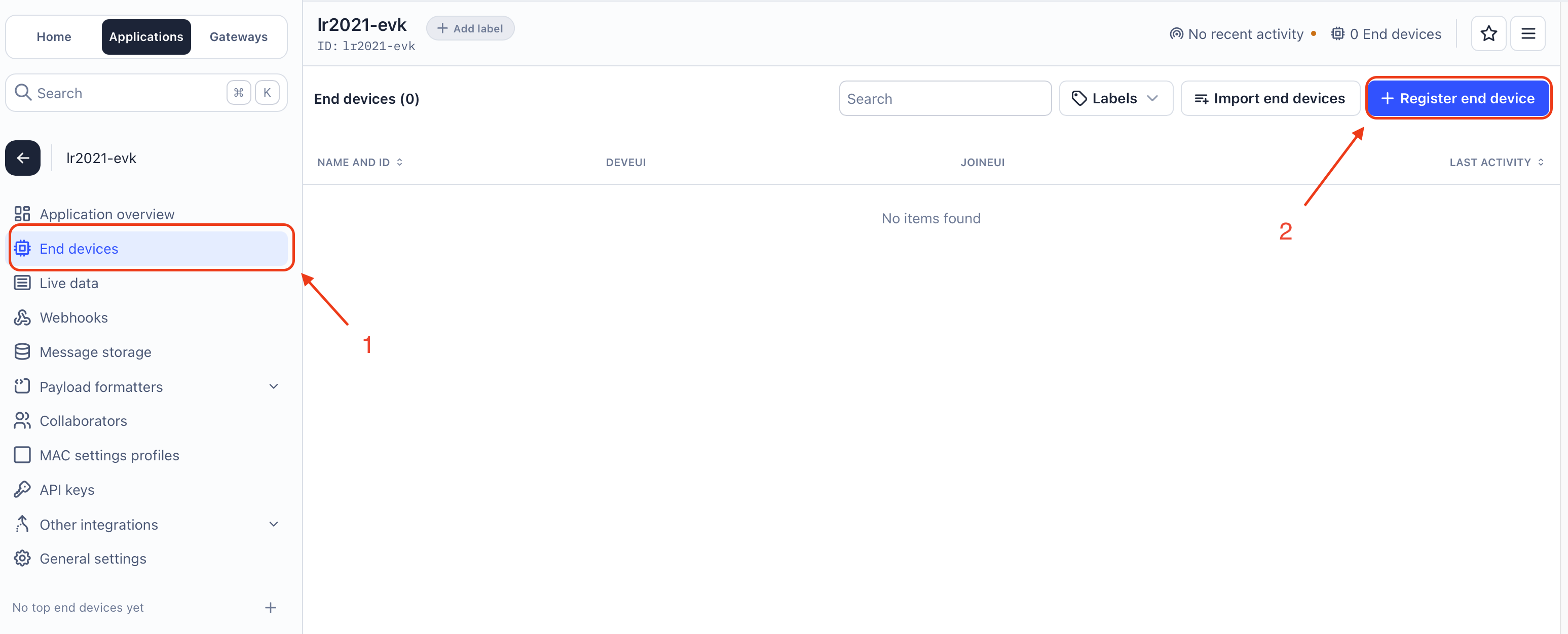
Step 6. Click the application created and choose the End devices on the panel, then click Register end device.
-
Step 7. Choose Manually to enter the registration credentials manually.
-
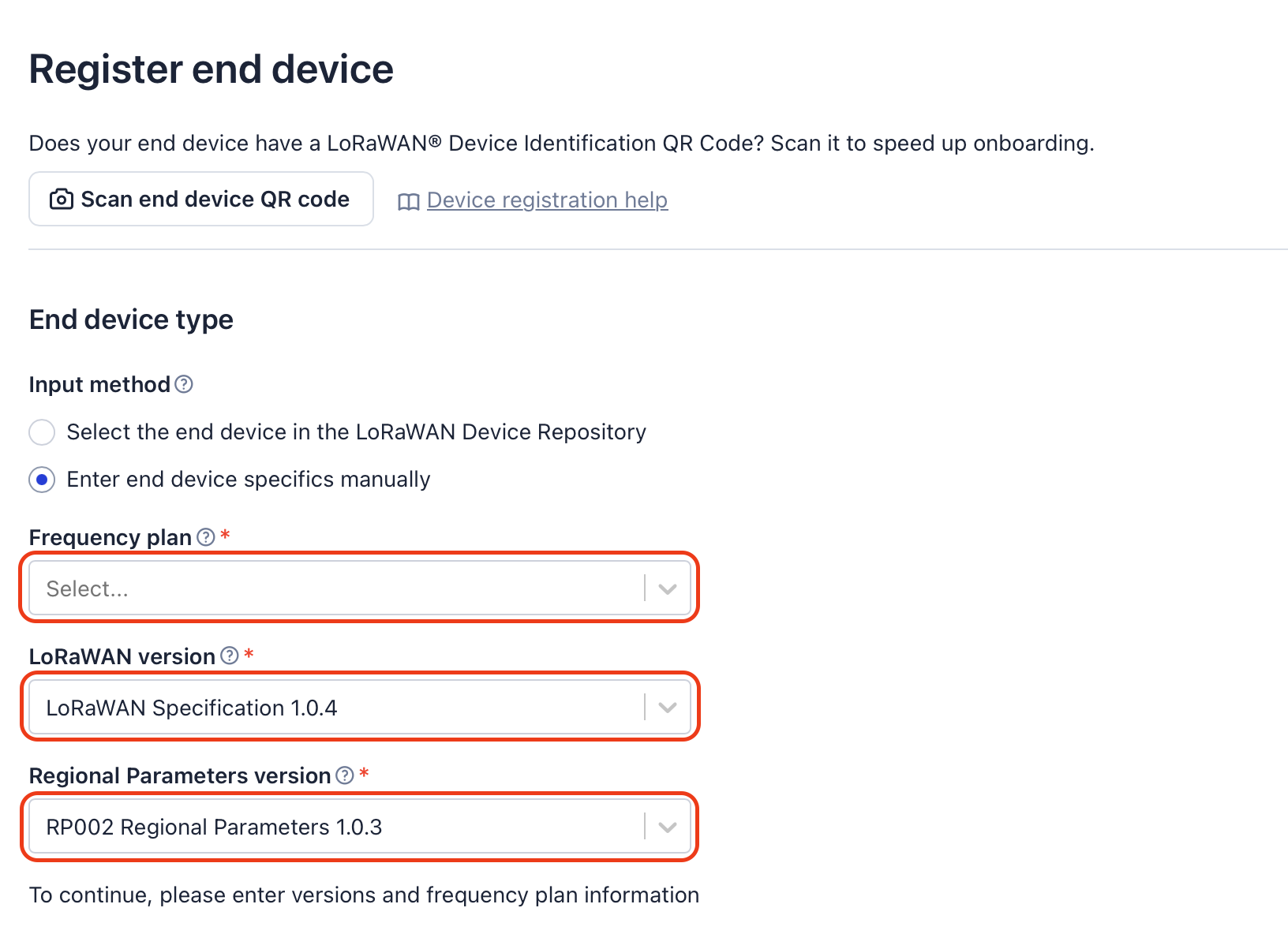
Step 8. Select the Frequency plan according to your region. Also make sure you use the same frequency as the gateway in which you will connect this device to. Select LoRaWAN Specification 1.0.4 as the LoRaWAN version and RP002 Regional Parameters 1.0.3 as the Regional Parameters version.
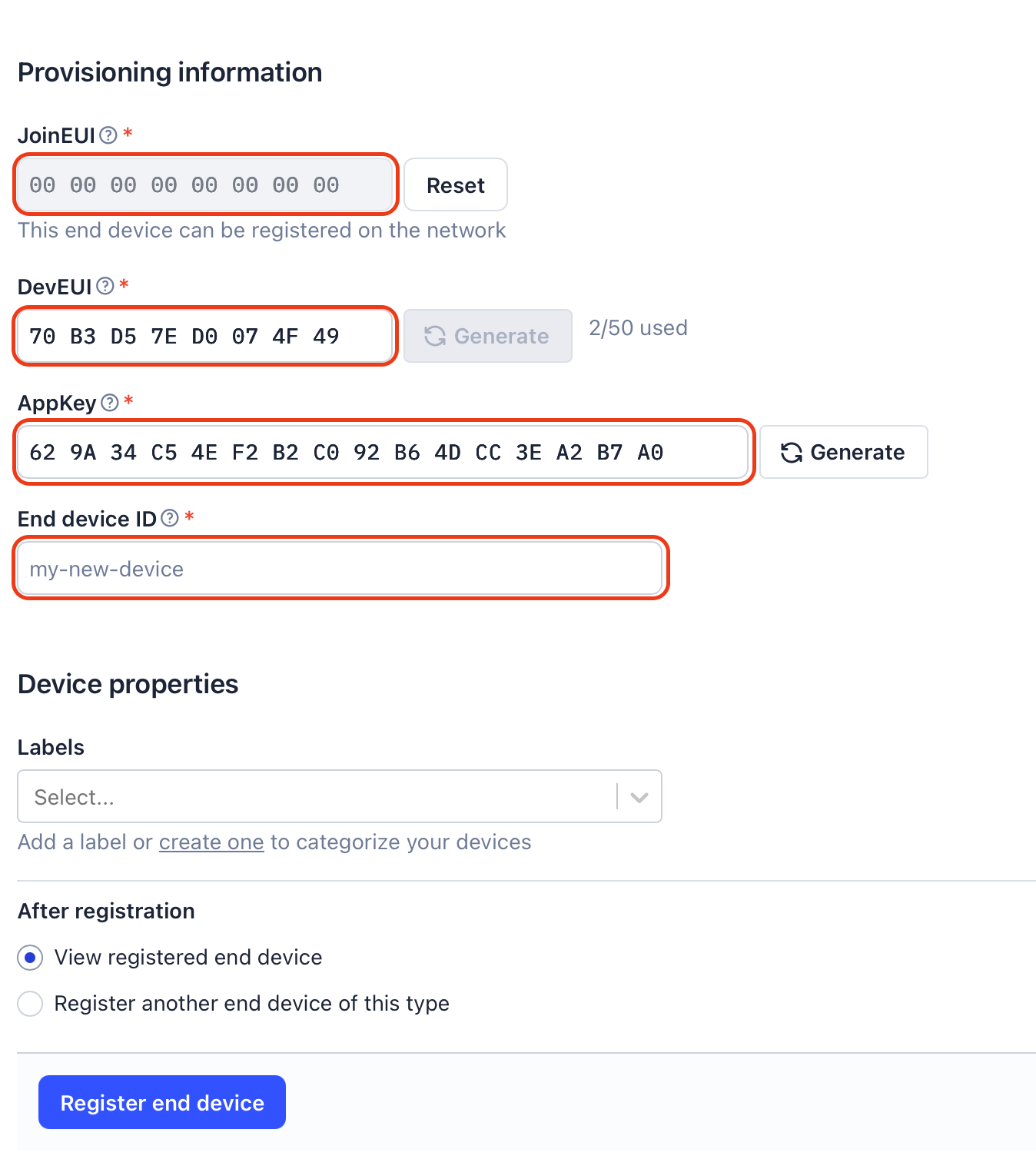
- Step 9. Set the JoinEUI, DevEUI and AppKey according to your own needs. These credentials will be further used for the end device configuration. Choose a End device ID for the registered device, then click Register end device.
- Step 10. Edit the file
boards/user_keys.overlayand replace the placeholder values with your actual credentials:
/ {
    zephyr,user {
        user-lorawan-device-eui = <0x00 0x00 0x00 0x00 0x00 0x00 0x00 0x00>;
        user-lorawan-join-eui = <0x00 0x00 0x00 0x00 0x00 0x00 0x00 0x00>;
        user-lorawan-gen_app-key = <0x00 0x00 0x00 0x00 0x00 0x00 0x00 0x00
                                   0x00 0x00 0x00 0x00 0x00 0x00 0x00 0x00>;
        user-lorawan-app-key = <0x00 0x00 0x00 0x00 0x00 0x00 0x00 0x00
                               0x00 0x00 0x00 0x00 0x00 0x00 0x00 0x00>;
        user-lorawan-region = "EU_868";
    };
};
Choose the appropriate region code from the supported list, and update the user-lorawan-region in the user_keys.overlay:
| Region Code | Description |
|---|---|
| EU_868 | Europe 868 MHz |
| US_915 | North America 915 MHz |
| AS_923_GRP1 | Asia-Pacific 923 MHz (GRP1) |
| AS_923_GRP2 | Asia-Pacific 923 MHz (GRP2) |
| AS_923_GRP3 | Asia-Pacific 923 MHz (GRP3) |
| AS_923_GRP4 | Asia-Pacific 923 MHz (GRP4) |
| AU_915 | Australia 915 MHz |
| CN_470 | China 470 MHz (RP2) |
| CN_470_RP_1_0 | China 470 MHz (RP1) |
| IN_865 | India 865 MHz |
| KR_920 | South Korea 920 MHz |
| RU_864 | Russia 864 MHz |
| WW_2G4 | WW 2.4 GHz |
Build Standard Version:
# Enable full logging and debug capabilities
west build --pristine --board xiao_nrf54l15/nrf54l15/cpuapp --shield semtech_loraplus_expansion_board --shield semtech_wio_lr2021 usp_zephyr/samples/usp/lbm/periodical_uplink
Build Low-Power Version:
# Power-optimized with minimal logging features
west build --pristine --board xiao_nrf54l15/nrf54l15/cpuapp --shield semtech_loraplus_expansion_board --shield semtech_wio_lr2021 usp_zephyr/samples/usp/lbm/periodical_uplink -- -DCONF_FILE=prj_lowpower.conf
If the build process is successful, you should see Zephyr compilation and build information as shown below:
...
-- Zephyr version: 4.2.0 (/Users/admin/zephyr_workspace/zephyr), build: v4.2.0
[248/248] Linking C executable zephyr/zephyr.elf
Memory region         Used Size  Region Size  %age Used
           FLASH:      257576 B      1428 KB     17.61%
             RAM:       40292 B       188 KB     20.93%
        IDT_LIST:          0 GB        32 KB      0.00%
Generating files from /Users/admin/zephyr_workspace/build/zephyr/zephyr.elf for board: xiao_nrf54l15
Flash the Device:
# Flash the firmware to the board
west flash
Monitor the Serial Console Output:
Connect a serial monitor (screen, PuTTY, etc.) to view logs. Here we use the built-in Terminal app screen to demonstrate:
# Unplug the XIAO-nRF54L15
# Use ls /dev/tty.* command to list current ports
ls /dev/tty.*
# Plug in the Type-c cable and run the ls /dev/tty.* command again
/dev/tty.Bluetooth-Incoming-Port	/dev/tty.usbmodemB141F6A13
/dev/tty.debug-console			/dev/tty.wlan-debug
Here, we find the new entry /dev/tty.usbmodemB141F6A13, which is the port for our dev board.
# Connect to the device with screen
# The default baud rate is 115200
screen /dev/tty.usbmodemB141F6A13 115200
Now the serial output will appear in the terminal, from which you can monitor the output logs of the kit. To exit the screen session, press Ctrl + A, then Ctrl + \.
Join the LNS:
Output: Startup and Join the LNS
[00:00:00.046,323] <inf> lorawan: smtc_modem_join_network
[00:00:00.046,388] <inf> lorawan:  Start a new join sequence in 5 seconds on stack 0
[00:00:05.057,559] <inf> lorawan: DevEUI
                                  70 b3 d5 7e d0 07 44 86                          |p..~..D.
[00:00:05.057,586] <inf> lorawan: JoinEUI
                                  00 00 00 00 00 00 00 00                          |........
[00:00:05.057,624] <inf> lorawan: DevNonce 0x1d2, stack_id 0
...
[00:00:12.433,537] <inf> usp: Event received: JOINED
[00:00:12.433,543] <inf> usp: Modem is now joined
[00:00:12.433,568] <inf> lorawan: add send task
[00:00:12.438,666] <inf> lorawan:  User LoRaWAN tx on FPort 101
- Periodical Uplink: The device uploads data once per minute using a counter that increments starting from
01onFPort 101. You can monitor the data in real time on the console as shown below:
Output: Periodical Uplink
[00:00:18.811,852] <inf> lorawan:   *************************************
[00:00:18.811,879] <inf> lorawan:   *  TX DONE
[00:00:18.811,896] <inf> lorawan:   *************************************
[00:00:18.811,984] <inf> lorawan:

[00:00:18.812,016] <inf> lorawan:   Open Rx1 for Hook Id = 4
[00:00:18.812,072] <inf> lorawan:   RX1 LoRa at 23841 ms: freq:867300000, SF12, BW125, sync word = 0x34
[00:00:18.812,102] <inf> lorawan:   Timer will expire in 5030 ms
[00:00:24.041,328] <inf> lorawan:

[00:00:24.041,357] <inf> lorawan:   *************************************
[00:00:24.041,389] <inf> lorawan:   * RX1 Timeout for stack_id = 0
[00:00:24.041,407] <inf> lorawan:   *************************************
[00:00:24.041,498] <inf> lorawan:

[00:00:24.041,530] <inf> lorawan:   Open Rx2 for Hook Id = 4
[00:00:24.041,585] <inf> lorawan:   RX2 LoRa at 24813 ms: freq:869525000, SF9, BW125, sync word = 0x34
[00:00:24.041,614] <inf> lorawan:   Timer will expire in 772 ms
[00:00:24.839,344] <inf> lorawan:

[00:00:24.839,363] <inf> lorawan:   *************************************
[00:00:24.839,408] <inf> lorawan:   * RX2 Timeout for stack_id = 0
[00:00:24.839,426] <inf> lorawan:   *************************************

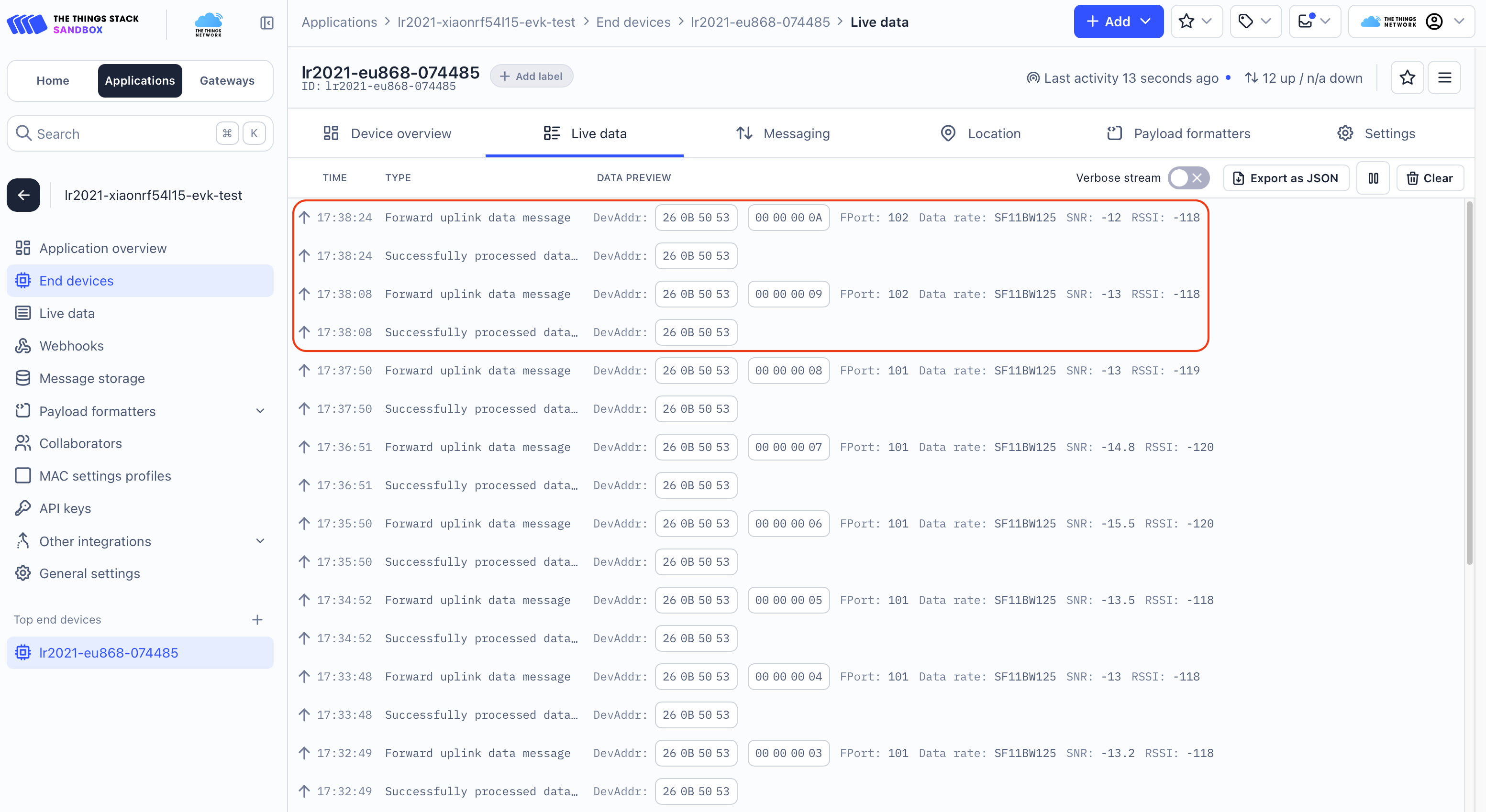
Button-Triggered Uplink: Each press of the user_key triggers an immediate data uplink, incrementing the counter by 1 on FPort 102. Button-triggered reports do not affect the timing of periodical reports.
Output: Button-Triggered Uplink
[00:01:43.010,970] <inf> usp: Button pushed
[00:01:43.011,015] <inf> lorawan: add send task
[00:01:43.011,449] <inf> lorawan:  User LoRaWAN tx on FPort 102
[00:01:43.011,489] <inf> lorawan:

[00:01:43.011,507] <inf> lorawan:   *************************************
[00:01:43.011,536] <inf> lorawan:   * Send Payload  for stack_id = 0
[00:01:43.011,553] <inf> lorawan:   *************************************
[00:01:43.011,627] <inf> lorawan:   Tx  LoRa at 107167 ms: freq:867100000, SF12, BW125, len 17 bytes 14 dBm, fcnt_up 4, toa = 1319
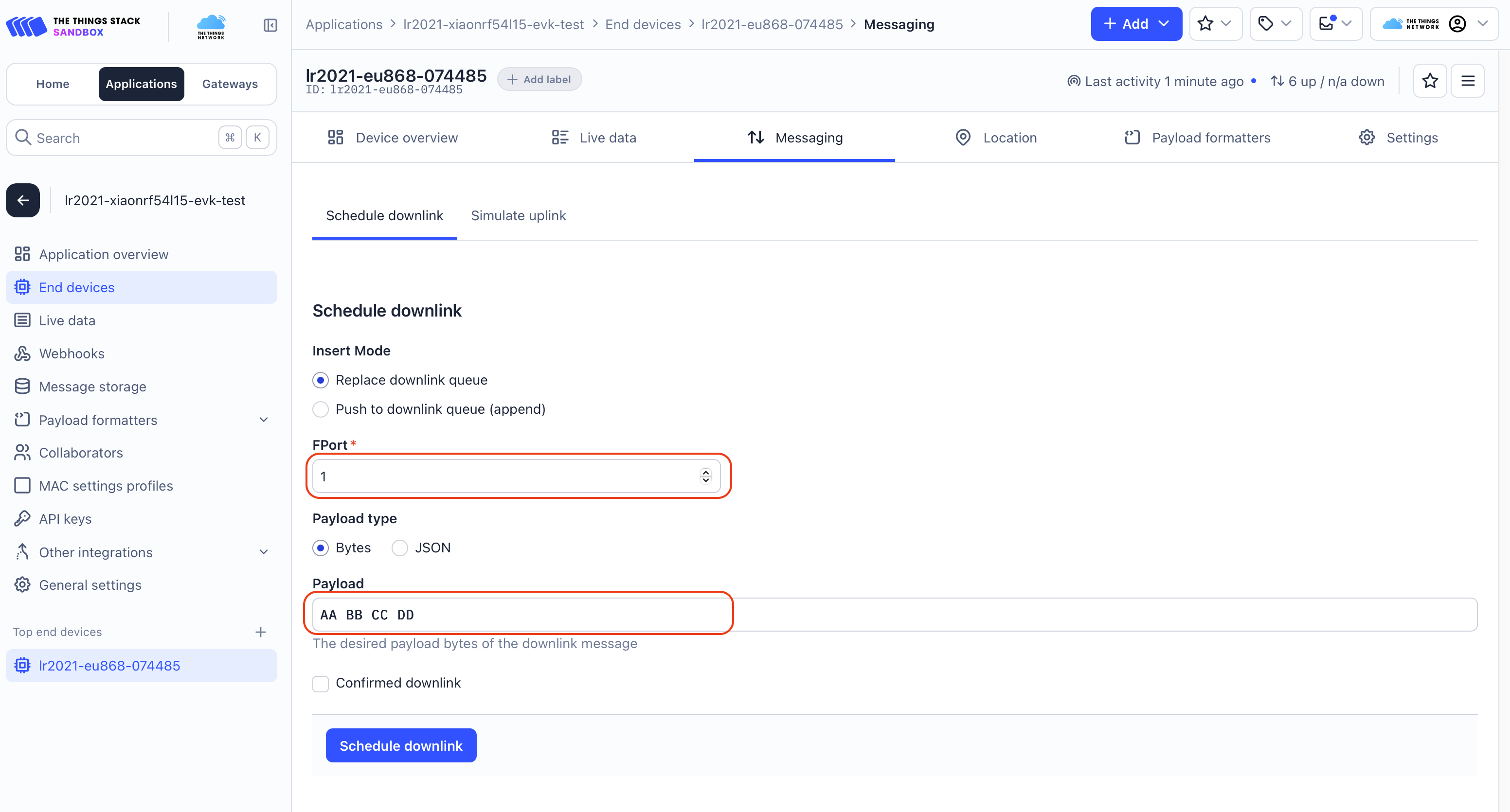
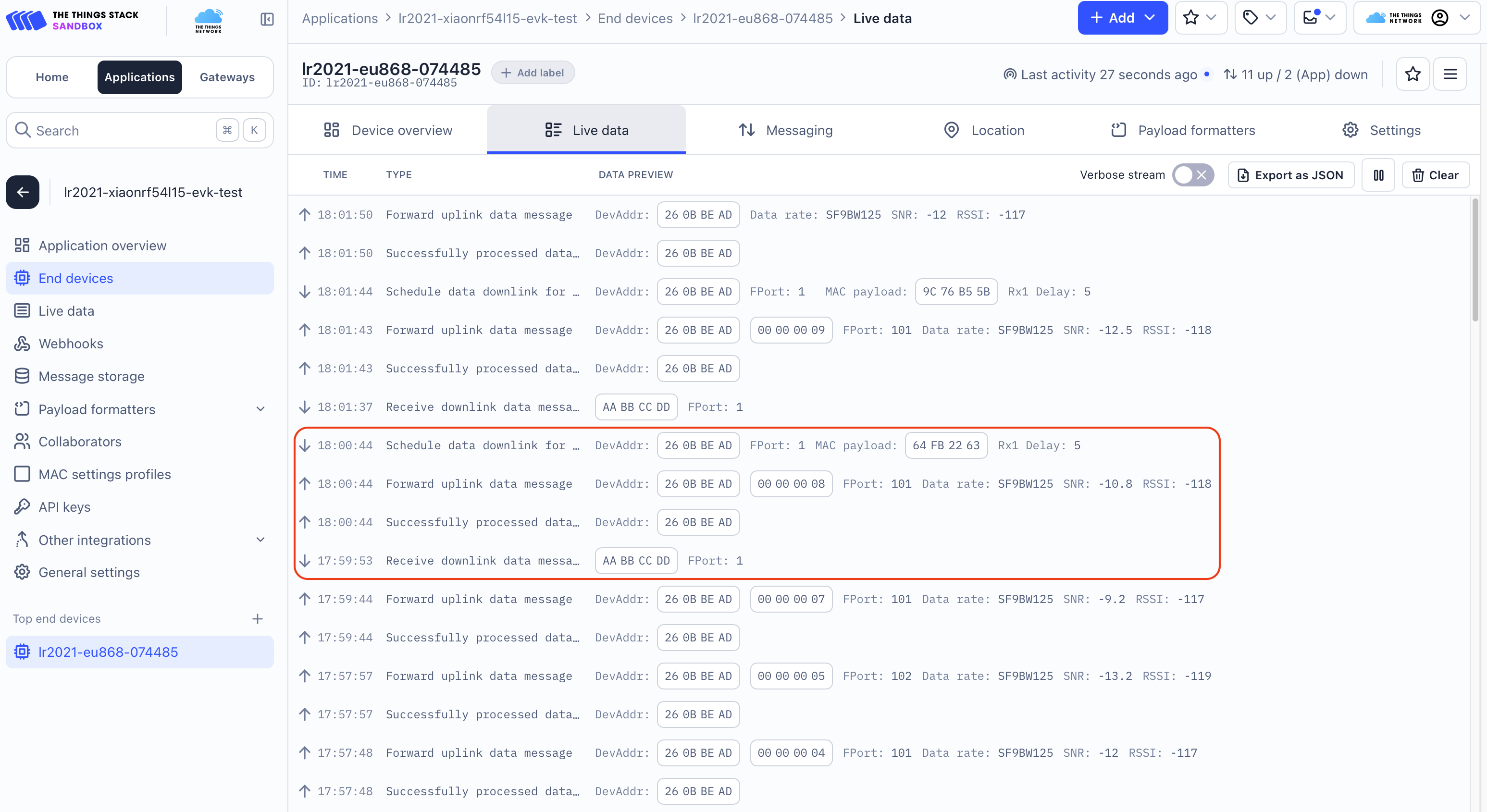
Scheduled Downlink: Schedule a downlink packet from the TTN in the Messaging opetion. Specify the frame port (FPort 1) and the data content (AA BB CC DD), then click Schedule downlink. You can observe that the payload now is waiting in the queue, once the next uplink coming, the downlink packet will be sent by the network server and received by the device.
Output: Downlink Reception
[00:02:14.666,960] <inf> lorawan:   Open Rx1 for Hook Id = 4
[00:02:14.667,016] <inf> lorawan:   RX1 LoRa at 139695 ms: freq:867100000, SF12, BW125, sync word = 0x34
[00:02:14.667,046] <inf> lorawan:   Timer will expire in 5029 ms
[00:02:20.837,445] <inf> lorawan:

[00:02:20.837,477] <inf> lorawan:   *************************************
[00:02:20.837,523] <inf> lorawan:   * Receive a Valid downlink Rx1 for stack_id = 0, rssi: -121 dBm, snr: -9 dB
[00:02:20.837,540] <inf> lorawan:   *************************************
[00:02:20.837,594] <inf> usp: Event received: DOWNDATA
[00:02:20.837,625] <inf> usp: Event received: TXDONE
[00:02:20.837,630] <inf> usp: Transmission done
Resources
Semtech LR2021
-
[PDF] Semtech LR2021 Datasheet
Expansion Board
Seeed Studio XIAO nRF54L15
Certificates
Tech Support & Product Discussion
Please submit any technical issue into our forum.
Thank you for choosing our products! We are here to provide you with different support to ensure that your experience with our products is as smooth as possible. We offer several communication channels to cater to different preferences and needs.