Private On-Premise Transcription for reSpeaker Clip — Selection, Deployment and Measured Data
One Clip pairs with this host only and cannot be paired with the phone app at the same time. If AI summaries use a cloud service, the transcript text is sent to it (the audio is not).
What this solution does
Conversations, consultations and counter talk recorded on a reSpeaker Clip sync over Bluetooth to your own reComputer host and are transcribed there, every turn with a timestamp and speaker label, in Chinese, English or Japanese. Audio does not leave the site; results are viewed on the host's web page or pulled into your own system over MQTT and HTTP. It fits store counters, interviews and meetings, clinics and legal work — places where recordings cannot leave the premises.
- Deployment package (Docker Compose and configuration): github.com/suharvest/sensecraft-solutions
- Voice engine source: github.com/Seeed-Solution/openvoicestream
- Selection and deployment: reference design page
Audio stays on site
Recordings sync from the Clip to the host over Bluetooth and are transcribed there, without a cloud service.
26 s of audio in 1.2 s
Measured with two-speaker Chinese audio on a reComputer J40 Series; see "Performance and measured data".
Who said what
Every turn carries a timestamp and speaker label; click a line to play from there.
Into your own system
An MQTT notice fires when a transcript is ready; your program fetches the full text over HTTP.
On a real device
The results page on the host: the transcript is split by speaker with a timestamp on every turn; the AI summary panel is on the right (off for this run).
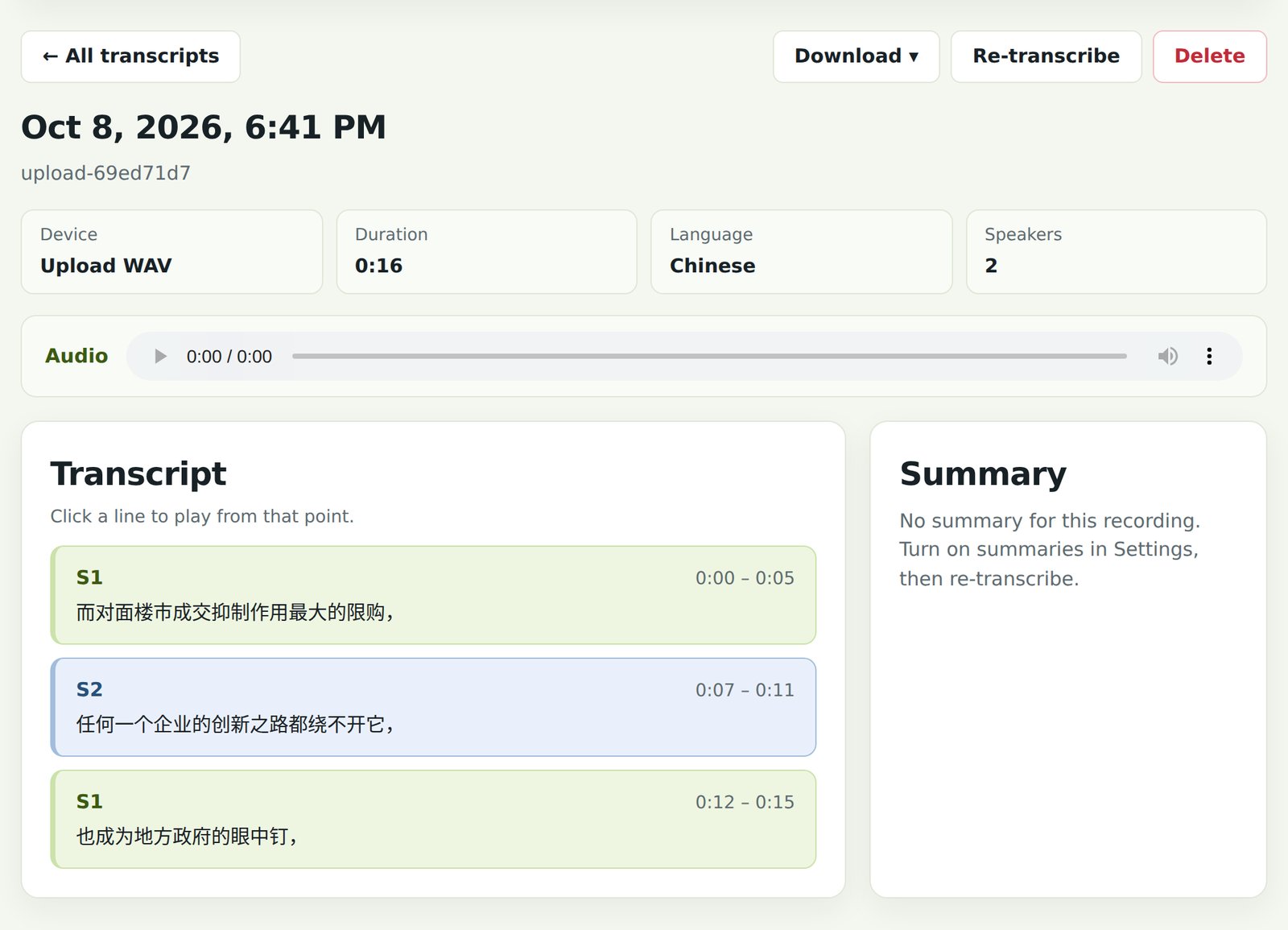
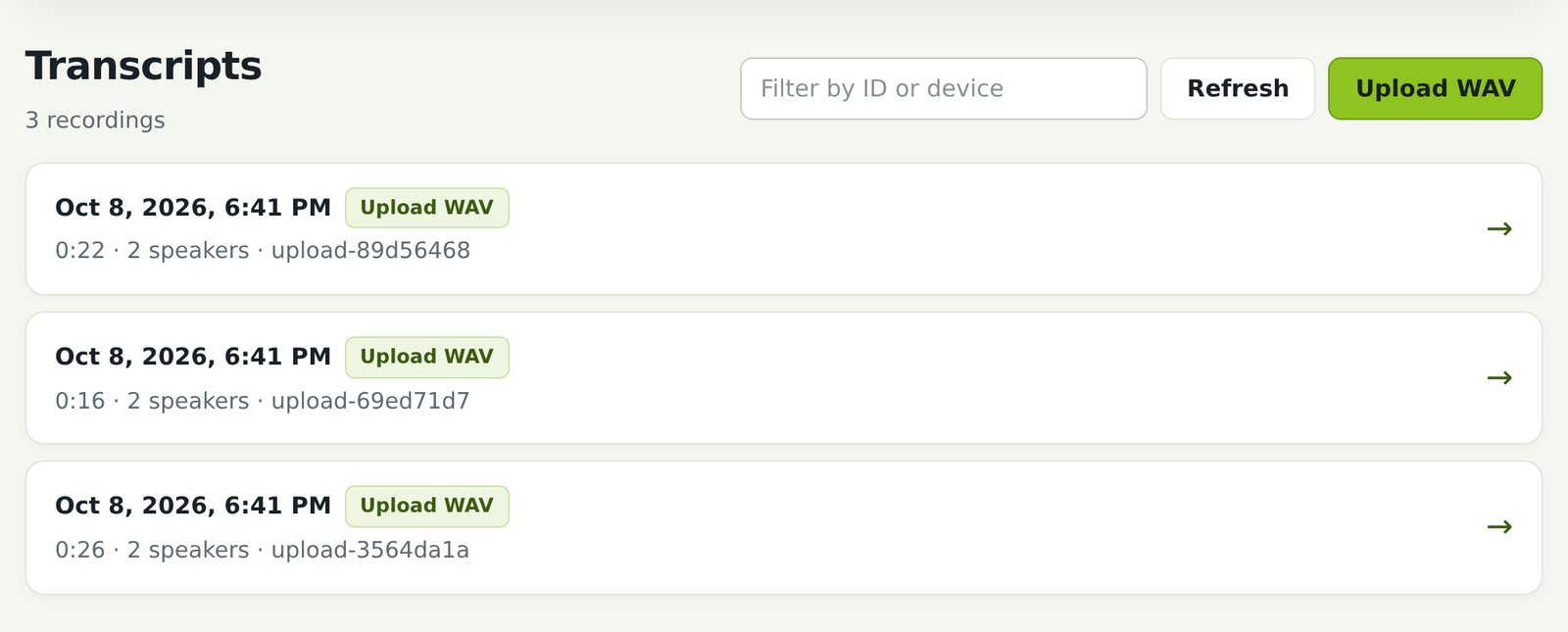
This 16 s recording joins two AISHELL-1 speakers and was uploaded as WAV; it was transcribed in 1.2 s. The first line has one extra character.
Hardware you need
Two things on site: a reSpeaker Clip and one transcription host.
① reSpeaker Clip: a wearable recorder that syncs to the host over Bluetooth. Store page
② Transcription host: pick one based on site size and badge volume.
| Transcription host | Single Audio Turnaround (30 s Chinese two-speaker) | Shift-End Batch Capacity (10 badges uploading at once) | Choose it when | |
|---|---|---|---|---|
 | reComputer J40 Series (J4012) Jetson Orin NX 16GB, JetPack 6.2 | 1.2 s | ~3.5 s total time (queue wait < 3.5 s) | Flagship choice for 10~50 badges; 16GB unified memory allows local 8B LLM summarization & compliance auditing |
 | reComputer J30 Series (J3011) Jetson Orin Nano 8GB, JetPack 6.2 | 1.3 s | ~4.1 s total time (queue wait < 4.1 s) | Mainstream cost-effective choice for 5~20 badges; identical user experience, VRAM footprint only 486 MB |
 | reComputer RK3588 Series (8 GB) RK3588 3-Core NPU | 3.0 s | ~14.5 s total time (3 parallel pipelines) | Mid-size workstation choice for 5~15 badges; 3 independent NPU cores run 3 parallel workers |
 | reComputer RK3576 Series (8 GB) On-board NPU | 4.6 s | ~46 s total time (single worker queue) | Low-cost option for 1~3 badges; peak RSS only 442 MB (W4A16), ideal for private clinics and counseling rooms |
- Jetson Series: JetPack 6.2 required, at least 15 GB free disk.
- RK3576: 8 GB memory version, runs W4A16 quantized weights, taking ~442 MB memory; host needs Bluetooth.
- Optional Wi-Fi fast sync: the host joins the Clip's own hotspot to download recordings. If the host itself is on Wi-Fi, add a USB Wi-Fi adapter.
Deploying on site
1. Put the host where Clips come back
A Clip syncs only within the host's Bluetooth range, so place the host where staff return or charge their Clips. The first deployment downloads the speech models (about 1.8 GB on Jetson, 155 MB on RK3576); after that transcription needs no internet.
2. Install the software: three steps
Device-by-device steps are on the reference design page; this is the outline.
- Deploy the transcription service: pick the recording language and set an access token; for summaries, enter an OpenAI-compatible service address.
- Pair the Clip: pair it with the host; recordings then sync automatically.
- Check: open the results page on port 8631, upload a WAV or sync a recording, and see a speaker-separated transcript.
Interfaces
The results page and API are on port 8631 of the host, and unauthorised requests get 401; completion notices go out on the host's MQTT broker.
- Just read results: open the results page, filter by ID or device, download, re-transcribe or delete.
- Automatic filing: subscribe to the completion notice, then fetch the full text by ID over HTTP into a ticket or customer record.
- Extra audio: submit a WAV through the upload endpoint; it goes through the same pipeline.
| Topic / port | Content |
|---|---|
HTTP 8631 / | Results page: transcript list and detail |
HTTP 8631 POST /v1/transcribe | Upload a WAV for transcription |
HTTP 8631 /healthz | Whether the service is ready |
MQTT clip-pt/<host-id>/transcript/<transcript-id>/ready | Transcript-ready notice |
Performance and measured data
Core model is Alibaba DAMO Academy SenseVoice-Small (multilingual: Chinese, Cantonese, English, Japanese, Korean with rich text / punctuation output) paired with CAM++ speaker diarization and Silero VAD.
1. Real-Time Single-Badge Interaction (30 s Dialogue)
Recordings were uploaded to the host as WAV and timed from upload to finished transcript and diarization; Bluetooth sync time from the Clip is not included.
| Device & Model | Language & Sample | Audio Duration | Processing Time | Speakers / Segments | Site Experience |
|---|---|---|---|---|---|
| reComputer J40 Series (Orin NX 16GB) | Chinese long dialogue (FLEURS-A) | 30.5 s | 1.17 s (measured) | 2 / 4 turns (measured) | 175x real-time speed, text appears immediately |
| reComputer J40 Series | Chinese customer service (FLEURS-B) | 26.1 s | 1.21 s (measured) | 2 / 5 turns (measured) | Near-instant: labeled as S1 / S2 |
| reComputer J40 Series | Chinese clinical consultation (AISHELL-1) | 16.5 s | 1.17 s (measured) | 2 / 3 turns (measured) | No noticeable waiting time |
| reComputer J30 Series (Orin Nano 8GB) | Chinese customer service (FLEURS-B) | 26.1 s | 1.32 s (measured) | 2 / 5 turns (measured) | Mainstream option, identical experience to J40 |
| reComputer J40 Series | Japanese counter audio (FLEURS) | 34.0 s | 1.71 s (measured) | 2 segments (measured) | Fast multilingual handling for review |
| reComputer J40 Series | English two sentences (LibriSpeech) | 6.3 s | 1.24 s (measured) | 2 / 2 turns (measured) | Rapid turnaround |
| reComputer RK3588 Series (8 GB) | Chinese long dialogue (FLEURS-A) | 30.5 s | 3.0 s (measured) | 2 / 4 turns (measured) | 10x real-time speed, multi-core parallel |
| reComputer RK3576 Series (8 GB) | Chinese long dialogue (FLEURS-A) | 30.5 s | 4.61 s (measured) | 2 / 4 turns (measured) | Done in under 5 s, suitable for non-urgent filing |
| reComputer RK3576 Series | Chinese customer service (FLEURS-B) | 26.1 s | 4.67 s (measured) | 2 / 5 turns (measured) | Stable single-worker execution |
2. Shift-End Batch Upload Concurrency (10 Badges Uploading 10 min Total Audio)
The most demanding scenario on site is shift-end return (e.g. 10 staff returning badges to chargers simultaneously). Concurrency handling and max queue wait latency across platforms:
| Hardware Option | Recommended Badges | 10 Badges Total Time | Max Queue Waiting Latency | Scheduling & Reliability Mechanism | Recommended Site |
|---|---|---|---|---|---|
| reComputer J40 Series (Orin NX 16GB) | 10 ~ 50 badges | ~3.5 s | < 3.5 s (imperceptible) | Sub-second queue drain: Single-context CUDA Graph lock protects against OOM and 429s | Supermarkets, chain stores, service halls |
| reComputer J30 Series (Orin Nano 8GB) | 5 ~ 20 badges | ~4.1 s | < 4.1 s (imperceptible) | Same architecture, GPU throughput 29.5 QPS, only 486 MB VRAM | Standard retail stores with 8~15 staff |
| reComputer RK3588 Series (RK3588 8GB) | 5 ~ 15 badges | ~14.5 s | ~5.0 s (3 parallel pipelines) | Hardware multi-core concurrency: 3 independent NPU cores run 3 parallel workers | Mid-size workstations, multi-counter hubs |
| reComputer RK3576 Series (RK3576 8GB) | 1 ~ 3 badges | ~46 s | ~46 s (sequential) | Lightweight single-worker: Peak RSS only 442 MB (W4A16), sequential processing | Private clinics, counseling rooms, small counters |
Why Jetson uses a single-context queue lock rather than multi-process concurrency:
On Orin Nano / NX, SenseVoice TensorRT FP16 with CUDA Graph already saturates GPU compute (GR3D98%, pure inference only 3033 ms, 175x real-time). Opening multiple execution contexts merely adds 200~300 MB of VRAM and causes CPU enqueue contention, degrading per-stream latency to 135 ms. A single-context queue lock drains concurrently submitted audio chunks in milliseconds, handling dozens of concurrent connections while eliminating memory exhaustion and 429 errors.
3. Resource footprint comparison
| Host Platform | Model Format & Precision | Weight & Engine Size | Peak Memory / VRAM | Worker Architecture |
|---|---|---|---|---|
| reComputer J40 Series | TensorRT 10.3 FP16 | 470 MB Engine | 483 MB VRAM / 1.1 GB RAM | Single-context queue lock (safe from OOM) |
| reComputer J30 Series | TensorRT 10.3 FP16 | 469 MB Engine | 486 MB VRAM / 1.1 GB RAM | Single-context queue lock (high stability) |
| reComputer RK3588 Series | RKNPU2 FP16 | 505 MB RKNN | ~1.2 GB RAM / Worker | 3 Workers on independent hardware cores |
| reComputer RK3576 Series | RKNPU2 W4A16 | 155 MB RKNN | 442 MB peak RSS (measured) | Single Worker (fits 8 GB budget) |
4. A real Clip
A reSpeaker Clip downloaded 3 recording sessions over Bluetooth; assembled into 16 kHz WAV and transcribed on a reComputer J40 Series, SenseVoice recognition took 534 ms and speaker separation 706 ms (measured).
- Reproduction: Performance and concurrency benchmarks are located in repository
benchmarks/eval_transcription.py; runpython3 benchmarks/eval_transcription.py --device j40 --batch 10.
5. Models and runtimes
| Device | Speech recognition | Diarization | Runtime |
|---|---|---|---|
| reComputer J40 / J30 Series | SenseVoice-Small (rich text) | CAM++ | TensorRT 10.3 FP16, GPU |
| reComputer RK3588 Series | SenseVoice-Small (multilingual) | CAM++ | RKNPU2 FP16, NPU, 3 Workers |
| reComputer RK3576 Series | SenseVoice-Small (multilingual) | CAM++ | RKNPU2 W4A16, NPU, 1 Worker |
Parameters that affect results:
- Recording language: chosen at deployment and applied to Clip recordings and uploaded WAV files alike; "auto" lets the model decide.
- Expected speakers: 0 (automatic) by default. Set it when you know the number for a steadier split.
- AI summary: off by default; when on, the transcript text goes to the service you configure.
6. Known degradation and boundary conditions
- Batch shift-end concurrency boundary: Due to the 8 GB system memory ceiling on RK3576, only 1 SenseVoice worker is deployed (~442 MB RSS). 10 badges returned at once will queue for ~45 s. For deployments with more than 5 badges returned at once, reComputer J30 or J40 Series is strongly recommended.
- Sentence-initial word drops: SenseVoice may occasionally drop opening words on long audio due to VAD slicing thresholds.
- Overlapped speech: When 2 or more people talk simultaneously, diarization accuracy drops and turns may be fragmented or merged.
- Ambient noise and wearing distance: In extremely loud environments (e.g. retail PA systems), speech may be filtered by noise suppression; wear the badge 20–40 cm from the speaker.
Data and asset sources
- FLEURS (Conneau et al., 2022): huggingface.co/datasets/google/fleurs, cmn_hans_cn dev split, CC BY 4.0.
- AISHELL-1 (Bu et al., 2017): openslr.org/33, Apache 2.0.
- LibriSpeech: openslr.org/12, CC BY 4.0 (English sample).