On-Device AI Fall Detection: Build, Deploy, and Measured Results
Assistive alert only. Not a certified medical or life-safety device, and not a replacement for in-person rounds.
What this solution does
Install a camera in the room. When someone falls, a message reaches whoever needs to see it — the nursing station, a family member's Home Assistant, the NVR at the front desk, or your own system — within seconds. Built for fixed-room settings: nursing homes, rehab centers, home care, single-occupant dorms. Measured on a public dataset: 95.8% fall recall and 1.4 s on average from the fall to the message going out (details under "Performance and measured data" below).
- Open-source implementation: github.com/suharvest/edgefallkit
- Picking a configuration and deploying: reference design page
Runs locally, no video to the cloud
Detection, decision and messaging all run on the on-site device; only a text message of a few hundred bytes crosses the network. Alerts keep working offline, and there is no per-camera cloud subscription.
Works out of the box
Install the app package for your device and alerts start. The model, runtime and decision thresholds ship frozen in the package; no training or tuning needed.
Use the cameras and systems you have
Existing IP cameras connect over RTSP with no change on the camera. Alerts go out over MQTT: Home Assistant picks them up via auto-discovery, and an NVR or nurse-call system subscribes to one topic.
Open source
Per-platform model conversion, Docker orchestration and decision-weight training scripts are all in the repo, so you can retrain the decision weights on footage from your own site.
Live demo
What the device actually outputs: a skeleton overlaid on the person, a box labeled with that person's track id and current state, and in the top right, how many of the three decision features currently hold.
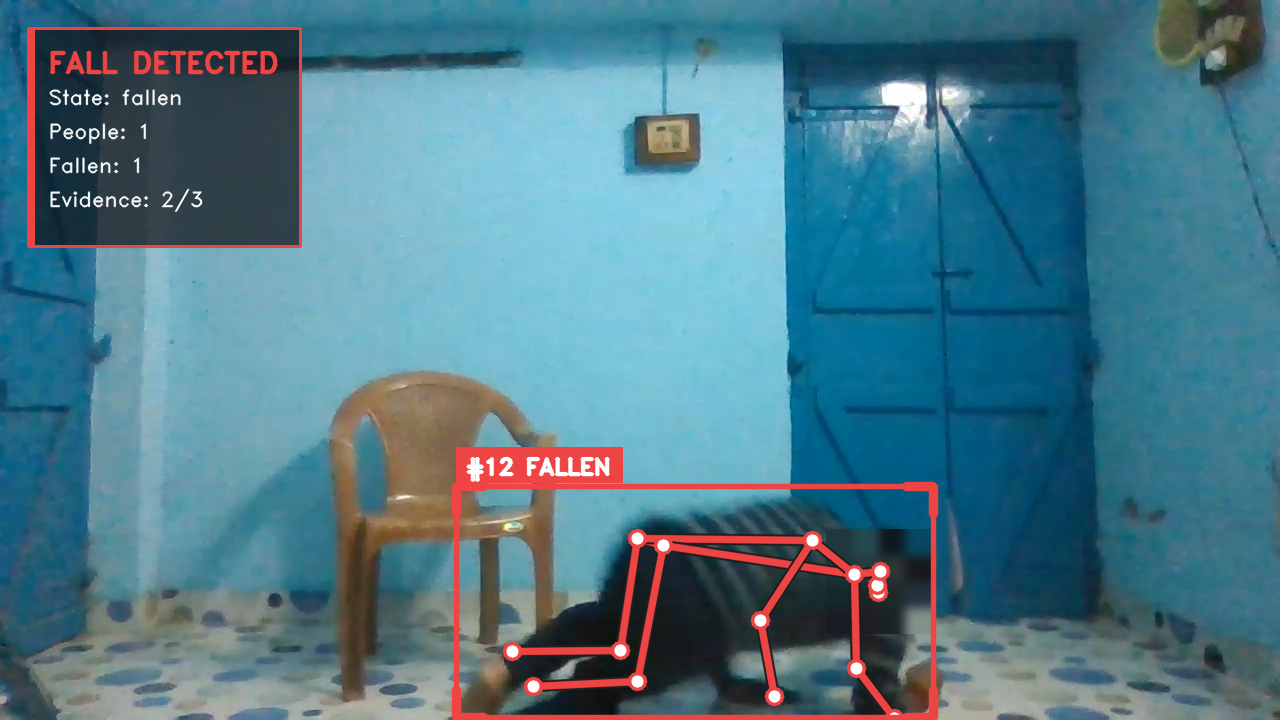
#12 FALLEN is that person's track id and current state; Evidence: 2/3 in the top left means two of the three decision features hold. The animated state transition is in the setup steps below.
Alarm panel (optional component)
The alarm panel is bundled in the compose stack on the reComputer J30 / J40, RK and R2000 presets. On the two reCamera presets it is an optional component on a separate host.
Once the fall detector publishes events, the alarm panel handles what follows: each room is a zone with its own rules, an alarm opens, someone on duty confirms or dismisses it on a one-page console, and the confirmed alarm goes out as a webhook or an MQTT message with the operator's name on it. Built for assisted living, home care and any site where each alarm has to be traceable to a person afterwards.
Three alarm kinds, decided per zone
A fall event from the detector; a zone empty past its
no_person_timeout; a person whose bbox centre has not moved past itsno_motion_timeout. A bathroom and a bedroom get different timeouts.Operator confirms before notifying
5 s evidence window, then 60 s for an operator. Confirm and dismiss are both recorded against whoever pressed them.
Delivery you can audit
A confirmed alarm not notified within 5 s moves to escalated and retries every 30 s. Measured on local replay: 3 of 3 queued alarms recovered after a 4 s outage, 0 duplicates.
No video in the notification
Alarm id, kind, zone, stream id, timestamp, operator, idempotency key. Snapshot capture is a switch that is off by default.
What the console shows
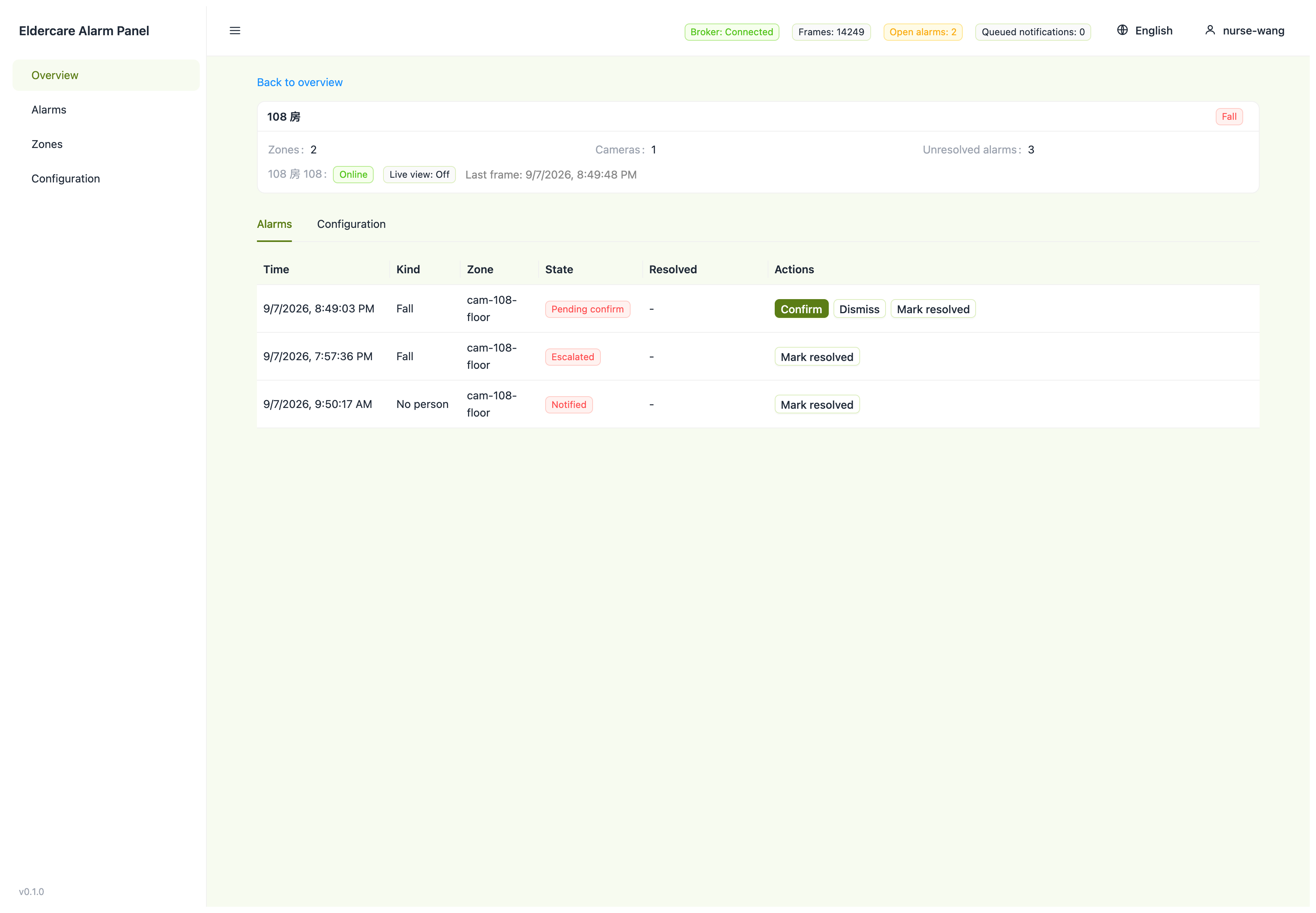
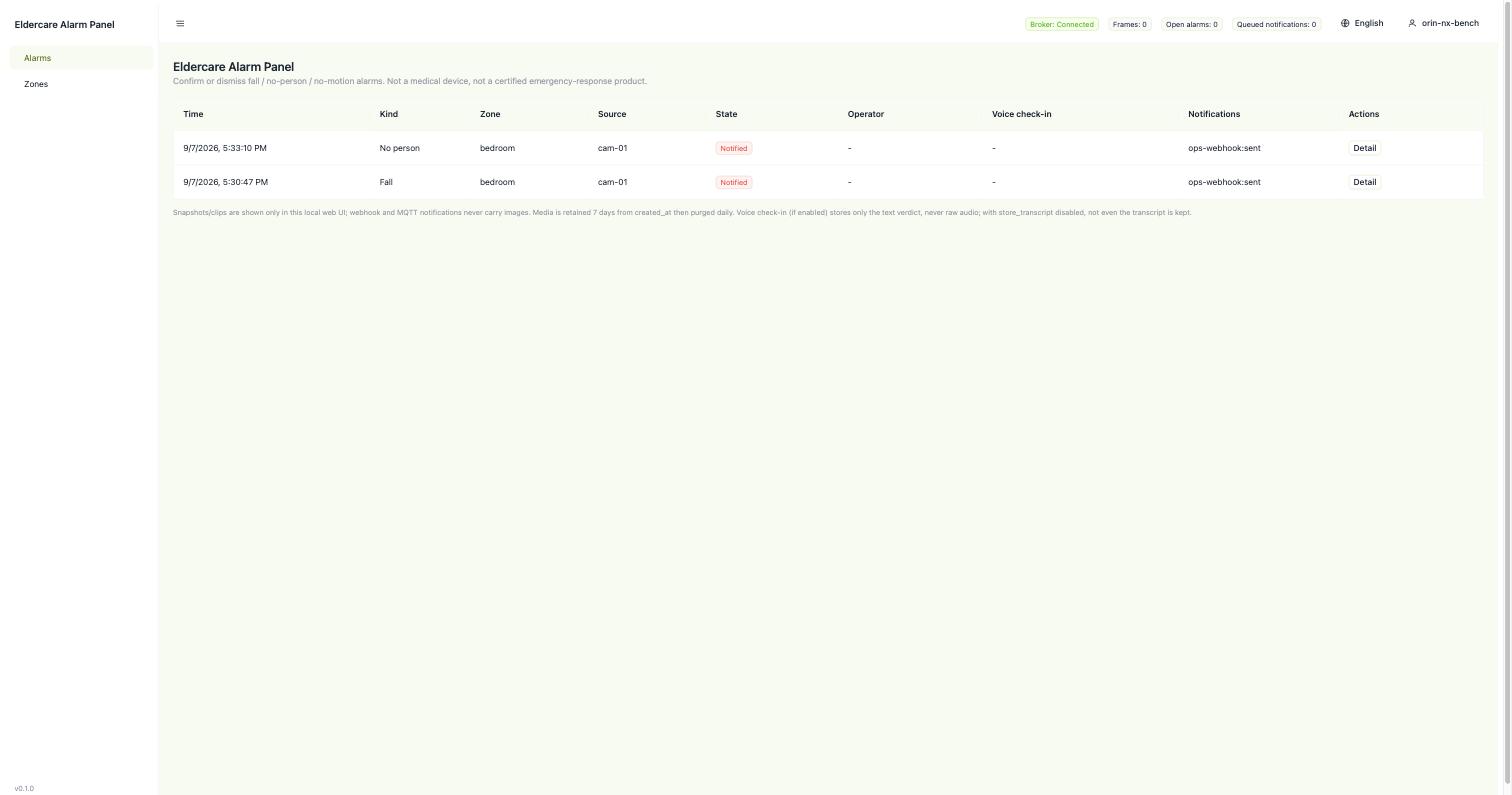
The operator works from the confirmation console only: the alarm list with each alarm's current state, the voice check-in verdict when that option is on, and confirm/dismiss buttons that write the operator's name into the audit trail. The alarm service serves the console on HTTP 8080.
The console screenshots below use replayed data: synthetic bbox and track data, with no camera footage and no people in frame.
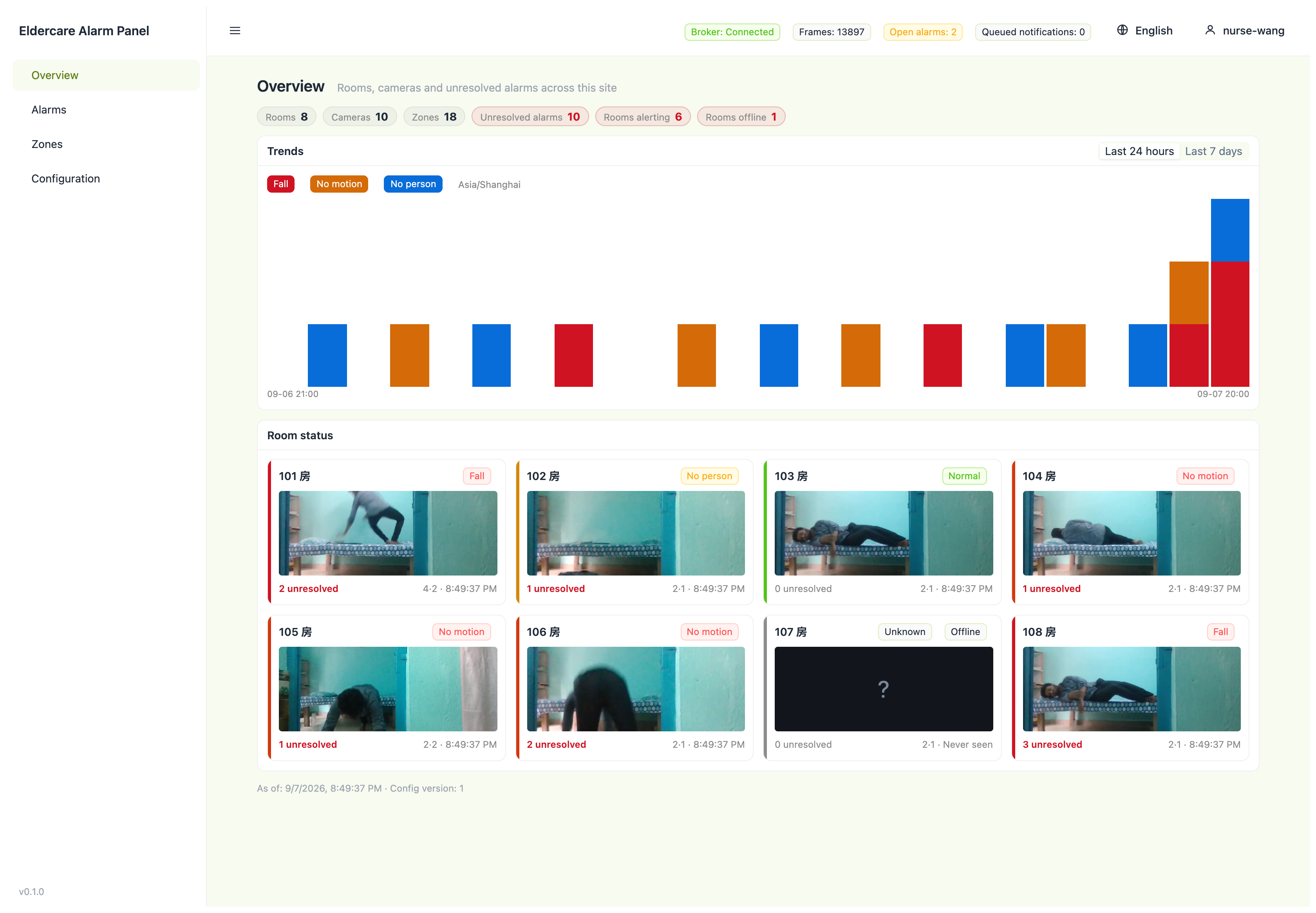
Opening one alarm gives its whole history — event time, state transitions, and who pressed confirm.
What hardware you need
Two things are on site: the camera that produces the picture, and the host that runs detection.
① Camera — Already have an IP camera? Use it as-is over RTSP; nothing on the camera side needs to change. If not, the reCamera 2002 / Pro combines camera and compute in one unit — plug it in and it's ready.
② Detector host — The device that runs detection and decision-making; it also decides how many streams you can run and what it costs. With an existing camera, this is a separate box; with reCamera, the camera is the detector host.
| Detector host | Streams per unit | When to pick it | |
|---|---|---|---|
 | reCamera 2002 / Pro Camera and compute in one unit | 1 | One room, the fastest way to get a single alert working |
 | reComputer RK3576 / RK3588 | 1 | Already standardized on Rockchip boards |
 | reComputer Industrial R2035-12 (Hailo-8) | 16 | Need one box to handle many streams |
 | reComputer J3011 / J4012 Orin Nano / Orin NX | 7 / 8 | Multiple rooms, and want headroom to grow |
Stream counts are derived from measured accelerator throughput (see "Stream counts" below).
Beyond that, all you need is a network — the device and the receiver just need to be on the same LAN; no internet access is required.
Alarm panel host
Three things: whatever produces the detection events, one host that decides what becomes an alarm, and whatever receives the notification. The third is your own system, so the choice is really about the first two.
① The event source — either RTSP cameras you already own, in which case the detector is deployed onto the alarm host and points at your stream, or reCamera cameras that already run the detector themselves, in which case nothing about detection changes.
② The alarm host — this is the box that runs zones, timeouts, the state machine, the SQLite audit store, the confirmation page and the delivery queue. On two of the three packages it also runs the detector.
| Alarm host | Detector runs | When to pick it | |
|---|---|---|---|
 | reComputer J3011 (Orin Nano 8GB) Detector, alarm service, broker and console on one Jetson | On this box, TensorRT engine built on first deploy | The cameras exist and the site has no gateway yet. Takes the most streams of the three packages |
| reComputer J4012 (Orin NX 16GB) Same stack, larger pose model | On this box, YOLO11m instead of YOLO11s | More rooms than one J3011 can watch, or a larger pose model is wanted. Same package, a different option in the deploy form |
| reComputer Industrial R2035-12 (Hailo-8) Fanless industrial enclosure | On this box, pre-compiled HEF | The host goes in a cabinet or a riser: fanless, wide temperature, DIN rail or wall mount |
 | reCamera 2002 All-in-one AI camera; the alarm service goes on a machine you already have | On the camera | There are no cameras yet, or the cameras are already detecting. The alarm service is brought up by hand — the deploy form has no device class for a gateway you supply |
Other prerequisites: an MQTT broker reachable on 1883 (the Orin and Hailo packages bring one up; the reCamera package can use the one the cameras already publish to), a fixed indoor view on the Orin and Hailo packages, and a webhook endpoint or an MQTT subscriber that will receive the notifications.
Voice check-in (optional, off by default)
When enabled, a raised fall alarm makes the service speak a prompt into the room and listen for a few seconds, in parallel with the evidence window. A call for help, no answer, or an unreadable answer confirms the alarm immediately; "I'm fine" does not close the alarm by default, it only flags it for review.
Hardware needed: a USB microphone and speaker on a LAN compute box, plus an OpenVoiceStream instance for TTS and streaming ASR. Audio does not go through the cameras: neither reCamera model has a confirmed usable microphone, and the SG2002 cannot run local ASR. Audio is never written to disk; only the verdict, confidence, latency and transcribed text are persisted, and store_transcript: false drops the text as well.
Negative Selection Boundaries
- Single-Room vs Central Multi-Stream: reCamera Pro is an all-in-one edge camera suited for single rooms. For central nursing station deployments aggregating 4–16 existing streams, choose a reComputer R2000 or RK3588 host.
- Wide-Angle and Occlusion: Fisheye distortion or dense bed rails degrade 2D pose estimation; mount cameras with clear line-of-sight and avoid severe oblique angles.
- Hailo-8 (R2000) Multi-Stream Video Decoding Constraint: Although Hailo-8 NPU throughput supports 16 pose streams, the reComputer R2000 Series host lacks multi-channel hardware video decoding. The measured 16 streams were achieved with 640×640 pre-scaled video streams at 15 FPS. Feeding 16 streams of full 1080p RTSP directly will peg the host CPU at 100% on software decoding and cause severe frame drops. In real deployments, cameras must be configured to supply 640×480 or 640×360 sub-streams to the gateway. If you require full on-box 1080p hardware decoding across many streams, select the Jetson J40 Series with dedicated NVDEC hardware.
How to deploy on site
Two steps: get the camera position right first, then install the software.
Step 1: mount the camera
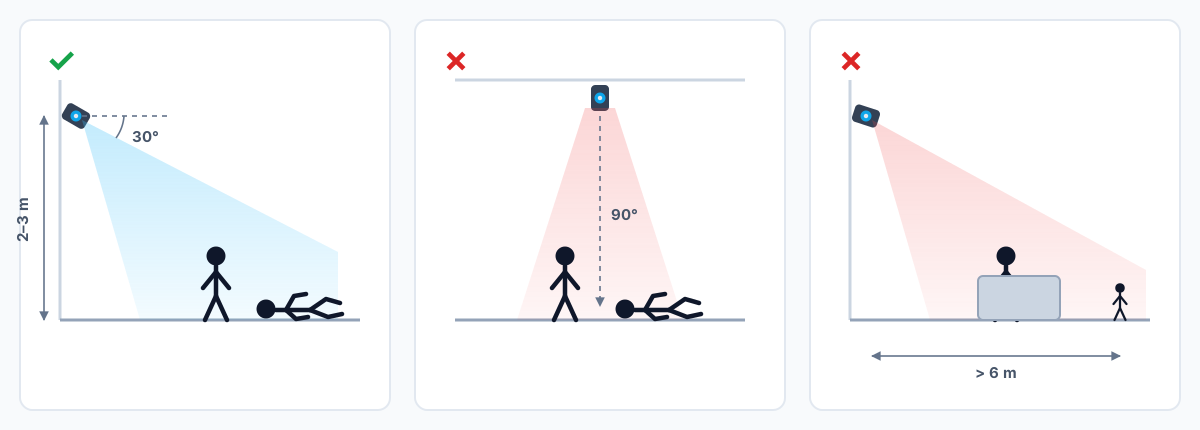
Fix the mount, 2–3 m from the person, side-on or at an angle, with shoulders and hips visible. The fall itself has to happen on camera: if the person is already lying down when the device starts, it only reports the pose and doesn't fire an alert. Straight-down overhead angles, long-corridor wide shots, and furniture blocking most of the person all noticeably lower accuracy.
Step 2: install the software — four steps
Step-by-step instructions for each device are on the reference design page — pick a configuration for your site there and download the matching app package.
The overall flow:
- Pick a configuration — Answer three questions on the reference design page (do you have a camera, how far from the fall zone, how many streams), and it returns a matching device combination.
- Install the app package — Download the package for that device and install it. The model, runtime and decision thresholds ship frozen in the package — the same configurations scored in the measured data below — so there's no training or tuning to do.
- Fill in two settings — the video source address (skip this with reCamera) and a device name. The device name is the first segment of the message topic; name it by room or bed so multiple devices on the same receiver never overwrite each other. The screenshot below is the device management page in the deployment platform: choose "Embedded", then fill in the device IP and ADB port.

- Check the preview to confirm framing — Once installed, the app shows a live feed with a skeleton and state overlaid on the person. Confirm the camera actually sees what it needs to before wiring up notifications. The screenshot below is the reCamera Pro preview page. The status labels come from a replay, not a measured run; measured numbers are under "Performance and measured data".
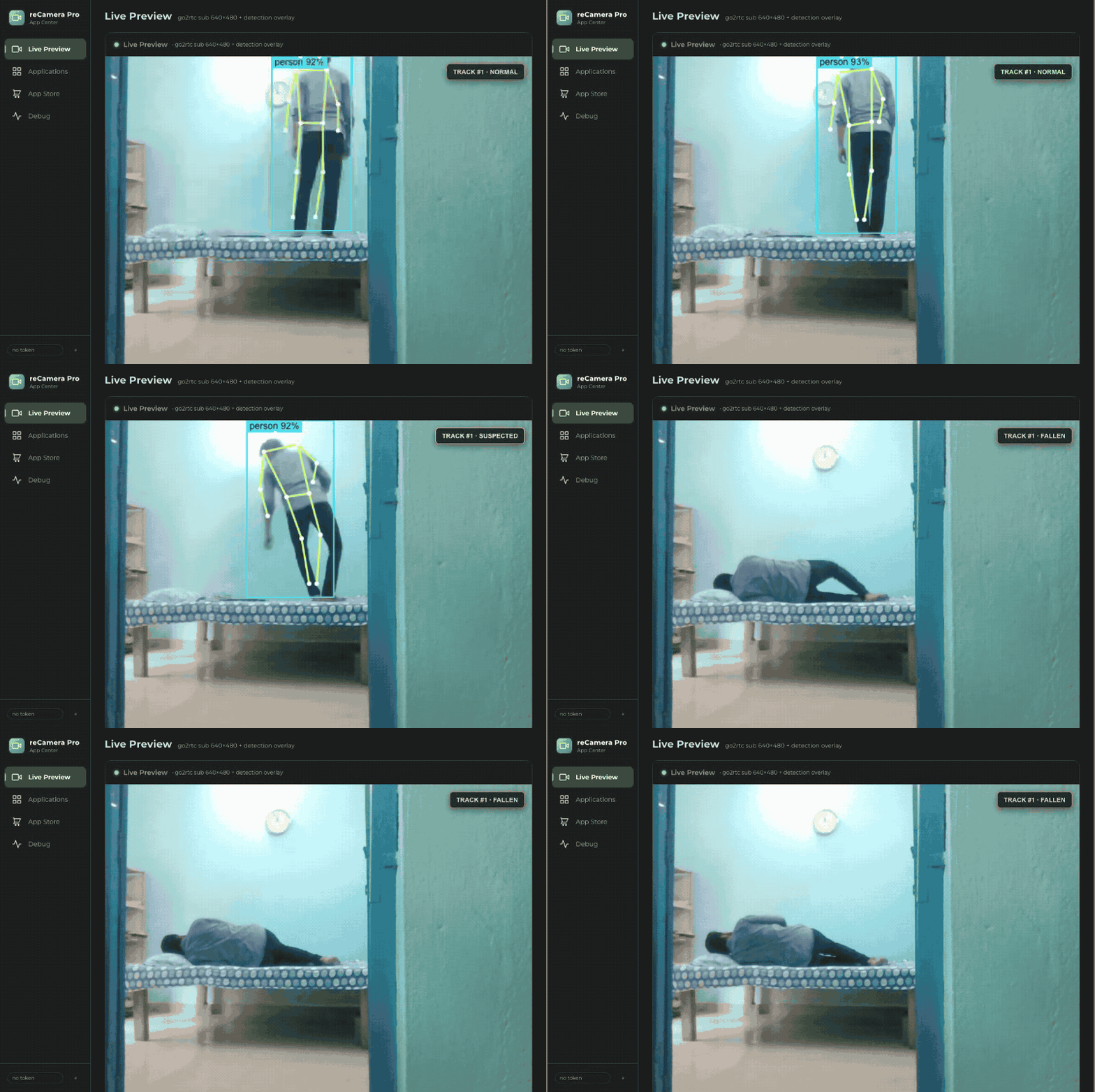
From install to running: about half an hour for reCamera. Jetson takes longer, because the inference engine has to be built on the device the first time (461 seconds and up, measured).
Alarm panel: zones and installation
Two parts: put the cameras where the zones will work, then install and configure.
1. Cameras and zones
Moving or re-aiming a camera invalidates the zone layout with no error: the rectangle still exists but covers a different part of the room. Re-check every zone after any physical change to a camera.
On the Orin and Hailo packages you also need a fixed indoor view where a person stays visible along the expected fall path. The detector is the same EdgeFallKit detector, with the same placement requirements as above (a side or corner view at 2–3 m, shoulders and hips visible).
Two points when drawing zones, or the site produces extra alarms:
no_motionwill fire during sleep unless the zone excludes the bed or the timeout is longer than a normal nap. Motion is the displacement of a tracked person's bbox centre abovemotion_threshold, not optical flow or keypoint velocity, so small movements under a blanket do not count.- Occlusion raises a false
no_person. A zone only re-arms after the person is seen again, so one occlusion produces a single alarm.
2. Software: four steps
Per-device steps are on the same reference design page above, where you can pick a configuration and download the matching application package.
- Pick a configuration — the configurator asks what is on the wall and where the host goes, and returns one of the three packages.
- Install the package — the Orin and Hailo packages deploy the detector and the alarm service together. The reCamera package installs nothing for detection; the alarm service is brought up by hand on a gateway you supply.
- Fill in the configuration — zones and their
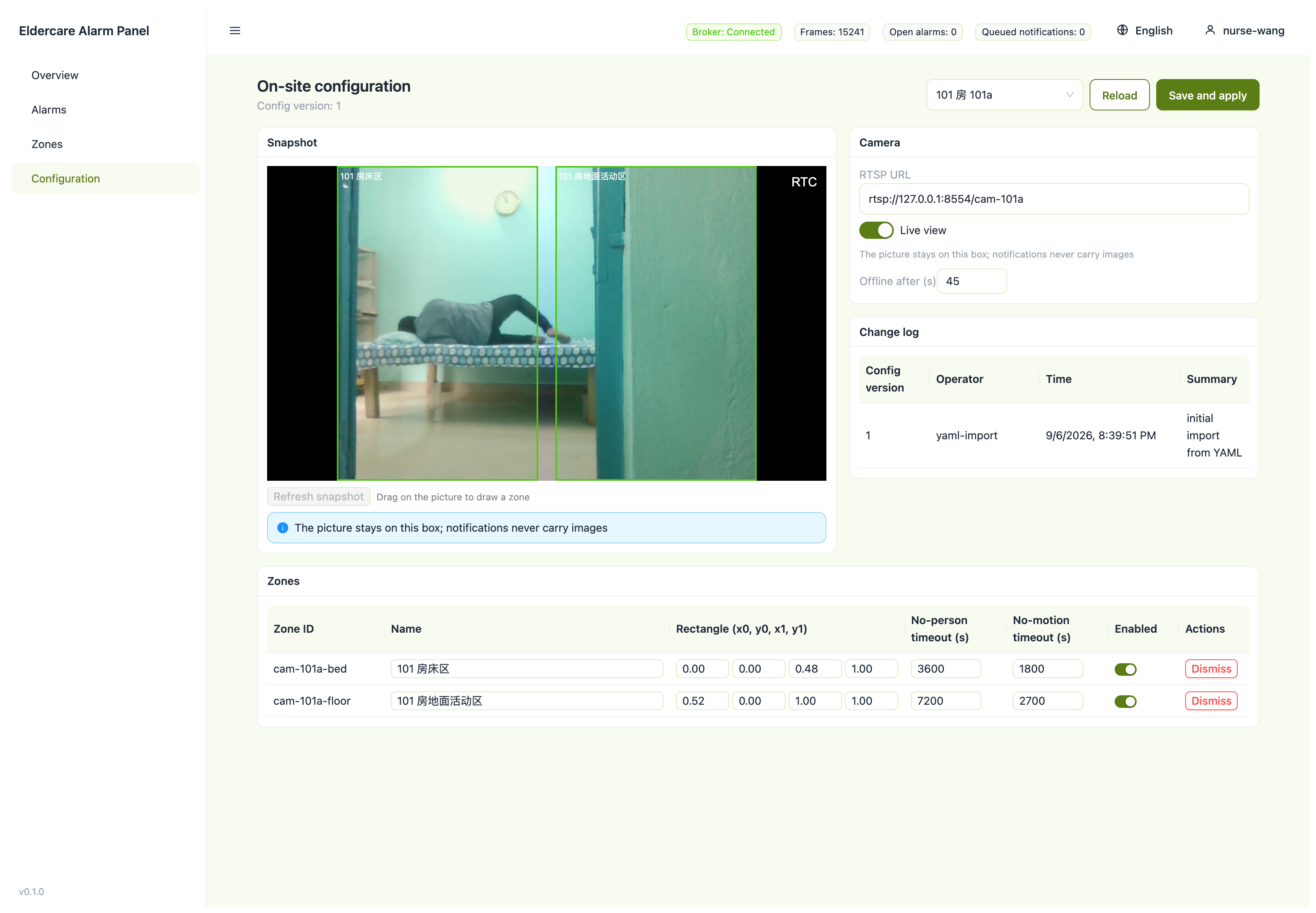
no_person_timeout/no_motion_timeout, the state-machine windows, the webhook URL, and the device name that forms the first topic segment. Zones are drawn straight onto the picture and take effect on save:
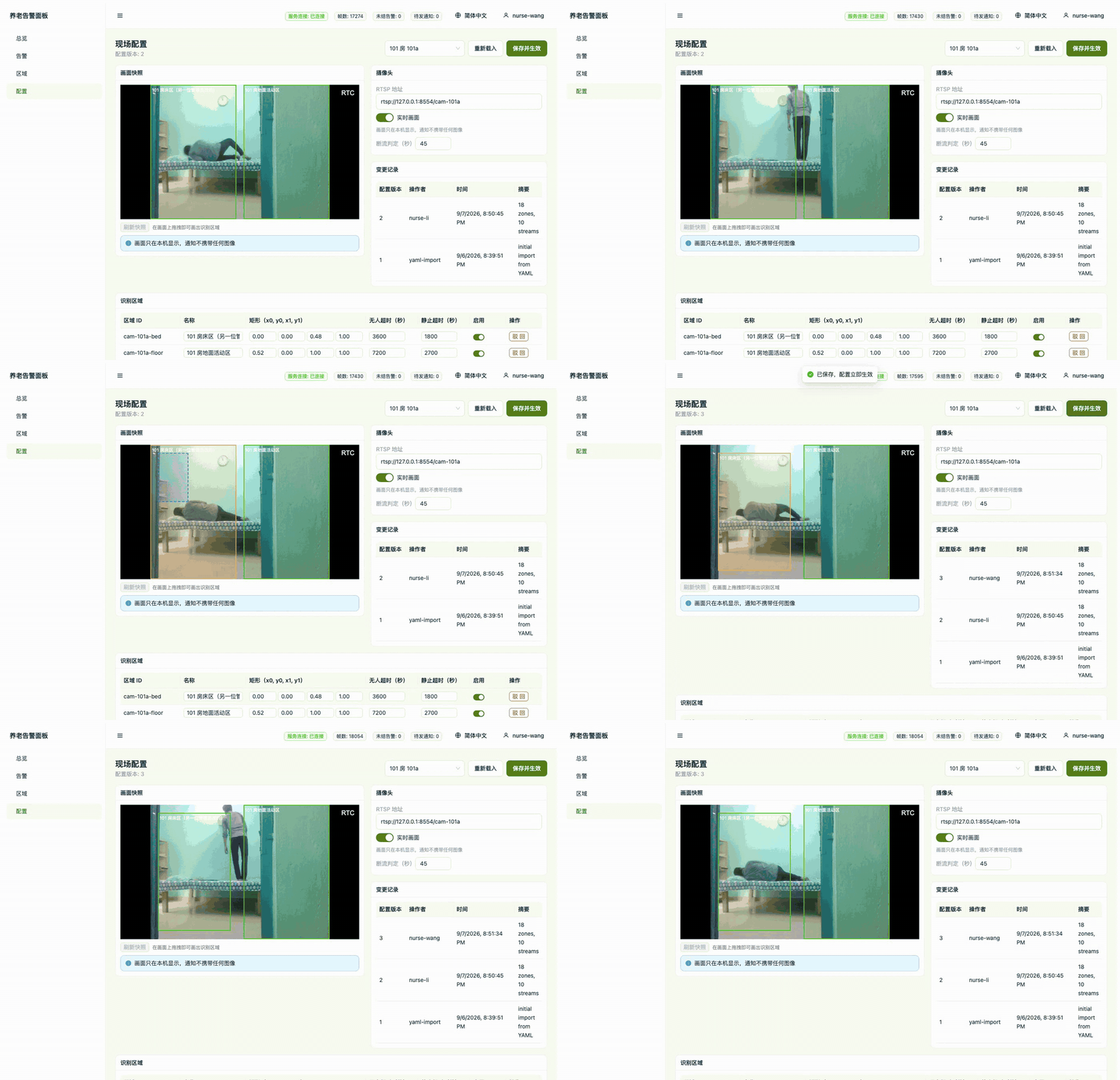
The configuration page shows that room's live view on the left and the zone's two timeouts on the right. When the camera is offline the view falls back to the last snapshot and the configuration is still editable.
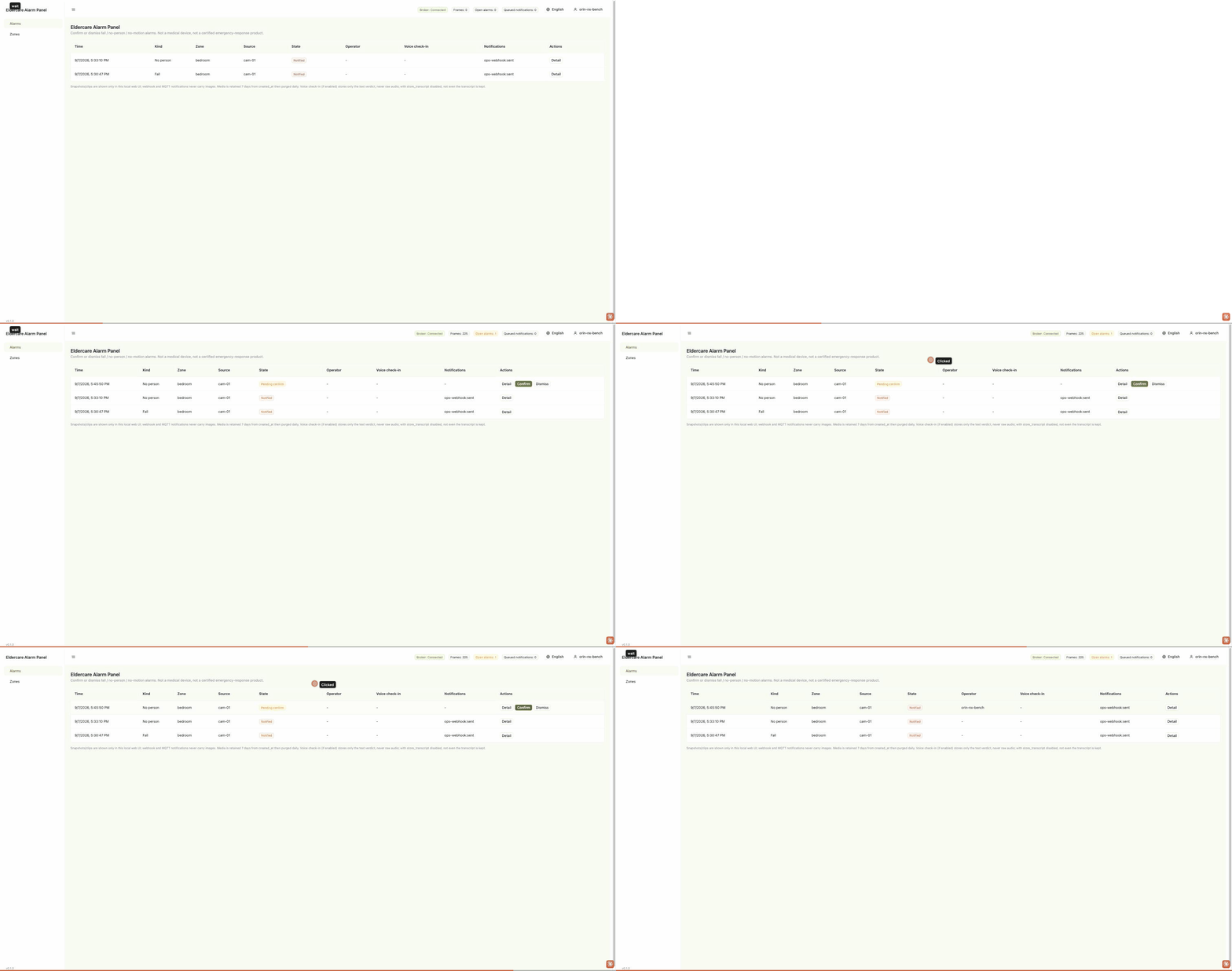
- Verify — raise a test alarm and watch it complete: the alarm appears in the console, an operator action is recorded against it, and the webhook endpoint receives one POST with an idempotency key. Below, one injected alarm goes from appearing to confirmed:
Detector and service state on the host itself are on the device console:
Estimated time is 45 minutes, rated intermediate. The Orin package is the longest because the first deploy builds a TensorRT engine on the device.
Which interfaces it exposes
The device publishes events to the MQTT broker running on itself (port 1883); your system just subscribes. Three ways to hook in:
- Home Assistant — No configuration needed. The device broadcasts via the auto-discovery protocol, and four entities appear directly in HA: a fall sensor, current state, event id, and presence — wire them into your automations.
- NVR / nurse-call systems — Subscribe to
<device>/fall-detection/results. If all you care about is "did someone fall", watchfall_eventin the payload — it's set only once, at the moment the state enters "fallen", so one fall triggers it once, not repeatedly for as long as the person is on the floor. - Custom system / API — Subscribe the same way; the payload also carries
person_count,fallen_count, and each person'strack_id/state/bbox— enough to build your own dashboard. reCamera additionally exposes RTSP 8554/live0for the live feed.
<device> is the name you filled in earlier — name it by room or bed so multiple devices on the same broker never overwrite each other.
Full topics and payload
| Topic / port | Payload | Retained |
|---|---|---|
<device>/fall-detection/results (multi-stream: .../results/{stream_id}) | One JSON per frame: state, fall_detected, fall_event, event_id, person_count, fallen_count, plus track_id / state / bbox for each entry in persons[] | No |
<device>/fall-detection/status | online / offline, published via the MQTT last will | Yes |
homeassistant/ | Auto-discovery config — fall sensor, state, event id, presence | Yes |
RTSP 8554 /live0 (reCamera) | Live video for preview and NVR | — |
The stream id is also written into the payload, so downstream consumers don't have to parse the topic to know the source.
The broker also lives on the detector host: reCamera uses its built-in one, and every reComputer configuration brings up eclipse-mosquitto:2 alongside the detector, serving port 1883 from the host. No external broker is needed, and nothing in the chain needs internet access.
Alarm panel interfaces
The alarm service is the only thing you integrate with, and it runs on the alarm host. Three ways in, by what you already have:
- A nurse call system or a paging service — take the webhook. One POST per confirmed alarm, carrying the alarm id, kind, zone, stream id, timestamp and operator. Deduplicate on the idempotency key, not on the timestamp.
- An MQTT-based site — turn the alarm bus on and subscribe to
eldercare/alarm/<zone-id>. Same payload as the webhook. It is off by default. - Your own dashboard or record system — poll or read
GET /api/alarmson HTTP 8080 for the full alarm records including state history and the operator on each.
The idempotency key is zone:kind:event_timestamp:global_event_id. stream_id is read from the message payload and never parsed out of the topic, so a broker rewrite or a bridge prefix cannot silently reroute a zone. Alarm records (events, state transitions, operators and delivery receipts) are retained for 90 days.
The full topics and payloads
| Topic / port | Payload | Default |
|---|---|---|
HTTP 8080 GET /api/alarms, page at / | Alarm records: id, kind, zone_id, stream_id, state, event_timestamp, operator. The same page serves confirm and dismiss | On |
| HTTP POST to your webhook URL | {"id":"a-17","kind":"fall","zone_id":"bedroom","stream_id":"cam-01","state":"notified","event_timestamp":1788581337237,"operator":"nurse-a"} plus an idempotency header. No snapshot, no video | On once the URL is set |
MQTT 1883 eldercare/alarm/<zone-id> | Same payload as the webhook | Off |
MQTT 1883 <device-name>/fall-detection/results/<stream-id> | The fall_result_v1 stream this service consumes: stream_id, person_count, fall_event, per-person bbox | Input, published by the detector |
The state field: escalated means the notification deadline was missed; it does not revert to notified when a later retry succeeds. Don't show escalated as a delivery failure on a dashboard; it only means the deadline passed.
The broker runs on the alarm host in the Orin and Hailo packages, and on the cameras or the gateway in the reCamera package; nothing in the path needs the internet. The bundled broker allows anonymous connections and is meant for a trusted LAN; add credentials and TLS before the device is reachable from outside it.
Performance and measured data
Everything below is measured on devices against a public dataset. Raw per-clip reports and checksums are in the repo under evaluation/. The source includes per-platform model conversion, Docker orchestration and decision-weight training scripts.
Accuracy results
Averaged over six frozen configurations: accuracy 85.8%, fall recall 95.8%, specificity 77.8%, F1 85.7%, mean alert latency 1.4 s. Individual configurations land between 81.5% and 88.9%.
These six configurations are Jetson YOLO11s, Jetson YOLO11m, reCamera Pro, RK3576, RK3588, and Hailo-8, each with its own frozen configuration. The reCamera 2002's v0.2 baseline (74.1% accuracy) is excluded from the average — it runs an earlier generation of temporal weights. Per-configuration detail is in the repo's unified accuracy table.
Conditions: dataset GMDCSA-24 v2.1 (MIT), split by subject; held-out Subject 4 scored once, 27 clips (12 falls / 15 activities of daily living); all video at 15 FPS; an alert more than 0.5 s before the annotated fall onset counts as a false positive; every platform retrains and freezes decision weights from its own pose output, nothing shared across platforms.
Reproduce: platforms/jetson/tools/evaluate_videos.py (the dataset is not distributed with the repo — obtain it yourself).
Accuracy does not separate the devices: in a 27-clip test set one clip is 3.7 percentage points, and RK3576, RK3588 and Hailo land on the same score (88.9%). Model size doesn't correlate with the score either. Choose a device by stream count, existing hardware and video source.
Devices tested
Seven devices, four accelerators. "End-to-end" means the full path from stream ingest to an alert was run and scored on the test set; "inference speed" means only detection speed was measured.
| Device | Accelerator | Model shipped | End-to-end | Inference speed |
|---|---|---|---|---|
| reCamera 2002 | Built-in NPU | YOLO11n-Pose INT8 | ✅ | ✅ |
| reCamera Pro | Built-in NPU (RK) | YOLO11n-Pose INT8 | ✅ | ✅ |
| reComputer RK3576 | RK3576 NPU | YOLO11n-Pose FP16 | ✅ | ✅ FP16 / INT8 |
| reComputer RK3588 | RK3588 NPU | YOLO11n-Pose FP16 | ✅ | ✅ FP16 / INT8 |
| reComputer R2000 Series | Hailo-8 | YOLOv8s-Pose INT8 | ✅ | ✅ |
| reComputer J30 | Orin Nano GPU | YOLO11s-Pose FP16 | ✅ | ✅ FP16 / INT8 |
| reComputer J40 | Orin NX GPU | YOLO11m-Pose FP16 | ✅ | ✅ FP16 / INT8 |
Per-device per-frame latency, multi-stream throughput and test conditions are in detailed performance results below.
Detailed performance results
Per-frame latency and throughput
The same model on different devices: YOLO11n-Pose, 640² input. Per-frame figures are accelerator inference only (no RTSP decode, no post-processing); aggregate throughput is the highest total frame rate measured across 1–6 concurrent contexts. FP16 and INT8 are in separate tables. The Hailo-8 rows were measured on reComputer R2000 Series + Hailo-8 M.2 module (26 TOPS).
FP16:
| Platform | Pose model | Per-frame | Aggregate | Inference-bound streams | Recommended streams |
|---|---|---|---|---|---|
| reComputer RK3576 | YOLO11n | 56.1 ms | 29.2 FPS | 1 | 1 |
| reComputer RK3588 | YOLO11n | 51.4 ms | 51.4 FPS | 3 | 1 |
| reComputer J30 Series (J3011) | YOLO11n | 3.7 ms | 270.7 FPS | 18 | 7 |
| reComputer J40 Series (J4012) | YOLO11n | 3.3 ms | 306.2 FPS | 20 | 8 |
INT8:
| Platform | Pose model | Per-frame | Aggregate | Inference-bound streams | Recommended streams |
|---|---|---|---|---|---|
| reCamera 2002 | YOLO11n | 53.0 ms | 10.0 FPS | 1 | 1 |
| reCamera Pro | YOLO11n | 35.9 ms | 18.1 FPS | 1 | 1 |
| reComputer RK3576 | YOLO11n | 36.2 ms | 42.1 FPS | 2 | 1 |
| reComputer RK3588 | YOLO11n | 29.8 ms | 90.4 FPS | 6 | 2 |
| reComputer R2000 Series (R2035-12, Hailo-8) | YOLOv8s ▲ | 6.9 ms | 393.9 FPS | 26 | 16 |
▲ The Hailo row uses the s size: the n size is slower on this accelerator. The hailo8 directory of official Model Zoo v2.15 ships only yolov8s_pose and yolov8m_pose — no n-size pose model at all. We compiled a YOLO11n-Pose ourselves with Hailo Dataflow Compiler 3.31.0 (640², INT8, 64-frame GMDCSA calibration) and measured 9.01 ms / 92.2 FPS on the same board, against 6.87 ms / 393.9 FPS for the s size: per-frame latency is the same order (+31%), but throughput differs by 4.3×. The compiler split 11n into 3 contexts, swapping weights every frame; the Model Zoo s model is single-context with weights resident. At 15 FPS per stream, 92.2 FPS still leaves roughly 6× headroom; the gap only affects multi-stream density. The result applies to this one HEF's compilation.
Jetson INT8 uses calibrated engines and is listed separately. The INT8 rows above are all YOLO11n; the calibrated Jetson INT8 engines so far exist only for YOLOv8s / YOLOv8m-Pose (entropy calibration on GMDCSA frames — 64 for s, 494 for m — with FP16 fallback for layers that have no INT8 implementation), so they are not the same model as the other platforms:
| Platform | Pose model | Precision | Per-frame | Aggregate |
|---|---|---|---|---|
| reComputer J30 (Orin Nano Super) | YOLOv8s-Pose | INT8 | 3.75 ms | 266 FPS |
| reComputer J40 (Orin NX Super) | YOLOv8s-Pose | INT8 | 3.34 ms | 300 FPS |
| reComputer J30 (Orin Nano Super) | YOLOv8m-Pose | Mixed (neck + head FP16) | 8.11 ms | 123 FPS |
| reComputer J40 (Orin NX Super) | YOLOv8m-Pose | Mixed (neck + head FP16) | 7.18 ms | 139 FPS |
Conditions: 640², batch 1, median of three 120 s runs, GPU compute only. YOLOv8s INT8 is 1.57× faster than FP16 on the same device. Full-INT8 YOLOv8m loses its fall output, hence mixed precision for m. Deployment evaluation on GMDCSA-24 Subject 4 (27 clips): YOLOv8s INT8 F1 66.7%, YOLOv8m mixed precision 87.0%. The presets still ship YOLO11s / YOLO11m FP16.
Reproduce: tools/build_calibrated_int8.py.
RK's INT8 was calibrated on 240 GMDCSA frames; on frames outside the calibration set its per-frame detection count matches FP16 exactly, so it is deployable.
Real-frame pipeline latency
Both tables above are fed synthetic blank 640 frames and measure accelerator inference only. Real footage is slower, because anything in frame has to go through raw-head decoding, DFL, keypoints and NMS:
| Platform | Pose model | Accelerator | Real-frame pipeline | Pre/post delta |
|---|---|---|---|---|
| reCamera 2002 | YOLO11n INT8 | 52.74 ms ◇ | 53.23 ms | 0.012 ms |
| reCamera Pro | YOLO11n INT8 | 35.2 ms ✦ | 36.6 ms | 1.4 ms |
| reComputer RK3576 | YOLO11n FP16 | 69.6 ms | 70.8 ms | 1.2 ms |
| reComputer RK3588 | YOLO11n FP16 | 54.4 ms | 54.8 ms | 0.4 ms |
| reComputer R2000 Series (R2035-12, Hailo-8) | YOLOv8s INT8 | 6.9 ms | 8.77 ms | 1.9 ms |
| reComputer J30 Series (J3011) | YOLO11n FP16 | 3.7 ms ◆ | 5.57 ms | 1.9 ms |
| reComputer J40 Series (J4012) | YOLO11n FP16 | 3.3 ms ◆ | 5.18 ms | 1.9 ms |
"Pipeline" = inference + preprocessing + raw-head decode / DFL / keypoints / NMS. It excludes RTSP decode, tracking, the temporal MLP and MQTT. The Orin NX figure of 5.18 ms comes from 400 measured frames, Orin Nano's 5.57 ms from 1359, and Hailo's 8.77 ms from 1951 (of which hardware inference is 6.87 ms and decode plus NMS account for only 0.052 ms).
- ◇ reCamera 2002 cannot separate an "accelerator only" column: it exposes a single timer whose scope is exactly this table's pipeline definition, so 52.74 ms already includes pre- and post-processing (250 measured frames, with and without a person in view are nearly identical).
- ✦ The reCamera Pro row is measured with clocks locked (NPU 950 MHz, CPU performance governor). The default
rknpu_ondemandgovernor was measured settling at 800 MHz and 43.1 ms — a 23% difference on the same board from the frequency governor alone. RK3576 / RK3588 were measured always running at their top step and are unaffected. - ◆ The Jetson column is
trtexecpure GPU compute (no host copies), while the RK column isrknnlite.inference(); the two time different things, so compare across platforms with the pipeline column. By that column Jetson is about 11× faster than RK3588 and about 14× faster than RK3576.
Reproduce: evaluation/.
Stream counts
"Inference-bound streams" = aggregate throughput ÷ 15 FPS. It counts the accelerator only and is a theoretical ceiling. "Recommended streams" discounts that — end-to-end throughput measured on RK reaches only 28%–44% of the inference ceiling, because RTSP decode, tracking, the state machine and MQTT also consume CPU and memory bandwidth. With other workloads still running on the board, end-to-end throughput measured about 8.6 FPS on RK3588 and about 4.9 FPS on RK3576.
Hailo-8 16-Stream Test Conditions and Host Video Decoding: The recommended 16 streams on the Hailo-8 R2000 were measured using 640×640 input video streams at 15 FPS. Because the reComputer R2000 Series host lacks multi-channel hardware video decoding, software decoding 1080p streams will choke the CPU at roughly 2–4 streams. For real multi-camera deployments, cameras must be set to deliver lower-resolution sub-streams (recommended 640×480 or 640×360) to prevent CPU decoding bottlenecks.
Runtimes and key parameters
Every platform runs the same 640² pose model family. What differs is the runtime and how the model reaches the device:
| Detector host | Pose model | Precision | Runtime | Model delivery |
|---|---|---|---|---|
| reCamera 2002 | YOLO11n-Pose | INT8 | Camera NPU | Installed from the console as a camera app |
| reComputer J30 / J40 | YOLO11s (Orin Nano) / YOLO11m (Orin NX) | FP16 | TensorRT | Engine is built on the device — tied to that GPU architecture and TensorRT version, so it cannot ship prebuilt. Measured on Orin Nano: 461 s for YOLO11s |
| reComputer RK3576 / RK3588 | YOLO11n-Pose | FP16 | RKNN Lite | .rknn ships per board; a model compiled for RK3588 will not load on RK3576 |
| reComputer R2000 Series (R2035-12, Hailo-8) | YOLOv8s-Pose | INT8 | GStreamer + hailonet | Official prebuilt HEF, verified against a fixed digest |
The Hailo deployment is locked to HailoRT 4.21: GStreamer plugin, user library and kernel driver must all match, and no other process may hold the accelerator.
Parameters that change deployment behaviour (shipped default in parentheses):
max_fps(15) — per-stream processing rate; the stream counts above are derived from it.fall.temporal_confirmation_required(true) — entering "fallen" requires confirmation from the temporal model, the main mechanism that keeps false positives down; set it to false and geometric features can confirm a fall on their own.cooldown_sec(3.00) — one fall counts once;fall_eventfires only on entry to the fallen state.
Alarm panel:
statemachine.evidence_sec(5.0) /statemachine.confirm_window_sec(60.0) — the evidence window and the operator window; together they set most of the time from alarm to notification.statemachine.confirm_timeout_action(treat as real and notify) — what happens when nobody answers inside the operator window.publish_empty_frames(true on the Orin package) — the Jetson detector publishes empty frames when nobody is in view; without them theno_persontimeout gets no input. Set it again if you replace the shipped detector config with the device's own; the Hailo runtime has no such switch and needs none.
Alarm panel measured data
The alarm service does no detection itself; detection accuracy is under "Accuracy results" above. Alarm latency adds to the detection latency (per-platform mean 1.22–1.75 s).
| Metric | Value | Conditions |
|---|---|---|
| Alert latency, event timestamp to notification sent | P50 2061 ms / P95 2093 ms | Local replay, a replayer standing in for the cameras, excluding inference and cross-machine network; 5 fall replays, 15 FPS × 12 s each; 1 s evidence + 1 s auto-confirm; single zone, single stream, loopback webhook |
| No-person detection lateness against the configured timeout | P50 65 ms / P95 77 ms | Local replay, 3 runs, 10 FPS × 11 s, 5 s timeout, 0.1 s tick, no broker |
| Outage recovery, unique successful deliveries over queued | 3 of 3, 0 duplicates, first delivery 96 ms after recovery | Local replay, webhook endpoint returning 503 for 4 s, 3 alarms queued, 2 s retry interval |
| False alarms | 0 over 0.02 camera-hours | 72 s of quiet replay, too short for a rate |
| Fall to webhook received | P50 2487 ms / P95 2751 ms | reCamera One (USB-RNDIS), real fall-detection frames + injected fall alarms through the device's own broker; first 5 of 10 injections (the rest were stopped by the notification rate limit, see known degradation); one real 60 s no-activity alarm was also delivered |
| Fall to webhook received, with Hailo-8 inference | P50 2830 ms / P95 3061 ms (min 2102 ms) | reComputer R2000 Series + Hailo-8 M.2 module, official YOLOv8s-Pose HEF, HailoRT 4.21.0; RTSP replay of a GMDCSA-24 fall clip (640×640, 15 FPS); 10 alarms, 1 s evidence + 1 s auto-confirm + 2 s re-arm; single zone, single stream; all 10 within the 5 s notification deadline |
Alert latency is roughly the sum of the two windows plus about 60 ms of dispatch. The windows in this table were shortened; with the shipped defaults (5 s evidence, 60 s operator) the same path starts at about 65 s (derived).
Reproduce: the three run directories dated 2026-09-05, 2026-09-06 and 2026-09-08 under eldercare-alarm/evaluation/runs/; the latency definition is in evaluation/measure_alert_latency.py.
Known degradation
- Camera placement. The numbers above come from a fixed camera, mid-range framing, indoors, with shoulders and hips visible. A 2–3 m side or oblique mount works; overhead top-down, long-corridor wide shots and heavy furniture occlusion lower accuracy.
- A different dataset lowers recall. On the external dataset RealBiomFall (34 clips, all falls), measured recall is 58.8% on reCamera and 52.9% for the deployed YOLO11m on reComputer J30 / J40; most misses come from the pose model not detecting the person. On a new site, re-extract tracks from on-site footage, then retrain and re-freeze the decision weights.
- Throughput drops when another workload holds the GPU. The Jetson figures above were measured with co-resident workloads stopped; with its own inference workload running, Orin NX measured only 264.9 FPS aggregate (306.2 FPS stopped), below Orin Nano. Orin Nano measured the same either way (270.5 / 270.7 FPS) because its workload does not use the GPU.
- Notifications are rate-limited. At most 5 per 600 s; alarms beyond that are not notified and raise no error (from the 6th injection on reCamera One).
Next steps
- Run the external RealBiomFall evaluation on the RK and Hailo routes.
- Record field video and pose traces on reCamera, and use annotated replay to evaluate the decision thresholds and retrain the temporal profile.
Data and asset sources
- GMDCSA-24 v2.1 — Both the accuracy evaluation and the demo footage come from this dataset, ekramalam/GMDCSA24-A-Dataset-for-Human-Fall-Detection-in-Videos, MIT License. Faces in the demo images have been pixelated and Gaussian-blurred: the license covers the author's copyright, not the subjects' likeness rights.
- RealBiomFall — The testing subset used for the external generalization test, 34 clips, all falls, so only recall and latency are reported.
- Neither dataset is distributed with the
edgefallkitrepo — obtain them yourself to reproduce the evaluation. - The camera-placement diagram is drawn in-house.