Parking Entry/Exit Vehicle Counting — Selection, Deployment and Measured Data
One set takes one camera, covering one entrance. Counting relies on vehicles crossing a line drawn on the picture; vehicles that are hidden or do not cross the line are not counted.
What this solution does
Know how many spaces are left without burying loops in every lane or fitting barrier counters. After deployment you drag a counting line onto the picture in a browser; each vehicle crossing it counts as an entry or exit, and vehicles inside and free spaces go live to your MQTT broker, ready to drive a free-space sign or a parking system. It fits mall and office car parks as well as campus and factory gates.
- Deployment package (Docker Compose and configuration): github.com/suharvest/sensecraft-solutions
- Selection and deployment: reference design page
Video stays on site
The picture is analysed on the host next to the gate; only counts leave it.
Counts on the crossing
On a reComputer J30 Series all 41 crossings were counted in the right direction; see "Performance and measured data".
Use the cameras you have
Existing RTSP network cameras at the gate connect directly; no loops, no barrier changes.
In and out, by vehicle type
Each crossing record carries the direction and the vehicle type (car, motorcycle, bus, truck).
On a real device
The counting host's own browser preview page: the yellow vertical line is the counting line, each vehicle carries a track ID and confidence, and the right panel shows vehicles inside, free spaces and today's totals.
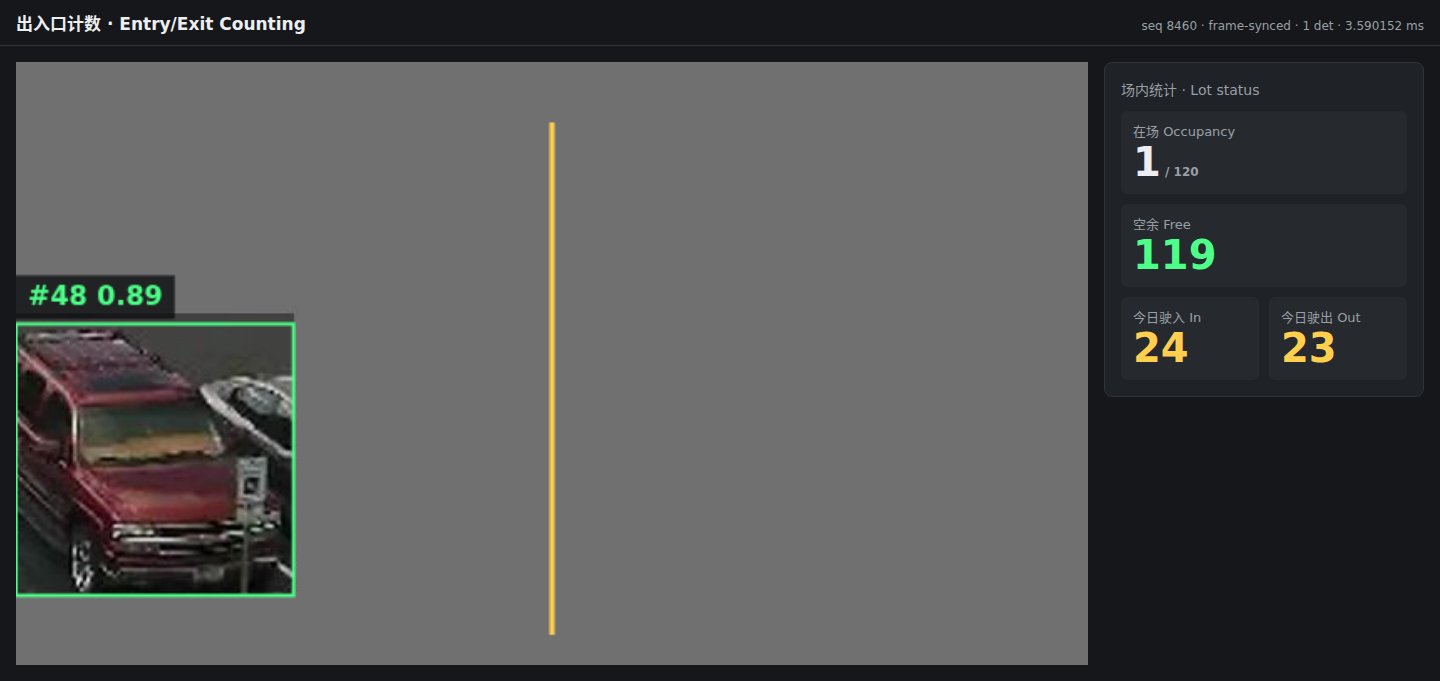
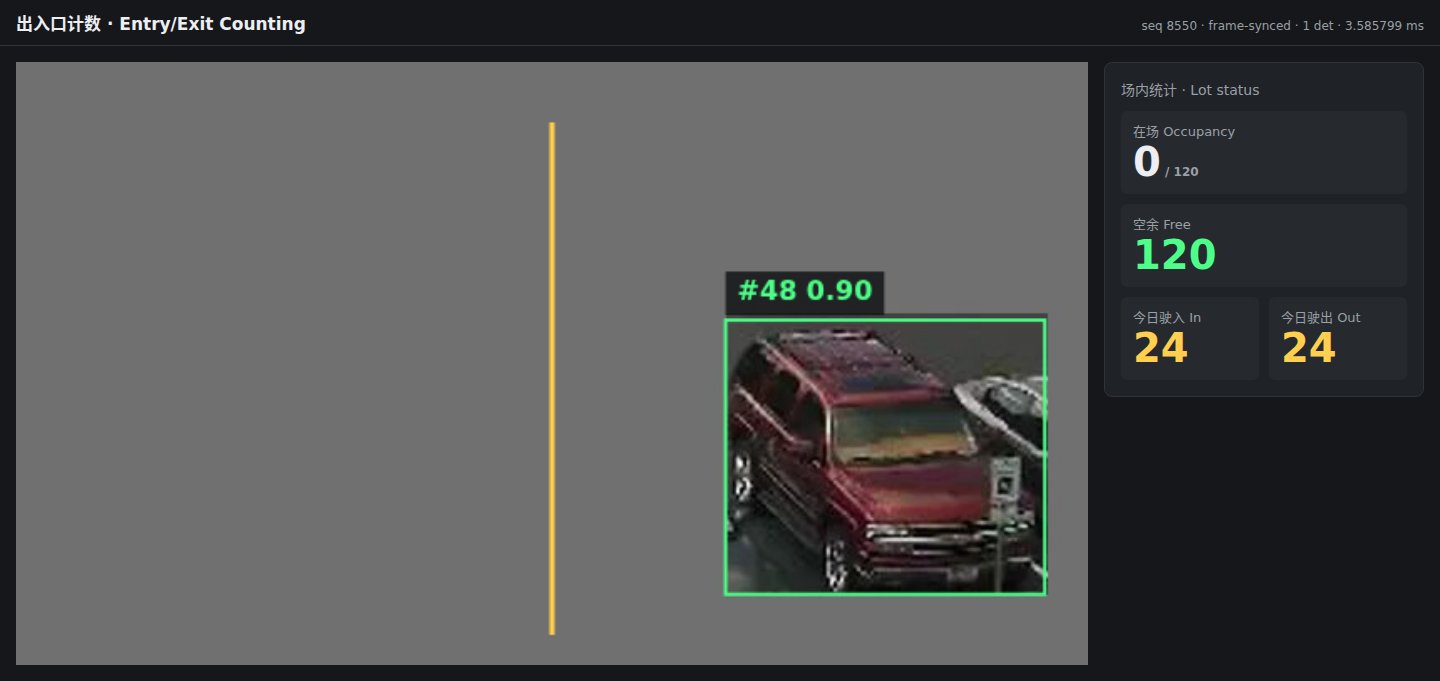
The two screenshots are 3 s apart. The input is a synthetic test clip (one vehicle image moving back and forth on a grey background), not site footage.
Hardware you need
Three things on site: the gate camera, one counting host, and an MQTT broker (one already on site, or install Mosquitto).
① Gate camera: an existing network camera with an RTSP stream in H.264 or H.265, fixed on the lane.
② Counting host: pick one; one host per camera.
| Counting host | Measured speed | Choose it when | |
|---|---|---|---|
 | reComputer Super J3011 Jetson Orin Nano, JetPack 6.2 | 30 fps | Vehicles drive through at normal speed |
 | reComputer Super J4012 Jetson Orin NX, JetPack 6.2 | Same package as J30 | The host also runs other models |
 | reComputer RK3576 Series On-board NPU | 30 fps | Normal-speed traffic, cost comes first |
 | reComputer RK3588 Series On-board NPU | about 3 fps | Barrier gates where vehicles slow down or stop |
J30 and RK3576 speeds were measured with 640×360 input at 30 fps; RK3588 with 1280×720 input at 5 fps.
The counting host, camera and MQTT broker share a LAN or can reach each other. The first deployment downloads the app (about 0.5–0.7 GB) and models; after that it runs offline.
Deploying on site
1. Mount the camera
Fix the camera on the lane so vehicles enter on one side of the picture and leave on the other. On an RK3588 host a vehicle has to stay in view for about 1 s or longer around the line to be counted reliably, which suits gates with a barrier.
2. Install the software: three steps
Device-by-device steps are on the reference design page; this is the outline.
- Deploy the counting host: enter the camera's RTSP address, the MQTT broker and the total number of spaces; deployment checks the board's runtime libraries.
- Draw the counting line: drag the line on the preview page, pick which side means "in", and save.
- Check: after a vehicle crosses, the in or out count on the preview page goes up by one and a crossing record arrives over MQTT.
Interfaces
Counts go over MQTT to your broker; status uses HTTP.
- Free-space sign / parking system: subscribe to the lot-status topic and read free spaces; switch to "Full" at zero.
- Traffic statistics: subscribe to the crossing topic and count by direction and vehicle type.
- Several entrances: deploy one set per entrance and sum them by site ID upstream.
| Topic / port | Content |
|---|---|
MQTT <site>/parking/<entrance>/crossing | One per crossing: direction (in / out), vehicle type, confidence, vehicles inside and free spaces after the crossing |
MQTT <site>/parking/<entrance>/occupancy | Vehicles inside, total spaces, free spaces, today's entries and exits; sent after every crossing |
HTTP 8080 /preview | Browser preview: picture, counting line, inside and free counts |
HTTP 8099 /healthz | Whether frames are arriving and the processing rate |
Performance and measured data
Counts and processing speed
| Device | Input | Processing speed | Count result |
|---|---|---|---|
| reComputer J30 Series (Orin Nano) | 640×360, 30 fps | 29.98 fps, per-frame analysis p50 3.6 ms (measured) | All 41 crossings counted, every direction correct (measured) |
| reComputer RK3576 Series | 640×360, 30 fps | 30.0 fps, container CPU 14.9%, memory 95 MiB (measured) | 19 crossing events: 9 in, 10 out (measured) |
| reComputer RK3588 Series | 1280×720, 5 fps | 3.0 fps, per-frame analysis p50 17.8 ms (measured) | 107 crossing events (measured) |
All inputs are a synthetic test clip: one vehicle image crossing back and forth on a grey background. The RK3588 processes about 3 fps, below the 5 fps input, so a vehicle has to stay near the line for about 1 s or longer.
Reproduce: sensecraft-solutions/solutions/edge_parking_counting (deployment package) with the synthetic clip count-synthetic-120s.mp4
Models and runtimes
| Device | Vehicle detection | Runtime |
|---|---|---|
| reComputer J30 / J40 Series | YOLOX, 416×416, FP16 | TensorRT |
| reComputer RK3588 / RK3576 Series | YOLOX, 416×416, INT8 (w8a8) | RKNN, MPP hardware decode |
Parameters that affect counting (deployment package config/counting*.json):
counting.line/in_side: line position and which side counts as "in"; change them on the preview page after deployment.counting.min_track_frames: a vehicle must be tracked for at least 3 consecutive frames before it counts, so at low frame rates it needs to stay in view longer.counting.capacity: total spaces; free spaces = total − vehicles inside.
Known degradation
- Tailgating and parallel occlusion: When following distances are under 1 m or two vehicles cross simultaneously side by side, bounding boxes can merge or occlude, causing undercounts or flipped direction vectors. Physical lane dividers are recommended.
- Pedestrian and bike interference: The model is trained on motor vehicles. Dense pedestrian crossings or motorbikes passing tightly beside a car can fragment tracking IDs.
- Speed and tracking frames: Crossing the counting line requires at least 3 tracked frames. Gate lanes should have an advisory speed limit ≤ 15 km/h; high-speed drive-throughs can cause missed counts.
Data and asset sources
- Screenshots and count results use a synthetic test clip; the original source of the vehicle image is still to be confirmed.
- Detection model code YOLOX: Apache-2.0.