Camera-Based Parking Occupancy Detection — Selection, Deployment and Measured Data
Bays must be visible in the camera picture: a bay fully hidden by its neighbour, or one that is very small and far away, is not judged reliably.
What this solution does
Instead of a magnetic or ultrasonic sensor in every bay, use the IP cameras already in the car park: every bay a camera can see is checked at the same time. You draw and name a box per bay in a browser; the edge host keeps deciding whether a vehicle is in it and sends each bay's state — occupied, free or unknown — to your system for free-space signs, parking guidance or reserved-bay management.
- Deployment package (Docker Compose and configuration): github.com/suharvest/sensecraft-solutions
- Selection and deployment: reference design page
Video stays on site
The picture is analysed on the edge host on site; only bay states leave it.
Several streams per host
A reComputer J30 Series ran 6 streams for 620 s with no dropped frames; see "Performance and measured data".
Draw your own bays
Draw and name boxes on the live picture in a browser; saving applies at once and survives a restart.
Lost cameras show up
About 10 s after a camera stream drops, its bays turn "unknown" instead of repeating the old state.
On a real device
The edge host's own bay editor: each box is a bay, red for occupied and green for free, with totals and the bay list on the right.
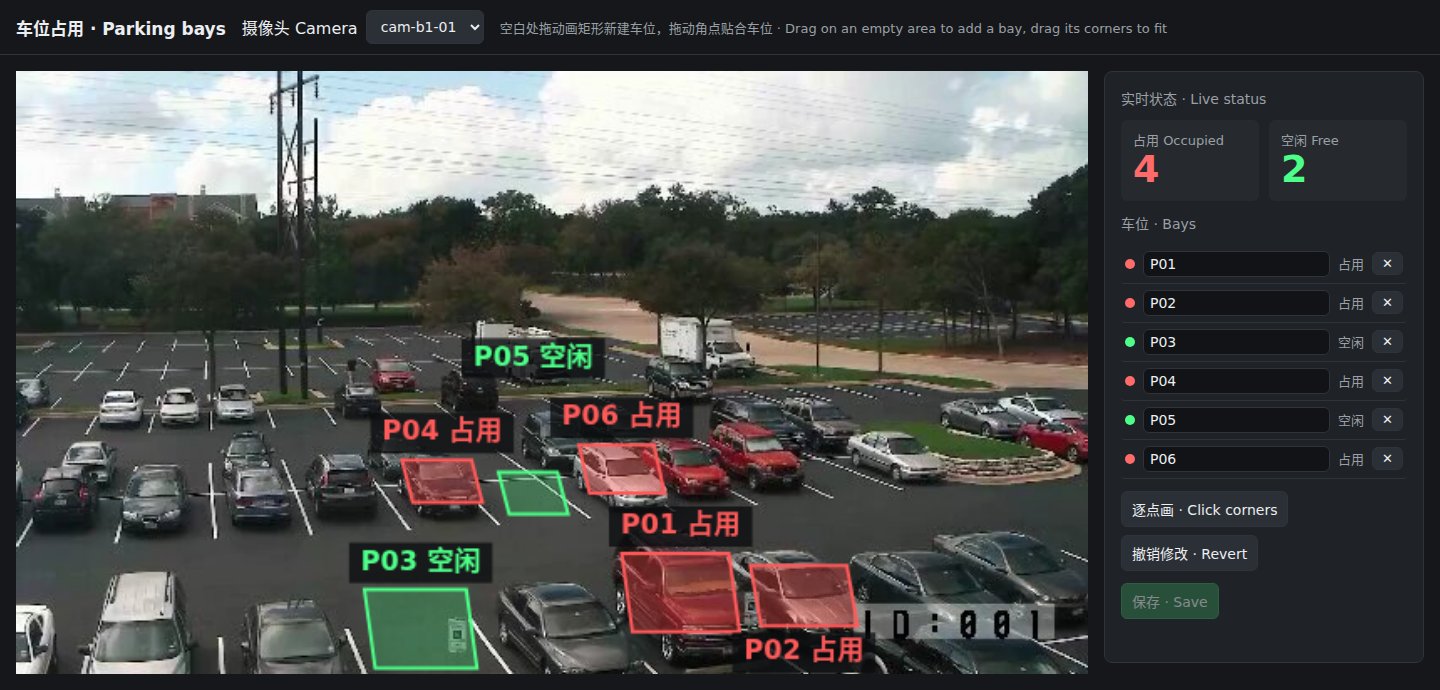
In the screenshot P01, P02, P04 and P06 are occupied and P03 and P05 free. The input is a looped still of a surface car park, not site footage.
Hardware you need
Three things on site: the car-park IP cameras, one edge host and an MQTT broker (for example an existing Mosquitto).
① IP cameras: existing cameras with an H.264 RTSP stream; the sub-stream is enough.
② Edge host: pick one; one host takes several cameras, each analysed at one frame per second.
| Edge host | Measured | Choose it when | |
|---|---|---|---|
 | reComputer Super J3011 Jetson Orin Nano, JetPack 6.2 | 6 streams, no drops; p50 6.5 ms per frame | Several cameras on one host; default choice |
 | reComputer Super J4012 Jetson Orin NX, JetPack 6.2 | Same package as J30 | The host also runs other models |
 | reComputer RK3588 Series On-board NPU | One stream; p50 36.6 ms per frame | The site standardises on Rockchip |
 | reComputer RK3576 Series On-board NPU | One stream at 1 fps, no drops | Few cameras, cost comes first |
On RK hosts, add streams one at a time and check that each keeps updating.
The edge host, cameras and MQTT broker share a LAN, and the host can reach the cameras' RTSP addresses (usually port 554). Deployment downloads the runtime and models; after that it runs offline.
Deploying on site
1. Check the camera view
Every bay must be clearly visible and not fully hidden by its neighbour. Draw one box per bay: a vehicle has to cover about a third of the box to count as occupied, and a large box spanning several bays never counts as occupied.
2. Install the software: three steps
Device-by-device steps are on the reference design page; this is the outline.
- Deploy the edge host: enter each camera's RTSP address and the MQTT broker, then deploy.
- Draw the bays: open the bay editor on port 8080, choose a camera, drag a rectangle on an empty area, drag its corners to fit, enter the bay ID (for example B1-023) and save.
- Check: when a bay changes, its colour in the editor follows and the camera's state message arrives over MQTT.
Interfaces
Bay states go over MQTT to your broker, one topic per camera.
- Free-space signs / guidance: subscribe to each camera's topic and sum the occupied, free and unknown counts in the message.
- Reserved bays: draw EV-charging or visitor bays as their own boxes and act on their bay IDs.
- Home Assistant or your own system: the same topic, read by bay ID.
| Topic / port | Content |
|---|---|
MQTT <site>/parking/<camera>/slots | Every bay under this camera (occupied / free / unknown) plus the three counts; sent whenever any bay changes |
HTTP 8080 /slots/editor | Bay editor: draw, name, live state |
HTTP 8099 /healthz | Service status |
States are held so they do not flicker frame to frame: a bay turns occupied about 3 s after the vehicle settles and free about 5 s after it leaves; about 10 s after a stream drops its bays turn unknown.
Performance and measured data
Several streams and one stream
| Device | Input | Result |
|---|---|---|
| reComputer J30 Series (Orin Nano) | 6 streams, 1 fps each, 620 s | 0 dropped frames on every stream, about 1.0 fps each (measured) |
| reComputer J30 Series (Orin Nano) | One stream | 0.988 fps, p50 6.5 ms per frame, 15 state changes reported per bay (measured) |
| reComputer RK3588 Series | One stream | p50 36.6 ms per frame, 17 state changes reported (measured) |
| reComputer RK3576 Series | One stream | 1.0 fps, 21 bay-state messages received, 0 dropped frames (measured) |
The single-stream input alternates a surface car-park still with dark frames to force occupied/free changes.
Reproduce: sensecraft-solutions/solutions/edge_parking_occupancy (deployment package) with input clip slots-occ20-empty20-400s.mp4
Camera stream lost
| Device | Result |
|---|---|
| reComputer RK3576 Series | Bays turned unknown 9.98 s after the stream stopped, about 11 s after the last frame (measured) |
Models and runtimes
| Device | Vehicle detection | Runtime |
|---|---|---|
| reComputer J30 / J40 Series | YOLOX, 640×640, FP16 | TensorRT |
| reComputer RK3588 / RK3576 Series | YOLOX, 640×640, INT8 (w8a8) | RKNN, MPP hardware decode |
Parameters that affect the decision (deployment package config/slots*.json):
slot_coverage.occupied_ratio/free_ratio: occupied above 0.3 of the box area, free below 0.2.slot_coverage.hold_s/free_hold_s: a state must hold for 3 s / 5 s before it changes.unknown_after_s: bays turn unknown 10 s after the stream drops.
Known degradation
- Wide-angle perspective distortion and occlusion: Bays near the perimeter of wide-angle camera views suffer from perspective stretch; high-profile vehicles (SUVs, vans) in the foreground can block adjacent rear bays. Restricting each camera to ≤ 30 bays is recommended.
- Straddling and boundary conditions: When a vehicle straddles bay lines, if both bays fall within the 0.2–0.3 transitional coverage ratio, temporary state flapping can occur. Increasing
hold_sstabilizes transitions. - Puddle reflections and dynamic shadows: Standing water after rain or strong dynamic shadows from pillars/trees can degrade edge detection confidence. Basic functional lighting (surface illuminance ≥ 30 Lux) should be maintained at night.
Data and asset sources
- Screenshots and single-stream results use a surface car-park still whose original source is still to be confirmed.
- Detection model code YOLOX: Apache-2.0.