Edge Security Alerting: Restricted Zones, Line Crossing and Loitering on the Edge
Assistive alert only. Not a certified security product, and not a replacement for patrols or an access-control system.
What this solution does
Draw a restricted zone or a tripwire on the camera view; entering or crossing raises an alert, and staying inside too long adds a loitering alert. Detection, the verdict, the evidence and the distribution all happen on the edge host at the site. Video never leaves, and it keeps working without an internet connection; the rule editor and the wall also pull their picture from the on-site device, with the browser talking to the local host.
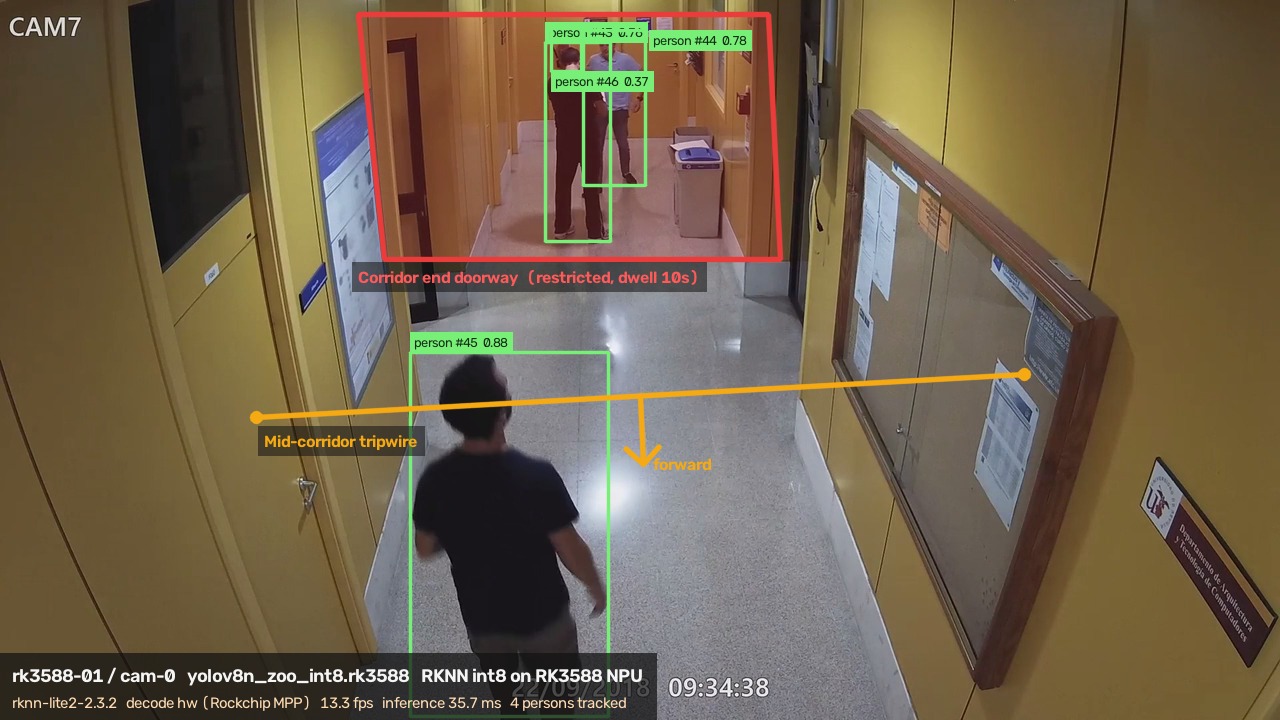
The three rules:
| Rule | Fires when |
|---|---|
| Restricted zone | a tracked person's centroid enters the polygon you drew |
| Loitering | that person stays inside past the dwell time you set — it adds to the intrusion alert rather than replacing it |
| Line crossing | that person's track crosses the line you drew; the line can count one direction only, so the reverse passage stays silent |
Rules are stored in normalized coordinates, so a change of resolution does not require redrawing. Moving the camera does, because the rules are drawn on that view.
The system is two processes. The detector does person detection and per-person tracking, and publishes over MQTT in a published message format. The hub subscribes, judges the rules, stores alerts and serves the workbench. A new board needs only a new detector, with nothing changed on the verdict side.
Scope: people only — vehicles, parcels and tools need a different detection model and a fresh validation. Each alert stores one frame, not a video clip; there is no evidence-grade recording.
- Open-source implementation: github.com/suharvest/edge-security-kit
- Hardware selection and deployment: reference design page
Edge verdicts, video stays on site
Detection, tracking, and zone verdicts happen on the local box. Alerts and snapshots cross the wire; raw video never leaves.
Existing RTSP cameras carry over
Ingests standard RTSP H.264 streams. Deploy without replacing existing camera hardware or pulling new cable.
Self-contained, no cloud server
Broker, rule engine and web workbench run on the box. Manage via local browser without cloud subscriptions or servers.
Multi-platform and open source
Supports Jetson (TensorRT), RK3588 (RKNN) and Hailo-8 (HailoRT). Container compose and model scripts are fully open.
The workbench
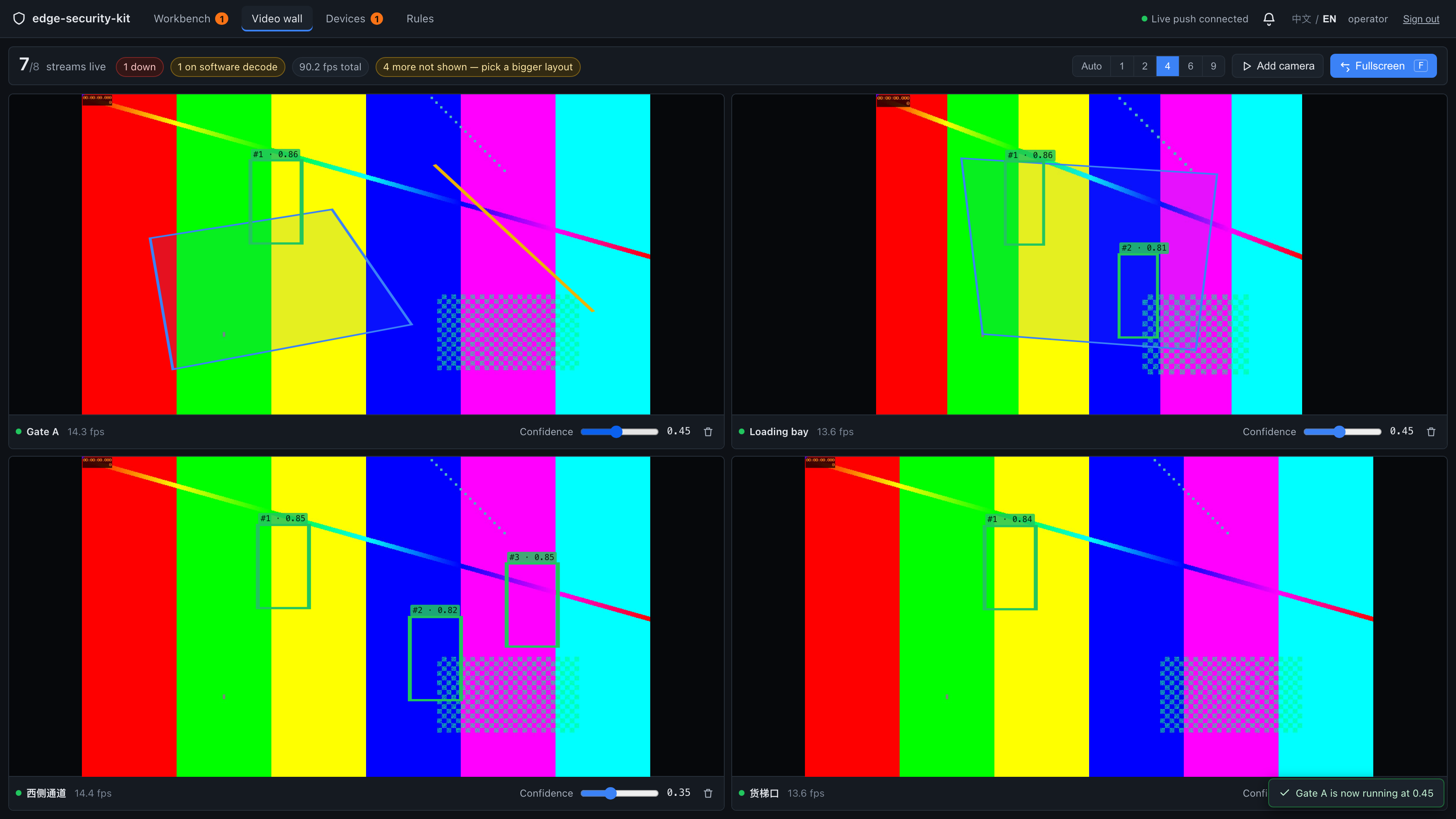
Video wall: every stream's live picture tiles into a grid, with detection boxes (track id and score), the zone polygon and the directed line drawn on top; a strip below counts streams online and alerts pending and acknowledged.
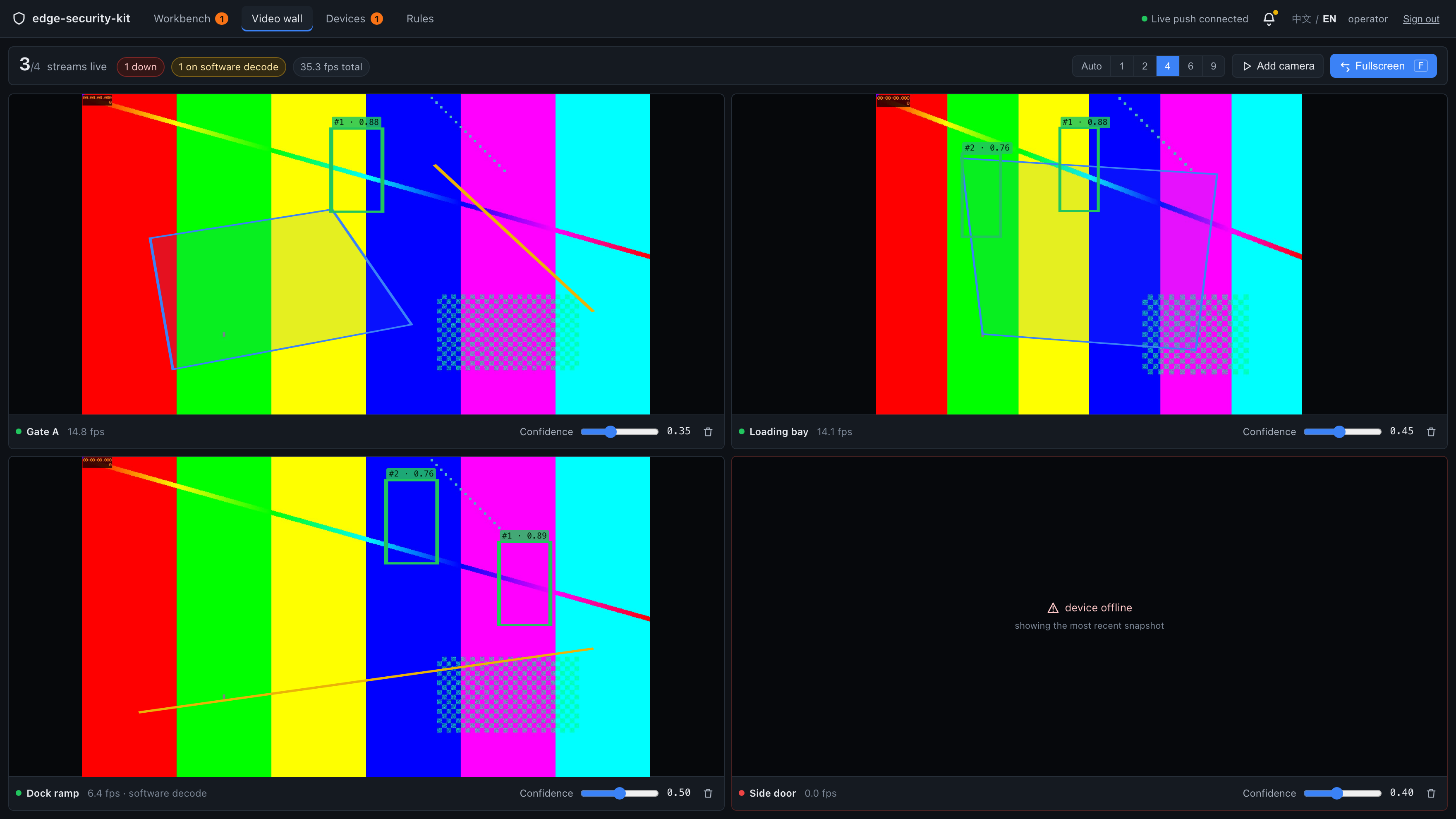
Demo capture: the video source is the repo's colour-bar test source, used to show the interface, overlays and numbers.
The grid adapts to the stream count, going to 3x3 above four.
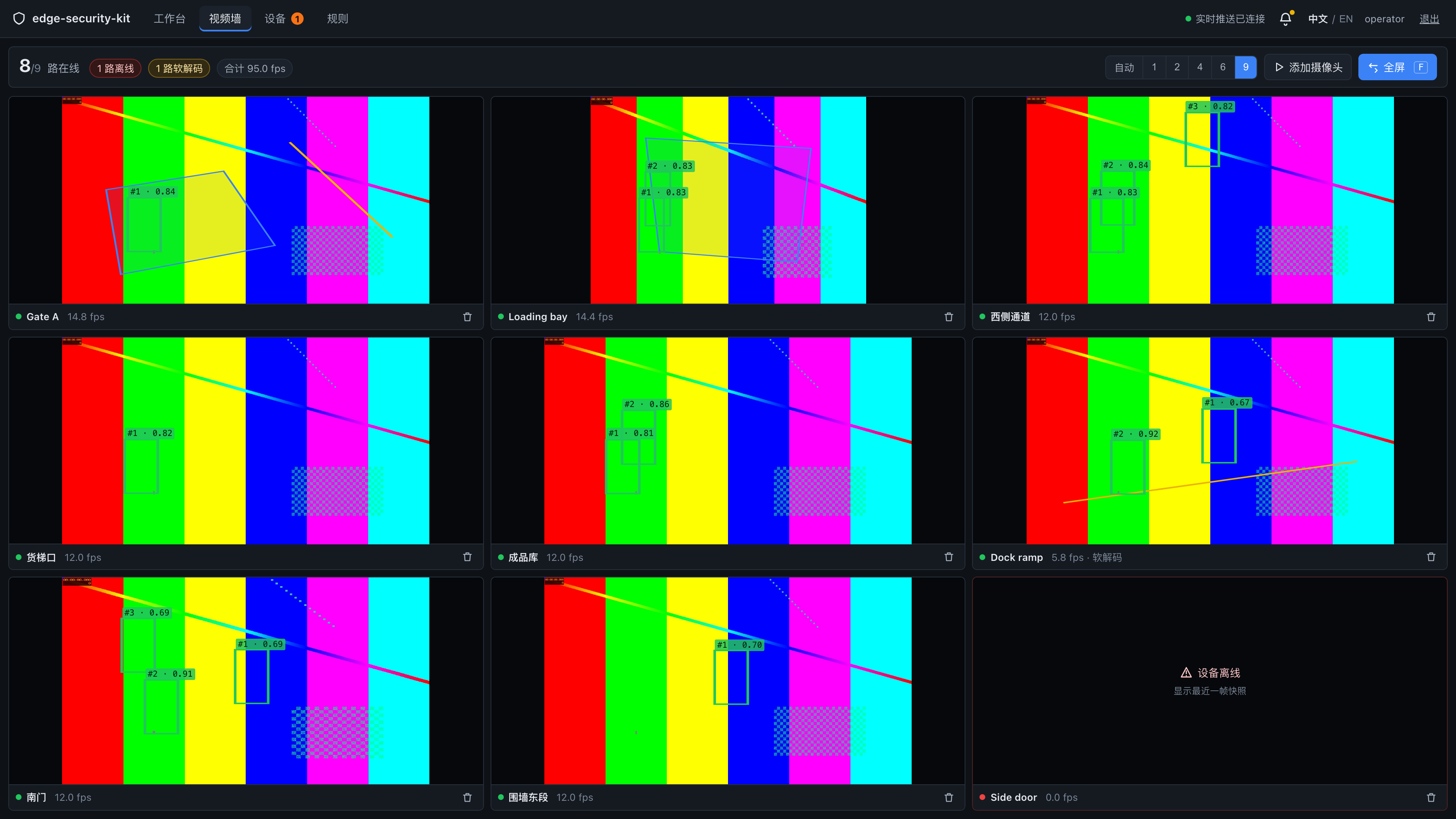
Demo capture.
Press F for full screen: the top bar collapses and the tiles fill the display, for an HDMI screen in a control room.
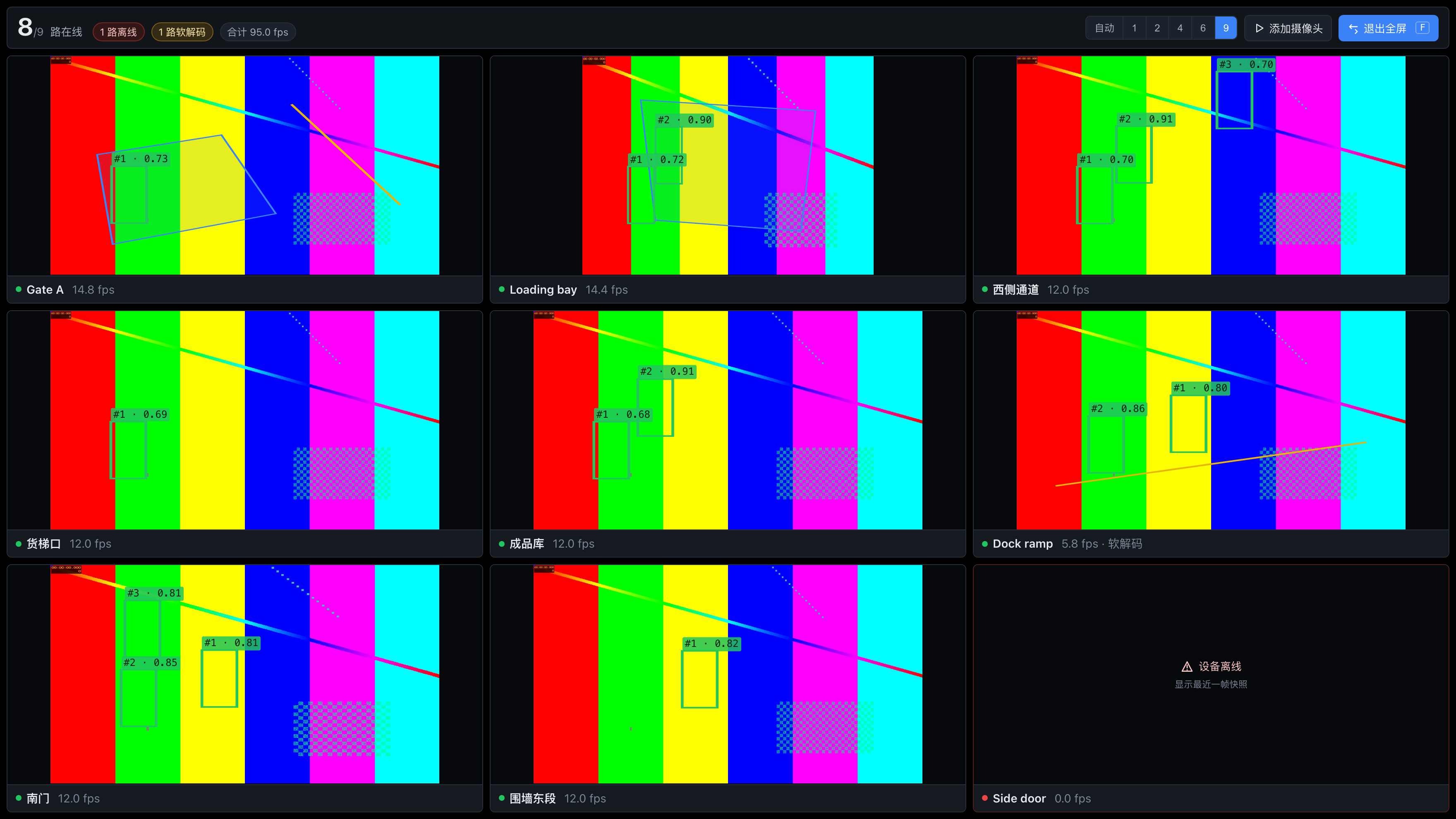
Demo capture.
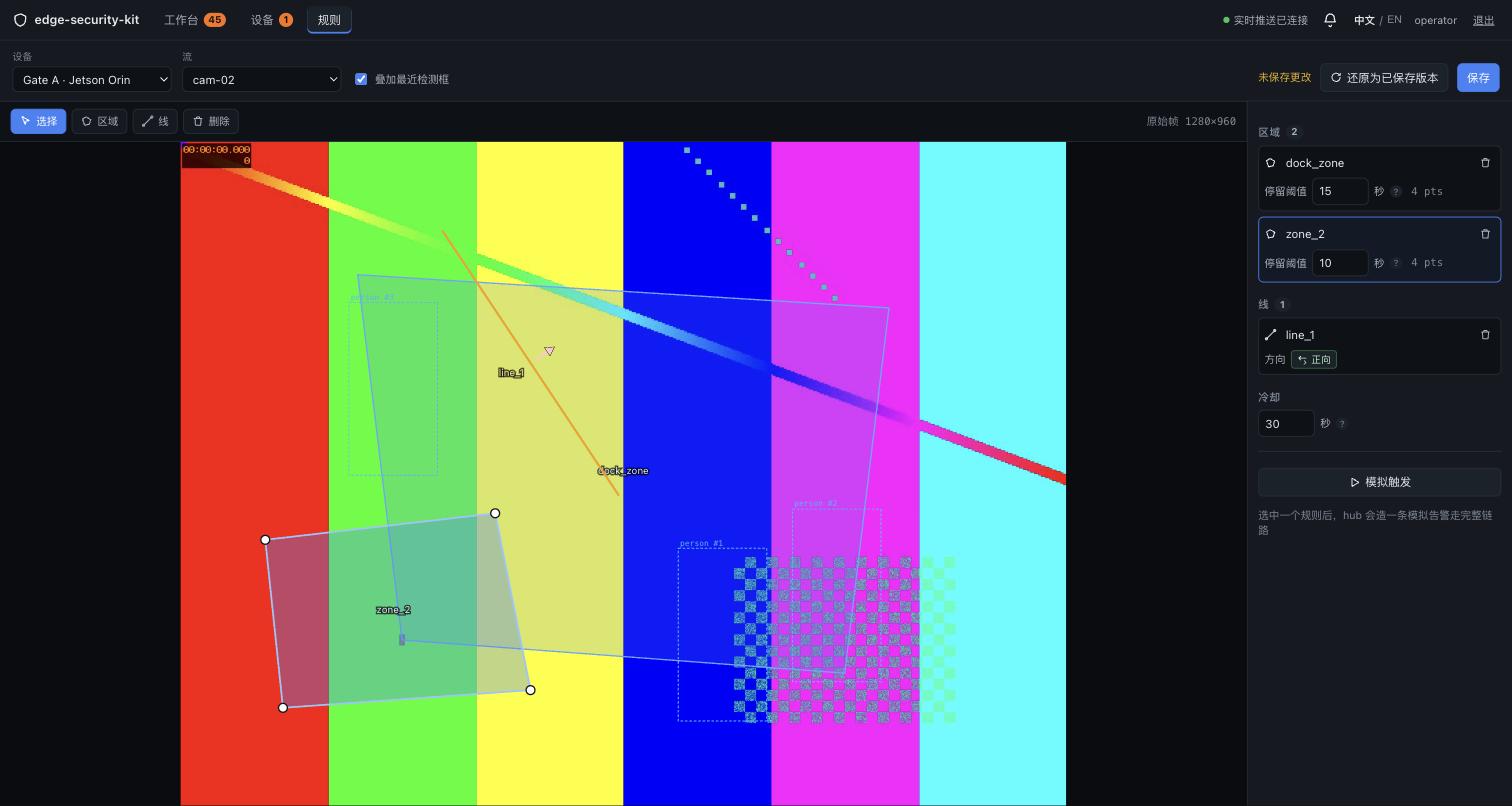
Drawing rules: the rule page's backdrop is the camera's own picture, proxied by the hub from the detector's preview endpoint, so the boundary you draw and the frame the detector judges share one coordinate space. Click several times to close a polygon (a restricted zone) or twice to lay a line; a line counts both ways, forward only or backward only. Loitering is the dwell time set on the zone. The Simulate button runs one alert through the whole chain (stored and pushed); simulated alerts are marked and bypass the cooldown.
Retuning confidence: each stream's threshold is changed on the wall, without editing a config file and restarting. 200 means the detector is already using it; an explicit refusal is 409; no ack in time is 504, and the interface does not redraw as if it had worked.
Demo capture.
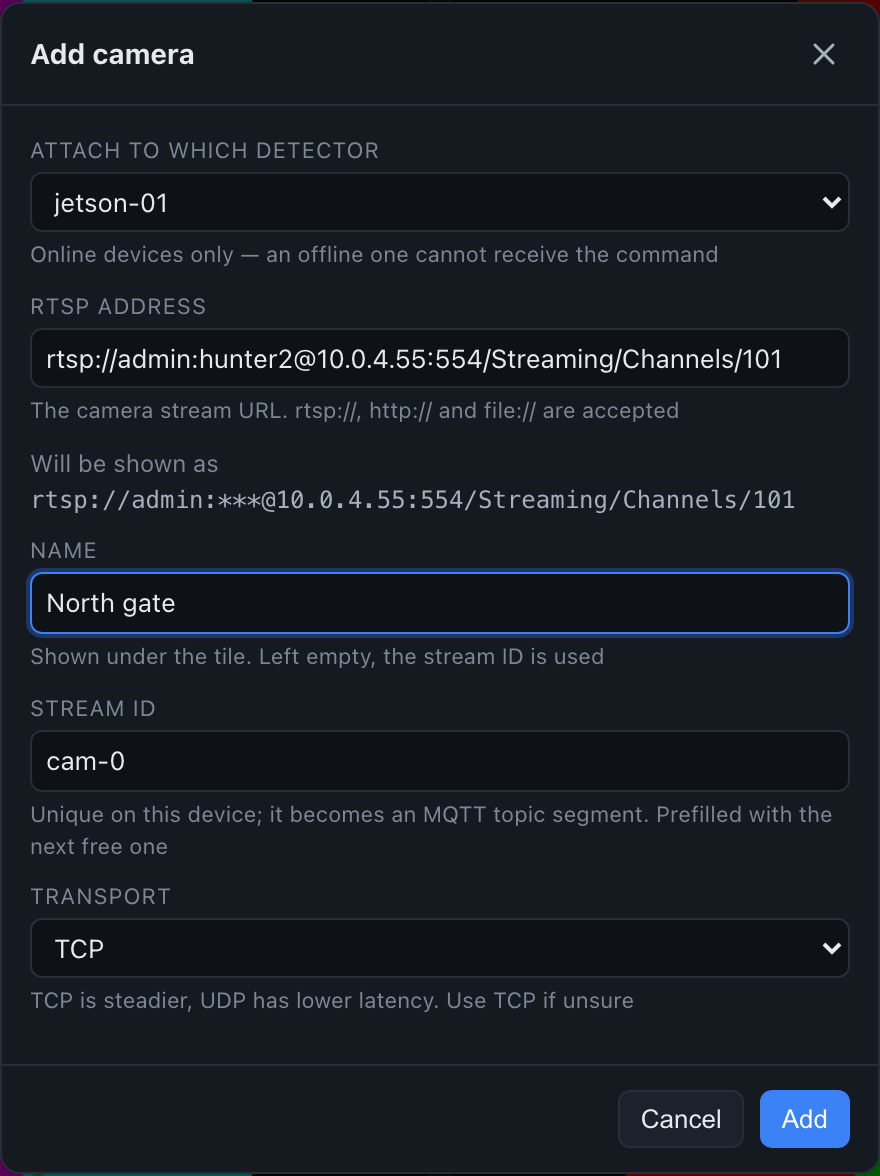
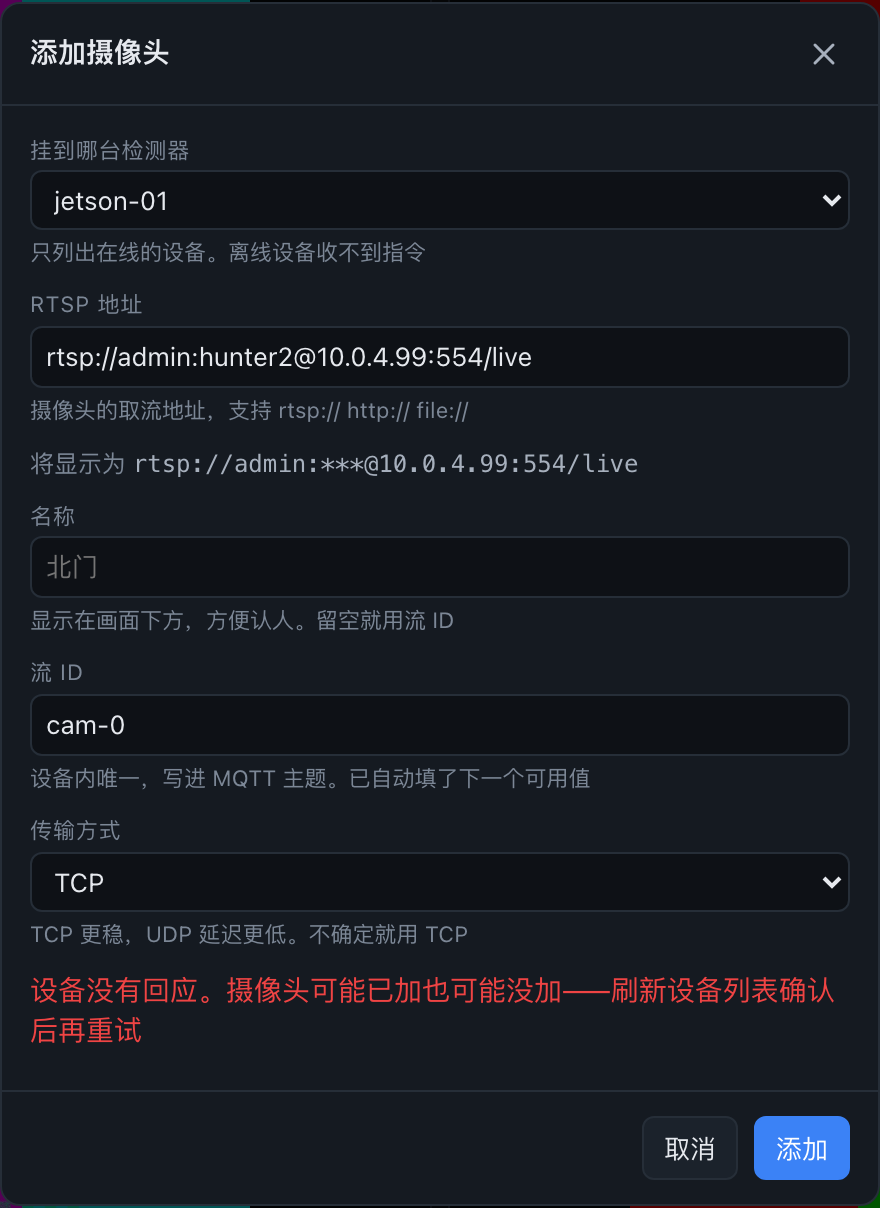
Adding a camera: the Add Camera dialog attaches a new stream at runtime, with no redeploy. The hub blocks a duplicate stream id before anything is sent; a single-stream detector acks ok:false and the interface reports 409 with the reason; when no ack arrives, the dialog stays open and says the outcome is unknown.
Demo capture.
Demo capture.
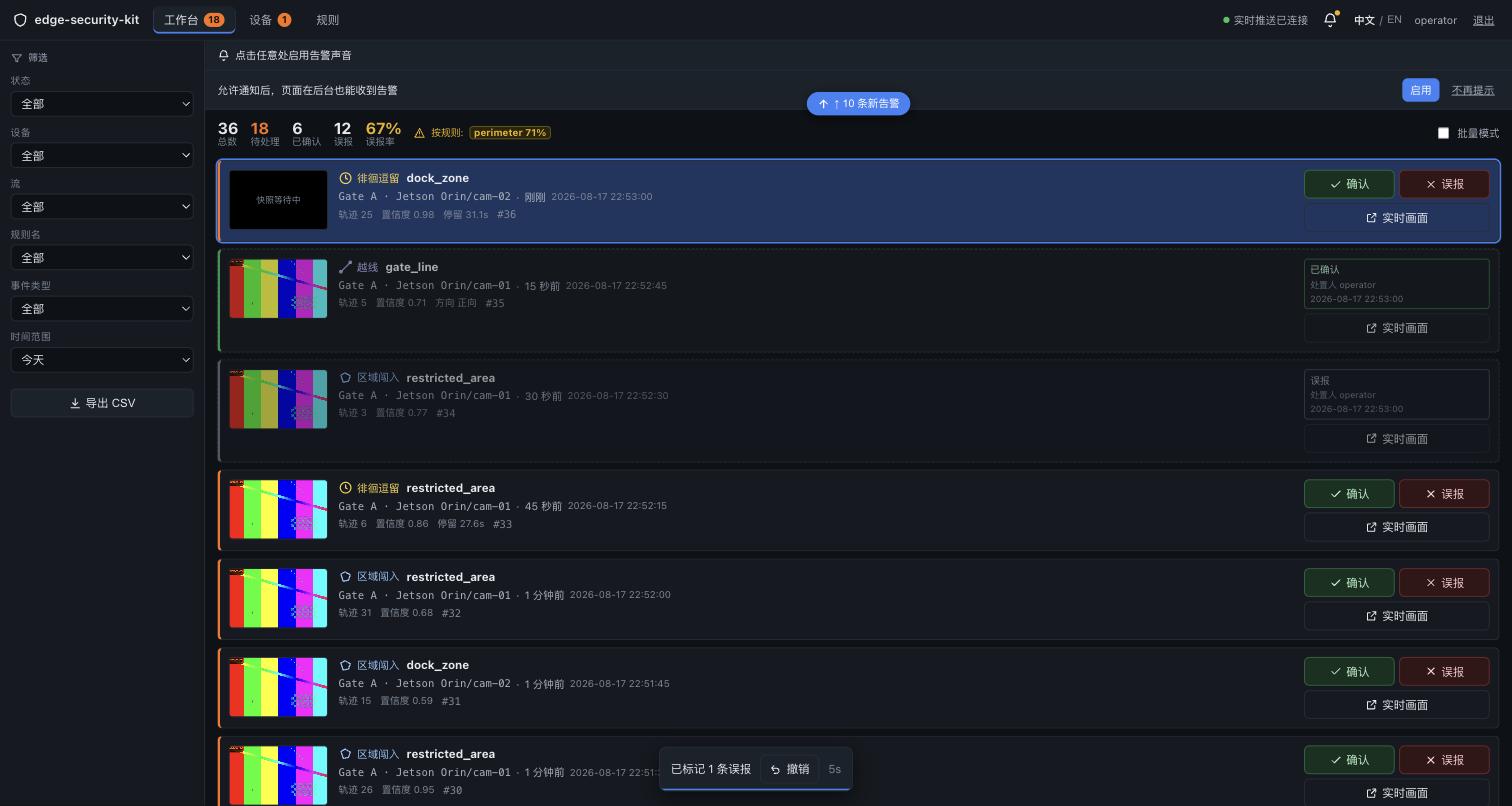
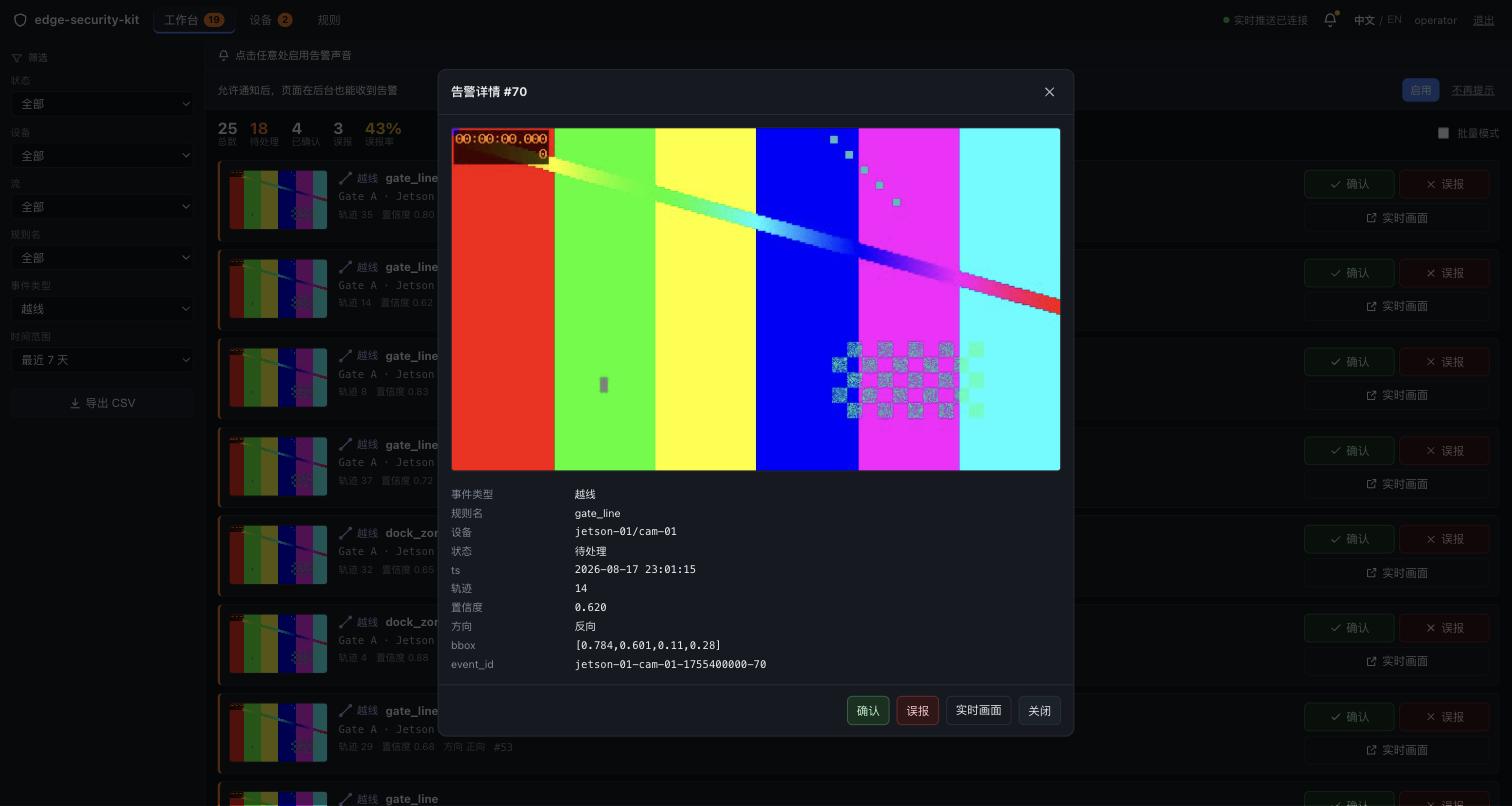
Working the alerts: the list runs newest first, each row with the frame captured when it fired plus device, stream, rule name, track id and score. Acknowledging records the operator and time; the list filters by device, stream, rule name and time range, and the filtered rows export to CSV.
What hardware you need
The camera
One fixed-mount IP camera per stream, and it must produce H.264 — every route's decode path is built for it. Standard RTSP, so cameras you already own stay where they are.
The host
One machine is enough — detection, verdicts and the workbench all run on it.
| Host | Accelerator | Video decode | Ports used | Free disk | |
|---|---|---|---|---|---|
 | reComputer Super J3011 / Super J4012 Jetson Orin module | Jetson GPU (TensorRT) | NVDEC hardware decode | 8090 / 1883 / 8099 | ~10 GB, engine build included |
 | reComputer RK3588 Series Rockchip NPU | Rockchip NPU (RKNN) | On-board MPP hardware decode | 8090 / 1883 / 8099 | ~6 GB |
 | reComputer Industrial R2035-12 Fanless industrial box | Hailo-8 (HailoRT) | CPU software decode | 8090 / 1883 / 8099 | ~6 GB |
Route-specific prerequisites:
- Jetson: the detector loads a TensorRT engine built on the target device, and the first deploy builds it there — measured at 361 s. Decode is on NVDEC, so a non-Jetson host fails the before-checks and does not fall back to software decode.
- RK3588: the board needs
/usr/lib/librknnrt.so, apython3that can importrknn_toolkit_lite2, and the hardware decode node/dev/mpp_service. Any one missing and the deploy step fails early. - Hailo-8: HailoRT must match the driver (measured on 4.21.0). Accelerator contexts are exclusive: no other process may hold
/dev/hailo0.
One alert list for several sites: deploy the shared hub preset — broker, rule engine and workbench on an always-on machine with no detector of its own — then point each detector's mqtt_host at it. The detectors do not have to match.
The hub does not need a server of its own: it measured 3.7% of one core and 52.8 MB RSS on an RK3588 board that was also carrying a detector.
Negative Selection Boundaries
- Stream Count and Load: For more than 8 channels of 1080p or 16 channels of 720p full-frame tracking, avoid the entry-level J3011; choose J4012 or RK3588 with hardware video decoders.
- Wireless Link Risk: Perimeter video analytics is sensitive to packet drops; avoid single-band Wi-Fi for multi-stream RTSP uplinks and ensure wired Gigabit Ethernet.
How to deploy on site
Mounting: the door, aisle or area you are protecting sits fully inside the frame, and a person walking through is not hidden behind racking, cabinets or a pillar for long. Once set, the camera must not move.
All four presets (Jetson single box, RK3588 single box, Hailo single box, shared hub) are two steps: deploy the stack, then open the workbench. Full configuration options and packages are on the reference design page:
Step 1: deploy the stack
Enter the host address and the camera's RTSP URL. Three containers go up: mosquitto (broker), hub (rule engine and workbench) and detector.
The step prints the hub's health response and the admin password generated on first start — there is no fixed default. The generated one is also written to /data/initial-password.txt inside the hub container. It then prints the decode path the detector actually negotiated; hardware decode is what you want: mppvideodec on RK3588, nvv4l2decoder on Jetson.
Step 2: open the workbench
Browse to http://<host>:8090, log in as admin with the printed password, and set a new one when prompted.
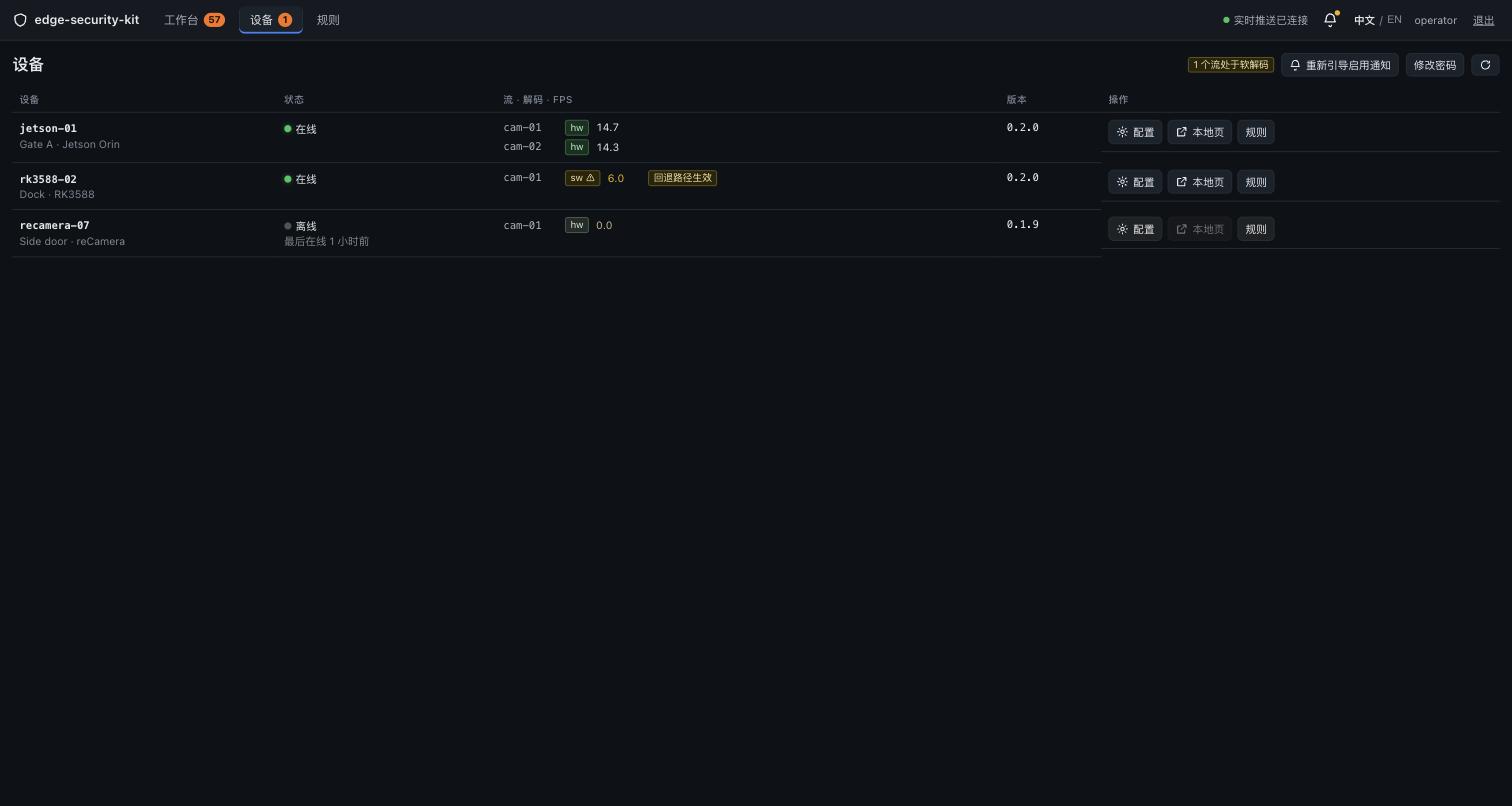
On the Devices page, confirm the host is online and the decode column reads hw. The detector reads that value off the GStreamer caps negotiated by the live pipeline, not from a config file.
Which interfaces it exposes
Three ways in:
- Use the workbench — the control room watches the wall and works the alerts; the filtered alert list exports to CSV (
/api/alerts/export.csv). - Pull alerts into a business system — call the hub's REST endpoint
GET /api/alerts, filtering by state, device, stream, rule name and time range;after_idfetches incrementally. - Bring your own detector or subscribe to detections — detectors publish
sensecraft.detection/1over MQTT; runtime control usescmd/control/cmd/ack.
In the single-box presets the broker is bound to loopback. An external subscriber needs the port opened and a password file added; both are required.
The detection uplink
Every detector publishes sensecraft.detection/1: coordinates are frame_norm (normalized to the original frame); track_id starts at 1, and since dwell and crossing are per-track state, a detector without tracking cannot feed hub-side rules; session_id changes on every process start, so the hub can tell a restarted device and reset its rule state.
{
  "version": "1.0",
  "device_id": "edge-sec-j4012-01",
  "stream_id": "camera_gate_north",
  "session_id": "sess_8f2a9c10",
  "timestamp": 1729000000.123,
  "detections": [
    {
      "track_id": 14,
      "class": "person",
      "confidence": 0.92,
      "bbox_norm": [0.42, 0.35, 0.58, 0.82]
    }
  ]
}
The runtime control downlink
A stream's confidence and the cameras a detector watches can be changed at runtime without a restart. The commands travel as sensecraft.command/1 on cmd/control and are answered with sensecraft.ack/1 on cmd/ack.
command | Required params | Effect |
|---|---|---|
set_conf_threshold | stream_id, conf_threshold (0-1) | the stream's detector runs at the new threshold from its next frame |
add_stream | stream_id, source; optional name, rtsp_transport | a new stream starts and appears in the next status message |
remove_stream | stream_id | that stream stops and leaves the status message |
Ack semantics:
ok: truemeans the change is in force; a change that only takes effect on restart acksok: falsewith the reason.- Requests and acks match on
request_id; a repeatedrequest_idis applied once and acked twice, so a redelivered QoS 1 command does not add a stream twice. appliedis authoritative: the detector reports what it actually did;persistedsays whether the change was written back to config and survives a restart.- No answer counts as failure: the hub's REST layer answers 504.
cmd/controlis optional, so a detector without the control channel can still connect; a detector that implements only some commands acks the othersok: false, naming the missing capability.
The hub's REST API
| Method | Path | Notes |
|---|---|---|
| GET | /api/alerts | Filter by state, device_id, stream_id, event_type, rule_name and a date range; 50 rows by default, newest first. With after_id it returns higher ids ascending, so a WebSocket reconnect can catch up |
| GET | /api/alerts/export.csv | The same parameter parsing, as UTF-8 BOM CSV |
| PUT | /api/rules/{device_id}/{stream_id} | Save rules; rev increments |
| POST | /api/rules/{device_id}/{stream_id}/simulate | Run one alert marked as simulated through the whole chain, bypassing the cooldown and requesting no snapshot |
| PUT | /api/devices/{device_id}/streams/{stream_id}/conf | Retune the threshold, with the 200 / 409 / 504 semantics above |
| POST | /api/devices/{device_id}/streams | Attach a stream at runtime; 201 on success |
| DELETE | /api/devices/{device_id}/streams/{stream_id} | Detach a stream |
| GET | /api/devices/{device_id}/streams/{stream_id}/preview.jpg | Single-frame preview proxy, cached 1.5 s. An unreachable device or a non-JPEG body is a 502, not a grey placeholder |
Everything but /api/health and the login route requires a cookie session. The session table is persisted, so sessions that have not expired survive a hub restart.
Performance and measured data
Rule timing
| Detection host | Line-crossing error | Restricted-zone error | Loitering error | Direction | Snapshots |
|---|---|---|---|---|---|
| reComputer J40 Series (J4012, Orin NX 16GB) | 0.109-0.268 s | 0.090 s | 0.090-0.290 s | 8/8 correct | 8/8 decodable |
| reComputer RK3588 Series | 0.085-0.248 s | 0.056-0.057 s | 0.080-0.233 s | 8/8 correct | 8/8 decodable |
| reComputer R2000 Series (R2135-12, Hailo-8) | 0.006-0.189 s | 0.001 s | 0.004-0.200 s | 8/8 correct | 8/8 decodable |
Conditions: all three hosts ran the same 1280x720 H.264 truth source at 5 fps over a 130 s observation window; the error is the gap between the alert and the truth instant, with a tolerance of +/-0.5 s. No host fired on the wrong direction.
Reproduce: edge-security-kit.
| Metric | Value | Conditions |
|---|---|---|
| Judged frame to stored alert | p50 23.8 ms / p95 206.2 ms | reComputer R2000 Series |
| Judged frame to stored alert | p50 117.4 ms / p95 297.0 ms | reComputer J40 Series |
| Trajectory alignment (normalized boxes against the truth trajectory) | mean 0.00115, max 0.00298 | reComputer J40 Series |
| Trajectory alignment (normalized boxes against the truth trajectory) | mean 0.00204, p95 0.00322, max 0.00463 | reComputer RK3588 Series |
Single-stream throughput
| Detection host | Inference p50 | p95 | Full pipeline p50 | Detector CPU | RSS | Decode |
|---|---|---|---|---|---|---|
| reComputer J40 Series (J4012, Orin NX 16GB) | 4.16 ms | 4.19 ms | 6.99 ms | 5.5% of one core | 310 MB | NVDEC, confirmed in-kernel |
| reComputer RK3588 Series | 36.2-44.5 ms | 55.8-56.2 ms | 38.1-46.3 ms | 16.4-17.9% of one core | 214 MB | Rockchip MPP, confirmed in-kernel |
| reComputer R2000 Series (R2135-12, Hailo-8) | 7.7 ms | 8.4 ms | 9.5 ms | 8.7-13.0% of one core | 127-131 MB | CPU software decode |
Conditions: 30 s warmup, then a 120 s sample; inference_time_ms and pipeline_ms are read off the message fields, with identical definitions on every platform; CPU is a percentage of one core over 5 s windows. The reComputer R2000 Series has no H.264 hardware decoder, so its full-pipeline and CPU figures include software decode: the inference column compares with the other two hosts, the full-pipeline column does not, and the gap widens with resolution. Latency from a flat-out benchmark loop reads optimistic: the loop is 8% faster than the real pipeline on Jetson and 6-66% faster on RK3588.
Reproduce: edge-security-kit.
Multi-stream
The reComputer RK3588 Series was measured to 32 streams:
| Streams (720p @ 5 fps) | Result |
|---|---|
| 16 | Full source rate, worst p95 46.9 ms, NPU at 41% of its three-core capacity, 1.4 of eight CPU cores, 7.3 GB RAM free |
| 24 | 119.9 inferences/s, four streams losing one to three frames; the three NPU cores read 79.5 / 61.3 / 42.6% |
| 32 | 157 of a demanded 160 delivered, fourteen streams lose frames, inference p50 rises from 33 to 99 ms |
- RGA saturates before the NPU. The frame loss at 32 streams is
RGA_BLIT failin the decode-time scaler, and the per-stream failure count matches the streams that drop frames. Hardware decode never fell back; all 32 streams ran onmppvideodec. - Multi-stream deployments are limited by memory. Fresh processes hold 173-226 MB, but rknnlite reference cycles make a process grow: a detector that had run for two days measured 1839 MB, and sixteen of those do not fit in 16 GB. Use the ctypes backend or a periodic
gc.collect()for multi-stream. - Two concurrent detectors is the largest configuration measured on one shared hub.
Runtimes and key parameters
Each host's runtime and decode path are in the host table under "What hardware you need". Parameters that change deployment behaviour:
require_hw_decode(on by default) — the detector refuses CPU decode. A device page showing decodeswmeans it was turned off.- Per-stream
conf_threshold(0-1, adjustable on the wall at runtime) — when an int8 model produces extra low-confidence boxes, raise the threshold first and switch back to fp16 only if that is not enough. preview_advertise_host— must be the host's LAN address so the hub can proxy a frame from port 8099; otherwise the rule page backdrop is grey.
Known degradation
- The reComputer RK3588 Series inference p50 varies by about 8 ms between runs; p95 is reproducible.
- When the detector cannot keep up with the stream, the tracker keeps issuing new track ids and a stationary person alerts repeatedly. Compare the detection rate on the device page against the camera frame rate.
Data and asset sources
- The rule-timing truth clip is composed by a script from a trajectory defined in seconds, so the real crossing and entry instants are known before the run.
- The video source in the workbench screenshots is the repo's colour-bar test source.
- The runtime code can go into a commercial product, but the person-detection models keep their own terms. Confirm that the licence on the detection weights you use suits your product, or substitute a compatibly-licensed model.