Home Assistant Local Voice Control — Selection, Deployment and Measured Data
Voice commands in Chinese and English. The official Xiaomi Home integration for Home Assistant is licensed for non-commercial use only and is not pre-installed; do not use it in commercial projects.
What this solution does
Bring the lights, curtains, air conditioning and Zigbee sensors in a home into Home Assistant and control them with one sentence. Say "turn on the living room light" and Home Assistant carries it out locally and answers that the light is on. Speech recognition and speech synthesis run on a local reComputer J40, so spoken audio is not uploaded to a cloud speech service. It fits living rooms and bedrooms, and smart-home integrators delivering systems in customers' homes.
- Deployment package (Docker Compose and Home Assistant configuration template): github.com/suharvest/sensecraft-solutions
- Voice engine source: github.com/Seeed-Solution/openvoicestream
- Selection and deployment: reference design page
No audio to the cloud
Understanding the command and speaking the reply both happen on the reComputer J40; Home Assistant executes locally.
Text 0.12 s after speech
Median over 5 Chinese and English commands; see "Performance and measured data".
Native Home Assistant integration
The voice service joins the Home Assistant voice assistant through the Wyoming Protocol integration, with no changes to Home Assistant.
Zigbee devices directly
Plug in a Connect ZBT-2 and Zigbee sensors and switches join Home Assistant without brand gateways.
On a real device
One exchange in the Home Assistant voice assistant: the spoken "turn on the living room light" (in Chinese) is recognised by the local voice service, Home Assistant carries it out and replies that the light is on, and the living-room light card on the right turns on.
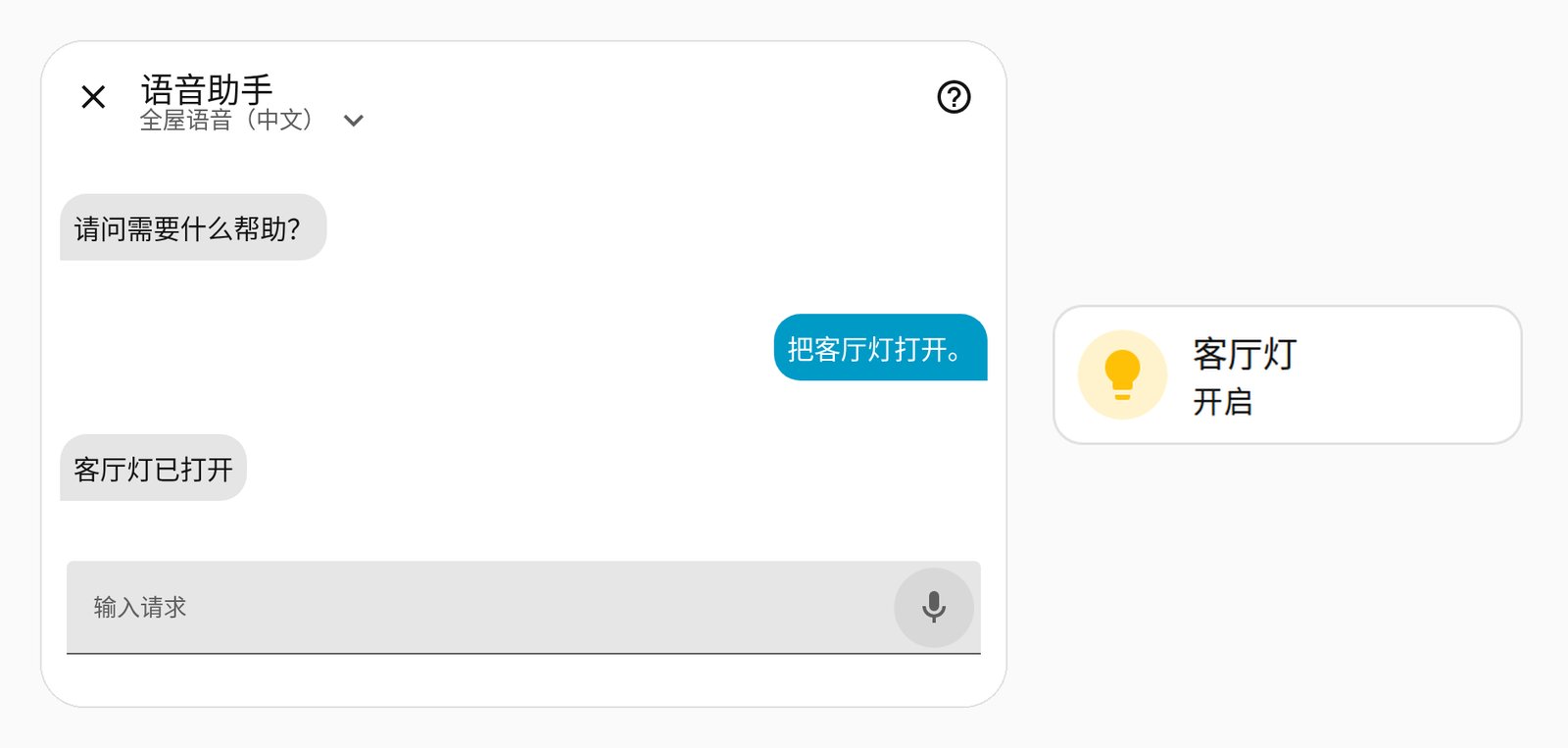
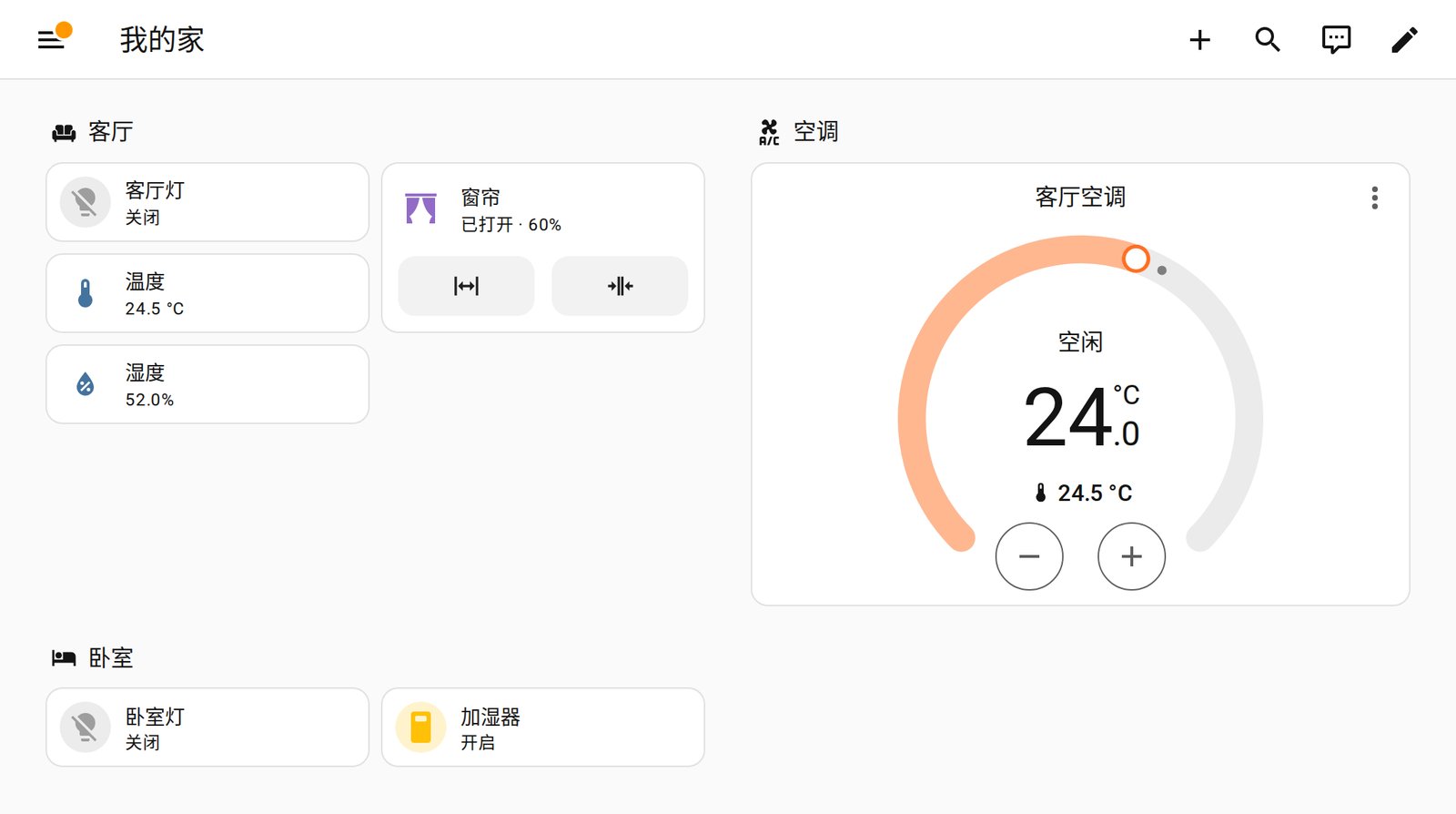
The lights, curtains, air conditioning and sensors in the screenshots are simulated demo devices; the voice input was synthesised by the same reComputer J40, not recorded from a person.
Hardware you need
Four things on site: the Home Assistant host, the voice host, a Zigbee coordinator and a voice terminal.
| Device | Role | Notes |
|---|---|---|
| ARM64 Linux host (64-bit OS, 8 GB RAM) | Runs Home Assistant | One per home |
 reComputer J40 Series (J4012, Orin NX 16GB) reComputer J40 Series (J4012, Orin NX 16GB) | Local speech recognition and synthesis | Downloads the voice models on first start; keep at least 30 GB of disk free |
| Home Assistant Connect ZBT-2 | Brings in Zigbee devices | Plugs into a USB port of the Home Assistant host |
| Home Assistant Voice Preview Edition | Voice terminal in the room: listens and plays replies | One per room |
| SONOFF SNZB Zigbee sensors (optional) | Temperature, humidity and other states | Join through the ZBT-2 |
The Home Assistant host, reComputer J40 and voice terminals share one LAN. For the Apple Home app, the iPhone must be on the same LAN as the Home Assistant host.
Deploying on site
1. Place the devices
The reComputer J40 only runs the voice service, so it can sit in a cabinet or network enclosure and talk to Home Assistant over the LAN; put a voice terminal in each room where people speak.
2. Install the software: three steps
Device-by-device steps are on the reference design page; this is the outline.
- Home Assistant host: deploy Home Assistant with the bundled Chinese, English and Japanese command sentences and the room/device template.
- Voice host: deploy the voice service on the reComputer J40; it downloads the models on first start, then recognition and synthesis run on the device.
- Connect and check: add the Wyoming Protocol integration in Home Assistant pointing at the two ports of the reComputer J40, select it as the assistant's speech-to-text and text-to-speech, then say "turn on the living room light" to a voice terminal and confirm the light turns on.
Interfaces
The voice service is offered to Home Assistant over the Wyoming Protocol; all other automation stays in Home Assistant.
- Home Assistant: add the Wyoming Protocol integration;
seeed-local-voiceappears as speech-to-text and text-to-speech in the voice assistant. - Apple Home / Siri: Home Assistant's HomeKit bridge syncs the devices to the iPhone.
- Your own system: read and write device states through Home Assistant's own API.
| Port | Machine | Content |
|---|---|---|
| HTTP 8123 | Home Assistant host | Home Assistant web UI and API |
| TCP 10300 | reComputer J40 | Speech-to-text service (Wyoming) |
| TCP 10200 | reComputer J40 | Text-to-speech service (Wyoming) |
Performance and measured data
End to end: speech to action
Home Assistant ran on an ARM64 Linux host with 8 GB of RAM and the voice service on a reComputer J40 Series (Orin NX 16GB); input was synthesised speech fed to the Home Assistant voice assistant.
| Metric | Result |
|---|---|
| Chinese and English light commands | 5/5 carried out, all handled locally by Home Assistant (measured) |
| End of speech to recognised text | median 0.12 s, range 0.11–0.95 s (measured) |
Reproduce: sensecraft-solutions/solutions/home_assistant_whole_home (deployment package)
Voice service on its own
Same reComputer J40 Series, voice service called directly, 16 kHz mono synthesised speech as input.
| Text | First reply audio | Recognised | Transcription after end of speech |
|---|---|---|---|
| 打开客厅灯 (turn on the living room light) | 0.122 s (measured) | 打开客厅灯。 | 0.383 s (measured) |
| 关闭卧室的灯 (turn off the bedroom light) | 0.049 s (measured) | 关闭卧室的灯。 | 0.421 s (measured) |
| Turn on the living room light | 0.115 s (measured) | Turn on the living room light. | 0.579 s (measured) |
Through the Wyoming path, two samples were transcribed in 0.13 s (measured).
Reproduce: sensecraft-solutions/solutions/home_assistant_whole_home/assets/docker/docker-compose.jetson-voice.yml
Models and runtimes
| Device | Speech recognition | Speech synthesis | Runtime |
|---|---|---|---|
| reComputer J40 Series | Qwen3-ASR | Matcha-TTS | TensorRT-Edge-LLM / TensorRT |
Settings that affect results:
- Assistant language: Chinese or English, each with its bundled command sentences.
- Device and room names: commands match names in Home Assistant, so "living room light" must match the entity name.
Known degradation
- Entity alias and phrasing divergence: Intent matching relies on entity names and aliases. If a spoken phrase diverges significantly from the configured Home Assistant entity alias, the text may be transcribed correctly without firing an automation.
- Compound and sequential intents: The pipeline is tuned for single-intent home control; compound requests (e.g. "turn on AC and close the blinds halfway") should be issued as separate commands.
- Multi-client voice concurrency: A single J4012 host comfortably serves 1–3 voice satellite endpoints; simultaneous long speech inputs from multiple rooms may cause a slight increase in time-to-first-token.
Data and asset sources
- Screenshots come from Home Assistant 2026.9.3 (Apache License 2.0, home-assistant.io) with simulated devices.
- Voice input was generated by the same reComputer J40's speech synthesis; no human recordings or third-party audio were used.