Bring Voice AI to Your Business System with Face Verification
Face recognition processes biometric data, which is specially regulated in many places — GDPR in the EU and UK, BIPA in Illinois, and elsewhere. Have your deployment reviewed before you enroll a real person; see Biometric Data for what falls to you.
Overview
What we supply is a small robot that stands on your customer's floor, holds a conversation, and knows who it is talking to. An operator walks up with their hands full, says "stock out forty units of the M16 bearings," and the transaction lands in your system attributed to the person the camera recognized — not to whatever name was spoken.
Microphone array, wake word, speech, language model and face recognition arrive as one tuned product, with a fully on-premises build for customers whose audio cannot leave the site. What is left is the part only you can do: connecting it to your platform. That connection is an MCP server in front of your own system — you do not adopt our platform. The reference for building one is our warehouse platform, MIT-licensed and open source:
Face recognition is the load-bearing piece, because a voice command carries no identity: the name a language model writes into a record is whatever the speaker claimed, and saying someone else's name is enough to forge it. Recognition can run in two places, and choosing between them is the main decision this page helps you make.
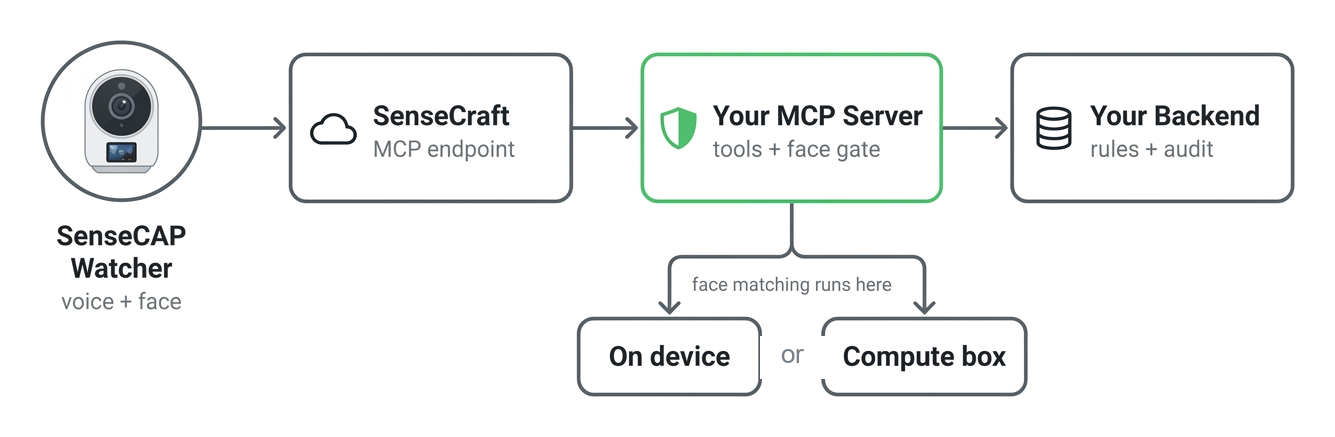
MCP is the Model Context Protocol, the open standard by which a language model calls your functions. XiaoZhi is the open-source voice assistant stack the Watcher runs — wake word, speech, and deciding which of your tools to call. SenseCraft is where you register a device and get the MCP endpoint that connects it to your server.
Features
Voice control without identity is an audit gap. These are the properties that close it.
Identity That Cannot Be Spoken
The operator name is produced by face matching, not by the language model. A speaker who claims someone else's name still writes their own verified identity into the record, because the two values travel in separate fields.
A Working Reference, Not a Black Box
The entire platform is open source — tool layer, verification gate, embedding store and admin screens. You are not integrating against a specification you cannot inspect; you are copying code that already runs.
Runs With or Without a Compute Box
Start on the device's own NPU with no extra hardware, then move recognition to a LAN inference server when you need a larger roster or anti-spoofing. The switch is a configuration change; your MCP tools and your database are untouched.
Per-Operation Enforcement
Rules are set per operation and per warehouse. Require a face for stock-out but not for stock queries, restrict an operation to a named allow-list, or raise the match threshold for high-value moves — without touching integration code.
System Architecture
Put the verification gate in the MCP tool layer, above your business logic. Every gated tool calls the gate first and only then touches your data. Keeping it there — rather than inside each business method — is what makes the guarantee hold uniformly.
- SenseCAP Watcher captures the voice command and, depending on the path you choose, either performs face matching on its own NPU or supplies a camera frame on request.
- Your MCP server exposes your business operations as tools. Before executing a gated tool, it asks your verification endpoint and honours the verdict. The policy must be fail-closed: anything other than an explicit allow blocks the operation.
- Your backend owns the enrolled people, their embeddings, the rules, and the audit log, and answers the verification call with a verdict plus the matched person's name.
- Your existing business API is untouched. The MCP server is a new front door, not a rewrite.
In the reference implementation these are mcp/warehouse_mcp.py (tool layer plus the _enforce_face() gate), mcp/mcp_pipe.py (transport), and the backend's /api/face/verify-mcp with the orchestrator and matcher behind it.
Hardware
Two pieces. SenseCAP Watcher is the device people talk to and the camera that recognizes them — always required. A compute box on the same LAN runs the recognition service, and is what you add when you go past a pilot.
| SenseCAP Watcher for XiaoZhi the device on the floor | A compute box the recognition service |
|---|---|
 |  |
| ESP32-S3 with a Himax WiseEye2 vision co-processor Camera, microphone and speaker · 1.45-inch touchscreen Wi-Fi 2.4 GHz and BLE 5 · Grove I2C expansion | Runs the face model your enrollment and matching use Lifts the 20-person ceiling and adds anti-spoofing Pick the tier that fits — options below |
Strictly speaking the compute box is optional: the Watcher can match faces on its own NPU, which is enough for a pilot. In practice that mode caps you at 20 people per device and cannot tell a face from a photograph of one, so production deployments almost always add the box. Part 2 covers the trade in full.
For getting the Watcher on the network and paired with an agent, see SenseCAP Watcher for Xiaozhi AI.
Try It Before You Build
You do not have to read code to find out whether this fits your product. There are three ways in, in increasing order of effort.
Use the hosted instance — for the voice half. Register yourself at warehouse.seeed.cn and you are talking to a running deployment. Pair a Watcher with it and you can exercise the voice-to-inventory flow without installing anything. Note that face verification is switched off on shared deployments, so this shows you the voice experience, not the identity one.
Deploy the reference design — for the face half. The Smart Warehouse reference design packages the same system for one-click deployment. Because it is a private instance, face verification can be enabled, so this is the shortest path to seeing the actual subject of this page working.
Run it yourself. When you are ready to look inside and start adapting:
git clone https://github.com/suharvest/warehouse_system.git
cd warehouse_system
docker-compose -f docker-compose.prod.yml up -d
Face recognition is off by default in cloud and hosted builds and is enabled per deployment. If you are evaluating the face flow specifically, plan on the reference design or a self-hosted instance rather than a shared one.
Part 1 — Build Your MCP Server
Once you have seen it work, decide how much of it to reuse. There are two honest options.
Option A — Reuse the Bridge, Swap the Data Source
If your domain is warehousing, the fastest path is to keep the reference tool layer and write one adapter class. You inherit the tool definitions, the voice prompt engineering — disambiguation, candidate read-back, quantity confirmation — and the face gate, and you change only where the data comes from.
from .base import BaseProvider


class MyWmsProvider(BaseProvider):
    PROVIDER_NAME = "my_wms"

    def __init__(self, config: dict):
        super().__init__(config)
        # Point the HTTP helpers at your own system.
        self.base_url = config.get("wms_base_url", "").rstrip("/")
        self._token = config.get("wms_token", "")

    def get_auth_headers(self) -> dict:
        return {"Authorization": f"Bearer {self._token}"}
Implement six required methods — resolve_name, query_stock, stock_in, stock_out, search, get_today_statistics — plus two optional ones, query_batch and move_batch_location.
mcp/providers/base.pyThe tool layer passes these arguments positionally, so copy each signature from the code rather than from any prose description. A signature that does not match raises TypeError on the first call.
The reference tool layer falls back to its built-in default Provider whenever yours fails to load or raises — network blip, missing file, bad config — and logs a warning instead of failing loudly. In the reference that is a convenience. In your product it is data misrouting: a transient error sends your customer's inventory writes to the wrong database, silently.
Make adapter failure fail loudly and refuse the operation. This is the one piece of reference behaviour you should not copy.
Option B — Write Your Own MCP Server
If your domain is not warehousing, the six methods will not fit. Define your own tools with FastMCP and keep only mcp_pipe.py as the transport. You then implement the face gate yourself — see Part 3.
@mcp.tool()
def check_order_status(order_id: str) -> dict:
    """
    Check the status of a customer order.
    Use this when the user asks about order tracking or delivery status.

    Args:
        order_id: The unique order identifier (e.g., "ORD-2024-001")
    """
    return api_get(f"/orders/{order_id}/status")
Constraints that come from the voice context, all of them learned the hard way:
- Never call
print(). stdio is the protocol channel; anything written to stdout corrupts the JSON-RPC framing. Uselogging, which goes to stderr. - Keep return values small. A language model reads them aloud. Stay near 1 KB; oversized payloads hit the WebSocket frame limit and drop the connection.
- The docstring is the tool's user interface. The model decides when to call a tool and how to fill its arguments from that text. Describe intent, not just types.
- Restart after every change. The tool list is reported once, at handshake.
The full bridge walkthrough — obtaining an MCP endpoint from SenseCraft, creating an API key, starting the bridge and testing with voice — is on the companion page:
Part 2 — Choose Your Verification Path
Both paths look identical to your MCP tools — same verification call, same verdict. They differ in where the face matching happens, and therefore in roster size, robustness and hardware cost.
Two settings control this, and they are independent:
mode— where inference runs:local(on the device) orlan(on a service you run).verify_frequency— how often verification happens:always, or once per conversation (session).
Any combination is valid.
| Path 1 — On-Device | Path 2 — External Compute Box | |
|---|---|---|
mode value | local | lan |
| Where matching runs | Himax WE2 NPU inside SenseCAP Watcher | Your LAN inference service |
| Extra hardware | None | One compute box per site |
| Enrolled people | 20 per device, a hard limit of the on-device store | No fixed limit |
| Face model | MobileFaceNet, 128-D, INT8 — fixed | Your choice |
| Anti-spoofing / liveness | Not available | Supported, if your service reports it |
| Match threshold | Global | Global, with per-rule override |
| Best for | Pilots and small single-shift teams | Production, larger rosters, multiple sites |
The on-device matcher compares faces; it cannot tell a face from a photograph of that face. Anyone holding up a printed photo of an authorised operator passes. That is acceptable for a pilot or a low-threat environment, but it is not an anti-fraud control — and deterring deliberate misattribution is usually the reason this feature gets funded.
Combined with the 20-person ceiling, this means most production deployments end up on Path 2. Treat Path 1 as the way to prove the workflow, not as the cheap version of the finished system.
Both paths use the same enrollment records, rules and audit log, and nothing in your MCP tools changes when you switch. The move is not free, though: a different model means a different model_tag, so every enrolled embedding has to be re-computed. Keep the source image alongside each embedding and that becomes a background job rather than re-enrolling everyone.
Path 1 — On-Device Verification
The Watcher matches faces itself. The backend pushes a compact face library to the device over the LAN, the device stores it in flash, and at verification time the backend asks the device who it is currently looking at.
You Still Need an Embedding Source
Matching happens on the device, but enrollment does not. Something has to turn each photo into an embedding, and it must come from the same model the device runs — an embedding from any other face model lands in a different vector space and will never match, however good that model is. So this path is not "no inference on your side"; it is "inference only at enrollment, and it must be bit-compatible with the firmware".
The reference implementation ships a host-side mirror of the device pipeline that is bit-exact against the on-device NPU, published under the model tag we2-mfnr6-128-v1. Use it either in-process during enrollment, or as a small HTTP service — set FACE_WE2_SIMULATOR_ENABLED=1 and it speaks the same /infer contract as an external compute box, which keeps your enrollment code identical across both paths.
The simulator routes carry no authentication — never expose that port beyond your own backend. And the INT8 runtime has no musl wheel, so the container needs a glibc base image; Alpine will fail to install it.
The Flow You Build
1. Enroll each operator. Take one or more photos per person, turn each into an embedding with the WE2-compatible model above, and store it against that person.
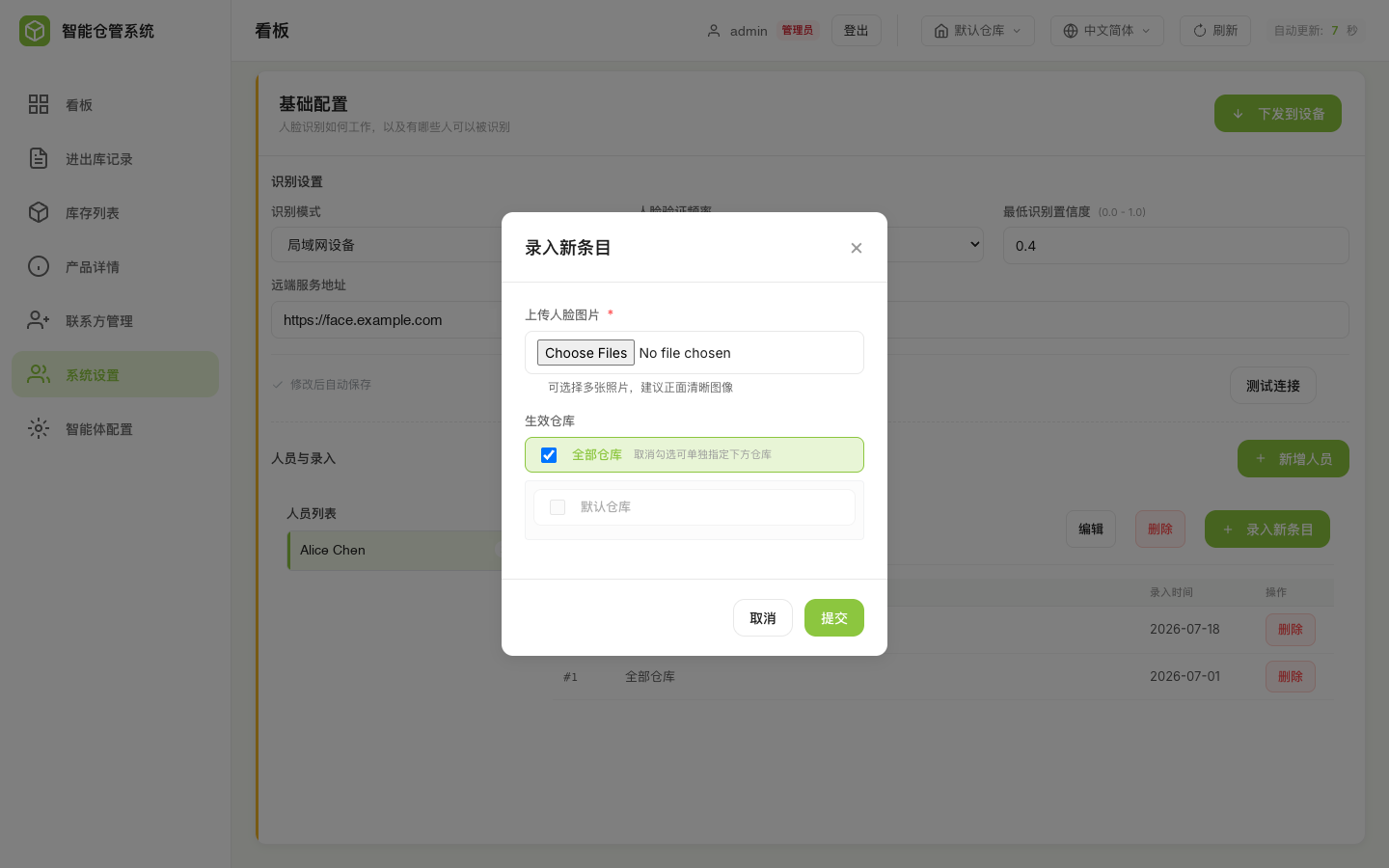
2. Register each physical device with its LAN IP, then push the face library to it. Your system needs somewhere to record device addresses and a push action per device.
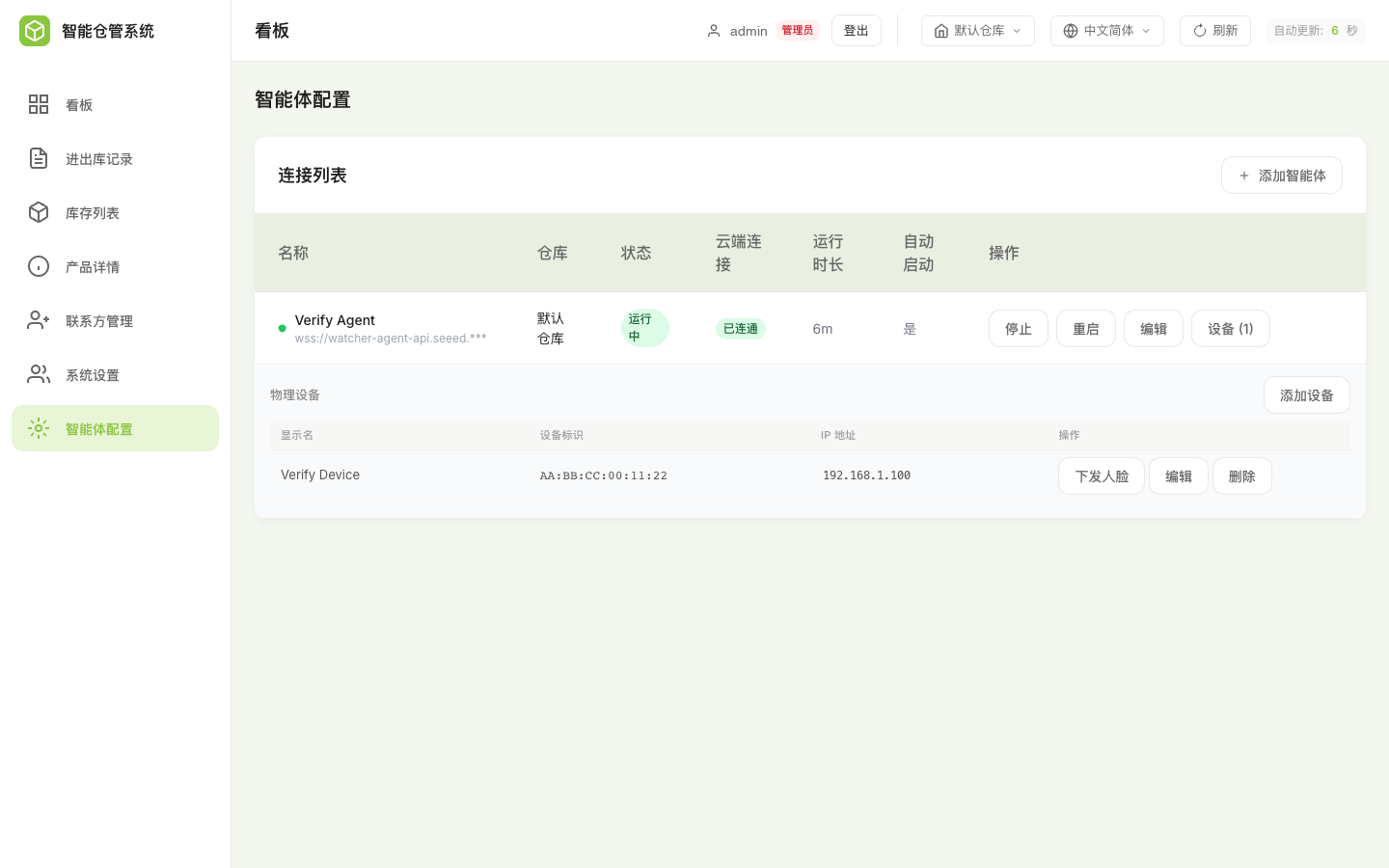
3. Ask the device at verification time using GET /api/face/current-speaker — see The Device Wire Protocol.
Verification asks the device directly. If your backend cannot reach it, the correct result is a denial, not a bypass. Reject public, loopback and link-local addresses when registering a device — a face gate that can be pointed at an attacker-controlled host is not a gate.
Path 2 — External Compute Box
Recognition moves to an HTTP service on your network. The backend obtains an image — supplied by the caller, or pulled from the device's camera — sends it to your service for embedding, and performs the cosine match itself against the enrolled roster.
This removes the 20-person limit, lets you run a larger and more accurate model, and enables liveness detection.
The Contract Your Service Implements
Two endpoints. Both accept Authorization: Bearer <token> when a token is configured, and both must answer within 10 seconds.
POST {endpoint}/infer
Content-Type: application/json

{"image_b64": "<base64-encoded image>"}
// Response
{
  "faces": [
    {
      "embedding": "<base64 float32 little-endian>",
      "det_score": 0.93,
      "live": true,
      "liveness_score": 0.9
    }
  ],
  "face_count": 1,
  "model_tag": "your-model-v1",
  "processing_time_ms": 12.3
}
GET {endpoint}/health
// Response
{"status": "ok", "backend": "...", "model_tag": "your-model-v1",
 "capabilities": ["detect", "embed"], "embedding_dim": 512,
 "embedding_dtype": "float32"}
Behaviour to be aware of:
- When several faces are returned, the one with the highest
det_scoreis used. - Returning
"live": falseblocks the operation as a spoof attempt. - The embedding dimension is yours to choose, but it must stay constant for a given
model_tag. Matching is scoped by tag, so changing your model means publishing a new tag. - Keep the source image with each enrollment. When the tag changes, that is what lets you re-compute the whole roster in the background instead of re-enrolling everyone.
The Flow You Build
Your backend obtains an image, posts it to /infer, and cosine-matches the returned embedding against your enrolled roster, scoped to the matching model_tag. Store the endpoint URL and its token as configuration, and give operators a connection test that calls /health and reports the model tag it found — see The Configuration Surface.
The reference default is a cosine threshold of 0.45, chosen for its bundled 128-D model. That number is meaningless in a different embedding space. Measure the score distribution of your own model on genuine and impostor pairs before picking a threshold, and allow a per-rule override so high-value operations can demand a stricter match.
Choosing a Compute Box
The inference service is a plain HTTP service, so any machine on the LAN that can run your model will do. These are the ready-to-deploy systems, cheapest first.
| reComputer RK3576-30 | reComputer RK3588-30 | reComputer AI Industrial R2135-12 |
|---|---|---|
 |  | |
| Rockchip RK3576 6 TOPS NPU · 8GB LPDDR5 2x GbE — entry point | Rockchip RK3588 6 TOPS NPU · 8GB LPDDR5 2x 2.5GbE, faster cores | Raspberry Pi CM5 + Hailo-8 26 TOPS · 8GB · 32GB eMMC IP40, -20 to 65 °C, DIN rail |
Face recognition is a light workload, so the entry boxes are genuinely enough for a single site — both Rockchip models carry the same 6 TOPS NPU, and the RK3588 buys you faster cores and 2.5GbE rather than more inference throughput. Step up to the R2135 for a dedicated Hailo accelerator in a DIN-rail industrial enclosure.
In this family, a name containing AI Industrial is actively cooled, and the plain Industrial line is fanless. They differ by one word and are otherwise near-identical. The box in the table above has a fan; if the deployment needs passive cooling, order reComputer Industrial R2135-12 instead, which ships the same Hailo-8 with a fanless enclosure.
Going Fully On-Premises
The boxes above cover face recognition. By default the voice half — speech recognition, the language model that picks the tool, speech synthesis — runs in the cloud. For customers whose answer to "does audio leave our network?" must be no, we also supply that whole pipeline to run on site, on a larger box that hosts it alongside the face model. Memory capacity, not TOPS, is what decides the sizing.
| reComputer Robotics J4012 | reComputer Mini J5012 with GMSL | NVIDIA Jetson AGX Thor Developer Kit |
|---|---|---|
 |  |  |
| Jetson Orin NX 16GB Up to 100 TOPS · 16GB LPDDR5 One conversation at a time | Jetson AGX Orin 64GB 64GB LPDDR5 · 64GB eMMC 19-48V input, 10GbE, GMSL and CAN | Jetson AGX Thor, Blackwell GPU 128GB LPDDR5X at 273GB/s Largest model, longest context |
16 GB holds the whole pipeline, so a single Watcher works well. It does not serve concurrent conversations — a second operator talking to a second device at the same moment is what it cannot do. Size for the number of devices that will be in use simultaneously, not the number installed.
Take the J4012 for a single-station site, the Mini J5012 when the box also has to run off vehicle or plant power and talk to industrial buses, and Thor when you want concurrency and the largest model one machine can serve. Either way this is a combined hardware and software offering — talk to us about the on-site build rather than assembling it yourself.
Part 3 — What You Implement
Five pieces live on your side. The reference implementation covers the first four, so treat this section as a map of what to read and reproduce.
1. The Verification Endpoint
Your MCP server calls one endpoint before every gated tool, and your backend answers it. Keep the shape below and the reference tool layer works against your system unchanged.
Request:
POST /api/face/verify-mcp
{
  "operation": "stock_out",        // required — the rule key
  "warehouse_id": 1,
  "request_id": "…",               // for audit correlation
  "image_b64": "…",                // server-inference path
  "embedding_b64": "…",            // or a precomputed embedding
  "embedding_model_tag": "…",
  "device_id": "…"                 // from the transport, never from the model
}
Response — always these five keys:
{
  "status": "pass" | "deny" | "skipped",
  "failure_reason": "…",           // null when it passed cleanly
  "confidence": 0.87,
  "matched_subject_id": 12,
  "matched_subject_name": "Zhang San"
}
pass and skipped allow the operation; deny blocks it.
Treat every error — 404, timeout, malformed body — as deny, never as an allow. And keep your handler well under the 18-second client timeout; past that the caller records a transport failure and denies anyway. Budget for the device round trip inside it: roughly 6.5 s to read the current speaker, 8 s to pull a frame, 10 s to reach a LAN inference service.
Two status values that matter for adoption: return skipped when the feature is off or no rule requires a face for that operation. That makes the gate transparent, so you can ship the MCP server first and turn verification on later without touching tool code.
2. The Device Wire Protocol
This is the part you cannot derive from your own system, because it is spoken by the device firmware. Three endpoints, all over plain HTTP on the LAN.
Push the face library (Path 1 only) — POST http://<device-ip>:80/api/face/batch-update. Note the port is fixed at 80.
{
  "model_tag": "we2-mfnr6-128-v1",
  "embedding_format": "fp16",
  "faces": [{"name": "Zhang San", "subject_id": 12, "embedding_b64": "…"}],
  "match_threshold": 45,              // int, 0-100
  "identify_mode": "local",           // or "lan"
  "identify_endpoint": "…",
  "identify_token": "…",
  "pull_token": "…"                   // per-device, you generate it
}
Embeddings go on the wire as fp16 — 256 bytes for 128 dimensions — while your database keeps the canonical float32. A mismatched model_tag rejects the whole batch.
Read the current speaker — GET http://<device-ip>/api/face/current-speaker?fresh=0, header X-Face-Token: <pull_token>, returns {valid, name, subject_id, similarity, mode, age_ms}. Require valid to be strictly true.
Pull a camera frame — GET http://<device-ip>/api/face/capture, same header, returns image/jpeg.
batch-update has no auth on the device side. Anyone on the same network can overwrite the face library. Put these devices on a trusted or isolated segment.
3. The Configuration Surface
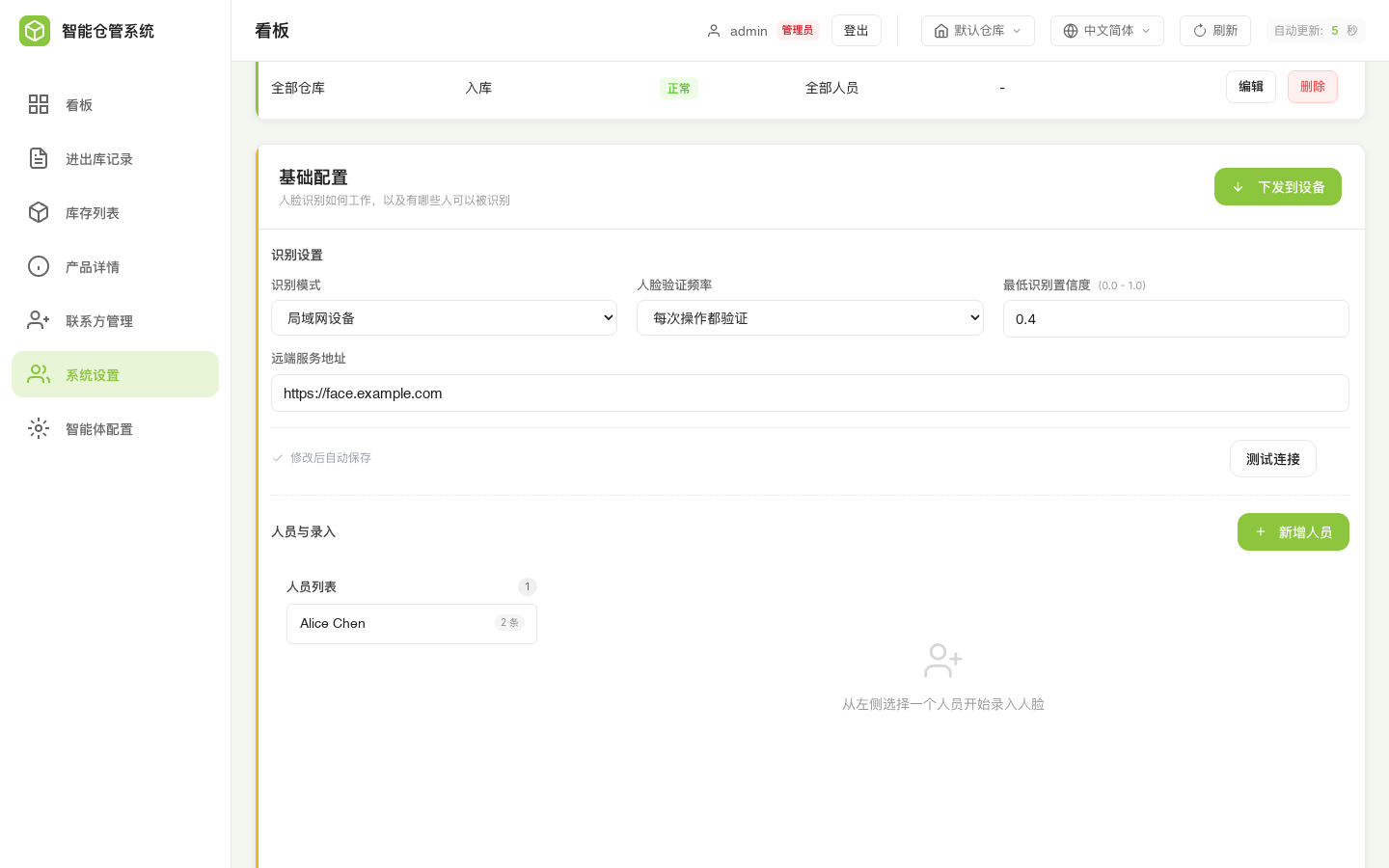
Someone has to choose the mode, the threshold and which operations require a face. You need screens for this. The reference implementation's screens are shown here as an illustration of the decisions your own UI must expose — you are not logging into ours.
Recognition mode, verification frequency, confidence threshold and the remote endpoint:
Per-operation rules, scoped by warehouse, with an allow-list and an optional threshold override:
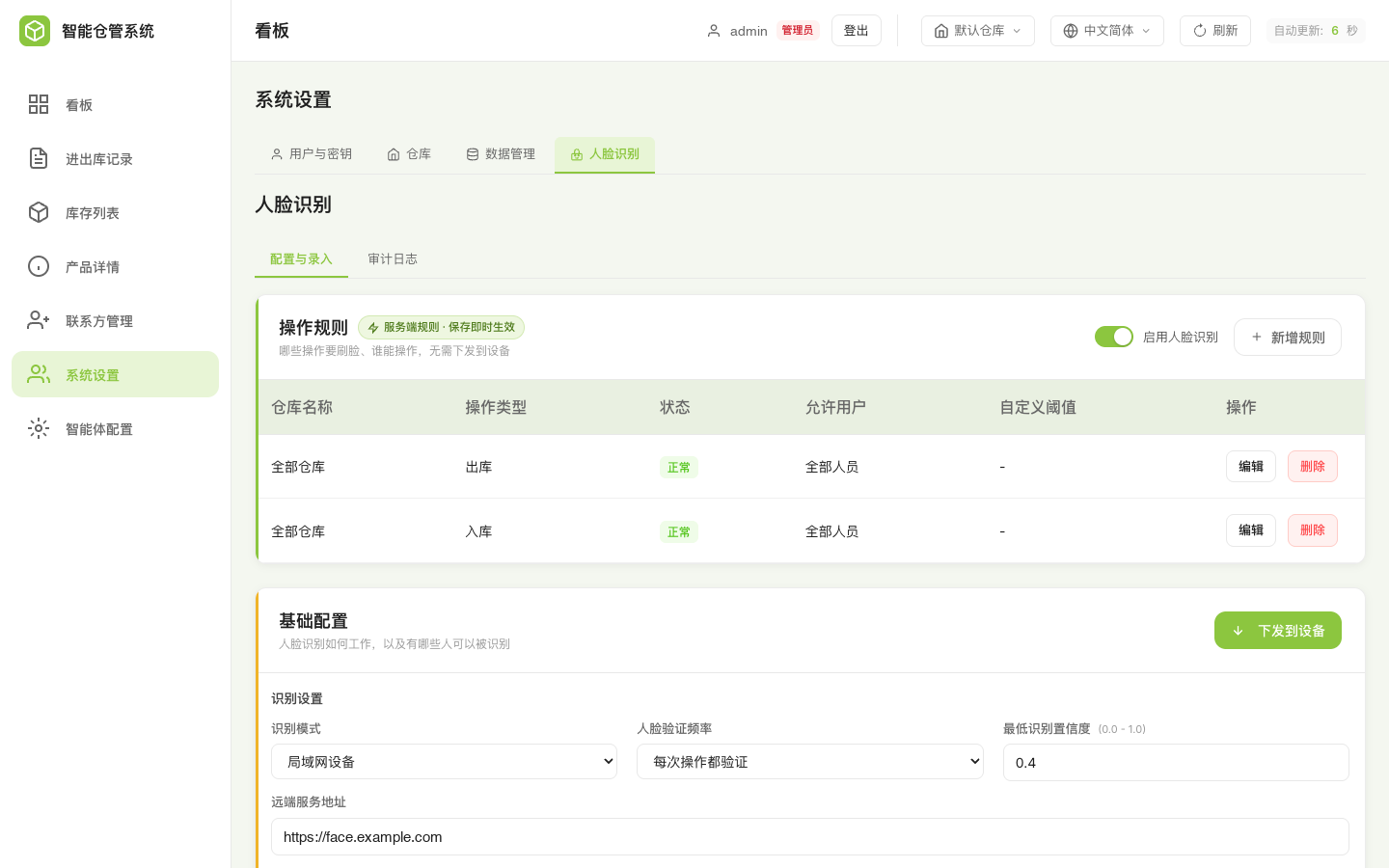
A rule set worth copying:
| Rule key | Covers |
|---|---|
stock_in | Stock-in |
stock_out | Stock-out |
move_batch_location | Batch relocation |
query | All read operations — stock query, batch query, search, statistics |
An empty allow-list means every enrolled and active person is accepted. A non-empty one restricts the operation to those people, so a confident match on anyone else is still denied.
4. The Audit Trail
Log every decision, not just the failures — the passes are what prove an operation was authorised. Record the matched person, the confidence, the verdict and the reason.
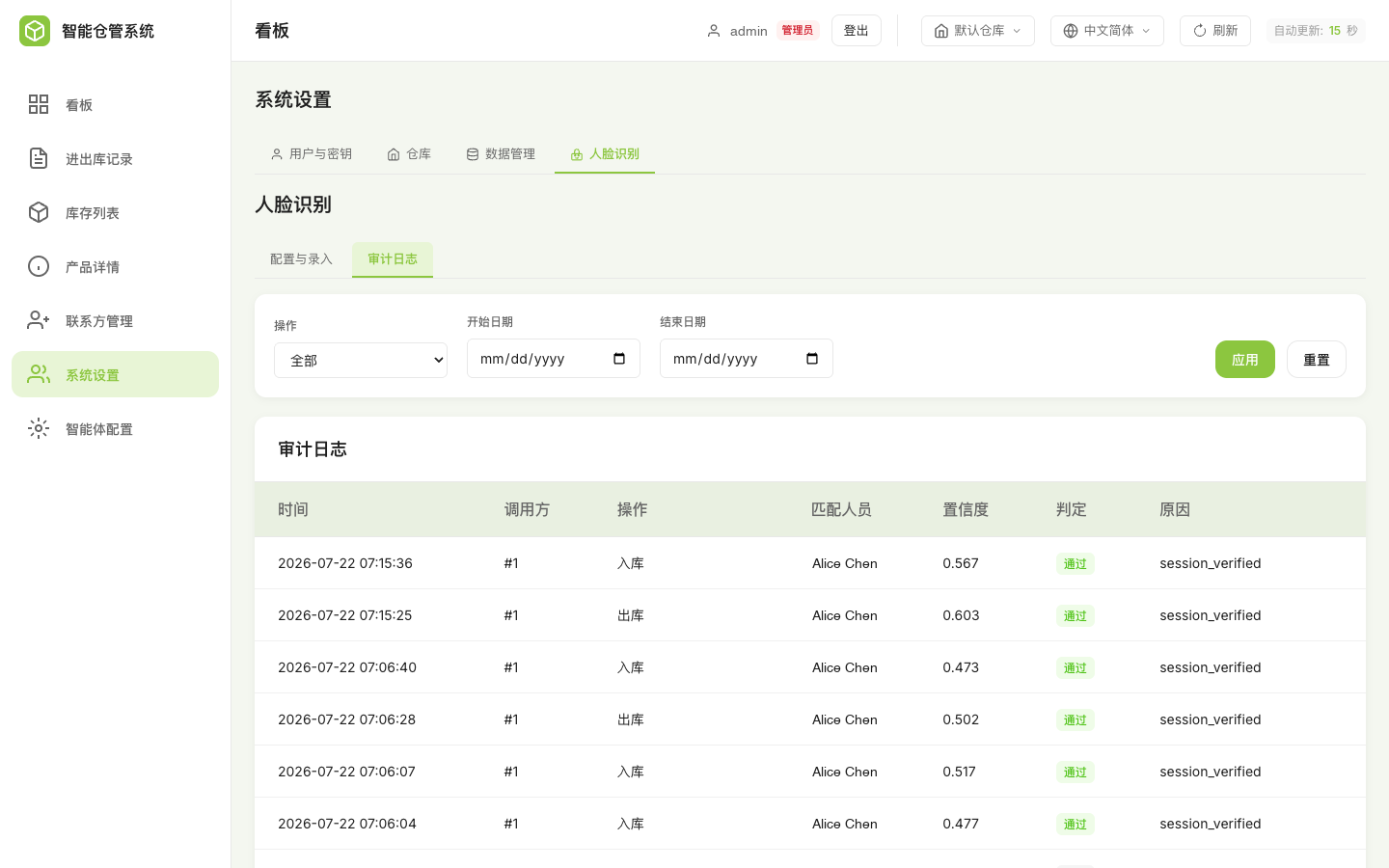
In your transaction table, keep the verified name in its own column:
-- Snapshot of the operator name resolved by face recognition.
ALTER TABLE <your_inventory_transactions>
  ADD COLUMN actual_operator VARCHAR(255) NULL;
Three constraints, and the third is the whole point:
- It must be nullable. When verification is disabled, or no rule requires it, the value is
NULL. - Store the name, not a foreign key — a snapshot, so the record still reads correctly after the person is deleted.
- Never merge it with the operator field the model fills in. That field reflects what the speaker said and can be false. This one is what the camera saw. Merging them collapses a trusted value into an untrusted one and throws away the only distinction that makes face verification worth building.
5. Biometric Data
Because you build and host this side, you are the data controller. Four decisions to make deliberately rather than inherit:
- Lawful basis and consent for each enrolled person. Employee biometrics at work can also engage labour law and works-council consultation in some jurisdictions.
- Retention and deletion. Deleting a person must remove their embeddings, not just deactivate a row.
- Whether to keep enrollment photographs. This page recommends keeping the source image so the roster can be re-computed when the model changes. That is an operational convenience with a privacy cost — your call, and worth making explicitly.
- Treat embeddings as personal data. They are numeric, but they identify a person and are regulated as such in most jurisdictions.
A Trap Worth Knowing
In the reference implementation the face gate and the data Provider read the same api_base_url configuration field.
Point api_base_url at your own system without also implementing /api/face/verify-mcp there, and the gate gets a 404. Because the policy is fail-closed, every tool stops working, including read-only queries — a confusing failure, since nothing about the symptom points at face recognition.
api_base_url points at | Gate result | Consequence |
|---|---|---|
Your system, no /face/verify-mcp | deny · http_404 | All tools blocked |
| An unreachable address | deny · transport_error | All tools blocked |
| Empty string | skipped · no_api_base | Tools run, but the Provider loses its base URL too |
| A backend that implements the endpoint | Decided by your rules | Correct |
Two ways out. Implement the endpoint in your own backend, which is the destination anyway — return a constant skipped stub at first if you are not ready to verify:
@app.post("/api/face/verify-mcp")
def verify_mcp():
    return {"status": "skipped", "failure_reason": "feature_disabled",
            "confidence": None, "matched_subject_id": None,
            "matched_subject_name": None}
Or split the fields, keeping api_base_url for the gate and reading your own address from a custom key:
provider: "my_wms"
api_base_url: "http://your-backend:2124/api"           # serves the face gate
auth:
  type: api_key
  key: "wh_xxx"
wms_base_url: "https://your-wms.example.com/api/v1"    # your business API
wms_token: "your-token"
Then override base_url in your Provider's constructor, as in Part 1. The two credential sets stay independent.
FAQ
1. A push reports zero faces sent
The face library is filtered by model tag. Only enrollments carrying we2-mfnr6-128-v1 are eligible for an on-device push, so enrollments created against a remote endpoint with a different tag are silently excluded — re-enroll, or let the background re-computation finish.
2. actual_operator is always empty in our records
Expected when no rule requires a face for that operation, or when verification is switched off. Create a rule for the operation to start recording it.
3. We swapped in our own data source but writes still land in the reference database
The reference tool layer falls back to its default Provider on any error and logs a warning rather than failing loudly. Check the MCP log for that warning — and see Option A on changing this behaviour before you ship.
4. Verification is slow or intermittently denied
Three timeouts bound the chain: 18 seconds from the MCP client to the backend, 10 seconds from the backend to a remote inference service, and roughly 6.5 to 8 seconds from the backend to the device. These are ceilings, not typical latencies — measure your own, because this is a person standing at a terminal waiting. If your inference service approaches 10 seconds, reduce the model size or the image resolution.
5. Can we verify once per conversation instead of per operation?
Yes. Set the verification frequency to session and the first successful check is cached for that conversation, up to a 10-minute ceiling.
Understand what you are trading: for those 10 minutes, every operation in the conversation is attributed to the person matched once at the start. Anyone who continues that conversation inherits the identity. Use session where the win is avoiding repeated prompts during a long picking run, and always wherever an individual operation must be independently proven.
Resources
- warehouse_system on GitHub — the reference implementation. Start with
mcp/README.mdfor the integration layer,mcp/providers/base.pyfor the adapter contract, and the backend's face orchestrator for the verification logic - Bring Voice AI to Your Business System (MCP) — the MCP bridge setup this page builds on
- Face Recognition with MCP — the device-level walkthrough: flashing the firmware, standing up a Hailo-accelerated recognition service, and managing the face database
- MCP Endpoint Setup Guide — creating and managing MCP endpoints
- Model Context Protocol — protocol specification