Retail People-Flow Heatmap: Build, Deploy, and Measured Results
The heatmap records only where people are. It does not identify anyone and does no face matching. Detection accuracy has not been evaluated; see Performance and measured data.
What this solution does
A camera looks down over the floor, locates every person in the frame and keeps tracking them, then writes where people stop, how long they stay and how many enter and leave into a local database, shown on a Grafana dashboard and a heatmap. Built for retail stores, chain-store pilots, exhibition halls, and any indoor space where layout decisions depend on where people walk.
Sites that already have IP cameras keep them and add one AI host that does the detection. Sites with no cameras use a reCamera, where detection runs inside the camera. Video is processed on site and the backend stores only numbers. On a live RTSP stream, reComputer R2000 series (Hailo-8) measured 14.3 FPS (15 FPS source), and reComputer RK3588 / RK3576 series measured 13.2 / 13.3 FPS.
- Open-source implementation (reCamera route): github.com/xr686/reCamera-with-Heatmap
- Open-source implementation (IP camera + Jetson route): github.com/bleaaach/yolo11-grafana-influxdb
- Picking a configuration and deploying: reference design page
Processed on site, backend stores numbers
Detection runs on the camera or the AI host. What reaches the backend is positions as percentages, counts and dwell times. Live preview goes through the local video gateway and stays on your network.
Use the cameras you have
Any IP camera with an RTSP stream works, whatever the brand; nothing on the wall needs replacing. With no cameras, a reCamera with the retail analytics app installed starts producing data.
Five hardware paths, one dashboard
reCamera 2002, reCamera Pro, Rockchip, Hailo-8 and Jetson all publish the same message format. Several stores can mix hardware and still report to one backend.
No internet needed once deployed
Broker, database and dashboard all run on the local backend. The internet is used only during deployment to pull images and models.
What the devices actually output
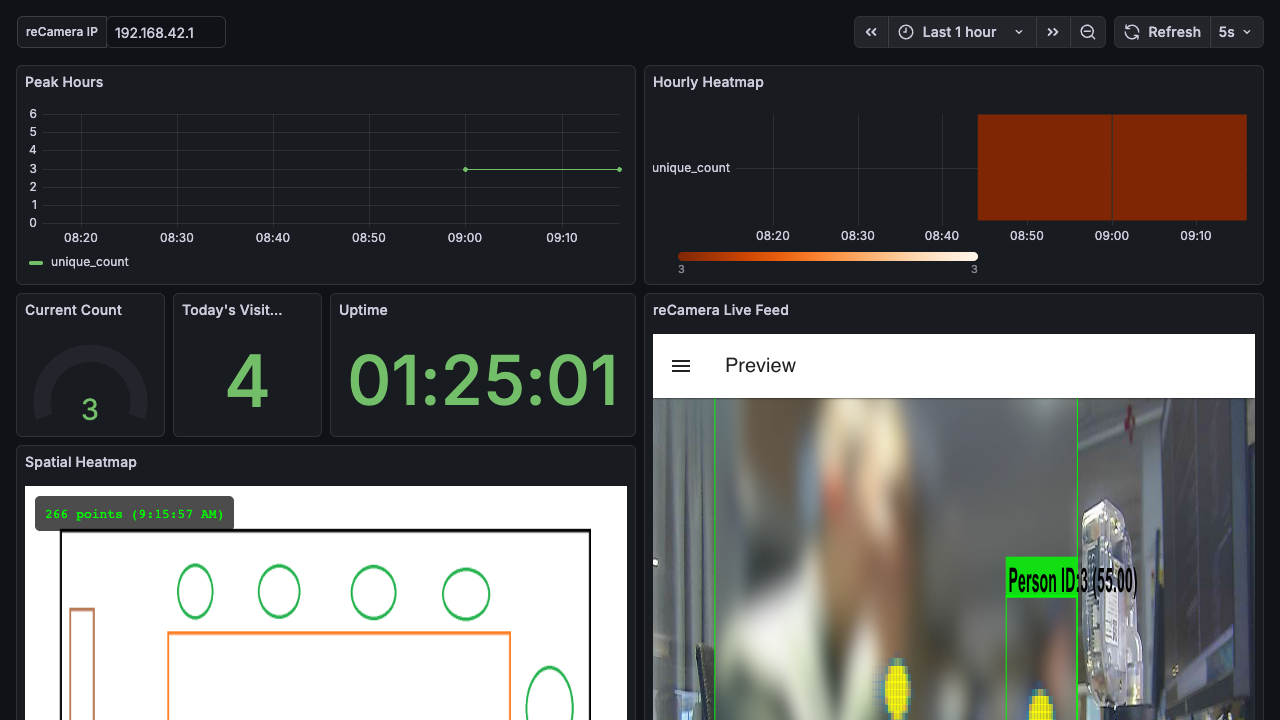
Results from every detector land on one Grafana dashboard: the live camera feed on the left, and panels aggregating occupancy, dwell states and entry/exit counts over time.
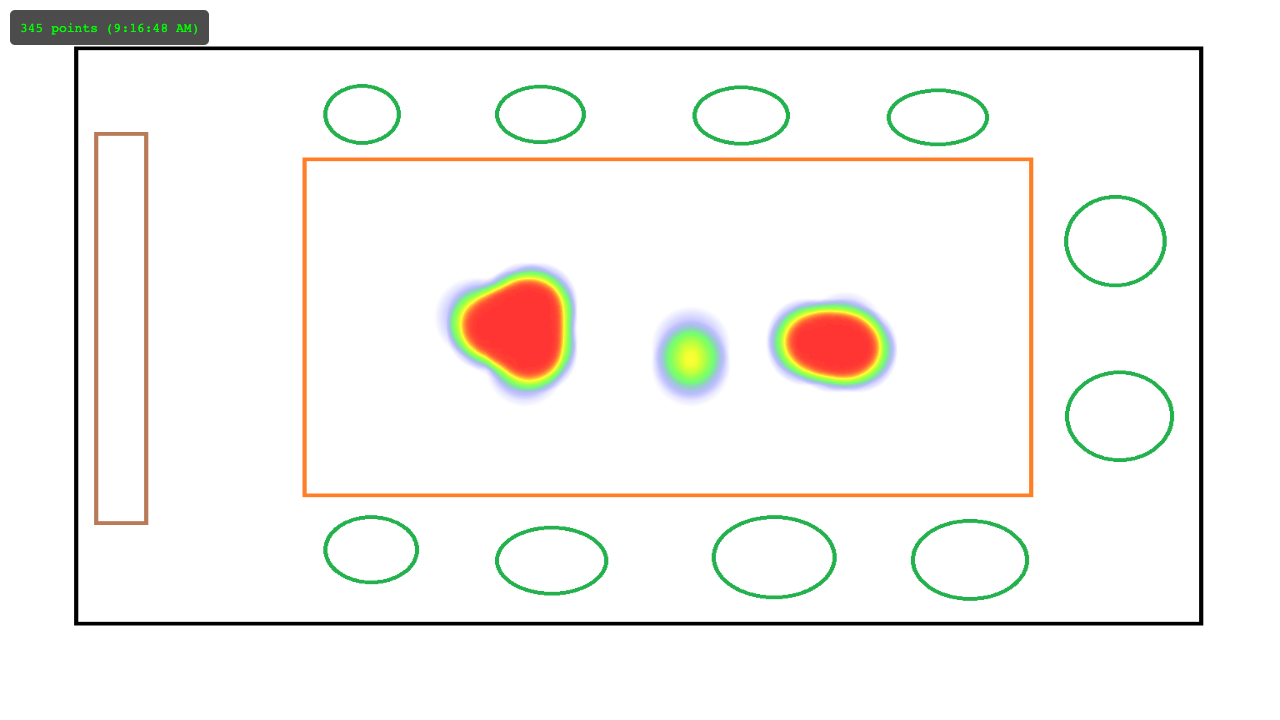
The same position data also draws a heatmap. Darker areas are where people stayed longer or passed more often. By default it overlays the camera view; after calibration it can overlay your store floor plan.
What hardware you need
Three things: a camera that sees the floor, something that detects people, and one backend that stores the data and draws it. The backend is shared by every route.
① Camera — if you already have IP cameras with an RTSP stream, keep them; any brand works and nothing on the wall changes. If you have none, reCamera 2002 / reCamera Pro put the camera and the compute in one unit, running detection, tracking, dwell states and entry/exit counting inside the camera.
② Detection host — needed only on the IP-camera routes. Every host runs the same tracking and dwell logic; the difference is the accelerator.
③ Dashboard backend — runs the MQTT broker, InfluxDB, Grafana and the video gateway. It can be an always-on computer or a reComputer R1100; on the IP-camera routes it can share the box with the detector.
| Device | What it does | When to pick it | |
|---|---|---|---|
 | reCamera 2002 camera and compute in one, 1080P | Detection + tracking + counting | Close to the counted area, small coverage, fastest way to get one stream running |
 | reCamera Pro camera and compute in one, 4K | Detection + tracking + counting | Farther away, large coverage, where distant people still need enough pixels to box |
 | reComputer RK3588 series the same preset also supports reComputer RK3576 series | Detection host | You already run Rockchip boards; video decode runs in hardware |
 | reComputer R2000 series (R2035-12, Hailo-8) | Detection host | A fanless industrial box for a cabinet or a utility closet |
 | reComputer Super J4012 and reComputer J50 series | Detection host | Several cameras on one host |
 | reComputer R1100 series (R1124-10) | Dashboard backend | No always-on computer on site to run the dashboard |
Other prerequisites: Docker on the backend machine, at least 2 GB of free disk, ports 1883, 3000, 8080 and 8086 free, and cameras and backend on the same network segment so ONVIF camera discovery works.
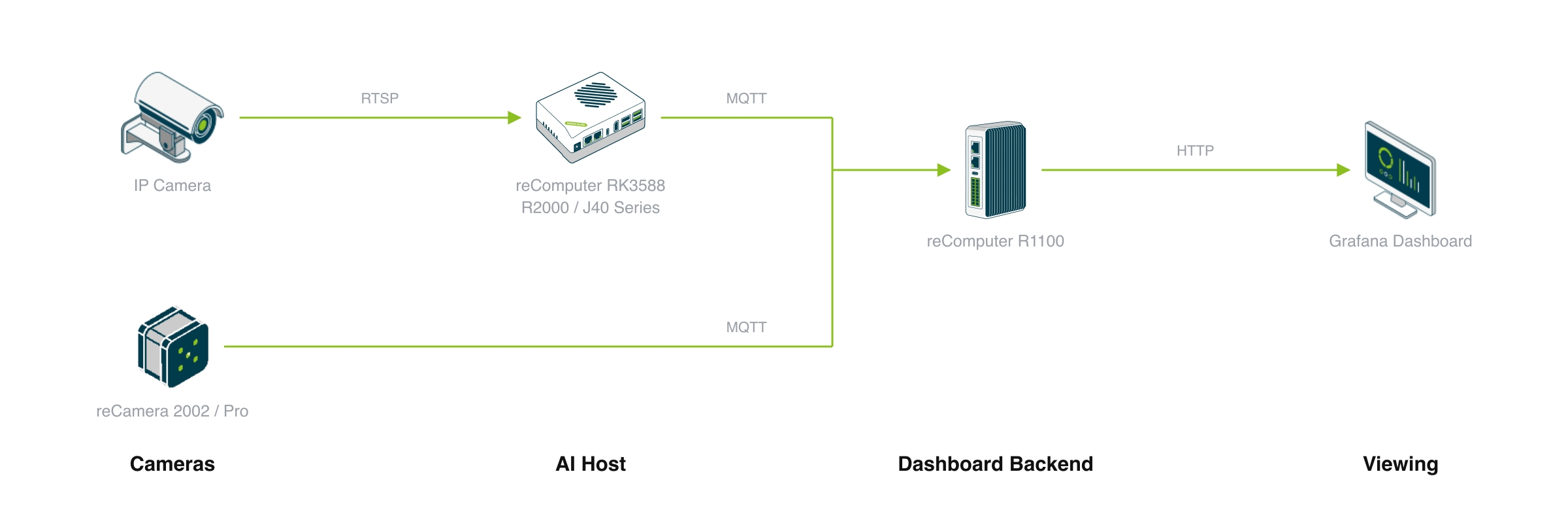
Device layout: IP cameras hand RTSP video to the AI host, while a reCamera runs detection inside the camera; detectors output only position percentages and counts, no images; every detector reports to one backend (MQTT broker, InfluxDB, Grafana, go2rtc video gateway), so one dashboard covers every camera. Live preview is the browser pulling from the camera through the local video gateway, not through the backend database.
Negative Selection Boundaries
- Mounting Height and Field of View: reCamera 2002 is suited for 3–4 m ceilings; for heights above 5 m or large atriums, do not pick 2002, pick reCamera Pro with 4K resolution.
- Identity Tracking: This solution generates anonymous density heatmaps only, not face recognition or person re-identification.
Installing on site
Two parts: mount the camera correctly, then install the software.
1. Mounting the camera
Mount the camera high, looking down at the area to count, 3–5 m from the target. People should take up at least about 30 × 30 pixels in the frame, otherwise they cannot be boxed. Eye-level views, angles with heavy mutual occlusion, and distant shots where people are too small all cause missed detections.
2. Installing the software — three to four steps
Per-device instructions live on the reference design page, where you answer a few questions about the site and download the matching application package.
- Bring up the backend — start the broker, InfluxDB, Grafana and the video gateway on the always-on machine. This step discovers ONVIF cameras on the same segment; for cameras on another segment, enter the RTSP URLs in the deployment form.
- Make the detector publish — on the reCamera routes, install the retail analytics app on the camera; on the IP-camera routes, deploy the detector to the AI host. Both ask for three things: the MQTT broker address (the machine from step 1), an installation name and a camera ID. Use one installation name per store and one ID per camera; that is how the dashboard tells devices apart.
- Calibrate the floor plan (optional) — open the heatmap on port 8080, upload a camera snapshot and the store floor plan, and click four matching points on each. Pick widely spaced landmarks such as pillars, doorways and wall corners. Calibration is saved on the server, and several cameras can share one plan. Skip this if the camera view is all you need.
- Open the dashboard — Grafana on port 3000, the live heatmap on 8080, the video gateway on 1984.
Upstream states 15 minutes end to end. The Jetson route is the exception: the first deployment builds a TensorRT engine on the device, which takes 2–5 minutes and is reused afterwards.
Which interfaces it exposes
Every detector publishes the same message format to the backend broker. Three ways in, depending on what you already run:
- The built-in dashboard is enough — nothing to integrate. The Grafana panels already cover people-flow trends by hour, day and week, plus dwell and entry/exit counts, and panel data can be exported directly.
- An existing BI or analytics system — subscribe to the MQTT results topic for live data, or query InfluxDB on the backend for history.
- Your own system or API — subscribe as above; the payload carries zone counts plus each tracked person's position and dwell time, enough to draw your own panels. Live frames come from the local video gateway on port 1984.
Full topic and payload reference
| Topic / port | Content | Retained |
|---|---|---|
<site>/retail-vision/results/<camera-id> | One batched JSON per second: zone counts (occupancy, browsing, engaged, needs assistance, entries, exits, average dwell) plus each tracked person's track_id, position and dwell time | No |
<site>/retail-vision/status | online / offline | Yes |
| MQTT broker 1883 | Results from every detector | — |
| Grafana 3000 | People-flow trends by hour, day and week; dwell and entry/exit counts | — |
| Live heatmap 8080 | Heat overlay on the camera view or on your floor plan; the gear icon opens calibration | — |
| Video gateway 1984 | Camera discovery and live preview | — |
<site> and <camera-id> are set in the deployment form and accept letters, digits, hyphens and underscores only.
Positions are published as percentages of the frame. Each detector converts the centre of the tracked box into a percentage before publishing, so one floor-plan calibration holds at any camera resolution; swapping in a higher-resolution camera does not require recalibrating.
Messages are batched once per second. On reCamera this is --mqtt-interval-ms 1000; without it the app publishes per frame (about 10 messages per second per camera). On the AI-host routes it is publish_hz: 1.0 in the detector config. With several cameras on one site, whether the broker keeps up depends on this parameter.
reCamera Pro does not output average dwell time, so the Avg Dwell panel stays empty on that route. Other metrics are unaffected.
Performance and measured data
All four AI-host routes run the same tracking and dwell logic; the detection model and runtime differ per accelerator.
What follows is measured device data for throughput and message rate, from single-stream live sources on the RK and Hailo routes.
Which devices were measured
| Device | Accelerator | Model delivered | Verification status |
|---|---|---|---|
| reComputer RK3588 series | RK3588 NPU | YOLO11n rawhead FP16 | ✅ Live stream on hardware |
| reComputer RK3576 series | RK3576 NPU | YOLO11n rawhead FP16 | ✅ Live stream on hardware |
| reComputer R2000 series (R2135-12, Hailo-8) | Hailo-8 | YOLOv8n INT8 | ✅ Live stream on hardware |
| reCamera 2002 | SG2002 NPU | YOLO11n INT8 | Deployment verified |
Performance detail
End-to-end frame rate on a live stream
The input is real RTSP footage. The measurement covers the full path from camera frame to results arriving at the backend: decode + detection + tracking + dwell logic + MQTT publish, one stream per host.
| Detection host | Model | Tracking rate | MQTT message rate | Source |
|---|---|---|---|---|
| reComputer R2000 series (R2135-12, Hailo-8) | YOLOv8n INT8 | 14.3 FPS | 0.94 msg/s | Measured (440 frames / 30.7 s) |
| reComputer RK3588 series | YOLO11n FP16 | 13.2 FPS | 1.00 msg/s | Measured |
| reComputer RK3576 series | YOLO11n FP16 | 13.3 FPS | 1.00 msg/s | Measured |
- The two RK boards: MPP hardware decode was active and the message rate was 1.00 msg/s.
- The Hailo 14.3 FPS is limited by the source frame rate. Unpaced, the same pipeline reached 234 FPS, roughly 15× the 15 FPS source.
- The difference between 0.94 and 1.00 msg/s comes from how it was averaged: both target one message per second, and 0.94 is the average over a 30.7 s window.
- Reproduction: End-to-end and standalone inference benchmarks are located in repository
benchmarks/run_heatmap_bench.sh; run./run_heatmap_bench.sh --profile rk3588.
Standalone inference speed
| Detection host | Model | Per inference | Source |
|---|---|---|---|
| reComputer J40 / J50 series | YOLO11n FP16 (TensorRT) | 9.7 ms | Standalone inference figure provided upstream |
| reCamera 2002 | YOLO11n INT8 | about 10 FPS | In-camera rate stated in the upstream app notes |
These two rows do not compare directly with the end-to-end table above: 9.7 ms excludes decode, tracking and publishing, and about 10 FPS is the in-camera processing rate, not the rate at which results reach the backend.
Multi-stream
Every number above came from one host watching one camera. "Several cameras on one host" is the division of labour between presets (the Jetson route takes that role). One backend can accept any number of detectors at the protocol level, separated by installation name and camera ID; the limit is on the AI-host side.
Runtimes and key parameters
| Detection host | Detection model | Precision | Runtime | How the model is delivered |
|---|---|---|---|---|
| reCamera 2002 | YOLO11n (yolo11n_detection_cv181x_int8.cvimodel) | INT8 | SG2002 camera NPU | Shipped with retail-vision_1.5.1_riscv64.deb, verified by sha256 |
| reCamera Pro | Bundled with the App Center retail-vision app | Set by the app | Camera NPU | Not included in the package; install it from the device App Center first |
| reComputer RK3576 / RK3588 series | yolo11n_pose_rawhead_fp16.<board>.rknn | FP16 | RKNN | Delivered per board and verified by sha256; the wrong board model will not load |
| reComputer R2000 series (R2135-12, Hailo-8) | YOLOv8n (yolov8n.hef) | INT8 | HailoRT 4.21 + GStreamer | Fetched from the Hailo Model Zoo v2.15.0 hailo8 directory, pinned by sha256 |
| reComputer J40 / J50 series | YOLO11n (yolo11n.engine) | FP16 | TensorRT | The engine is built on the device (ultralytics export, half=True, imgsz=640): 2–5 minutes the first time, reused afterwards |
- Hailo is locked to HailoRT 4.21. Deployment checks the libraries on the board and stops, printing the installed version, if they do not match. One Hailo-8 runs one application at a time; if another Hailo app holds the accelerator, the detector will not start.
- RK boards need the NPU driver present (
/usr/lib/librknnrt.so). - On reCamera the analytics app takes the camera exclusively: installing it disables Node-RED autostart, and the two cannot run together.
Parameters that change deployment behaviour (shipped values on the RK and Jetson routes):
dwell_min_duration(1.5 s) — a person counts as dwelling only after moving slower thandwell_speed_threshold(10.0) for this long, so turning around in front of a shelf does not count.dwell_assistance_threshold(20.0 s) — dwell time beyond this enters the needs-assistance state.avg_person_height_m(1.7) — converts the speed threshold from pixels to real distance. Where the average height of the people on camera differs substantially from 1.7 m, dwell detection becomes looser or stricter across the board.
Known degradation
- Placement. The camera must be mounted high, 3–5 m from the target, with people at least about 30 × 30 pixels in frame. Eye-level views, distant shots and heavy occlusion all prevent people from being boxed, and a person who is not detected leaves the heatmap blank with no error raised.
- Floor-plan calibration is four manually clicked points. Reference points that are close together or collinear amplify positional error. Moving or re-aiming the camera invalidates the calibration and it has to be redone — a wrong calibration raises no error, it just draws the heat somewhere else.
- reCamera Pro's Avg Dwell is always empty, because the app does not output that field.
- On RK, hardware decode falls back to software decode when it is not active. A clearly low frame rate together with a saturated CPU is the symptom; the Jetson route does not fall back (
fallback: none).
Sources and licences
- Detection models — the Hailo route uses
yolov8n.heffrom the Hailo Model Zoo v2.15.0 hailo8 directory, pinned by digest rather than re-hosted. The RK route reusesyolo11n_pose_rawhead_fp16.<board>.rknnalready published by fall_detection. The Jetson route exportsyolo11n.engineon the device withultralytics. - Model licensing — the detectors use YOLO-family models (YOLO11n, YOLOv8n). Ultralytics YOLO models are AGPL-3.0 unless commercially licensed, so confirm model licences, or substitute a compatibly licensed model, before shipping a product.
- Backend components — the MQTT broker, InfluxDB, Grafana and the go2rtc video gateway are deployed from their official images. Grafana's default credentials are
admin/admin; change them right after commissioning. - Images — the Grafana dashboard and heatmap screenshots come from the upstream solution asset library; the architecture diagram is drawn in-house. No identifiable person appears in the demo imagery.