Unmanned Store Face Access: Hardware, Face Library Distribution and Measured Boundaries
Not a certified security product and not a life-safety system. The reference face weights (InsightFace buffalo_l) are licensed for non-commercial research only; a commercial deployment needs a commercially licensed model.
What this solution does
A camera at a door nobody is standing behind recognises a face, requires a passive liveness check to pass, checks the person against the current face library, the schedule and the blocklist, and — only if all of that holds — pulses a relay that switches a lock running on its own 12/24 V supply. Every decision, allowed and denied alike, is published on MQTT and appended to a hash-chained audit log the console can verify.
It fits an unmanned or partially staffed shop's staff entrance, stock room or back door; a shared office where the roster changes weekly and enrolment has to be self-service; an equipment room where the record of who went through matters more than throughput; and a site that already has RTSP cameras at the door and does not want to replace them.
- Selection and deployment: reference design page
- Upstream repository: not published; the code is in an internal repository.
Opens offline (three of five presets)
Recognition, liveness, the decision and the unlock all happen at the door. A device that loses the cloud keeps opening on the last face library it loaded successfully. In the two MQTT-relay presets the unlock signal crosses the network to the relay.
Face library distributed and verified automatically
Devices poll for new versions, download in chunks, check per-file SHA-256 and the manifest signature, then switch atomically. Any failure keeps the previous version. Measured activation on a standard reCamera: p50 491.6 ms.
Rollback cannot restore a deleted person
Removing someone produces a new version without them and writes a deletion barrier. A rollback to any version that still contains that person is refused by name.
Every decision is audited
Allowed and denied decisions both go to MQTT and into a hash-chained audit log. Editing any past record breaks the chain, and the console's chain check reports it.
What the device at the door sees
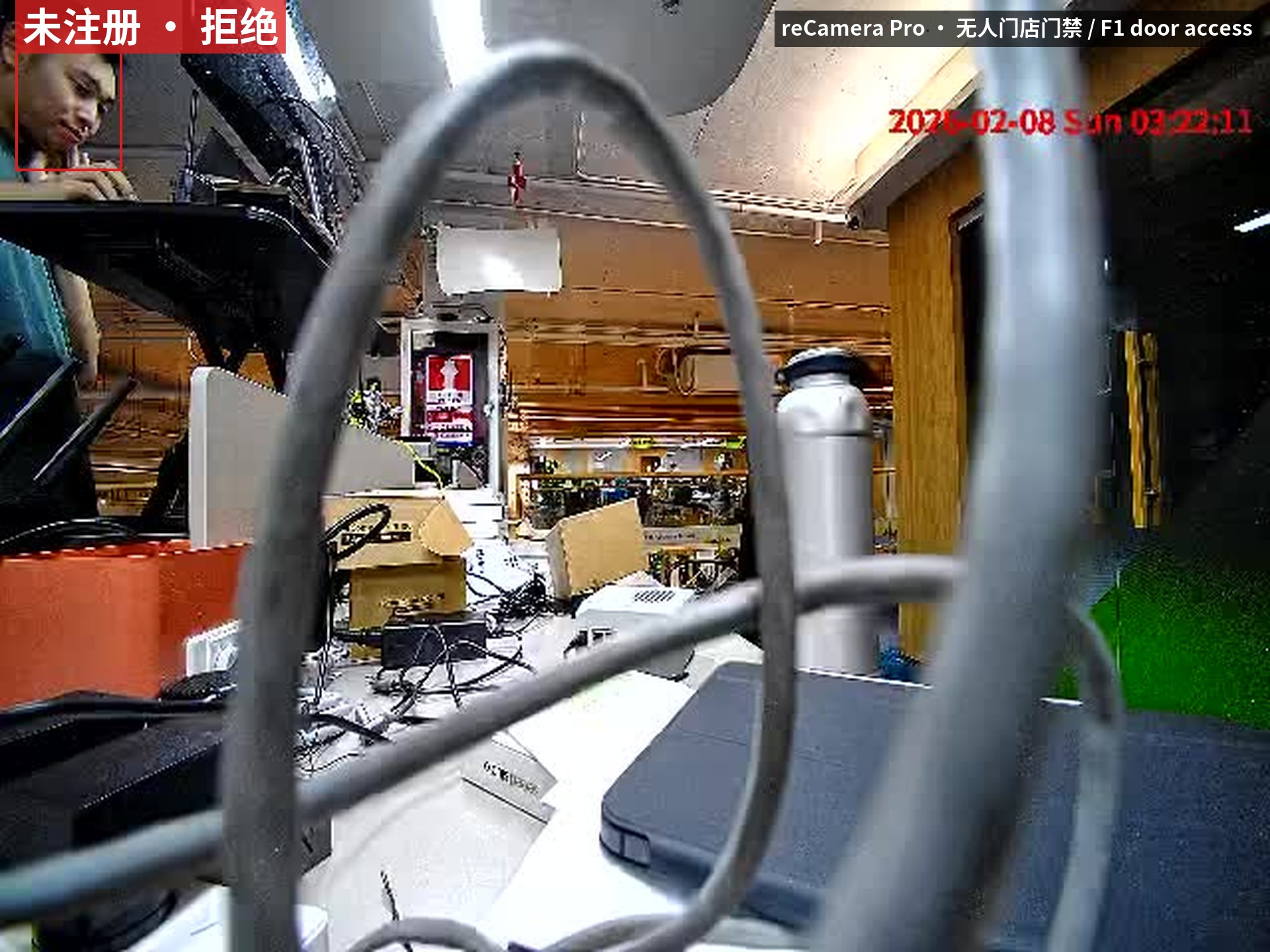
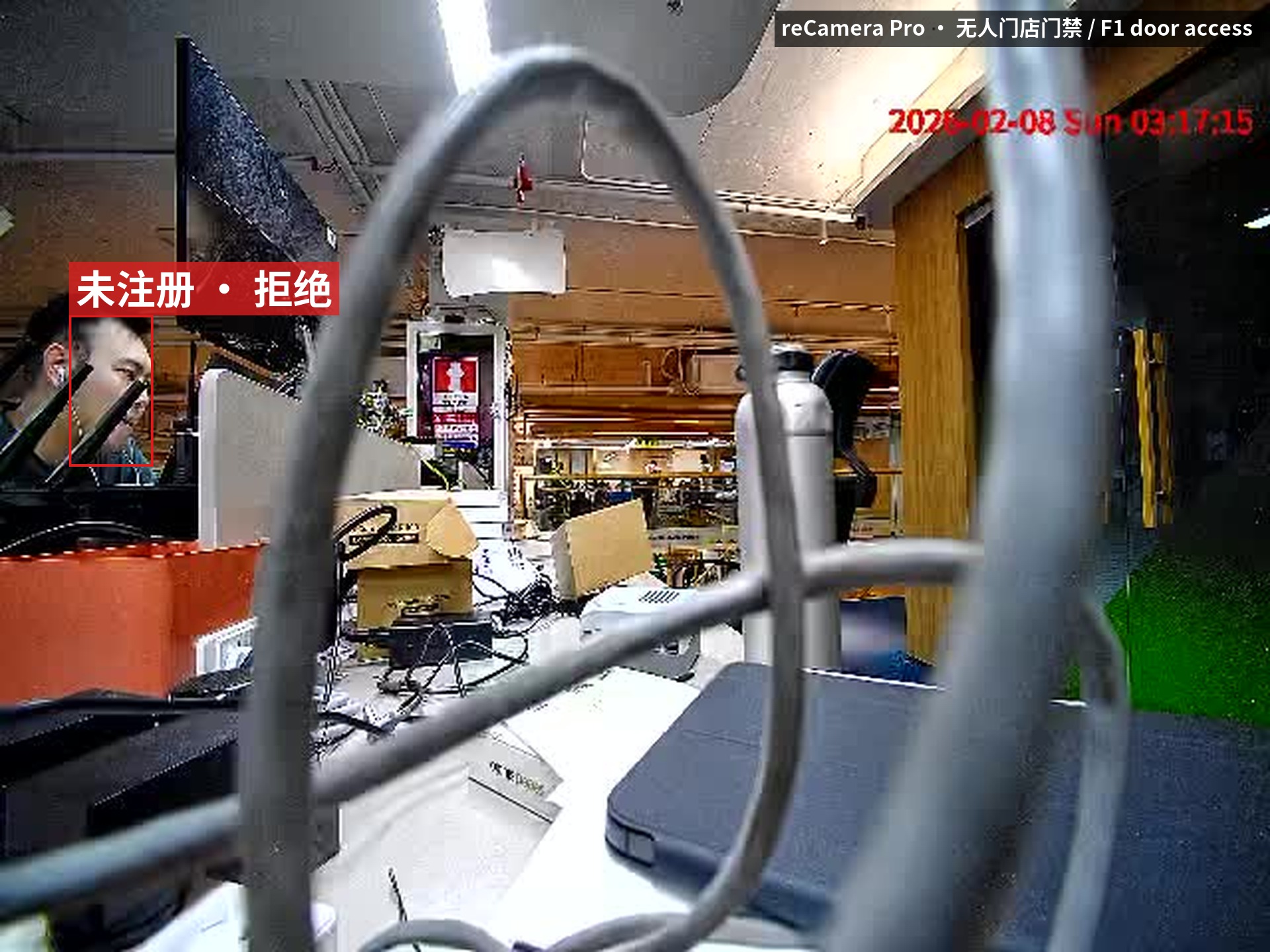
Recognition on a reCamera Pro: the face box carries the matched person id and the decision for that frame. With nobody in front of it the view is just the framing.
What hardware you need
Three device roles at the door, plus one cloud or on-prem host.
① The camera at the door. Either the device's own sensor (reCamera Pro or standard reCamera) or an existing RTSP camera feeding a separate host. Mount it at roughly face height, framed so one face fills a usable part of the frame at the distance people actually stop. Backlit doorways and glass reflections are common causes of failed recognition.
② The thing that recognises and decides.
| Recognition host | Where recognition runs | Install form | When to choose it | |
|---|---|---|---|---|
 | reCamera Pro (RV1126B) High-performance smart camera | On the camera, beside its existing face-recognition app | Installed on the camera, no container (Buildroot, no Docker) | No camera at the door yet; need fast on-device liveness and matching |
 | reCamera 2002 (SG2002) Entry-level smart camera | On the camera, in one native process — detection, embedding, liveness and matching | A small daemon copied onto the camera, no container | Cost-effective standalone single door |
 | reComputer J3011 / J4012 Jetson Orin edge host | In containers, against an existing RTSP stream | Containers over SSH | Existing RTSP camera; one box centralizes multiple doors |
 | reComputer Industrial R2035-12 Industrial fanless controller | In containers, against an existing RTSP stream | Containers over SSH | Cabinet install, multi-channel isolated IO and relay interfaces |
③ The relay. The lock must sit behind a relay or dry contact, on its own 12/24 V supply, separate from the compute board's. A lock draws 300 mA to 1 A; a GPIO pin and an opto-isolated digital output carry milliamps. Four settings — active_high, pulse_ms, relay_contact and fail_mode — are configured per installation and have no defaults: a fail-safe magnetic lock wired through the normally-open contact stands open permanently, and nothing shows it until the door is tested.
④ The cloud or on-prem host. Any amd64 or arm64 Linux box with Docker; no GPU. It runs the face library service, the management console and the MQTT broker. It must be reachable from every door device, and its clock must be right: devices with no RTC take their time correction from its HTTP Date header.
Negative Selection Boundaries
- Face Database Size: The on-camera face database is recommended for ≤ 1,000 enrolled users. Above 3,000 users, comparison latency increases; use a dedicated edge host instead.
- Severe Backlight: Direct unshaded outdoor sunlight saturates IR liveness detection; install a sunshade or anti-glare fill lighting.
How to deploy on site
Two parts, and the order matters.
One: wire the door — LED, then relay, then lock
Confirm polarity and pulse width on an LED. Confirm the contact clicks on the relay. Only then put a lock on it. A fail-safe magnetic lock goes through COM and NC; a fail-secure strike through COM and NO. Getting this backwards leaves the door open permanently, so relay_contact has no default value.
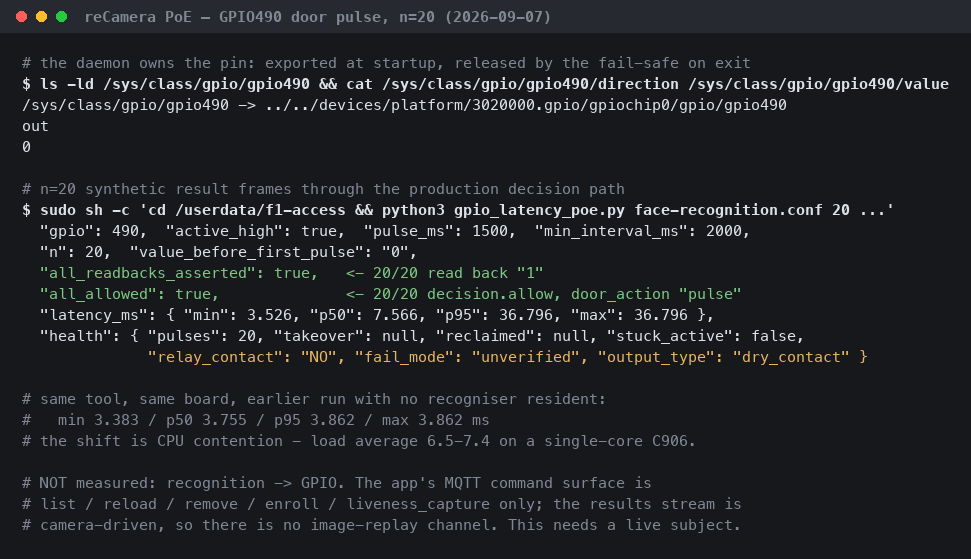
Check that the GPIO pin is free. One surveyed reCamera Pro had gpio131 already exported and driven by another application. The actuator refuses to start on a pin whose current state disagrees with the configured idle state, and will not take a pin over unless told to explicitly. On the reCamera 2002 HQ PoE baseboard the 6-pin header carries three IO lines — D1 = sysfs 490 (the only one not multiplexed), CLK = 487, SMD = 488 — but the header's level polarity and available drive current are not in the vendor documentation, so do not wire a lock there before a meter and an LED have confirmed them. On the J20 the design spec puts DO1–DO4 at sysfs 463/464/465/462; whether the target image exposes them that way or through Jetson.GPIO has not been confirmed on hardware.
Two: bring up the cloud side, then the device side
Full per-preset steps are on the reference design page, where answering a few questions about the site also gives you the matching application package to download.
The cloud side is the face library service, the console and a broker, from the compose files in assets/cloud/. The console refuses to start with no token configured. A shared token over plain HTTP is not authentication; terminate TLS on a reverse proxy in front of it. The bundled broker configuration is anonymous plaintext and is for testing only; production needs TLS, per-device identities and topic ACLs, none of which is in the bundled configuration.
The device side differs per preset: containers over SSH on the reComputer presets, a copy of a daemon on both reCameras.
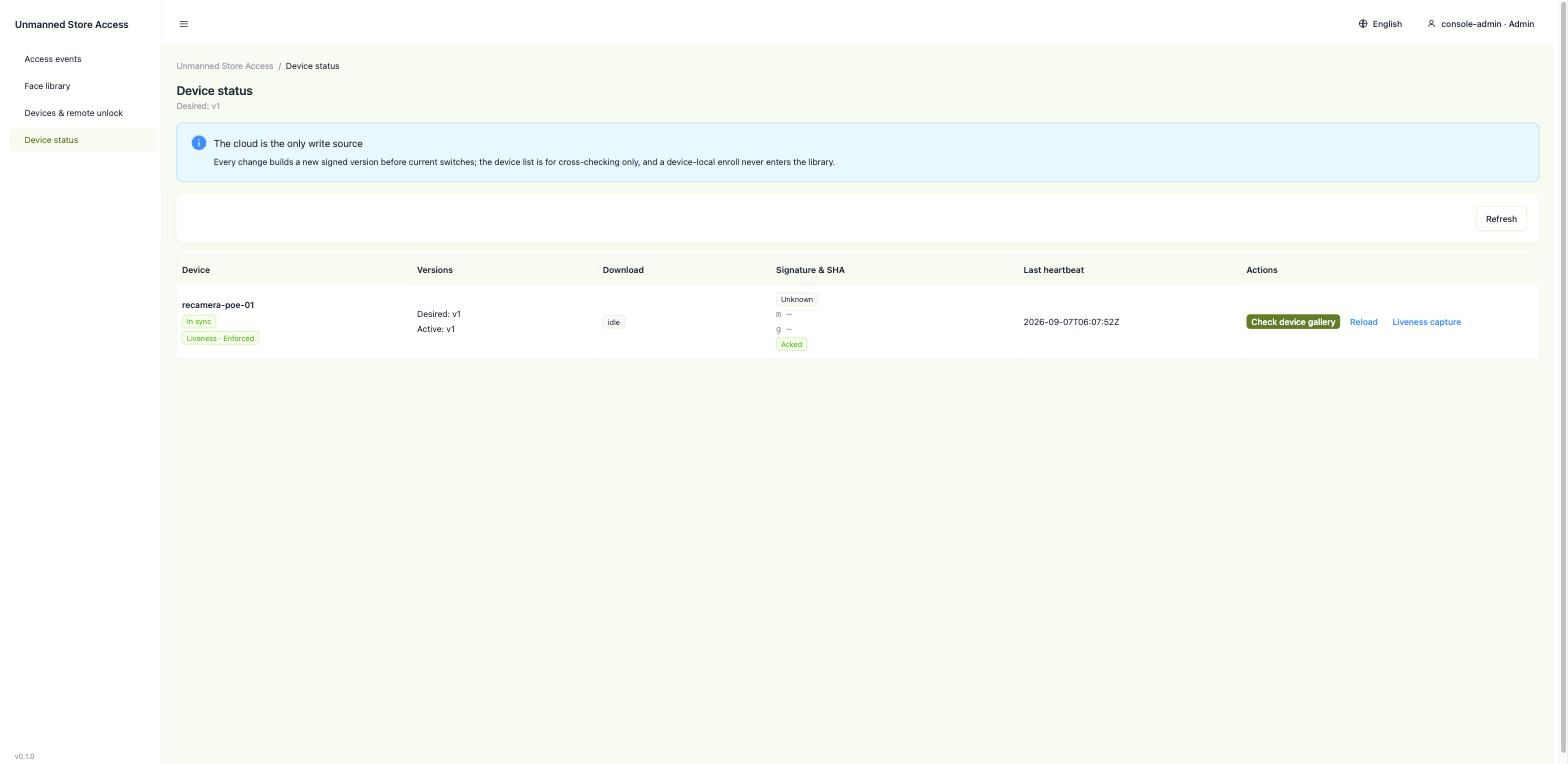
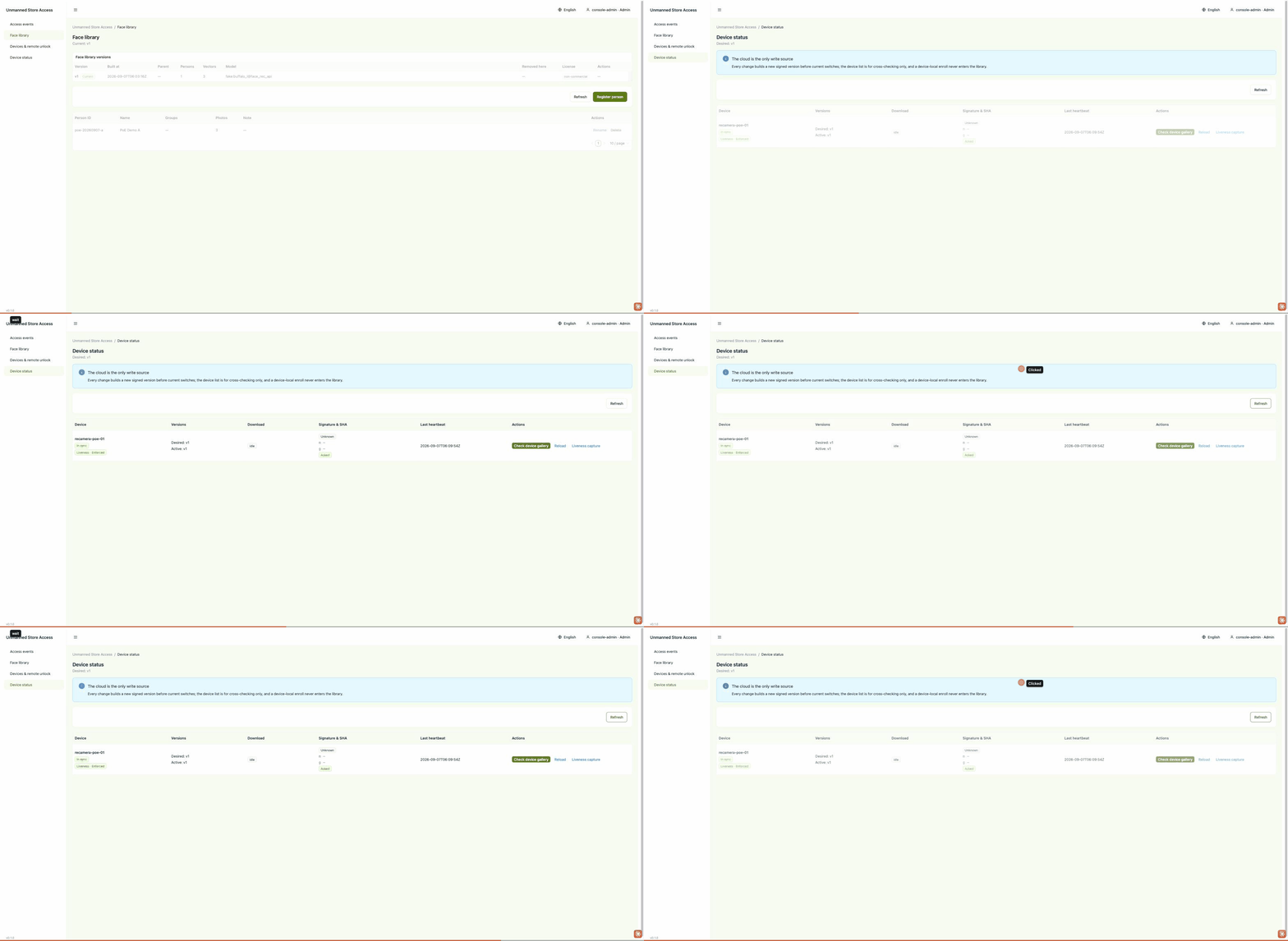
Once the cloud side is up, check on the console's device page that the door device is online, heartbeating, and on the expected face library version:
Then enrol the people who may pass on the persons page. Enrolment mints a new face library version, which the device picks up on its next poll.
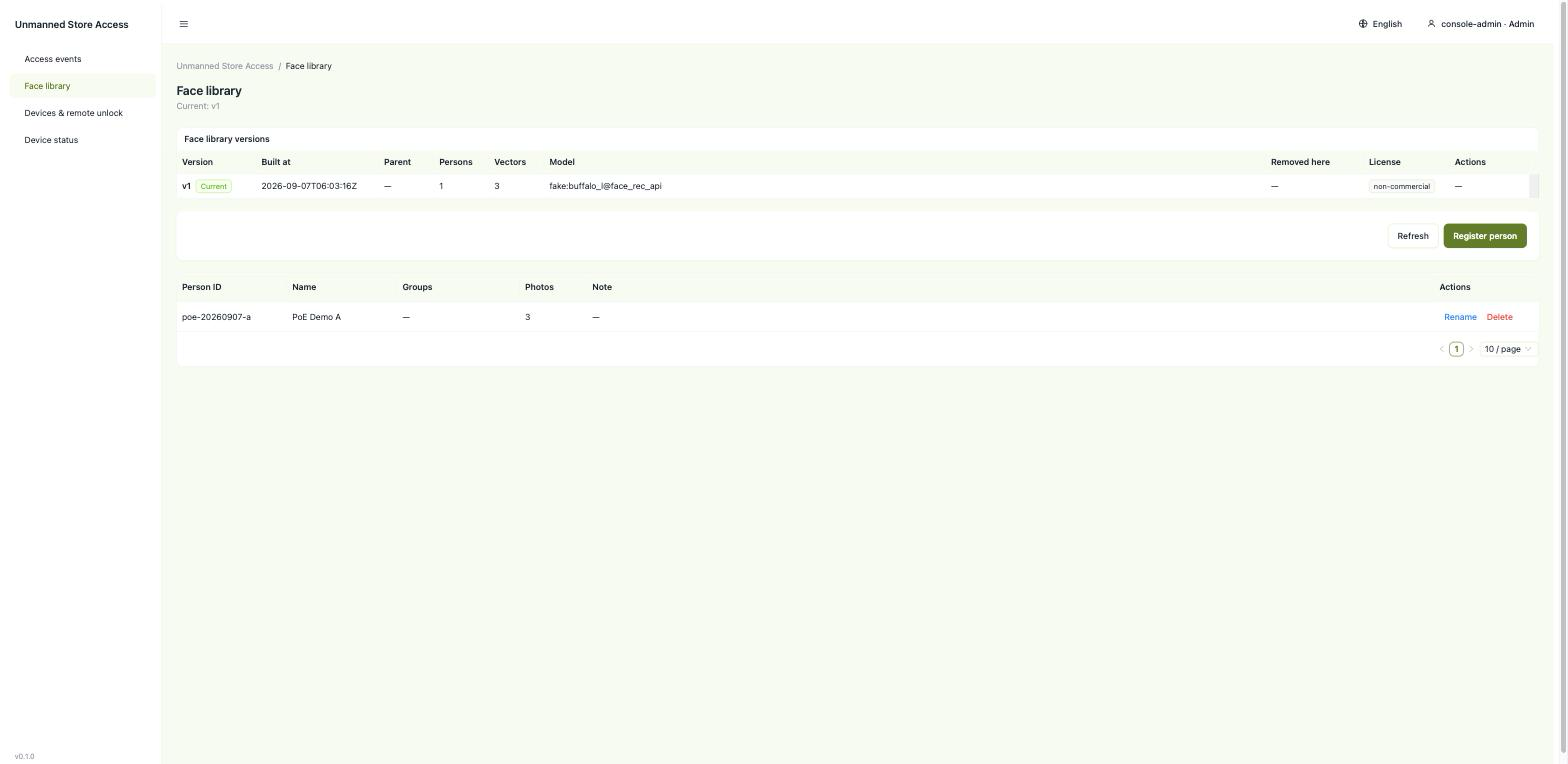
Below is one full pass: enrol a person, publish the version, the device pulls and switches, the door recognises them.
Before a lock goes on, confirm on the PoE baseboard that the GPIO line can actually be driven:
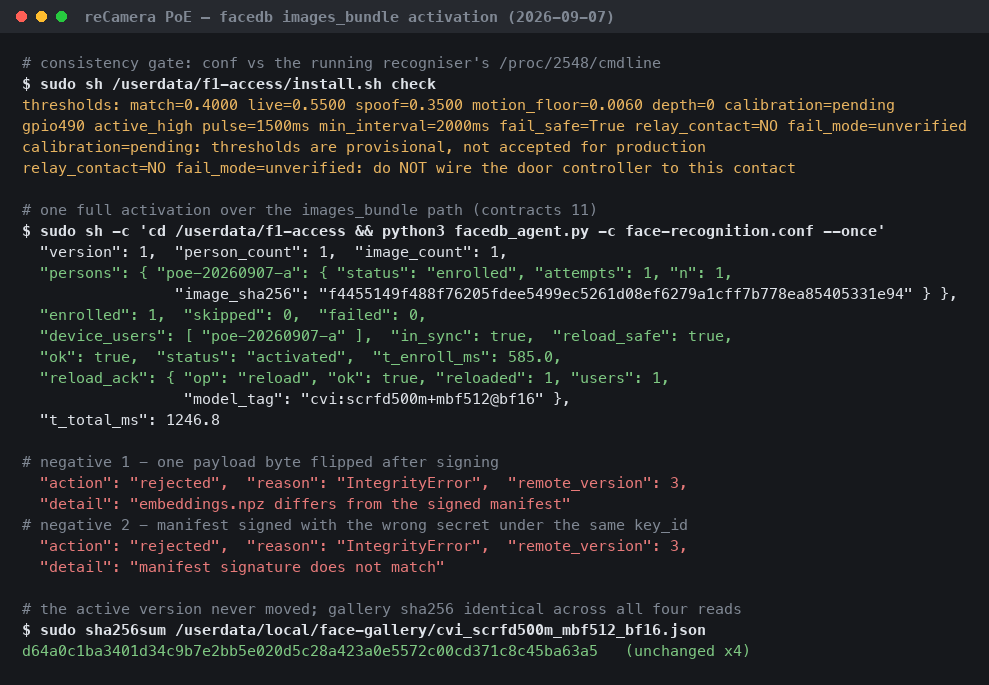
A plaintext http:// library URL is permitted on a LAN, but only with an HMAC-SHA256 signature over the manifest; without a key the device refuses to start. The signature protects against tampering on the wire; any leaked device key can be used to forge a library.
Which interfaces it exposes
The interface is five MQTT topics and two HTTP surfaces.
| Topic / endpoint | Payload | Retained |
|---|---|---|
access/v1/events (MQTT 8883, QoS 1) | One JSON per decision — see below | No |
access/v1/status/{device_id} | 30-second heartbeat: actuator health, library version and model tag, whether liveness is loaded | Last will only |
access/v1/commands/{door_id} | unlock, hold_open, lock | Never |
access/v1/receipts/{command_id} | The terminal state of one command | No |
access/v1/relay/{relay_id}/set and /state | MQTT-relay presets only; state reports the physical contact and does not reflect whether the door is open | set no, state yes |
GET /v1/facedb/current, GET /v1/facedb/{version} (HTTP 8080) | The entire library distribution surface. Range for chunked and resumable downloads | — |
/api/events, /api/devices, /api/persons, /api/audit/verify (HTTP 8088) | Console API behind the three-role token gate. No anonymous read | — |
The console's three token roles: viewer reads, operator issues unlock / hold_open / lock, admin enrols, deletes and rolls back. /api/audit/verify checks the audit log's hash chain: the log is append-only NDJSON, each record carries the previous record's hash, and altering any historical record is reported.
The event payload
{
  "schema": "access-event/v1",
  "event_id": "6f1a2c3d-4e5f-4a6b-8c7d-9e0f1a2b3c4d",
  "time": "2026-09-06T03:20:11Z",
  "device_id": "door-front-01",
  "person_id": "p_alice",
  "anonymous_id": null,
  "score": 0.7412,
  "threshold": 0.62,
  "liveness": { "passed": true, "score": 0.958 },
  "decision": { "allow": true, "reason": "allowed" },
  "door_action": "pulse",
  "actuator_id": "door-front",
  "facedb_version": 3,
  "model_sha": "3a7f...",
  "clock": { "valid": true, "reason": null, "offset_ms": 12 }
}
Three fields to watch when integrating. facedb_version is null before the first successful sync, meaning the device has no library yet (not the same as version 0); the denial reason is reported separately as no_facedb. threshold is the value in force for that decision, so a threshold change shows up in the event stream. clock.valid says whether the corrected timestamp can be trusted; devices never set their system clock, they only carry an offset. A null liveness result means the check did not run; it is treated as a failure and reported as liveness_unknown.
The command gate
A command must carry an exact field set, a UUIDv4 command_id, an RFC3339 issued_at with a timezone, and a TTL within bounds, and it is checked against a per-identity replay table. A redelivered command does not open the door a second time; the device returns the original receipt for the caller to reconcile against. An expired one comes back as TTL_EXPIRED. An anonymous identity is refused.
The set topic and the command topic are never retained. A retained unlock replays on every reconnect, so the door would open by itself after a power cut.
Face library distribution
The device polls current, compares versions, and fetches files only when the version changed, with chunking and resume over standard Range. Every file is SHA-256 checked and the manifest signature verified before an atomic switch; a failure at any step leaves the old version in place. Removing a person produces a new version without them plus a deletion barrier, and any later rollback to a version that still contains them is refused by name.
Every version's manifest carries five licence fields — license_id, use_scope, redistributable, source_revision, sha256 — so the licence terms travel with the artefact.
Performance and measured data
Face library activation latency
The time from a new library version being published to the device running on it.
| Platform | Full activation | Conditions |
|---|---|---|
| Standard reCamera (SG2002 / CV181x riscv64, firmware 0.2.2) | p50 491.6 ms, p95 507.8 ms (n=20) | USB-RNDIS, 2 people, 16.5 KB library. op:reload round trip p50 100.0 ms (n=25) |
| reCamera Pro (RV1126B, Buildroot 2023.02.6) | 62.2 ms (v1), 45.4 ms (v2); up-to-date no-op round 6.2 ms | Ethernet, 1–2 people, under 20 KB library |
Scaling with library size. Two scale points on the standard reCamera, one run each: 402 people / 2.86 MB in 9 801.7 ms, and 1502 people / 10.66 MB in 22 278.7 ms. Activation time grows with library size; use these two figures to plan the first sync of a large library.
Reproduce: in the upstream repository unmanned-store-access, evaluation/runs/2026-09-06-recamera-std-p3-r2/results.md and evaluation/runs/2026-09-07-recamera-pro-p1/results.md.
Door-open time (reCamera Pro, replayed video)
From the first replay frame handed to the app to the GPIO pin being driven to its active level, across capture, detection, liveness, matching, policy and the pin write. p50, p95 in brackets, 12 runs per point (at n=12 read the p95 column as an upper bound).
| Camera / host | 10 people | 1 000 people |
|---|---|---|
| reCamera Pro (RV1126B), f1-access 0.1.1 | 0.62 s (0.67) | 0.66 s (0.68) |
Conditions: 1280x720 frames replayed at 12.5 fps, liveness on, minimum face 40 px, match threshold 0.40; the probe is a stock video clip replayed through the device's own pipeline, not a live person. The pin was asserted in 24 of 24 runs. The 1 500 ms contact hold after the pin write is not counted; no relay and no lock are connected, so these figures contain no mechanical response.
Rejections (reCamera Pro, replayed video)
20 runs per row, same device and app.
| Run | Face library | Pin asserted |
|---|---|---|
| Unregistered person | 9 synthetic identities | 0 / 20 |
| Unregistered person | 999 synthetic identities | 0 / 20 |
| Phone screen replay, clip A | 10, template built from the attack clip | 0 / 20 |
| Phone screen replay, clip B | 10, template built from the attack clip | 0 / 20 |
| Still screen image | 10, template built from the attack clip | 0 / 20 |
Conditions: in the two unregistered-person rows the library holds only synthetic vectors, so the person in the clip is not enrolled; in the three screen rows the template is built from the attack clip itself, so the face in the library and the face on the screen are the same person; the still-screen row is one display frame held still.
Other measurements
| Metric | Value | Conditions |
|---|---|---|
| Recognition event to GPIO pin readback | p50 1.448 ms, p95 2.709 ms (n=22) | reCamera Pro, injected synthetic recognition events, sysfs readback, no external circuit; an upper bound on one link of the software path, door action not included |
| Recognition service, one frame: face box + liveness verdict + 512-d embedding | 24-26 ms server time, 30.3 ms p50 over HTTP (12 requests) | reComputer J40 Series (Orin NX 16 GB, JetPack 6), one frame off a 1280x720 RTSP stream |
| Recognition service first start | TensorRT engines built on the box in 61 s + 62 s + 73 s; health endpoint answers 214 s after start | reComputer J40 Series (Orin NX 16 GB, JetPack 6) |
The gpio130 read back on the reCamera Pro is one of the expansion port's UART4 M0 pins reconfigured as GPIO — the 3.3 V family, not one of the board's two native 12–21 V outputs.
Reproduce (GPIO readback): evaluation/runs/2026-09-07-recamera-pro-p1/results.md.
Runtimes and key parameters
| Recognition host | Recognition model and where it runs |
|---|---|
| reCamera Pro | The device's own recognition model, rv1126b:scrfd500m+mbf512@fp16 |
| Standard reCamera | A native process on the device does detection, embedding, liveness and matching |
| reComputer presets | A recognition service in a container; TensorRT engines are built on the box at first start |
Liveness is enforced: if the recognition service does not report liveness as loaded, the adapter refuses to run.
Parameters that change deployment behaviour:
- Face library poll interval (default 30 s) — the device polls for new versions at this interval, so library activation latency depends on it.
- Match threshold — the shipped threshold is a starting value; set it by sweeping positive and negative pairs on the installed camera. The event's
thresholdreports the value in force for each decision. - The four relay settings
active_high,pulse_ms,relay_contact,fail_mode— no defaults; configured per installation.
Known degradation
- Enrolment for reCamera Pro. The
buffalo_lused for cloud enrolment and the device's ownrv1126b:scrfd500m+mbf512@fp16sit in model spaces whose cosine similarity is approximately zero, so the bundled enrolment path cannot yet produce a production-usable library for this device. The standard reCamera computes embeddings on the device and is unaffected. - Liveness on the RKNN backend is not implemented upstream. Presets running on RKNN cannot meet "liveness enforced".
- Changing the face backbone means rebuilding every face library version. Embeddings are not comparable across models, so all old versions become unusable; the
model_tagguard in the manifest stops a device from loading one by mistake.
Next steps
- A contact-loopback test with a Grove Relay on reCamera Pro (20 cycles), recording contact close latency and hold time, before a door controller is connected.
Data and asset sources
Licensing. The code in the solution package and in the upstream repository is Apache-2.0. The model weights are not. Face detection and embedding use InsightFace's buffalo_l; InsightFace's own statement is that the code is MIT with no limitation on commercial use, but that the training data — and models trained with that data — are available for non-commercial research purposes only. buffalo_l is such a model: license_id: non-commercial, use_scope: non-commercial, redistributable: false. The solution package does not include the weights, and a commercial deployment must replace the face backbone with a commercially licensed one.
The passive liveness model, MiniVision's Silent-Face-Anti-Spoofing, is Apache-2.0: use_scope: commercial, redistributable, used unmodified.
- Licence terms:
gallery/ATTRIBUTION.mdin the solution package, and the licensing section of the package description. - Registration model-space gap: upstream
docs/user-guide.md§5.1. - The door recognition frames come from a reCamera Pro; the person in them is a project member who took the shot.
- Console screenshots are synthetic demo data; the people, scores and events are not field results.