Voice-Controlled Warehouse Management on Edge Hardware: Build, Deploy, and Measured Results
This is an operator aid, not a certified inventory ledger. The REST API has no offline queue: requests sent during a network or service outage fail and are not replayed after recovery.
What this solution does
An operator at the receiving dock says "stock in 10 boxes of apples". The SenseCAP Watcher on the rack hears it, and a stock-in record is written to the warehouse database on a reComputer gateway in the same building. Ask "how many apples are left" and the answer is spoken back. No typing, no menus, hands stay on the goods.
Built for sites where transactions happen far from a keyboard: receiving docks, rack aisles, forklift cabs, and small warehouses that never adopted a WMS because training cost more than it saved.
- Open-source implementation: github.com/suharvest/warehouse_system
- Picking a configuration and deploying: reference design page
Speech and the database are connected through MCP (Model Context Protocol). The warehouse system publishes each inventory operation as an MCP tool, and the voice agent on the Watcher connects to that endpoint as an MCP client. Adding a voice action means adding a tool, with no speech-model retraining; integrating an existing ERP/WMS means mapping its data interface onto the same set of tools.
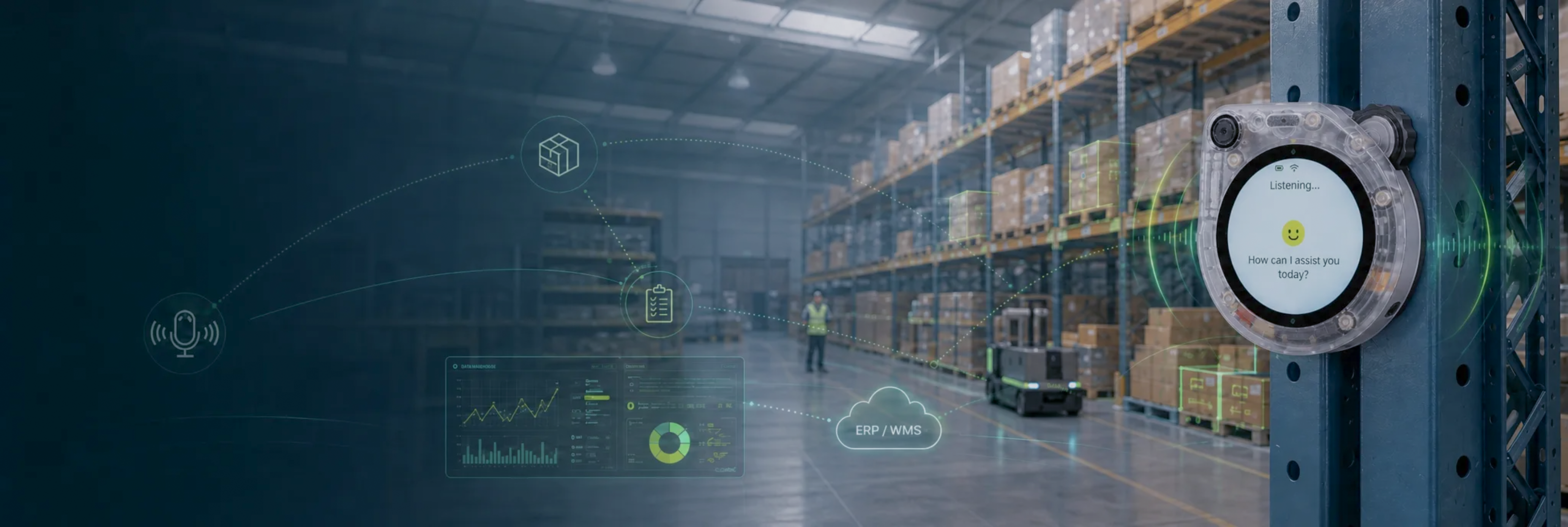
Watcher works once mounted
The SenseCAP Watcher carries the voice agent and face recognition firmware. Flash it, mount it at the station, and operators can book stock by voice with their identity checked.
Data stays on site
The warehouse database runs on a reComputer gateway on site. Tier 3 also keeps recognition, the LLM and synthesis on the premises and calls no external service after deployment.
Open source, connects to your ERP/WMS
The warehouse system is open source. Connecting an existing system means mapping its data interface onto the same MCP tools, on the order of a few dozen lines of mapping code.
New commands without retraining
Adding a voice action means registering one MCP tool. The Watcher firmware stays unchanged.
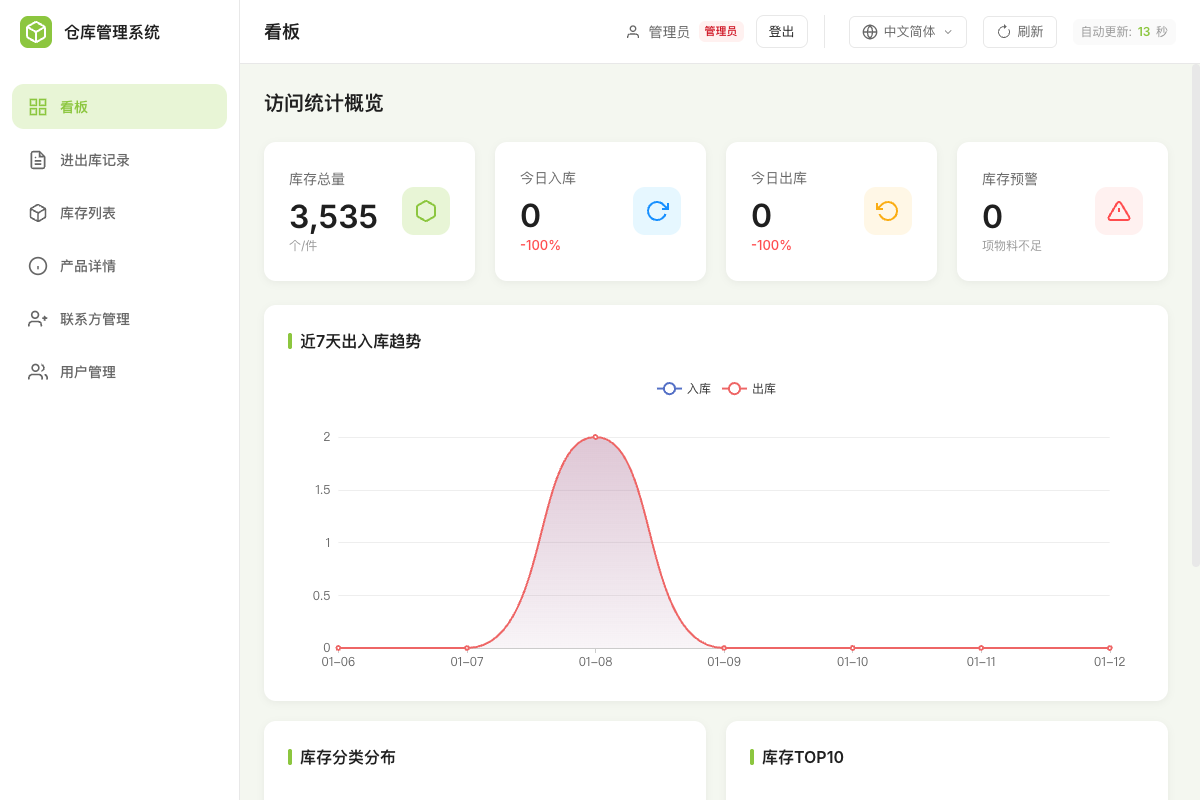
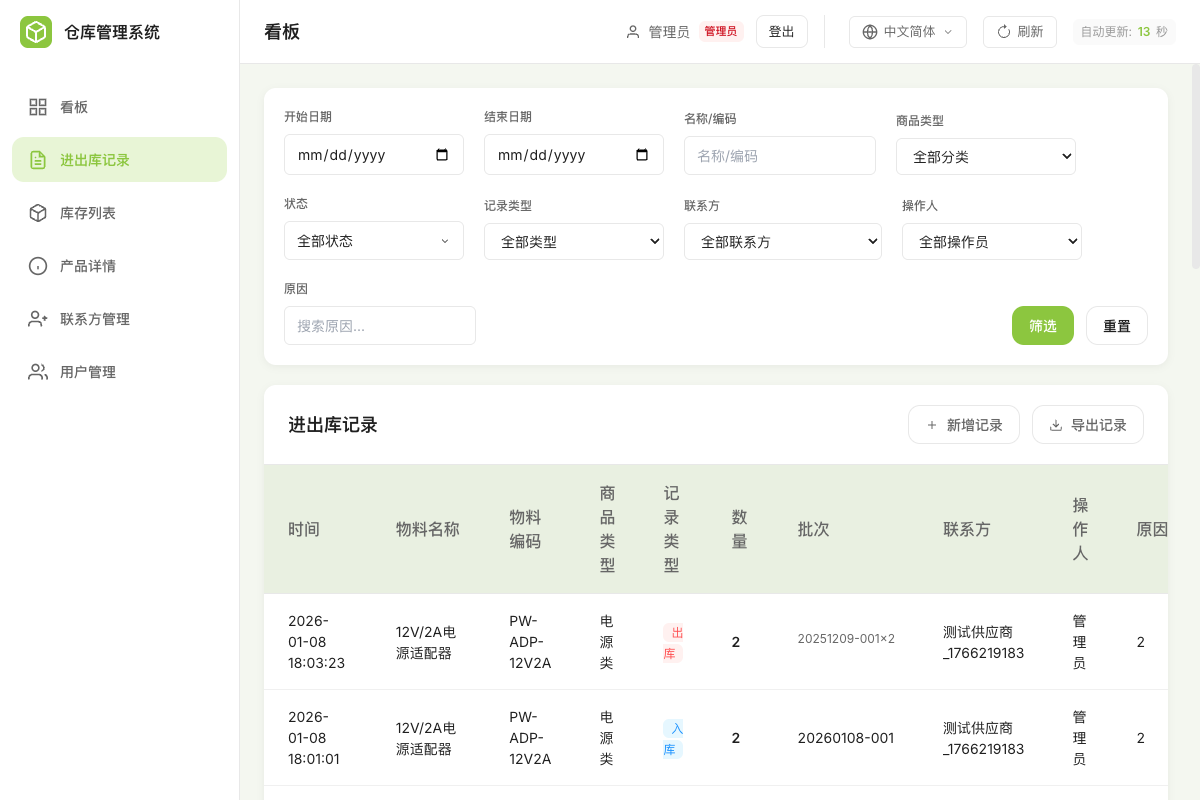
What the dashboard shows
After an utterance, the result appears on the gateway dashboard. The inventory page lists the current quantity and latest movement for each item:
The transaction page lists each stock-in and stock-out with batch number, operator and source (voice or REST):
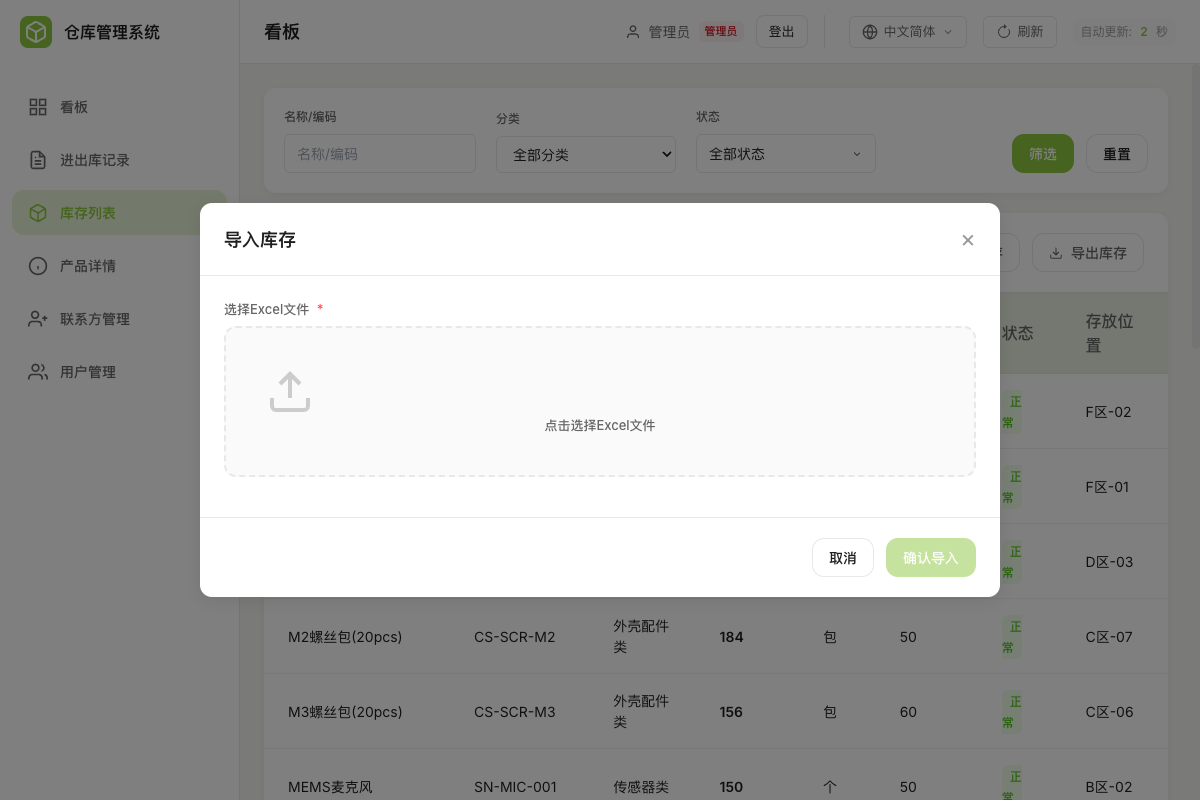
The operator roster is maintained on the users page, and face verification checks against it:
What hardware you need
Three device roles. Which ones you buy depends on where the data and the voice AI are allowed to run.
① Voice terminal: SenseCAP Watcher. Required in every tier, one per work station. It has two processors: the ESP32 runs the Xiaozhi voice agent (wake word, recording, streaming, MCP client), and the Himax WE2 runs face recognition firmware for operator verification.
② Edge gateway. Runs the warehouse system, and in self-hosted tiers also the MCP endpoint. It determines whether face recognition can move to the gateway and how many stations one host can serve.
③ On-premise AI host. Needed only when recognition, the LLM and synthesis must all stay on the premises.
| Model | Role in this design | When to pick it | |
|---|---|---|---|
 | SenseCAP Watcher | Voice terminal, MCP client, on-device face recognition | Always, one per station |
 | reComputer R1125-10 | Edge gateway running the warehouse system | Inventory data stays on site, up to 20 operators, face recognition on the Watcher |
 | reComputer Industrial R2135-12 | Edge gateway with a Hailo-8 accelerator | More than 20 operators, or liveness detection is required |
 | reComputer J4012 | One box running the warehouse system, face recognition and a self-hosted speech service | 2–3 stations share one host |
 | reComputer Robotics J5011 | On-premise LLM and speech, no external service calls | The facility must stay offline |
The Watcher stores at most 20 face templates on the device. Beyond 20 operators, recognition has to move to the gateway: up to 20, pick the R1125; above 20, pick the R2135 with Hailo-8.
Other prerequisites: the Watcher connects to 2.4 GHz Wi-Fi only (a 5 GHz-only SSID does not appear in the provisioning scan), and the gateway must be on the same LAN. Tier 3 deployment pre-checks the NVIDIA container runtime and about 10 GB of free disk (speech models plus LLM engine files).
Negative Selection Boundaries
- Fully Offline LLM Needs: If operating in a classified or air-gapped warehouse requiring offline LLM interaction, avoid cloud-dependent tiers; select Tier 3 with reComputer J4012 (Orin NX 16GB).
- Network Outage Queue: The warehouse REST API currently lacks a server-side offline queue; clients must buffer transactions locally if operating over intermittent wireless.
How to deploy on site
Three steps: mount and flash the Watcher, start the containers on the gateway, connect the voice path.
Step 1: mount the Watcher
Mount the Watcher at the receiving dock, rack aisle or forklift cab, where operators actually book stock in and out. Mounted in the office, it forces operators to remember quantities and walk over to enter them.
Flashing goes over USB-C; the device enumerates as a WCH USB-UART bridge (0x1a86:0x55d2). Two firmware images, one per processor: the Xiaozhi voice agent goes on the ESP32, the face recognition firmware on the Himax WE2.
Step 2: bring up the gateway
The warehouse system is one Docker service. Deployment steps differ by tier; pick a configuration on the reference design page and download the matching application package.
Deployment can run over SSH to the gateway or directly on the gateway. Existing inventory can be imported at first start with the supplied Excel template.
After deployment the dashboard is at http://GATEWAY_IP:2125, and the container health check is GET /health on the same port.
Step 3: connect the voice path
Trial, Tier 1 and Tier 2A use a SenseCraft-issued MCP endpoint URL. Tiers 2B and 3 self-host the MCP endpoint on port 18004 and the speech server on 18000 (admin console on 18003). Tier 3 adds EdgeLLM on 8000 and OpenVoiceStream on 8621, and calls no external service after deployment.
Available interfaces
Two integration surfaces:
MCP endpoint (port 18004): for the voice side. Everything the agent can do is a tool on this endpoint. Extending the command set means registering another tool; the Watcher firmware stays unchanged. Integrating an existing ERP/WMS means implementing your system's data interface against the same tools, on the order of a few dozen lines of mapping code. Variations in phrasing are fuzzy-matched to the closest registered command instead of being rejected.
REST API (port 2125): for other systems. Inventory list, transaction history and agent status are available over HTTP.
| Interface | Endpoint / port | Payload |
|---|---|---|
| Dashboard + REST API | http://GATEWAY_IP:2125 | Inventory list, transaction history, agent connection status |
| Health check | http://GATEWAY_IP:2125/health | 200 once the warehouse service is ready |
| MCP endpoint | 18004 | Inventory operations published as MCP tools |
| Inventory database | SQLite at /data/warehouse.db in the warehouse_data volume | Mount or dump for an external BI/ERP job |
| Speech server | WebSocket 18000, admin console 18003 | Watcher audio stream (Tiers 2B and 3) |
| On-premise AI | 8000 EdgeLLM (OpenAI-compatible), 8621 OpenVoiceStream | Chat completions; recognition, synthesis and voiceprint (Tier 3) |
Access is scoped by API key role and by tenant. A VIEW key on a write endpoint returns 403; cross-tenant reads and writes both return 403. Both were measured; see "Performance and measured data".
Performance and measured data
Runtimes and key parameters
| Deployment | LLM | TTS / ASR | Network |
|---|---|---|---|
| SenseCraft cloud | Hosted by Seeed | Hosted by Seeed | Internet required |
| Your own API | Any OpenAI-compatible endpoint (e.g. DeepSeek) | OpenAI · Azure Speech · Volcano Engine · Alibaba Cloud · Edge TTS | Internet required |
| Local Jetson | EdgeLLM: Qwen3.5-4B, profile qwen35-4b-gdn-mtp, 8k engine | OpenVoiceStream (recognition + synthesis + voiceprint) | LAN only |
The local images are built for JetPack 6.2 / TensorRT 10.3.
BUSINESS_RATE_LIMIT: rate limit for stock-out and other business endpoints, default 600 requests/minute, counted per authenticated identity (API key / session) and per source IP only when no identity is available. The anti-enumeration limits on registration, password recovery and device verification count by IP.- Batch number
batch_no: formatYYYYMMDD-NNN, allocated atomically, so concurrent stock-in writes are serialized.
Warehouse REST API measurements
Device: reComputer R2000 series (arm64) running the warehouse container. Conditions: 60 s per level, 1 warehouse, 50 seeded materials, SQLite backend; requests travel over a Tailscale WAN link.
| Operation | Level | Result |
|---|---|---|
GET /api/materials/list | concurrency 10 | p95 404 ms, p99 2.7 s, 0% errors |
GET /api/materials/list | concurrency 20 | p95 824 ms, p99 5.3 s, 0% errors |
GET /api/materials/list | concurrency 50 | p95 5.5 s, p99 8.7 s, 0% errors |
POST /api/materials/stock-in | concurrency 5 / 10 / 20 | 0% errors at all three levels; 1481 batches created, 0 duplicate batch numbers; p95 634 ms – 4.96 s |
POST /api/materials/stock-out | concurrency 10 / 20 / 50, two API keys sharing one egress IP | 0 HTTP 429 within the default 600 requests/minute; about 5–6 requests/s per identity |
| Service outage | about 10 req/s query traffic, 34 s outage from a container restart | 100% of requests fail during the outage, with no queueing or replay; full recovery within about 1 s, no backlog, no dirty data |
| Role and tenant isolation | 4 single-shot probes | 4/4 as expected: VIEW key write 403, read 200; cross-tenant write 403, read 403 |
Reproduce: runs/2026-09-05-load/, evaluation/runs/2026-09-06-a2-retest/results.md
Local LLM throughput
| Device | Model | Throughput | Conditions |
|---|---|---|---|
| reComputer Robotics J5011 | EdgeLLM Qwen3.5-4B | about 16 tokens/s | Upstream figure, no run log attached |
Known degradation
- Inventory query latency degrades from concurrency 20. p95 rises from 404 ms at concurrency 10 to 824 ms at 20 and 5.5 s at 50, which is too slow for interactive use.
- The REST API has no offline queue. Requests sent during a network or service outage fail and are not replayed; reconnect and backoff cover only the MCP voice WebSocket channel. Mitigations: keep the gateway network available (wired first, UPS power, service and clients on the same LAN) so the unavailable window shrinks to device restart time; or add a client-side write queue that replays in order after reconnecting and deduplicates by batch number (the client-side queue is not implemented).
Next steps
- Run the warehouse REST load tests on the reComputer R1125-10 gateway.
Data and asset sources
- Load-test figures, test conditions and known limits: upstream
sensecraft-solutions@smart_warehousedescription.md, "Measured Boundaries" and "Known Limitations". - Local LLM throughput (about 16 tokens/s, reComputer Robotics J5011): the "Preset: Tier 3 · Premium" section of upstream
guide.md. - Device roles, tier composition and accelerator requirements:
intro.device_catalogandintro.presetsin upstreamsolution.yaml. - Warehouse system source: github.com/suharvest/warehouse_system.
- Product images: Seeed Studio product catalog (media-cdn.seeedstudio.com).
- Scene images: Seeed Studio solution assets (files.seeedstudio.com).