Getting Started with Sound Event Detection Module
Introduction
A compact edge audio board delivers real-time sound detection with strong local data privacy protection. It detects five abnormal sound events — Baby Cry, Glass Break, Gunshot, T3/T4 Alarms, and Snore, enabling immediate response and reliable early warning. Designed for native ESPHome integration with seamless compatibility for Home Assistant with XIAO series, ideal for home security monitoring or responsive automation triggers.
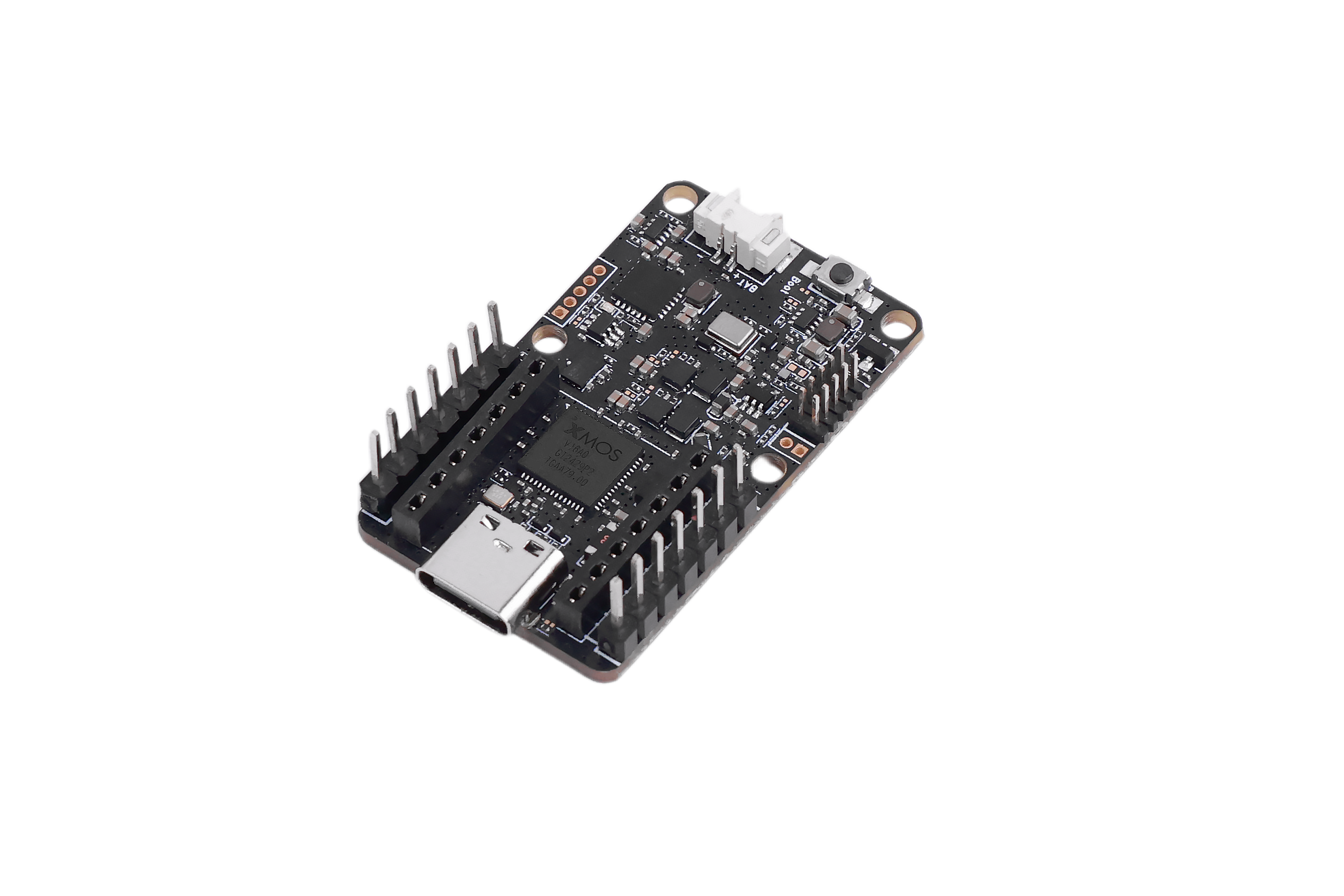
Specification
| Feature | Description |
|---|---|
| Core Chip | XMOS XU316-1024-QF60BC24 |
| Supported Events | Baby Cry / Glass Break / Gunshot / Smoke Alarm & CO Alarm (T3/T4) / Snoring |
| Digital Microphones | High-performance digital microphones × 1 |
| Sensitivity | -26 dBFS |
| Acoustic Overload Point | 120 dBL |
| SNR | 64 dBA |
| Power Supply | USB 5V, External 5V |
| Dimensions | 40 × 20 mm |
| Operating Temperature | 0℃ – 65℃ |
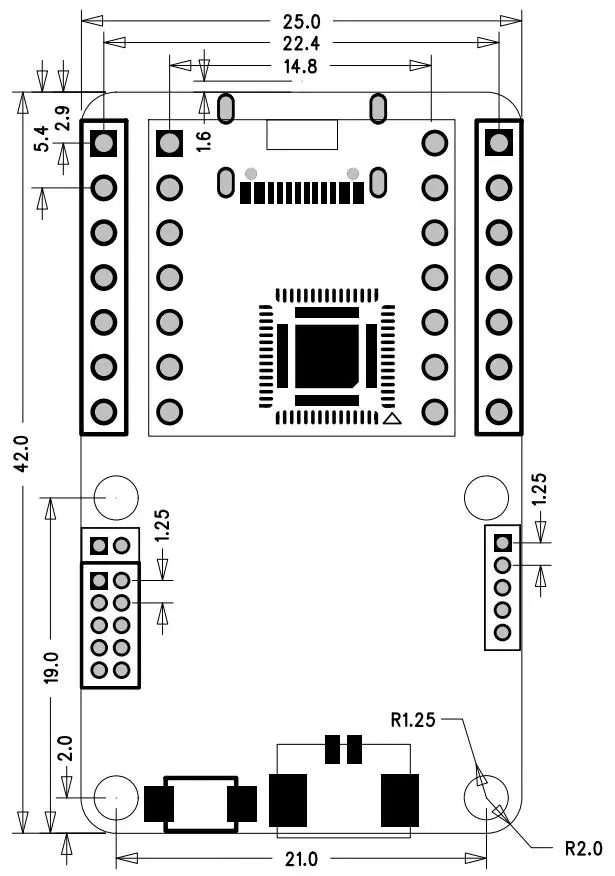
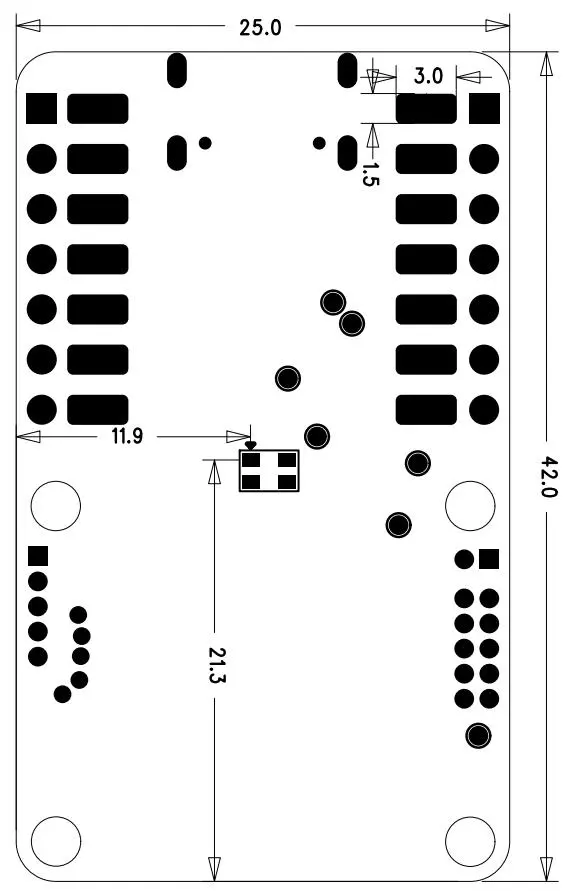
Hardware Overview and Dimensions
Front View
Back View
USB Usage
This device can operate in standalone mode and supports plug-and-play communication through the USB interface using AT commands.
First, connect the device to your computer using a USB Type-C to USB Type-A cable.
-
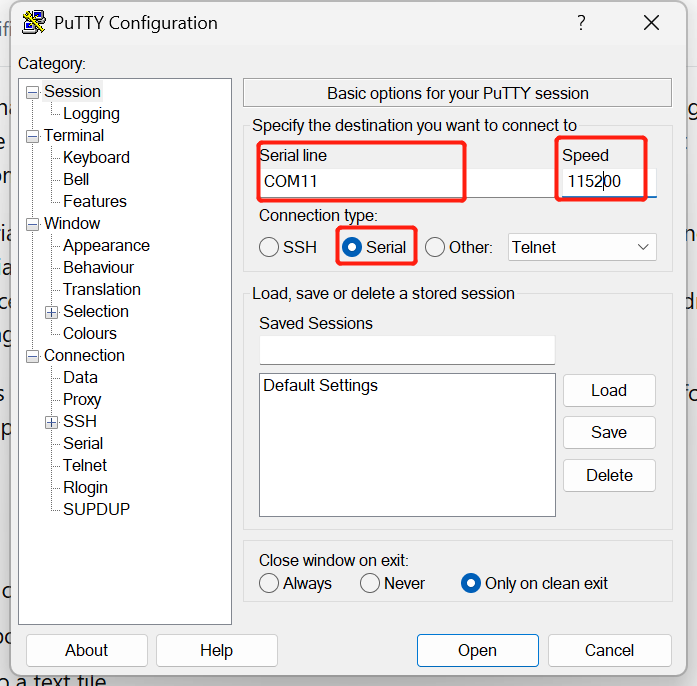
Step 1 :Next, open PuTTY or any other serial terminal software. If you have not installed one yet, you can download PuTTY from the following link:
-
Step 2 :After opening the serial terminal, select the correct COM port and set the baud rate to 115200. Once connected, you will be able to interact with the device through the USB interface.
Since the device continuously listens for sound events, you can test it by generating supported sound events near the device.
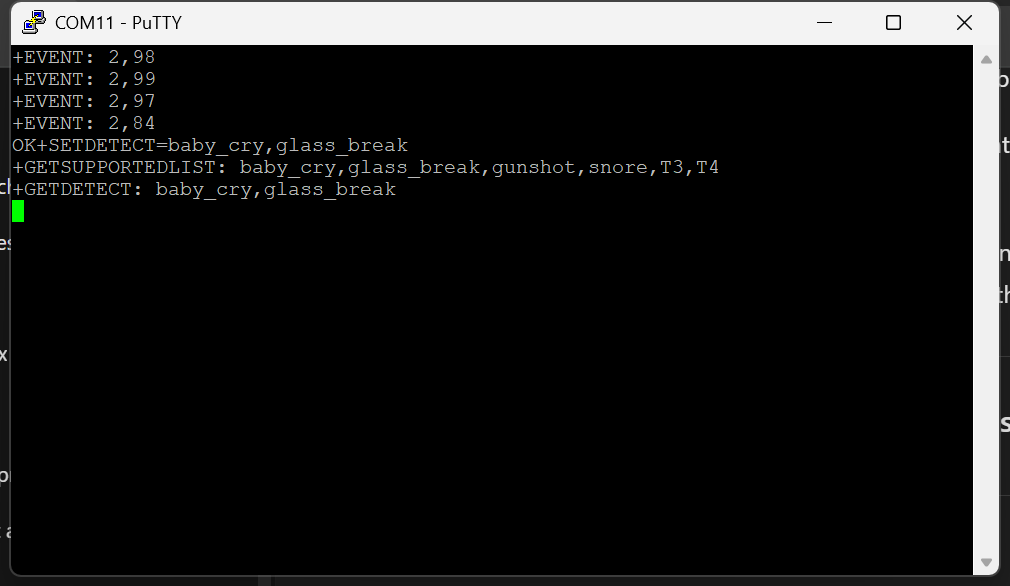
Furthermore, you can adjust device parameters using AT commands. Below are some commands you can use to interact with the device.
| Command | Description | Example |
|---|---|---|
AT+GETDETECT | Get currently enabled detection types (1–5 types). | AT+GETDETECT → +GETDETECT:baby_cry,glass_break |
AT+SETDETECT=<types> | Set event types to detect (comma-separated, maximum of 5). | AT+SETDETECT=baby_cry,snore |
AT+GETEVENTTHRESHOLD=<type> | Get the confidence threshold for a specific event. | AT+GETEVENTTHRESHOLD=baby_cry → +GETEVENTTHRESHOLD:baby_cry,70 |
AT+SETEVENTTHRESHOLD=<type>,<val> | Set the confidence threshold for a specific event. | AT+SETEVENTTHRESHOLD=baby_cry,75 |
AT+GETSUPPORTEDLIST | List all event types supported by the device. | AT+GETSUPPORTEDLIST → +GETSUPPORTEDLIST:doorbell,glass_break,baby_cry,... |
AT+SETOUTPUTTYPE=<type> | Set what gets output when an event is detected. | AT+SETOUTPUTTYPE=highest_confidence |
AT+GETINTMODE | Get the current interrupt mode. | AT+GETINTMODE → +GETINTMODE:single |
AT+SETINTMODE=<mode> | Set the interrupt operation mode. | AT+SETINTMODE=continuous |
AT+RESETINT | Reset interrupt status and pull the INT_N pin HIGH. | AT+RESETINT |
AT+SAVECONFIG | Save the current configuration so it persists after reboot. | AT+SAVECONFIG |
AT+GETFWVERSION | Get the firmware version string. | AT+GETFWVERSION → +GETFWVERSION:1.0.2 |
AT+RESET | Restore default settings and restart the device (clears all custom configuration). | AT+RESET |
When an event is detected the device automatically sends:
+EVENT: <event_id>,<confidence>
Example: +EVENT: 1,87 → event ID 1 (baby_cry), 87% confidence
AT+SETOUTPUTTYPE values
| Value | Behaviour |
|---|---|
highest_confidence | Only the single top-confidence event is reported |
all_events | All detected events are reported each detection cycle |
AT+SETINTMODE values
| Value | Behaviour |
|---|---|
single | INT_N fires once, then must be reset with AT+RESETINT |
continuous | INT_N fires continuously while event is detected |
Arduino Usage
Plug XIAO
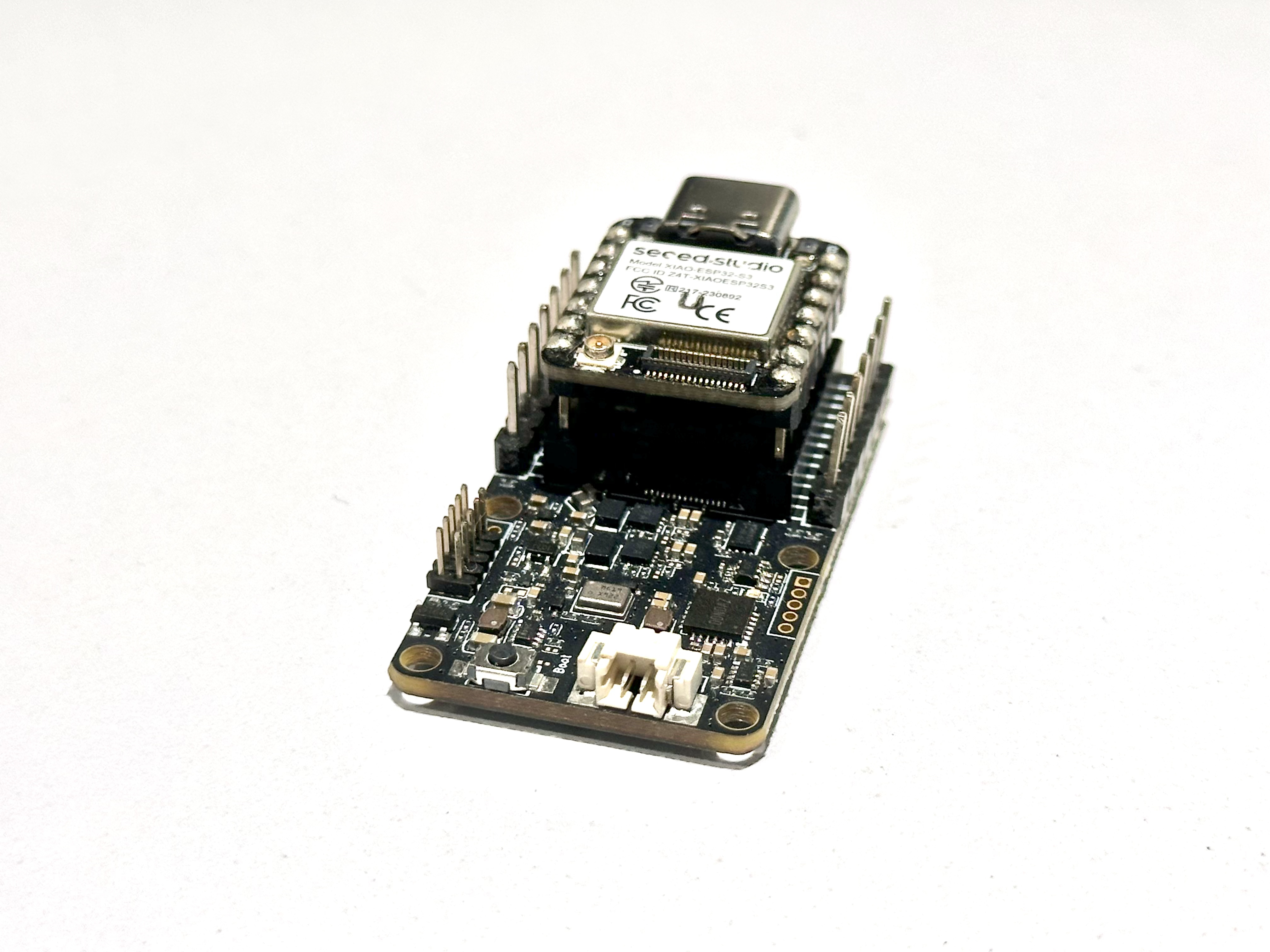
This device supports XIAO modules and can be connected to any available UART pins on the board. It is compatible with ESP32S3, ESP32C6, and ESP32C3 modules, so you only need to modify the RX and TX pin definitions in the code accordingly. Plug the device in the same orientation as shown in the images.
Download the Library
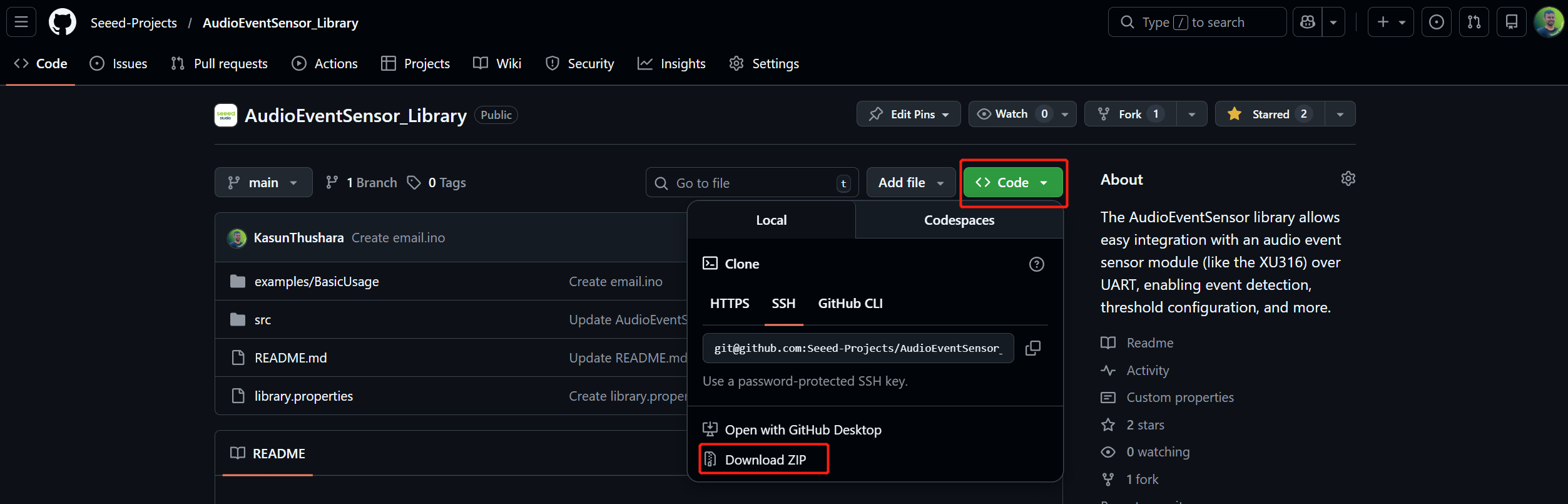
- Go to the GitHub repository Link
- Click the green "Code" button
- Select "Download ZIP"
- Save the file (e.g., AudioEventSensor-main.zip) to your computer
Install the Library in Arduino IDE
Using Arduino IDE (Recommended)
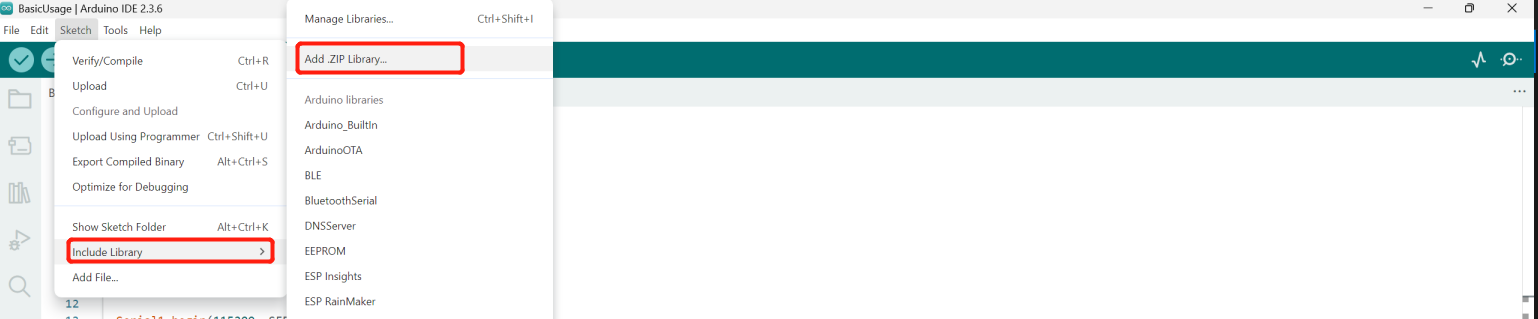
- Open Arduino IDE
- Go to Sketch → Include Library → Add .ZIP Library...
- Navigate to your downloaded ZIP file
- Click "Open" to install
Verify Installation
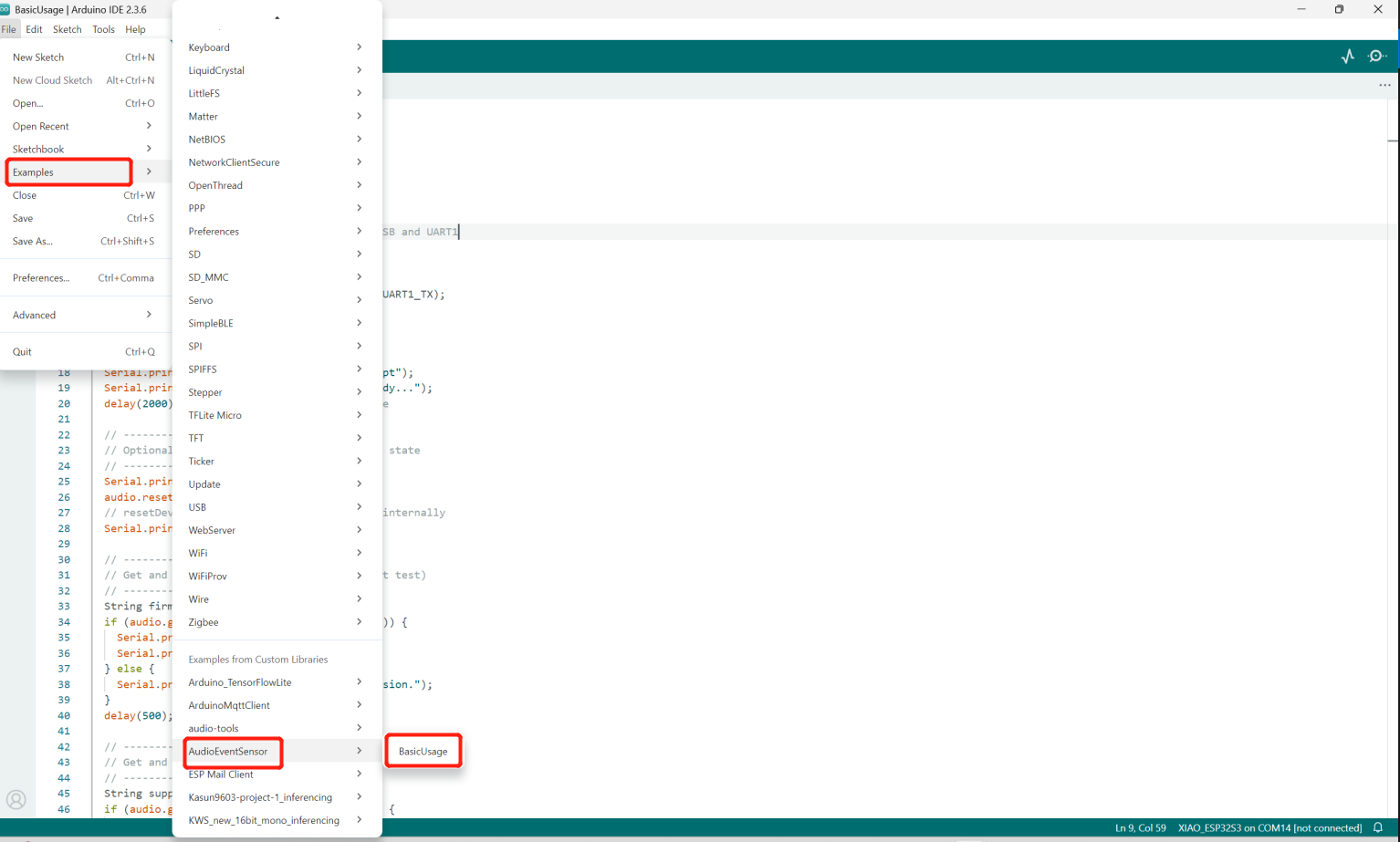
Go to File → Examples → AudioEventSensor to see example sketches
Change the UART Pins
According to your XIAO board, you should change the UART pin definitions in the code. In this example, we use the XIAO ESP32S3.
#define UART1_TX 43
#define UART1_RX 44
Basic Usage
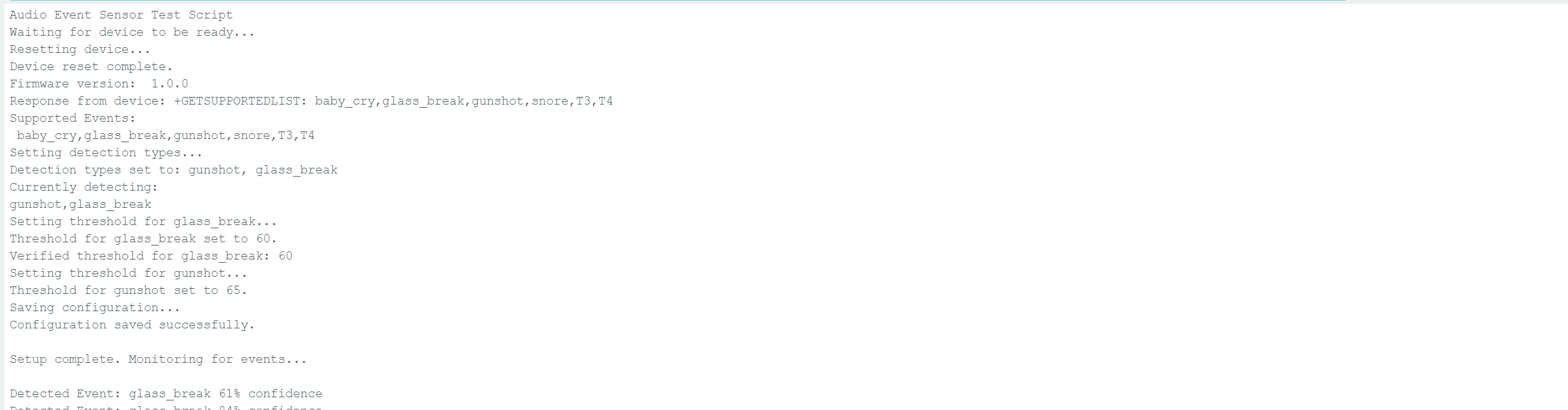
After you flash to ESP32,this code initializes an Audio Event Sensor over UART and configures it to detect specific sound events such as gunshot and glass break. During setup, it resets the device, reads the firmware version, retrieves the list of supported sound events, and sets detection thresholds for each selected event. The configuration is then saved so the settings persist after reboot. In the main loop, the program continuously listens for detected sound events and prints them to the serial monitor in real time. This allows the system to act as an early warning and monitoring solution for abnormal acoustic events.
Bonus : Email Notifications
- First, you need to create an App Password. Please refer to this guide
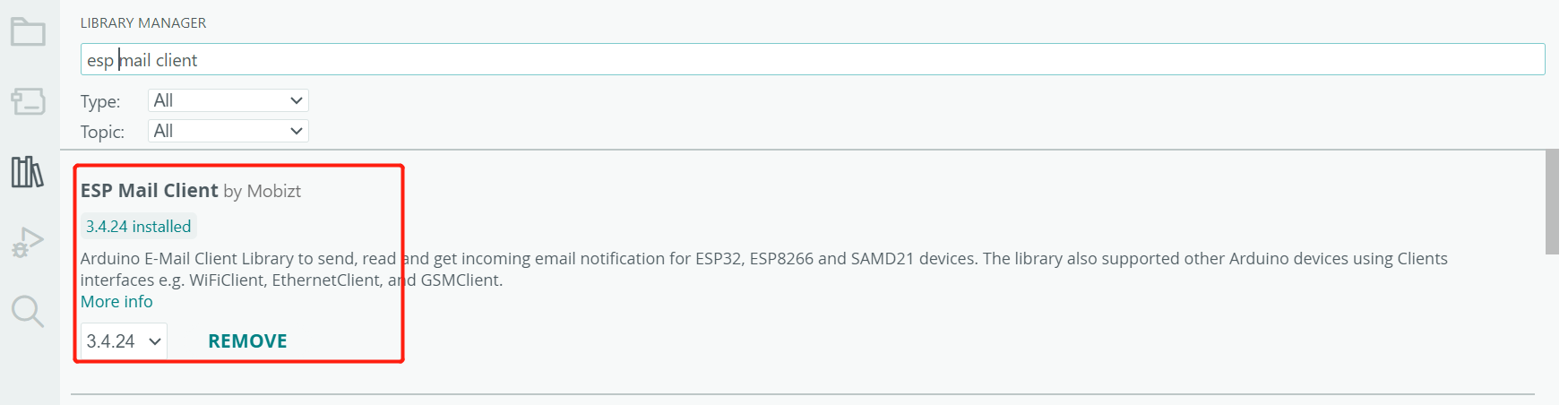
- Next, download and install the required supporting libraries.Install the ESP Mail Client library from the Arduino Library Manager.
Code
Email Ino
#include <WiFi.h>
#include <ESP_Mail_Client.h>
#include <AudioEventSensor.h>

// WiFi credentials
#define WIFI_SSID "WIFI-SSID"
#define WIFI_PASSWORD "PASSWORD"

// Email credentials
#define SENDER_EMAIL "[email protected]"
#define SENDER_PASSWORD "abcd efgh ijkh xvyz"
#define RECIPIENT_EMAIL "[email protected]"

#define SMTP_HOST "smtp.gmail.com"
#define SMTP_PORT 587

// UART pins for audio sensor
#define UART1_TX 43
#define UART1_RX 44

// Cooldown period in milliseconds (30 seconds)
#define EVENT_COOLDOWN_MS 30000

// Event tracking structure
struct EventTracker {
  String eventType;
  unsigned long lastTriggerTime;
  int detectionCount;
};

// Track multiple event types
EventTracker events[] = {
  {"baby_cry", 0, 0},
  {"glass_break", 0, 0},
  {"gunshot", 0, 0},
  {"snore", 0, 0},
  {"T3", 0, 0},
  {"T4", 0, 0}
};
const int EVENT_COUNT = 6;

SMTPSession smtp;
AudioEventSensor audio(Serial1);

void setup() {
  Serial.begin(115200);
  delay(1000);

  Serial1.begin(115200, SERIAL_8N1, UART1_RX, UART1_TX);
  audio.begin(115200);

  Serial.println("=================================");
  Serial.println("Audio Event Email Alert System");
  Serial.println("=================================\n");

  // Connect to WiFi
  WiFi.begin(WIFI_SSID, WIFI_PASSWORD);
  Serial.print("Connecting to Wi-Fi");

  while (WiFi.status() != WL_CONNECTED) {
    Serial.print(".");
    delay(300);
  }

  Serial.println();
  Serial.print("Connected with IP: ");
  Serial.println(WiFi.localIP());
  Serial.println();

  // Initialize audio sensor
  Serial.println("Initializing audio sensor...");
  delay(2000);

  audio.resetDevice();
  delay(500);

  // Get firmware version
  String firmwareVersion;
  if (audio.getFirmwareVersion(firmwareVersion)) {
    Serial.print("Firmware version: ");
    Serial.println(firmwareVersion);
  }

  // Configure detection
  Serial.println("Setting detection types...");
  if (audio.setDetectTypes("gunshot,glass_break,baby_cry,snore,T3")) {
    Serial.println("✓ Detection types set: gunshot, glass_break");
  } else {
    Serial.println("✗ Failed to set detection types");
  }
  delay(500);

  // Set thresholds
  audio.setEventThreshold("glass_break", 60);
  audio.setEventThreshold("gunshot", 65);
  delay(500);

  // Save configuration
  audio.saveConfig();
  delay(500);

  Serial.println("\n=================================");
  Serial.println("System ready. Monitoring events...");
  Serial.println("=================================\n");
}

void loop() {
  // Check for audio events
  if (audio.available()) {
    String eventData = audio.readEvent();

    if (eventData.length() > 0) {
      Serial.print("[" + getTimestamp() + "] ");
      Serial.println(eventData);

      // Extract event type from the event string
      String eventType = extractEventType(eventData);
      int confidence = extractConfidence(eventData);

      // Check if we should send an email for this event
      if (shouldSendEmail(eventType)) {
        Serial.println("\n>>> ALERT: New " + eventType + " detected!");
        Serial.println(">>> Sending email notification...");

        sendEventEmail(eventType, confidence);

        Serial.println(">>> Email sent. Cooldown active for " +
                      String(EVENT_COOLDOWN_MS/1000) + " seconds.\n");
      }
    }
  }

  delay(100);
}

// Extract event type from event string (e.g., "glass_break 95% confidence")
String extractEventType(String eventData) {
  int spaceIndex = eventData.indexOf(' ');
  if (spaceIndex > 0) {
    return eventData.substring(0, spaceIndex);
  }
  return eventData;
}

// Extract confidence from event string
int extractConfidence(String eventData) {
  int percentIndex = eventData.indexOf('%');
  if (percentIndex > 0) {
    // Find the last space before %
    int lastSpace = eventData.lastIndexOf(' ', percentIndex);
    if (lastSpace > 0) {
      String confStr = eventData.substring(lastSpace + 1, percentIndex);
      return confStr.toInt();
    }
  }
  return 0;
}

// Check if enough time has passed since last email for this event type
bool shouldSendEmail(String eventType) {
  unsigned long currentTime = millis();

  for (int i = 0; i < EVENT_COUNT; i++) {
    if (events[i].eventType == eventType) {
      // Check if cooldown period has passed
      if (currentTime - events[i].lastTriggerTime >= EVENT_COOLDOWN_MS) {
        // Update last trigger time
        events[i].lastTriggerTime = currentTime;
        events[i].detectionCount++;
        return true;
      } else {
        // Still in cooldown period
        unsigned long timeRemaining = EVENT_COOLDOWN_MS - (currentTime - events[i].lastTriggerTime);
        Serial.println("    ⏳ Cooldown active. " + String(timeRemaining/1000) + "s remaining.");
        return false;
      }
    }
  }

  return false; // Unknown event type
}

// Send email notification
void sendEventEmail(String eventType, int confidence) {
  // Prepare email subject and body
  String subject = "🚨 ALERT: " + formatEventName(eventType) + " Detected!";

  String body = "SECURITY ALERT\n";
  body += "═══════════════════════════════\n\n";
  body += "Event Type: " + formatEventName(eventType) + "\n";
  body += "Confidence: " + String(confidence) + "%\n";
  body += "Time: " + getTimestamp() + "\n";
  body += "Device: ESP32 Audio Sensor\n";
  body += "Location: [Your Location]\n\n";
  body += "═══════════════════════════════\n";
  body += "This is an automated alert from your audio monitoring system.\n";

  // Send the email
  gmail_send(subject, body);
}

// Format event name for display
String formatEventName(String eventType) {
  if (eventType == "glass_break") return "Glass Breaking";
  if (eventType == "gunshot") return "Gunshot";
  if (eventType == "baby_cry") return "Baby Crying";
  if (eventType == "snore") return "Snoring";
  return eventType;
}

// Get formatted timestamp
String getTimestamp() {
  unsigned long seconds = millis() / 1000;
  unsigned long minutes = seconds / 60;
  unsigned long hours = minutes / 60;

  seconds = seconds % 60;
  minutes = minutes % 60;
  hours = hours % 24;

  char timestamp[12];
  sprintf(timestamp, "%02lu:%02lu:%02lu", hours, minutes, seconds);
  return String(timestamp);
}

// Gmail send function
void gmail_send(String subject, String textMsg) {
  MailClient.networkReconnect(true);

  smtp.debug(0); // Set to 1 for debug output
  smtp.callback(smtpCallback);

  Session_Config config;
  config.server.host_name = SMTP_HOST;
  config.server.port = SMTP_PORT;
  config.login.email = SENDER_EMAIL;
  config.login.password = SENDER_PASSWORD;
  config.login.user_domain = F("127.0.0.1");
  config.time.ntp_server = F("pool.ntp.org,time.nist.gov");
  config.time.gmt_offset = 3;
  config.time.day_light_offset = 0;

  SMTP_Message message;
  message.sender.name = F("ESP32 Security System");
  message.sender.email = SENDER_EMAIL;
  message.subject = subject;
  message.addRecipient(F("Security Admin"), RECIPIENT_EMAIL);
  message.text.content = textMsg;
  message.text.transfer_encoding = "base64";
  message.text.charSet = F("utf-8");
  message.priority = esp_mail_smtp_priority::esp_mail_smtp_priority_high;
  message.addHeader(F("Message-ID: <[email protected]>"));

  if (!smtp.connect(&config)) {
    Serial.printf("✗ Connection error, Status Code: %d, Error Code: %d, Reason: %s\n",
                  smtp.statusCode(), smtp.errorCode(), smtp.errorReason().c_str());
    return;
  }

  if (!MailClient.sendMail(&smtp, &message)) {
    Serial.printf("✗ Send error, Status Code: %d, Error Code: %d, Reason: %s\n",
                  smtp.statusCode(), smtp.errorCode(), smtp.errorReason().c_str());
  } else {
    Serial.println("✓ Email sent successfully!");
  }
}

void smtpCallback(SMTP_Status status) {
  Serial.println(status.info());

  if (status.success()) {
    Serial.println("────────────────────");
    Serial.printf("✓ Message sent: %d\n", status.completedCount());
    Serial.printf("✗ Message failed: %d\n", status.failedCount());
    Serial.println("────────────────────\n");
    smtp.sendingResult.clear();
  }
}
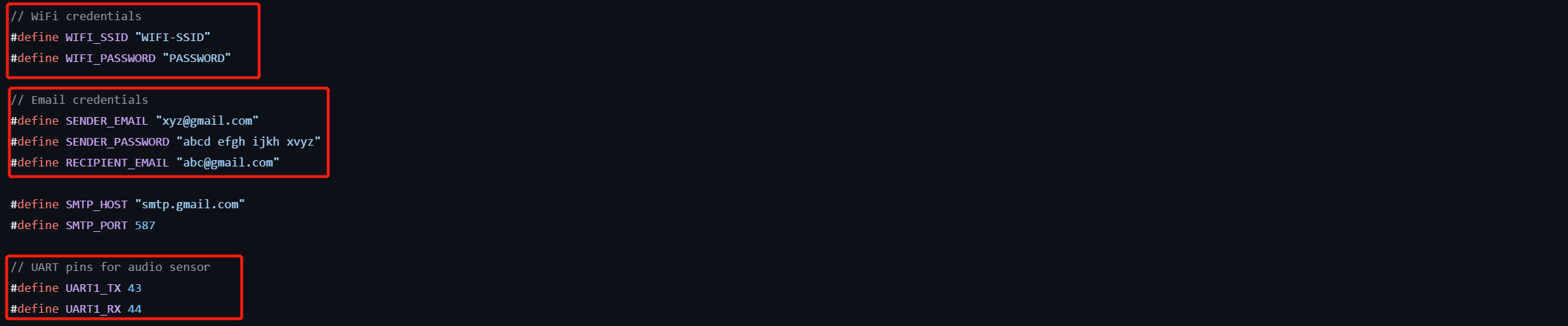
Then, replace the following parameters in the code with your own values: the sender email address, the UART pins, App Password, the receiver email address, and your Wi-Fi SSID and password.
Tech Support & Product Discussion
Thank you for choosing our products! We are here to provide you with different support to ensure that your experience with our products is as smooth as possible. We offer several communication channels to cater to different preferences and needs.