Bluetooth LE for XIAO nRF54LM20A Sense
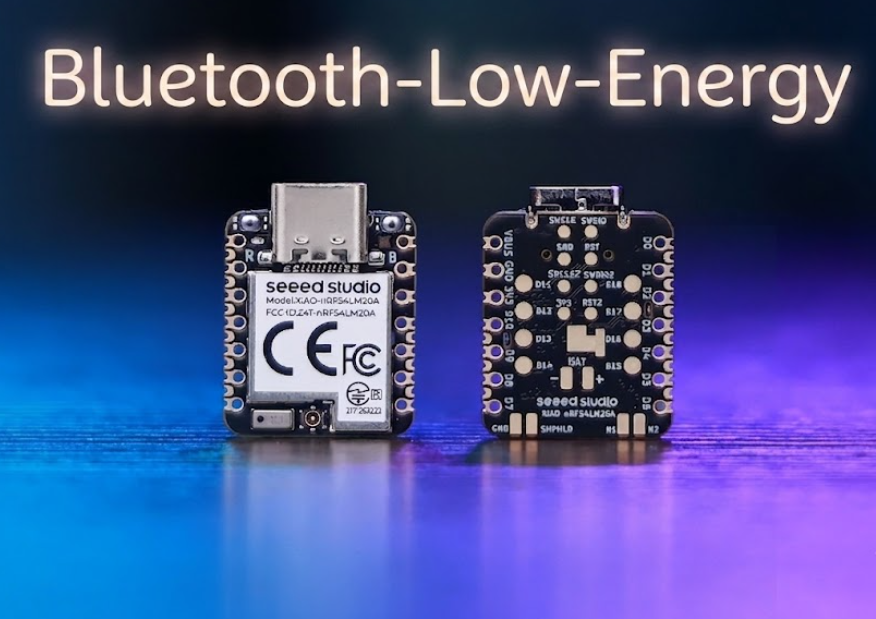
Bluetooth Low Energy (BLE) is a low-power wireless communication standard introduced in Bluetooth 4.0. Designed for intermittent small-data transmission, it enables wireless connectivity within tens of meters while maintaining an ultra-low average current consumption at the microampere level. It is widely applied in wearable devices, smart home sensors, indoor positioning and industrial IoT scenarios.
Powered by the nRF54LM20A SoC, the XIAO nRF54LM20A Series supports Bluetooth LE, Matter, Thread, Zigbee and 2.4GHz proprietary protocols, delivering a peak data rate of 4 Mbps ideal for low-latency scenarios. It also features support for Bluetooth Channel Sounding and Bluetooth Mesh. This article illustrates its BLE functionality through two practical examples: basic broadcast Beacon transmission and a BLE LED Button Service (LBS) connection between Central and Peripheral devices.
- This tutorial is based on the PlatformIO build system and Zephyr RTOS. If you are not familiar with creating a PlatformIO project for the XIAO nRF54LM20A, refer to Getting Started with Seeed Studio XIAO nRF54LM20A.
- If you would like to learn more about the nRF54LM20A SoC and BLE, please visit the links below: nRF54LM20A SoC Introduction and Bluetooth-Low-Energy for Nordic
Hardware Preparation
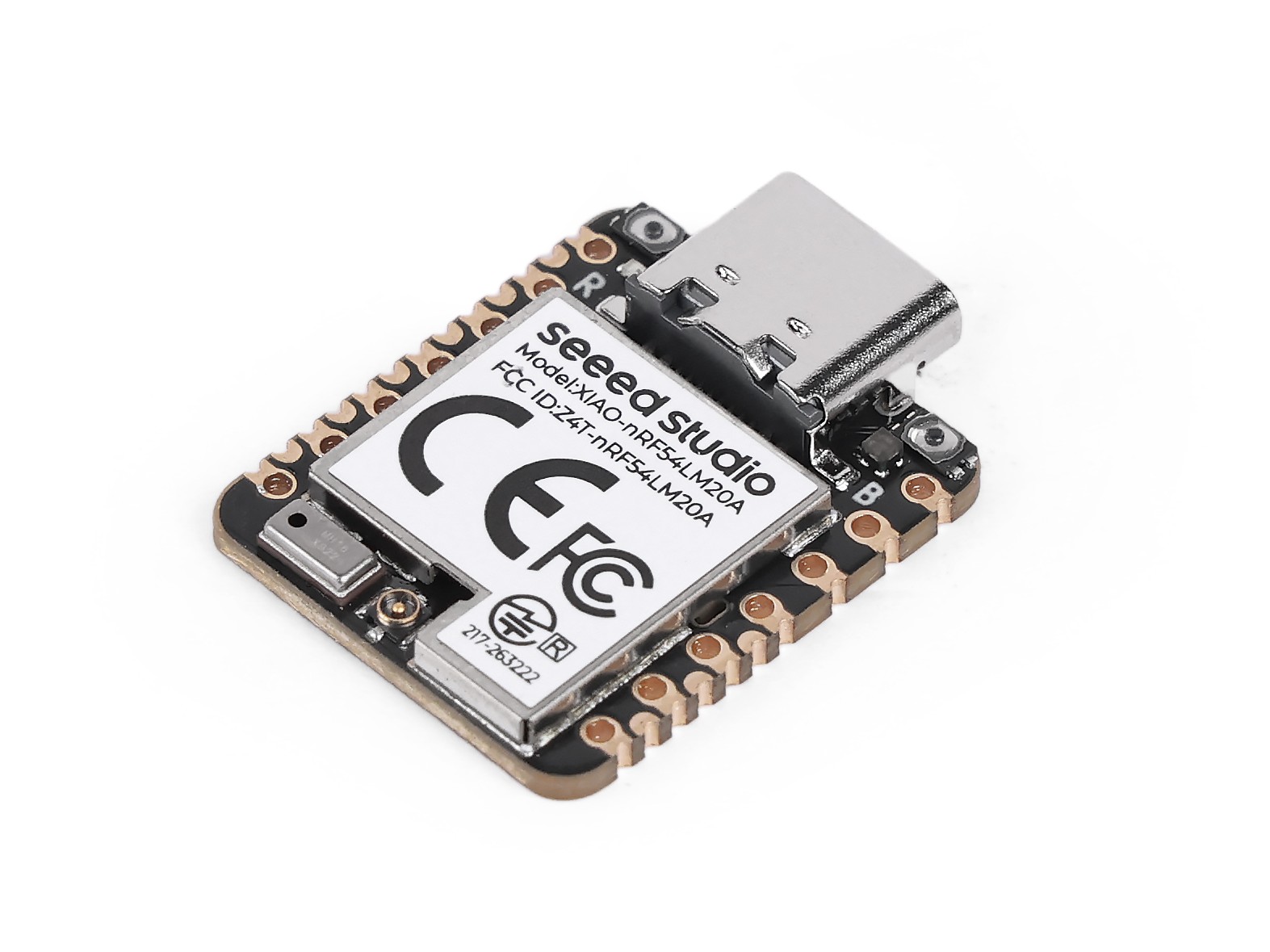
Before getting started, prepare at least two XIAO nRF54LM20A Sense boards if you plan to run the BLE LBS example.
| Seeed Studio XIAO nRF54LM20A Sense |
|---|
 |
Bluetooth Antenna
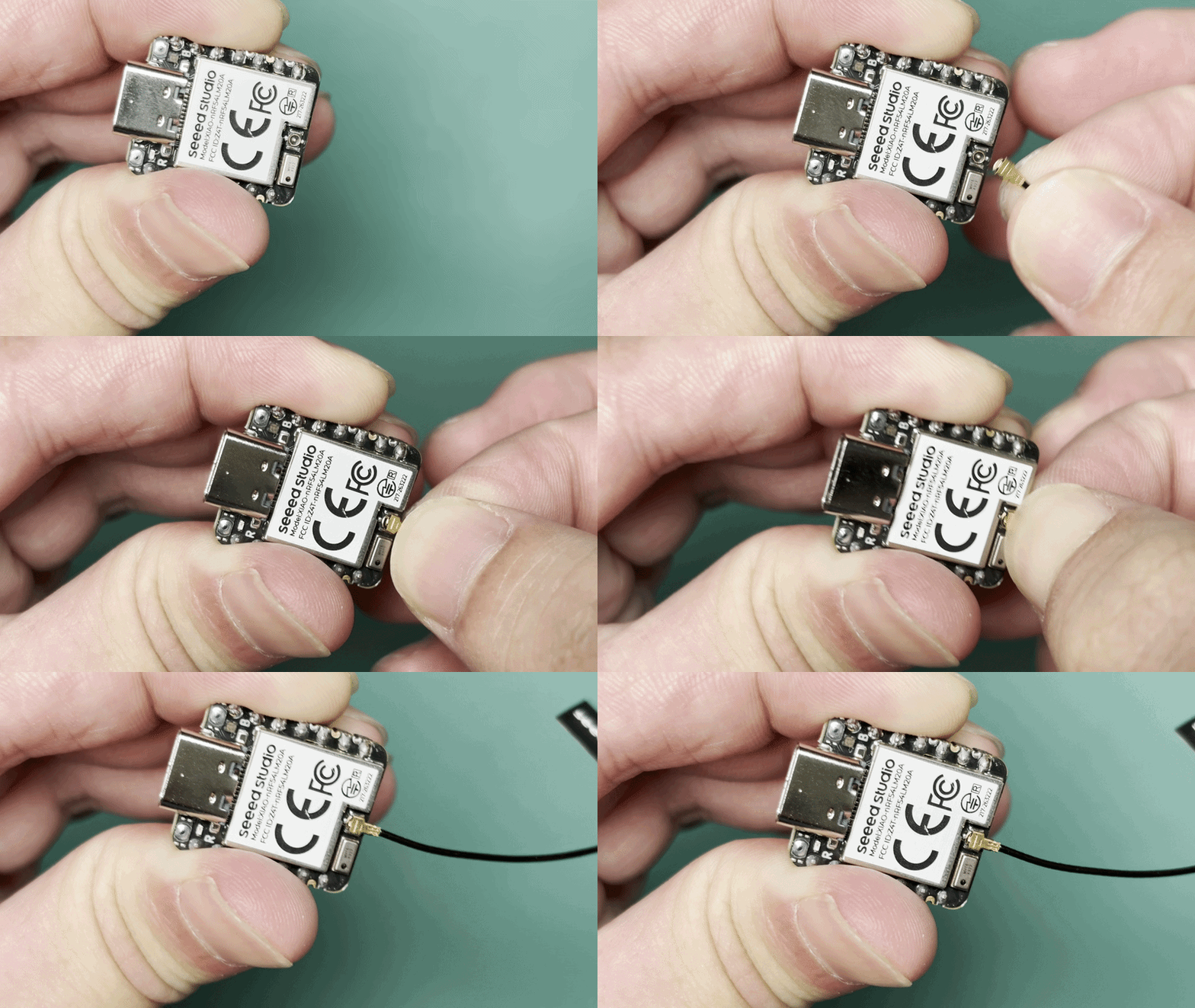
This board uses an external Bluetooth antenna. To ensure a better quality of Bluetooth signal and enhance your Bluetooth usage experience, it is recommended to install a Bluetooth antenna. The connection method is shown below:
Antenna Installation
The Seeed Studio XIAO nRF54LM20A package includes a dedicated 2.4 GHz antenna. For optimal Bluetooth performance, attach the supplied antenna to the onboard antenna connector.
| 2.4GHz FPC Antenna A-04 for XIAO nRF54 Series |
|---|
 |
Application
This section introduces core BLE features and the usage method of BLE on XIAO nRF54LM20A Sense through practical cases.
BLE Beacon
This example implements a BLE Beacon on the XIAO nRF54LM20A. After startup, the device continuously broadcasts advertising packets containing Manufacturer Specific Data. The packet includes a counter that increments once per second, allowing the data changes to be monitored in real time using nRF Connect.
Software
- Relevant device tree configurations shall be enabled in
app.overlayto switch the BLE controller to native Zephyr implementation.
/* Enable Zephyr native BLE controller (LL SW Split) */
&bt_hci_controller {
        status = "okay";
};

/ {
        chosen {
                zephyr,bt-hci = &bt_hci_controller;
        };
};
- Enable relevant Bluetooth configurations in
prj.conf, set the log output mode, and rename the Bluetooth device name to XIAO-Beacon.
# GPIO
CONFIG_GPIO=y
# XIAO nRF54LM20A can fault early with the MPU enabled in this toolchain/board package.
CONFIG_ARM_MPU=n
# Regulator (for power_en)
CONFIG_REGULATOR=y
# Logging
CONFIG_LOG=y
# UART for console logging
CONFIG_SERIAL=y
CONFIG_UART_ASYNC_API=y
CONFIG_UART_20_ASYNC=y
CONFIG_UART_21_ASYNC=y
CONFIG_UART_NRFX_UARTE_ENHANCED_RX=y
# BLE
CONFIG_BT=y
CONFIG_BT_PERIPHERAL=y
CONFIG_BT_DEVICE_NAME="XIAO-Beacon"
# Avoid GCC 8.2 rejecting the controller's optimized assert inline asm path.
CONFIG_BT_CTLR_ASSERT_OPTIMIZE_FOR_SIZE=n
CONFIG_BT_CTLR_ASSERT_DEBUG=n
CONFIG_BT_CTLR_ASSERT_OVERHEAD_START=n
# Disable auto-procedures to avoid LL Procedure Collision on nRF54L
CONFIG_BT_AUTO_PHY_UPDATE=n
CONFIG_BT_DATA_LEN_UPDATE=n
# Memory
CONFIG_HEAP_MEM_POOL_SIZE=8192
# System workqueue stack
CONFIG_SYSTEM_WORKQUEUE_STACK_SIZE=2048
# Assert level
CONFIG_ASSERT=y
- Implement the advertising data format and update logic in
main.c.
main.c
#include <stdio.h>

#include <zephyr/kernel.h>
#include <zephyr/device.h>
#include <zephyr/drivers/gpio.h>
#include <zephyr/drivers/regulator.h>
#include <zephyr/bluetooth/bluetooth.h>
#include <zephyr/bluetooth/hci.h>
#include <zephyr/logging/log.h>

LOG_MODULE_REGISTER(ble_beacon, LOG_LEVEL_INF);

/* Manufacturer Data configuration */
#define MANUF_COMPANY_ID    0x0059
#define MANUF_DATA_SIZE     8

static uint32_t manufacturer_counter;

static const uint8_t adv_flags[] __aligned(4) = {
    BT_LE_AD_GENERAL | BT_LE_AD_NO_BREDR,
};

static const uint8_t adv_name[] __aligned(4) = CONFIG_BT_DEVICE_NAME;

static uint8_t manuf_data[MANUF_DATA_SIZE] __aligned(4);

static const struct bt_data ad[] __aligned(4) = {
    BT_DATA(BT_DATA_FLAGS, adv_flags, sizeof(adv_flags)),
    BT_DATA(BT_DATA_NAME_COMPLETE, adv_name, sizeof(adv_name) - 1),
    BT_DATA(BT_DATA_MANUFACTURER_DATA, manuf_data, sizeof(manuf_data)),
};

/* Power enable regulator (GPIO1_12) - must be enabled before BLE init */
static const struct device *const power_en_dev =
    DEVICE_DT_GET(DT_NODELABEL(power_en));

static void adv_update_work_handler(struct k_work *work);

static K_WORK_DELAYABLE_DEFINE(adv_update_work, adv_update_work_handler);

static void fill_manuf_data(uint32_t counter)
{
    /* [Company ID (2B)][Counter (4B)][Custom (2B)] */
    manuf_data[0] = MANUF_COMPANY_ID & 0xFF;
    manuf_data[1] = (MANUF_COMPANY_ID >> 8) & 0xFF;
    manuf_data[2] = (counter >> 0) & 0xFF;
    manuf_data[3] = (counter >> 8) & 0xFF;
    manuf_data[4] = (counter >> 16) & 0xFF;
    manuf_data[5] = (counter >> 24) & 0xFF;
    manuf_data[6] = 0xAA;
    manuf_data[7] = 0xBB;
}

static int enable_power(void)
{
    int ret;

    if (!device_is_ready(power_en_dev)) {
        LOG_ERR("power_en regulator is not ready");
        return -ENODEV;
    }

    ret = regulator_enable(power_en_dev);
    if (ret < 0 && ret != -EALREADY) {
        LOG_ERR("Failed to enable power_en: %d", ret);
        return ret;
    }

    k_sleep(K_MSEC(20));
    LOG_INF("Power rail enabled");
    return 0;
}

static void adv_update_work_handler(struct k_work *work)
{
    int err;

    manufacturer_counter++;
    fill_manuf_data(manufacturer_counter);

    err = bt_le_adv_update_data(ad, ARRAY_SIZE(ad), NULL, 0);
    if (err < 0) {
        LOG_ERR("Failed to update advertising data (err %d)", err);
    } else {
        LOG_INF("Manufacturer counter: %u", manufacturer_counter);
    }

    k_work_schedule(&adv_update_work, K_SECONDS(1));
}

int main(void)
{
    int err;

    LOG_INF("BLE Manufacturer Data Beacon");

    /* Enable board power rail before BLE initialization */
    err = enable_power();
    if (err < 0) {
        LOG_ERR("Power enable failed (err %d)", err);
        return err;
    }

    LOG_INF("Initializing BLE...");

    err = bt_enable(NULL);
    if (err < 0) {
        LOG_ERR("Bluetooth enable failed (err %d)", err);
        return err;
    }

    LOG_INF("BLE initialized");

    /* Initial advertising data with counter = 0 */
    fill_manuf_data(0);

    err = bt_le_adv_start(BT_LE_ADV_NCONN, ad, ARRAY_SIZE(ad), NULL, 0);
    if (err < 0) {
        LOG_ERR("Advertising failed to start (err %d)", err);
        return err;
    }

    LOG_INF("BLE advertising started");

    /* Schedule counter update after 1 second */
    k_work_schedule(&adv_update_work, K_SECONDS(1));

    for (;;) {
        k_sleep(K_FOREVER);
    }

    return 0;
}
Result
- After flashing the firmware, install the nRF Connect app to scan and detect BLE devices.
Meanwhile, you can search and download the nRF Connect app in major mobile app stores, which allows your phone to scan for and connect to Bluetooth devices.
- Android: nRF Connect
- IOS: nRF Connect
- After installing the software, scan for the Bluetooth device named XIAO-Beacon and check the received Manufacturer Data. Meanwhile, open the serial port to view output logs.
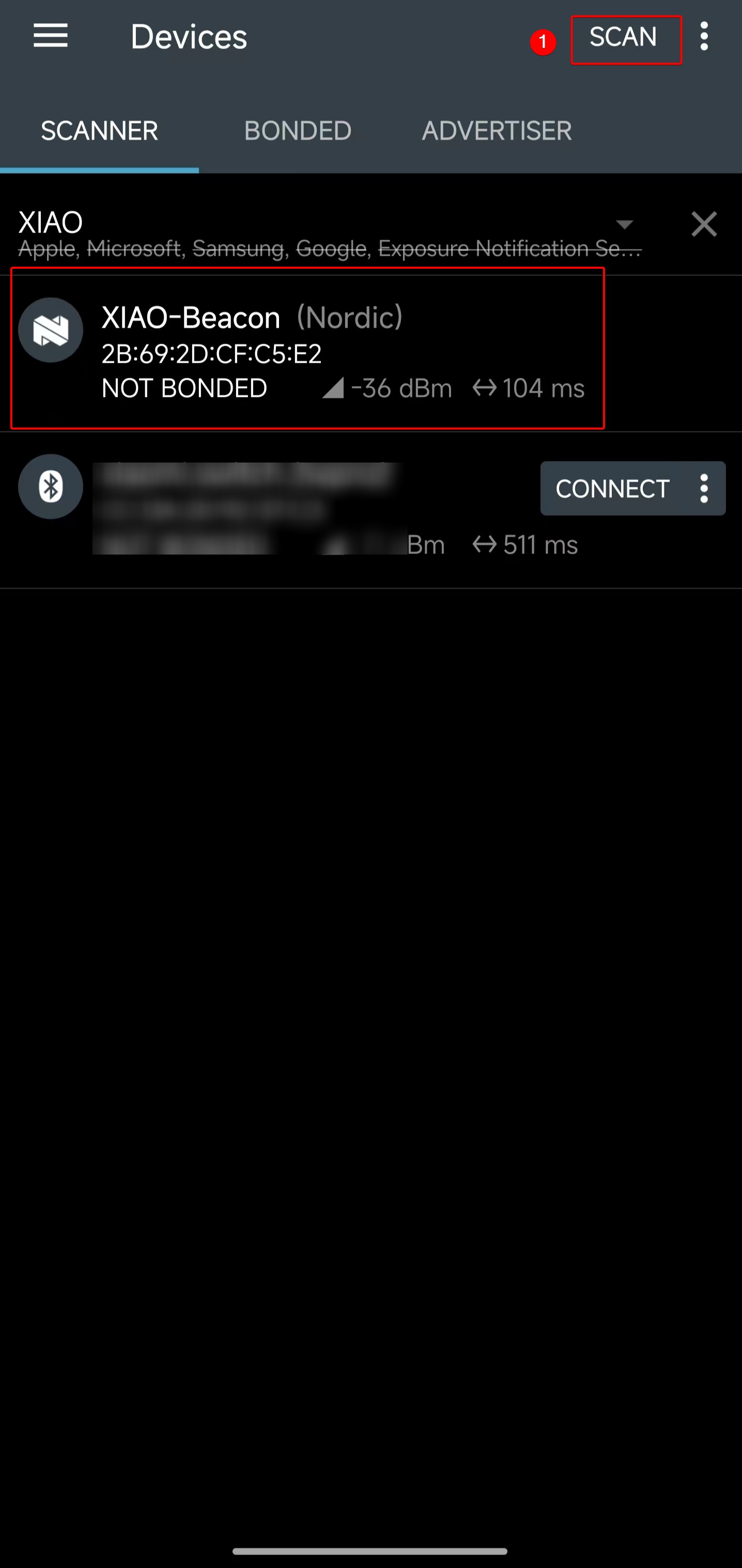 | 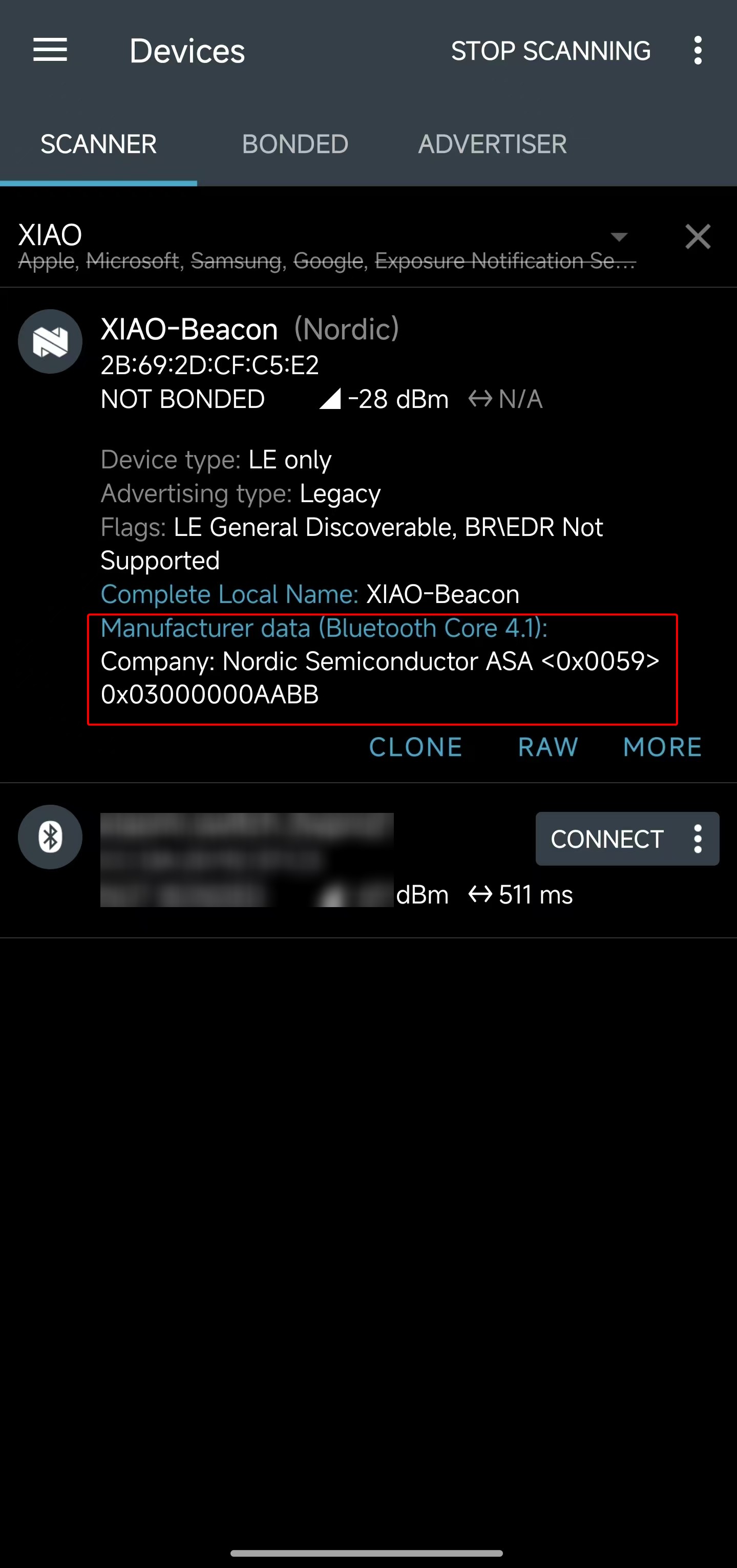 |
- The obtained Manufacturer Data is the hexadecimal value
<0x0059> 0x03000000AABB. By checking the program code, the segment0x03000000indicates that the current counter value is 3.
#define MANUF_COMPANY_ID    0x0059
static uint32_t manufacturer_counter;
...
manuf_data[0] = MANUF_COMPANY_ID & 0xFF;
manuf_data[1] = (MANUF_COMPANY_ID >> 8) & 0xFF;
manuf_data[2] = (manufacturer_counter >> 0) & 0xFF;
manuf_data[3] = (manufacturer_counter >> 8) & 0xFF;
manuf_data[4] = (manufacturer_counter >> 16) & 0xFF;
manuf_data[5] = (manufacturer_counter >> 24) & 0xFF;
manuf_data[6] = 0xAA;
manuf_data[7] = 0xBB;
- Open the serial port tool and check that the counter values are printed line by line, with the current count reaching 3.
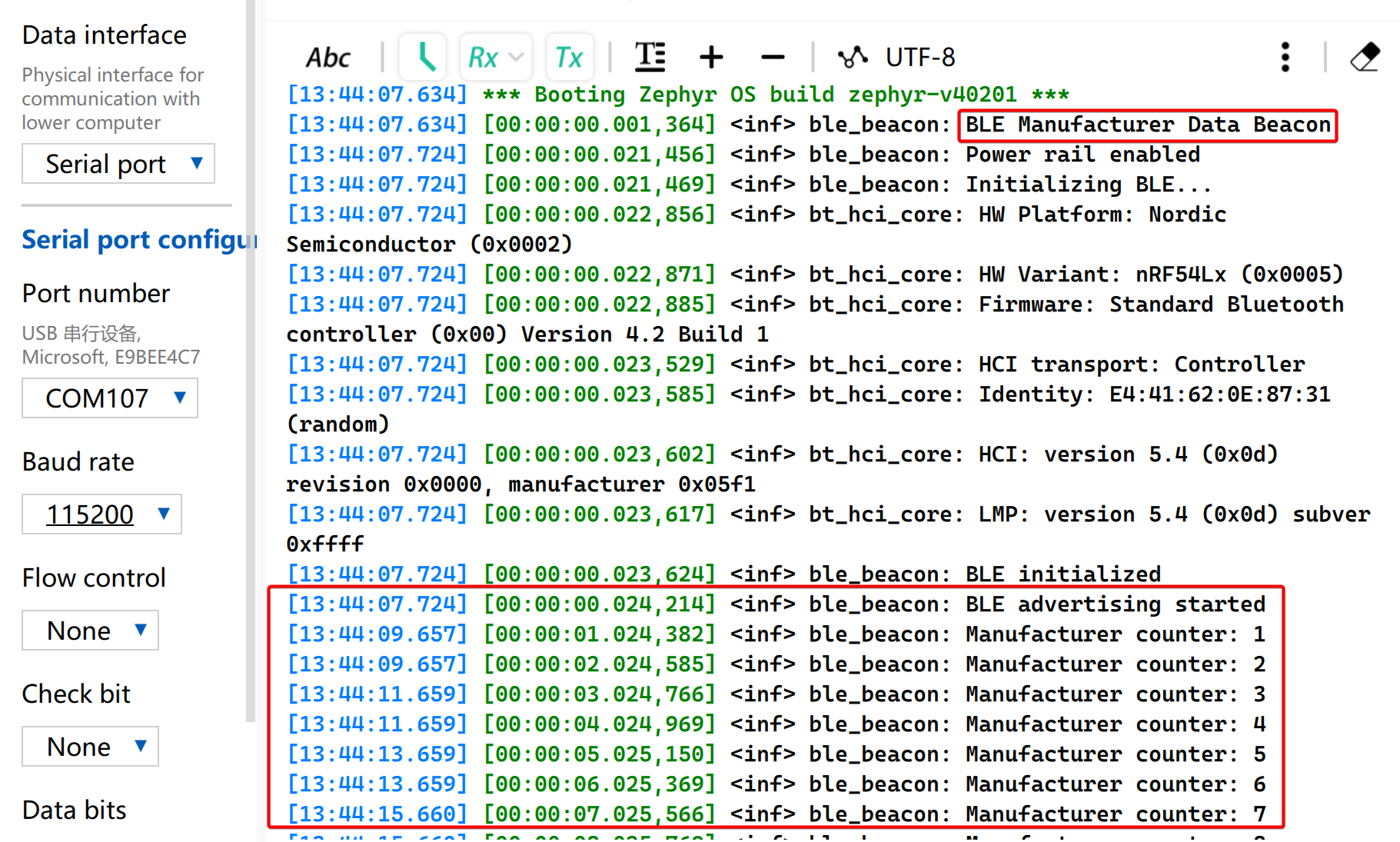
From the above results, the process of transmitting custom BLE advertising packets on XIAO nRF54LM20A Sense can be clearly understood, which facilitates further research on BLE operating characteristics. In specific application scenarios, advertising data can be adopted to judge trigger conditions without establishing actual connections.
BLE LBS
This example uses two XIAO nRF54 boards to implement a BLE LED Button Service (LBS). One board acts as a BLE Peripheral and advertises a custom LBS service. The other acts as a BLE Central, scans for the service, connects automatically, and controls the LED on the Peripheral through a GATT Write Characteristic.
No additional app.overlay file is required because the board definition already provides the led0 and sw0 aliases used by this example.
Software
BLE Central
- Configure the project in
CMakeLists.txt.
# SPDX-License-Identifier: Apache-2.0

cmake_minimum_required(VERSION 3.13.1)
find_package(Zephyr REQUIRED HINTS $ENV{ZEPHYR_BASE})
project(ble-lbs-min-central)

target_sources(app PRIVATE src/main.c)
- Enable Bluetooth-related configurations in
prj.conf
CONFIG_GPIO=y
CONFIG_SERIAL=y
CONFIG_CONSOLE=y
CONFIG_UART_CONSOLE=y
CONFIG_PRINTK=y

CONFIG_LOG=y
CONFIG_LOG_BACKEND_UART=y
CONFIG_LOG_BUFFER_SIZE=2048

CONFIG_BT=y
CONFIG_BT_CENTRAL=y
CONFIG_BT_OBSERVER=y
CONFIG_BT_GATT_CLIENT=y
CONFIG_BT_CTLR_TX_PWR_PLUS_8=y
CONFIG_BT_DEVICE_NAME="zephyr_ble_lbs_central"

CONFIG_BT_BUF_ACL_RX_SIZE=255
CONFIG_BT_BUF_ACL_TX_SIZE=251
CONFIG_BT_BUF_CMD_TX_SIZE=255
CONFIG_BT_BUF_EVT_DISCARDABLE_SIZE=255
CONFIG_BT_L2CAP_TX_MTU=247

CONFIG_MAIN_STACK_SIZE=4096
CONFIG_SYSTEM_WORKQUEUE_STACK_SIZE=2048
- Implement the BLE application logic in
main.c.
main.c
#include <zephyr/kernel.h>
#include <zephyr/drivers/gpio.h>
#include <zephyr/logging/log.h>
#include <zephyr/sys/atomic.h>

#include <zephyr/bluetooth/bluetooth.h>
#include <zephyr/bluetooth/conn.h>
#include <zephyr/bluetooth/hci.h>
#include <zephyr/bluetooth/uuid.h>
#include <zephyr/bluetooth/gatt.h>

#include <string.h>

LOG_MODULE_REGISTER(app, LOG_LEVEL_INF);

#define BT_UUID_LBS_MIN_VAL BT_UUID_128_ENCODE(0x8e7f1a23, 0x4b2c, 0x11ee, 0xbe56, 0x0242ac120002)
#define BT_UUID_LBS_MIN BT_UUID_DECLARE_128(BT_UUID_LBS_MIN_VAL)

#define BT_UUID_LBS_MIN_WRITE_VAL \
	BT_UUID_128_ENCODE(0x8e7f1a24, 0x4b2c, 0x11ee, 0xbe56, 0x0242ac120002)
#define BT_UUID_LBS_MIN_WRITE BT_UUID_DECLARE_128(BT_UUID_LBS_MIN_WRITE_VAL)

#define LED0_NODE DT_ALIAS(led0)
#define SW0_NODE DT_ALIAS(sw0)

static const struct gpio_dt_spec led0 = GPIO_DT_SPEC_GET_OR(LED0_NODE, gpios, {0});
static const struct gpio_dt_spec sw0 = GPIO_DT_SPEC_GET_OR(SW0_NODE, gpios, {0});

static struct bt_conn *default_conn;
static struct bt_conn *discover_conn;
static struct bt_gatt_discover_params discover_params;
static struct bt_gatt_write_params write_params;
static struct gpio_callback sw0_cb;
static struct k_work button_work;
static struct k_work_delayable debounce_work;
static struct k_work_delayable blink_work;
static atomic_t write_busy;

static uint16_t svc_start_handle;
static uint16_t svc_end_handle;
static uint16_t write_handle;
static uint8_t remote_led_state;
static uint8_t blink_led_state;
static bool blink_active;

static bool gpio_ready(const struct gpio_dt_spec *spec)
{
	return spec->port != NULL && device_is_ready(spec->port);
}

static void status_led_apply(uint8_t value)
{
	if (!gpio_ready(&led0)) {
		return;
	}

	(void)gpio_pin_set_dt(&led0, value ? 1 : 0);
}

static void blink_handler(struct k_work *work)
{
	ARG_UNUSED(work);

	if (!blink_active) {
		return;
	}

	blink_led_state = blink_led_state ? 0U : 1U;
	status_led_apply(blink_led_state);
	k_work_reschedule(&blink_work, K_MSEC(500));
}

static int init_status_led(void)
{
	int err;

	k_work_init_delayable(&blink_work, blink_handler);

	if (!gpio_ready(&led0)) {
		return -ENODEV;
	}

	err = gpio_pin_configure_dt(&led0, GPIO_OUTPUT_INACTIVE);
	if (err) {
		return err;
	}

	status_led_apply(0U);
	return 0;
}

static void start_blink(void)
{
	if (!gpio_ready(&led0)) {
		return;
	}

	blink_active = true;
	k_work_reschedule(&blink_work, K_NO_WAIT);
}

static void stop_blink(void)
{
	blink_active = false;
	(void)k_work_cancel_delayable(&blink_work);
	blink_led_state = 0U;
	status_led_apply(0U);
}

static bool ad_has_uuid(struct bt_data *data, void *user_data)
{
	bool *found = user_data;
	struct bt_uuid_128 uuid;

	if (data->type != BT_DATA_UUID128_ALL && data->type != BT_DATA_UUID128_SOME) {
		return true;
	}

	if ((data->data_len % 16U) != 0U) {
		return true;
	}

	for (size_t i = 0; i < data->data_len; i += 16U) {
		memcpy(uuid.val, &data->data[i], 16U);
		uuid.uuid.type = BT_UUID_TYPE_128;
		if (bt_uuid_cmp(&uuid.uuid, BT_UUID_LBS_MIN) == 0) {
			*found = true;
			return false;
		}
	}

	return true;
}

static void start_scan(void);

static void device_found(const bt_addr_le_t *addr, int8_t rssi, uint8_t type,
			 struct net_buf_simple *ad)
{
	bool found = false;
	int err;

	ARG_UNUSED(rssi);

	if (default_conn != NULL) {
		return;
	}

	if (type != BT_GAP_ADV_TYPE_ADV_IND &&
	    type != BT_GAP_ADV_TYPE_ADV_DIRECT_IND &&
	    type != BT_GAP_ADV_TYPE_ADV_SCAN_IND &&
	    type != BT_GAP_ADV_TYPE_SCAN_RSP) {
		return;
	}

	bt_data_parse(ad, ad_has_uuid, &found);
	if (!found) {
		return;
	}

	{
		char addr_str[BT_ADDR_LE_STR_LEN];

		bt_addr_le_to_str(addr, addr_str, sizeof(addr_str));
		LOG_INF("LBS adv matched from %s (type=0x%02x)", addr_str, type);
	}

	err = bt_le_scan_stop();
	if (err) {
		LOG_WRN("scan stop failed: %d", err);
	}

	err = bt_conn_le_create(addr, BT_CONN_LE_CREATE_CONN, BT_LE_CONN_PARAM_DEFAULT,
				&default_conn);
	if (err) {
		LOG_ERR("create conn failed: %d", err);
		start_scan();
	} else {
		LOG_INF("connecting to matching peripheral");
	}
}

static void start_scan(void)
{
	int err = bt_le_scan_start(BT_LE_SCAN_ACTIVE, device_found);

	if (err) {
		LOG_ERR("scan start failed: %d", err);
		return;
	}

	LOG_INF("scanning");
}

static uint8_t discover_func(struct bt_conn *conn, const struct bt_gatt_attr *attr,
			     struct bt_gatt_discover_params *params)
{
	if (attr == NULL) {
		LOG_INF("discover complete (attr=NULL) write_handle=0x%04x", write_handle);
		memset(params, 0, sizeof(*params));
		if (discover_conn) {
			bt_conn_unref(discover_conn);
			discover_conn = NULL;
		}
		return BT_GATT_ITER_STOP;
	}

	if (params->type == BT_GATT_DISCOVER_PRIMARY) {
		const struct bt_gatt_service_val *svc = attr->user_data;

		svc_start_handle = attr->handle;
		svc_end_handle = svc->end_handle;
		LOG_INF("primary svc found: start=0x%04x end=0x%04x",
			svc_start_handle, svc_end_handle);

		memset(params, 0, sizeof(*params));
		/* Discover all characteristics in the service, then match the write
		 * characteristic in code. Filtering by the 128-bit UUID at ATT level
		 * can return nothing even when the characteristic exists.
		 */
		params->uuid = NULL;
		params->func = discover_func;
		params->start_handle = svc_start_handle + 1U;
		params->end_handle = svc_end_handle;
		params->type = BT_GATT_DISCOVER_CHARACTERISTIC;

		if (bt_gatt_discover(conn, params)) {
			LOG_ERR("characteristic discover failed");
		}

		return BT_GATT_ITER_STOP;
	}

	if (params->type == BT_GATT_DISCOVER_CHARACTERISTIC) {
		const struct bt_gatt_chrc *chrc = attr->user_data;
		char uuid_str[37];

		bt_uuid_to_str(chrc->uuid, uuid_str, sizeof(uuid_str));
		LOG_INF("chrc: value_handle=0x%04x props=0x%02x uuid=%s",
			chrc->value_handle, chrc->properties, uuid_str);

		if (bt_uuid_cmp(chrc->uuid, BT_UUID_LBS_MIN_WRITE) == 0) {
			write_handle = chrc->value_handle;
			LOG_INF("write handle found: 0x%04x", write_handle);
			return BT_GATT_ITER_STOP;
		}
	}

	return BT_GATT_ITER_CONTINUE;
}

static void discover_lbs_service(struct bt_conn *conn)
{
	svc_start_handle = 0U;
	svc_end_handle = 0U;
	write_handle = 0U;

	if (discover_conn) {
		bt_conn_unref(discover_conn);
	}

	discover_conn = bt_conn_ref(conn);

	memset(&discover_params, 0, sizeof(discover_params));
	discover_params.uuid = BT_UUID_LBS_MIN;
	discover_params.func = discover_func;
	discover_params.start_handle = BT_ATT_FIRST_ATTRIBUTE_HANDLE;
	discover_params.end_handle = BT_ATT_LAST_ATTRIBUTE_HANDLE;
	discover_params.type = BT_GATT_DISCOVER_PRIMARY;

	if (bt_gatt_discover(conn, &discover_params)) {
		LOG_ERR("service discover failed");
	} else {
		LOG_INF("discovering LBS service");
	}
}

static void write_cb(struct bt_conn *conn, uint8_t err, struct bt_gatt_write_params *params)
{
	ARG_UNUSED(conn);
	ARG_UNUSED(params);

	atomic_set(&write_busy, 0);

	if (err) {
		LOG_ERR("write failed: 0x%02x", err);
		return;
	}

	LOG_INF("write ok");
}

static void button_work_handler(struct k_work *work)
{
	uint8_t next_state;
	int err;

	ARG_UNUSED(work);

	if (default_conn == NULL || write_handle == 0U) {
		return;
	}

	if (!atomic_cas(&write_busy, 0, 1)) {
		return;
	}

	next_state = remote_led_state ? 0U : 1U;
	remote_led_state = next_state;
	LOG_INF("button press -> write 0x%02x", remote_led_state);

	write_params.handle = write_handle;
	write_params.offset = 0U;
	write_params.data = &remote_led_state;
	write_params.length = sizeof(remote_led_state);
	write_params.func = write_cb;

	err = bt_gatt_write(default_conn, &write_params);
	if (err) {
		atomic_set(&write_busy, 0);
		LOG_ERR("write start failed: %d", err);
	} else {
		LOG_INF("write started");
	}
}

static void debounce_handler(struct k_work *work)
{
	ARG_UNUSED(work);

	if (gpio_pin_get_dt(&sw0) > 0) {
		LOG_INF("button debounced");
		k_work_submit(&button_work);
	}
}

static void sw0_isr(const struct device *dev, struct gpio_callback *cb, uint32_t pins)
{
	ARG_UNUSED(dev);
	ARG_UNUSED(cb);
	ARG_UNUSED(pins);

	k_work_reschedule(&debounce_work, K_MSEC(30));
}

static int init_button(void)
{
	int err;

	if (!gpio_ready(&sw0)) {
		return -ENODEV;
	}

	err = gpio_pin_configure_dt(&sw0, GPIO_INPUT);
	if (err) {
		return err;
	}

	k_work_init(&button_work, button_work_handler);
	k_work_init_delayable(&debounce_work, debounce_handler);

	gpio_init_callback(&sw0_cb, sw0_isr, BIT(sw0.pin));
	err = gpio_add_callback(sw0.port, &sw0_cb);
	if (err) {
		return err;
	}

	return gpio_pin_interrupt_configure_dt(&sw0, GPIO_INT_EDGE_TO_ACTIVE);
}

static void connected(struct bt_conn *conn, uint8_t err)
{
	if (err) {
		LOG_ERR("connect failed: 0x%02x %s", err, bt_hci_err_to_str(err));
		if (default_conn) {
			bt_conn_unref(default_conn);
			default_conn = NULL;
		}
		start_scan();
		return;
	}

	LOG_INF("connected");
	stop_blink();
	discover_lbs_service(conn);
}

static void disconnected(struct bt_conn *conn, uint8_t reason)
{
	ARG_UNUSED(conn);

	LOG_INF("disconnected: 0x%02x %s", reason, bt_hci_err_to_str(reason));

	if (default_conn) {
		bt_conn_unref(default_conn);
		default_conn = NULL;
	}

	write_handle = 0U;
	atomic_set(&write_busy, 0);
	start_blink();
	start_scan();
}

BT_CONN_CB_DEFINE(conn_callbacks) = {
	.connected = connected,
	.disconnected = disconnected,
};

int main(void)
{
	int err;

	remote_led_state = 0U;

	err = init_status_led();
	if (err) {
		LOG_WRN("status led init failed: %d", err);
	}

	err = init_button();
	if (err) {
		LOG_WRN("button init failed: %d", err);
	}

	err = bt_enable(NULL);
	if (err) {
		LOG_ERR("bt enable failed: %d", err);
		return err;
	}

	LOG_INF("bluetooth initialized");
	start_blink();
	start_scan();

	for (;;) {
		k_sleep(K_FOREVER);
	}
}
- Configure the PlatformIO project in
platformio.ini.
[env:seeed-xiao-nrf54lm20a]
platform = https://github.com/Seeed-Studio/platform-seeedboards.git
framework = zephyr
board = seeed-xiao-nrf54lm20a
platform_packages =
  platformio/toolchain-gccarmnoneeabi@~1.90201.0
monitor_speed = 115200
BLE Peripheral
- Configure the project in
CMakeLists.txt.
# SPDX-License-Identifier: Apache-2.0

cmake_minimum_required(VERSION 3.13.1)
find_package(Zephyr REQUIRED HINTS $ENV{ZEPHYR_BASE})
project(ble-lbs-min-peripheral)

target_sources(app PRIVATE src/main.c)
- Enable Bluetooth-related configurations in
prj.conf
CONFIG_GPIO=y
CONFIG_SERIAL=y
CONFIG_CONSOLE=y
CONFIG_UART_CONSOLE=y
CONFIG_PRINTK=y

CONFIG_LOG=y
CONFIG_LOG_BACKEND_UART=y
CONFIG_LOG_BUFFER_SIZE=2048

CONFIG_BT=y
CONFIG_BT_PERIPHERAL=y
CONFIG_BT_CTLR_TX_PWR_PLUS_8=y
CONFIG_BT_DEVICE_NAME="zephyr_ble_lbs"

CONFIG_MAIN_STACK_SIZE=4096
CONFIG_SYSTEM_WORKQUEUE_STACK_SIZE=2048
- Implement the BLE application logic in
main.c.
main.c
#include <zephyr/kernel.h>
#include <zephyr/drivers/gpio.h>
#include <zephyr/logging/log.h>

#include <zephyr/bluetooth/bluetooth.h>
#include <zephyr/bluetooth/conn.h>
#include <zephyr/bluetooth/hci.h>
#include <zephyr/bluetooth/uuid.h>
#include <zephyr/bluetooth/gatt.h>

LOG_MODULE_REGISTER(app, LOG_LEVEL_INF);

#define BT_UUID_LBS_MIN_VAL BT_UUID_128_ENCODE(0x8e7f1a23, 0x4b2c, 0x11ee, 0xbe56, 0x0242ac120002)

#define BT_UUID_LBS_MIN_WRITE_VAL \
	BT_UUID_128_ENCODE(0x8e7f1a24, 0x4b2c, 0x11ee, 0xbe56, 0x0242ac120002)

#define BT_UUID_LBS_MIN_READ_VAL \
	BT_UUID_128_ENCODE(0x8e7f1a25, 0x4b2c, 0x11ee, 0xbe56, 0x0242ac120003)

static const struct bt_uuid_128 lbs_min_uuid __aligned(4) =
	BT_UUID_INIT_128(BT_UUID_LBS_MIN_VAL);
static const struct bt_uuid_128 lbs_min_write_uuid __aligned(4) =
	BT_UUID_INIT_128(BT_UUID_LBS_MIN_WRITE_VAL);
static const struct bt_uuid_128 lbs_min_read_uuid __aligned(4) =
	BT_UUID_INIT_128(BT_UUID_LBS_MIN_READ_VAL);

#define BT_UUID_LBS_MIN ((const struct bt_uuid *)&lbs_min_uuid.uuid)
#define BT_UUID_LBS_MIN_WRITE ((const struct bt_uuid *)&lbs_min_write_uuid.uuid)
#define BT_UUID_LBS_MIN_READ ((const struct bt_uuid *)&lbs_min_read_uuid.uuid)

#define LED0_NODE DT_ALIAS(led0)

static const struct gpio_dt_spec led0 = GPIO_DT_SPEC_GET_OR(LED0_NODE, gpios, {0});
static struct k_work_delayable blink_work;
static uint8_t led_state __aligned(4);
static uint8_t blink_led_state __aligned(4);
static bool blink_active;

static bool gpio_ready(const struct gpio_dt_spec *spec)
{
	return spec->port != NULL && device_is_ready(spec->port);
}

static void led_apply(uint8_t value)
{
	if (!gpio_ready(&led0)) {
		return;
	}

	(void)gpio_pin_set_dt(&led0, value ? 1 : 0);
}

static void blink_handler(struct k_work *work)
{
	ARG_UNUSED(work);

	if (!blink_active) {
		return;
	}

	blink_led_state = blink_led_state ? 0U : 1U;
	led_apply(blink_led_state);
	k_work_reschedule(&blink_work, K_MSEC(500));
}

static void start_blink(void)
{
	if (!gpio_ready(&led0)) {
		return;
	}

	blink_active = true;
	k_work_reschedule(&blink_work, K_NO_WAIT);
}

static void stop_blink(void)
{
	blink_active = false;
	(void)k_work_cancel_delayable(&blink_work);
	blink_led_state = 0U;
	led_apply(led_state);
}

static ssize_t read_led(struct bt_conn *conn, const struct bt_gatt_attr *attr,
			void *buf, uint16_t len, uint16_t offset)
{
	const uint8_t *value = attr->user_data;

	return bt_gatt_attr_read(conn, attr, buf, len, offset, value, sizeof(*value));
}

static ssize_t write_led(struct bt_conn *conn, const struct bt_gatt_attr *attr,
			 const void *buf, uint16_t len, uint16_t offset, uint8_t flags)
{
	uint8_t value;

	ARG_UNUSED(conn);
	ARG_UNUSED(attr);
	ARG_UNUSED(flags);

	if (len != 1U) {
		return BT_GATT_ERR(BT_ATT_ERR_INVALID_ATTRIBUTE_LEN);
	}

	if (offset != 0U) {
		return BT_GATT_ERR(BT_ATT_ERR_INVALID_OFFSET);
	}

	value = ((const uint8_t *)buf)[0];
	if (value != 0U && value != 1U) {
		return BT_GATT_ERR(BT_ATT_ERR_VALUE_NOT_ALLOWED);
	}

	led_state = value;
	led_apply(led_state);
	LOG_INF("remote led state=%u", led_state);

	return len;
}

BT_GATT_SERVICE_DEFINE(lbs_min_svc,
	BT_GATT_PRIMARY_SERVICE(BT_UUID_LBS_MIN),
	BT_GATT_CHARACTERISTIC(BT_UUID_LBS_MIN_WRITE, BT_GATT_CHRC_WRITE,
			       BT_GATT_PERM_WRITE, NULL, write_led, NULL),
	BT_GATT_CHARACTERISTIC(BT_UUID_LBS_MIN_READ, BT_GATT_CHRC_READ,
			       BT_GATT_PERM_READ, read_led, NULL, &led_state),
);

static const struct bt_data ad[] __aligned(4) = {
	BT_DATA_BYTES(BT_DATA_FLAGS, (BT_LE_AD_GENERAL | BT_LE_AD_NO_BREDR)),
	BT_DATA(BT_DATA_NAME_COMPLETE, CONFIG_BT_DEVICE_NAME,
		sizeof(CONFIG_BT_DEVICE_NAME) - 1),
};

static const struct bt_data sd[] __aligned(4) = {
	BT_DATA_BYTES(BT_DATA_UUID128_ALL, BT_UUID_LBS_MIN_VAL),
};

static void connected(struct bt_conn *conn, uint8_t err)
{
	ARG_UNUSED(conn);

	if (err) {
		LOG_ERR("connect failed: 0x%02x %s", err, bt_hci_err_to_str(err));
		return;
	}

	LOG_INF("connected");
	stop_blink();
}

static void disconnected(struct bt_conn *conn, uint8_t reason)
{
	ARG_UNUSED(conn);

	LOG_INF("disconnected: 0x%02x %s", reason, bt_hci_err_to_str(reason));
	start_blink();
}

BT_CONN_CB_DEFINE(conn_callbacks) = {
	.connected = connected,
	.disconnected = disconnected,
};

int main(void)
{
	int err;

	k_work_init_delayable(&blink_work, blink_handler);

	led_state = 0U;
	if (gpio_ready(&led0)) {
		err = gpio_pin_configure_dt(&led0, GPIO_OUTPUT_INACTIVE);
		if (err == 0) {
			led_apply(led_state);
		}
	}

	err = bt_enable(NULL);
	if (err) {
		LOG_ERR("bt enable failed: %d", err);
		return err;
	}

	LOG_INF("bluetooth initialized");

	err = bt_le_adv_start(BT_LE_ADV_CONN_FAST_1, ad, ARRAY_SIZE(ad), sd, ARRAY_SIZE(sd));
	if (err) {
		LOG_ERR("advertising failed: %d", err);
		return err;
	}

	LOG_INF("advertising");
	start_blink();

	for (;;) {
		k_sleep(K_FOREVER);
	}
}
- Configure the PlatformIO project in
platformio.ini.
[env:seeed-xiao-nrf54lm20a]
platform = https://github.com/Seeed-Studio/platform-seeedboards.git
framework = zephyr
board = seeed-xiao-nrf54lm20a
platform_packages =
  platformio/toolchain-gccarmnoneeabi@~1.90201.0
monitor_speed = 115200
Result
-
Flash the Peripheral firmware to one XIAO board and the Central firmware to another.
-
Reset both boards. Before a connection is established, the Peripheral LED blinks to indicate advertising, while the Central LED blinks to indicate scanning.
-
Once the Central discovers the Peripheral, the two boards connect automatically. After the connection is established, both LEDs stop blinking.
-
Press the BOOT button on the Central board. The Central writes either
0or1to the Peripheral through the GATT Write Characteristic, and the Peripheral updates its LED accordingly.
Through this example, you will learn how to build a complete BLE Central and Peripheral application, including BLE Advertising, Scanning, Auto Connection, GATT Service Discovery, and the basic communication process of using a button on one development board to remotely control the LED on another development board.
Summary
This example demonstrates how to build a BLE Central and Peripheral application, including BLE advertising, scanning, automatic connection, GATT service discovery, and remote LED control through a GATT Write Characteristic.
Tech Support & Product Discussion
Thank you for choosing our products! We are here to provide you with different support to ensure that your experience with our products is as smooth as possible. We offer several communication channels to cater to different preferences and needs.