YOLOv11 for Speed Estimation and Loitering Detection
Introduction
YOLOv11 is the latest and most advanced version of the "You Only Look Once" (YOLO) family of real-time object detection models,it was released in late 2024 by Ultralytics.
This wiki is a comprehensive real-time object detection, tracking, and speed estimation system optimized for Hailo AI accelerators use yolov11. This project enables efficient detection of objects (with focus on persons and vehicles) with simultaneous tracking and speed calculation capabilities.
Prepare Hardware
| reComputer AI Industrial R2000 | reComputer AI R2000 | reComputer Industrial R2045 | reComputer Industrial R2135 |
|---|---|---|---|
 |  |  |  |
Note: You need a USB camera as the input.
Install Hailo Software & Verify Installation
update the system
sudo apt update
sudo apt full-upgrade
Sometimes you may encounter the following issues during updates.
Get:1 http://deb.debian.org/debian bookworm InRelease [151 kB]
Get:2 http://deb.debian.org/debian-security bookworm-security InRelease [48.0 kB]
Get:3 http://deb.debian.org/debian bookworm-updates InRelease [55.4 kB]
Get:4 http://archive.raspberrypi.com/debian bookworm InRelease [39.0 kB]
Reading package lists... Done
E: Release file for http://deb.debian.org/debian/dists/bookworm/InRelease is not valid yet (invalid for another 58d 8h 26min 35s). Updates for this repository will not be applied.
E: Release file for http://deb.debian.org/debian-security/dists/bookworm-security/InRelease is not valid yet (invalid for another 84d 18h 23min 59s). Updates for this repository will not be applied.
E: Release file for http://archive.raspberrypi.com/debian/dists/bookworm/InRelease is not valid yet (invalid for another 84d 13h 13min 5s). Updates for this repository will not be applied.
E: Release file for http://deb.debian.org/debian/dists/bookworm-updates/InRelease is not valid yet (invalid for another 85d 0h 52min 29s). Updates for this repository will not be applied.
This is because the time on the Raspberry Pi is set incorrectly, and you need to manually set the time on the Raspberry Pi with command below:
# This command only you can connect google.com
sudo date -s "$(wget -qSO- --max-redirect=0 google.com 2>&1 | grep Date: | cut -d' ' -f5-8)Z"
After set your raspberry time, you can update your raspberry.
Set pcie to gen2/gen3(gen3 is faster than gen2)
Add following text to /boot/firmware/config.txt
#Enable the PCIe external connector

dtparam=pciex1

#Force Gen 3.0 speeds

dtparam=pciex1_gen=3
If you want to use gen2, please comment dtparam=pciex1_gen=3
Install hailo-all and reboot
Open terminal on the Raspberry Pi5, and input command as follows to install Hailo software.
sudo apt install hailo-all
sudo reboot
Check Software and Hardware
Open terminal on the Raspberry Pi5, and input command as follows to check if hailo-all have been installed.
hailortcli fw-control identify
The right result show as bellow:

Open terminal on the Raspberry Pi5, and input command as follows to check if hailo-8L have been connected.
lspci | grep Hailo
The right result show as bellow:

Run Project
Install Project
cd ~ && git clone https://github.com/Seeed-Projects/YOLOv11-Hailo-Tracker.git
cd YOLOv11-Hailo-Tracker
Prepare the environment
python -m venv .env --system-site-packages
source .env/bin/activate
pip install -r requirements.txt
Run the project
Access localhost:5000 to reach the frontend and configure settings.
python run_api.py
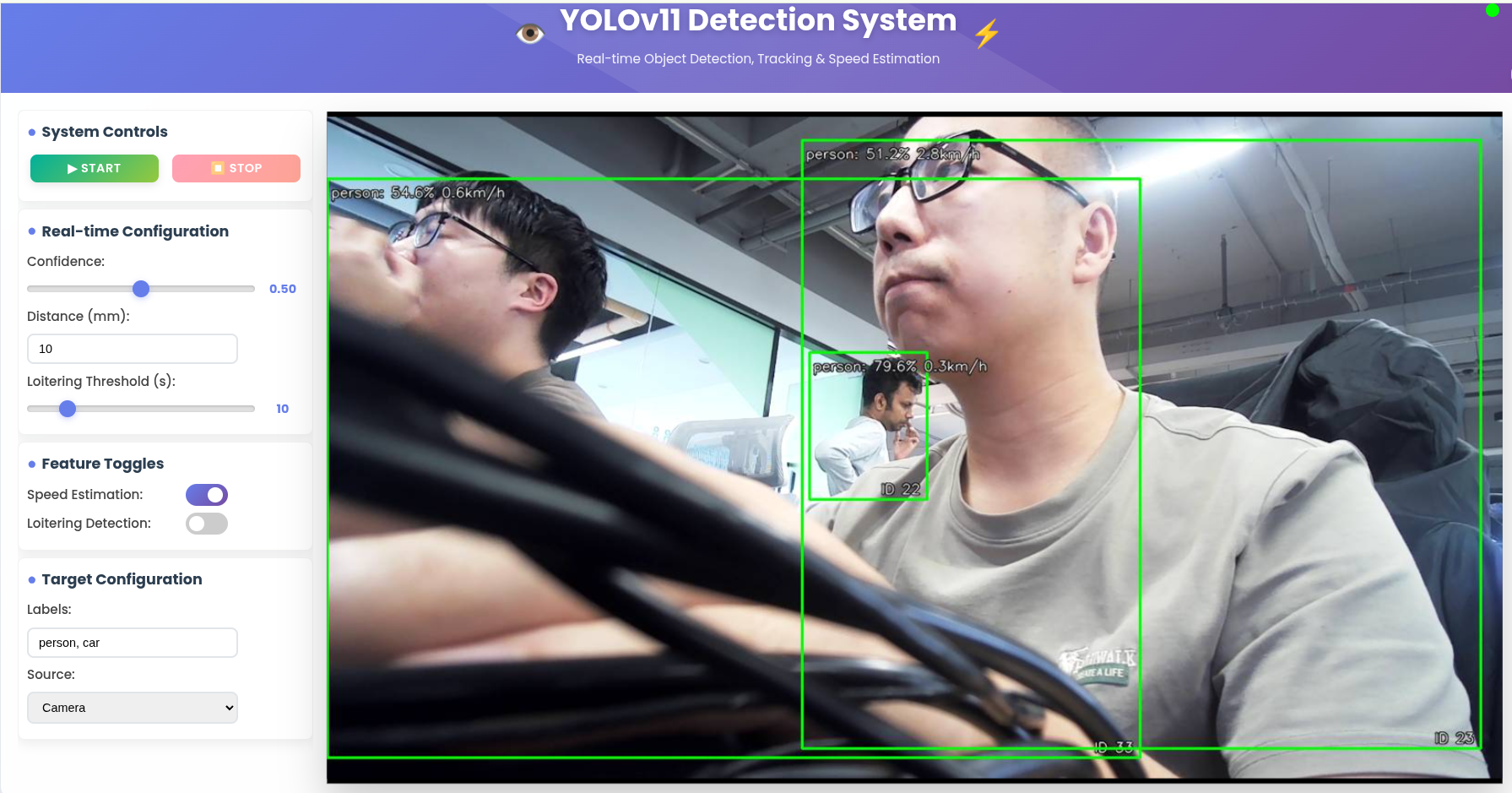
Result
Tech Support & Product Discussion
Thank you for choosing our products! We are here to provide you with different support to ensure that your experience with our products is as smooth as possible. We offer several communication channels to cater to different preferences and needs.